Why Your Headphones Sound Worse the Second a Call Starts
Nothing is broken. Bluetooth swaps to a different profile the moment something wants your microphone — and only one can run at a time.

If you buy through our links, we may earn a commission. It never affects our verdicts or scores — how that works. As an Amazon Associate I earn from qualifying purchases.
Your headphones are not broken, and neither is the app. The moment anything asks for your microphone, Bluetooth swaps to a different profile — and that profile was designed for intelligible speech, not music.
The giveaway is that it happens instantly and reverses instantly. Music is fine, the call connects, everything goes muffled and slightly distant, the call ends, and the music is fine again.
Two profiles, and only one at a time
Bluetooth does not have a single “audio” mode. It has separate profiles for separate jobs, and your headphones support several.
A2DP — the Advanced Audio Distribution Profile — is the one playing your music. The Bluetooth SIG’s own description is that it “defines the requirements for Bluetooth devices necessary for support of the high-quality audio distribution”. It is one-directional: it sends audio to your headphones and expects nothing back.
HFP — the Hands-Free Profile — is the one that takes over on a call. It exists so that “a Mobile Phone can be used in conjunction with a Hands-Free device”, and it carries the microphone as well as the earpiece.
Here is the part that matters: you cannot run both at once. Microsoft’s own support answer on this exact question puts it plainly — “you cannot use two different Bluetooth profiles at the same time” — because they have different bandwidth, latency and power requirements.
So the instant something needs your microphone, the connection leaves the high-quality one-way profile and enters the two-way call profile. Both directions now share a link that was specified for speech. Everything you hear degrades, because the link is no longer being asked to do the job A2DP was written for.
The popular explanation is nearly right
On r/techsupport, the top answer to someone describing exactly this says it is because Bluetooth “only supports two simultaneous audio channels, so you can either get stereo output or one channel for output and one for microphone.”
That is a good intuition and it gets the reader to the right conclusion, but it is not what the specifications say. The constraint is not a fixed count of channels — it is that A2DP and HFP are different profiles with different requirements, and the connection is in one or the other. The practical result is the same. The reason it is worth being precise about is that it tells you where the fix is: not in a channel setting, but in which device is being asked for the microphone.
What to actually do
On a laptop or desktop, this is fixable in about thirty seconds. The switch is triggered by your headphones being selected as the input device. Choose a different microphone and they stay in the high-quality profile.
- Windows — Settings → System → Sound → Input, and pick the laptop’s built-in microphone array instead of the headset.
- macOS — System Settings → Sound → Input, same idea.
- Then set the output back to your headphones if it moved.
You will sound like your laptop’s microphone, which is usually a fair trade: everyone else hears a slightly worse you, and you hear a considerably better everyone.
On a phone, you generally cannot. The Reddit thread ends where every version of this thread ends — “is there no way to make my phone use my phone mic instead?” — and the honest answer is that phones route call audio and microphone together, and do not expose the choice.
If it matters enough, leave Bluetooth. Wired earbuds have no profiles to switch between. Wireless headsets that ship their own USB transmitter are not using Bluetooth at all, which is exactly why gaming headsets sound the same on voice chat as off it.
The check, if you want to confirm it
Play music, join a call with your microphone set to the headset, and listen to the music. Then change the input device to anything else while the call is still running. The music quality will jump back, mid-call, without touching the headphones. That is the profile switching, and it is the whole of the phenomenon.
How we researched this
No one at bitcritiq has handled this product. Everything here comes from published sources, listed below.
- What this cannot tell you
- This explains why the drop happens and what can be done about it on a desktop or laptop. It does not fix it on a phone, because phones route call audio and the microphone together and generally give you no control over that. Nor does it cover proprietary wireless headsets that use their own USB transmitter rather than Bluetooth, which sidestep the problem entirely by not being Bluetooth.
How we chose this, and what we did
- Why this subject
- This is one of the most common complaints about wireless headphones and one of the least well explained. People assume their headphones are faulty, their microphone is bad, or the calling app is at fault. The actual cause is in the Bluetooth specifications, is the same on every pair ever made, and takes two minutes to work around on a computer.
- How we looked at it
- Read the Bluetooth SIG's own specification pages for the two profiles involved, checked the constraint against Microsoft's support answer on the same question, and read what people report and believe about it on r/techsupport. Where the popular explanation and the specification disagree, both are given.
What this rests on
3 claims, 1 official, 1 corroborated and 1 reported. Nothing here was measured by bitcritiq — see how we test for why.
A Bluetooth connection cannot run the high-quality audio profile and the hands-free profile at the same time.Official
Bluetooth SIG profile specifications, and Microsoft's support answer stating you cannot use two profiles simultaneously.
Choosing a different input device on a computer keeps headphones in the high-quality profile.Corroborated
Follows from the profile behaviour above and is widely reproduced by users. Not measured by bitcritiq.
Phones do not expose the choice of microphone during a call.Reported
Consistent owner reports across platforms; no vendor documents an option because none is offered.
Sources 5
- Advanced Audio Distribution Profile 1.4.1 — Bluetooth SIGOfficialaccessed Aug 28, 2026
- Hands-Free Profile 1.9 — Bluetooth SIGOfficialaccessed Aug 28, 2026
- Bluetooth specifications list — Bluetooth SIGOfficialaccessed Aug 28, 2026
- Why does the sound quality drop when I switch the audio input device to my headphone — Microsoft Q&Aaccessed Aug 28, 2026
- Sound quality diminishes when I'm in a call and my headphones are connected — r/techsupportaccessed Aug 28, 2026
Pass it on
Know someone weighing this up? Send them the answer.
bitcritiq.com/3n96The link is permanent: it opens this article for good, even if the title changes.
No email, no account
Follow bitcritiq
Every new article, in whatever reader you already use.
Subscribe by RSSAll the ways to follow
Using Chrome on Android? Open the browser menu and tap Follow. New articles then turn up in the Following tab in Discover.
read next
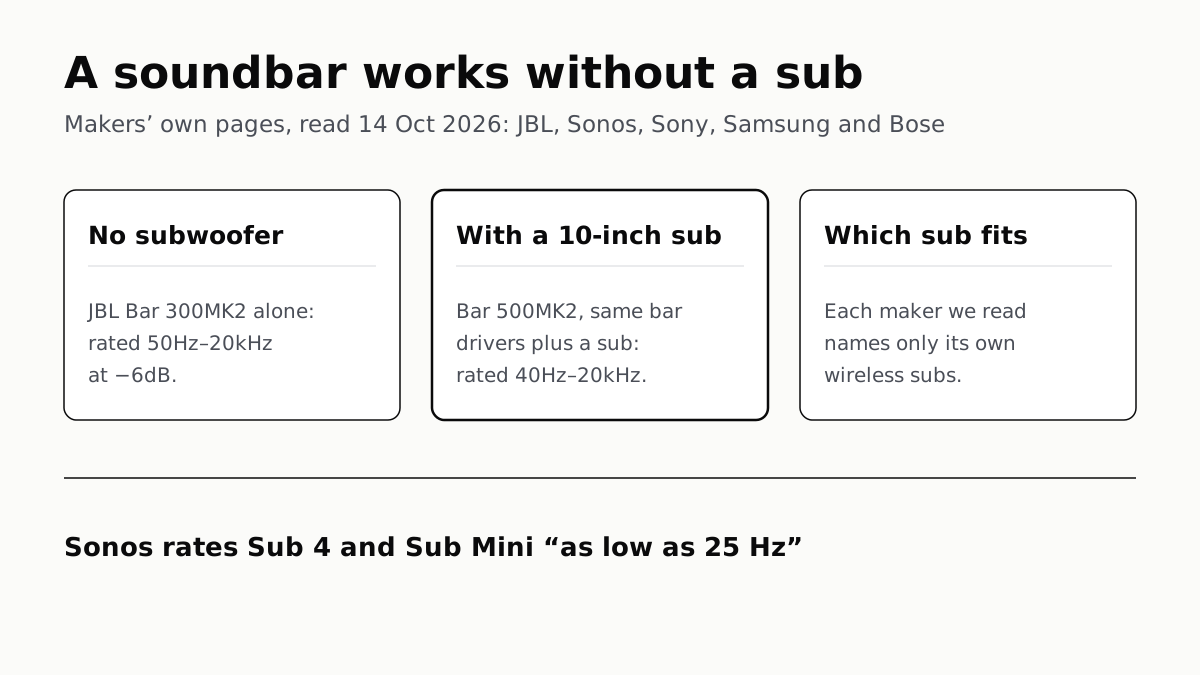
A Soundbar Works Without a Sub; Add One for the Lowest Bass
In JBL’s specs, the same bar drivers reach 50Hz alone and 40Hz with a 10-inch sub. Sony, Sonos and Samsung list only their own subs.
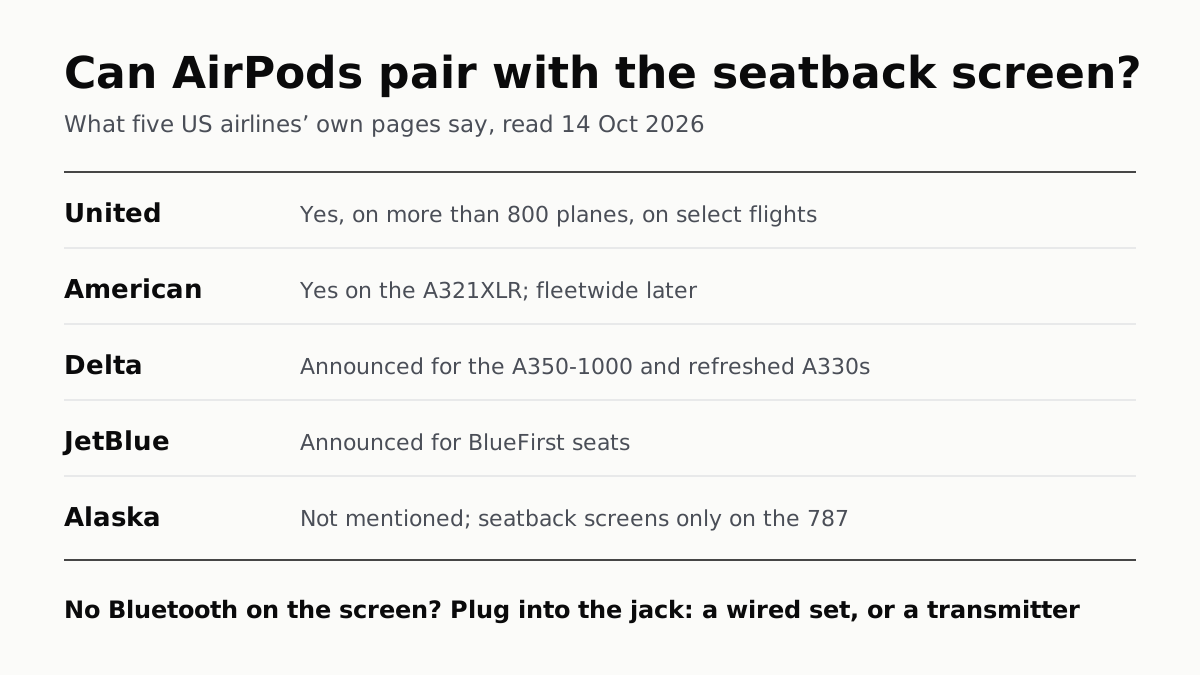
Seatback Bluetooth: United on 800+ Planes, Others Starting
American’s A321XLR has it and JetBlue and Delta have announced it. Without it, the seatback jack needs a wired plug or a transmitter.
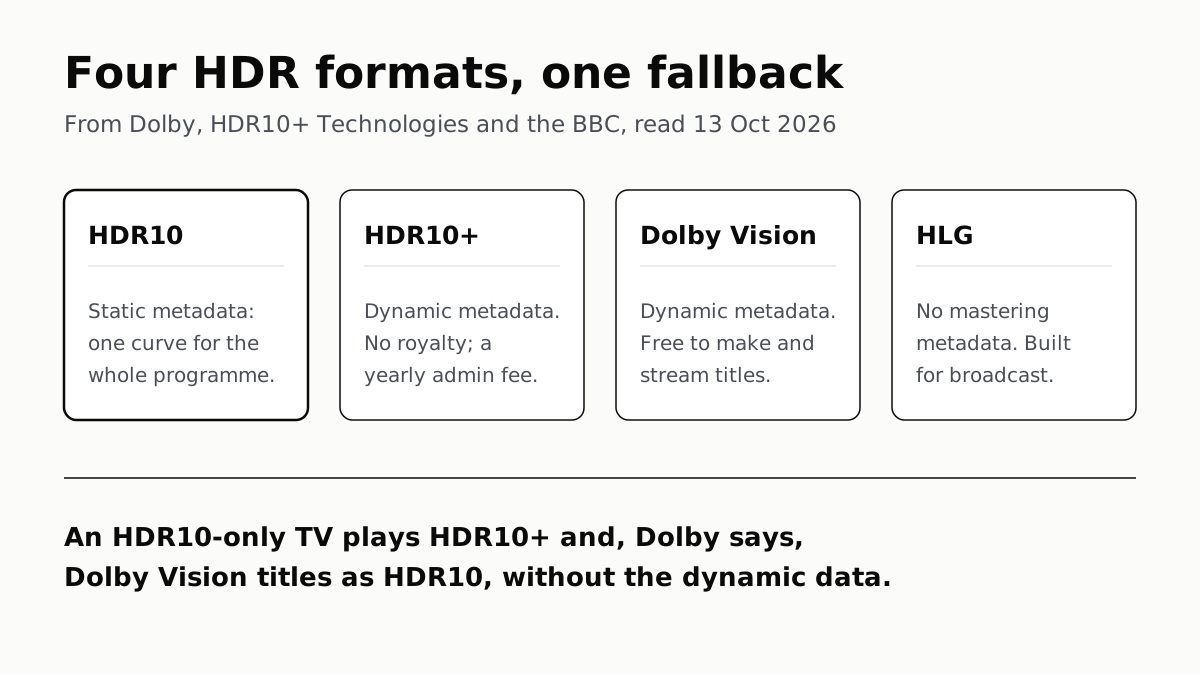
HDR10 Is the Fallback; Dolby Vision and HDR10+ Are Upgrades
Samsung’s S90F lists HDR10+, not Dolby Vision; LG’s C6 the reverse. TCL’s QM7K lists both.
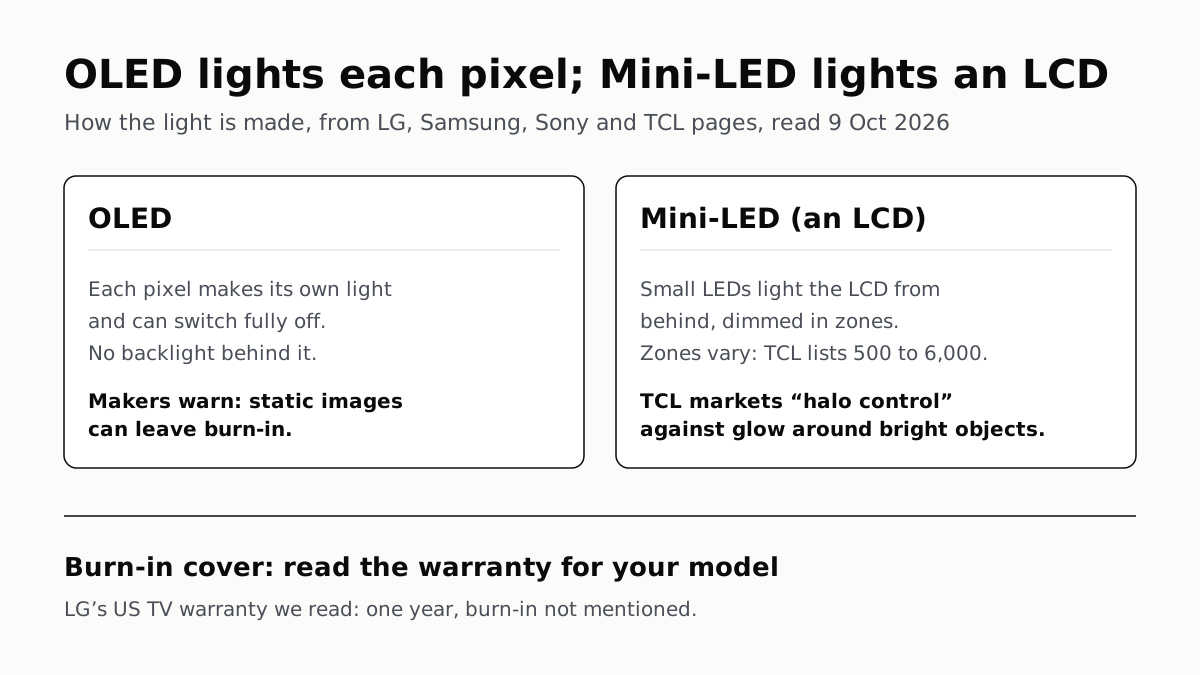
OLED Lights Each Pixel; Mini-LED Lights an LCD Behind It
Self-lit pixels give OLED its blacks and a burn-in risk; a zoned backlight gives Mini-LED brightness and a halo risk.