Guides

Every one sourced, dated and kept current.

sections
3
updated
1d ago

October 202613 articles

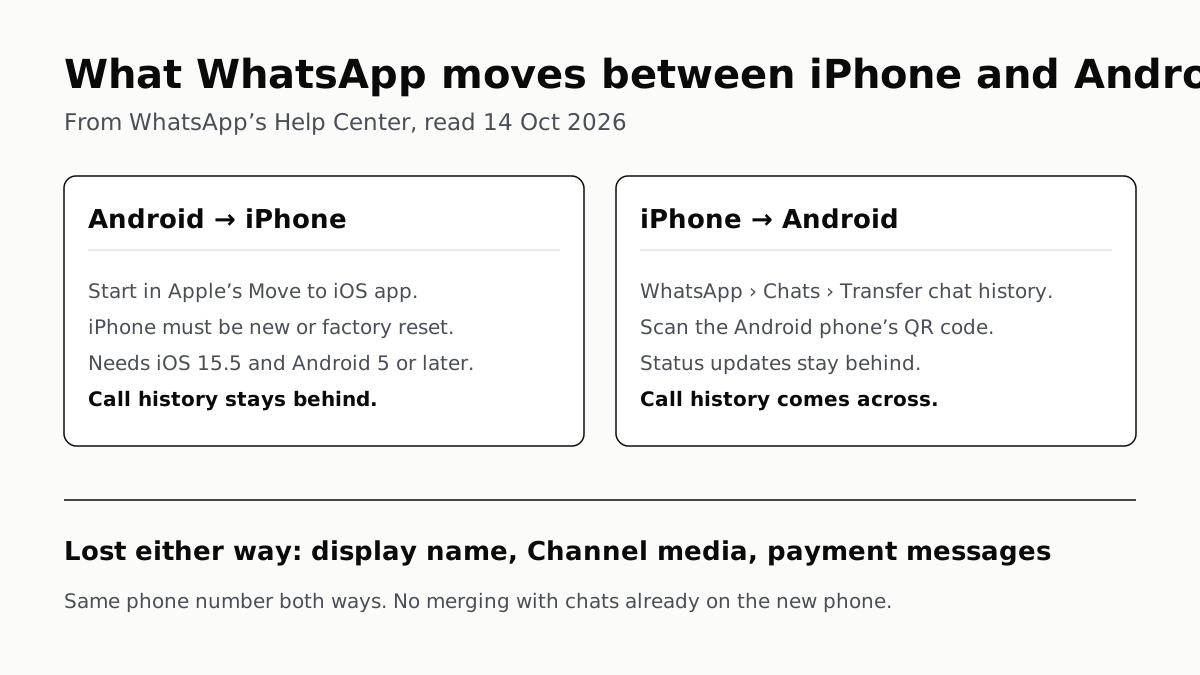
What WhatsApp moves between iPhone and Android, from WhatsApp’s Help Center, read 14 October 2026. Android to iPhone: start in Apple’s Move to iOS app; the iPhone must be new or factory reset; needs iOS 15.5 and Android 5 or later; call history stays behind. iPhone to Android: in WhatsApp, Chats, Transfer chat history; scan the Android phone’s QR code; call history comes across; status updates stay behind. Lost either way: display name, Channel media and payment messages. Same phone number both ways, and no merging with chats already on the new phone.
Mobile · Guide

WhatsApp Chats Can Cross Between iPhone and Android

Messages, media and settings move both ways. Display names, Channel media and payment messages don’t, and call logs reach Android alone.
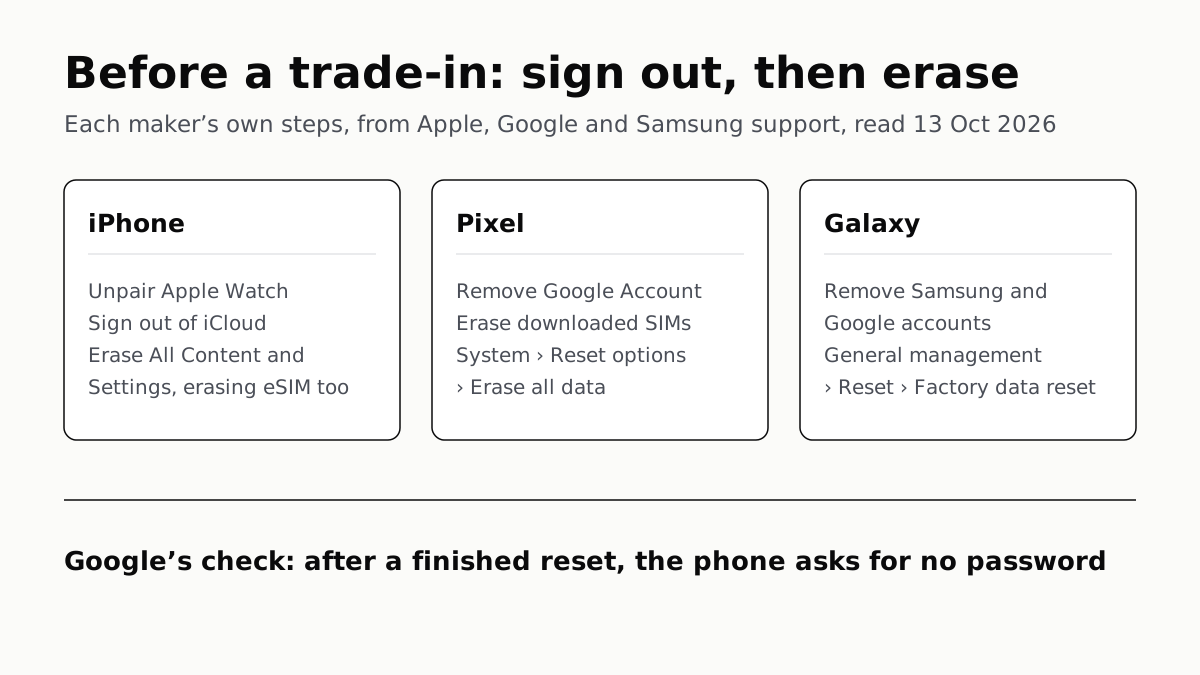
Before a trade-in: sign out, then erase. Each maker’s own steps, from Apple, Google and Samsung support, read 13 October 2026. iPhone: unpair Apple Watch, sign out of iCloud, then Erase All Content and Settings, erasing the eSIM too. Pixel: remove the Google Account, erase downloaded SIMs, then System, Reset options, Erase all data. Galaxy: remove the Samsung and Google accounts, then General management, Reset, Factory data reset. Google’s check: after a finished reset, the phone asks for no password.
Mobile · Guide

Sign Out Before You Wipe a Phone for Trade-In

Google returns trade-ins that are still locked, and Samsung won’t accept them. Back up, sign out, unpair, then erase.
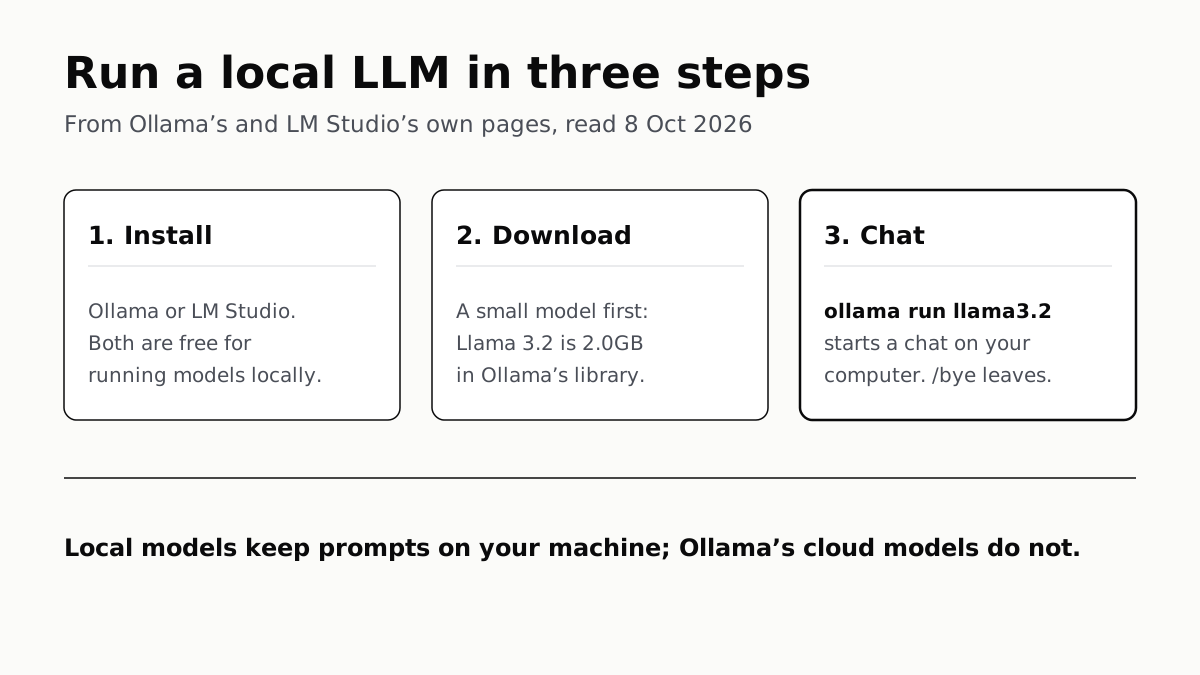
Run a local LLM in three steps, from Ollama's and LM Studio's own pages, read 8 October 2026. Step 1, install: Ollama or LM Studio, both free for running models locally. Step 2, download a small model first: Llama 3.2 is 2.0GB in Ollama's library. Step 3, chat: the command ollama run llama3.2 starts a chat on your computer, and /bye leaves it. Local models keep prompts on your machine; Ollama's cloud models do not.
AI · Guide

Run a Local LLM: One Free App, One 2GB Model

Ollama and LM Studio both run models on Windows, macOS and Linux at no cost. Start small, and know which models are cloud ones.
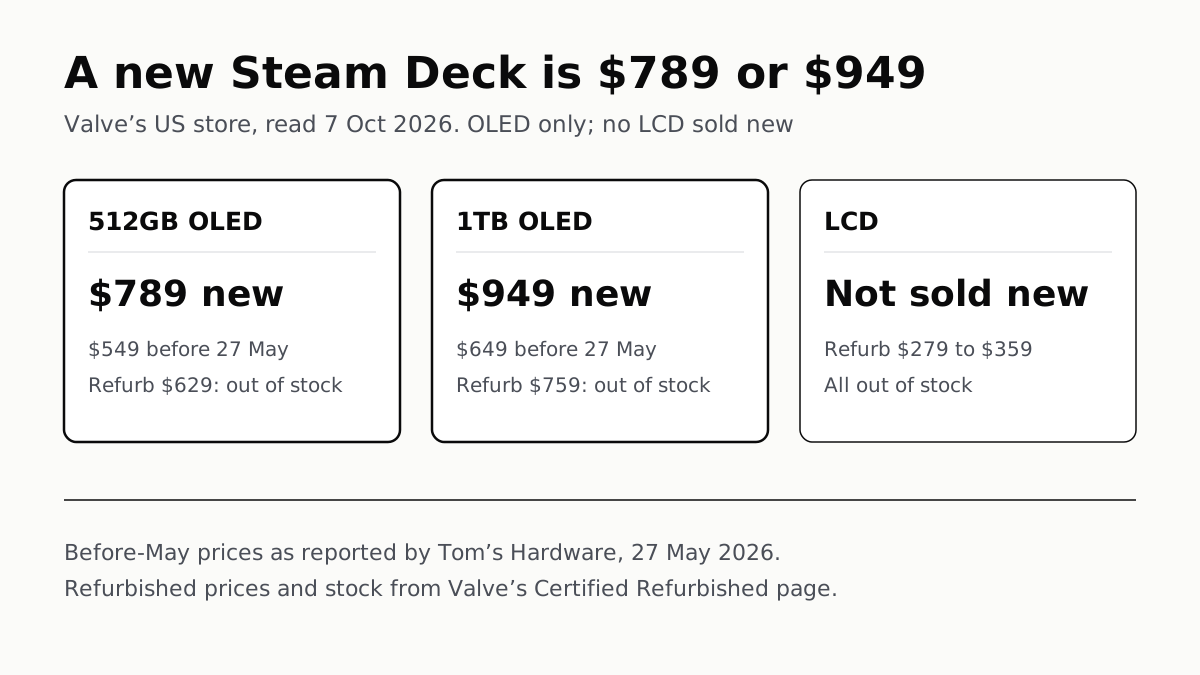
A new Steam Deck is $789 or $949: Valve’s US store, read 7 October 2026, sells the OLED only, with no LCD sold new. 512GB OLED: $789 new, $549 before 27 May, refurbished $629 and out of stock. 1TB OLED: $949 new, $649 before 27 May, refurbished $759 and out of stock. LCD: not sold new, refurbished $279 to $359, all out of stock. Before-May prices as reported by Tom’s Hardware on 27 May 2026; refurbished prices from Valve.
Gaming · Guide

Steam Deck Price Now: $789 or $949, and Only OLED

Valve raised both OLED models in May. No LCD Deck is sold new, and every refurbished unit was out of stock on 7 October.
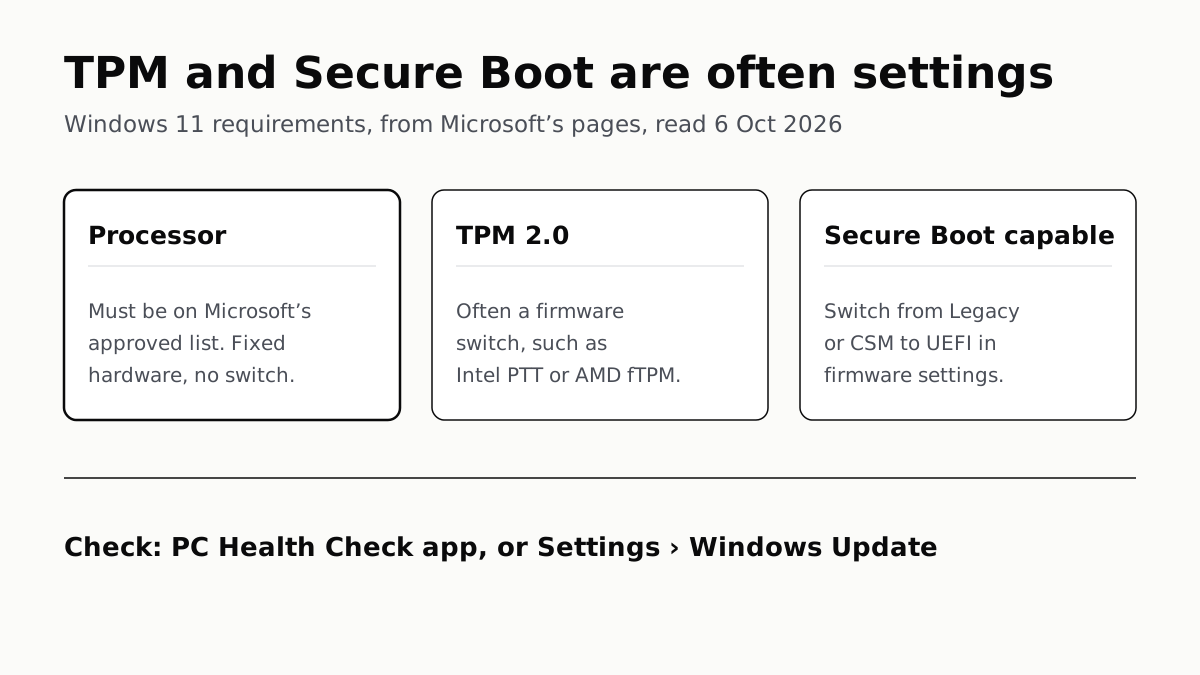
TPM and Secure Boot are often settings: Windows 11 requirements, from Microsoft's pages, read 6 October 2026. Processor: must be on Microsoft's approved list; fixed hardware, no switch. TPM 2.0: often a firmware switch, such as Intel PTT or AMD fTPM. Secure Boot capable: switch from Legacy or CSM to UEFI in firmware settings. To check: PC Health Check app, or Settings, Windows Update.
Computing · Guide

TPM and Secure Boot Are Often Settings; the CPU Is Not

PC Health Check names the requirement your PC fails. Two of the three usual ones can be switched on in firmware, and Microsoft says how.
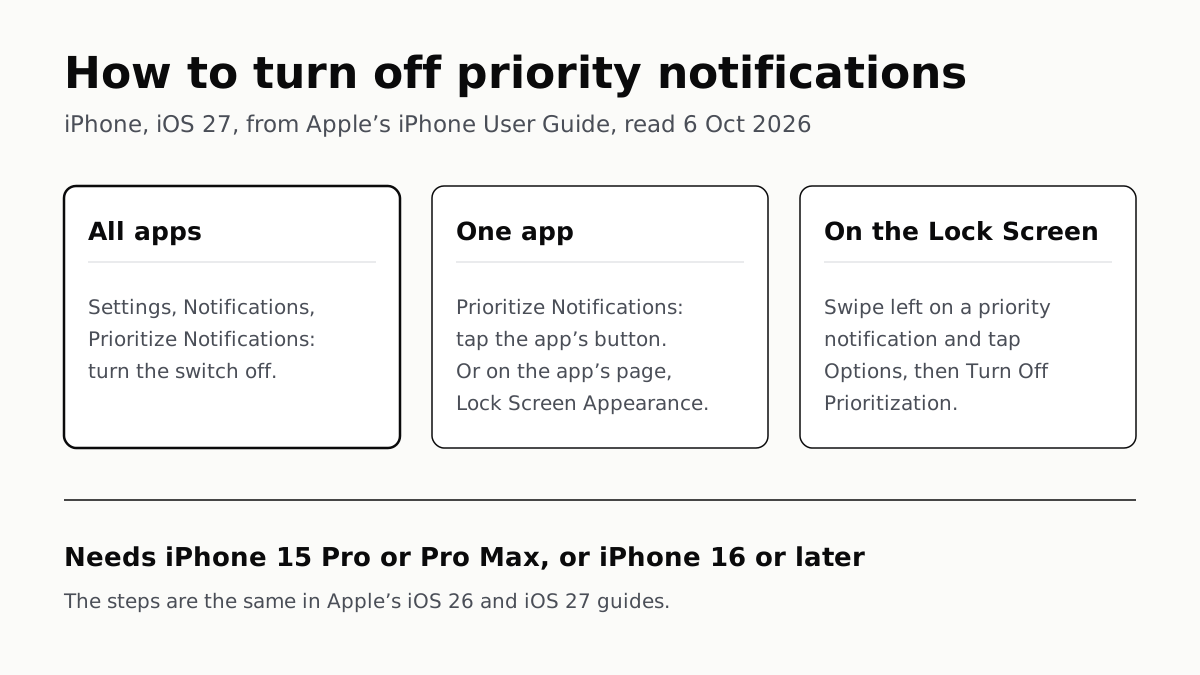
How to turn off priority notifications on iPhone, iOS 27, from Apple’s iPhone User Guide, read 6 October 2026. All apps: Settings, Notifications, Prioritize Notifications, turn the switch off. One app: on the Prioritize Notifications screen tap the app’s button, or on the app’s own page under Lock Screen Appearance. On the Lock Screen: swipe left on a priority notification, tap Options, then Turn Off Prioritization. It needs an iPhone 15 Pro or Pro Max, or an iPhone 16 or later. The steps are the same in Apple’s iOS 26 and iOS 27 guides.
Mobile · Guide

Turn Off Priority Notifications All at Once or Per App

Apple’s iOS 27 guide gives one master switch, two per-app toggles and a Lock Screen shortcut. It needs an iPhone 15 Pro or newer.
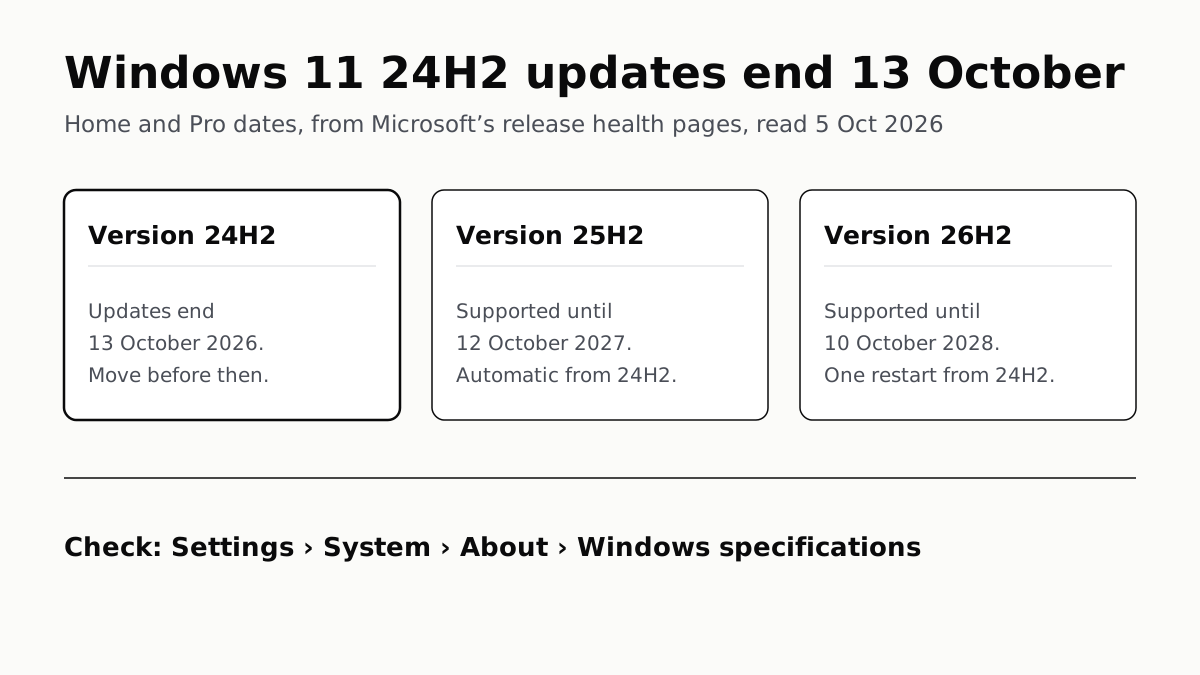
Windows 11 24H2 updates end 13 October: Home and Pro dates, from Microsoft's release health pages, read 5 October 2026. Version 24H2: updates end 13 October 2026, move before then. Version 25H2: supported until 12 October 2027, sent automatically to unmanaged 24H2 PCs. Version 26H2: supported until 10 October 2028, one restart from 24H2. To check: Settings, System, About, Windows specifications.
Computing · Guide

Windows 11 24H2 Home and Pro Lose Updates on 13 October

Version 26H2 installs as a small update with one restart and is supported until October 2028. Settings shows which version you have.
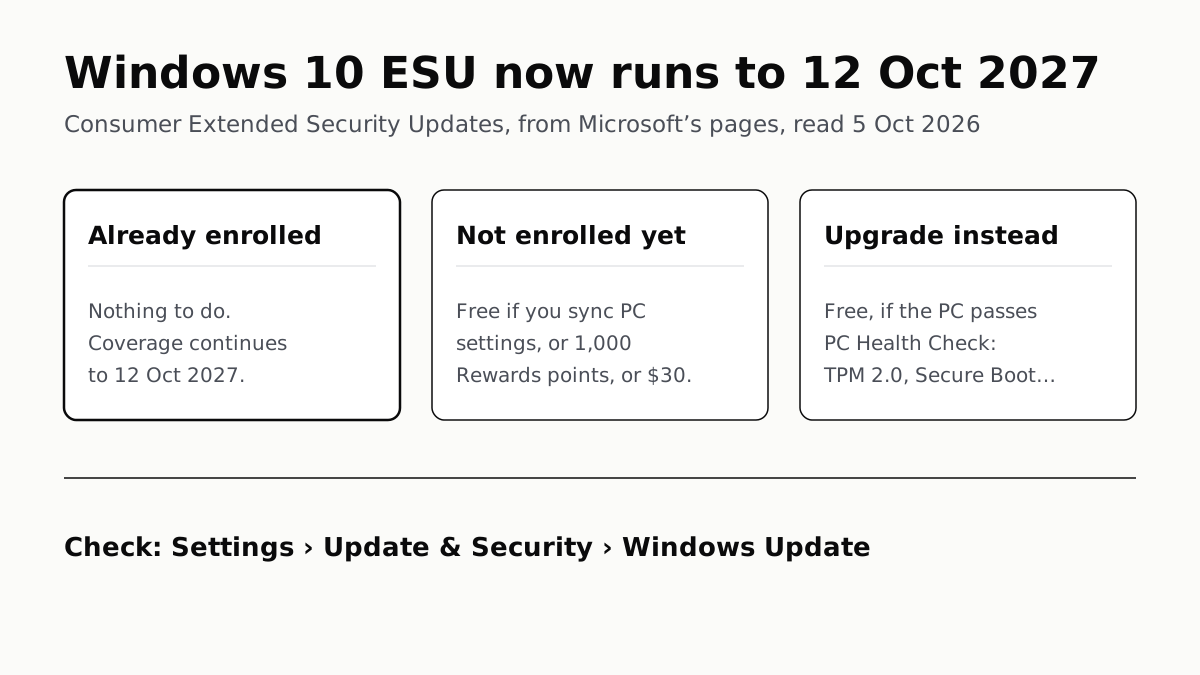
Windows 10 ESU now runs to 12 October 2027: consumer Extended Security Updates, from Microsoft's pages, read 5 October 2026. Already enrolled: nothing to do, coverage continues to 12 October 2027. Not enrolled yet: free if you sync PC settings, or 1,000 Rewards points, or $30. Upgrade instead: free if the PC passes PC Health Check, which needs TPM 2.0 and Secure Boot among other things. To check: Settings, Update & Security, Windows Update.
Computing · Guide

Windows 10 Security Updates Now Run to October 2027

Microsoft added a year to consumer ESU. PCs already enrolled carry on with nothing to do, and the rest can still sign up for $30 or less.
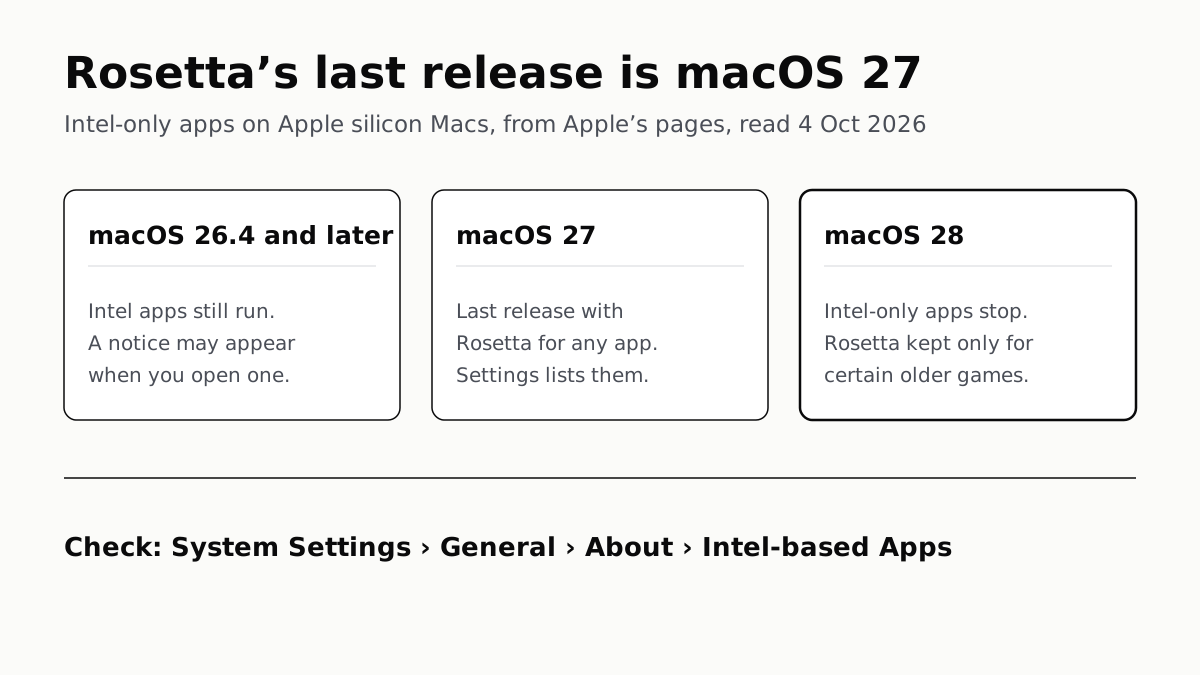
Rosetta's last release is macOS 27: Intel-only apps on Apple silicon Macs, from Apple's pages, read 4 October 2026. macOS 26.4 and later: Intel apps still run, and a notice may appear when you open one. macOS 27: the last release with Rosetta for any app, and Settings lists them. macOS 28: Intel-only apps stop, and Rosetta is kept only for certain older games. To check: System Settings, General, About, Intel-based Apps.
Computing · Guide

Intel-Only Mac Apps Stop Running in macOS 28

Rosetta lasts through macOS 27, then only some older games keep it. macOS 27 can list which of your apps are still Intel-only.
September 20264 articles

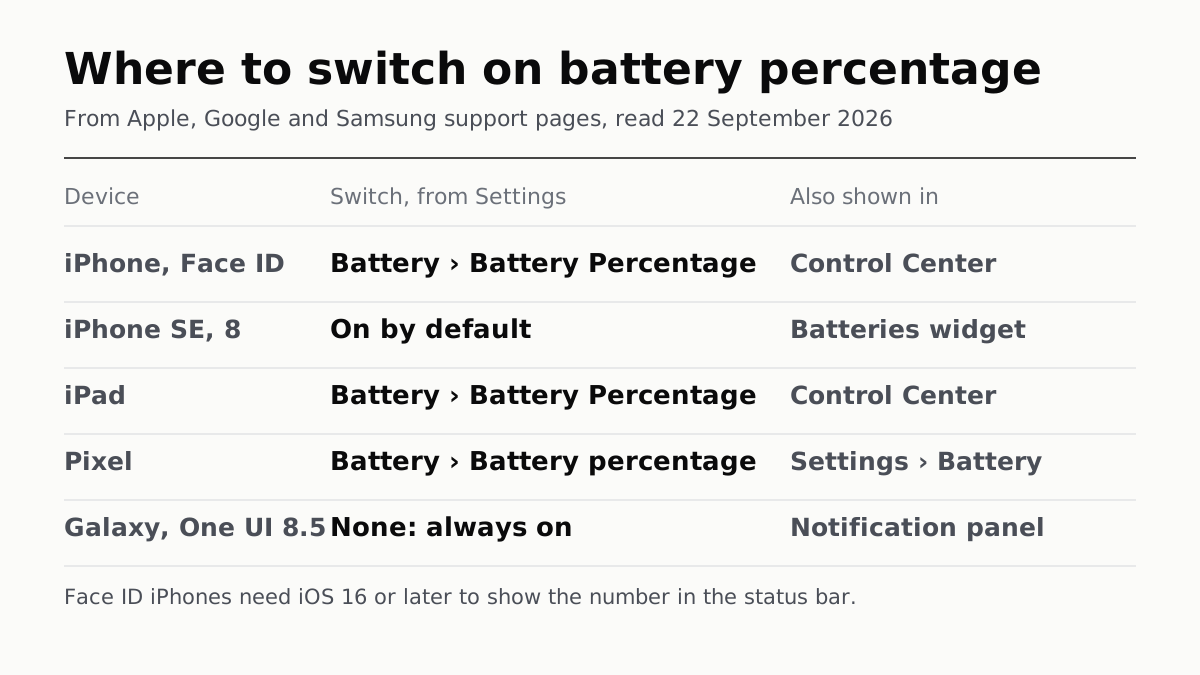
Where to switch on battery percentage, from Apple, Google and Samsung support pages, read 22 September 2026. iPhone with Face ID: Battery, then Battery Percentage, from Settings; also shown in Control Center. iPhone SE and iPhone 8: on by default; also shown in the Batteries widget. iPad: Battery, then Battery Percentage; also shown in Control Center. Pixel: Battery, then Battery percentage; also shown in Settings, Battery. Galaxy on One UI 8.5: no switch, always on; also shown in the notification panel. Footnote: Face ID iPhones need iOS 16 or later to show the number in the status bar.
Mobile · Guide

Battery Percentage: One Switch, Unless You Have a Galaxy

Settings, then Battery, on iPhone, iPad and Pixel. Samsung made the number permanent in One UI 8.5; its switch now hides only the icon.
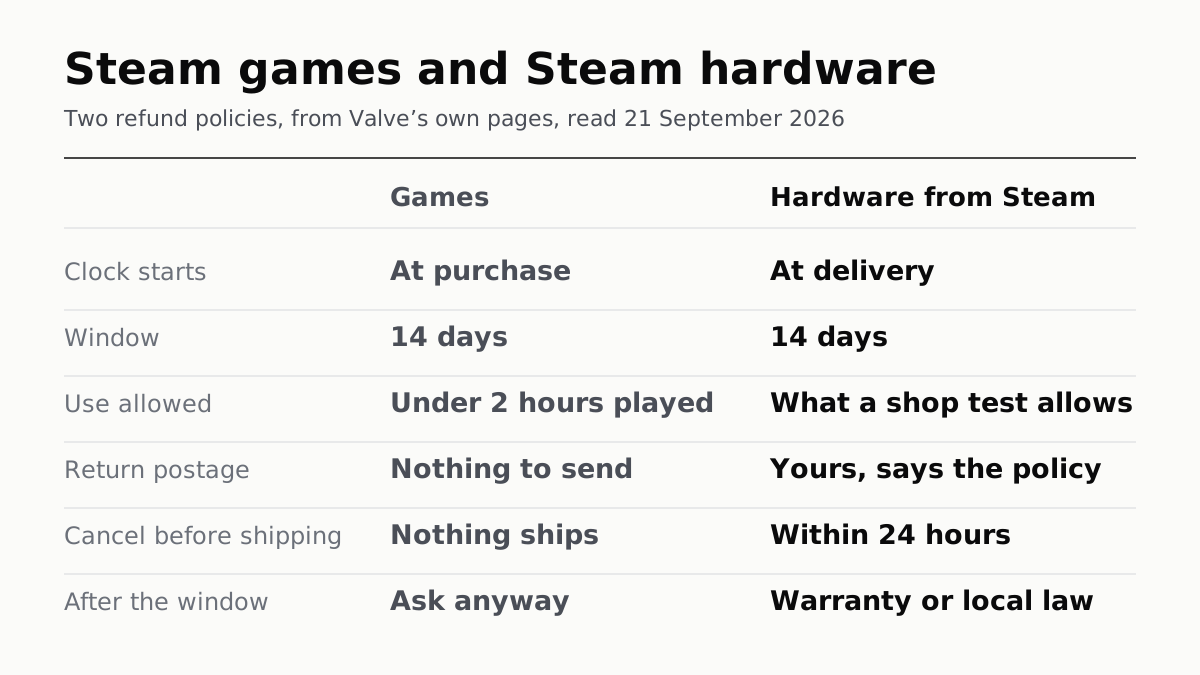
Steam games and Steam hardware compared: two refund policies, from Valve’s own pages, read 21 September 2026. Clock starts: at purchase for games, at delivery for hardware bought from Steam. Window: 14 days for both. Use allowed: under 2 hours played, against what a shop test allows. Return postage: nothing to send, against yours, says the policy. Cancel before shipping: nothing ships, against within 24 hours. After the window: ask anyway, against warranty or local law.
Gaming · Guide

Steam Hardware Gets 14 Days From Delivery, Not 2 Hours

No playtime cap, but the unit has to pass as new, and Valve’s policy puts the return postage on you. Cancel within 24 hours to skip it all.
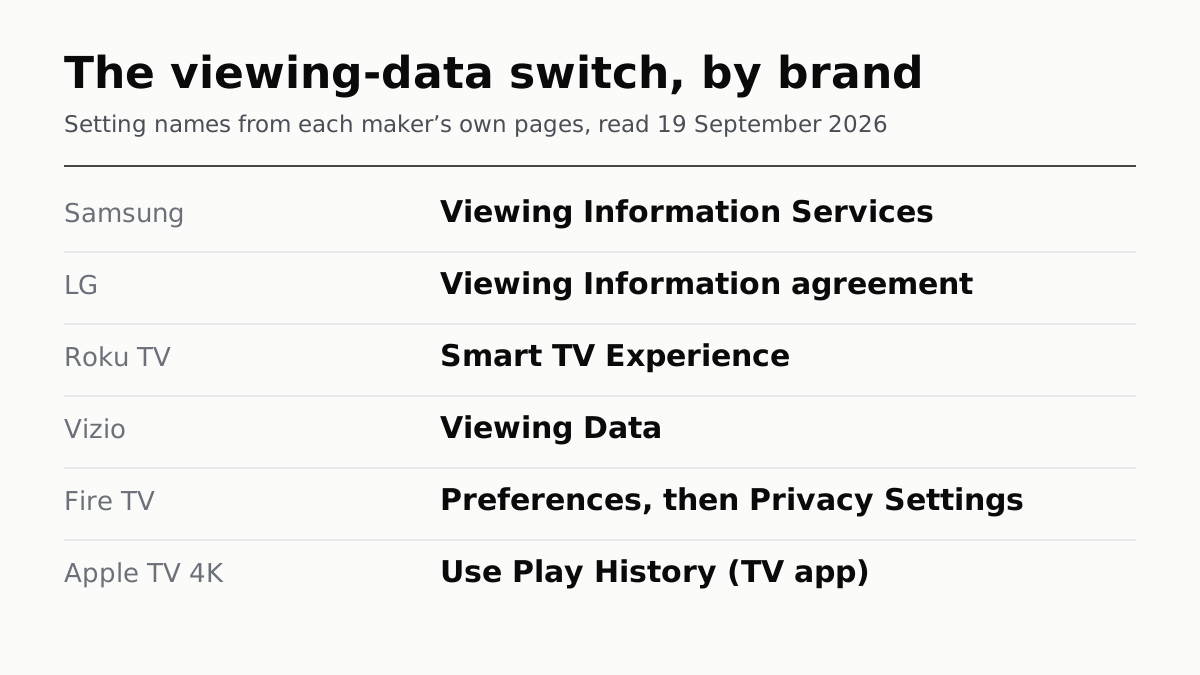
The viewing-data switch, by brand, with setting names from each maker's own pages, read 19 September 2026. Samsung: Viewing Information Services. LG: Viewing Information agreement. Roku TV: Smart TV Experience. Vizio: Viewing Data. Fire TV: Preferences, then Privacy Settings. Apple TV 4K: Use Play History (TV app).
Audio & Home · Guide

The TV Viewing Tracker Has a Different Name at Each Brand

Samsung, LG, Roku and Vizio all let you switch it off. LG and Roku say it also covers boxes plugged into the TV, not just its tuner.
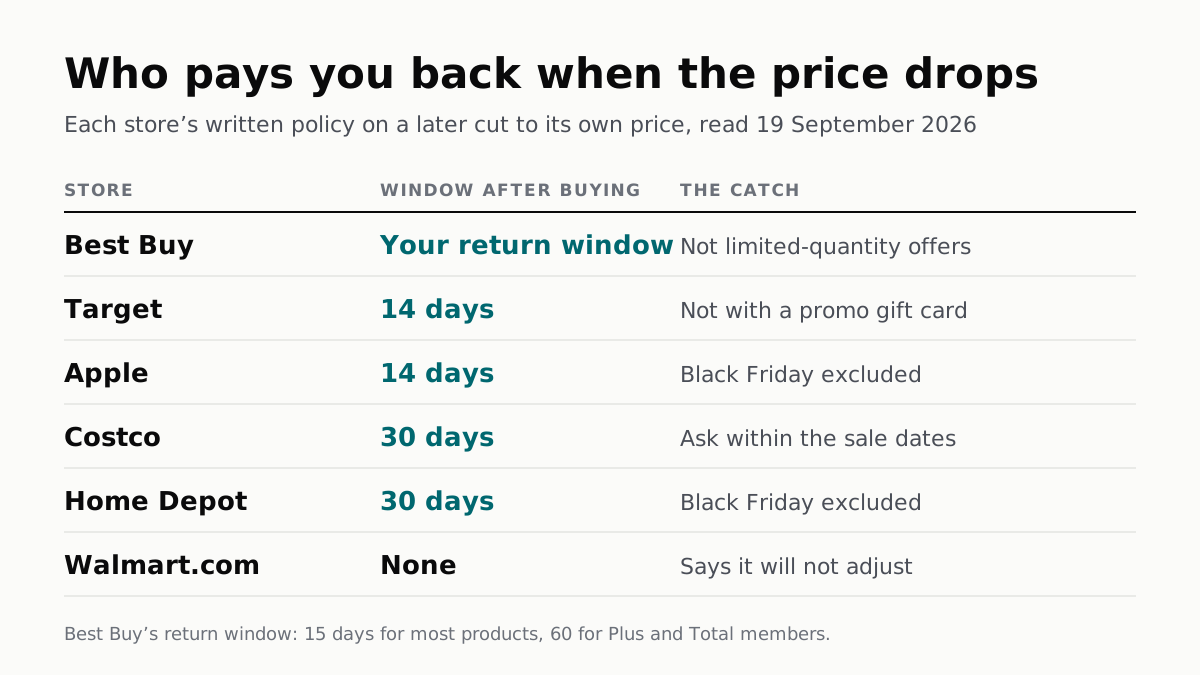
A table headed Who pays you back when the price drops, from each store's written policy read 19 September 2026. Best Buy: your return window, not limited-quantity offers. Target: 14 days, not with a promo gift card. Apple: 14 days, Black Friday excluded. Costco: 30 days, ask within the sale dates. Home Depot: 30 days, Black Friday excluded. Walmart.com: none, says it will not adjust. A footnote gives Best Buy's return window as 15 days for most products and 60 for Plus and Total members.
Buying · Guide

Five Stores Pay Back a Price Drop. Walmart.com Does Not

The windows run from 14 to 30 days, or your whole return period at Best Buy. Apple and Home Depot write Black Friday out of theirs.