TPM and Secure Boot Are Often Settings; the CPU Is Not
PC Health Check names the requirement your PC fails. Two of the three usual ones can be switched on in firmware, and Microsoft says how.
If you buy through our links, we may earn a commission. It never affects our verdicts or scores — how that works. As an Amazon Associate I earn from qualifying purchases.
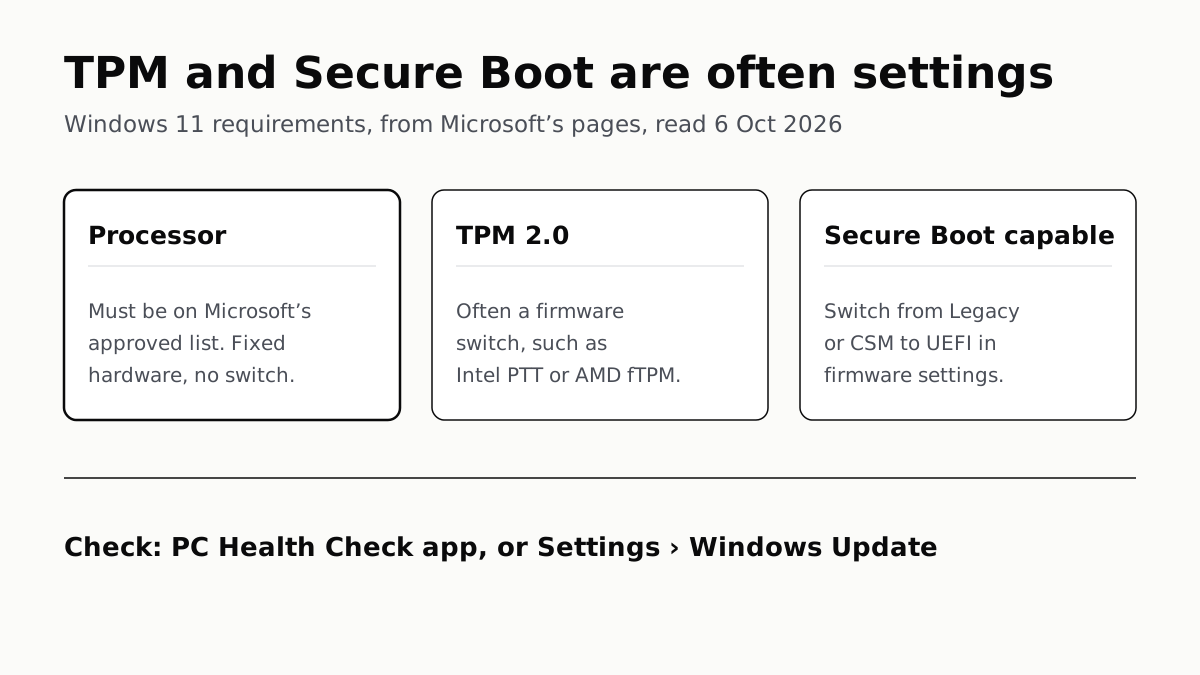
When Windows says “This PC can’t run Windows 11”, Microsoft’s free PC Health Check app names the requirement it failed, and the three Microsoft’s own pages single out are the processor, TPM 2.0 and UEFI with Secure Boot capability. The TPM and Secure Boot checks often fail because of a firmware setting you can change; Microsoft calls the processor “a main determining factor” and says it cannot be upgraded.
Find out which check failed
Install PC Health Check from aka.ms/GetPCHealthCheckApp and select Check now. Microsoft says it explains why the PC is or is not eligible, and what you can do about it. Settings › Update & Security › Windows Update gives the same verdict with less detail.
PC Health Check does not test the graphics card or display, which Microsoft says most compatible PCs meet anyway. The PC also needs Windows 10 version 2004 or later to upgrade through Windows Update.
| Requirement | How to check | Can you change it? |
|---|---|---|
| Processor on Microsoft’s list | PC Health Check | No. Microsoft says it is not upgradable |
| TPM 2.0 | Windows Security, or tpm.msc | Often: switched off in firmware. A TPM below 2.0 does not qualify |
| UEFI, Secure Boot capable | PC Health Check | Usually: a firmware boot-mode setting |
| 4GB RAM, 64GB storage | Settings › System › About | Sometimes, Microsoft says, by upgrading parts |
| DirectX 12 graphics, 720p screen over 9 inches | Not checked by PC Health Check | Rarely an issue, per Microsoft |
If RAM is the problem, this check shows whether your laptop can take more.
TPM 2.0: often present but switched off
Microsoft’s TPM article says retail motherboards bought by people building their own PC ship with TPM turned off by default, “even though it is almost always available to be enabled”. A TPM that is off looks like a TPM that is missing.
Check it, either way:
- Open Settings › Update & Security › Windows Security › Device Security. If there is no Security processor section, the TPM may be disabled. If there is, select Security processor details and read Specification version.
- Or press Windows+R, type tpm.msc and select OK. “Compatible TPM cannot be found” may mean a disabled TPM. If it reports the TPM is ready, read Specification Version under TPM Manufacturer Information.
A version below 2.0 does not meet the requirement, Microsoft says.
Switch it on:
- Go to Settings › Update & Security › Recovery and select Restart now under Advanced startup.
- Choose Troubleshoot › Advanced options › UEFI Firmware Settings › Restart.
- Look in a menu labelled Advanced, Security or Trusted Computing.
- Enable the option, which Microsoft says may be called Security Device, Security Device Support, TPM State, AMD fTPM switch, AMD PSP fTPM, Intel PTT or Intel Platform Trust Technology.
Menus vary by maker. Microsoft points to Asus, Dell, HP, Lenovo and Surface support pages for model-specific steps.
Secure Boot: the requirement is UEFI mode
Microsoft’s Secure Boot article says the upgrade needs only that the PC be “Secure Boot capable by having UEFI/BIOS enabled”. In practice that means the firmware must boot in UEFI mode, not Legacy BIOS, which some menus call CSM. Turning Secure Boot itself on is recommended, not required.
The firmware menu is reached the same way as for the TPM. Where both UEFI and Legacy/CSM are enabled, Microsoft says to make UEFI the first or only option.
Check the disk before you switch. Microsoft’s deployment documentation says an installed copy of Windows boots in the mode it was installed with, and that switching modes afterwards may need its MBR2GPT tool.
- Right-click Start and open Disk Management.
- Right-click the system disk, choose Properties, then the Volumes tab.
- Read Partition style. GPT is the style UEFI boots from. MBR means the disk needs converting first.
MBR2GPT ships in Windows and, per Microsoft, converts a system disk from MBR to GPT without deleting data; after it runs, the firmware has to be set to UEFI. If BitLocker is on, Microsoft says protection must be suspended for the conversion.
The processor: hardware you cannot switch on
Microsoft’s requirement is a 1GHz-or-faster chip with two or more cores that appears on its approved list. Its original Windows 11 lists start at Intel’s 8th-generation Core processors and AMD’s Ryzen 2000 series. A handful of other chips appear too, such as Intel’s Core 7000X series, so look up yours if it is close to the line.
Microsoft writes those lists for manufacturers building new PCs, and says newer chips meeting the same principles count as supported even before they are added. Lists for later versions can be shorter: the 25H2 AMD list no longer includes the Ryzen 2000 series. For an existing PC, Microsoft’s own processor page sends owners to PC Health Check rather than the lists.
After changing any setting, Microsoft says to wait until Windows Update reports that Windows 11 is ready for your device before upgrading.
What Microsoft says about installing anyway
Microsoft does not recommend installing Windows 11 on a PC that fails the requirements. Its support page says such a PC “won’t receive support from Microsoft” and is not guaranteed updates, “including but not limited to security updates”. The disclaimer you must accept adds that damage caused by incompatibility is not covered by the maker’s warranty.
Windows marks an unsupported install with a desktop watermark and may show a notice in Settings. To undo it, Settings › System › Recovery › Go back returns the PC to Windows 10, but only for 10 days after the upgrade.
That page, last updated December 2024, still recommends returning to Windows 10. Windows 10 no longer gets free updates, so a PC that cannot run Windows 11 needs Extended Security Updates, which now run to October 2027, or a replacement. If it can upgrade, remember each Windows 11 version has its own end date: 24H2 on Home and Pro stops getting updates on 13 October.
Questions people ask
Why does it say this PC can’t run Windows 11?
The PC failed at least one of Microsoft’s minimum requirements. The three Microsoft’s pages single out are the processor, TPM 2.0 and UEFI with Secure Boot capability. Microsoft’s free PC Health Check app names which one failed.
How do I enable TPM 2.0?
Open Settings › Update & Security › Recovery, choose Restart now under Advanced startup, then Troubleshoot › Advanced options › UEFI Firmware Settings. Look under Advanced, Security or Trusted Computing for an option such as Intel PTT, AMD fTPM, TPM State or Security Device.
How do I check if my PC has TPM 2.0?
Press Windows+R, type tpm.msc and press Enter. If it says the TPM is ready, read Specification Version: it must be 2.0. Microsoft says “Compatible TPM cannot be found” may mean a TPM that is switched off in firmware.
Does Secure Boot have to be turned on for Windows 11?
No. Microsoft’s requirement is that the PC be Secure Boot capable, which means running in UEFI mode rather than Legacy or CSM. Microsoft suggests turning Secure Boot on for better security, but the upgrade does not demand it.
Can I fix “Windows 11 CPU not supported”?
Not with a setting. Microsoft calls the processor a main determining factor and says its speed and core count are not upgradable. Microsoft’s lists start at Intel 8th-generation Core and AMD Ryzen 2000; for most older chips the options are a new PC or staying on Windows 10 with Extended Security Updates.
Can I install Windows 11 on an unsupported PC?
Microsoft advises against it. Its support page says such a PC is unsupported, is not guaranteed updates including security updates, and that damage from incompatibility is not covered by the maker’s warranty. Windows also adds a desktop watermark.
How we researched this
No one at bitcritiq has handled this product. Everything here comes from published sources, listed below.
- What this cannot tell you
- Microsoft publishes no figure for which requirement fails most often; we report what its own pages say, that the processor is 'a main determining factor' and that TPM and Secure Boot are often a matter of firmware settings. Firmware menus differ by maker and Microsoft names only common labels. The Windows 11 25H2 AMD list, written for manufacturers building new PCs, no longer includes the Ryzen 2000 series; Microsoft does not say this changes anything for existing PCs, and directs owners to PC Health Check. Microsoft's page on unsupported installs, last updated December 2024, still recommends rolling back to Windows 10, which no longer gets free security updates. We have not run these checks on a PC of our own for this article.
How we chose this, and what we did
- Why this subject
- Windows 10 lost free support in October 2025, and owners whose PCs show “This PC can’t run Windows 11” want to know which requirement failed and whether they can fix it. Our Windows 10 ESU guide lists the requirements in one table but does not explain how to check or change each one.
- How we looked at it
- Everything is from Microsoft's own pages, read through a browser on 6 October 2026: the Windows 11 specifications page, the Support articles 'Windows 11 System Requirements', 'Enable TPM 2.0 on your PC', 'Windows 11 and Secure Boot' (KB5005381), 'How to use the PC Health Check app' and 'Windows 11 on devices that don't meet minimum system requirements'; the Windows processor requirements page and the Windows 11 and Windows 11 25H2 Intel and AMD processor lists on Microsoft Learn; and the Learn pages 'Boot to UEFI Mode or Legacy BIOS mode' and 'MBR2GPT'. The statement that first-generation Ryzen (1000 series) is absent from the original Windows 11 AMD list was checked against a control on the same list: the Ryzen 5 2600 and 2600X are present.
What this rests on
6 claims, all official. Nothing here was measured by bitcritiq — see how we test for why. Open a claim to read the source it came from.
Windows 11 needs a processor on Microsoft's approved list, and Microsoft treats its speed and core count as not upgradable.Official
Microsoft Support, Windows 11 System Requirements: “1 Ghz or faster with 2 or more cores and appearing on our list of approved CPUs. The processor in your PC will be a main determining factor for running Windows 11… are inherent to the processor design as it was manufactured and are not considered upgradable components.”
A TPM is often present but switched off, and is enabled in the PC's UEFI firmware settings under one of several maker-specific names.Official
Microsoft Support, Enable TPM 2.0 on your PC: “Most retail PC motherboards used by people building their own PC, for example, ship with TPM turned off by default even though it is almost always available to be enabled.” and “The option to enable the TPM may be labeled Security Device, Security Device Support, TPM State, AMD fTPM switch, AMD PSP fTPM, Intel PTT, or Intel Platform Trust Technology.”
The firmware requirement is only that the PC be Secure Boot capable, which means booting in UEFI mode rather than Legacy or CSM; turning Secure Boot on is optional.Official
Microsoft Support KB5005381: “you will need to switch the PC boot mode from one enabled as “Legacy” BIOS (also known as “CSM” Mode) to UEFI/BIOS” and “While the requirement to upgrade a Windows 10 device to Windows 11 is only that the PC be Secure Boot capable by having UEFI/BIOS enabled, you may also consider enabling or turning Secure Boot on for better security.”
Installed Windows boots in the firmware mode it was installed in; switching modes afterwards may need MBR2GPT, after which the firmware must be set to UEFI.Official
Microsoft Learn, Boot to UEFI Mode or Legacy BIOS mode: “After Windows is installed, the device boots automatically using the same mode it was installed with.” and “if you need to switch firmware modes, you may be able to use the MBR2GPT tool.” MBR2GPT page: “After the disk has been converted to GPT partition style, the firmware must be reconfigured to boot in UEFI mode.”
Microsoft's original Windows 11 processor lists start at Intel's 8th-generation Core chips and AMD's Ryzen 2000 series, and the lists are written for manufacturers building new PCs.Official
Microsoft Learn, Windows 11 supported Intel processors: rows from “8th Generation Core i3 Processors” upward, and “OEMs may use the following CPUs for new Windows 11 devices.” Windows 11 supported AMD processors: includes “Ryzen™ 5 2600” and “Ryzen™ 5 2600X”; no Ryzen 1000 models.
Microsoft says a PC running Windows 11 below the requirements is unsupported, is not guaranteed updates including security updates, and that damage from incompatibility is not covered by the maker's warranty.Official
Microsoft Support, Windows 11 on devices that don't meet minimum system requirements: “these devices aren't guaranteed to receive updates, including but not limited to security updates.” Disclaimer: “If you proceed with installing Windows 11, your PC will no longer be supported and won't be entitled to receive updates. Damages to your PC due to lack of compatibility aren't covered under the manufacturer warranty.”
Sources 12
- Windows 11 System Requirements — Microsoft SupportOfficialaccessed Oct 6, 2026
- Windows 11 Specs and System Requirements — MicrosoftOfficialaccessed Oct 6, 2026
- Enable TPM 2.0 on your PC — Microsoft SupportOfficialaccessed Oct 6, 2026
- Windows 11 and Secure Boot (KB5005381) — Microsoft SupportOfficialaccessed Oct 6, 2026
Show 8 more · 8 official or standards
- How to use the PC Health Check app — Microsoft SupportOfficialaccessed Oct 6, 2026
- Windows 11 on devices that don't meet minimum system requirements — Microsoft SupportOfficialaccessed Oct 6, 2026
- Windows Processor Requirements — Microsoft LearnOfficialaccessed Oct 6, 2026
- Windows 11 supported Intel processors — Microsoft LearnOfficialaccessed Oct 6, 2026
- Windows 11 supported AMD processors — Microsoft LearnOfficialaccessed Oct 6, 2026
- Windows 11, version 25H2 supported AMD processors — Microsoft LearnOfficialaccessed Oct 6, 2026
- Boot to UEFI Mode or Legacy BIOS mode — Microsoft LearnOfficialaccessed Oct 6, 2026
- MBR2GPT — Microsoft LearnOfficialaccessed Oct 6, 2026
Pass it on
Know someone weighing this up? Send them the answer.
bitcritiq.com/tv6dThe link is permanent: it opens this article for good, even if the title changes.
No email, no account
Follow bitcritiq
Every new article, in whatever reader you already use.
Subscribe by RSSAll the ways to follow
Using Chrome on Android? Open the browser menu and tap Follow. New articles then turn up in the Following tab in Discover.
read next
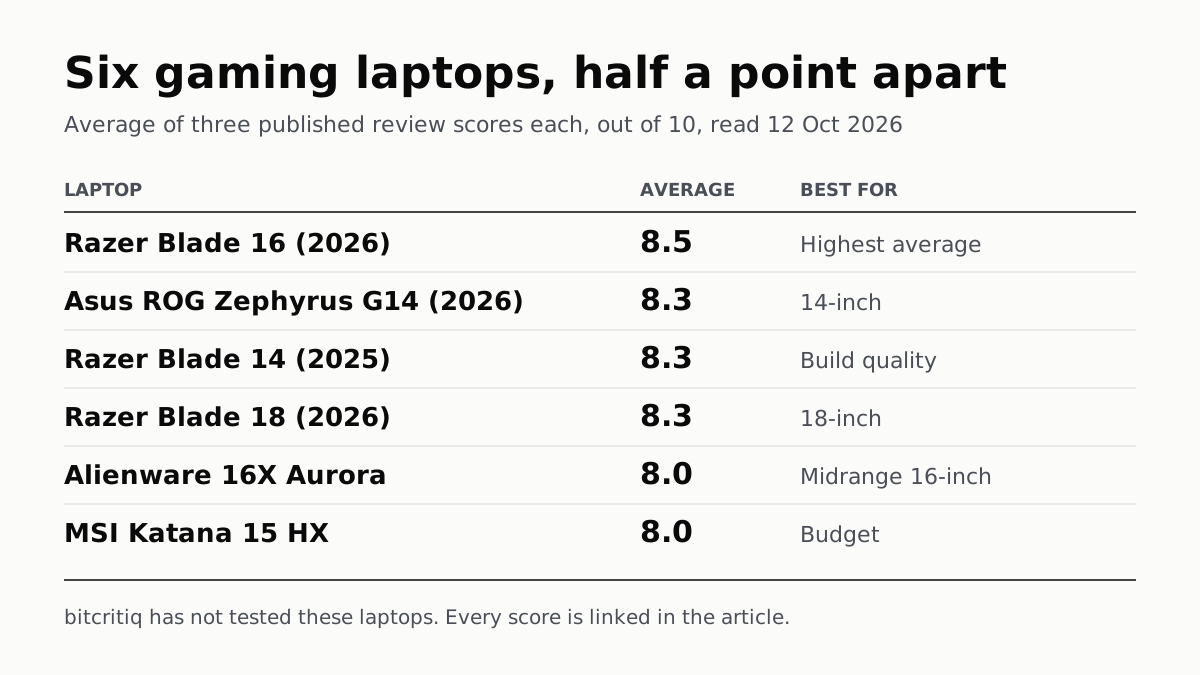
Razer Blade 16 Tops Gaming Laptop Reviews, by Half a Point
Eighteen review scores from eight outlets, all read on 12 October. Six laptops land within half a point, so pick by size and price.
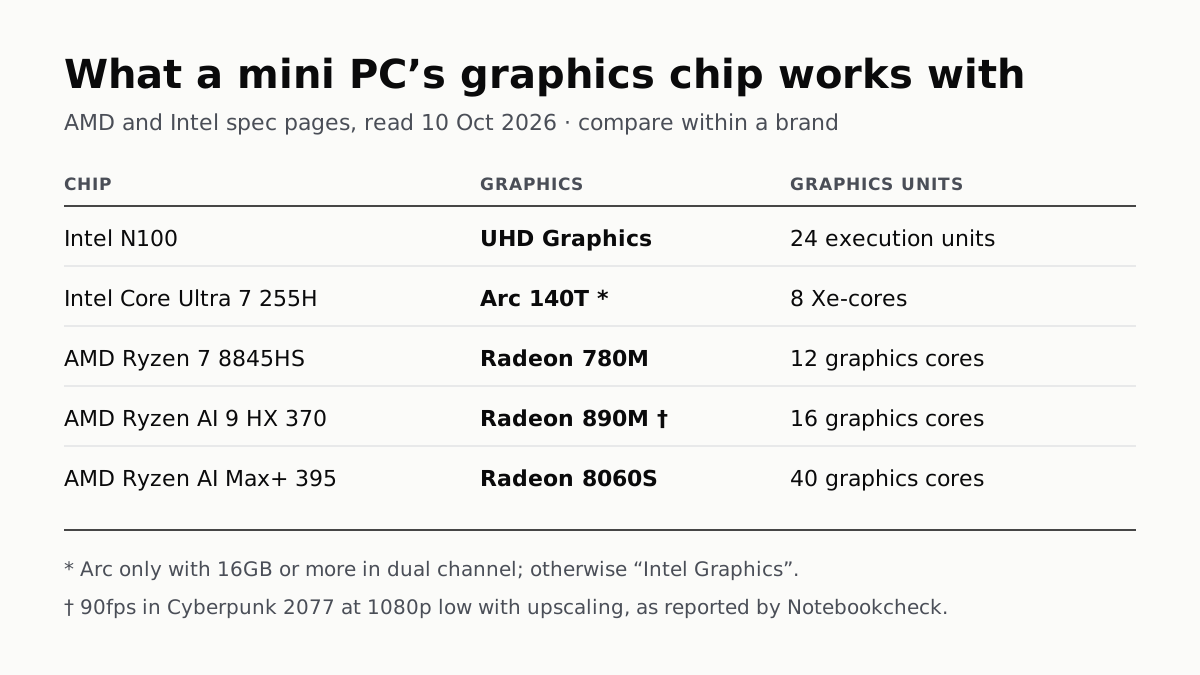
A Mini PC Can Game, but Its Graphics Chip Sets the Ceiling
Balatro's minimum is integrated graphics; Cyberpunk 2077's is a GTX 1060. A Radeon 890M ran Cyberpunk at 1080p low in one reported test.
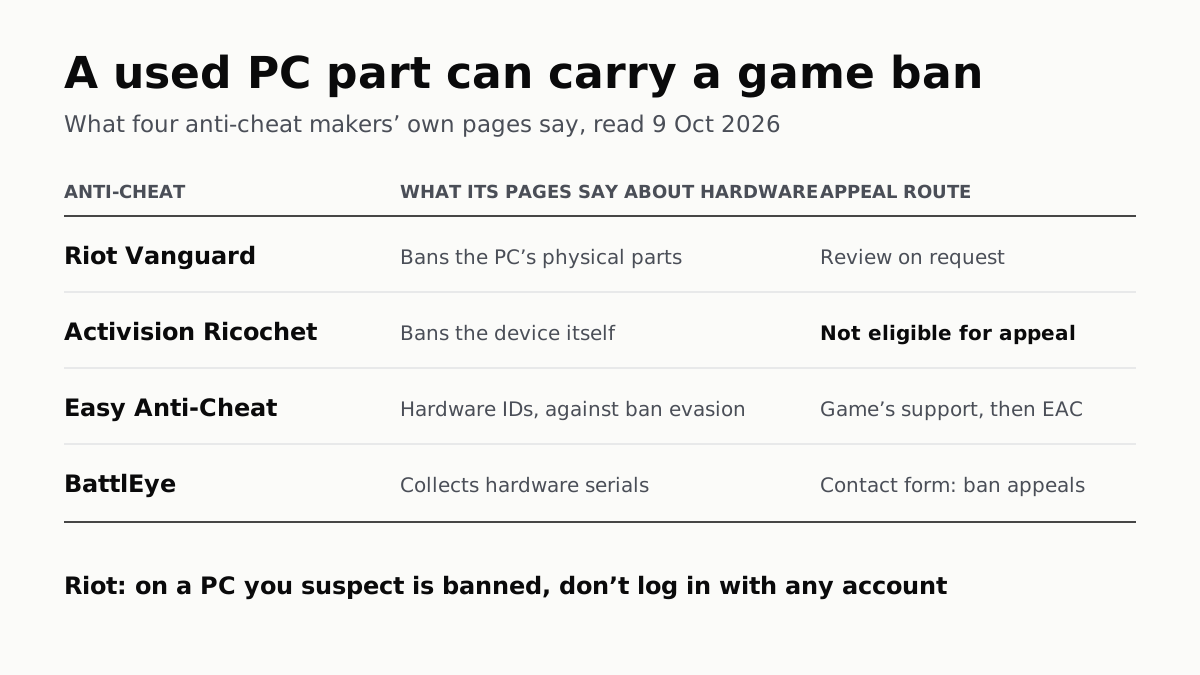
A Used PC or CPU Can Carry Its Last Owner’s Game Ban
Riot and Activision ban hardware, not only accounts. Riot will re-check one on request; Activision rules out an appeal.
The Same RTX 5070 Laptop GPU Runs at 90W or 115W
Nvidia publishes a power range for each laptop GPU and the maker picks a point in it. The spec sheet, or Nvidia Control Panel, shows which.