Windows 10 Security Updates Now Run to October 2027
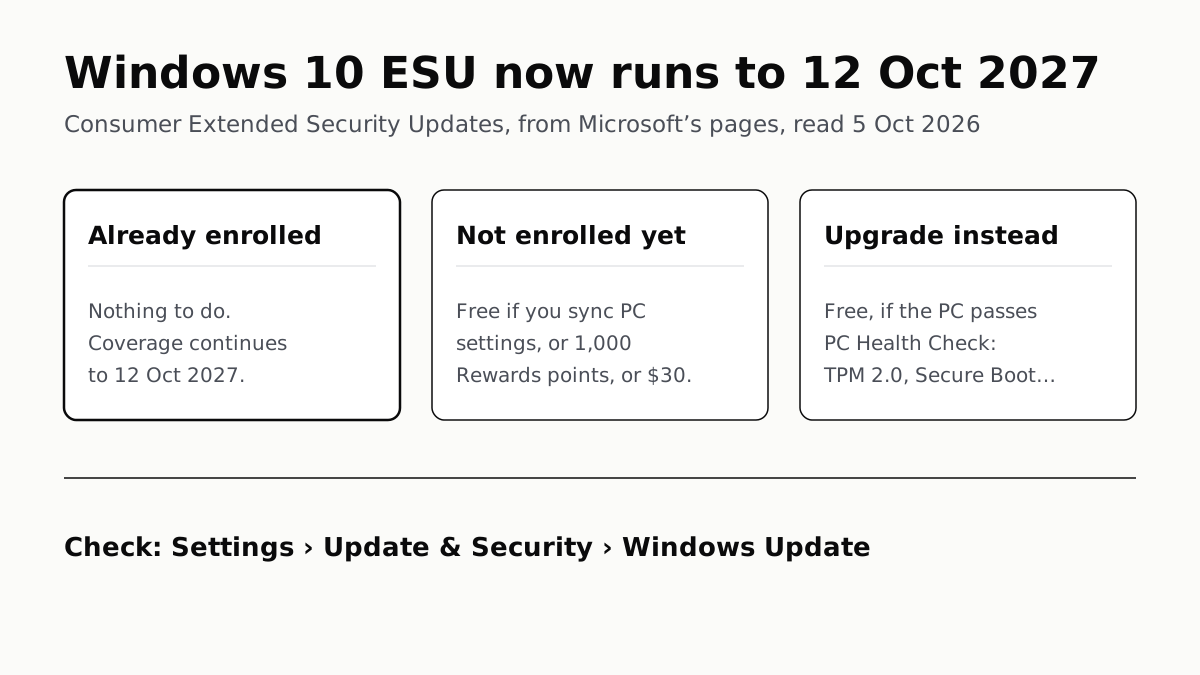
Microsoft added a year to consumer ESU. PCs already enrolled carry on with nothing to do, and the rest can still sign up for $30 or less.
If you buy through our links, we may earn a commission. It never affects our verdicts or scores — how that works. As an Amazon Associate I earn from qualifying purchases.
Windows 10 PCs enrolled in Microsoft’s Extended Security Updates now get security fixes until 12 October 2027, a year later than first promised, and Microsoft says already-enrolled PCs carry on automatically with no action needed. If yours is not enrolled, you can still sign up: free if you sync your PC settings, for 1,000 Microsoft Rewards points, or for a one-time $30.
The old end date was 13 October 2026, eight days from when we wrote this. Microsoft changed it on 25 June 2026, by editing its ESU pages and adding an editor’s note to the Windows Experience Blog post that set out consumer ESU a year earlier. We found no separate announcement, and BleepingComputer reported the change the same day as a “quiet update”.
Windows 10 dates that still matter
| What | Until |
|---|---|
| Regular Windows 10 support | Ended 14 October 2025 |
| Consumer ESU, as first announced | 13 October 2026 |
| Consumer ESU, now | 12 October 2027 |
| Microsoft 365 apps: security updates | 10 October 2028 |
| Microsoft 365 apps: feature updates | August 2026, the last for consumers |
| Defender Antivirus definitions | October 2028 |
The last three rows are separate from ESU. Microsoft’s blog says Microsoft 365 apps keep getting security updates on Windows 10 until 10 October 2028, and Defender’s definitions continue through October 2028. Neither replaces ESU: definitions help Defender recognise known malware, while fixes for flaws in Windows itself now reach Windows 10 only through ESU.
If you are already enrolled
Do nothing. Microsoft’s page says: “If you’re already enrolled, your coverage will automatically continue through that date—no action needed.” That holds whichever way you enrolled.
To check it, open Settings › Update & Security › Windows Update. If you paid, the order also appears in your Microsoft account’s Order History.
How to enrol now
Check you qualify first. Microsoft lists these requirements:
- Windows 10 version 22H2, in the Home, Pro, Pro Education or Workstations edition
- The latest Windows updates installed, including the licensing package KB5126256
- An administrator Microsoft account. It cannot be a child account, and if you sign in with a local account you will be asked to sign in with a Microsoft account to enrol
- A personal PC. Enrolment is not offered on kiosk-mode PCs, or on PCs joined to an Active Directory or Microsoft Entra domain or managed by an MDM tool
Then:
- Open Settings › Update & Security › Windows Update.
- Select Enroll now. Microsoft shows the link only to PCs that meet the requirements, so if it is missing, go back through the list above.
- Sign in with your Microsoft account if asked.
- Pick a route. If you already back up your PC settings, you will just be asked to enrol.
- For each further PC, up to 10, repeat steps 1 and 2 and choose Add device if you are signed in with the same account.
| Route | Cost | What you give up |
|---|---|---|
| Sync PC settings with Windows Backup | Nothing extra | Your settings sync to Microsoft’s cloud |
| Microsoft Rewards | 1,000 points | Rewards orders are final |
| One-time purchase | $30, or local equivalent, plus tax | Refunds follow Microsoft’s digital purchase policy |
Coverage is per PC, not per person: once one user on a PC enrols, every other account on that PC is covered too. A child’s PC has to be enrolled from a parent’s administrator account added to it.
In the European Economic Area the terms differ. Microsoft’s US page says only that options and timing “may vary by region”. Its Swiss newsroom post of September 2025, written for the EEA and Switzerland, described free enrolment for anyone who signs in with a Microsoft account and stays signed in, with updates stopping if the account is not used for 60 days. That post predates the extension, so check your local Microsoft page.
Enrol, upgrade or replace?
Enrolling does not block an upgrade later. Microsoft says an enrolled PC can still move to Windows 11 whenever it meets the requirements, so the free route costs nothing to try.
First, check whether the PC can upgrade. The upgrade to Windows 11 is free. Go to Settings › Update & Security › Windows Update, or run Microsoft’s PC Health Check app, which Microsoft notes does not test the graphics card or display. The PC must already be on Windows 10 version 2004 or later. If the check fails, which requirement failed, and whether it is a setting you can change, decides your next step.
| Windows 11 needs | Minimum |
|---|---|
| Processor | 1GHz, 2 or more cores, on Microsoft’s compatible 64-bit list |
| RAM | 4GB |
| Storage | 64GB |
| Firmware | UEFI, Secure Boot capable |
| Security chip | TPM 2.0 |
| Graphics and display | DirectX 12; a screen over 9 inches at 720p |
If it cannot upgrade, ESU buys a year to replace it on your own schedule. The deadline no longer forces a purchase this Black Friday. It does make this November the last Black Friday before the cut-off, since Black Friday 2027 falls after 12 October 2027.
If you do shop for a laptop in a sale, put the money into the parts you cannot change later. If the old PC is a tower, a mini PC is worth considering as the replacement. If the main complaint about the old laptop is noise rather than age, the usual causes of a loud laptop fan are often fixable without a screwdriver.
Microsoft’s own advice to PCs that cannot upgrade is a new Windows 11 or Copilot+ PC. A Copilot+ badge means an NPU rated at 40 TOPS or more, which gates one specific list of Windows features and has nothing to do with security updates.
Upgrading starts a new clock rather than ending them: each Windows 11 version has its own end date, and version 24H2 on Home and Pro runs out on 13 October 2026.
Microsoft has not said whether consumer ESU will run past 12 October 2027. Plan as if it will not.
Questions people ask
Does Windows 10 still get security updates?
Only if the PC is enrolled in Extended Security Updates. Regular support ended on 14 October 2025. Enrolled PCs get critical and important security fixes through 12 October 2027; PCs that are not enrolled get none.
Do I need to do anything if I’m already enrolled in Windows 10 ESU?
No. Microsoft says coverage for enrolled PCs continues automatically to 12 October 2027, with no action needed. You can confirm the status in Settings › Update & Security › Windows Update.
Can I still enroll in Windows 10 ESU?
Yes. Microsoft says you can enrol any time until the programme ends on 12 October 2027. Look for Enroll now in Settings › Update & Security › Windows Update; the PC needs version 22H2 and the latest updates.
How much does Windows 10 ESU cost?
Nothing if you sync your PC settings with Windows Backup, 1,000 Microsoft Rewards points, or a one-time $30 plus tax. Each route runs to 12 October 2027 and one licence covers up to 10 PCs on the same Microsoft account.
Do I have to pay again for ESU’s extra year?
No. Microsoft says existing enrolments continue through 12 October 2027 automatically, with no action needed, and that every enrolment route provides updates to that date.
How do I know if my PC can run Windows 11?
Open Settings › Update & Security › Windows Update, or run Microsoft’s PC Health Check app. The main hurdles are TPM 2.0, Secure Boot and a processor on Microsoft’s compatible list. The upgrade itself is free.
Will my Windows 10 PC stop working after October 2027?
No. Microsoft says Windows 10 PCs continue to function without ESU. They stop receiving security fixes, and Microsoft warns that unpatched PCs are more vulnerable to viruses and malware.
How we researched this
No one at bitcritiq has handled this product. Everything here comes from published sources, listed below.
- What this cannot tell you
- We found no standalone Microsoft announcement of the extension, only the editor's notes dated 25 June 2026 and the edited pages; the 'quiet' description is BleepingComputer's. Microsoft's US page says enrolment options and timing may vary in the European Economic Area but does not give the terms; the EEA terms we quote are from September 2025 and may since have changed. Microsoft has not said whether there will be any consumer ESU after 12 October 2027. We have not enrolled a PC ourselves.
How we chose this, and what we did
- Why this subject
- Microsoft moved the end of consumer Extended Security Updates for Windows 10 from 13 October 2026 to 12 October 2027, and the original date was eight days away when we wrote this. Owners searching now want to know whether their PC is still covered, whether they have to do anything, and whether to enrol or replace the PC.
- How we looked at it
- Everything central is from Microsoft's own pages, read through a browser on 5 October 2026: the consumer ESU page and its FAQ (read from the page source, because the answers are collapsed), the Windows end-of-support page, the Windows 11 specifications page, the Windows Experience Blog post of 24 June 2025 that set out consumer ESU, and Microsoft's Swiss newsroom post of 30 September 2025. The 13 October 2026 end date comes from the unedited body of that Swiss post; the change date comes from the editor's notes on it and on the blog post.
What this rests on
6 claims, all official. Nothing here was measured by bitcritiq — see how we test for why. Open a claim to read the source it came from.
Consumer ESU for Windows 10 now runs to 12 October 2027, and PCs already enrolled are covered to that date without doing anything.Official
Microsoft's ESU page: “You can enroll in ESU any time until the program ends on October 12, 2027. If you’re already enrolled, your coverage will automatically continue through that date—no action needed.”
The consumer programme originally ended on 13 October 2026, and Microsoft recorded the extension on 25 June 2026.Official
Microsoft Source EMEA, 30 September 2025: “ESU support for personal devices will run from 15 October 2025 to 13 October 2026.” Editor's note on the same post and on the Windows Experience Blog post: “June 25, 2026 … the Windows 10 Extended Security Updates (ESU) program for personal use devices is being provided an additional year, with coverage now available through October 12, 2027.”
There are three ways to enrol: free if you sync PC settings, 1,000 Microsoft Rewards points, or a one-time $30 purchase, and one licence covers up to 10 PCs.Official
Microsoft's ESU page: “At no additional cost if you are syncing your PC Settings. Redeem 1,000 Microsoft Rewards points. One-time purchase of $30 USD or local currency equivalent plus applicable tax.” and “You can use your existing ESU license for up to 10 devices.”
Enrolment needs Windows 10 version 22H2, the latest updates, KB5126256 and an administrator Microsoft account that is not a child account; managed, domain-joined and kiosk PCs are excluded.Official
Microsoft's ESU page lists: “Windows 10, version 22H2”, “the latest Windows update installed”, “KB5126256, is required”, “must be an administrator account”, “can’t be a child account”, and says enrolment won't be offered for kiosk mode or devices “joined to an Active Directory domain or Microsoft Entra and/or enrolled in a Mobile Device Management (MDM) solution.”
Microsoft 365 apps on Windows 10 get security updates to 10 October 2028, and Defender Antivirus definitions continue through October 2028.Official
Windows Experience Blog: “Microsoft 365 Apps running on personal and commercial Windows 10 PCs will continue receiving security updates until Oct. 10, 2028, and feature updates through August 2026.” and “Microsoft will continue to provide Security Intelligence Updates for Microsoft Defender Antivirus on Windows 10 through October 2028.”
Windows 11 needs a compatible 64-bit processor with 2 or more cores, 4GB of RAM, 64GB of storage, UEFI with Secure Boot and TPM 2.0.Official
Windows 11 specifications page: “1 gigahertz (GHz) or faster with 2 or more cores on a compatible 64-bit processor … RAM 4 gigabytes (GB) Storage 64 GB or larger … UEFI, Secure Boot capable … Trusted Platform Module (TPM) version 2.0.”
Sources 6
- Windows 10 Consumer Extended Security Updates (ESU) — MicrosoftOfficialaccessed Oct 5, 2026
- End of support for Windows 10, Windows 8.1, and Windows 7 — MicrosoftOfficialaccessed Oct 5, 2026
- Stay secure with Windows 11, Copilot+ PCs and Windows 365 before support ends for Windows 10 — Windows Experience Blog, 24 June 2025, editor's note 25 June 2026Officialaccessed Oct 5, 2026
- Information on the end of support for Windows 10 in Switzerland — Microsoft Source EMEA, 30 September 2025, updated 25 June 2026Officialaccessed Oct 5, 2026
Show 2 more · 1 official or standards
- Windows 11 Specs and System Requirements — MicrosoftOfficialaccessed Oct 5, 2026
- Microsoft quietly extends free Windows 10 ESU support to October 2027 — BleepingComputer, 25 June 2026accessed Oct 5, 2026
Pass it on
Know someone weighing this up? Send them the answer.
bitcritiq.com/gax7The link is permanent: it opens this article for good, even if the title changes.
No email, no account
Follow bitcritiq
Every new article, in whatever reader you already use.
Subscribe by RSSAll the ways to follow
Using Chrome on Android? Open the browser menu and tap Follow. New articles then turn up in the Following tab in Discover.
read next
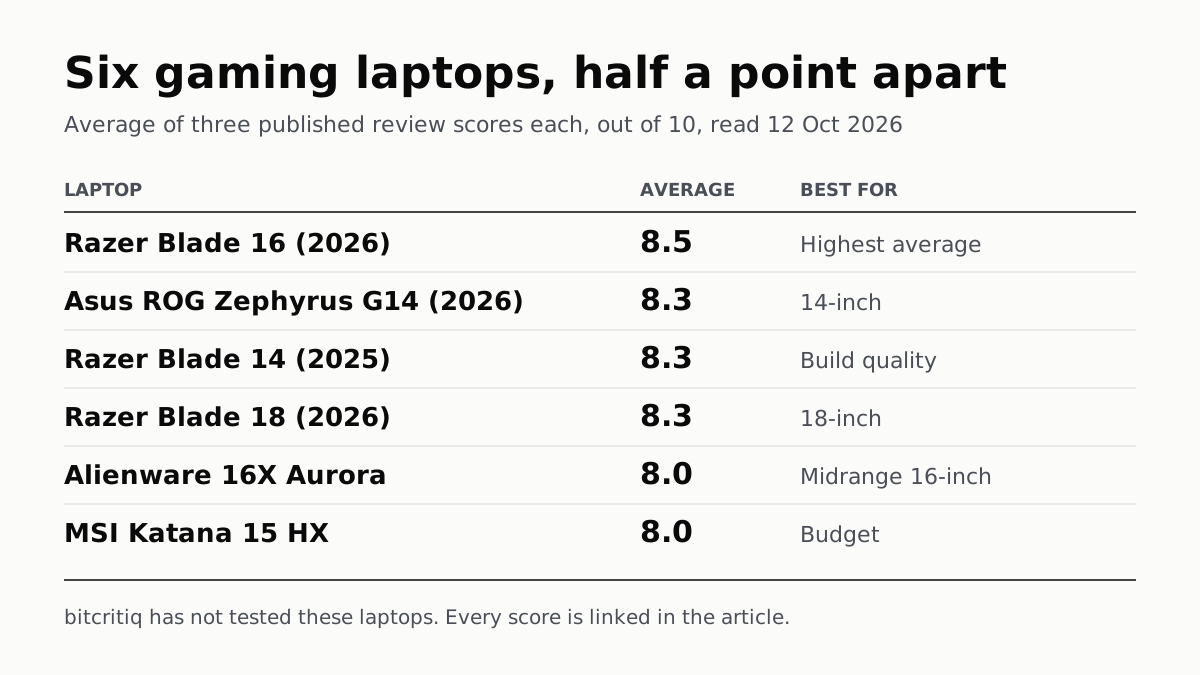
Razer Blade 16 Tops Gaming Laptop Reviews, by Half a Point
Eighteen review scores from eight outlets, all read on 12 October. Six laptops land within half a point, so pick by size and price.
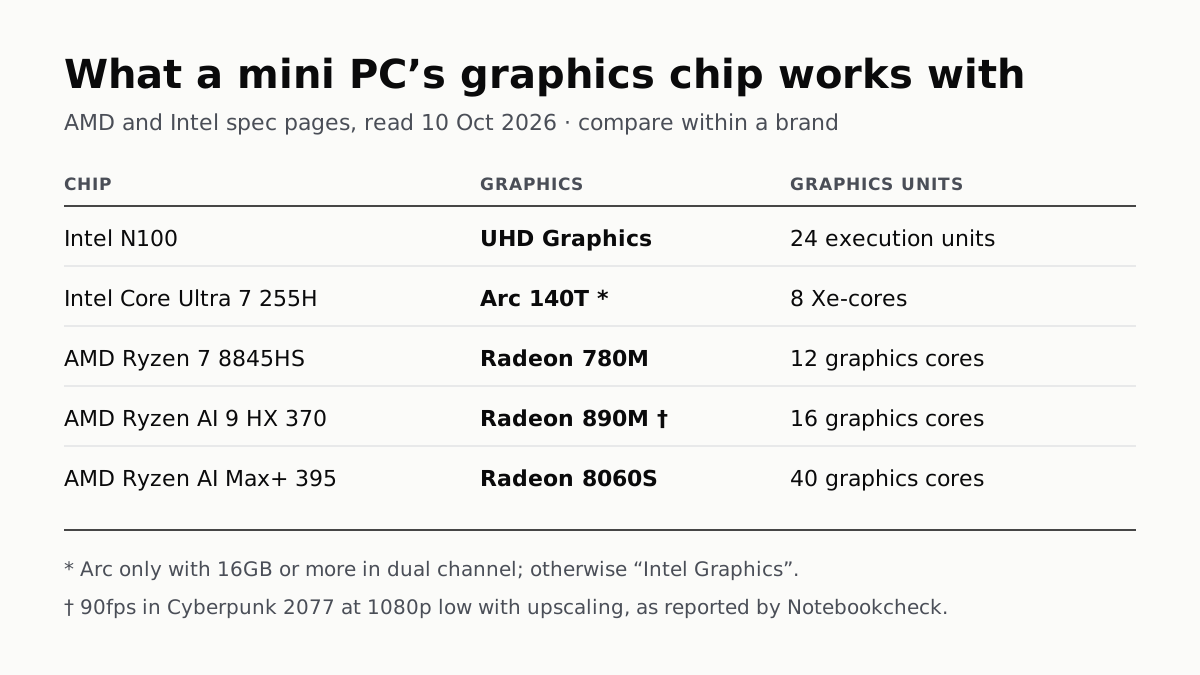
A Mini PC Can Game, but Its Graphics Chip Sets the Ceiling
Balatro's minimum is integrated graphics; Cyberpunk 2077's is a GTX 1060. A Radeon 890M ran Cyberpunk at 1080p low in one reported test.
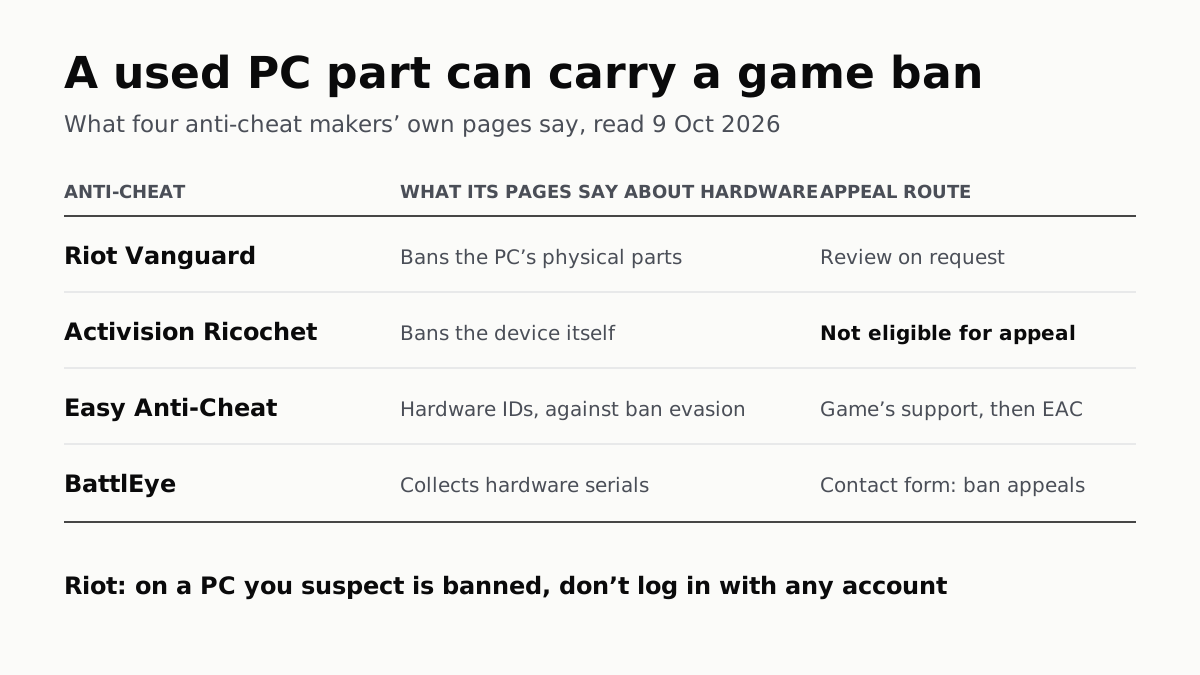
A Used PC or CPU Can Carry Its Last Owner’s Game Ban
Riot and Activision ban hardware, not only accounts. Riot will re-check one on request; Activision rules out an appeal.
The Same RTX 5070 Laptop GPU Runs at 90W or 115W
Nvidia publishes a power range for each laptop GPU and the maker picks a point in it. The spec sheet, or Nvidia Control Panel, shows which.