What an NPU Actually Does, and Whether You Need 40 TOPS
The number on the sticker gates one specific list of Windows features. The feature most people would actually notice needs a quarter of it.

If you buy through our links, we may earn a commission. It never affects our verdicts or scores — how that works. As an Amazon Associate I earn from qualifying purchases.
An NPU is a third processor, alongside the CPU and the GPU, built to do the one kind of arithmetic AI models are made of. The 40 TOPS on the sticker is not a speed rating you will feel — it is the threshold Microsoft set for a named list of Windows features, and nothing else on your machine consults it.
TOPS stands for trillions of operations per second. Microsoft describes a Copilot+ PC as hardware with an NPU “that can perform more than 40 trillion operations per second (TOPS)”, and that figure is a floor for branding, not a measure of how fast your laptop feels.
What the badge actually requires
Three numbers, all published on Microsoft’s own specifications page, and all of them floors rather than targets:
| Requirement | Minimum |
|---|---|
| NPU | an NPU capable of performing 40+ TOPs |
| Memory | 16 GB DDR5/LPDDR5 |
| Storage | 256 GB SSD/UFS |
Note the second row before the first. A machine that clears 40 TOPS but ships 8 GB of memory is not a Copilot+ PC, and in practice the memory is the requirement more likely to improve your day.
Microsoft’s own 8GB first-edition Surface Pro 12-inch and Surface Laptop 13-inch are examples: its store says they miss Copilot+ features, while the second editions start at 16GB.
There are two thresholds, and nobody mentions the smaller one
This is the part worth knowing before you pay for the badge.
Microsoft’s specifications page states that Copilot+ features “require a neural processing unit (NPU) capable of 40+ trillion operations per second (TOPS) to function as intended.”
The same page states that Windows Studio Effects — background blur, eye contact correction, automatic framing, the things that run during a video call — “requires a processor or SoC that incorporates neural processing units (NPUs) with 10+ trillion operations per second (TOPS).”
The feature most people would actually notice needs a quarter of the headline number. Machines sold well below the Copilot+ bar have been doing the camera work for years, and they keep doing it.
Owners reach the same conclusion from the other direction. In a large r/Windows11 thread asking what is special about these machines now, one reply works through the feature list and lands on exactly this: camera enhancement “can be useful, but also available in Intel Meteor Lake processors (not Copilot+ with a much weaker NPU).”
What an NPU is for, which is not speed
The case for a separate AI chip is power, not performance. Microsoft’s developer guidance says the NPU processes data in parallel “using energy on AI tasks more efficiently than a CPU or GPU resulting in longer device battery life”, and that Windows “assigns processing tasks to the most appropriate place”.
That is the honest pitch. A GPU will out-run an NPU at almost any AI task you can name. What it will not do is run a background feature all day on battery without you noticing. An NPU exists so that blur-your-background can be always-on rather than a thing that costs you an hour of runtime.
The check, which takes about a minute
Microsoft’s guidance notes that on devices with an NPU, “the Task Manager can now be used to view NPU resource usage.”
So: open Task Manager, go to Performance, and look for an NPU entry beside CPU, Memory, GPU. Two things follow from what you see.
- No NPU listed — your machine does not have one, or Windows does not see it. No Copilot+ feature will run regardless of what the box said.
- NPU listed but flat — this is the common case, and it is the real answer to whether you need one. Join a video call with background blur on and watch it move. If it never moves during a normal day’s work, the chip is idle and the badge bought you nothing you are using.
What owners report
The r/Windows11 thread is blunt, and worth weighing against the marketing. The top reply calls it “a feature looking for a problem which doesn’t exist”, from someone who owns one: “my experience with Windows would be identical if the NPU didn’t exist.”
Another puts it more economically — “My NPU is also unemployed most of the time.” A third offers NPU = “not particularly useful” as an expansion of the acronym.
This is a snapshot of one moment, and the software side is the half that changes. But it is the right correction to a sticker that implies the number is doing something for you today.
What to actually do
- Do not pay a premium for TOPS alone. It gates a feature list you can read in advance. Read it, and decide whether you want anything on it; Microsoft’s latest promise, Copilot reading your files with permission, is announced for Copilot+ PCs.
- If video-call effects are the appeal, you need 10+ TOPS, not 40. That is a much cheaper machine, and Microsoft says so on its own specifications page.
- Spend the difference on memory. 16 GB is the Copilot+ floor for a reason, and memory is what you will feel every day whether or not you ever touch an AI feature.
- Check Task Manager before renewing the argument with yourself. If the NPU row is flat after a week, you have your answer for the next laptop too.
- If you want to run models locally rather than use Windows features, this is the wrong chip to shop for. That is a memory and GPU question — how much VRAM you need to run an LLM covers what actually decides it.
How we researched this
No one at bitcritiq has handled this product. Everything here comes from published sources, listed below.
- What this cannot tell you
- This is about Windows on x86 and Arm, where the TOPS figure is a marketing number with a published meaning. Apple Silicon has had a neural engine since 2017 and does not market it this way, so the comparison does not transfer. Nor does this benchmark NPUs against each other: TOPS is a peak-throughput figure, and two chips quoting the same number will not do the same work at the same speed.
How we chose this, and what we did
- Why this subject
- TOPS has become the number on the laptop sticker, and almost nobody buying one can say what it gates. The searches are split between people asking what an NPU is and people asking whether 40 TOPS is worth paying for, which is really one question: what stops working below it.
- How we looked at it
- Took the thresholds from Microsoft's own Windows 11 specifications page and its Copilot+ developer guidance, because Microsoft sets the requirement and publishes it. Then read a large r/Windows11 thread asking whether the NPU is useful yet, to check the published spec against what owners report living with.
Sources 3
- Windows 11 Specs and System Requirements — MicrosoftOfficialaccessed Aug 29, 2026
- Copilot+ PCs developer guide — Microsoft LearnOfficialaccessed Aug 29, 2026
- What's special about the Copilot+ PCs now? — r/Windows11accessed Aug 29, 2026
Pass it on
Know someone weighing this up? Send them the answer.
bitcritiq.com/s46yThe link is permanent: it opens this article for good, even if the title changes.
No email, no account
Follow bitcritiq
Every new article, in whatever reader you already use.
Subscribe by RSSAll the ways to follow
Using Chrome on Android? Open the browser menu and tap Follow. New articles then turn up in the Following tab in Discover.
read next
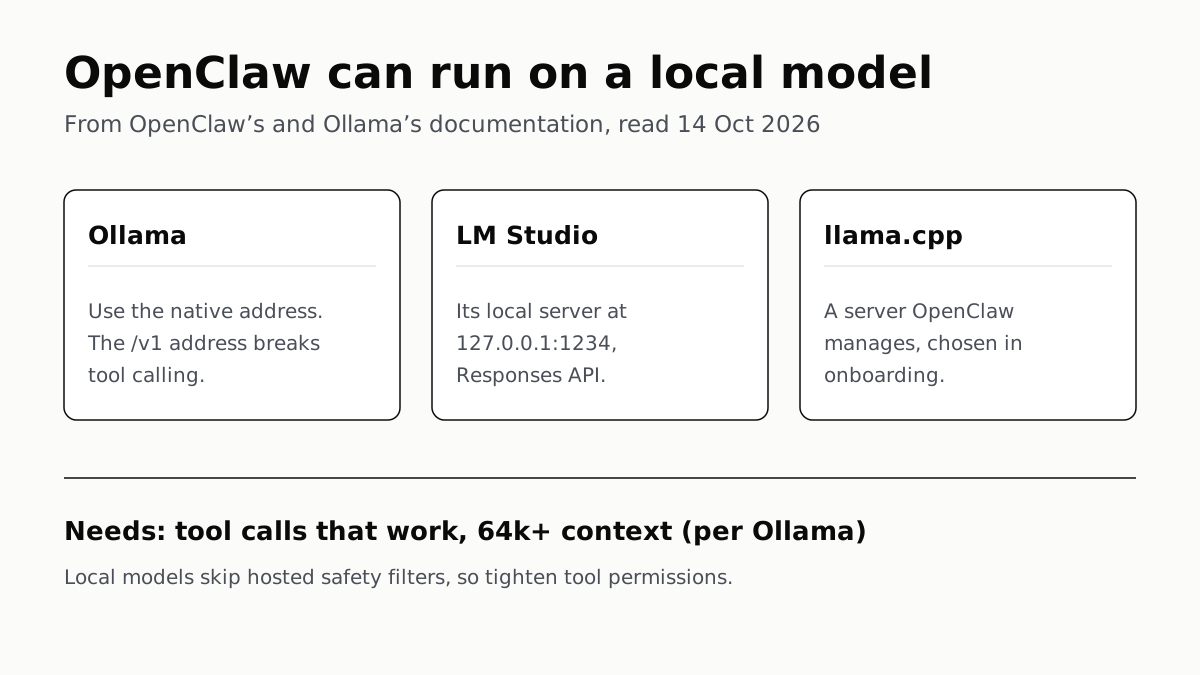
OpenClaw Runs on a Local LLM via Ollama or LM Studio
OpenClaw's docs also cover llama.cpp, vLLM and any OpenAI-compatible server. Ollama advises 64k context; small models are easier to hijack.
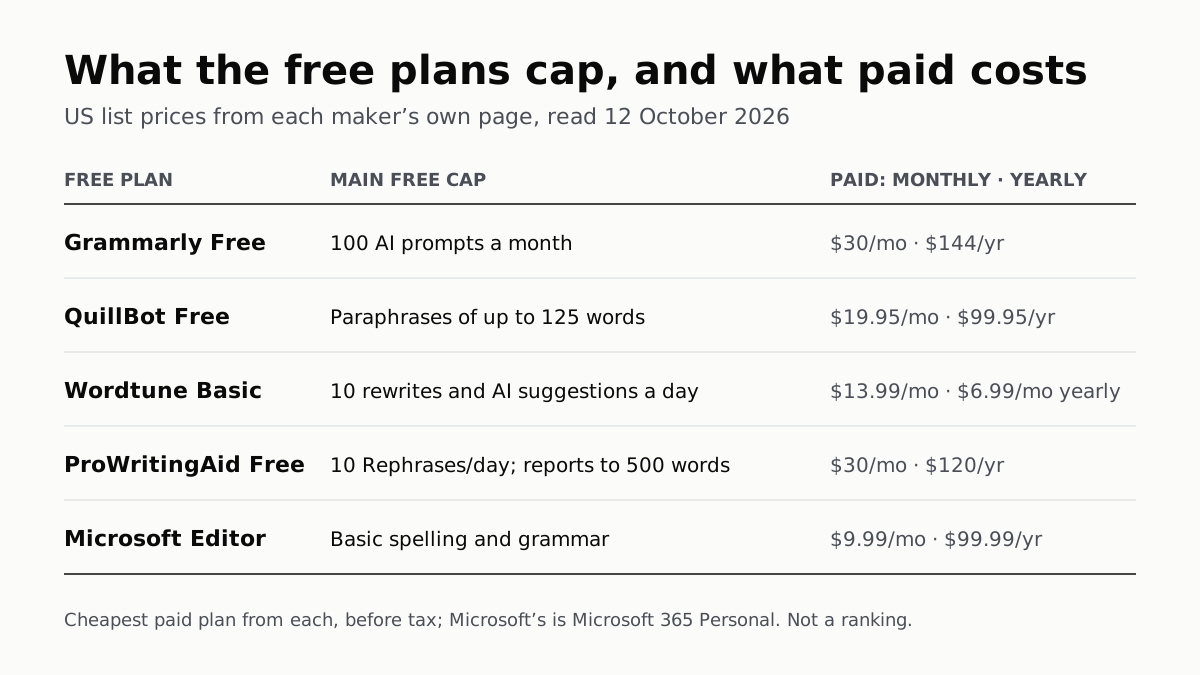
Free AI Writing Tools Ration Rewrites in Different Units
Grammarly gives 100 AI prompts a month, Wordtune 10 rewrites a day, QuillBot 125 words a paraphrase. Yearly billing halves most prices.
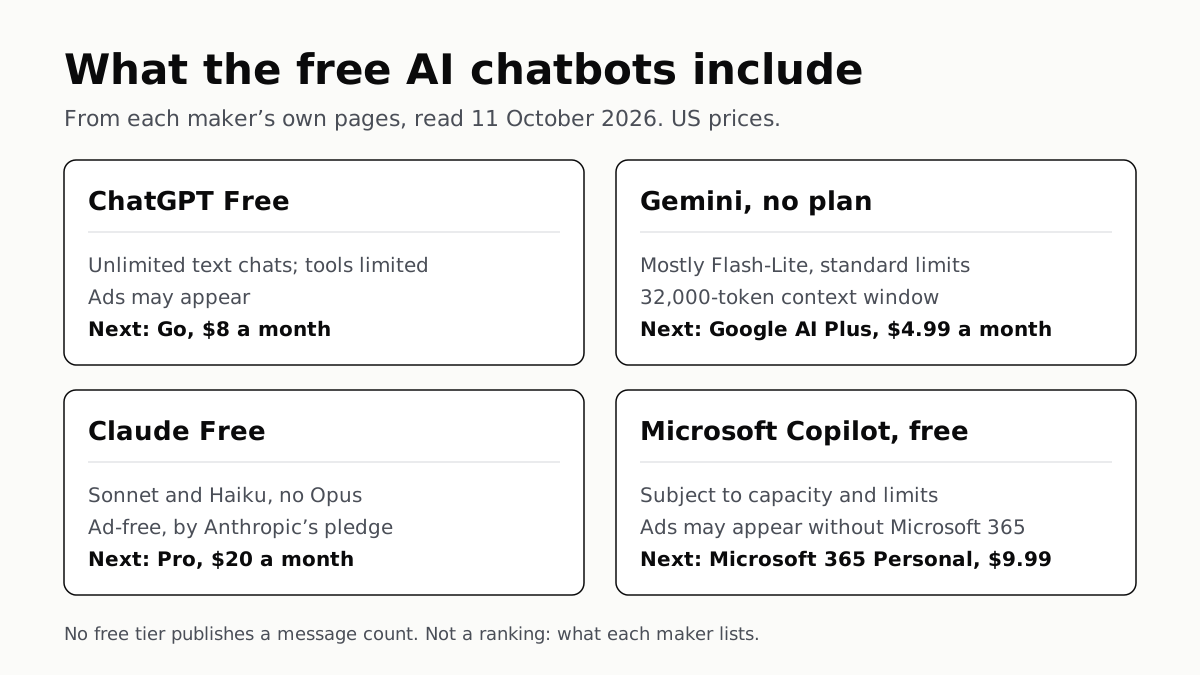
Of Four Free AI Chatbots, Only ChatGPT Lists Unlimited Chat
ChatGPT’s free tier carries ads, as Copilot’s may; Gemini’s leans on Flash-Lite and Claude’s leaves out Opus.
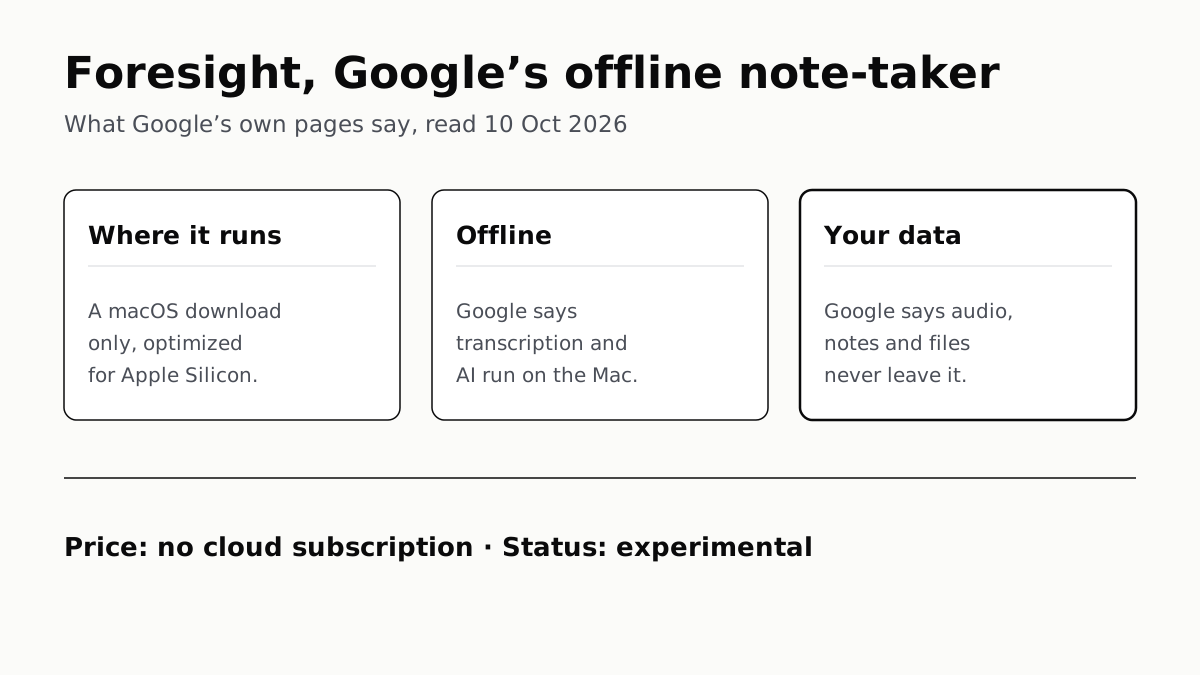
Google’s Offline AI Note-Taker Runs Only on a Mac
Transcription and AI run on the Mac itself, with no phone version. Google says your audio, notes and files never leave the computer.