Free AI Writing Tools Ration Rewrites in Different Units
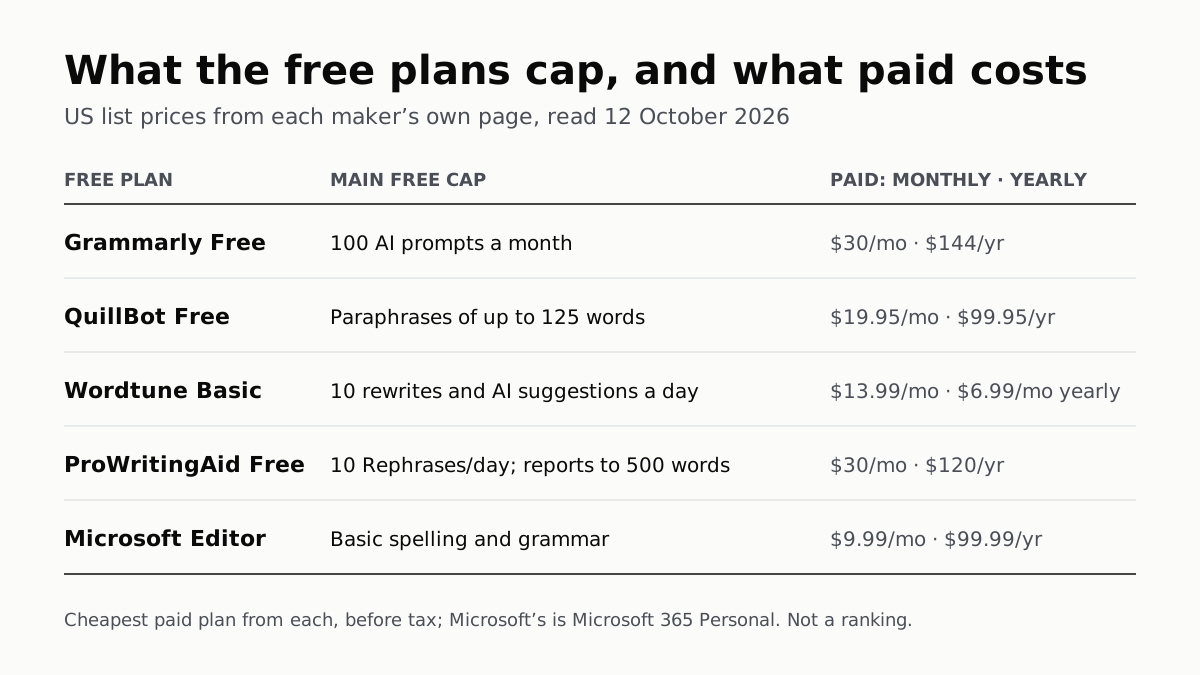
Grammarly gives 100 AI prompts a month, Wordtune 10 rewrites a day, QuillBot 125 words a paraphrase. Yearly billing halves most prices.
If you buy through our links, we may earn a commission. It never affects our verdicts or scores — how that works. As an Amazon Associate I earn from qualifying purchases.
The free plans of Grammarly, QuillBot and Wordtune each cap the AI, in different units: Grammarly Free allows 100 AI prompts a month, Wordtune’s free plan 10 rewrites a day, and QuillBot’s free paraphraser 125 words at a time. The cheapest paid plan from each of the five makers here costs $9.99 to $30 billed monthly in the US; billing yearly halves four of those prices or better.
What the free plans ration is the generative part: rewriting, paraphrasing, summarising and drafting. ProWritingAid’s free plan allows 10 Rephrases a day. Microsoft’s free Editor stops at basic spelling and grammar, and puts its rewriting help behind a Microsoft 365 subscription.
What each free plan includes, and its caps
| Free plan | AI rewriting and drafting | Other caps | Paid only |
|---|---|---|---|
| Grammarly Free | 100 AI prompts a month, refilled monthly | Spelling, grammar and tone detection, no stated cap | Full-sentence rewrites, tone adjustment, 2,000 prompts a month |
| QuillBot Free | Paraphrase up to 125 words, 2 modes | Summarize 1,200 words; humanize up to 125 words, “limited usage”; AI chat “limited usage” | Plagiarism checker (25,000 words a month), 9 modes and custom modes |
| Wordtune Basic | 10 rewrites and AI suggestions a day | 3 AI summaries a month; spelling and grammar unlimited | AI recommendations, vocabulary and clarity help |
| ProWritingAid Free | 10 Rephrases a day | Each editing report 2 runs a day, up to 500 words; 3 Sparks a day | Chapter Critique, unlimited reports and Rephrases |
| Microsoft Editor, free | No rewriting help | Basic spelling and grammar | Clarity, conciseness and formality refinements; Copilot in Word |
Every figure is from the maker’s own plan or help page, read on 12 October 2026. Where a cell quotes “limited usage”, the maker gives no number.
The units differ, so the caps do not line up. A Grammarly prompt can be “a few words or up to several paragraphs”, Grammarly says, and pressing a suggestion such as “Improve it” uses one. QuillBot caps the length of each paraphrase but does not state how many you get a day. Wordtune’s 10 a day is shared between rewrites and AI suggestions, and its plan list adds “AI generations” under limited daily use without giving a number.
Grammarly lists detecting plagiarism and AI-generated text among Pro’s additions, and QuillBot’s free plan includes a limited AI Detector. Before relying on one to judge someone else’s work, read why OpenAI withdrew its own AI detector.
What the paid plans cost
| Plan | Billed monthly | Billed yearly | What it adds over free |
|---|---|---|---|
| Grammarly Pro | $30 | $144 ($12 a month) | 2,000 AI prompts a month, sentence rewrites, tone adjustment, plagiarism and AI detection |
| QuillBot Premium | $19.95 | $99.95 ($8.33 a month) | Full paraphrasing, 9 modes, 6,000-word summaries, plagiarism checks |
| Wordtune Advanced | $13.99 | $6.99 a month | 30 rewrites a day, 15 summaries a month |
| Wordtune Unlimited | $19.99 | $9.99 a month | No caps on rewrites or summaries |
| ProWritingAid Premium | $30 | $120 ($10 a month) | Unlimited reports and Rephrases, 1 Chapter Critique a day |
| Microsoft 365 Personal | $9.99 | $99.99 | Editor refinements, Copilot in Word and the other Office apps, 1TB storage |
US list prices from each maker’s own page on 12 October 2026, before tax. Wordtune shows its yearly plans as a monthly figure billed annually and does not print the yearly total. Grammarly also sells three months for $60, and QuillBot three months for $39.95.
Grammarly says its default currency is the US dollar, with regional pricing in euros, pounds and rupees at checkout; QuillBot says prices “may automatically adjust based on your location”. Microsoft does not publish a number for how much Copilot use Personal includes: its usage page grades chat and Pages “Extensive usage” and voice and image generation “Standard usage”. For what the free Copilot app itself allows, see what the free ChatGPT, Gemini, Claude and Copilot include.
Do they train on your writing?
| Maker | Uses your text to train? | How to opt out |
|---|---|---|
| Grammarly | Yes, on by default for individual accounts | Product Improvement and Training toggle in account privacy settings |
| QuillBot | Yes: inputs are “used for … training to improve the services” | In the browser extension’s Data and Privacy settings, for account holders |
| Wordtune | Data is anonymised and “only used for optimizing Wordtune models” | No setting described; contact the team, or privacy@wordtune.com |
| ProWritingAid | No: “We will never use your writing to train our algorithms” | Not needed |
| Microsoft (Copilot in Word) | No: prompts, responses and file contents “aren’t used to train foundation models” | Not needed |
Grammarly is the clearest about the default: “Product Improvement and Training is on for individual users by default.” Turning it off stops your content being used, but Grammarly says it may still collect “writing statistics (total words written, types of suggestions accepted, mistakes made, etc.)”.
QuillBot describes its opt-out for extension users on version 4.37.0 or later, “available to account-holders”, and says it does not train on Team Plan text. Its help page does not describe a training switch in the website’s own editor.
Wordtune names no in-app switch. Its help centre says to message the team if you prefer it “doesn’t capture the content of your writing”, and its privacy policy says that to stop it aggregating your data “you may contact us at privacy@wordtune.com”.
Microsoft says prompts, responses and file contents in Copilot in Microsoft 365 apps are not used to train foundation models. For the free Editor in Edge, it says typed text sent for spelling and grammar checks “is not stored and is deleted after processing”.
The same question for ChatGPT has a single switch, covered in whether ChatGPT trains on your chats.
Questions people ask
Is Grammarly free enough for AI rewriting?
For light use. Grammarly Free fixes spelling and grammar and shows your tone, and gives 100 generative AI prompts a month, refilled monthly. Rewriting full sentences with a click and adjusting tone are listed as Pro features.
How many words can QuillBot paraphrase for free?
Up to 125 words, in two modes, Standard and Fluency, according to QuillBot’s plan comparison. Premium lifts that to full access and nine modes plus custom ones. QuillBot does not state a daily number of free paraphrases.
How many free rewrites does Wordtune give?
Ten a day on the free Basic plan, a count shared between rewrites and AI suggestions, plus three AI summaries a month. Advanced raises that to 30 a day and 15 summaries; Unlimited removes the caps.
How much does Grammarly Premium cost now?
Grammarly now sells Pro in place of Premium. In the US it costs $30 billed monthly, $60 every three months, or $144 billed yearly, which Grammarly gives as an average of $12 a month.
Do AI writing tools train on what I write?
It depends on the maker. Grammarly does by default, with a switch to turn it off. QuillBot uses inputs for training, with an opt-out in its browser extension. Wordtune uses anonymised data for its models. ProWritingAid says it never trains on your writing.
Is Microsoft Editor free?
Basic spelling and grammar checking is free with a Microsoft account in Word for the web and the Edge and Chrome extension. Clarity, conciseness and formality refinements, and Copilot in Word, need Microsoft 365 Personal, at $9.99 a month or $99.99 a year.
How we researched this
No one at bitcritiq has handled this product. Everything here comes from published sources, listed below.
- What this cannot tell you
- We did not sign in to any of these services, so this is what the makers publish, not what an account shows; QuillBot notes that “limits may vary across platforms”. Wordtune’s pricing page shows dollar signs without naming a currency; we read it from a US connection. Wordtune and QuillBot describe opting out of training in ways that apply to some users or need a request, set out below; we have not tested either route. Grammarly’s prompts article still mentions a Premium plan with 1,000 prompts, which its plans page has replaced with Pro at 2,000; we used the plans page. We have not used or compared the quality of any of these tools, and this is not a ranking.
How we chose this, and what we did
- Why this subject
- Google Trends listed “ai writing tools” among the top AI queries in all five weekly pulls to 4 October 2026, with “ai tools list” rising (+60%) and “free ai tools” among the top AI queries (ops/trends/2026-10-04-digest.md). bitcritiq had compared the free tiers of the general chatbots, but not the writing assistants people use for rewriting and paraphrasing, whose free limits are counted in prompts, words and rewrites rather than messages.
- How we looked at it
- Every cap and price is from the maker’s own pricing, help or privacy page, read in a browser on 12 October 2026 from a US connection. Grammarly: grammarly.com/plans and its comparison table; Support articles ‘How much does Grammarly Pro cost?’, ‘How many generative AI prompts do I have?’ and ‘Product Improvement and Training Control’. QuillBot: quillbot.com/premium with the billing toggle set both ways, including its comparison table; the quillbot.com FAQ ‘How much is QuillBot Premium?’ for the yearly total; Help Center ‘How does QuillBot use my data?’. Wordtune: wordtune.com/plans with the toggle set both ways; Help Center ‘Can I delete my account?’; the Wordtune privacy policy. ProWritingAid: prowritingaid.com/pricing with the toggle set both ways, whose checkout links carry currency=USD; its ‘Approach to AI’ page. Microsoft: the US Microsoft Editor page with its FAQ and billing toggle; Support’s ‘Microsoft Editor checks grammar and more’, ‘Frequently asked questions about Copilot in Microsoft 365 subscriptions’, ‘How AI usage works across Microsoft 365 subscriptions for individuals’ (updated October 2026) and ‘Copilot in Microsoft 365 apps for home: your data and privacy’. Absence claims have a control on the same page: Wordtune’s plan list numbers “10 Rewrites & AI suggestions” a day but gives “AI generations” no number; QuillBot’s table numbers the summarizer (1,200 words) but calls AI chat “Limited usage”; Microsoft’s usage page grades each Copilot feature per plan (“Extensive usage”, “Standard usage”) but gives no count.
What this rests on
6 claims, all official. Nothing here was measured by bitcritiq — see how we test for why. Open a claim to read the source it came from.
Grammarly Free includes 100 generative AI prompts a month, refilled monthly; full-sentence rewrites and tone adjustment are Pro features.Official
grammarly.com/plans comparison: “Generate text with AI prompts — 100 prompts / month” (Free), “2,000 prompts / member / month” (Pro); “Rewrite full sentences” and “Adjust your writing tone” listed under Pro. Grammarly Support: “The number of available prompts will be automatically refilled on a monthly basis.”
QuillBot’s free plan paraphrases up to 125 words in two modes and summarizes up to 1,200 words.Official
quillbot.com/premium comparison: “Paraphrase your writing — Up to 125 words” (Free), “Standard and Fluency” modes; “Summarize text — 1,200 words” (Free), “6,000 words” (Premium).
Wordtune Basic allows 10 rewrites and AI suggestions a day and 3 AI summaries a month.Official
wordtune.com/plans, Basic: “Limited daily use: 10 Rewrites & AI suggestions … Limited monthly use: 3 AI summarizations.” Comparison table: “10 per day”, “3 per month”.
ProWritingAid Free allows 10 Rephrases a day and two runs a day of each editing report, on up to 500 words.Official
prowritingaid.com/pricing: “10 Rephrases per day”; comparison table for each report: “2 runs/day (up to 500 words)” (Free), “Unlimited” (Premium).
Grammarly trains on Free users’ content by default, with a switch to opt out; ProWritingAid says it does not train on users’ writing.Official
Grammarly Support: “Product Improvement and Training is on for individual users by default” and lets Free users “opt out of allowing us to use their content … to train our models”. ProWritingAid: “We will never use your writing to train our algorithms.”
US list prices on 12 October 2026: Grammarly Pro $30 a month or $144 a year; QuillBot Premium $19.95 or $99.95; Wordtune Advanced $13.99, or $6.99 a month billed yearly; ProWritingAid Premium $30 or $120; Microsoft 365 Personal $9.99 or $99.99.Official
Grammarly Support: “Monthly subscription: $30 USD/member/month … Annual subscription: $144 USD/member/year”. QuillBot: “$19.95 USD Per month”; “$99.95 billed every twelve months”. Wordtune: “$13.99 per month”; “$6.99 per month/ billed annually”. ProWritingAid: “$30.00 per month, billed monthly”; “billed yearly $120”. Microsoft: “$9.99 /month”; “$99.99 /year”.
Sources 17
- Grammarly prices and plans — GrammarlyOfficialaccessed Oct 12, 2026
- How much does Grammarly Pro cost? — Grammarly SupportOfficialaccessed Oct 12, 2026
- How many generative AI prompts do I have? — Grammarly SupportOfficialaccessed Oct 12, 2026
- Product Improvement and Training Control — Grammarly SupportOfficialaccessed Oct 12, 2026
Show 13 more · 13 official or standards
- QuillBot Premium — plans and comparisonOfficialaccessed Oct 12, 2026
- How much is QuillBot Premium? — QuillBotOfficialaccessed Oct 12, 2026
- How does QuillBot use my data? — QuillBot Help CenterOfficialaccessed Oct 12, 2026
- Wordtune pricing and plansOfficialaccessed Oct 12, 2026
- Can I delete my account? — Wordtune Help CenterOfficialaccessed Oct 12, 2026
- Wordtune privacy policyOfficialaccessed Oct 12, 2026
- Pricing — ProWritingAidOfficialaccessed Oct 12, 2026
- ProWritingAid’s approach to AIOfficialaccessed Oct 12, 2026
- Microsoft Editor — Microsoft 365 (US)Officialaccessed Oct 12, 2026
- Microsoft Editor checks grammar and more in documents, mail, and the web — Microsoft SupportOfficialaccessed Oct 12, 2026
- Frequently asked questions about Copilot in Microsoft 365 subscriptions — Microsoft SupportOfficialaccessed Oct 12, 2026
- How AI usage works across Microsoft 365 subscriptions for individuals — Microsoft SupportOfficialaccessed Oct 12, 2026
- Copilot in Microsoft 365 apps for home: your data and privacy — Microsoft SupportOfficialaccessed Oct 12, 2026
Pass it on
Know someone weighing this up? Send them the answer.
bitcritiq.com/k2rfThe link is permanent: it opens this article for good, even if the title changes.
No email, no account
Follow bitcritiq
Every new article, in whatever reader you already use.
Subscribe by RSSAll the ways to follow
Using Chrome on Android? Open the browser menu and tap Follow. New articles then turn up in the Following tab in Discover.
read next
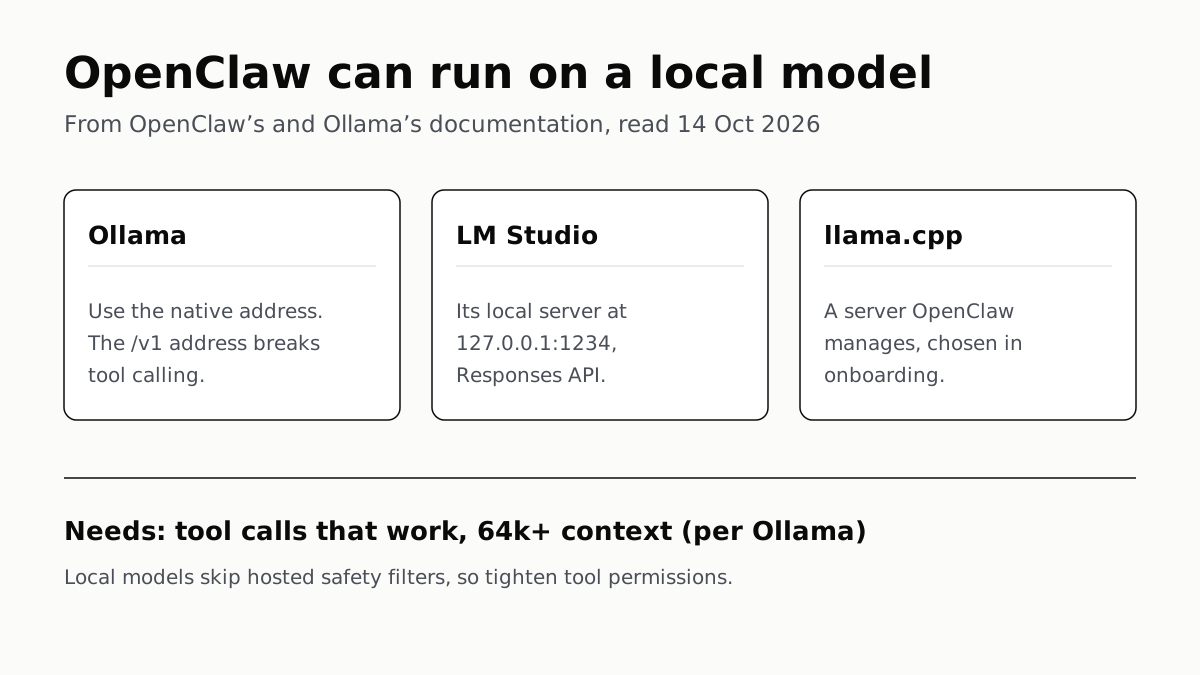
OpenClaw Runs on a Local LLM via Ollama or LM Studio
OpenClaw's docs also cover llama.cpp, vLLM and any OpenAI-compatible server. Ollama advises 64k context; small models are easier to hijack.
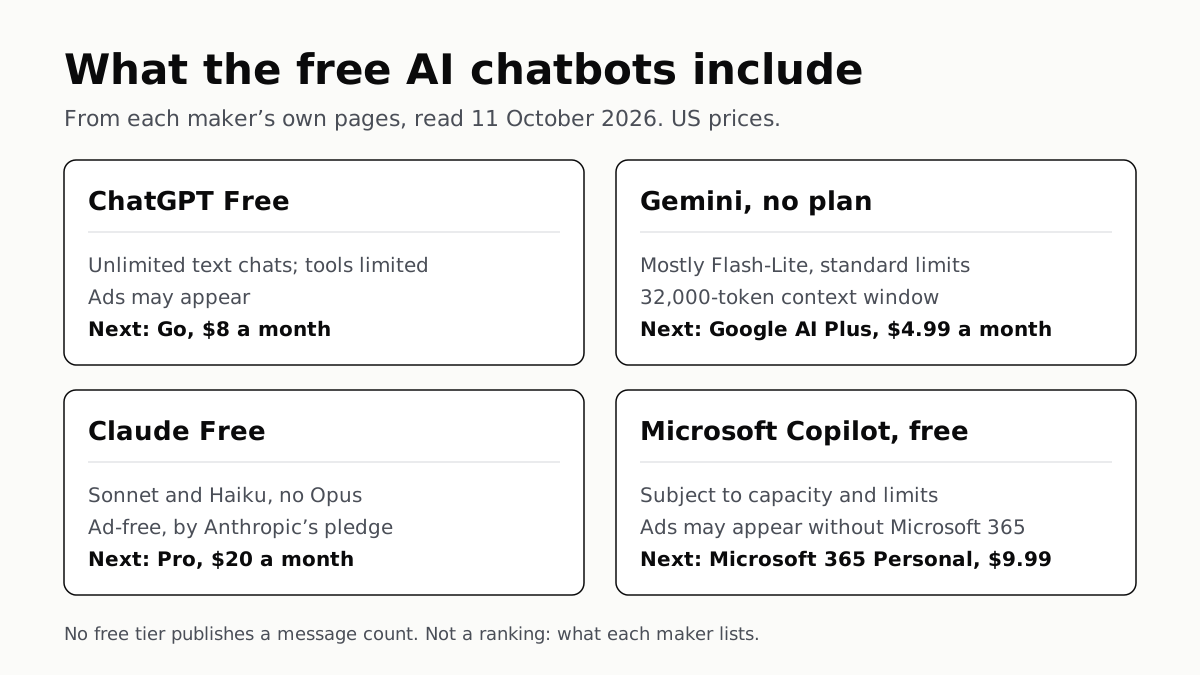
Of Four Free AI Chatbots, Only ChatGPT Lists Unlimited Chat
ChatGPT’s free tier carries ads, as Copilot’s may; Gemini’s leans on Flash-Lite and Claude’s leaves out Opus.
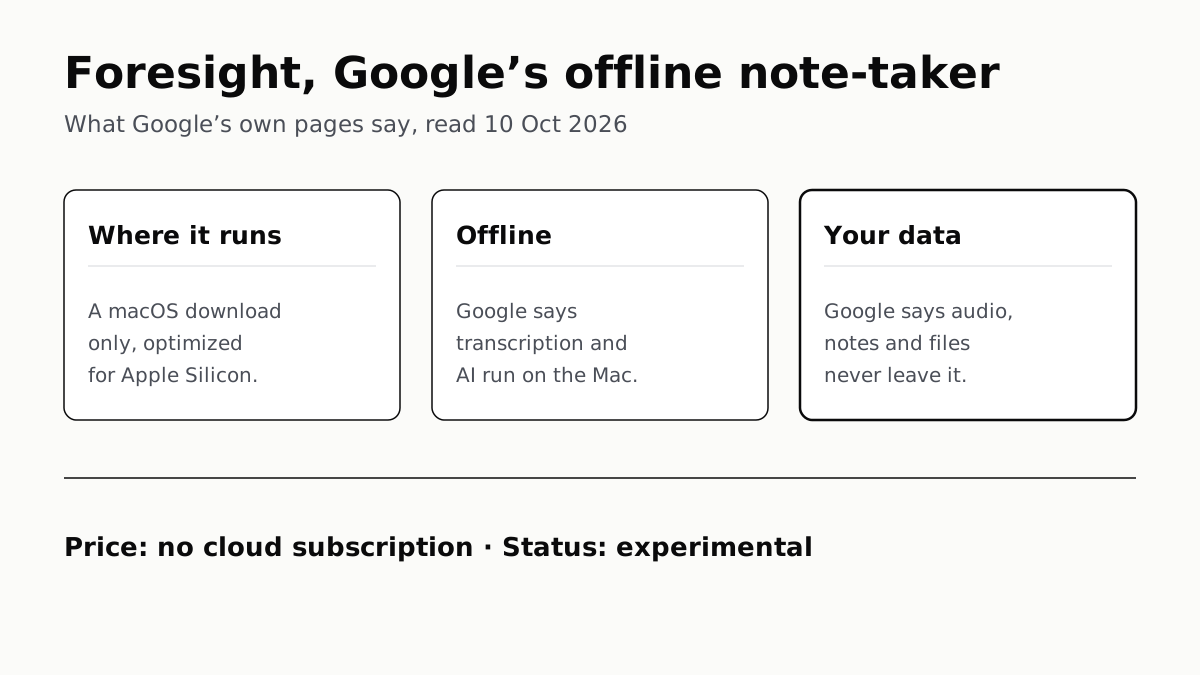
Google’s Offline AI Note-Taker Runs Only on a Mac
Transcription and AI run on the Mac itself, with no phone version. Google says your audio, notes and files never leave the computer.
Copilot Gets File Access on Copilot+ PCs, With Permission
Microsoft promises it “in the coming months” and names no setting for it yet. What you can limit today: agents’ folder access, or the app.