Copilot Gets File Access on Copilot+ PCs, With Permission
Microsoft promises it “in the coming months” and names no setting for it yet. What you can limit today: agents’ folder access, or the app.
If you buy through our links, we may earn a commission. It never affects our verdicts or scores — how that works. As an Amazon Associate I earn from qualifying purchases.
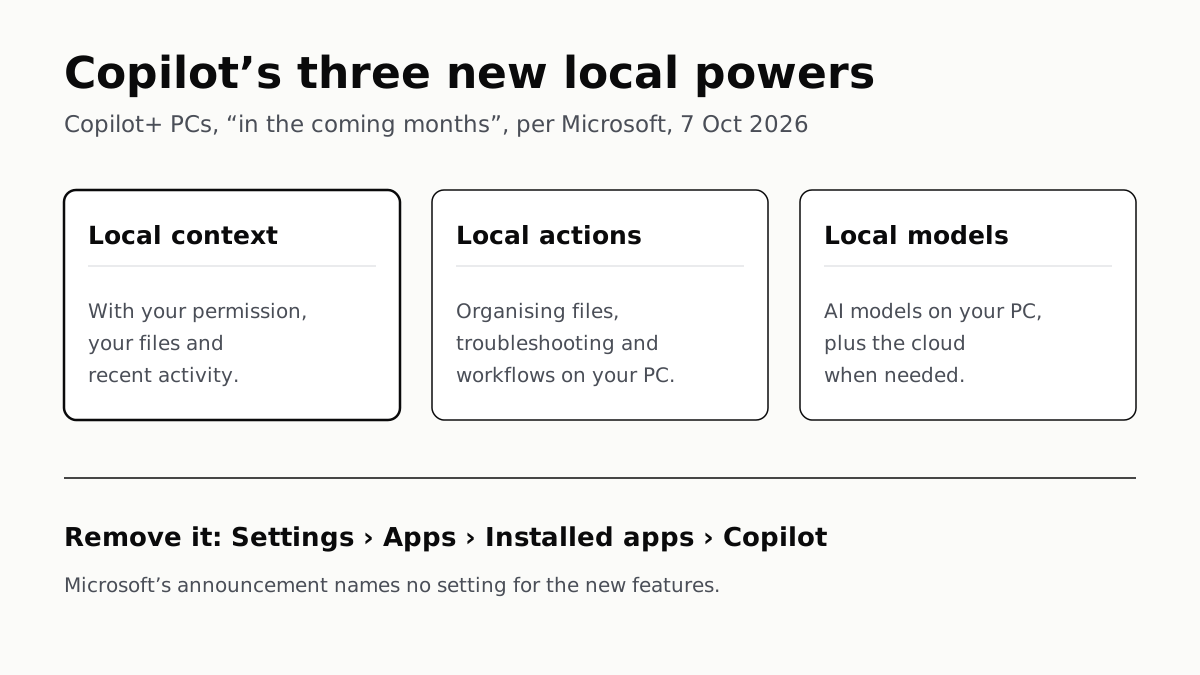
Copilot is getting three new powers on Copilot+ PCs: reading your files and recent activity with your permission, taking actions across Windows, and running AI models on the PC itself. Microsoft says they will start rolling out “in the coming months”, and its 7 October announcement names no setting for them.
What you can limit today is narrower: Windows’ agent settings let you make an agent ask, or refuse it, before it opens your main folders, and the Copilot app can be uninstalled.
What Microsoft announced, and who gets it
Microsoft calls the idea “hybrid intelligence”: agents that run on the PC when that makes sense and in the cloud when they need to. For most people, the parts that matter are in Copilot and in Windows Search.
| Feature | Availability | Permission or control |
|---|---|---|
| Local context: Copilot reads files and recent activity | Copilot+ PCs, “in the coming months” | “With your permission”; no setting named |
| Local actions: Copilot organises files, runs diagnostics, troubleshoots, codes | Copilot+ PCs, “in the coming months” | “With your permission”; no setting named |
| Local models: Copilot uses AI models on the PC | Copilot+ PCs, “in the coming months” | Not described |
| Actions in Windows Search: dark mode, Bluetooth, mute, arranging windows | Windows Insiders, Experimental channel, from 7 October, English | Feature flag for Insiders |
| Copilot inside Windows Search | Select markets, later this year | Opt-in |
Windows Experience Blog and Windows Insider Blog, 7 October 2026.
The local Copilot features were not in the Insider builds Microsoft released the same day; the builds post lists the new Windows Search and a Battery Status widget. Microsoft’s footnote says availability “may vary by device, market, and silicon platform”, and Microsoft gives no date and no list of countries.
A Copilot+ PC is Microsoft’s label for Windows machines that meet its hardware bar, including an NPU rated at more than 40 TOPS; our explainer covers what that 40 TOPS threshold gates. Microsoft’s new Surface Laptop Ultra is one, according to its product page.
What “local context” and “local actions” mean
Microsoft’s post describes the three abilities in a sentence each:
- Local context: “With your permission, Copilot can understand relevant content on your PC, including files and recent activity.”
- Local actions: Copilot “can take action on your behalf across Windows”, with organising files, assessing device diagnostics, troubleshooting, coding and “carrying out workflows” as the examples.
- Local models: Copilot can use models running on the PC and combine them with the cloud “when needed”.
This is the new Copilot that Microsoft introduced on 25 September, built around Home, Code and Autopilot. Autopilot is the agent that “keeps working even when you’re not”. According to The Verge’s report of 7 October, the on-stage demo had Autopilot search several folders for tax documents, rename them, zip them and draft an email to an accountant.
How the new Copilot reaches people matters here. Microsoft’s 25 September post says it is rolling out through its Frontier early-access programme, with Code in preview for Microsoft 365 Premium and Pro subscribers later this year. The Copilot app is one app for work and personal accounts, and Microsoft’s support page says that what you get depends on the account. The 7 October post does not say which accounts or subscriptions the local features will need.
What the permission controls look like
Microsoft’s announcement says Copilot acts “with your permission” and that you stay “in control at every step”. It does not say where that control lives. The post names management tools for organisations, Agent 365 and Intune, but no setting a person can open on their own PC.
The closest thing Microsoft documents is the agent workspace, built for an earlier preview called Copilot Actions. Its support article, last updated on 5 December 2025, describes these controls:
- The master switch. Settings › System › AI Components › Experimental agentic features. It is off by default, only an administrator can turn it on, and once on it applies to every user on the PC. Agents then work in a separate account and desktop rather than yours.
- Folder access. With it on, agents such as Copilot can request access to six folders: Documents, Downloads, Desktop, Music, Pictures and Videos. Turning the switch off limits that access.
- Per agent. On preview builds 26100.7344 and later, Settings › System › AI Components › Agents, pick the agent, then Files, offers Allow Always, Ask every time or Never allow. Windows asks by default.
Microsoft has not said whether the new local Copilot features will run in that workspace or use these settings. Treat the list above as what exists now, not as the controls the new features will ship with.
For other agents, Microsoft made its sandboxing layer, Microsoft Execution Containers, generally available on 7 October. It limits which files and networks an agent can reach, and the agent cannot widen that itself. It works only in agents built to use it; Microsoft lists GitHub Copilot, OpenAI’s Codex and others, and says a Windows app of Meta’s Muse is coming with it. We covered what Muse can reach and what it asks first on phones and the web.
How to remove Copilot
If you would rather not have Copilot at all, Microsoft’s support page gives the route on Windows 11: Settings › Apps › Installed apps, find Copilot, open the More options (…) menu and choose Uninstall. On Windows 10 it is Settings › Apps, then Copilot and Uninstall.
Copilot inside Windows Search, when it arrives, is opt-in by Microsoft’s account, so leaving it off needs no action.
Once the local features ship, the first prompt asking to let Copilot read your files is the one to read carefully. Until Microsoft documents where that permission is kept and how to withdraw it, uninstalling the app is the control on its pages that covers Copilot as a whole.
Questions people ask
Can Copilot access my files on Windows 11?
Microsoft says it will, with your permission, on Copilot+ PCs: “local context” covers files and recent activity on the PC. It is expected to start rolling out in the coming months. Microsoft has not said which setting will control it.
When will Copilot be able to control my PC?
Microsoft’s 7 October post says the local features are “expected to begin rolling out on Copilot+ PCs in the coming months”, with timing varying by device, market and chip. They were not in that day’s Windows Insider builds.
Do I need a Copilot+ PC for the new Copilot features?
Microsoft names Copilot+ PCs for local context, local actions and local models. The new Windows Search actions are not tied to Copilot+ PCs in Microsoft’s posts; they are rolling out to Windows Insiders in the Experimental channel first.
How do I stop Copilot accessing my files?
For the new features, Microsoft has not published a setting yet. Today, Settings › System › AI Components › Agents lets you set an agent’s folder access to Ask every time or Never allow on preview builds, and uninstalling the Copilot app removes it.
How do I uninstall Copilot on Windows 11?
Open Settings › Apps › Installed apps, find Copilot, open the More options (…) menu and choose Uninstall. Microsoft’s support page gives that route and a separate one for Windows 10.
Is Copilot in Windows Search turned on automatically?
No, according to Microsoft. It says the option to bring Copilot into Search on the taskbar will be opt-in, starting in select markets later this year. The new search actions themselves are a separate feature.
How we researched this
No one at bitcritiq has handled this product. Everything here comes from published sources, listed below.
- What this cannot tell you
- None of the new Copilot features has shipped, so we have not used them and cannot say what their permission prompts look like. Microsoft has not said whether they will use the agent workspace and per-folder controls described in its Experimental Agentic Features article; that article was last updated on 5 December 2025 and describes Copilot Actions on Insider builds. Microsoft gives no date, country list or price for the new local features; the footnote says availability ‘may vary by device, market, and silicon platform’. Which Copilot subscription or account type the local features will need is not stated in the 7 October post.
How we chose this, and what we did
- Why this subject
- At its Windows and Surface event on 7 October 2026, Microsoft said Copilot would get access to local files and the ability to act across Windows. The Verge, Ars Technica, Tom’s Hardware and Engadget covered it the same day. Our only piece from the event covered the Surface Laptop Ultra hardware. The reader’s question is practical: what Copilot can now do with their PC and files, when it arrives, and whether they can limit or remove it.
- How we looked at it
- Central claims are from Microsoft’s own pages, read through a browser on 8 October 2026: the Windows Experience Blog post ‘Building Windows for hybrid intelligence’ (7 October 2026), the Windows Insider Blog posts ‘From searching to doing’ and ‘Announcing new builds for 7 October 2026’, the Windows Developer Blog post on Microsoft Execution Containers (7 October 2026), the Official Microsoft Blog post introducing the new Copilot (25 September 2026), and two Microsoft Support articles: ‘Experimental Agentic Features’ and ‘Get started with the Microsoft Copilot app’. The Verge’s report of 7 October is used only for what was shown on stage, labelled as reported. For the statement that the 7 October announcement names no setting for the new Copilot features, the control is that the same post does name management tools for organisations, ‘Agent 365 and Intune’. For the statement that the features are not in that day’s Insider builds, the control is that the builds post lists two features, the new Windows Search and a Battery Status widget.
What this rests on
6 claims, 5 official and 1 reported. Nothing here was measured by bitcritiq — see how we test for why. Open a claim to read the source it came from.
On Copilot+ PCs, Copilot will gain local context, local actions and local models, starting to roll out in the coming months.Official
Windows Experience Blog, 7 October 2026: “on Copilot+ PCs, Copilot will get supercharged with Windows hybrid intelligence, providing three key local capabilities.” “Copilot features powered by hybrid intelligence are expected to begin rolling out on Copilot+ PCs in the coming months.” Footnote: “Availability and timing may vary by device, market, and silicon platform.”
Copilot’s use of files and recent activity is described as needing the user’s permission.Official
Windows Experience Blog: “Local context. With your permission, Copilot can understand relevant content on your PC, including files and recent activity.” And: “Copilot understands your PC, takes action with your permission … with you in control at every step.”
Actions in Windows Search began rolling out to Windows Insiders in the Experimental channel on 7 October, in English; a Copilot option in Search will be opt-in and reach select markets later this year.Official
Windows Insider Blog: “This search experience with inline actions is gradually rolling out to Windows Insiders starting today in the Experimental channel, with English as the supported language for this initial release.” Windows Experience Blog: “This experience will be opt-in, and will first start rolling out to select markets later this year.”
Windows’ existing agent controls let agents such as Copilot reach six folders, with a per-agent choice of Allow Always, Ask every time or Never allow, on preview builds.Official
Microsoft Support, Experimental Agentic Features: “Agentic apps like Copilot can request and get access to these six commonly used folders … Documents, Downloads, Desktop, Music, Pictures, and Videos.” “In preview builds 26100.7344+ you can manage access to these six known folders per-agent. By default, when agents request access to files in these folders, Windows will ask you for consent.”
The Copilot app can be uninstalled from Settings, Apps, Installed apps on Windows 11.Official
Microsoft Support, Get started with the Microsoft Copilot app: “Windows 11: Open Settings > Apps > Installed apps. Find Copilot, open the More options (…) menu, and choose Uninstall.”
On stage, Microsoft showed Autopilot finding tax documents across folders, renaming and zipping them and drafting an email.Reported
The Verge, 7 October 2026: “Autopilot then used Hybrid Intelligence to search across different folders to find the documents, rename the files, zip them into a folder, and draft an email to send to the accountant with the zip file attached.”
Sources 8
- Building Windows for hybrid intelligence — Windows Experience Blog, 7 October 2026Officialaccessed Oct 8, 2026
- From searching to doing: Building a faster, more streamlined Windows Search — Windows Insider Blog, 7 October 2026Officialaccessed Oct 8, 2026
- Announcing new builds for 7 October 2026 — Windows Insider BlogOfficialaccessed Oct 8, 2026
- Microsoft Execution Containers: Policy-driven containment for AI agents — Windows Developer Blog, 7 October 2026Officialaccessed Oct 8, 2026
Show 4 more · 3 official or standards
- Introducing the new Copilot with Home, Code and Autopilot — Official Microsoft Blog, 25 September 2026Officialaccessed Oct 8, 2026
- Experimental Agentic Features — Microsoft SupportOfficialaccessed Oct 8, 2026
- Get started with the Microsoft Copilot app — Microsoft SupportOfficialaccessed Oct 8, 2026
- Microsoft is giving Copilot more control over Windows and your files — The Verge, 7 October 2026accessed Oct 8, 2026
Pass it on
Know someone weighing this up? Send them the answer.
bitcritiq.com/mp9vThe link is permanent: it opens this article for good, even if the title changes.
No email, no account
Follow bitcritiq
Every new article, in whatever reader you already use.
Subscribe by RSSAll the ways to follow
Using Chrome on Android? Open the browser menu and tap Follow. New articles then turn up in the Following tab in Discover.
read next
OpenClaw Runs on a Local LLM via Ollama or LM Studio
OpenClaw's docs also cover llama.cpp, vLLM and any OpenAI-compatible server. Ollama advises 64k context; small models are easier to hijack.
Free AI Writing Tools Ration Rewrites in Different Units
Grammarly gives 100 AI prompts a month, Wordtune 10 rewrites a day, QuillBot 125 words a paraphrase. Yearly billing halves most prices.
Of Four Free AI Chatbots, Only ChatGPT Lists Unlimited Chat
ChatGPT’s free tier carries ads, as Copilot’s may; Gemini’s leans on Flash-Lite and Claude’s leaves out Opus.
Google’s Offline AI Note-Taker Runs Only on a Mac
Transcription and AI run on the Mac itself, with no phone version. Google says your audio, notes and files never leave the computer.