OpenClaw Runs on a Local LLM via Ollama or LM Studio
OpenClaw's docs also cover llama.cpp, vLLM and any OpenAI-compatible server. Ollama advises 64k context; small models are easier to hijack.
If you buy through our links, we may earn a commission. It never affects our verdicts or scores — how that works. As an Amazon Associate I earn from qualifying purchases.
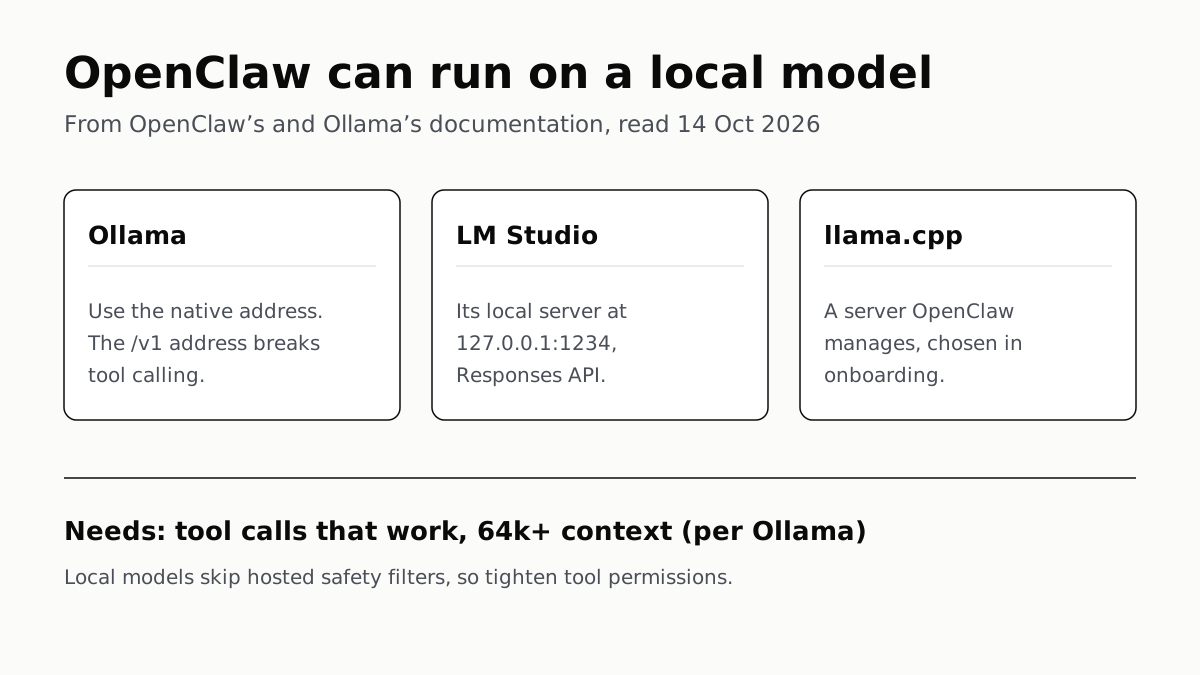
Yes: OpenClaw runs on a local LLM, and its docs support Ollama, LM Studio, an OpenClaw-managed llama.cpp server, and any server that speaks the OpenAI chat API. What it takes is a model that handles tool calls, a large context window, and tighter permissions than you would use with a hosted model.
OpenClaw is the open-source personal agent that connects chat apps such as WhatsApp, Telegram and Signal to an AI agent running on your own machine. It is MIT-licensed and run by the OpenClaw Foundation, and its latest release when we read the docs on 14 October was v2026.10.3. Its home page says you need “an API key from your chosen provider”, but a local server can stand in for that provider.
Your local options
OpenClaw’s Local models page lists these backends. The “use when” wording is the docs’ own.
| Backend | How OpenClaw connects | OpenClaw’s docs say use it when |
|---|---|---|
| Ollama | Ollama’s native API at http://host:11434, not /v1 |
You want a CLI workflow, a model library and a background service |
| LM Studio | Its local server at http://127.0.0.1:1234/v1, Responses API |
First-time local setup, with a GUI loader |
| llama.cpp | A server OpenClaw installs and manages, picked in onboarding | You want hardware-aware model selection and verified downloads |
| MLX, vLLM, SGLang | A custom provider pointed at their OpenAI-style endpoint | You want high-throughput self-hosted serving |
| ds4 | OpenAI-compatible tool calls | You want DeepSeek V4 Flash locally on a Mac (Metal) |
| llmman | OCI-registry model pulls, with llama.cpp, vLLM or MLX engines | You want hybrid local and hosted routing |
| LiteLLM or another proxy | A custom provider, openai-completions |
You front another model API |
Three ways to set it up
From Ollama. Ollama’s own docs give one command: ollama launch openclaw. It offers to install OpenClaw through npm if it is missing, shows a security notice about tool access, lets you pick a local or cloud model, configures the provider and starts the gateway. OpenClaw was previously called Clawdbot, and Ollama says ollama launch clawdbot still works. If you write the config by hand, OpenClaw’s docs are emphatic about one setting: point it at http://host:11434, because the /v1 address “breaks tool calling” and models start printing tool-call JSON as text.
From OpenClaw’s onboarding. Install the llama.cpp plugin, run openclaw onboard and choose Managed local server. The docs say setup shows the model, download size and backend before downloading, then verifies a real tool call before switching the default model.
From LM Studio or any OpenAI-style server. Add a provider to ~/.openclaw/openclaw.json with its baseUrl, the model ID, its context window and an api type. OpenClaw’s docs recommend openai-responses where the server supports it, as LM Studio does, and openai-completions otherwise. A placeholder API key such as ollama-local is accepted for servers on your own machine or LAN. If you need a first model to try, our starter guide covers installing Ollama and LM Studio.
You do not have to go fully local. The docs show a hybrid setup in which a local model is the primary and a hosted model is a fallback, or the other way round; OpenClaw switches per turn when a provider errors.
What a local model needs
Context. Ollama recommends at least 64k tokens of context for OpenClaw on local models, and OpenClaw’s managed llama.cpp recipes use 64K too. That is far above the window Ollama starts with on cards under 24GiB, which is the same wall local coding tools hit.
Memory. OpenClaw does not give one figure. Its Local models page says memory depends on the weights, context size, runtime and whatever else the machine is doing. The smallest managed llama.cpp recipe has an 8 GiB host-memory floor, and the docs add that these floors “do not guarantee fit or speed”. For sizing a model to your own graphics card, see how much VRAM a model needs.
Working tool calls. Most of the docs’ local-model troubleshooting is about these. “A model that loads or answers a short prompt may still fail an agent turn,” they warn. When tool calls come back as raw JSON, XML or an empty list, the advice is to fix the server’s chat template and parser first. OpenClaw can force tool use per model with tool_choice: "required", and as a last resort switch tools off for that model, so the agent runs without tool calls. For Ollama, LM Studio and managed servers it turns on Tool Search automatically, which defers tool definitions to save context.
Security is your job, more than usual
OpenClaw’s Local models page is blunt: “Local models do not provide hosted providers’ safety filters.” Its prompt-injection page goes further, saying smaller models are “more susceptible to tool misuse and instruction hijacking”, and that for agents that run tools or read untrusted content, the risk with older or smaller models “is often too high”.
If you run a small local model anyway, the docs’ list is specific: read-only tools, sandboxing for every session, minimal filesystem access, strict allowlists, and web search, web fetch and the browser switched off unless inputs are tightly controlled. Sandboxing is opt-in, so it is off until you enable it. For a chat-only assistant with trusted input and no tools, the docs say smaller models are usually fine.
The defaults help. On a normal install the gateway listens only on your own machine, and most chat channels answer an unknown sender with a pairing code rather than acting on the message. openclaw security audit reports where your setup has drifted from that.
Questions people ask
Can OpenClaw run with a local LLM?
Yes. OpenClaw’s docs support local models through Ollama, LM Studio, an OpenClaw-managed llama.cpp server, and any server with an OpenAI-style /v1/chat/completions endpoint, such as vLLM, SGLang or MLX.
How do I use OpenClaw with Ollama?
Run ollama launch openclaw. Ollama’s docs say it installs OpenClaw if needed, shows a security notice, lets you pick a model, configures the provider and starts the gateway. If you configure it by hand, use the native address http://host:11434, not /v1.
What context window does OpenClaw need?
Ollama recommends at least 64k tokens for local models with OpenClaw. OpenClaw’s own managed llama.cpp recipes also use a 64K context, and its docs say to leave room for the full prompt, tools, history and output.
Why does my local model print tool-call JSON instead of running tools?
OpenClaw’s docs give two causes: pointing it at Ollama’s /v1 address, which breaks tool calling, or a server whose chat template and parser do not support tool calls. Fix the template first; forcing tool_choice is a per-model override.
Does OpenClaw work with LM Studio?
Yes. Start LM Studio’s local server (default http://127.0.0.1:1234), add it as a provider in ~/.openclaw/openclaw.json, and use the Responses API, which OpenClaw’s docs recommend so reasoning stays separate from the final reply.
Is it safe to run OpenClaw on a small local model?
OpenClaw’s docs advise against small models for agents that run tools or read untrusted content. If you must, they say to use read-only tools, sandboxing, minimal file access, strict allowlists, and to switch off web search, web fetch and the browser.
How we researched this
No one at bitcritiq has handled this product. Everything here comes from published sources, listed below.
- What this cannot tell you
- We have not run OpenClaw on a local model, so nothing here says which local model completes agent tasks well; OpenClaw's docs themselves say a model that answers a short prompt may still fail an agent turn. OpenClaw's docs change often (its latest release when we read them was v2026.10.3), and settings names may move. We give no hardware sizing beyond what the docs state; our VRAM guide covers that.
How we chose this, and what we did
- Why this subject
- Google Trends showed “openclaw local llm” as a Breakout search across six pulls. Our local-LLM guides cover running a model, memory and context, but none covers pointing OpenClaw, the open-source personal agent, at one. The reader's question is whether it works and what it takes.
- How we looked at it
- Read on 14 October 2026 through a browser: OpenClaw's documentation home page, its Local models page, its Ollama provider index and Ollama config recipes, its Security and Prompt injection pages, the openclaw/openclaw GitHub README, and Ollama's own OpenClaw integration page. Every provider, setting and requirement below is from those pages. The 64k context figure is Ollama's; OpenClaw's own Local models page states an 8 GiB floor for its smallest managed llama.cpp recipe, which we report as written.
What this rests on
6 claims, all official. Nothing here was measured by bitcritiq — see how we test for why. Open a claim to read the source it came from.
OpenClaw is an open-source, MIT-licensed, self-hosted agent gateway; its latest release when read was v2026.10.3.Official
OpenClaw Docs: “OpenClaw is a self-hosted gateway that connects your favorite chat apps… to AI coding agents… Open source: MIT licensed, community-driven.” The same page lists “Latest release: v2026.10.3”.
OpenClaw's docs list Ollama, LM Studio, llama.cpp, ds4, llmman, MLX, vLLM, SGLang and custom OpenAI-compatible proxies as local backends.Official
OpenClaw Local models page, “Pick a backend” table: ds4; LiteLLM / OAI-proxy / custom OpenAI-compatible proxy; llama.cpp; llmman; LM Studio; MLX / vLLM / SGLang; Ollama.
OpenClaw connects to Ollama's native API, and its docs warn that the /v1 OpenAI-compatible address breaks tool calling.Official
OpenClaw Ollama page: “Do not use the /v1 OpenAI-compatible URL (http://host:11434/v1). It breaks tool calling and models can emit raw tool-call JSON as plain text. Use the native URL: baseUrl: “http://host:11434” (no /v1).”
Ollama recommends a context window of at least 64k tokens for OpenClaw on local models.Official
Ollama's OpenClaw page: “OpenClaw requires a larger context window. It is recommended to use a context window of at least 64k tokens if using local models.”
OpenClaw's managed llama.cpp recipes use a 64K context, and the smallest has an 8 GiB host-memory floor that does not guarantee fit or speed.Official
OpenClaw Local models page: “Its curated recipes use a 64K context. The smallest has an 8 GiB host-memory floor, while larger recipes need more memory. These floors do not guarantee fit or speed.”
OpenClaw's docs say local models skip hosted safety filters and that smaller models are more susceptible to prompt injection.Official
Local models page: “Local models do not provide hosted providers' safety filters.” Prompt injection page: “smaller/cheaper models are more susceptible to tool misuse and instruction hijacking under adversarial prompts.”
Sources 8
- OpenClaw Docs — home page (What is OpenClaw?)Officialaccessed Oct 14, 2026
- Local models — OpenClaw DocsOfficialaccessed Oct 14, 2026
- Ollama — OpenClaw Docs (provider index)Officialaccessed Oct 14, 2026
- Ollama config recipes — OpenClaw DocsOfficialaccessed Oct 14, 2026
Show 4 more · 4 official or standards
- Security — OpenClaw DocsOfficialaccessed Oct 14, 2026
- Prompt injection — OpenClaw DocsOfficialaccessed Oct 14, 2026
- openclaw/openclaw — GitHub READMEOfficialaccessed Oct 14, 2026
- OpenClaw — Ollama documentation (Integrations)Officialaccessed Oct 14, 2026
Pass it on
Know someone weighing this up? Send them the answer.
bitcritiq.com/967uThe link is permanent: it opens this article for good, even if the title changes.
No email, no account
Follow bitcritiq
Every new article, in whatever reader you already use.
Subscribe by RSSAll the ways to follow
Using Chrome on Android? Open the browser menu and tap Follow. New articles then turn up in the Following tab in Discover.
read next
Free AI Writing Tools Ration Rewrites in Different Units
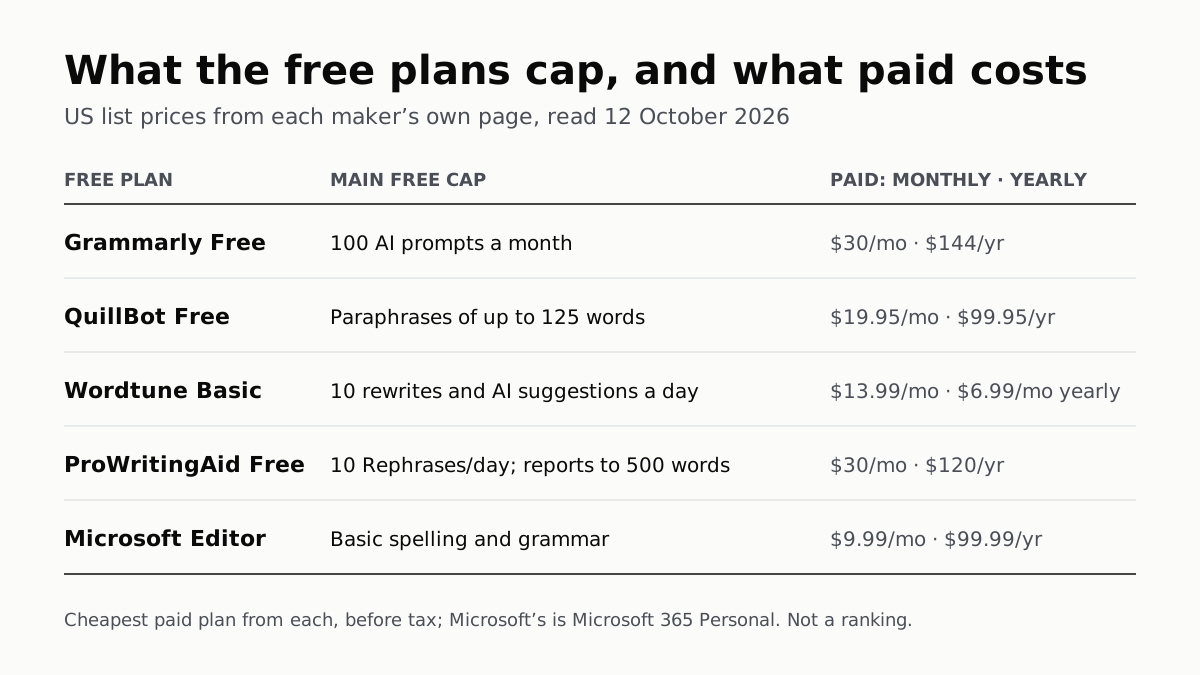
Grammarly gives 100 AI prompts a month, Wordtune 10 rewrites a day, QuillBot 125 words a paraphrase. Yearly billing halves most prices.
Of Four Free AI Chatbots, Only ChatGPT Lists Unlimited Chat
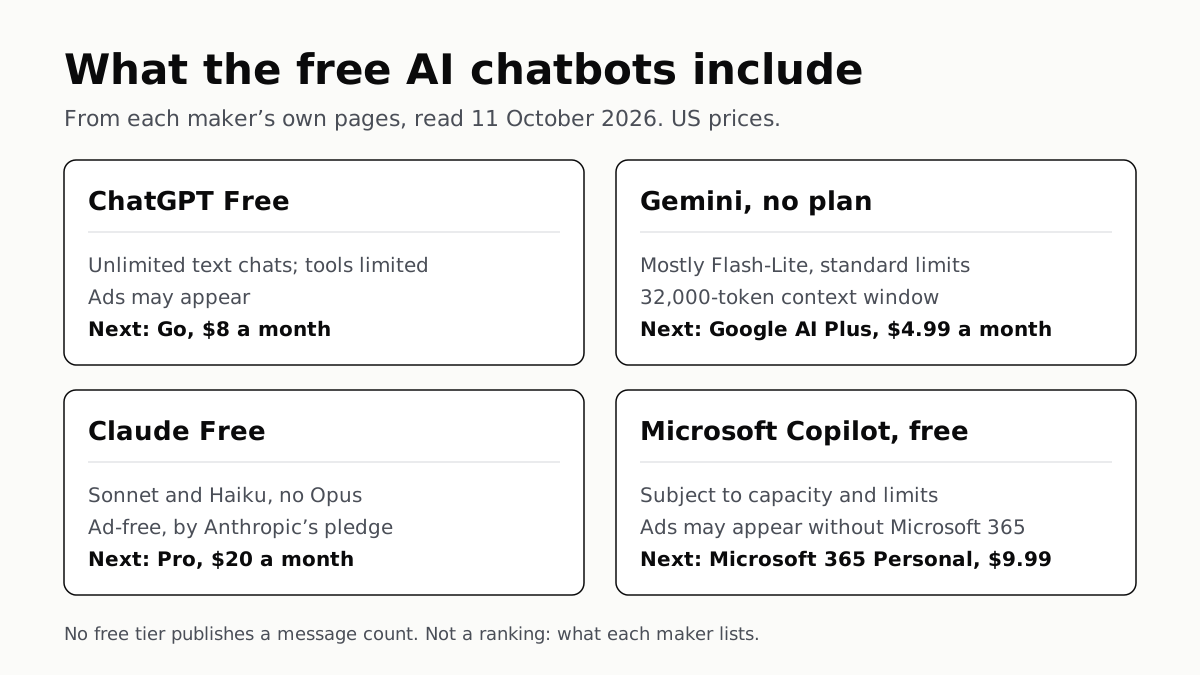
ChatGPT’s free tier carries ads, as Copilot’s may; Gemini’s leans on Flash-Lite and Claude’s leaves out Opus.
Google’s Offline AI Note-Taker Runs Only on a Mac
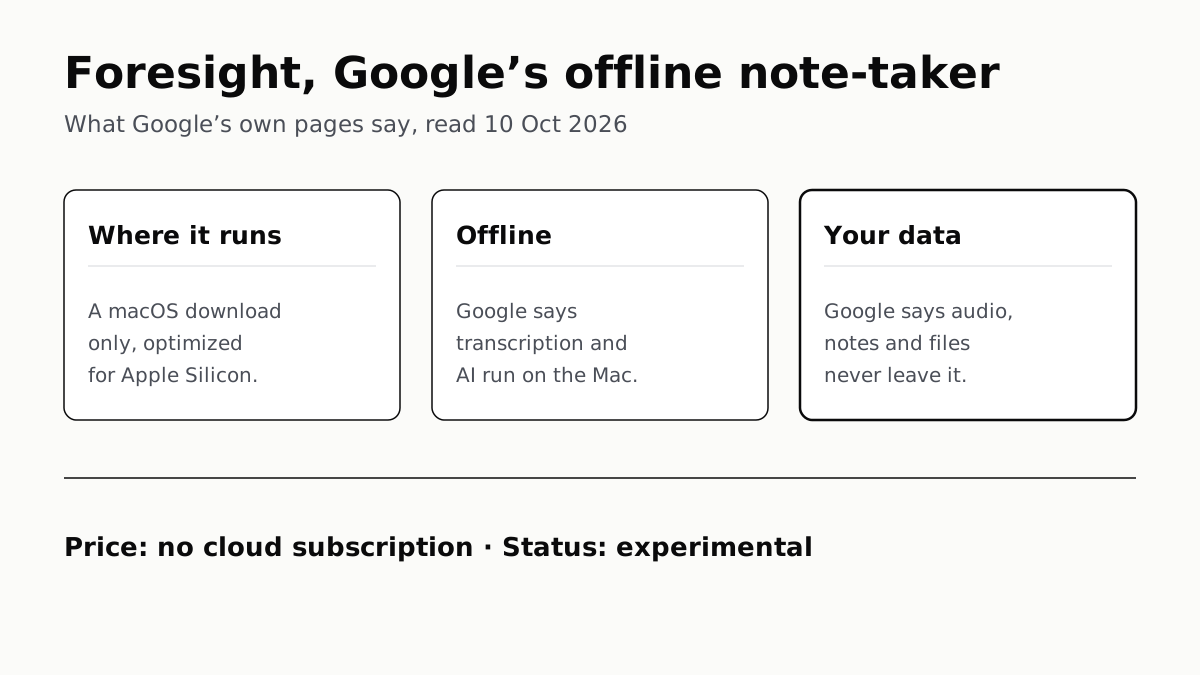
Transcription and AI run on the Mac itself, with no phone version. Google says your audio, notes and files never leave the computer.
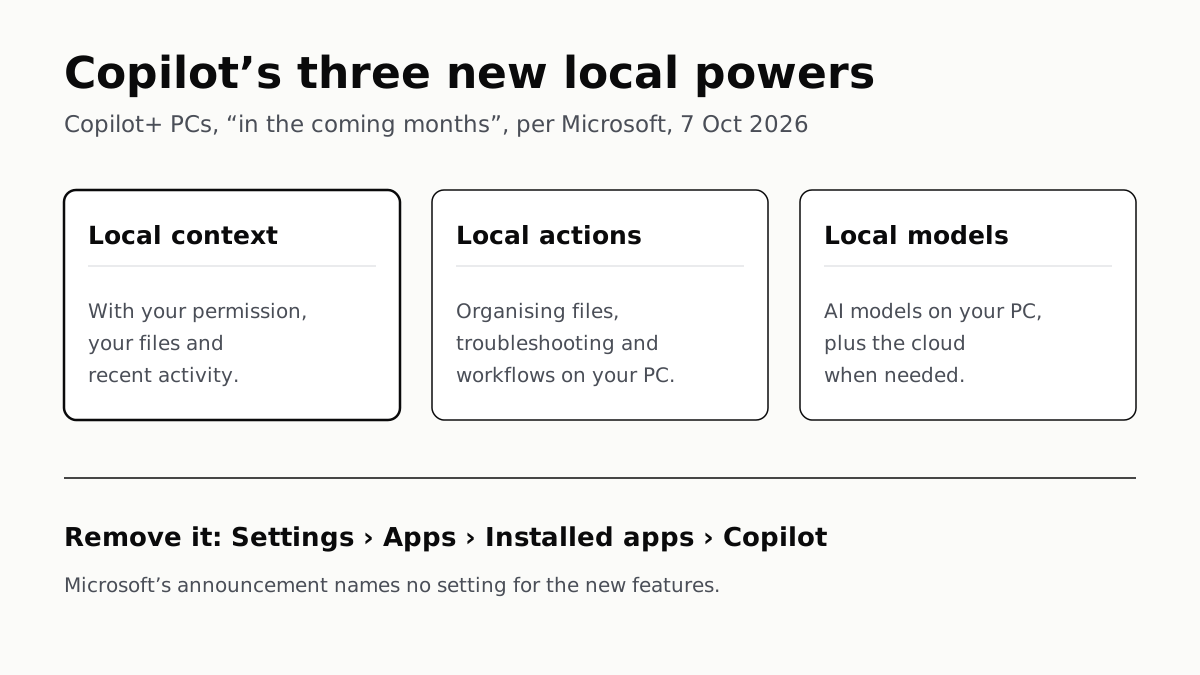
Copilot Gets File Access on Copilot+ PCs, With Permission
Microsoft promises it “in the coming months” and names no setting for it yet. What you can limit today: agents’ folder access, or the app.