Local LLMs for Coding: Context Is the Wall, Not the Model
Ollama gives a card under 24GB a 4k context. Its own docs say coding agents need at least 64k. That gap is why local coding disappoints.

If you buy through our links, we may earn a commission. It never affects our verdicts or scores — how that works. As an Amazon Associate I earn from qualifying purchases.
You are probably not choosing the wrong model. You are running it with a sixteenth of the context it needs.
Ollama documents both halves and they collide. Its default context, by available VRAM:
- Under 24 GiB — 4k context
- 24–48 GiB — 32k
- 48 GiB or more — 256k
And its own guidance on what agentic work requires: tasks “which require large context like web search, agents, and coding tools should be set to at least 64000 tokens.”
So a machine with a 12GB or 16GB card — which is most people asking this question — starts at 4k against a documented requirement of 64k.
Why coding is different from chatting
A chat turn is short. An agent’s turn is not.
Point a coding tool at a repository and the context fills with the file it is editing, the files it opened to understand that one, the output of every command it ran, its own previous reasoning, and the instructions you gave it at the start. Then it does that again for the next step, carrying the lot.
4k tokens is a few hundred lines. The agent runs out of memory of the task before it finishes the task — which is experienced not as an error but as the model being stupid: forgetting the file it just edited, re-reading things, contradicting itself. The model was fine. It was working blindfolded.
The arithmetic that decides your machine
Weights first, because those are published. From Ollama’s library:
| Model | Weights |
|---|---|
qwen3:8b |
5.2GB |
qwen3:14b |
9.3GB |
qwen3-coder:30b |
19GB |
qwen3:32b |
20GB |
qwen3-coder:480b |
290GB |
Now put the good coding model on the card people aspire to. qwen3-coder:30b is 19GB of weights on a 24GB card — before a single token of context is allocated. Roughly 5GB left for the 64k the same vendor says the job needs. The newer Qwen 3.6
asks for twice that, and its memory needs start in the
same place.
Ollama’s warning is explicit: “Setting a larger context length will increase the amount of memory required to run a model. Ensure you have enough VRAM available.” How much more is not published per model, and we have not measured it — but the direction is not in dispute, and the headroom above is thin.
What that means at each tier
Read this as the shape of the constraint, not as a promise:
| VRAM | Realistic for coding |
|---|---|
| 8GB | An 8B model at small context. Fine for completion and single-file questions. Not an agent. |
| 12–16GB | 8B–14B comfortably, and the context becomes the thing you spend the headroom on rather than a bigger model. |
| 24GB | A 30B coding model fits, and 64k context is tight against it. This is the first tier where agentic work is genuinely on the table. |
| 48GB+ | Ollama’s own defaults stop fighting you — 256k out of the box. |
The unintuitive part, and the reason this article exists: between a bigger model and a bigger context, context is usually the better spend. A 14B model that can see the whole problem beats a 30B model that cannot.
What to actually do
- Raise the context before you change model.
OLLAMA_CONTEXT_LENGTH=64000 ollama serve, then judge the same model again. This is free and it is the single change most likely to fix what you are experiencing. - Then run
ollama psand read the PROCESSOR column. If raising context pushed part of the model into system RAM, you will see it there — and what the split means for speed covers why that matters more than it sounds. - Prefer the smaller model with the larger window when you have to choose. For agents this is almost always the right trade.
- Do not buy a GPU on a model’s parameter count. Buy on total memory, then spend it deliberately between weights and context.
- Be honest about the tier you are in. At 8GB, local completion is good and local agentic coding is not there. Knowing that saves more time than any model download.
How we researched this
No one at bitcritiq has handled this product. Everything here comes from published sources, listed below.
- What this cannot tell you
- The memory cost of a given context length is not published per model and varies with architecture, quantisation and whether Flash Attention is available, so this does not put a number on it — it shows the direction and says why. bitcritiq has measured no throughput. Ollama's defaults are Ollama's; llama.cpp and LM Studio set their own, and the general shape holds while the numbers do not.
How we chose this, and what we did
- Why this subject
- Agentic coding against a local model is the loudest emerging signal in our AI keyword corpus — best local llm for coding 2026 is Breakout, claude code local llm is up 150%, and several agent-plus-local-model phrasings are Breakout together. Almost all the advice answers which model to download, which is the part that is not the constraint.
- How we looked at it
- Took the context defaults and the recommended figure for agents from Ollama's own documentation, and the model weights from its published library listings, where every tag carries its size. Set the two against each other rather than treating them as separate facts, because the collision between them is the finding.
What this rests on
4 claims, 3 official and 1 corroborated. Nothing here was measured by bitcritiq — see how we test for why. Open a claim to read the source it came from.
Ollama defaults to a 4k context on machines with under 24GiB of VRAM.Official
Ollama's published context-length documentation.
Coding tools and agents should be set to at least 64,000 tokens.Official
The same document, naming web search, agents and coding tools specifically.
A 30B coding model is about 19GB of weights before any context is allocated.Official
Ollama's library lists qwen3-coder:30b at 19GB.
Raising context is what pushes a model that fitted into one that does not.Corroborated
Follows from Ollama's own warning that larger context increases memory required. The size of the increase is not published per model and we have not measured it.
Sources 3
- Context length — Ollama documentationOfficialaccessed Aug 31, 2026
- qwen3-coder tags — Ollama model libraryOfficialaccessed Aug 31, 2026
- qwen3 tags — Ollama model libraryOfficialaccessed Aug 31, 2026
Pass it on
Know someone weighing this up? Send them the answer.
bitcritiq.com/avv4The link is permanent: it opens this article for good, even if the title changes.
No email, no account
Follow bitcritiq
Every new article, in whatever reader you already use.
Subscribe by RSSAll the ways to follow
Using Chrome on Android? Open the browser menu and tap Follow. New articles then turn up in the Following tab in Discover.
read next
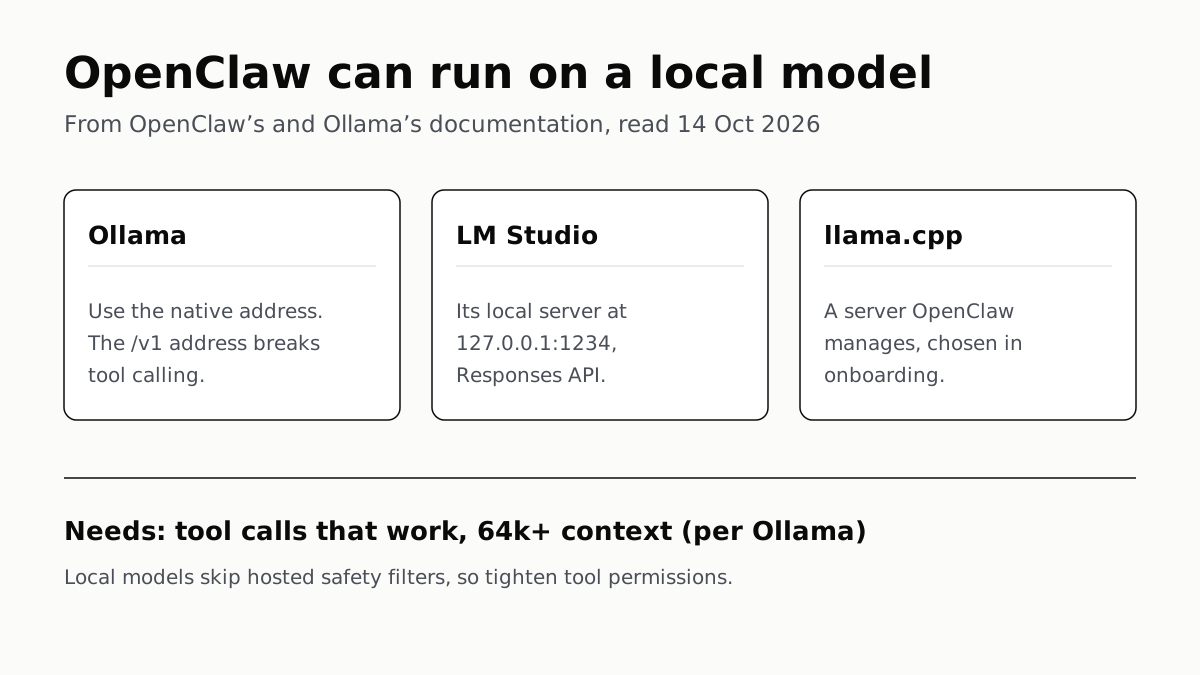
OpenClaw Runs on a Local LLM via Ollama or LM Studio
OpenClaw's docs also cover llama.cpp, vLLM and any OpenAI-compatible server. Ollama advises 64k context; small models are easier to hijack.
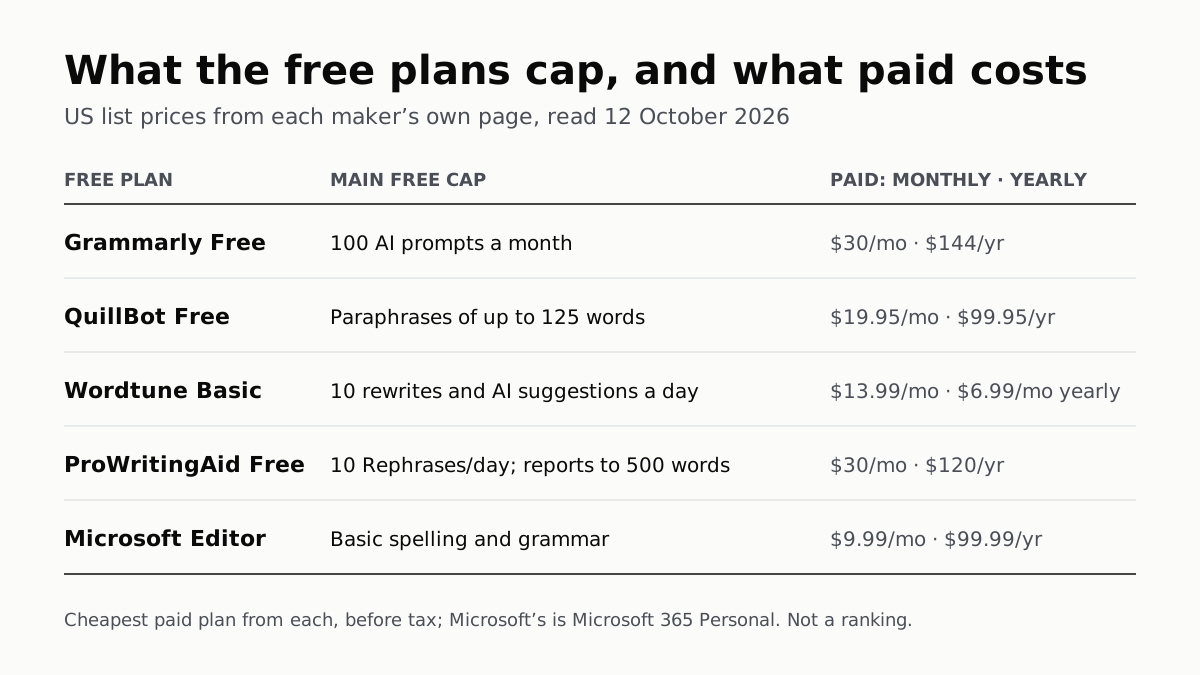
Free AI Writing Tools Ration Rewrites in Different Units
Grammarly gives 100 AI prompts a month, Wordtune 10 rewrites a day, QuillBot 125 words a paraphrase. Yearly billing halves most prices.
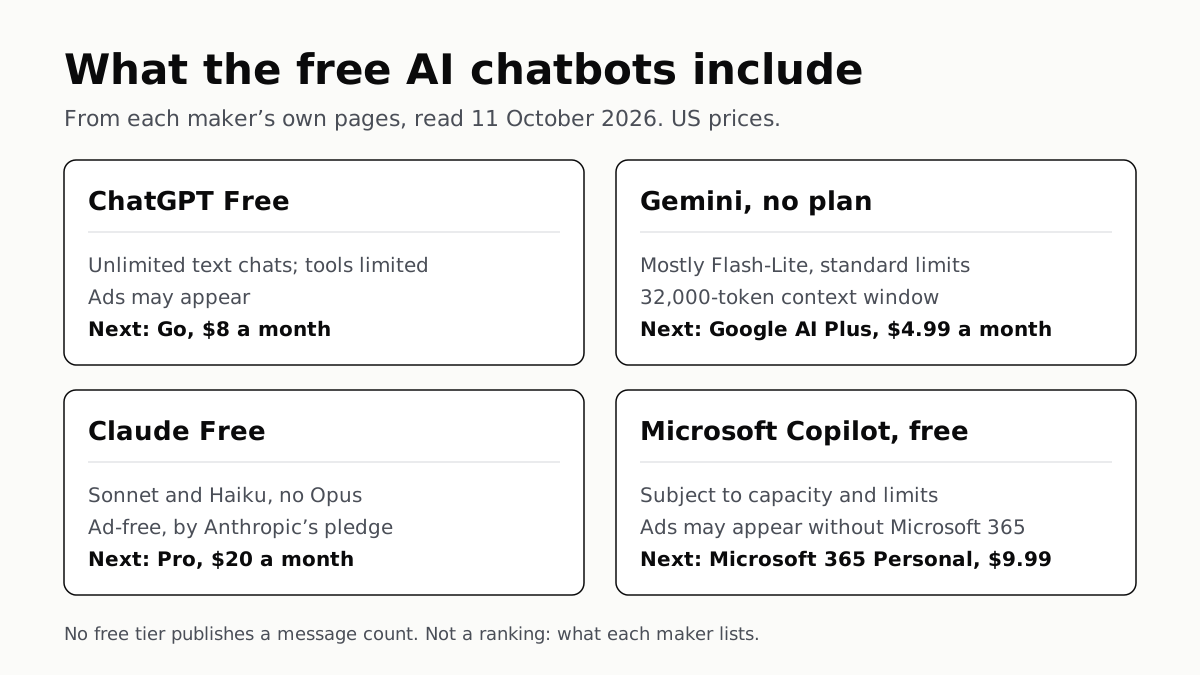
Of Four Free AI Chatbots, Only ChatGPT Lists Unlimited Chat
ChatGPT’s free tier carries ads, as Copilot’s may; Gemini’s leans on Flash-Lite and Claude’s leaves out Opus.
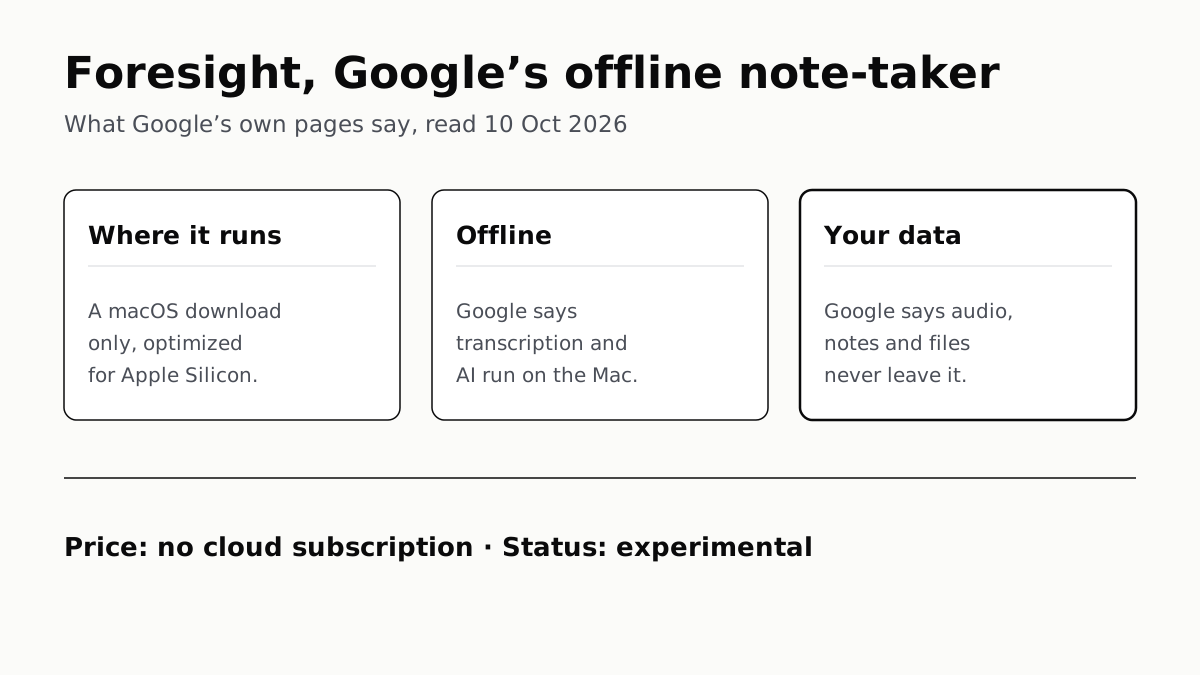
Google’s Offline AI Note-Taker Runs Only on a Mac
Transcription and AI run on the Mac itself, with no phone version. Google says your audio, notes and files never leave the computer.