How Much VRAM You Need to Run an LLM on Your Own Machine
The download size is the floor, not the answer. Context, quantisation and where the model actually lands all move the number.

If you buy through our links, we may earn a commission. It never affects our verdicts or scores — how that works. As an Amazon Associate I earn from qualifying purchases.
Start with the model’s download size, then assume you need more. The file has to fit in memory, and the working memory the model needs on top of it grows with how much text you ask it to hold.
The good news is that you do not have to estimate the first part. Every model in Ollama’s library publishes its size next to its name, so the floor is a fact you can look up rather than a calculation you can get wrong. (If you have never run a model at all, how to run a local LLM covers the install first.)
The published sizes, which are the useful anchor
Google’s Gemma 3 comes in five sizes, and Ollama lists each one:
| Model | Download size |
|---|---|
gemma3:270m |
292 MB |
gemma3:1b |
815 MB |
gemma3:4b |
3.3 GB |
gemma3:12b |
8.1 GB |
gemma3:27b |
17 GB |
Read down that column and the shape of the whole problem appears. Parameter counts and memory scale together, roughly two-thirds of a gigabyte per billion parameters at the default precision — so an 8 GB card is a 12B-class machine, and a 27B model needs a 24 GB card to sit comfortably.
Quantisation is why the same model has two sizes
The default tags above are not the raw model. Ollama’s library lists gemma3:1b at 815 MB with digest 8648f39daa8f — and lists gemma3:1b-it-q4_K_M with the same digest and the same 815 MB. The default download is the four-bit version.
The full-precision tag of that identical model, gemma3:1b-it-fp16, is 2.0 GB.
Same model, same capabilities on paper, two and a half times the memory. Quantisation stores each weight in fewer bits, and it is the single reason consumer hardware can run these models at all. When someone says a 27B model runs on a 24 GB card, they mean the quantised one — nobody is loading it at full precision.
Context costs memory too, and this is what people forget
The model file is the floor. The conversation is the rest.
Ollama’s own documentation is blunt about it: “Setting a larger context length will increase the amount of memory required to run a model.” And the defaults it ships are set by how much VRAM it finds:
- Under 24 GiB VRAM — 4k context
- 24–48 GiB — 32k context
- 48 GiB or more — 256k context
That first tier is the one most people are in, and 4k tokens is a short conversation. The same documentation notes that tasks “which require large context like web search, agents, and coding tools should be set to at least 64000 tokens” — sixteen times the default you were given. Turning that up is exactly the moment a model that fit stops fitting.
It compounds if you run more than one request at once. Ollama’s FAQ states that required RAM “will scale by OLLAMA_NUM_PARALLEL * OLLAMA_CONTEXT_LENGTH”, and that a “2K context with 4 parallel requests will result in an 8K context and additional memory allocation.”
The check that tells you whether it actually fit
This is the part worth learning, because it replaces guessing with a reading. Ollama’s documentation says to “avoid offloading the model to CPU” and to “verify the split under PROCESSOR” by running:
ollama ps
The output names the model, its size in memory, and the split:
NAME             ID              SIZE      PROCESSOR    CONTEXT    UNTIL
gemma4:latest    c6eb396dbd59    9.6 GB    100% GPU     131072     2 minutes from now
100% GPU means it fit. Anything else — 40% GPU / 60% CPU — means part of the model is living in system RAM, and that part is being computed by a processor that is far slower at this than your graphics card. It will still answer. It will answer slowly, and now you know why.
Note the SIZE column too: 9.6 GB in memory for a model whose download is smaller. The gap is the context.
What people actually live with
The documented limits and the reported experience agree, which is reassuring. In a large r/LocalLLaMA thread asking exactly this, one person on 12 GB says they “generally use the quantized version of Gemma 12B” — which is precisely what the table above predicts for that card.
Another on the same 12 GB describes the trade-off honestly: “I also mainly stuck to the 8-12b q4 models, but lately I’ve found that I can also live with the 5tok/s from gemma3 27B if I just need 3-4 answers”. That is the spill to CPU, quantified. Five tokens a second is unpleasant for chat and perfectly fine for a job you leave running.
And at the far end, someone with a 512 GB Mac reports “about 16-18 t/s on these models” and adds the sentence that should temper anyone’s upgrade plans: “It doesn’t run any models particularly fast, it’s more just that you can at all.”
Apple Silicon changes the arithmetic
On a Mac, there is no separate pool of video memory — the GPU draws on the same unified memory as everything else. A 32 GB MacBook is therefore closer to a 32 GB graphics card than to a 32 GB PC with an 8 GB GPU, and the thread has people running on an M3 Max what others run on dedicated cards.
The trade is speed rather than capacity, which is why the same thread has Mac owners quoting sixteen tokens a second where a stack of GPUs would be far quicker.
What to actually do
- Look up the file size before you download anything. It is on the model’s tags page. If it is larger than your VRAM, you already know the answer.
- Leave headroom of a few gigabytes. The file size is not the running size, and
ollama pswill show you the difference on your own machine. - Run
ollama psafter the first prompt. IfPROCESSORdoes not say 100% GPU, drop to the next size down before concluding the model is bad. - Match the card to the class you want, not the biggest number you have seen. 8 GB comfortably runs models up to about 12B; 12 GB is the same class with room for context; 24 GB is where 27B-class models stop being a compromise.
- If you are buying a Mac for this, buy memory. It is the one spec that decides what will run, and it cannot be added later.
How we researched this
No one at bitcritiq has handled this product. Everything here comes from published sources, listed below.
- What this cannot tell you
- This is about fitting a model in memory, which is the constraint that stops a model running at all. It is not about speed — how fast a model that fits will generate is a separate question involving memory bandwidth and the specific GPU. Figures are Ollama's, checked on the dates given; model libraries change, and the method for checking matters more here than any single number.
How we chose this, and what we did
- Why this subject
- People about to spend money on a graphics card ask this, and the answers they find are either a formula with no worked example or a forum thread about somebody's ten-GPU rack. Both skip the part that decides it: published model file sizes are a matter of record, and so are the memory rules of the software almost everyone starts with.
- How we looked at it
- Took the file sizes from Ollama's own model library, where every tag lists its size and digest, and the memory behaviour from Ollama's published documentation on context length and its FAQ. Then read a large r/LocalLLaMA thread where people state their VRAM and the model they actually use daily, to check the documented limits against what people report living with.
What this rests on
3 claims, 2 official and 1 reported. Nothing here was measured by bitcritiq — see how we test for why.
Ollama's default tags are four-bit quantised, not full precision.Official
Ollama's library lists gemma3:1b and gemma3:1b-it-q4_K_M with the same digest and the same size.
Ollama sets default context length by available VRAM: 4k below 24GiB, 32k from 24-48GiB, 256k above.Official
Ollama's published context-length documentation.
A 12GB card comfortably runs quantised models in the 8-12B class.Reported
What owners on r/LocalLLaMA report running daily. Consistent with the published file sizes, but not measured by bitcritiq.
Sources 5
- Context length — Ollama documentationOfficialaccessed Aug 28, 2026
- FAQ — Ollama documentationOfficialaccessed Aug 28, 2026
- gemma3 tags — Ollama model libraryOfficialaccessed Aug 28, 2026
- Ollama model libraryOfficialaccessed Aug 28, 2026
- How much VRAM do you have and what's your daily-driver model? — r/LocalLLaMAaccessed Aug 28, 2026
Pass it on
Know someone weighing this up? Send them the answer.
bitcritiq.com/upj8The link is permanent: it opens this article for good, even if the title changes.
No email, no account
Follow bitcritiq
Every new article, in whatever reader you already use.
Subscribe by RSSAll the ways to follow
Using Chrome on Android? Open the browser menu and tap Follow. New articles then turn up in the Following tab in Discover.
read next
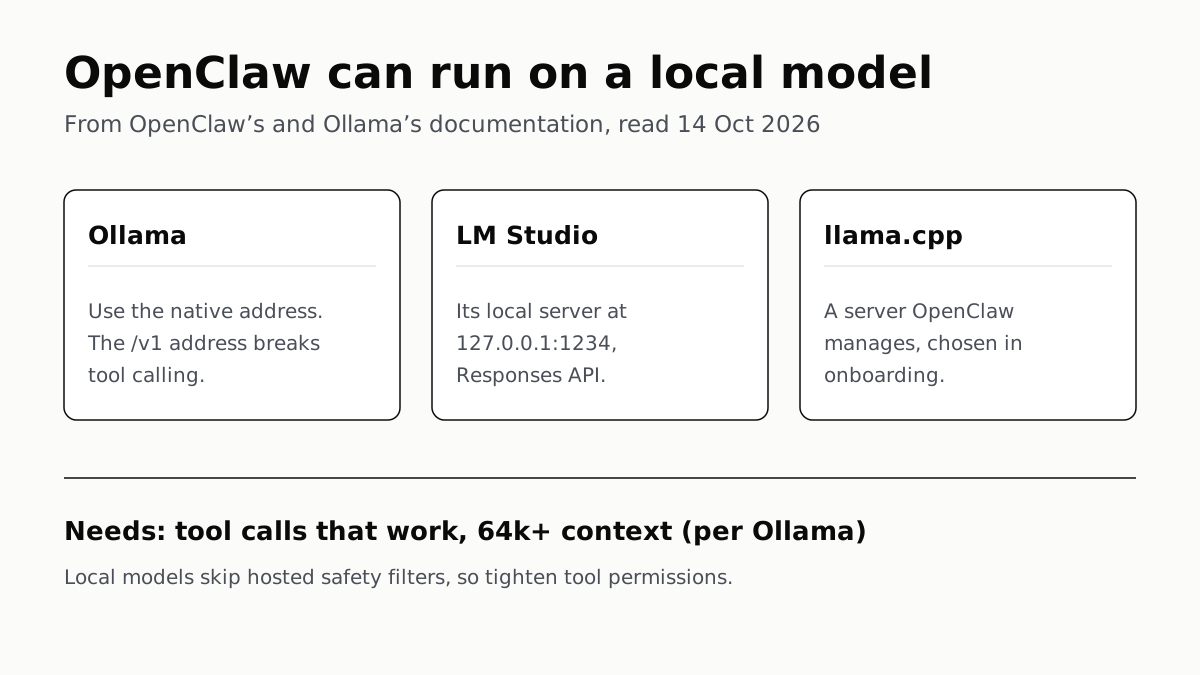
OpenClaw Runs on a Local LLM via Ollama or LM Studio
OpenClaw's docs also cover llama.cpp, vLLM and any OpenAI-compatible server. Ollama advises 64k context; small models are easier to hijack.
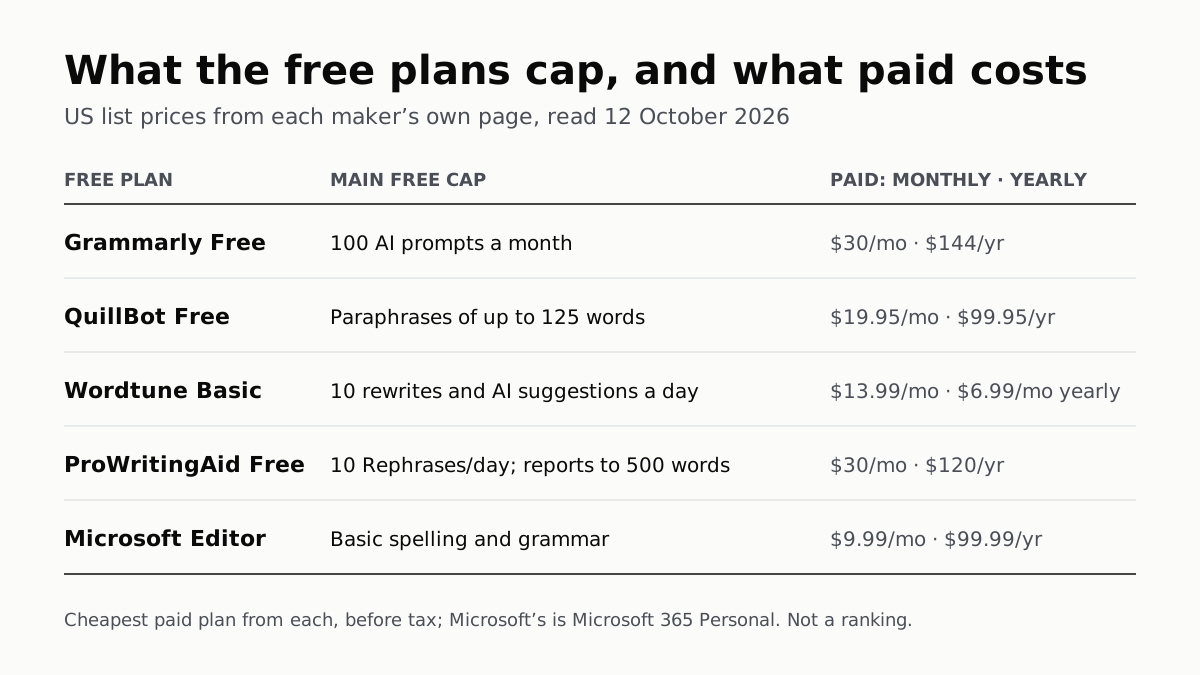
Free AI Writing Tools Ration Rewrites in Different Units
Grammarly gives 100 AI prompts a month, Wordtune 10 rewrites a day, QuillBot 125 words a paraphrase. Yearly billing halves most prices.
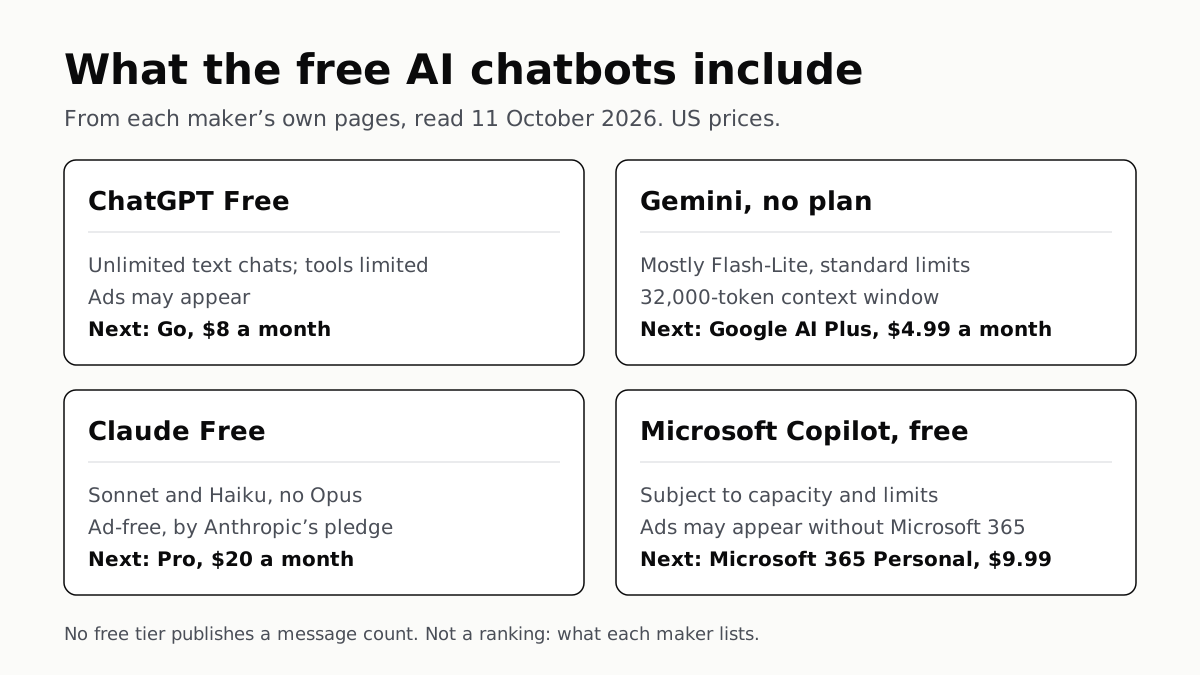
Of Four Free AI Chatbots, Only ChatGPT Lists Unlimited Chat
ChatGPT’s free tier carries ads, as Copilot’s may; Gemini’s leans on Flash-Lite and Claude’s leaves out Opus.
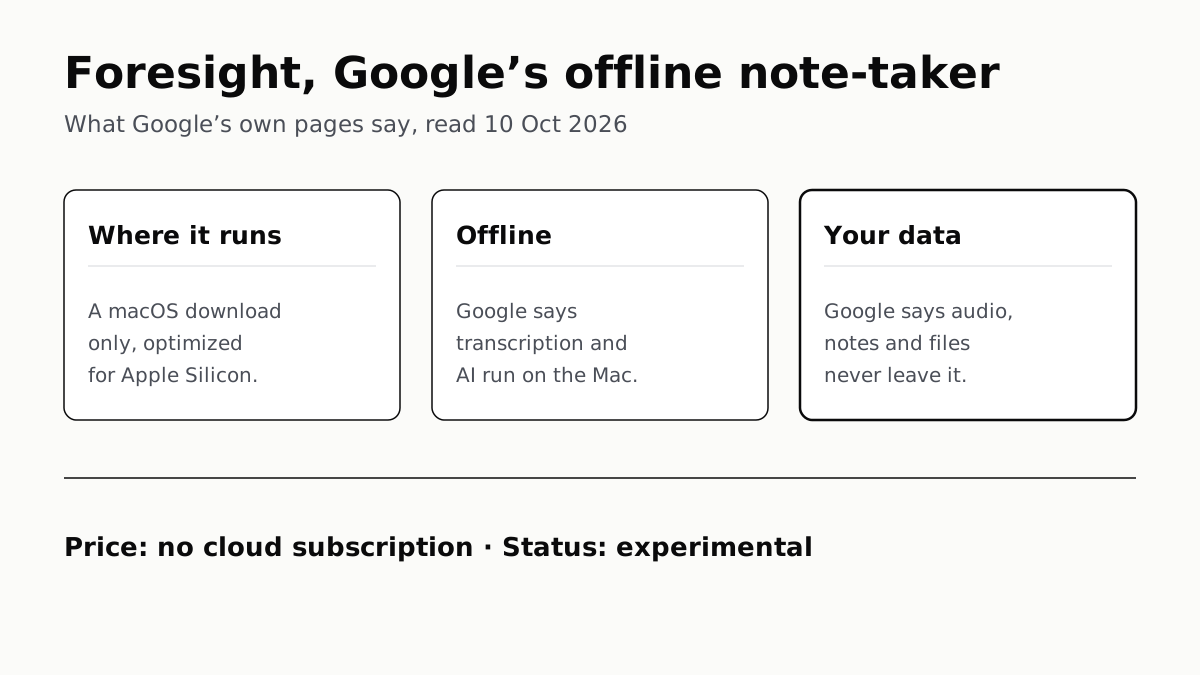
Google’s Offline AI Note-Taker Runs Only on a Mac
Transcription and AI run on the Mac itself, with no phone version. Google says your audio, notes and files never leave the computer.