Does ChatGPT Train on Your Chats? Yes, Until You Say No
The consumer app and the developer API ship opposite defaults. One setting changes it, and it is not the one most people reach for.

If you buy through our links, we may earn a commission. It never affects our verdicts or scores — how that works. As an Amazon Associate I earn from qualifying purchases.
In the consumer app, yes, by default — and there is one switch that stops it. In the developer API, no, by default, and has not since 2023. Same company, opposite starting positions, which is most of why the internet cannot agree on the answer.
The switch, and its exact name
OpenAI’s help centre gives the path. On the web, signed in: profile icon, Settings, Data Controls, then turn off “Improve the model for everyone”.
OpenAI says the same control governs the dots agent on personal plans, the agent it launched on 29 September for the ChatGPT plans that include dots. Meta’s Muse agent ships the same default, with its own switch under Data controls (what Muse can see and how to limit it).
That is the whole control. Two details from the same page matter more than the path.
First, it syncs: “Once you turn off model training, the setting applies to your entire account. It doesn’t matter which device you’re using.” You do not need to repeat it on your phone.
Second, and this is where people go wrong: your conversations still appear in your chat history. OpenAI’s wording is that they “won’t be used to train ChatGPT” — not that they stop existing. Turning off training is not deletion, and it was never meant to be.
There is also a control for signed-out users — the ? icon at the bottom right, then Settings — which is worth knowing if you use it without an account and assumed that was already private.
The API has the opposite default
If you reach OpenAI through code rather than the chat window, the position reverses. Its platform documentation states that “As of March 1, 2023, data sent to the OpenAI API is not used to train or improve OpenAI models” unless you explicitly opt in.
That is why a developer will tell you your data is not used for training and a ChatGPT user will tell you it is, and both are reporting their own product accurately.
The API is not a black hole either. The same page describes abuse monitoring logs that “may contain certain customer content, such as prompts and responses”, generated for all API usage and retained for up to 30 days unless law or harm-prevention requires longer.
Temporary Chat is not the same as private
This is the other thing people reach for, and it does a narrower job than the name suggests. Per OpenAI, Temporary Chats “are deleted from our systems after 30 days”, “aren’t used to train our models”, “may be reviewed only to monitor for abuse”, and “don’t get saved in your history and don’t create memories”.
Read the third clause. Not trained on is not the same as not read, and thirty days is not immediately. Temporary Chat is the right tool for keeping something out of your history and out of the model’s memory. It is not a private channel.
What each control actually does
| If you want to… | Use | What it does not do |
|---|---|---|
| Stop chats improving the model | Turn off “Improve the model for everyone” | Does not delete anything, or hide history |
| Keep a chat out of history and memory | Temporary Chat | Still kept 30 days, still reviewable for abuse |
| Remove a conversation | Delete the chat | Does not retroactively undo past training |
| Build on OpenAI without training | Use the API | Abuse logs still retained up to 30 days |
The row that catches people is the last column of the first: they turn the setting off, see every old conversation still sitting in the sidebar, and conclude it did not work. It did. It is just not a delete button.
What to actually do
- Turn off “Improve the model for everyone” now if you want it off. It takes ten seconds, it applies account-wide, and nothing about the product gets worse — OpenAI does not gate features on it.
- Do it before the conversation you care about, not after. The setting is not retroactive, and neither is deleting a chat afterwards.
- Use Temporary Chat for the one-off you would rather not keep, understanding it is a thirty-day window and an abuse-review exception, not a vault.
- Do not assume this transfers. Every other assistant sets its own defaults, and several have changed them recently. Check the one you actually use.
- Some models read you without ever reading your text. The switch above governs what a service does with words you typed; it says nothing about a service inferring things from how you behave. Discord estimates your age from who you talk to, and there is no setting for it.
- If it is genuinely sensitive, do not type it into someone else’s computer. The strongest version of this control is the text you never send — and if the reason is that you want a model with no third party in the loop at all, what it takes to run one locally is the honest comparison.
How we researched this
No one at bitcritiq has handled this product. Everything here comes from published sources, listed below.
- What this cannot tell you
- This covers OpenAI only, and it is a snapshot of stated policy on the date accessed, not an audit of what happens inside the company. Other assistants set their own defaults and you cannot carry these answers across to them. Business plans are noted but not detailed: Team, Enterprise and Edu carry separate terms that a reader on those plans should get from their administrator rather than from us.
How we chose this, and what we did
- Why this subject
- People ask this in two forms — whether it happens at all, and how to stop it — and both get answered badly, usually by someone confidently describing the wrong product. The answer differs between the app and the API, and the setting that controls it is not the one people assume. All of it is documented by OpenAI in public.
- How we looked at it
- Took every claim from OpenAI's own documentation: the Data Controls FAQ in its help centre for the consumer app, and the platform data-controls page for the API. Where the two contradict each other, that contradiction is the point rather than an error, because they are different products with different defaults.
Sources 2
- Data Controls FAQ — OpenAI Help CenterOfficialaccessed Aug 29, 2026
- Data controls in the OpenAI platform — OpenAI developer documentationOfficialaccessed Aug 29, 2026
Pass it on
Know someone weighing this up? Send them the answer.
bitcritiq.com/74beThe link is permanent: it opens this article for good, even if the title changes.
No email, no account
Follow bitcritiq
Every new article, in whatever reader you already use.
Subscribe by RSSAll the ways to follow
Using Chrome on Android? Open the browser menu and tap Follow. New articles then turn up in the Following tab in Discover.
read next
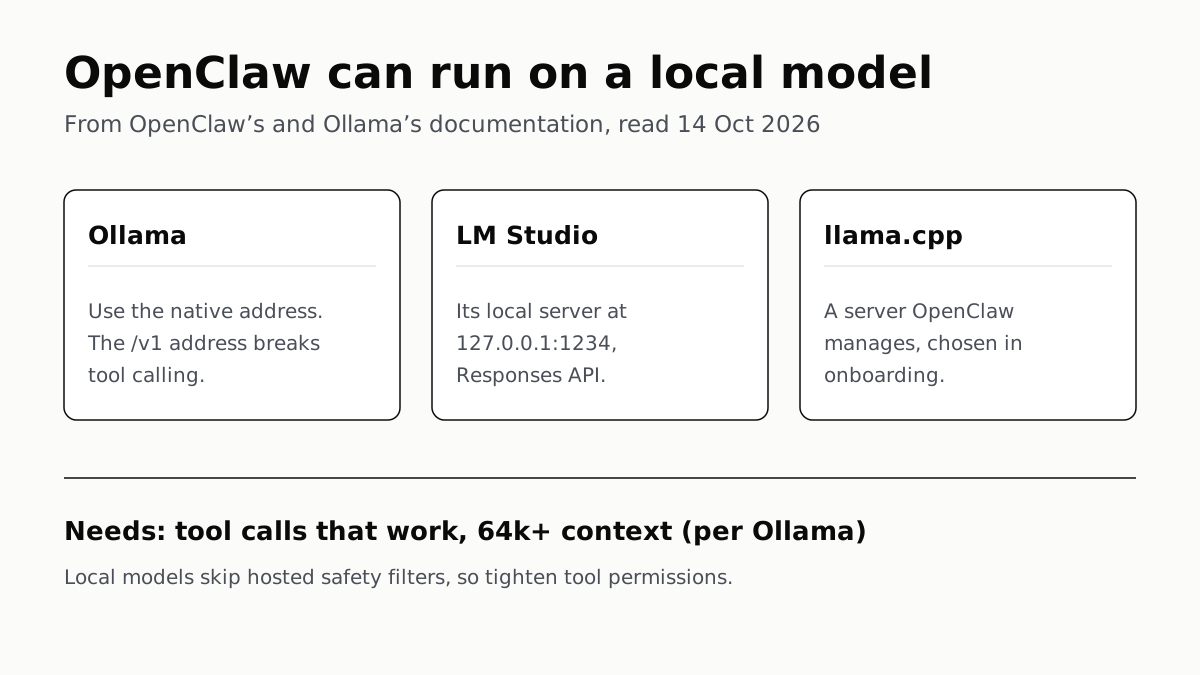
OpenClaw Runs on a Local LLM via Ollama or LM Studio
OpenClaw's docs also cover llama.cpp, vLLM and any OpenAI-compatible server. Ollama advises 64k context; small models are easier to hijack.
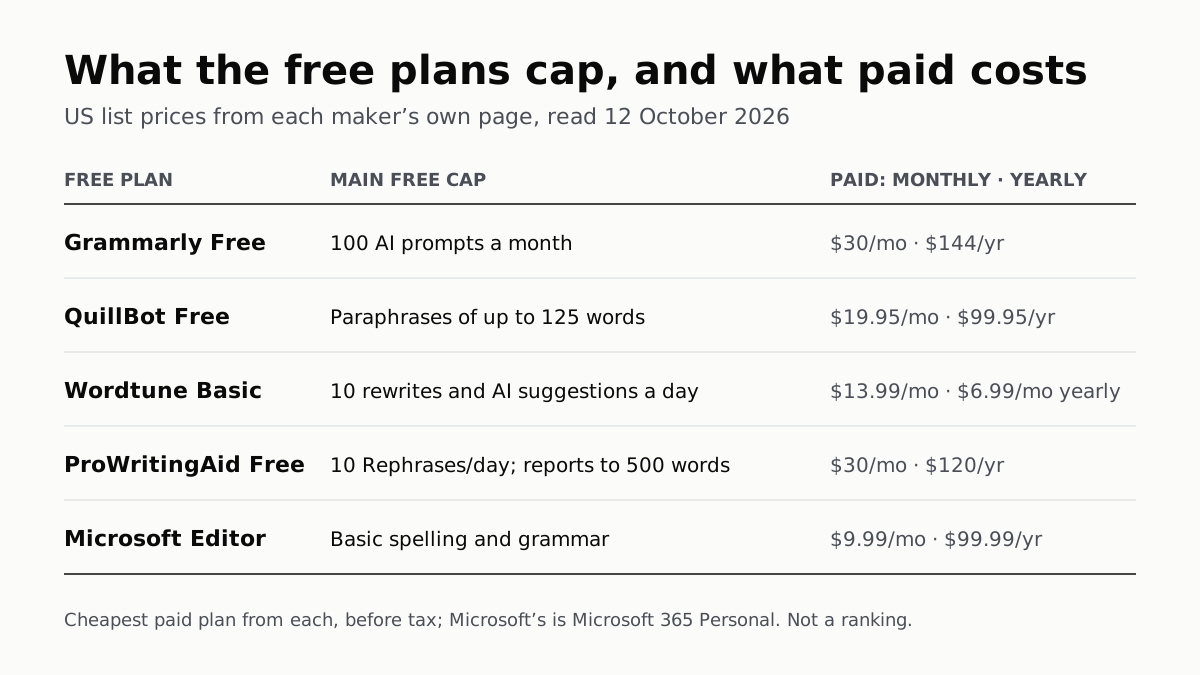
Free AI Writing Tools Ration Rewrites in Different Units
Grammarly gives 100 AI prompts a month, Wordtune 10 rewrites a day, QuillBot 125 words a paraphrase. Yearly billing halves most prices.
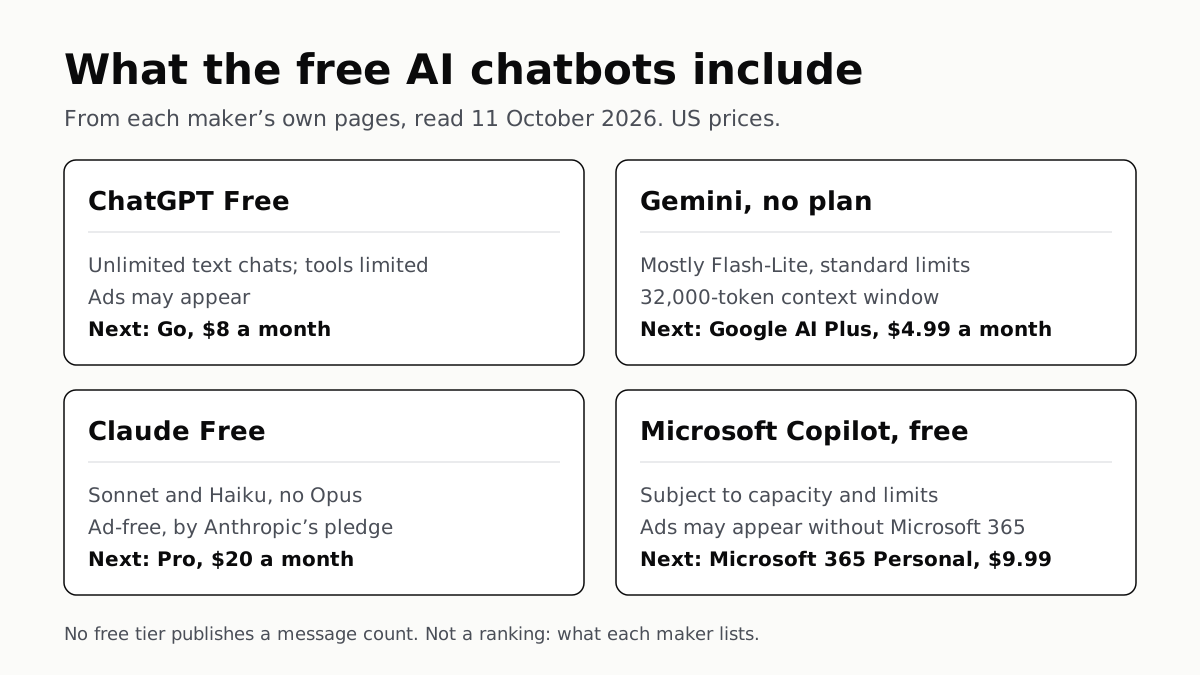
Of Four Free AI Chatbots, Only ChatGPT Lists Unlimited Chat
ChatGPT’s free tier carries ads, as Copilot’s may; Gemini’s leans on Flash-Lite and Claude’s leaves out Opus.
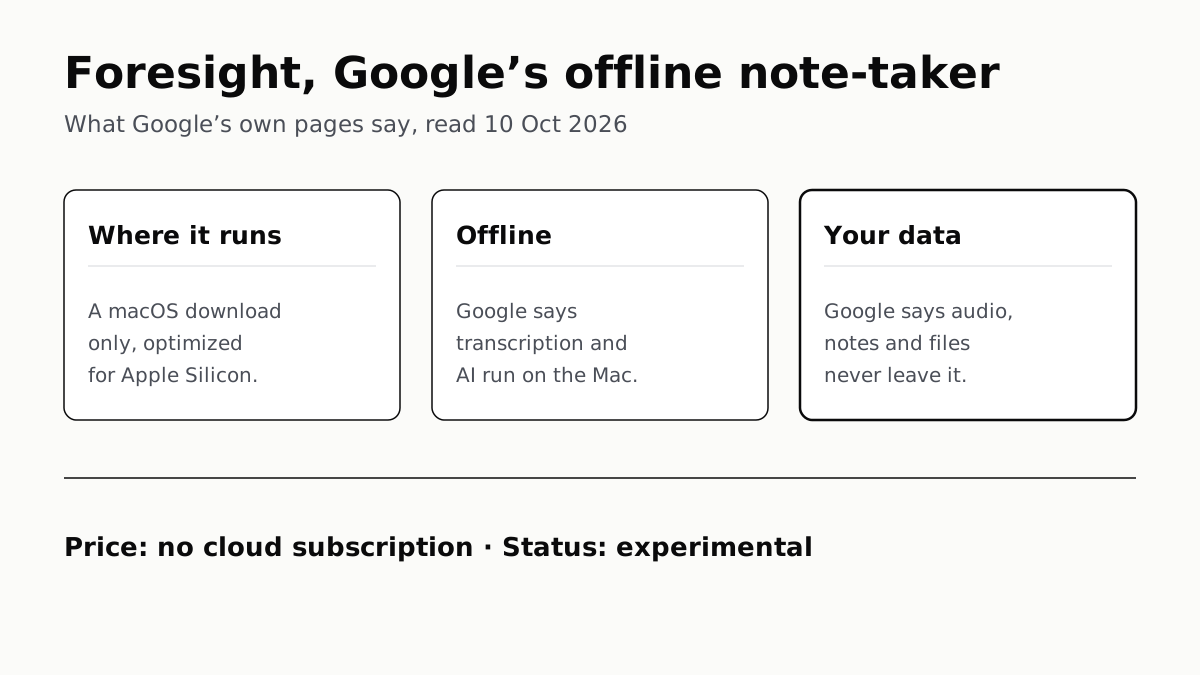
Google’s Offline AI Note-Taker Runs Only on a Mac
Transcription and AI run on the Mac itself, with no phone version. Google says your audio, notes and files never leave the computer.