The Mini PC Quietly Became the Default Desktop
Searches for specific mini PC models are breaking out while the tower sits still. The reason is a change in what a desk actually needs.

If you buy through our links, we may earn a commission. It never affects our verdicts or scores — how that works. As an Amazon Associate I earn from qualifying purchases.
The interesting signal in our keyword data is not that people are searching for mini PCs. It is that they are searching for specific models — individual product names from Geekom, GMKtec and Minisforum are rising faster than the generic term.
That is what a category looks like after the argument is settled. People stop asking whether a small computer is a real computer and start asking which one to buy.
What changed was the workload, not the hardware
The tower did not lose an argument about performance. It lost a job.
For roughly two decades a desktop earned its size because of what it had to hold: a mechanical drive, an optical drive, expansion cards for sound and networking, and a cooling system for chips that ran hot. Every one of those has since been absorbed. Storage moved to an M.2 stick the size of a stick of gum. Audio and networking moved onto the board. Optical media left entirely.
What is left of a desktop for most desks is a processor, memory, one SSD and the ports. None of that needs a tower.
The category split into three, and the middle is new
Reading how the review outlets now organise their mini PC coverage, three distinct products are being sold under one name.
The appliance tier is built around the Intel N100 and its relatives. Intel’s specification caps it at 16GB of memory on a single channel, with four cores and a 6W power envelope. That is a genuinely useful machine for a browser, a television, or an always-on server — and completely unsuitable for anything that needs to hold a lot in memory at once.
The desktop tier is the one that changed. Machines with full mobile-class processors now appear as outright recommendations at PCMag and Tom’s Guide, not as compromises with an asterisk. This tier is what makes the category interesting: it is not a small computer for people with no room, it is the normal computer for most work.
The small-form-factor gaming tier houses a real graphics card in a case the size of a console, and is the one place where the size still costs you something in heat and noise.
The mistake buyers make is to treat these as one category with a price range, which is how a machine bought at appliance prices ends up disappointing at desktop work.
What you still give up
Three things, and they are the same three regardless of tier.
Upgrades. Memory is often soldered, and where it is not there are usually two slots and a low ceiling. A tower can be re-specified for years; a mini PC is roughly what you bought.
Graphics. Outside the gaming tier there is no slot for a card, so the graphics you buy are the graphics you keep. How far a mini PC’s built-in graphics go in games depends on which chip it has.
Thermal headroom. A small case sustains less. Sprints are fine; long renders are where the difference appears.
If none of those apply to what you actually do, the tower is spending money and desk space on capability that was already absorbed elsewhere.
What to actually do
- Work out which of the three tiers you need first. The price gaps between them are large and the disappointment when you buy a tier down is total.
- Check the memory ceiling before anything else — it is the specification most likely to end the machine’s usefulness, and it is published.
- Buy a tower if you upgrade, game seriously, or run sustained heavy loads. Those are still real reasons and they have not stopped being real.
- Otherwise start with the reviewers’ picks, and read what an N100 can actually do before buying at the cheap end.
How we researched this
No one at bitcritiq has handled this product. Everything here comes from published sources, listed below.
- What this cannot tell you
- Search interest measures attention, not sales, and we have no shipment data — so this describes a change in what people are considering, which is not the same as a change in what is on desks. The performance claims here are about what published specifications and reviews establish, not about machines examined here.
How we chose this, and what we did
- Why this subject
- Mini PC queries are among the strongest rising signals in our keyword corpus, and unusually the growth is in specific model names rather than the generic term — which is what interest looks like when people have moved from wondering about a category to choosing inside it. That shift is the subject here.
- How we looked at it
- Compared the shape of mini PC search interest in our own keyword corpus against how the major review outlets now position the category, and checked the technical claims about the low end against Intel's published processor specifications rather than against retailer listings.
Sources 5
- The Best Windows Mini PCs We've Tested for 2026 — PCMagaccessed Aug 27, 2026
- The best mini PCs in 2026 — Tom's Guideaccessed Aug 27, 2026
- Best mini PCs 2026 — TechRadaraccessed Aug 27, 2026
- The Best Mini Desktops We've Tested for 2026 — PCMagaccessed Aug 27, 2026
- Intel Processor N100 specifications — Intel ARKaccessed Aug 27, 2026
Pass it on
Know someone weighing this up? Send them the answer.
bitcritiq.com/gku7The link is permanent: it opens this article for good, even if the title changes.
No email, no account
Follow bitcritiq
Every new article, in whatever reader you already use.
Subscribe by RSSAll the ways to follow
Using Chrome on Android? Open the browser menu and tap Follow. New articles then turn up in the Following tab in Discover.
read next
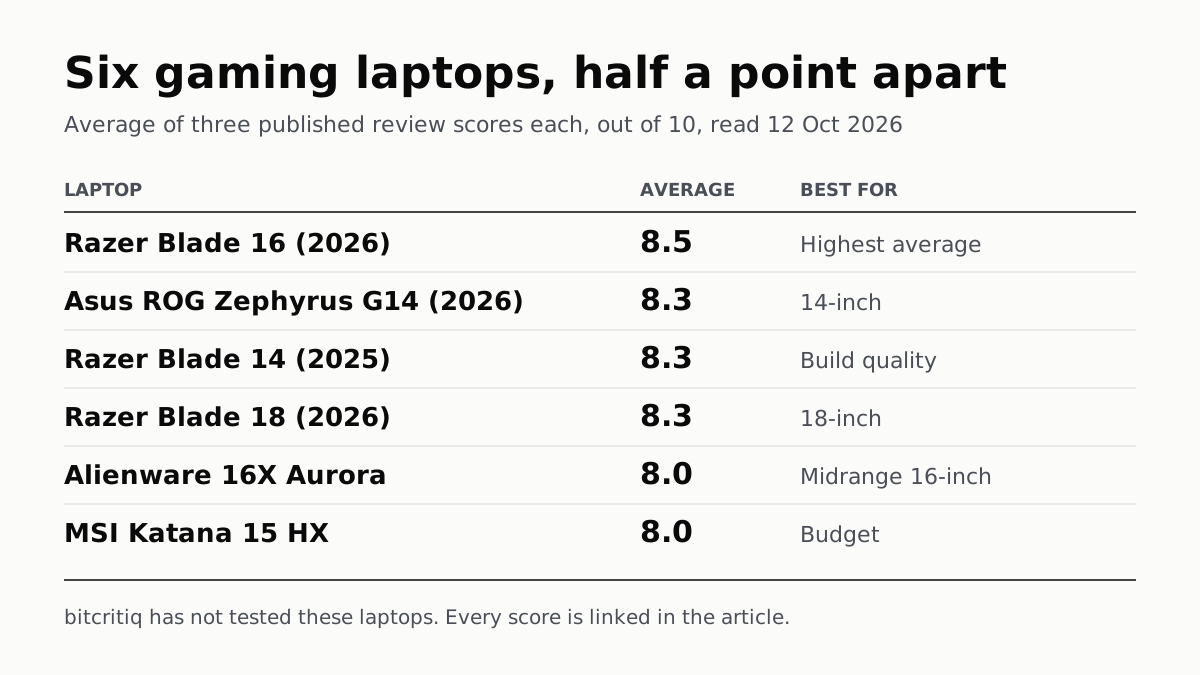
Razer Blade 16 Tops Gaming Laptop Reviews, by Half a Point
Eighteen review scores from eight outlets, all read on 12 October. Six laptops land within half a point, so pick by size and price.
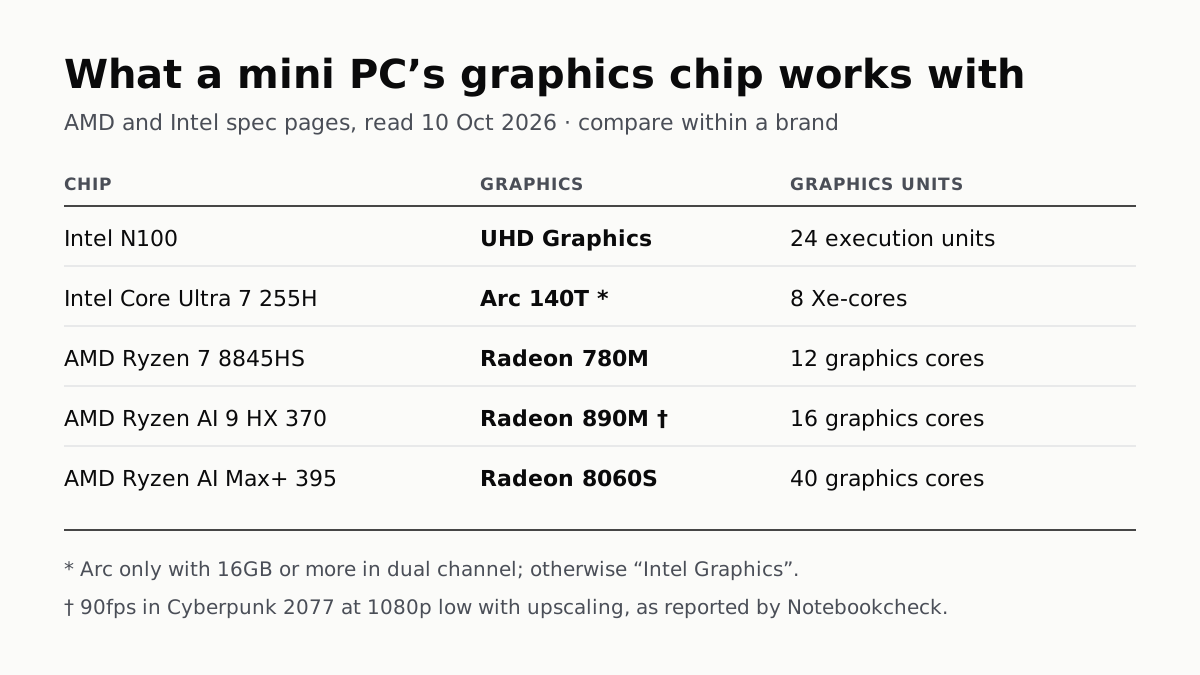
A Mini PC Can Game, but Its Graphics Chip Sets the Ceiling
Balatro's minimum is integrated graphics; Cyberpunk 2077's is a GTX 1060. A Radeon 890M ran Cyberpunk at 1080p low in one reported test.
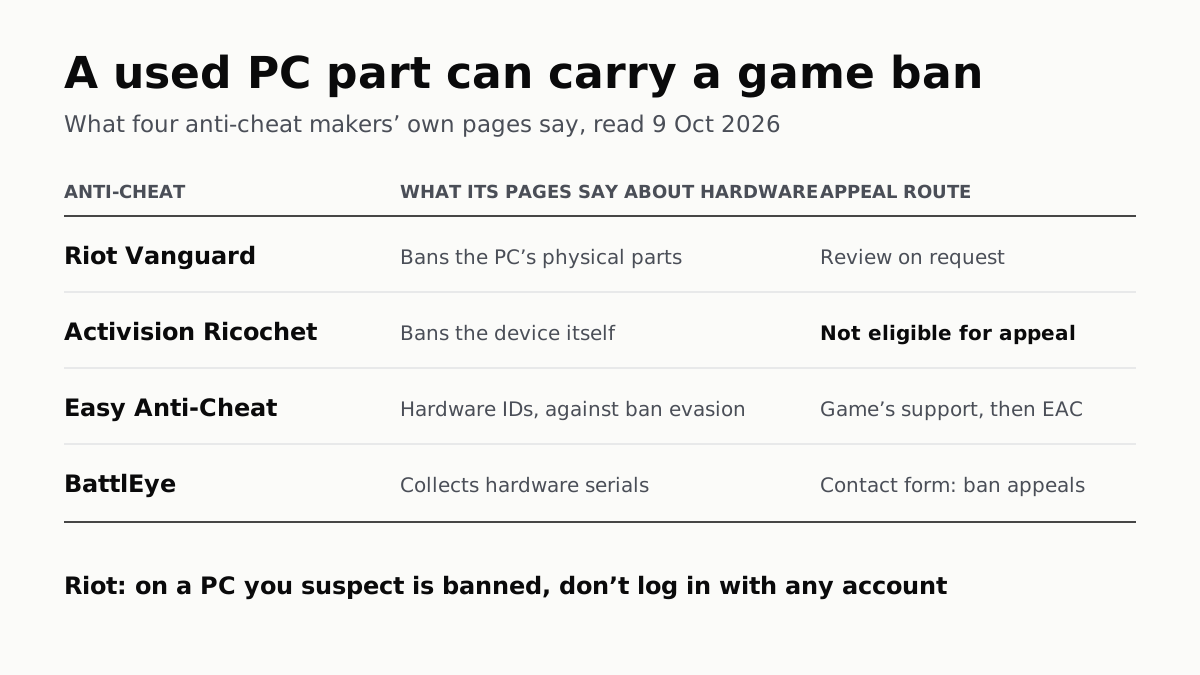
A Used PC or CPU Can Carry Its Last Owner’s Game Ban
Riot and Activision ban hardware, not only accounts. Riot will re-check one on request; Activision rules out an appeal.
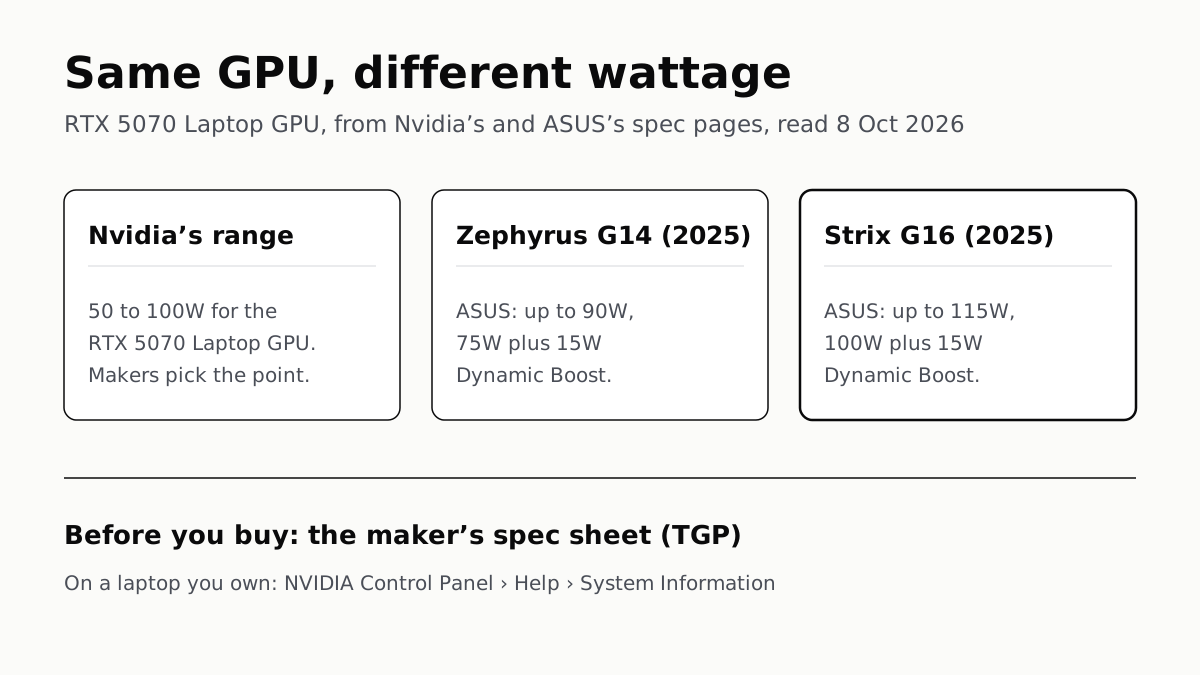
The Same RTX 5070 Laptop GPU Runs at 90W or 115W
Nvidia publishes a power range for each laptop GPU and the maker picks a point in it. The spec sheet, or Nvidia Control Panel, shows which.