All Mobile

Mobile Guides

Phones, tablets, wearables, and the software that runs them.

updated
1d ago

November 20262 articles

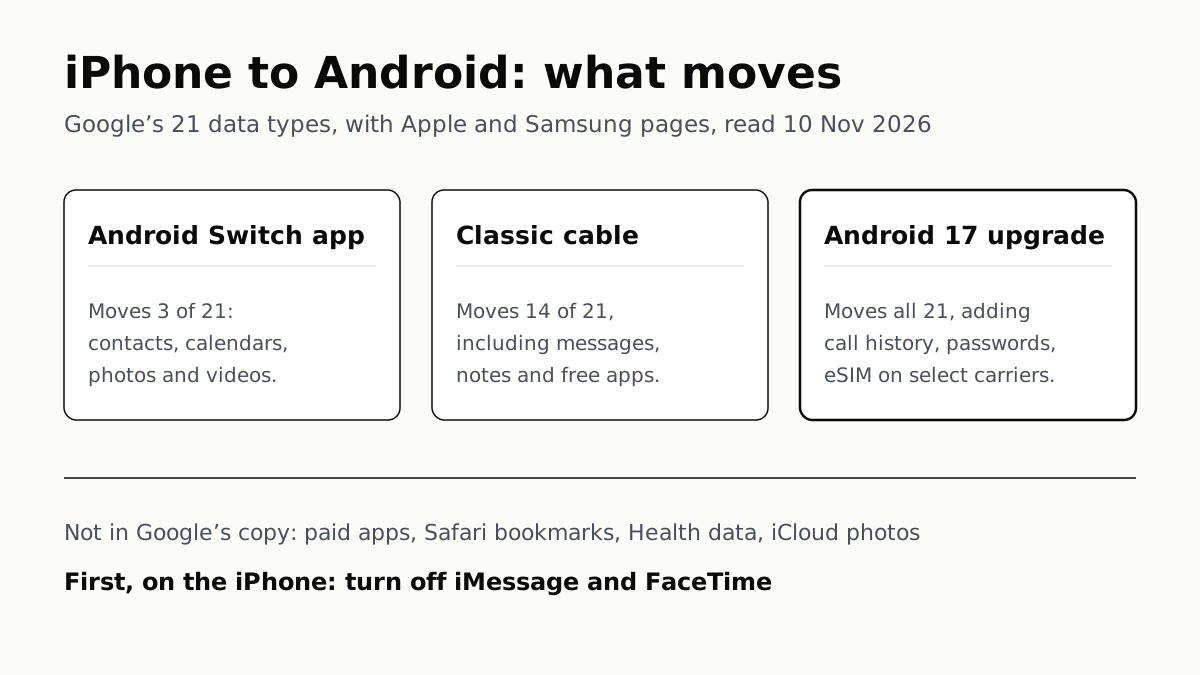
iPhone to Android, what moves: Google’s 21 data types, with Apple and Samsung pages, read 10 November 2026. The Android Switch app moves 3 of 21: contacts, calendars, photos and videos. The classic cable moves 14 of 21, including messages, notes and free apps. The Android 17 upgraded transfer moves all 21, adding call history, passwords and the eSIM on select carriers. Not in Google’s copy: paid apps, Safari bookmarks, Health data and iCloud photos. First, on the iPhone: turn off iMessage and FaceTime.
Mobile · Guide

iPhone to Android Moves Most Data, but Not Paid Apps

Turn off iMessage and FaceTime first so texts arrive. Android 17’s upgraded copy adds call history, passwords and the eSIM.
October 20266 articles

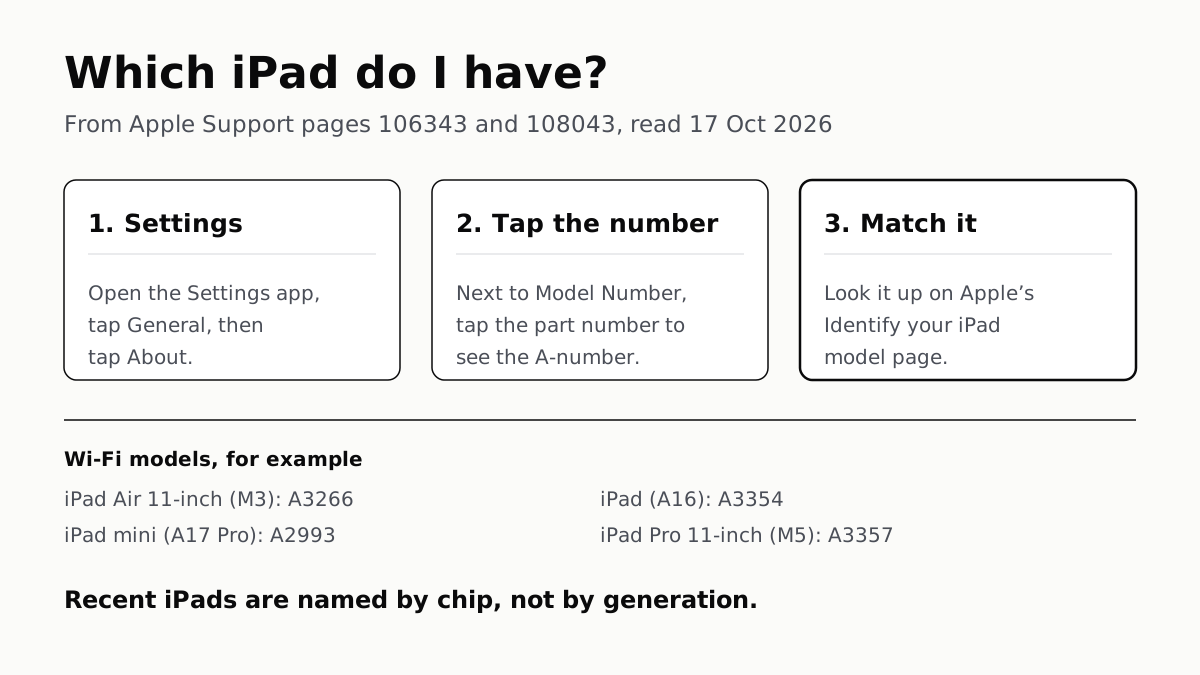
How to tell which iPad you have, from Apple Support pages read 17 October 2026. Step 1: Settings, General, About. Step 2: next to Model Number is a part number; tap it to see the A-number. Step 3: match the A-number on Apple's Identify your iPad model page. Examples of Wi-Fi models: iPad Air 11-inch (M3) is A3266, iPad (A16) is A3354, iPad mini (A17 Pro) is A2993, iPad Pro 11-inch (M5) is A3357. Recent iPads are named by chip, not by generation.
Mobile · Guide

Which iPad Do I Have? The A-Number Tells You

Settings shows a part number; tap it once for the A-number, then match it on Apple's list. Newer iPads are named by chip, not generation.
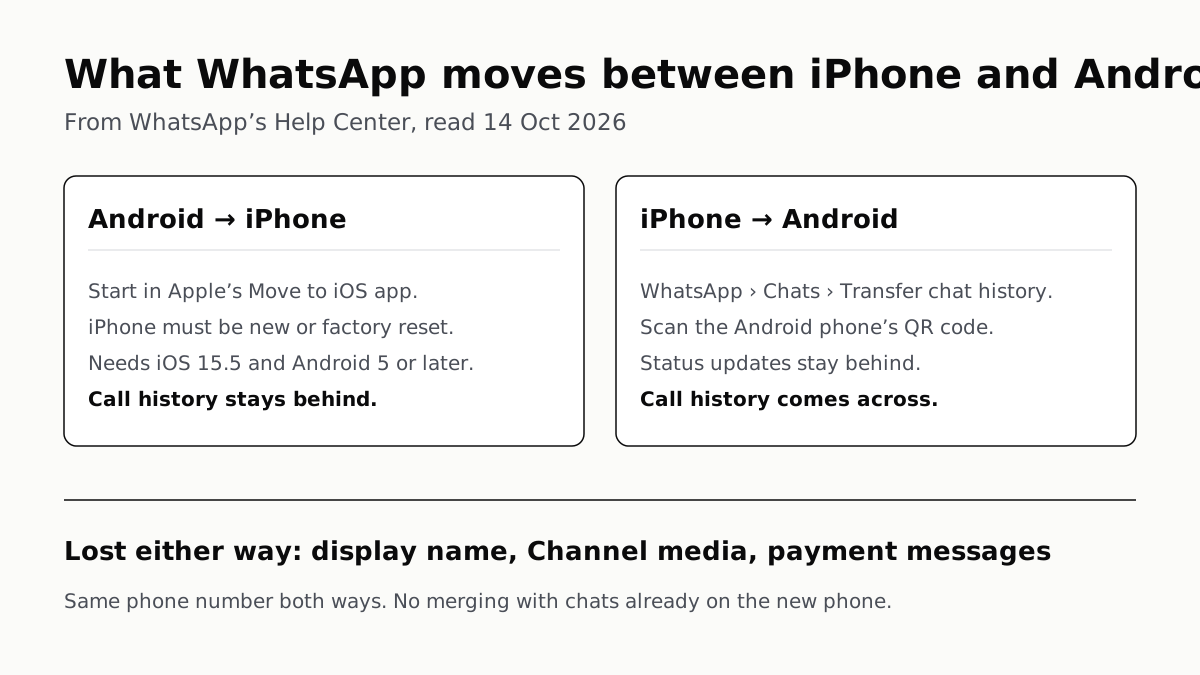
What WhatsApp moves between iPhone and Android, from WhatsApp’s Help Center, read 14 October 2026. Android to iPhone: start in Apple’s Move to iOS app; the iPhone must be new or factory reset; needs iOS 15.5 and Android 5 or later; call history stays behind. iPhone to Android: in WhatsApp, Chats, Transfer chat history; scan the Android phone’s QR code; call history comes across; status updates stay behind. Lost either way: display name, Channel media and payment messages. Same phone number both ways, and no merging with chats already on the new phone.
Mobile · Guide

WhatsApp Chats Can Cross Between iPhone and Android

Messages, media and settings move both ways. Display names, Channel media and payment messages don’t, and call logs reach Android alone.
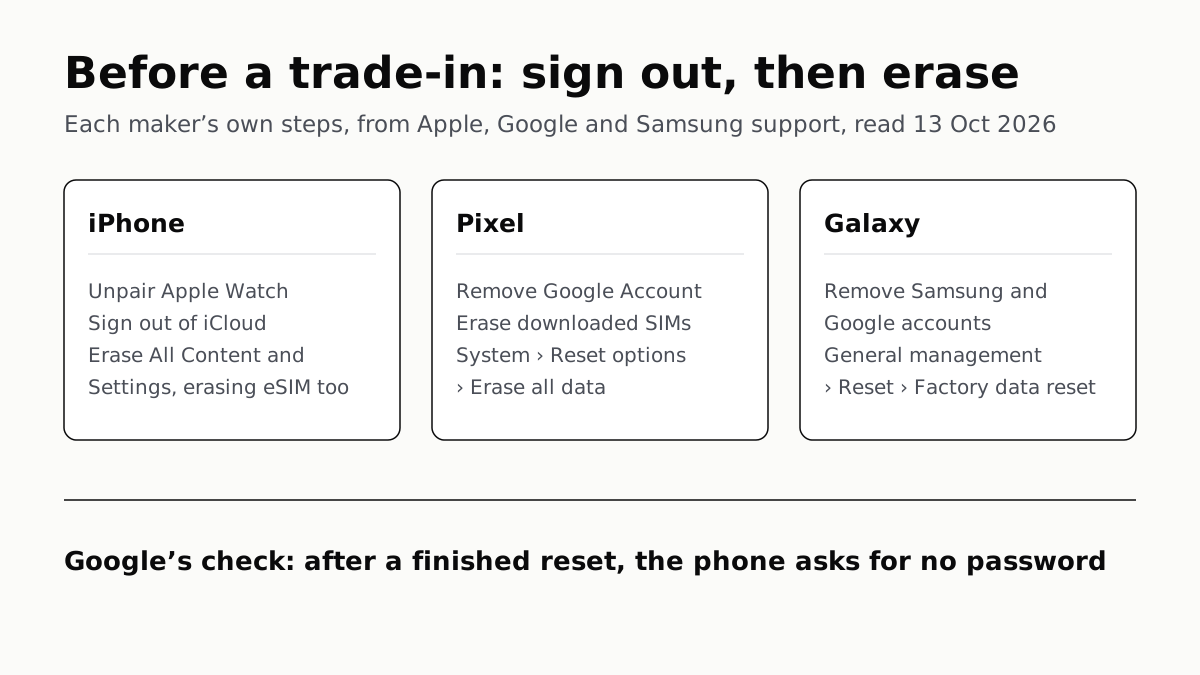
Before a trade-in: sign out, then erase. Each maker’s own steps, from Apple, Google and Samsung support, read 13 October 2026. iPhone: unpair Apple Watch, sign out of iCloud, then Erase All Content and Settings, erasing the eSIM too. Pixel: remove the Google Account, erase downloaded SIMs, then System, Reset options, Erase all data. Galaxy: remove the Samsung and Google accounts, then General management, Reset, Factory data reset. Google’s check: after a finished reset, the phone asks for no password.
Mobile · Guide

Sign Out Before You Wipe a Phone for Trade-In

Google returns trade-ins that are still locked, and Samsung won’t accept them. Back up, sign out, unpair, then erase.
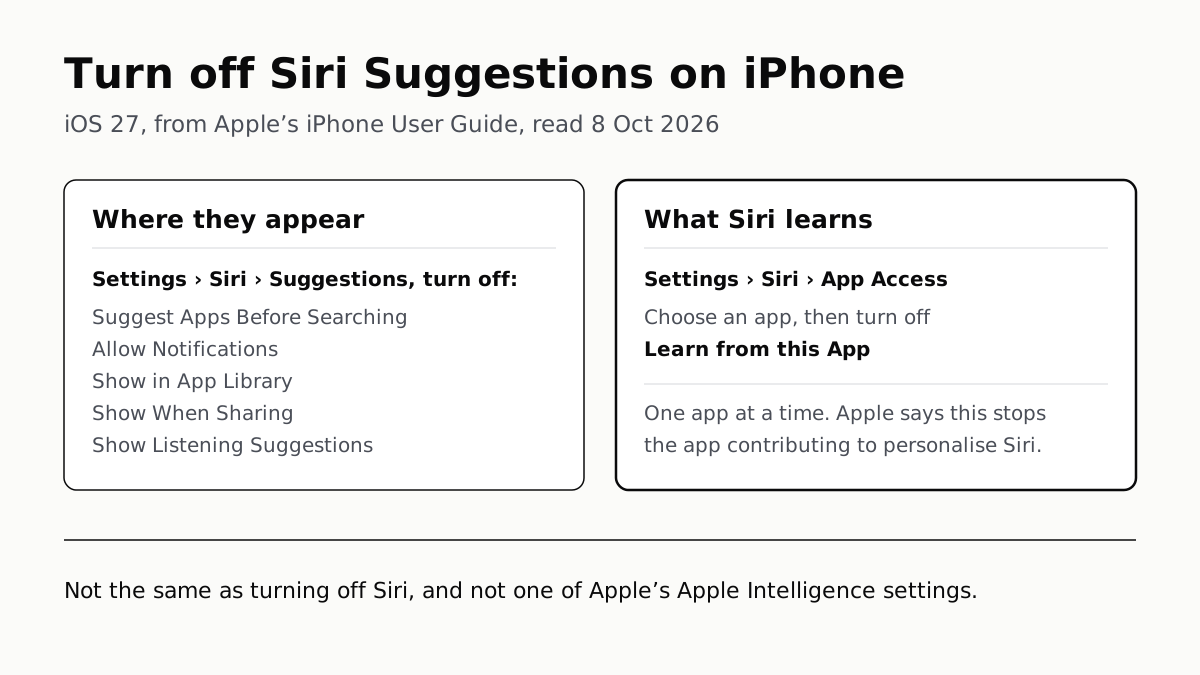
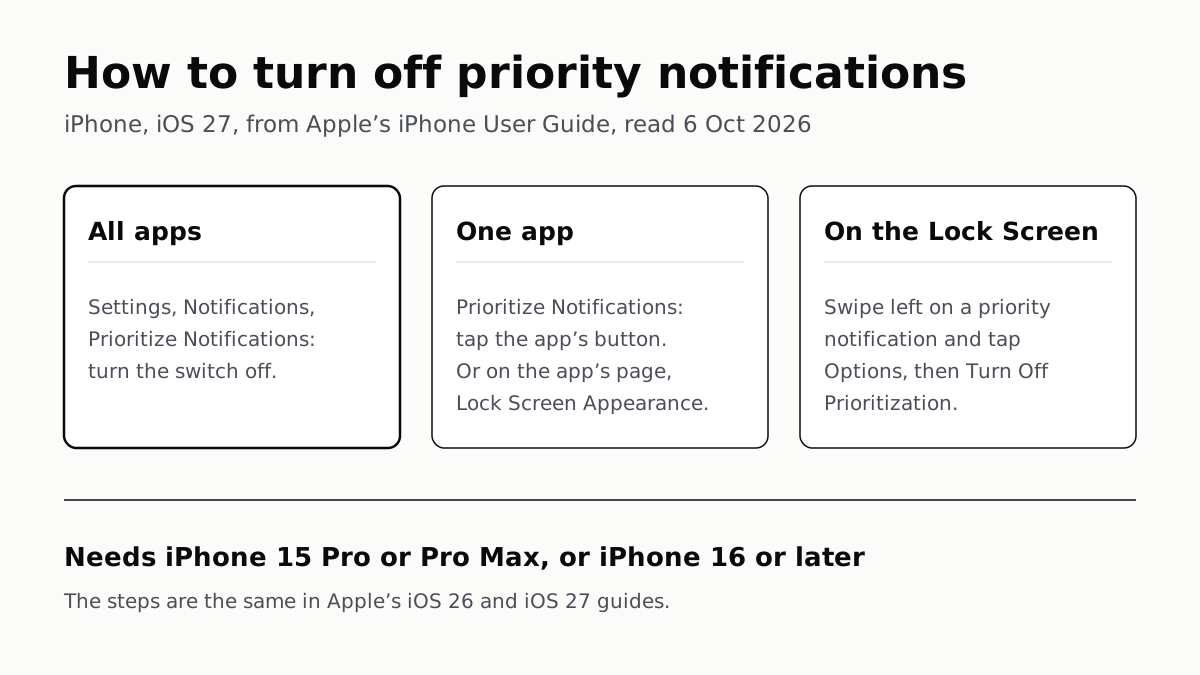
How to turn off priority notifications on iPhone, iOS 27, from Apple’s iPhone User Guide, read 6 October 2026. All apps: Settings, Notifications, Prioritize Notifications, turn the switch off. One app: on the Prioritize Notifications screen tap the app’s button, or on the app’s own page under Lock Screen Appearance. On the Lock Screen: swipe left on a priority notification, tap Options, then Turn Off Prioritization. It needs an iPhone 15 Pro or Pro Max, or an iPhone 16 or later. The steps are the same in Apple’s iOS 26 and iOS 27 guides.
Mobile · Guide

Turn Off Priority Notifications All at Once or Per App

Apple’s iOS 27 guide gives one master switch, two per-app toggles and a Lock Screen shortcut. It needs an iPhone 15 Pro or newer.
September 20264 articles

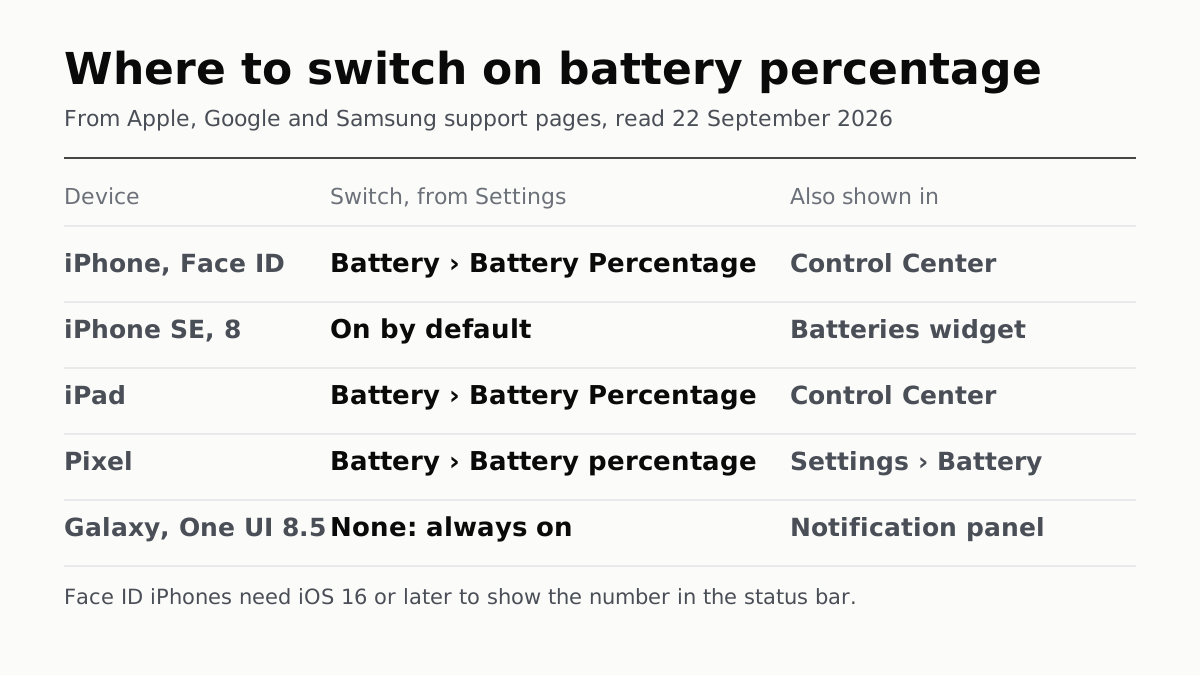
Where to switch on battery percentage, from Apple, Google and Samsung support pages, read 22 September 2026. iPhone with Face ID: Battery, then Battery Percentage, from Settings; also shown in Control Center. iPhone SE and iPhone 8: on by default; also shown in the Batteries widget. iPad: Battery, then Battery Percentage; also shown in Control Center. Pixel: Battery, then Battery percentage; also shown in Settings, Battery. Galaxy on One UI 8.5: no switch, always on; also shown in the notification panel. Footnote: Face ID iPhones need iOS 16 or later to show the number in the status bar.
Mobile · Guide

Battery Percentage: One Switch, Unless You Have a Galaxy

Settings, then Battery, on iPhone, iPad and Pixel. Samsung made the number permanent in One UI 8.5; its switch now hides only the icon.
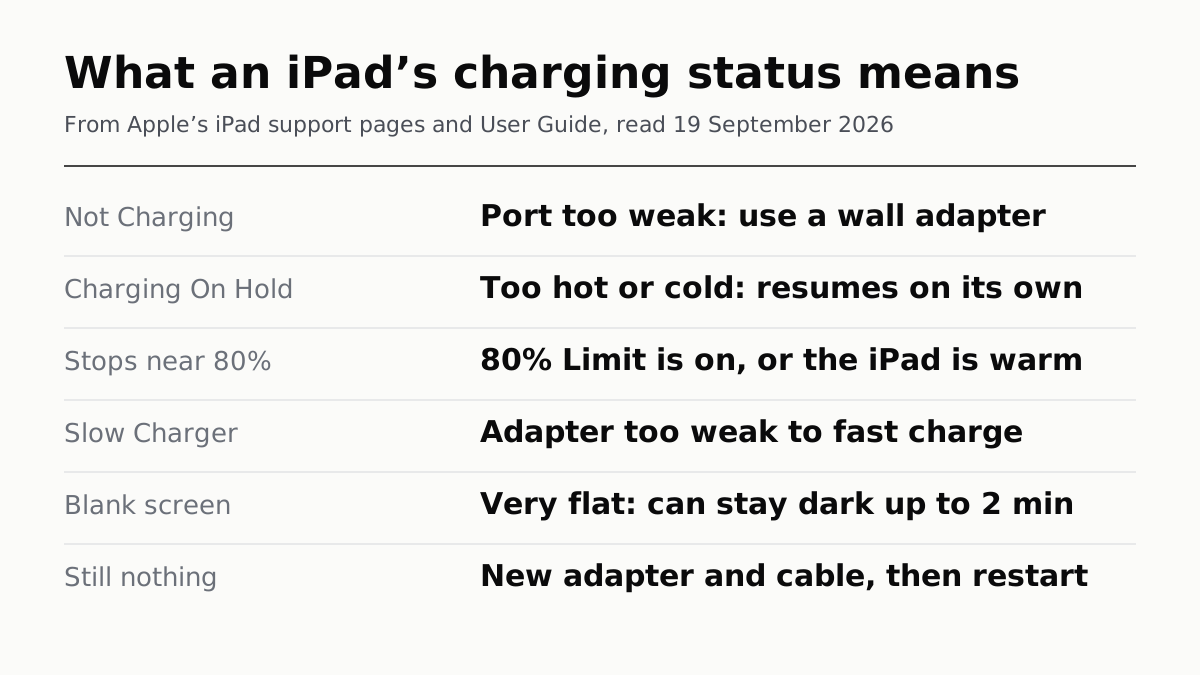
What an iPad’s charging status means, from Apple’s iPad support pages and User Guide, read 19 September 2026. Not Charging: port too weak, use a wall adapter. Charging On Hold: too hot or cold, resumes on its own. Stops near 80%: 80% Limit is on, or the iPad is warm. Slow Charger: adapter too weak to fast charge. Blank screen: very flat, can stay dark up to 2 minutes. Still nothing: new adapter and cable, then restart.
Mobile · Guide

When an iPad Says Not Charging, Apple Blames the Port

Apple's checks in order, the 15W minimum for other adapters, and the three statuses that mean the iPad stopped charging on purpose.
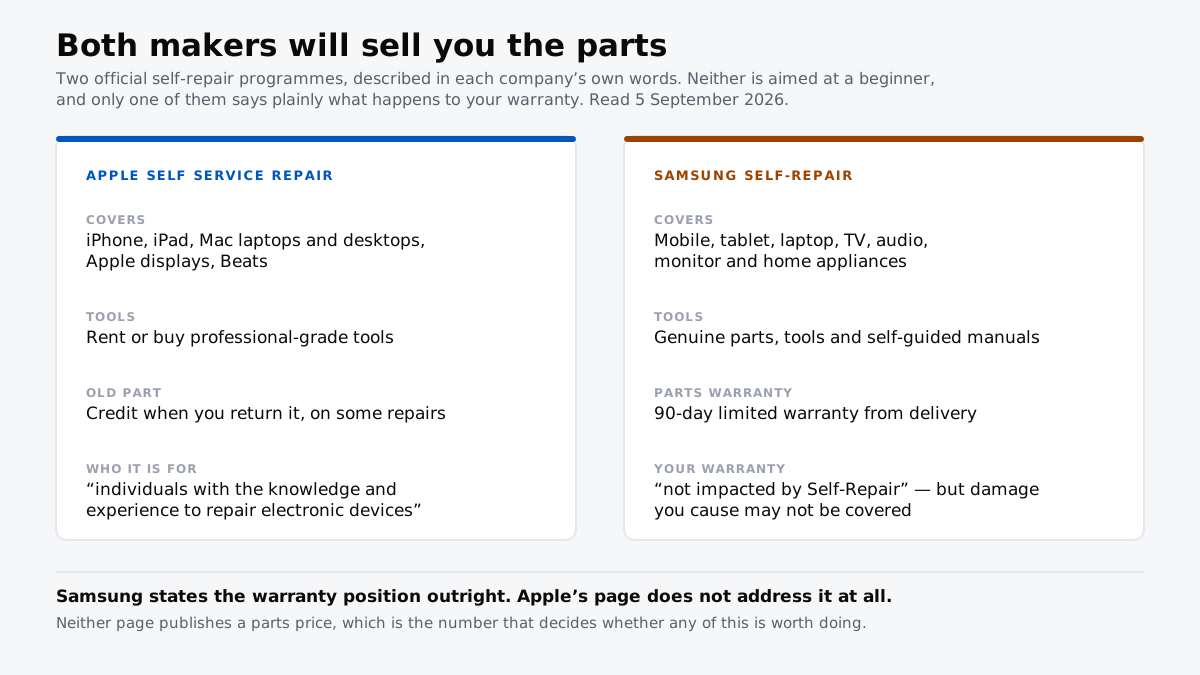
Apple Self Service Repair against Samsung Self-Repair. Apple covers iPhone, iPad, Macs, displays and Beats, rents professional tools and offers credit for returned parts. Samsung covers mobile through home appliances, gives parts a 90-day warranty and states the main warranty is not impacted.
Mobile · Guide

Both Makers Will Sell You the Parts Now

Apple and Samsung both run official self-repair. Only Samsung says outright what it does to your warranty.
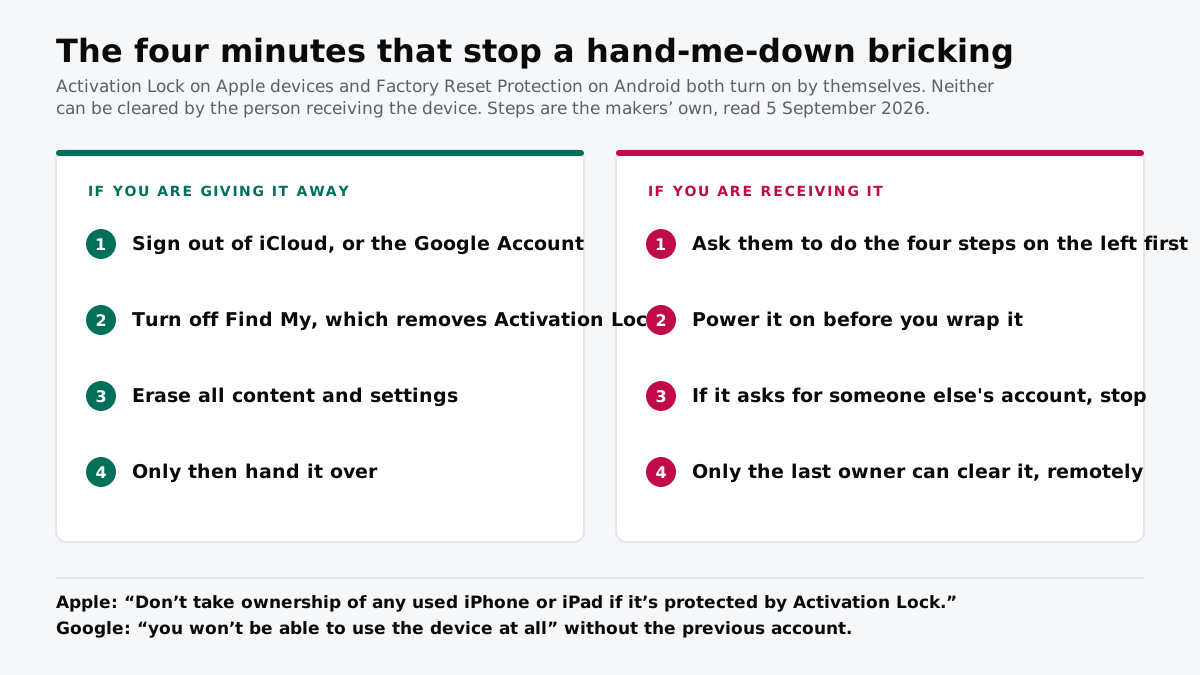
Two checklists. If you are giving a device away: sign out of iCloud or the Google Account, turn off Find My, erase all content and settings, then hand it over. If you are receiving one: ask them to do those four steps first, power it on before wrapping it, stop if it asks for someone else's account, and know that only the last owner can clear it.
Mobile · Guide

The Hand-Me-Down Phone That Will Not Switch On

Activation Lock turns itself on. If the last owner did not clear it, the phone is a brick and only they can fix it.

August 20263 articles

A hand holding a phone open at the settings menu.
Mobile · Guide

iPhone Storage Still Full? What Other Actually Is

Most of the blob you cannot delete is cache, and iOS clears it on its own when it needs the room. Apple says so in its own documentation.

Two smartphones side by side on a wooden table.
Mobile · Guide

Backing Up an iPhone? Tick the Encrypt Box

Apple turns encryption off by default on computer backups, and an unencrypted one leaves your Health history and saved passwords behind.

Two smartphones charging side by side on a desk.
Mobile · Guide

How to Check Your Phone's Battery Health, and What It Means

Where iPhone, Pixel and Samsung Galaxy show it, and what each maker says a reading means. Only Apple and Google give you a percentage.