The Hand-Me-Down Phone That Will Not Switch On
Activation Lock turns itself on. If the last owner did not clear it, the phone is a brick and only they can fix it.
If you buy through our links, we may earn a commission. It never affects our verdicts or scores — how that works. As an Amazon Associate I earn from qualifying purchases.
A phone handed on without being signed out will not finish setting up, and the person holding it cannot fix that. Apple’s Activation Lock switches on by itself the moment Find My is enabled, and Google’s equivalent will not let a reset Android device be used at all without the previous account.
Both are working exactly as designed. They exist so a stolen phone is worthless, and the side effect is that a generous one can be too.
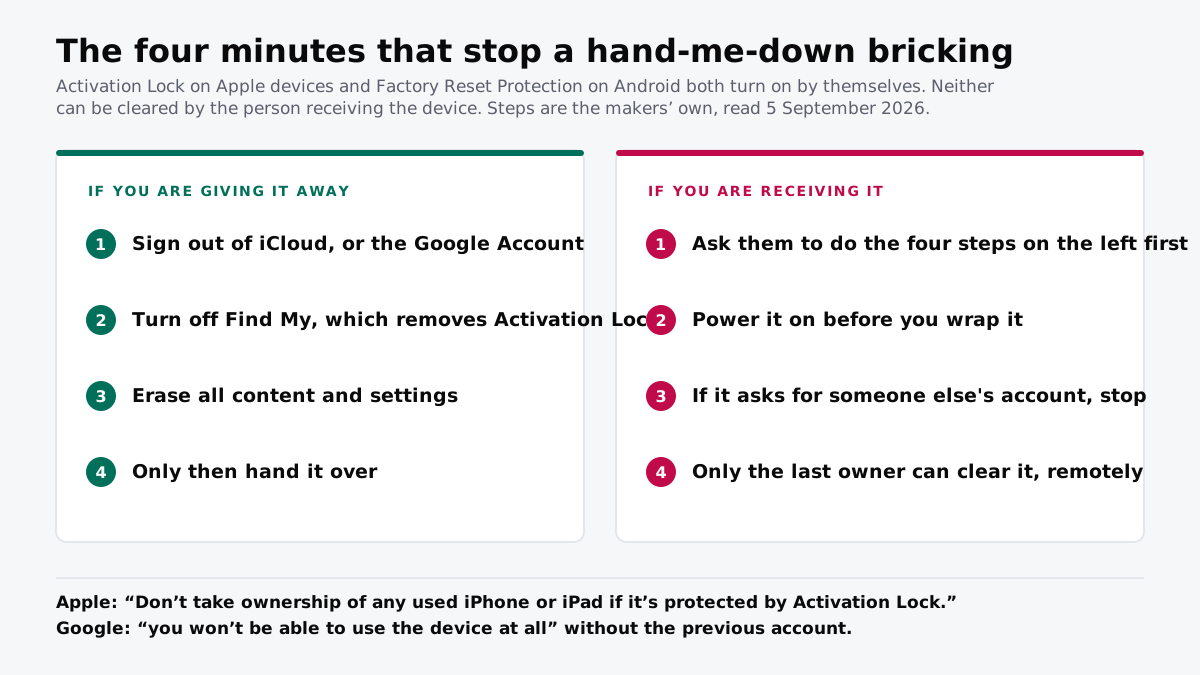
If you are giving a device away
Four steps, in this order, before it leaves your hands.
- Sign out of iCloud, or remove the Google Account. On an iPhone that is Settings, your name, scroll down, Sign Out.
- Turn off Find My. Apple states that doing this removes Activation Lock automatically. On Android, removing the Google Account is what turns off the protection.
- Erase all content and settings. On an iPhone this is under Transfer or Reset. Erasing also turns off Find My and Activation Lock, so it covers step two if you do it properly.
- Then hand it over, and not before.
The order matters. Wiping a device without signing out first is the specific mistake that creates the problem, because the lock survives the wipe and the account it points at is no longer on the phone to be removed.
If you are receiving one
Power it on before you wrap it. The whole failure is invisible until setup runs, which by default is Christmas morning in front of the person who gave it to you.
If the setup screen asks for an Apple Account or Google Account that is not yours, stop. Apple’s own guidance is blunt about this: “Don’t take ownership of any used iPhone or iPad if it’s protected by Activation Lock.” Google’s is blunter about the consequence, saying you will not be able to use the device at all.
There is no workaround, and services offering one are either selling you nothing or selling you something worse. The lock is the product.
The good news, if it has already gone wrong
The previous owner can clear it remotely, after the fact. Apple states that if you forgot to turn off Find My before giving a device away, Activation Lock can be removed through Find Devices on iCloud.com, and that it is removed immediately.
So the recovery is a phone call rather than a repair. That is worth knowing before anyone spends money on a shop that claims it can unlock the device, because the person who can actually do it is the one who gave it to you.
What to actually do
- Do the four steps a week early, not on the day. Every one of them needs the account password, and the account password is exactly what nobody can find under time pressure.
- Boot the device once before wrapping it. Thirty seconds of setup screen tells you whether the four steps worked.
- Never accept a locked device from a stranger. Apple says not to, and a second-hand phone that cannot be cleared cannot be made to work.
- Check for a carrier lock separately. It is a different mechanism with a different remedy, and a device can pass one check and fail the other.
- If it goes wrong, ask the giver, not a shop. Only their account can release it, and they can do it from a browser in about a minute.
How we researched this
No one at bitcritiq has handled this product. Everything here comes from published sources, listed below.
- What this cannot tell you
- This covers Apple's Activation Lock and Google's Factory Reset Protection on consumer devices. It does not cover managed or enterprise-enrolled hardware, where an organisation's mobile device management can impose a separate lock that neither the giver nor the recipient can remove. It does not cover carrier locks, which are a different mechanism with a different remedy. Menu paths change between operating system versions; the sequence is stable but the exact wording on screen may not be. This is not advice about a device you did not receive from someone you know.
How we chose this, and what we did
- Why this subject
- The most common tech gift in December is not bought at all — it is the phone or tablet somebody upgraded from. Both major platforms now lock a device to its previous owner's account automatically, and both say plainly that the recipient cannot undo it. That combination turns an ordinary act of generosity into a device that will not complete setup, and it is entirely avoidable in about four minutes.
- How we looked at it
- Every step and every quoted line comes from Apple's and Google's own support documentation, read on 5 September 2026. Nothing here is reconstructed from forum advice or from memory, which matters in a category where wrong instructions circulate widely and where following them can make the situation worse.
What this rests on
5 claims, all official. Nothing here was measured by bitcritiq — see how we test for why. Open a claim to read the source it came from.
Apple's Activation Lock switches on by itself, without the owner choosing it.Official
Apple's own support page states that Activation Lock turns on automatically when you turn on Find My on your device.
Apple tells people not to accept a used device that still has Activation Lock on it.Official
Apple's page states: "Don't take ownership of any used iPhone or iPad if it's protected by Activation Lock."
On Android, a device that has been factory reset cannot be used at all without the previous Google Account or screen lock.Official
Google's Factory Reset Protection page states that if you cannot give this information during setup, you will not be able to use the device at all.
Turning off Find My removes Activation Lock, and erasing the device does both.Official
Apple states that when you turn off Find My on an iPhone or iPad, Activation Lock is automatically removed, and that erasing the device turns off Find My and Activation Lock.
A device already handed over can still be cleared by the previous owner remotely.Official
Apple states that if you forgot to turn off Find My before selling or giving away a device, you can remove Activation Lock using Find Devices on iCloud.com, and that it is removed immediately.
Sources 4
- Activation Lock for iPhone and iPad — Apple SupportOfficialaccessed Sep 5, 2026
- What to do before you sell, give away, or trade in your iPhone or iPad — Apple SupportOfficialaccessed Sep 5, 2026
- How to remove Activation Lock — Apple SupportOfficialaccessed Sep 5, 2026
- Factory Reset Protection — Google Android HelpOfficialaccessed Sep 5, 2026
No email, no account
Follow bitcritiq
Every new article, in whatever reader you already use.
Subscribe by RSSAll the ways to follow
Using Chrome on Android? Open the browser menu and tap Follow. New articles then turn up in the Following tab in Discover.
read next
The Charging Pad Is Not What Ages Your Battery
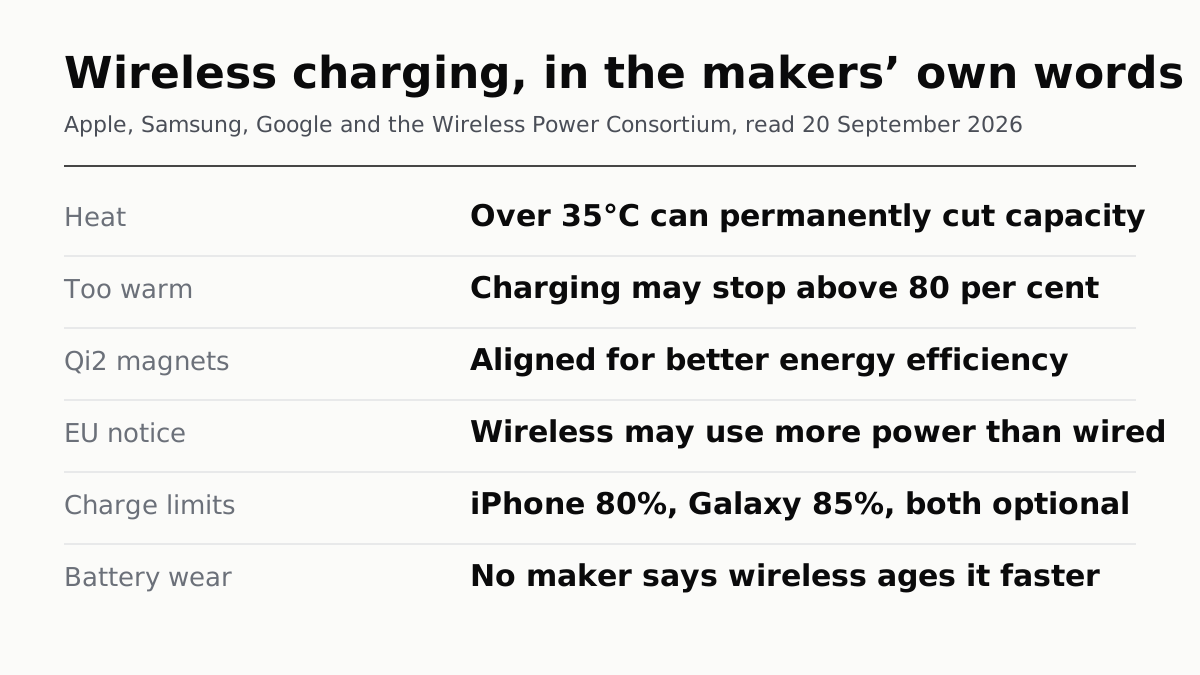
Apple, Samsung and Google name heat, cycles and time spent full. None names the charging method. Above 35°C, Apple says damage is permanent.
CarPlay Ultra Adds the Gauges. Your Car Decides.
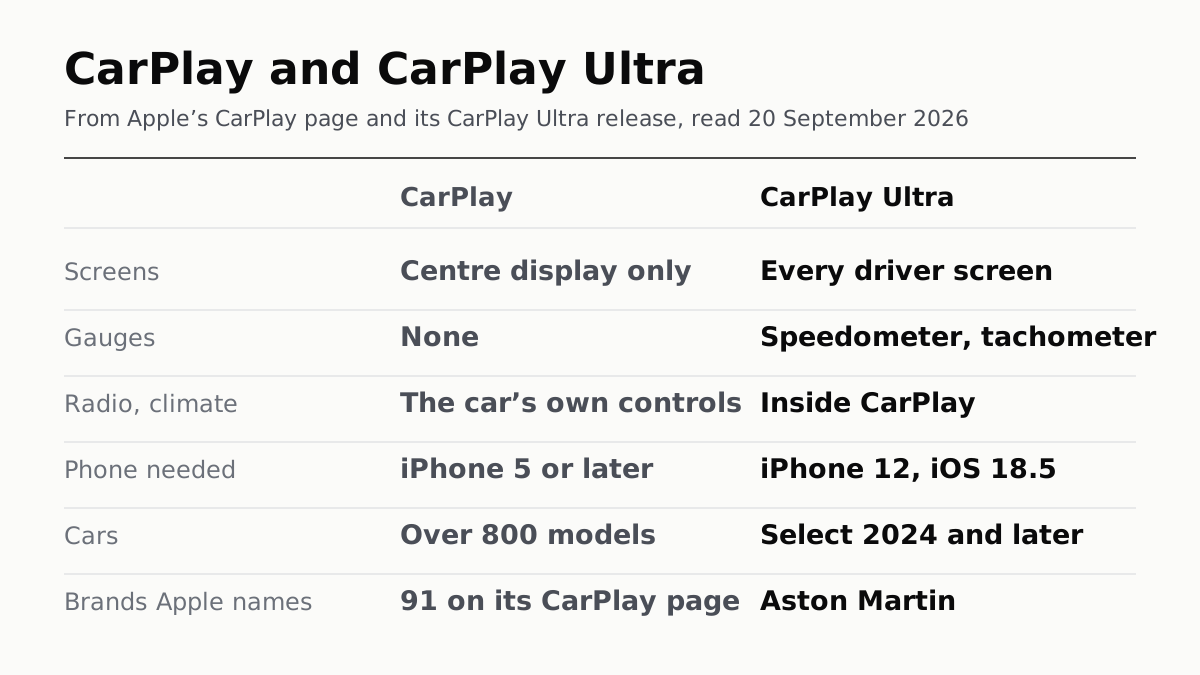
Apple asks for an iPhone 12 on iOS 18.5 and a select 2024-or-later car. Aston Martin is the one brand it has named shipping it.
When an iPad Says Not Charging, Apple Blames the Port
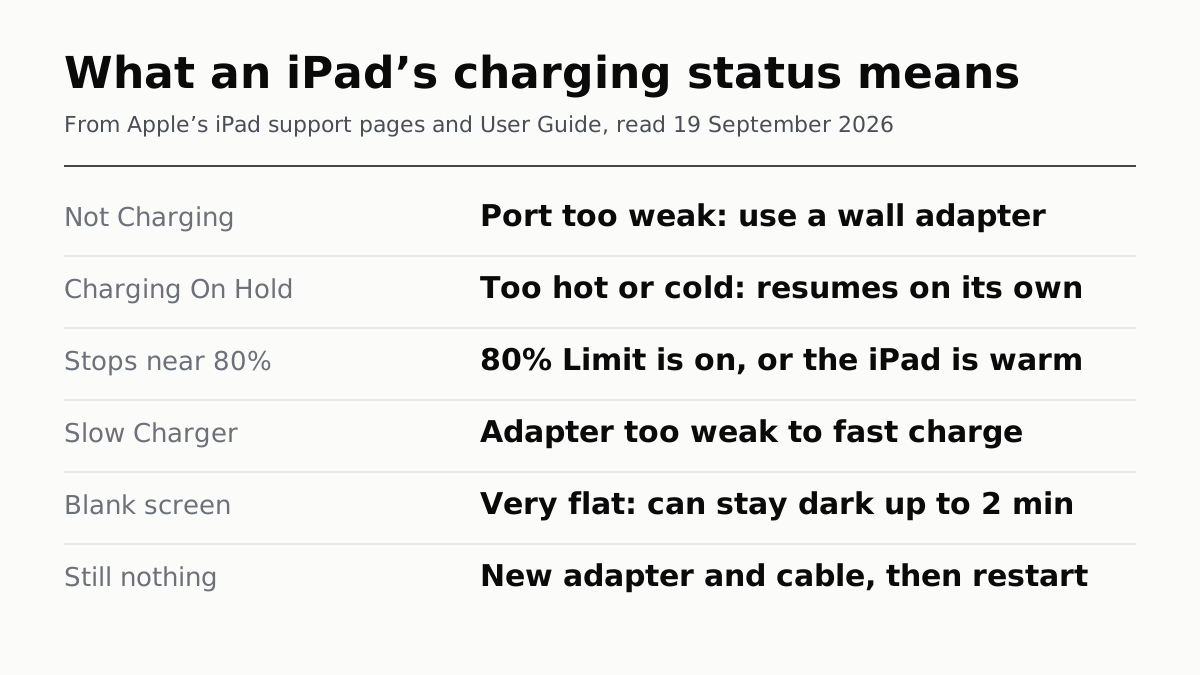
Apple's order of checks, the 15W minimum it sets for other adapters, and the two statuses that mean the iPad chose to stop.
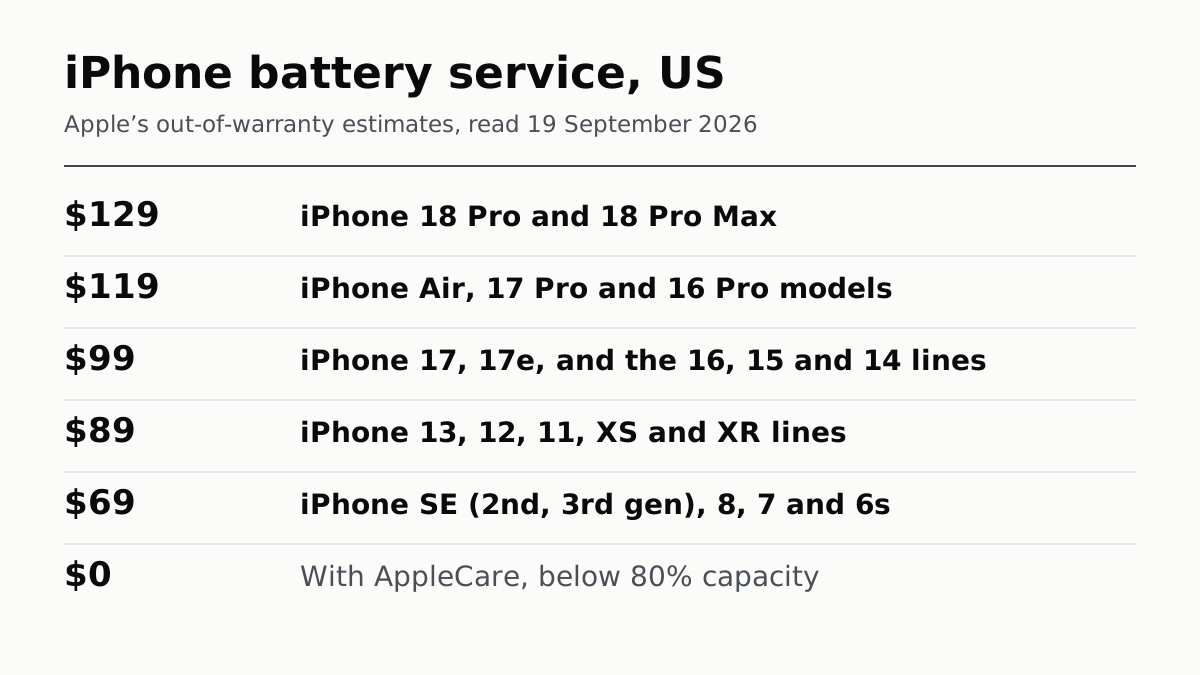
An iPhone Battery From Apple Costs $69 to $129
Apple's own estimator, model by model: the 18 Pro costs $10 more than the 17 Pro, and AppleCare pays in full once capacity drops below 80%.