iPhone to Android Moves Most Data, but Not Paid Apps
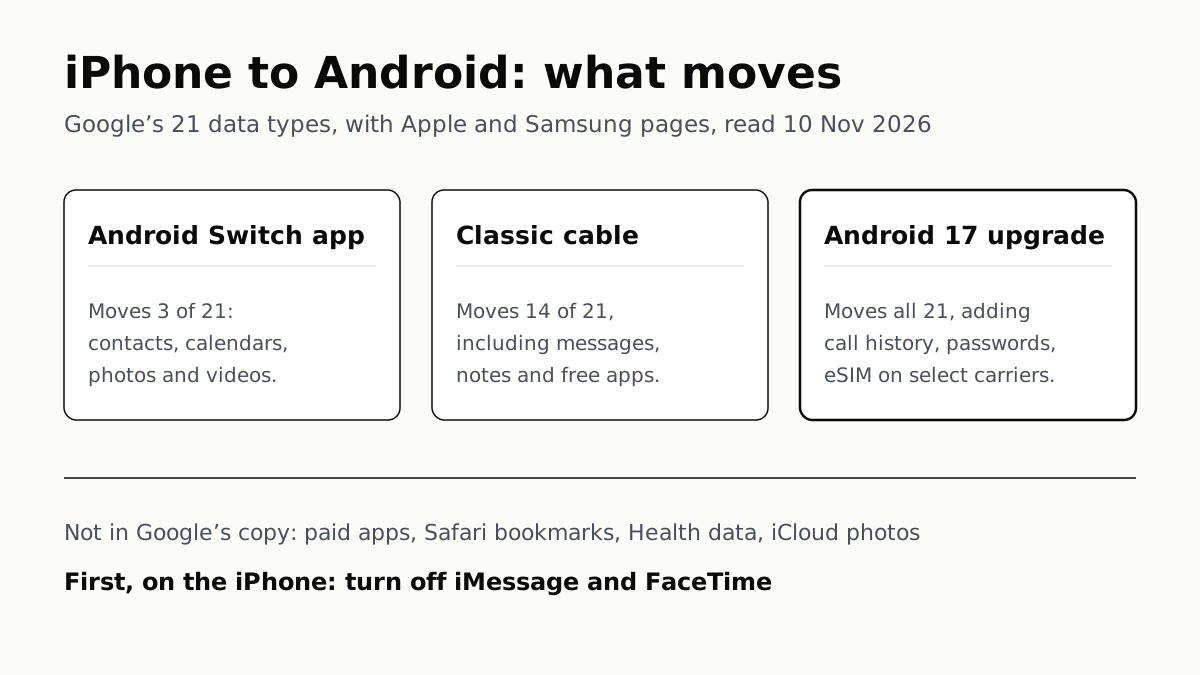
Turn off iMessage and FaceTime first so texts arrive. Android 17’s upgraded copy adds call history, passwords and the eSIM.
If you buy through our links, we may earn a commission. It never affects our verdicts or scores — how that works. As an Amazon Associate I earn from qualifying purchases.
Most of your iPhone comes across to Android at setup: contacts, photos, calendars, messages, notes and free apps, with a cable or Google’s newer Android 17 transfer. Google’s copy leaves paid apps and in-app purchases, Safari bookmarks, Health data and photos kept in iCloud behind, and you need to turn off iMessage and FaceTime on the iPhone so texts from iPhone users reach the new phone.
How much moves depends on the route. Google lists 21 data types: its Android Switch app moves 3 wirelessly, the classic cable transfer moves 14, and the upgraded process on Android 17 moves all 21.
Do these on the iPhone first
- Update and charge it. Google says to charge both phones, connect the iPhone to Wi-Fi and make sure you can unlock it with its passcode. It suggests turning off auto-lock.
- Turn off iMessage and FaceTime. In Settings, tap Apps, then Messages, and turn off iMessage; then Apps, FaceTime, and turn off FaceTime (Apple’s steps). Google’s transfer page says you must turn off iMessage, and its Messages page says to do it before the SIM comes out, or SMS and MMS messages “could continue going to your old iPhone instead of your new phone.”
- Move iCloud photos separately. Photos and videos stored in iCloud are on Google’s list of things that do not transfer. Google links a request that copies them from iCloud to Google Photos, and Samsung suggests doing that before the move to save time and space.
- Check storage on the new phone. Google says you will not be able to transfer everything if it runs out of room. A copy usually takes under 30 minutes, it says, and can take a few hours with a lot of data.
What moves, by route
| Data | Switch app | Cable | Android 17 | Smart Switch |
|---|---|---|---|---|
| Contacts | Yes | Yes | Yes | Both |
| Calendars | Yes | Yes | Yes, with attachments | Both |
| Photos and videos | Yes | Yes | Yes, with albums | Both |
| Messages | No | Yes | Yes, with encrypted and iCloud messages | Both |
| Notes | No | Yes | Yes, with attachments and labels | Both |
| Voice memos | No | Yes | Yes | Both |
| Alarms | No | Yes | Yes | Both |
| Music | No | Yes | Yes | Both (DRM-free) |
| Home screen layout | No | Yes | Yes | Both |
| Wallpaper (custom photo) | No | Yes | Yes | Cable |
| Free apps on Google Play | No | Yes | Yes | Both |
| Downloaded files | No | Yes | Yes | Not listed |
| Accessibility settings | No | Yes | Yes, more of them | Not listed |
| WhatsApp history | No | Yes | Yes, also after setup | Extra step, by cable |
| Call history | No | No | Yes | Wireless |
| Passwords and passkeys | No | No | Yes | Wireless |
| Wi-Fi networks | No | No | Yes | Wireless |
| All files and folders | No | No | Yes | Documents, both |
| Google Account | No | No | Yes | Not listed |
| App data | No | No | Yes, if the developer allows | Not listed |
| eSIM | No | No | Yes, select carriers | Not listed |
The first three columns are Google’s own table; “Android 17” is what Google calls the upgraded transfer. In the Smart Switch column, “Both” means Samsung lists it for a cable and for wireless on One UI 9, and “Wireless” means One UI 9 wireless only. Read on 10 November 2026.
What stays behind
| Item | Google’s transfer | Smart Switch | What to do |
|---|---|---|---|
| Paid apps and in-app purchases | Does not transfer | Not listed | Contact the app’s developer, Google suggests |
| Safari bookmarks | Does not transfer | Cable, with reading lists | Use Smart Switch by cable on a Galaxy |
| Health data | Does not transfer | Not listed | Neither page offers a route |
| Photos and videos in iCloud | Does not transfer | Listed for its iCloud route | Request the copy to Google Photos |
For paid subscriptions, Google’s table also says to contact the developer. Apple’s pages we read say nothing on App Store purchases. If WhatsApp is on your list, its iPhone-to-Android transfer has its own rules, and passwords kept in a third-party manager can move with Android’s newer manager-to-manager transfer.
Which route your phone gets
Google says the upgraded process starts on Android 17 on some devices: Pixel 8 and newer, Galaxy Z Flip 8, Galaxy Z Fold 8 and Galaxy S26 FE, and two Vivo X500 Pro models, with availability varying by country. If your phone qualifies, it shows a QR code as soon as you choose to copy from an iPhone or iPad; scan it with the iPhone’s camera. On those phones Google says you can also skip setup and copy later from Settings, under Accounts and backup.
Apple’s side of the same transfer is in iOS 26.3: Settings, General, Transfer or Reset iPhone, Transfer to Android. Apple says it needs a compatible version of Android 17 and moves third-party app data once the developer enables it.
Without a QR code you get the classic transfer. Use the iPhone’s charging cable (with a USB-A to USB-C adapter if needed), tap Trust, and stay with the phone, because Google says you enter your PIN during the copy. The wireless Android Switch app needs iOS 15 or later and, per Google’s table, moves contacts, calendars and photos alone.
On a Samsung Galaxy, Google notes Samsung has its own method. Samsung recommends a cable for One UI 8.5 and older; on One UI 9, wireless with iOS 26.6 or later is its pick and adds call logs, passwords and passkeys and Wi-Fi networks. WhatsApp still needs a cable there. Smart Switch also reminds you to deregister iMessage when it finishes.
Your number and the eSIM
A physical SIM card moves from the iPhone to the Android phone. For an eSIM, the upgraded transfer moves it on select carriers, and Apple lists AT&T, FirstNet, T-Mobile and Verizon in the US. Apple says that once the transfer completes, “the number will no longer work” on the iPhone. If your carrier is not on that list, download the eSIM from the carrier; how eSIM differs from a SIM card covers what to expect from that call.
If texts from iPhones go missing
Apple says to deregister if you are on a non-Apple phone and are not getting RCS or SMS/MMS messages. With the iPhone, put the SIM back in it, connect to cellular data, and turn off iMessage and FaceTime. Without it, use Apple’s Deregister iMessage page: enter the number, get a code by text and enter the 6-digit code. Apple says texts should arrive right away, though some Apple devices can take a few hours to notice.
Two loose ends. Google says to start new group chats with iPhone friends to keep getting their messages. Apple says iMessages sent to your Apple Account still reach any other Apple devices you keep. Once the new phone has everything, sign out and wipe the iPhone before it goes anywhere.
Questions people ask
What doesn’t transfer from iPhone to Android?
Google lists four things: paid apps and in-app purchases, bookmarks from Safari, Health data, and photos and videos stored in iCloud. For iCloud photos, Google points to a separate request that copies them to Google Photos.
Do I need to turn off iMessage before switching to Android?
Yes. Google says to turn it off before you take the SIM out, or texts from iPhone users can keep going to the old iPhone. Apple’s steps also turn off FaceTime. If you no longer have the iPhone, deregister your number on Apple’s website.
How do I deregister my number from iMessage without my iPhone?
Use Apple’s Deregister iMessage page. You enter the phone number, Apple texts a confirmation code, and you enter the 6-digit code. Apple says texts should arrive right away, though some Apple devices can take a few hours to notice.
Can I transfer my eSIM from iPhone to Android?
On iOS 26.3 or later and a compatible Android 17 phone, Apple says yes, with a supported carrier: AT&T, FirstNet, T-Mobile or Verizon in the US. Otherwise move the physical SIM card or download the eSIM from your carrier.
Do paid iPhone apps transfer to Android?
No. Google lists paid apps and in-app purchases as not transferring and suggests contacting the app’s developer. Free apps that are also on Google Play come across with a cable or the upgraded Android 17 transfer.
Do iMessages transfer to an Android phone?
With a cable, yes, says Google, and its upgraded Android 17 process also copies encrypted messages and messages stored in iCloud. The wireless Android Switch app does not copy messages. Samsung lists iMessages for Smart Switch by cable and on One UI 9 wirelessly.
How we researched this
No one at bitcritiq has handled this product. Everything here comes from published sources, listed below.
- What this cannot tell you
- Google says data types vary by manufacturer and device, and that availability of the upgraded process varies by country. Samsung’s older article ANS10001413 gives a different cable list (it includes call history and Wi-Fi), so we use the newer ANS10007653 and treat Smart Switch call history over cable as unconfirmed. Apple’s transfer page says iOS 26.3; Samsung’s One UI 9 wireless route asks for iOS 26.6 or later. Apple’s pages we read do not say what happens to App Store purchases or Apple subscriptions; the statement on paid apps is Google’s. We have not run a transfer.
How we chose this, and what we did
- Why this subject
- Upgrade and gift season brings iPhone owners to Android, and the questions arrive together: what comes across, what is lost, and why texts from iPhone friends stop arriving. Our WhatsApp and password-manager guides cover two pieces of it; nothing on the site covered the whole move.
- How we looked at it
- Read through a browser on 10 November 2026: Google’s Android Help articles ‘Copy apps & data from an iPhone or iPad to a new Android device’ (13626960) and ‘Switch texting from iMessage to Google Messages’ (6156081); Apple Support ‘Deregister iMessage on your iPhone or online’ (102455, published 12 May 2026), ‘Transfer an eSIM and data from your iPhone or iPad to an Android device’ (126058, published 11 May 2026) and Apple’s Deregister iMessage page on selfsolve.apple.com; and Samsung US ‘How to transfer data from iPhone to Samsung’ (ANS10007653). The 21 data types are the rows of Google’s own table, counted by hand: 3 marked Yes for the Android Switch app, 14 for the classic cable and 21 for the upgraded process. Smart Switch entries come from Samsung’s lists for cable and for wireless on One UI 9. Where we write ‘not listed’ for Smart Switch, the control is that the same Samsung page does list neighbouring items (contacts, notes, Wi-Fi) in that list.
What this rests on
6 claims, all official. Nothing here was measured by bitcritiq — see how we test for why. Open a claim to read the source it came from.
Google’s table lists 21 data types: 3 move with the Android Switch app, 14 with the classic cable transfer and all 21 with the upgraded process on Android 17.Official
Android Help 13626960: “Supported data varies depending on your devices and the transfer method used. The upgraded method supports transfers for more data types.” Columns: “Classic: Android Switch App (wireless)”, “Classic (cable)”, “Upgraded (wireless or cable)”.
Google lists paid apps and in-app purchases, Safari bookmarks, Health data and photos and videos on iCloud as not transferring.Official
Android Help 13626960, ‘What won’t transfer to your new device’: “Photos and videos on iCloud.” “Paid apps, and in-app purchases. We suggest you contact the app developer for further help.” “Bookmarks from Safari.” “Health data.”
Google says to turn off iMessage before removing the SIM, or texts can keep going to the old iPhone.Official
Android Help 6156081: “Make sure to turn iMessage off before you remove the SIM card from your iPhone. Otherwise, your SMS/MMS messages could continue going to your old iPhone instead of your new phone.”
Apple’s steps turn off both iMessage and FaceTime, and its online form deregisters the number without the iPhone.Official
Apple Support 102455: “Turn off iMessage… tap FaceTime. Turn off FaceTime.” “If you don't have access to your iPhone, you can deregister iMessage online. After you complete deregistration, your phone number is removed from iMessage services.”
From iOS 26.3 an iPhone can transfer its eSIM to an Android phone on supported carriers, which in the US are AT&T, FirstNet, T-Mobile and Verizon.Official
Apple Support 126058: “In iOS 26.3 and iPadOS 26.3, you can transfer your data and eSIM to an Android device…” “To transfer an eSIM, you need a supported carrier (USA: AT&T, FirstNet, T-Mobile, Verizon…).” “To use the transfer feature, you need a compatible version of Android 17.”
Samsung recommends a cable for Smart Switch on One UI 8.5 and older, and wireless on One UI 9 and newer, which adds call logs, passwords and passkeys and Wi-Fi.Official
Samsung ANS10007653: “Cable (Recommended for One UI 8.5 and older)”; “Wireless (Recommended for One UI 9 and newer)… compatible with iOS devices on iOS 26.6 or later and Android 17 with One UI 9 or later.” One UI 9 list includes “Calls (Call logs, missed calls)”, “Passwords and passkeys”, “Connected Wi-Fi information”.
Sources 7
- Copy apps & data from an iPhone or iPad to a new Android device — Android Help 13626960Officialaccessed Nov 10, 2026
- Switch texting from iMessage to Google Messages — Android Help 6156081Officialaccessed Nov 10, 2026
- Deregister iMessage on your iPhone or online — Apple Support 102455 (published 12 May 2026)Officialaccessed Nov 10, 2026
- Deregister and Turn Off iMessage — Apple Support (selfsolve.apple.com)Officialaccessed Nov 10, 2026
Show 3 more · 3 official or standards
- Transfer an eSIM and data from your iPhone or iPad to an Android device — Apple Support 126058 (published 11 May 2026)Officialaccessed Nov 10, 2026
- How to transfer data from iPhone to Samsung — Samsung US ANS10007653Officialaccessed Nov 10, 2026
- Transfer content from an iOS device with Samsung Smart Switch — Samsung US ANS10001413Officialaccessed Nov 10, 2026
Pass it on
Know someone weighing this up? Send them the answer.
bitcritiq.com/75nkThe link is permanent: it opens this article for good, even if the title changes.
No email, no account
Follow bitcritiq
Every new article, in whatever reader you already use.
Subscribe by RSSAll the ways to follow
Using Chrome on Android? Open the browser menu and tap Follow. New articles then turn up in the Following tab in Discover.
read next
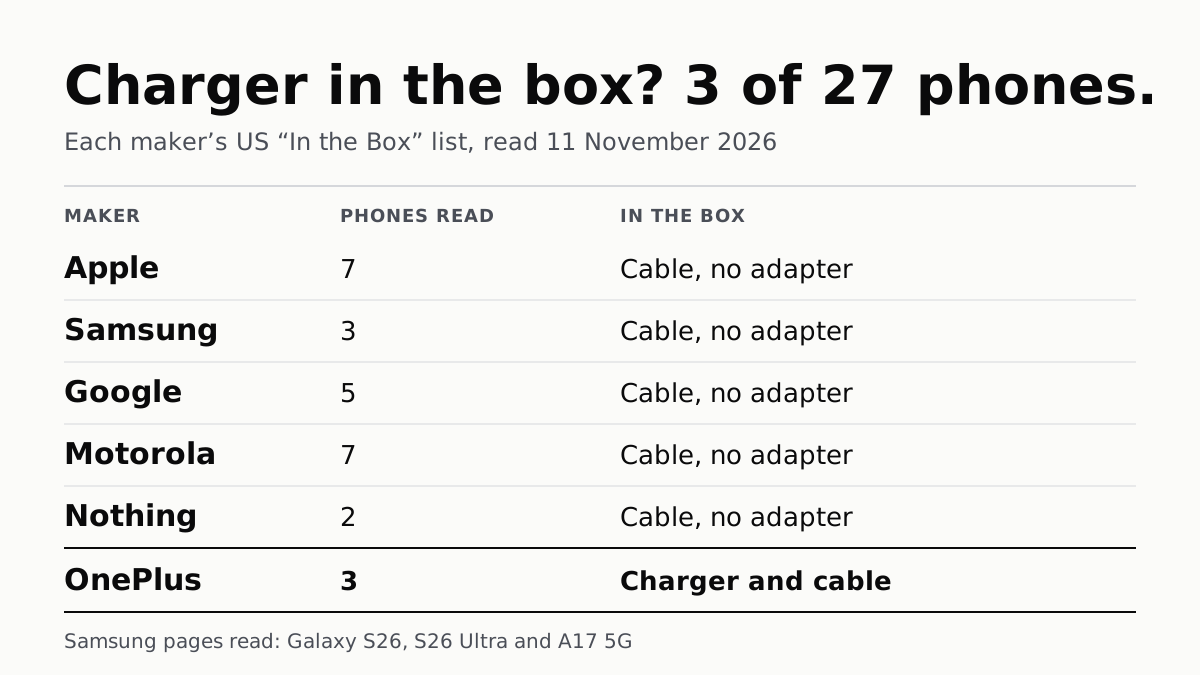
Of 27 Phones, Only OnePlus’s 3 Come With a Charger
Apple, Samsung, Google, Motorola and Nothing list a cable and no adapter in the box. Most name the charger wattage to buy.
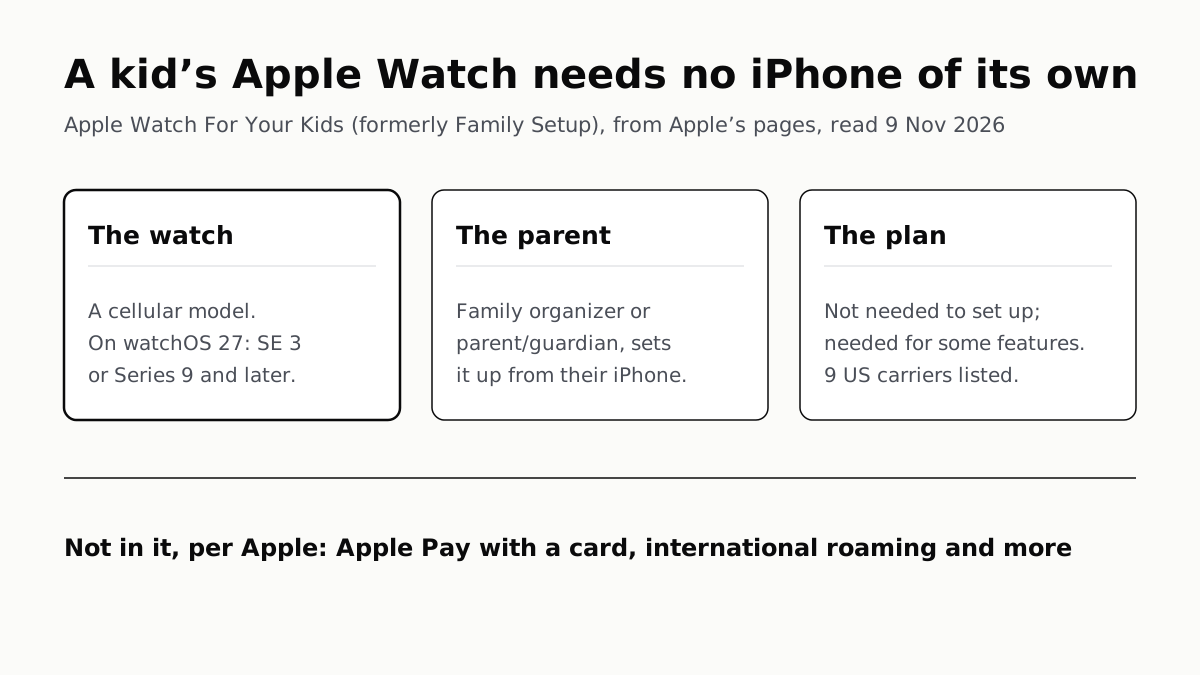
A Kid’s Apple Watch Needs a Cellular Model, Not an iPhone
Family Setup, now Apple Watch For Your Kids, is run from a parent’s iPhone. On watchOS 27 Apple names SE 3 or Series 9 and later.
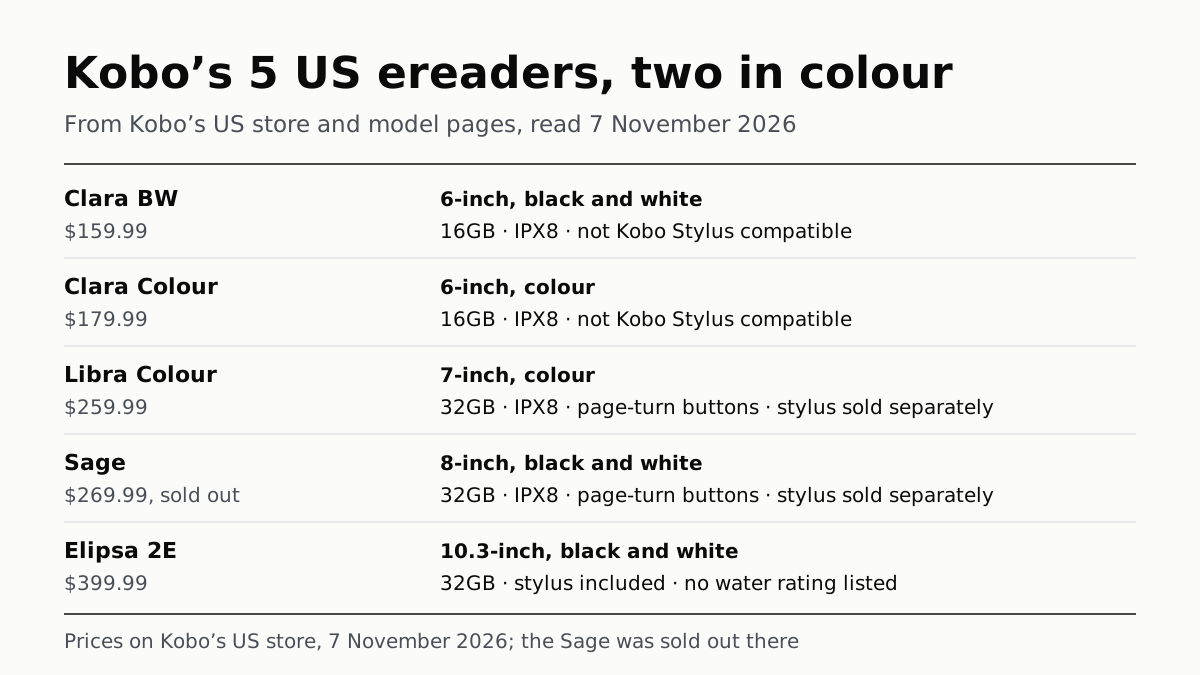
Kobo’s 5 US Ereaders: Two in Colour, Three Take a Stylus
From the 6-inch Clara BW at $159.99 to the 10.3-inch Elipsa 2E at $399.99, on Kobo’s US store. The Sage was sold out on 7 November.
Anker Power Banks: 6 of the 11 We Read Charge Wirelessly
Two Prime packs reach 140W from one USB-C port, and Anker prints watt-hours on three product pages, all under 100Wh.