Android Can Now Move Your Passkeys Between Password Managers
Until now passwords left as an unencrypted file and passkeys could not move at all. Four managers support the new transfer at launch.
If you buy through our links, we may earn a commission. It never affects our verdicts or scores — how that works. As an Amazon Associate I earn from qualifying purchases.
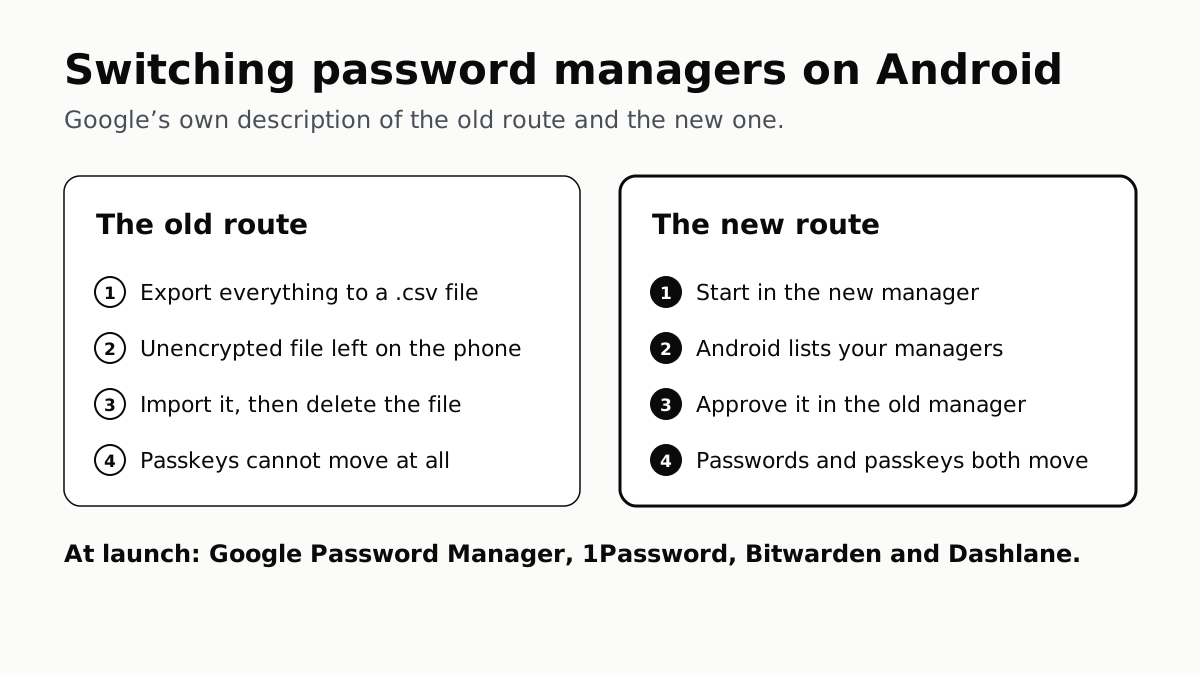
Moving to a different password manager on Android no longer means a file full of your passwords. Google says Android can now move passwords and passkeys between password managers “in just a few clicks — no file downloads required.”
That fixes two things at once. The old route left every password in “an unencrypted text file” on the phone, and passkeys “couldn’t be transferred at all.”
How the new transfer works
Google describes three steps, and the order is the part worth remembering:
- Start in the password manager you are moving to. Choose its option to import or copy passwords and passkeys from another provider. It hands the job to Android.
- Android shows the managers it found on your phone and which of them you can import from.
- Approve it in the manager you are leaving. Android takes you there to select, review and authorize what moves. Google says the transfer itself takes a few seconds.
At launch, Google names four managers that support it: Google Password Manager, 1Password, Bitwarden and Dashlane. It says more partners will follow.
If yours is not on that list
Until your password manager supports the transfer, you are on the older route, and Google still documents it. Its help page lists three steps for importing with a .csv file: export from the other app, import into Google Password Manager, and then delete the .csv file from your device.
That last step is the one that matters, because the file is every password you own in plain text. Google’s own help page lists export instructions from LastPass, Edge and Safari among others, which is a reasonable sign those users will still be exporting a file for now. And a file-based move still does nothing for passkeys, which you would recreate site by site.
Two related jobs worth doing while you are at it
If you are switching managers because you are switching phones, the passwords are only half of it. An iPhone backup only keeps saved passwords and health data when you tick the encrypt box, and a phone you hand on can refuse to work for its next owner if you do not sign out of it first.
How we researched this
No one at bitcritiq has handled this product. Everything here comes from published sources, listed below.
- What this cannot tell you
- This describes Android and the four password managers Google names at launch. Other managers may add support later — Google says more partners will follow — and until one does, its users are on the older file-based route. Nothing here compares the security of the password managers themselves.
How we chose this, and what we did
- Why this subject
- Google announced on 10 September that Android can move passwords and passkeys between password managers without a file. Switching managers has been one of the most common reasons people stay with one they dislike, and passkeys made that worse, because until now they could not be carried across at all.
- How we looked at it
- Every step and quoted line is from Google's own announcement on its Keyword blog, dated 10 September 2026, and from Google's Password Manager help article on importing and exporting passwords, both read on 15 September 2026. Nothing here was tested by us.
What this rests on
6 claims, all official. Nothing here was measured by bitcritiq — see how we test for why. Open a claim to read the source it came from.
Android can now move passwords and passkeys between password managers without downloading a file.Official
Google's announcement describes a new experience to move passwords and passkeys between password managers 'in just a few clicks — no file downloads required.'
Until now, moving passwords on Android meant an unencrypted file sitting on the phone.Official
Google states that historically, moving passwords meant 'downloading them into an unencrypted text file, which left them unprotected on your device.'
Passkeys could not be transferred between managers at all before this.Official
Google states that 'passkeys couldn't be transferred at all, so you'd have to recreate them across multiple sites and apps.'
The transfer starts in the new password manager and is approved in the old one.Official
Google describes opening the new password manager and choosing to import, Android detecting existing password managers on the device, then being taken to the existing manager to select, review and authorize the transfer.
At launch the transfer works with four password managers.Official
Google states the experience is 'already available on Google Password Manager, 1Password, Bitwarden Password Manager, and Dashlane, with more partners to follow.'
Google's help still documents the file-based route, and tells you to delete the file afterwards.Official
Google's Password Manager help for Android lists importing with a .csv file in three steps, the last being 'Delete your .csv password file on your device'.
Sources 2
- Switching password managers is easy and safe on Android — Google, The Keyword, 10 September 2026Officialaccessed Sep 15, 2026
- Import or export passwords and passkeys with Google Password Manager (Android) — Google Chrome HelpOfficialaccessed Sep 15, 2026
No email, no account
Follow bitcritiq
Every new article, in whatever reader you already use.
Subscribe by RSSAll the ways to follow
Using Chrome on Android? Open the browser menu and tap Follow. New articles then turn up in the Following tab in Discover.
read next
The Charging Pad Is Not What Ages Your Battery
CarPlay Ultra Adds the Gauges. Your Car Decides.
When an iPad Says Not Charging, Apple Blames the Port