Which iPad Do I Have? The A-Number Tells You
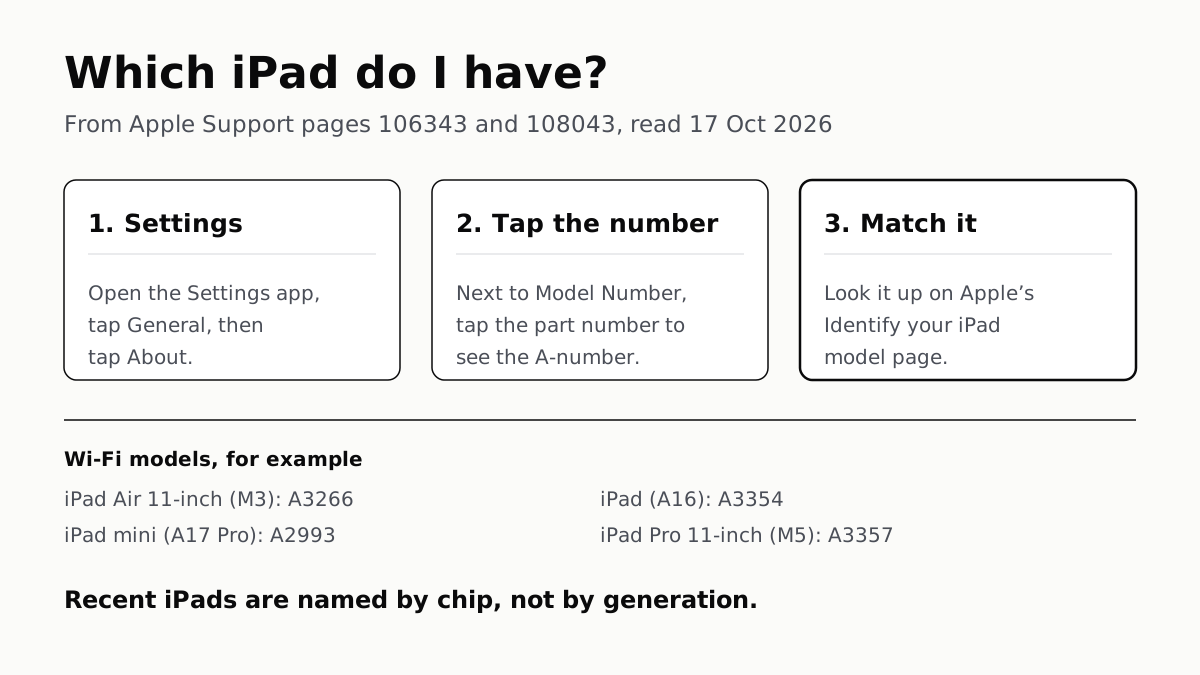
Settings shows a part number; tap it once for the A-number, then match it on Apple's list. Newer iPads are named by chip, not generation.
If you buy through our links, we may earn a commission. It never affects our verdicts or scores — how that works. As an Amazon Associate I earn from qualifying purchases.
To tell which iPad you have, open Settings › General › About, tap the part number next to Model Number to reveal the A-number, and match it on Apple’s list. The newest iPads have no generation number: Apple names them by chip, so an iPad Air (M3) is simply that, the 2025 model, A3266 or A3267 in the 11-inch size.
Find the A-number in Settings
Apple’s steps, from its support page on model numbers:
- Open Settings, then tap General.
- Tap About.
- Next to Model Number is a part number. Tap it, and it changes to the model number, which starts with A.
If the iPad will not start, Apple says some iPads have the model number on the back. On an iPad that does not, look inside the USB-C or Lightning port, in bright light, on the upper side of the connector, the side with the display.
Match it to the table
Every row below is from Apple’s “Identify your iPad model” page, published 10 March 2026. Apple also lists a separate China-mainland-only number for most cellular models; those are not in the table.
| iPad (Apple’s name) | Year | Wi-Fi | Wi-Fi + Cellular |
|---|---|---|---|
| iPad Pro 13-inch (M5) | 2025 | A3360 | A3361 |
| iPad Pro 11-inch (M5) | 2025 | A3357 | A3358 |
| iPad Pro 13-inch (M4) | 2024 | A2925 | A2926 |
| iPad Pro 11-inch (M4) | 2024 | A2836 | A2837 |
| iPad Air 13-inch (M4) | 2026 | A3461 | A3462 |
| iPad Air 11-inch (M4) (affiliate link to Amazon, opens in a new tab) | 2026 | A3459 | A3460 |
| iPad Air 13-inch (M3) | 2025 | A3268 | A3269 |
| iPad Air 11-inch (M3) | 2025 | A3266 | A3267 |
| iPad Air 13-inch (M2) | 2024 | A2898 | A2899 |
| iPad Air 11-inch (M2) | 2024 | A2902 | A2903 |
| iPad Air (5th generation) | 2022 | A2588 | A2589, A2591 |
| iPad Air (4th generation) | 2020 | A2316 | A2324, A2325, A2072 |
| iPad mini (A17 Pro) | 2024 | A2993 | A2995 |
| iPad mini (6th generation) | 2021 | A2567 | A2568 |
| iPad (A16) | 2025 | A3354 | A3355 |
| iPad (10th generation) | 2022 | A2696 | A2757 |
| iPad (9th generation) | 2021 | A2602 | A2604, A2603 (North America) |
Older iPads, back to the first iPad Pro and iPad Air, are on the same Apple page.
Chip names replaced generation numbers
On Apple’s list, the iPads launched from 2024 carry chip names, not numbers. The same page that lists the iPad Air (5th generation), iPad mini (6th generation) and iPad (10th generation) lists their successors as iPad Air (M2), iPad mini (A17 Pro) and iPad (A16). The iPad Pro made the same switch with the M4. So when a site calls the iPad Air (M3) the “7th generation”, that is a count, not Apple’s name: it is the seventh iPad Air on Apple’s list, and the iPad Air (M4) from 2026 followed it.
The chip in the name matters for more than tidiness. Apple Intelligence on iPad needs M1 or later or the A17 Pro, which leaves the iPad (A16) (affiliate link to Amazon, opens in a new tab) outside it — the detail is in which iPads get iPadOS 27. The model also decides which Pencil fits: the iPad Air (M2) and later take a different one from the iPad Air (5th generation), set out in which Apple Pencil works with your iPad.
iPad Air (M3): size, dimensions and specs
Both sizes share the chip, storage options and cameras. Figures are from Apple’s two tech specs pages.
| iPad Air 11-inch (M3) | iPad Air 13-inch (M3) | |
|---|---|---|
| Height × width × depth | 247.6 × 178.5 × 6.1 mm | 280.6 × 214.9 × 6.1 mm |
| In inches | 9.74 × 7.02 × 0.24 | 11.04 × 8.46 × 0.24 |
| Weight, Wi-Fi | 460 g (1.01 lb) | 616 g (1.36 lb) |
| Weight, Wi-Fi + Cellular | 460 g (1.01 lb) | 617 g (1.36 lb) |
| Screen, measured as a rectangle | 10.86 in | 12.9 in |
| Chip | M3: 8-core CPU, 9-core GPU, 16-core Neural Engine | Same |
| Memory | 8GB | 8GB |
| Storage | 128GB, 256GB, 512GB, 1TB | Same |
Apple lists the 11-inch at 460 grams for both the Wi-Fi and cellular models. The 11-inch screen is 2360 by 1640 pixels at 264 ppi and 500 nits, per Apple. Both sizes have a 12MP rear camera, a 12MP Center Stage front camera on the landscape edge, Touch ID in the top button, and eSIM only on cellular models, with no SIM tray.
If the iPad you are identifying will not charge
A model number is often the first thing a repair desk or support chat asks for. If you are looking it up because the iPad has stopped charging, start with why an iPad won’t charge, and what to check first.
Questions people ask
iPad Air M3 is which generation?
Apple does not give it a generation number. Its name is iPad Air 11-inch (M3) or iPad Air 13-inch (M3), from 2025. Counting the entries on Apple’s own list, it is the seventh iPad Air, after the M2 and before the iPad Air (M4) from 2026.
What is the iPad Air M3 size?
Two sizes. Apple says the 11-inch screen measures 10.86 inches diagonally as a rectangle, and the 13-inch measures 12.9 inches. Both bodies are 6.1 mm thick.
What are the iPad Air M3 dimensions?
The 11-inch is 247.6 mm tall, 178.5 mm wide and 6.1 mm deep (9.74 × 7.02 × 0.24 inches) and weighs 460 grams. The 13-inch is 280.6 × 214.9 × 6.1 mm (11.04 × 8.46 × 0.24 inches), 616 grams for Wi-Fi and 617 grams with cellular.
What are the iPad Air M3 specs?
Apple’s tech specs list an M3 chip with an 8-core CPU, 9-core GPU, 16-core Neural Engine and 8GB of RAM; 128GB, 256GB, 512GB or 1TB of storage; a 12MP rear camera and a 12MP landscape front camera; Touch ID in the top button; and eSIM only on cellular models.
What are the iPad M3 specs?
The only iPads Apple lists with an M3 are the iPad Air 11-inch and 13-inch (M3) from 2025: 8-core CPU, 9-core GPU, 8GB of RAM. Apple’s list has no iPad Pro (M3): the chip-named Pros are the M4 from 2024 and the M5 from 2025.
How do I find my iPad model number?
Open Settings, tap General, then About. Next to Model Number is a part number; tap it and it changes to the model number, which starts with A. Apple also prints it on the back of some iPads, or inside the USB-C or Lightning port.
Which generation is the iPad (A16)?
Apple names it iPad (A16), with no generation number, from 2025. On Apple’s list it follows the iPad (10th generation) from 2022. Its Wi-Fi model number is A3354, and A3355 is the Wi-Fi + Cellular model.
How we researched this
No one at bitcritiq has handled this product. Everything here comes from published sources, listed below.
- What this cannot tell you
- The table covers iPads from 2020 onward; Apple's page goes back further and is the place to check an older one. Calling the iPad Air (M3) the seventh iPad Air is our count of the entries on Apple's list, not a name Apple uses, and other sites may count differently. We have not handled these iPads; nothing here describes how they feel or perform.
How we chose this, and what we did
- Why this subject
- Search Console, 17 September to 14 October 2026, shows readers landing on our iPad Air (M3) product page with “ipad air m3 is which generation”, “ipad air m3 size”, “ipad air m3 dimensions”, “ipad air m3 specs” and “ipad m3 specs”, at positions 34 to 94. The product page does not answer the generation question, and no bitcritiq post maps model numbers to iPads, so this guide answers how to identify any iPad and puts the iPad Air (M3) facts in one place.
- How we looked at it
- Read through a browser on 17 October 2026. The steps for finding the model number are from Apple Support 106343, 'Find the model number of your iPhone, iPad, or iPod touch' (published 9 December 2025). Every model number, model name and year in the table is from Apple Support 108043, 'Identify your iPad model' (published 10 March 2026), copied row by row for the Wi-Fi and Wi-Fi + Cellular models; the China-mainland-only numbers are left out of the table and noted in the text. Sizes, weights and chip details for the iPad Air (M3) are from Apple's tech specs pages 122241 (11-inch) and 122242 (13-inch). The statement that Apple does not give the chip-named iPads a generation number has a control: the same page 108043 does number the older models in each line, such as iPad Air (5th generation), iPad mini (6th generation) and iPad (10th generation).
What this rests on
6 claims, all official. Nothing here was measured by bitcritiq — see how we test for why. Open a claim to read the source it came from.
Settings › General › About shows a part number next to Model Number; tapping it shows the model number.Official
Apple Support 106343: 'Open the Settings app, then tap General. Tap About. To the right of Model Number, you'll find the part number. To find the model number, tap the part number.'
On an iPad that does not show the model number on the back, Apple says to look inside the USB-C or Lightning connector.Official
Apple Support 106343: 'If you have an iPhone without a SIM tray or an iPad that doesn't show the model number on the back, look in the USB-C or Lightning connector… Find the model number on the upper side of the connector—the side with the display.'
The iPad Air 11-inch (M3) is A3266 (Wi-Fi) or A3267 (Wi-Fi + Cellular), and the 13-inch is A3268 or A3269; both are from 2025.Official
Apple Support 108043: 'iPad Air 11-inch (M3) Year: 2025 … A3266 on iPad Air 11-inch (M3) Wi-Fi, A3267 on iPad Air 11-inch (M3) Wi-Fi + Cellular'; 'iPad Air 13-inch (M3) Year: 2025 … A3268 … A3269'.
Apple names its newest iPads by chip, and the iPad Air (M4) from 2026 follows the M3.Official
Apple Support 108043 lists iPad Pro (M5), iPad Pro (M4), iPad Air (M4) with 'Year: 2026', iPad Air (M3) and (M2), iPad mini (A17 Pro) and iPad (A16) with no generation number, while older entries read iPad Air (5th generation), iPad mini (6th generation) and iPad (10th generation).
The iPad Air 11-inch (M3) measures 247.6 by 178.5 by 6.1 mm and weighs 460 grams; the 13-inch measures 280.6 by 214.9 by 6.1 mm and weighs 616 grams (Wi-Fi).Official
Apple Support 122241: 'Width: 7.02 inches (178.5 mm) Height: 9.74 inches (247.6 mm) Depth: 0.24 inch (6.1 mm) Weight: 1.01 pounds (460 grams)'. Apple Support 122242: 'Width: 8.46 inches (214.9 mm) Height: 11.04 inches (280.6 mm) Depth: 0.24 inch (6.1 mm) Weight: 1.36 pounds (616 grams)', 617 grams for Wi-Fi + Cellular.
Both sizes of iPad Air (M3) use an M3 chip with an 8-core CPU, 9-core GPU and 8GB of RAM.Official
Apple Support 122241 and 122242, Chip: 'Apple M3 chip, 8-core CPU with 4 performance cores and 4 efficiency cores, 9-core GPU … 16-core Neural Engine, 8GB RAM'.
Sources 4
- Identify your iPad model — Apple Support 108043 (published 10 March 2026)Officialaccessed Oct 17, 2026
- Find the model number of your iPhone, iPad, or iPod touch — Apple Support 106343 (published 9 December 2025)Officialaccessed Oct 17, 2026
- iPad Air 11-inch (M3) — Tech Specs — Apple Support 122241Officialaccessed Oct 17, 2026
- iPad Air 13-inch (M3) — Tech Specs — Apple Support 122242Officialaccessed Oct 17, 2026
Pass it on
Know someone weighing this up? Send them the answer.
bitcritiq.com/za8gThe link is permanent: it opens this article for good, even if the title changes.
No email, no account
Follow bitcritiq
Every new article, in whatever reader you already use.
Subscribe by RSSAll the ways to follow
Using Chrome on Android? Open the browser menu and tap Follow. New articles then turn up in the Following tab in Discover.
read next
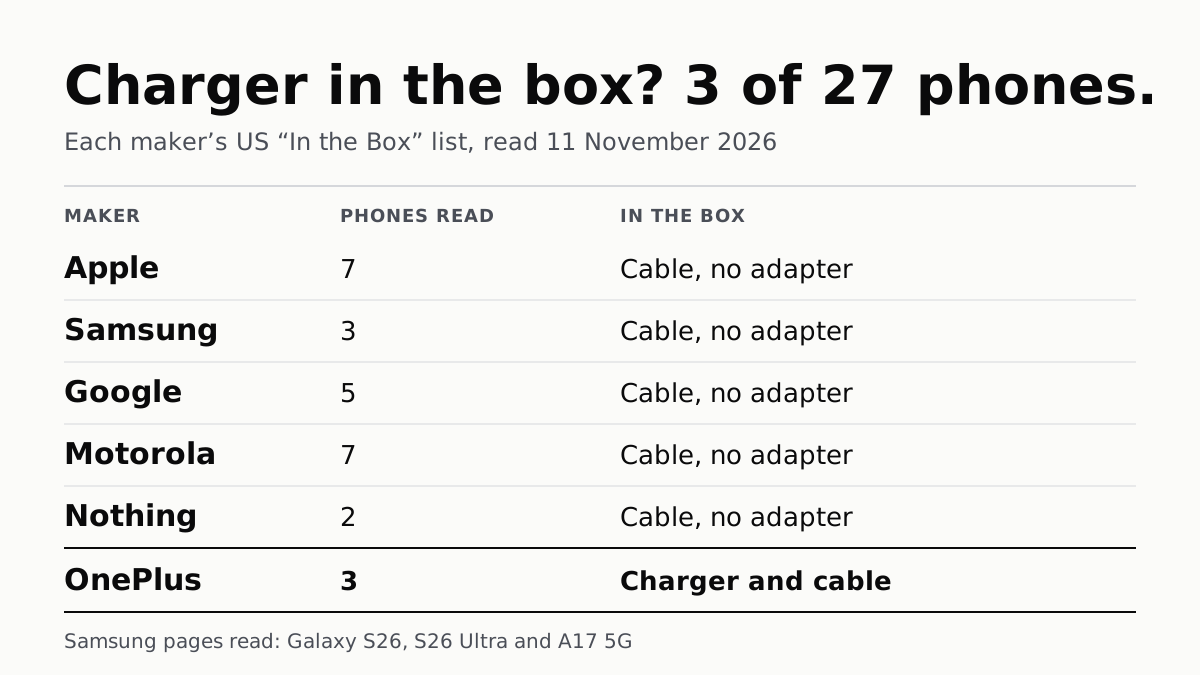
Of 27 Phones, Only OnePlus’s 3 Come With a Charger
Apple, Samsung, Google, Motorola and Nothing list a cable and no adapter in the box. Most name the charger wattage to buy.
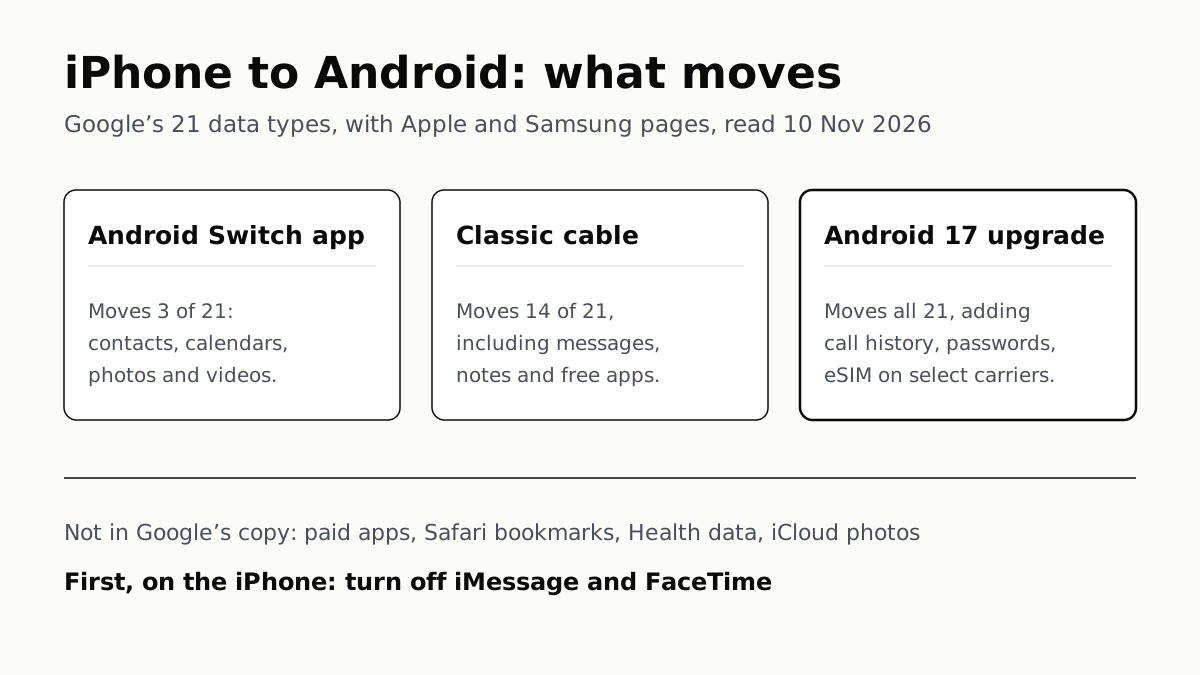
iPhone to Android Moves Most Data, but Not Paid Apps
Turn off iMessage and FaceTime first so texts arrive. Android 17’s upgraded copy adds call history, passwords and the eSIM.
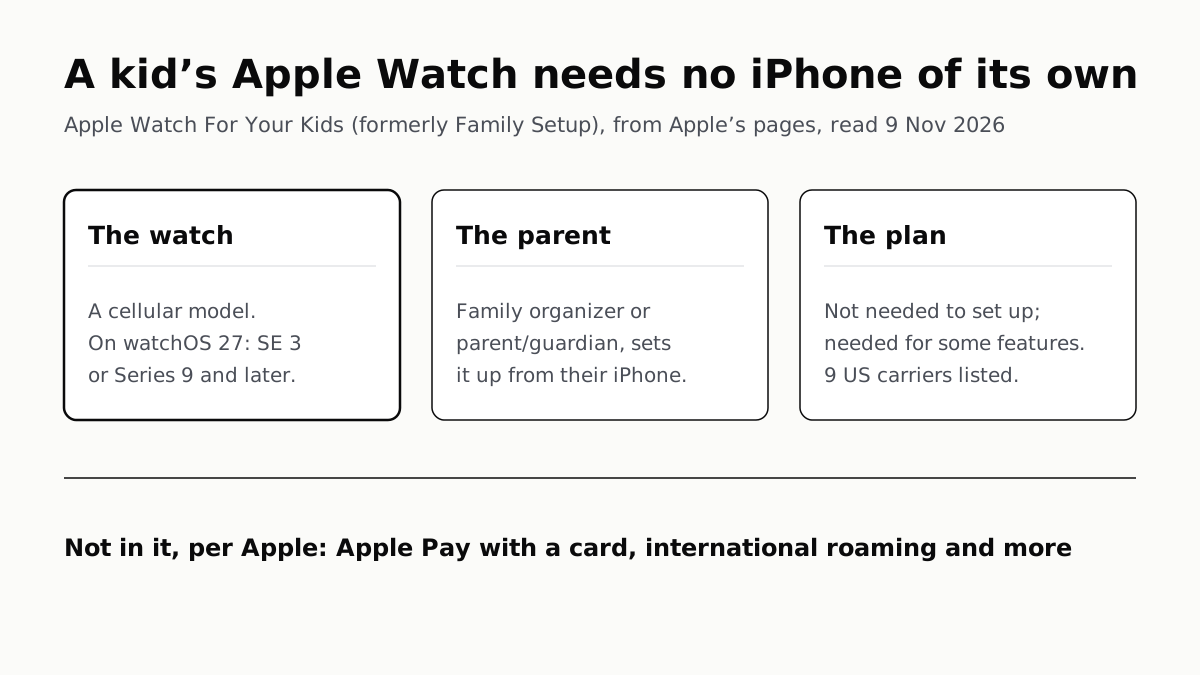
A Kid’s Apple Watch Needs a Cellular Model, Not an iPhone
Family Setup, now Apple Watch For Your Kids, is run from a parent’s iPhone. On watchOS 27 Apple names SE 3 or Series 9 and later.
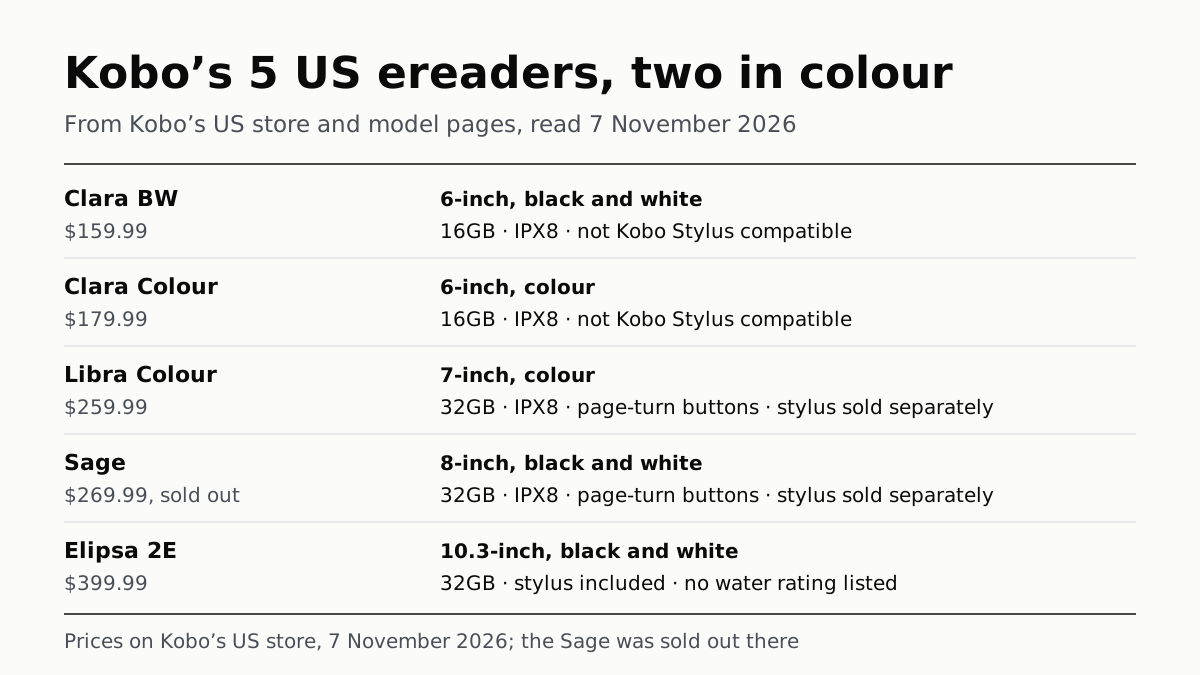
Kobo’s 5 US Ereaders: Two in Colour, Three Take a Stylus
From the 6-inch Clara BW at $159.99 to the 10.3-inch Elipsa 2E at $399.99, on Kobo’s US store. The Sage was sold out on 7 November.