Send Your AirTag Link to United, Delta, American, JetBlue
Find My’s Share Item Location makes a seven-day link a bag agent can open. Apple says more than 50 airlines accept it.
If you buy through our links, we may earn a commission. It never affects our verdicts or scores — how that works. As an Amazon Associate I earn from qualifying purchases.
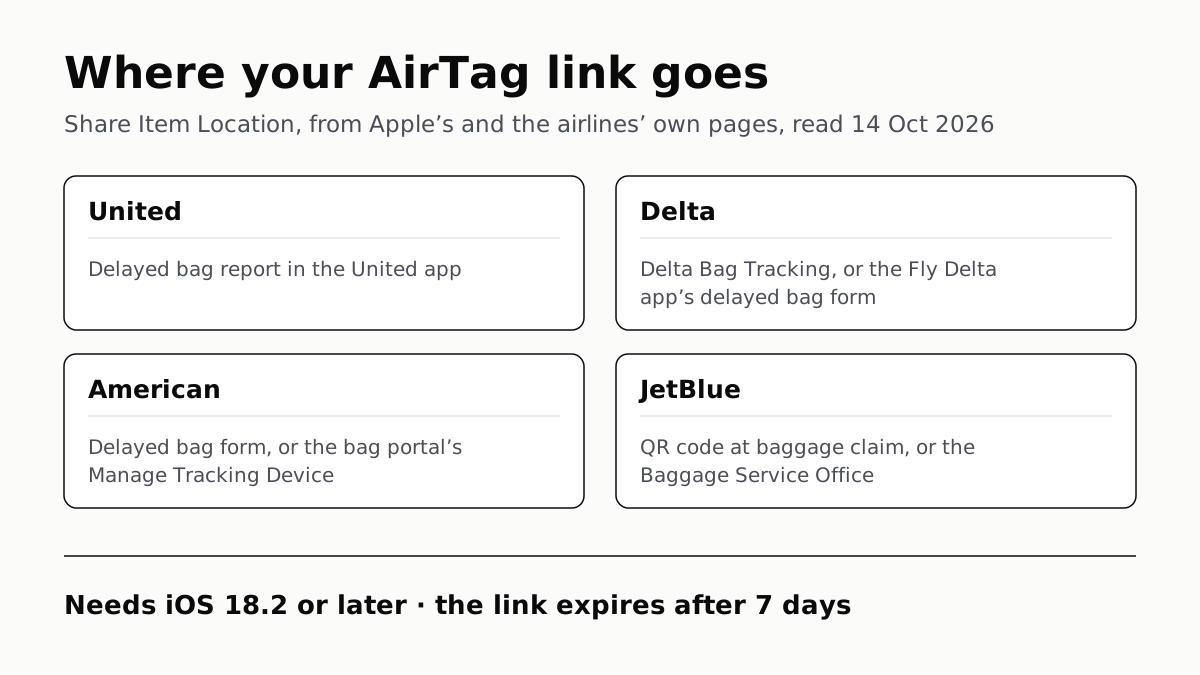
Yes: Apple’s Find My app can make a temporary link to your AirTag’s location that you hand to the airline when a bag is delayed, and Apple says more than 50 airlines accept it. United, Delta, American and JetBlue each say on their own pages where the link goes.
The feature is called Share Item Location. It needs iOS 18.2 or later, and the link stops working after seven days, as soon as you are back with the bag, or when you end it.
Where each airline takes the link
| Airline | Accepts it (source) | Where you give the link |
|---|---|---|
| United | Yes (United’s release, Dec 2024; on Apple’s 2024 list) | The delayed baggage report in the United app |
| Delta | Yes (Delta’s baggage page; on Apple’s 2024 list) | Delta Bag Tracking, with your 10-digit bag tag and confirmation numbers, or the “Share Find My Item Location” field in the Fly Delta app’s delayed bag form |
| American | Yes (American’s baggage page) | The delayed bag form, or later in the bag portal under Manage Tracking Device |
| JetBlue | Yes (JetBlue’s release, June 2025) | A QR code in the baggage claim area, or a crewmember at the Baggage Service Office |
| Alaska, Southwest | No first-party page found | Ask at the baggage service office |
Delta asks for the link once the bag has already been reported delayed at its Baggage Service Office. American’s page says the link can also be added after the report is filed, from its bag portal.
Apple’s January 2026 AirTag release puts the partner count at more than 50 airlines, but the most recent list of names we found from Apple is from November 2024: Aer Lingus, Air Canada, Air New Zealand, Austrian Airlines, British Airways, Brussels Airlines, Delta, Eurowings, Iberia, KLM, Lufthansa, Qantas, Singapore Airlines, Swiss, Turkish Airlines, United, Virgin Atlantic and Vueling. We found no page on Alaska’s or Southwest’s own sites about it. That is not a refusal, so ask at the desk.
How to share your AirTag’s location
- Report the bag as delayed with the airline first. United, Delta and American all tie the link to a delayed bag report.
- Open Find My on your iPhone, iPad or Mac and tap Items.
- Tap the AirTag (affiliate link to Amazon, opens in a new tab) in the missing bag, then tap Share Item Location.
- Follow the on-screen steps to create the link, then copy it.
- Paste it where your airline asks for it, from the table above.
- To check who opened it, go back to Share Item Location and read the Visited By and Expiration rows.
Two conditions are easy to miss. Apple says you cannot share an item that is close to the device you are sharing from, so this works once the bag is somewhere else. And the map updates only while at least one of your Apple devices signed in to your Apple Account is online. If you are abroad, that means keeping your iPhone on data, which our guide to roaming day passes and travel eSIMs covers.
What the airline sees, and for how long
Whoever opens the link has to sign in, either with an Apple Account or as a registered Apple Partner using a work email and a verification code. Apple says they then see the item’s most recent location, the phone number or email of the Apple Account it is registered to, and its serial number. If the agent opens the link in Find My on an iPhone with iOS 26 or later and Ultra Wideband, and the AirTag is within Bluetooth range, they can use Precision Finding to walk to it.
The link ends after 7 days, when you are reunited with the bag, or when you tap Stop Sharing Item Location. If the search runs longer, Apple says to make a new link and send it again. Apple also notes Find Lost Item is not available in all countries and regions.
Does it help? Apple quotes SITA, the airline IT company, saying carriers report 26 percent fewer baggage delays and 90 percent fewer “truly lost” bags with Share Item Location. Those are SITA’s figures as Apple reports them, not a published study we could check.
Android: Find Hub has its own version
Google’s Find Hub does the same thing for a Find Hub tag. On your Android phone, open Find Hub, pick the tag, and tap Share item location; the option appears only when the tag is not nearby, and the link expires after 7 days. Google’s help page and its android.com guide name the button differently (“Share item location” and “Share device”), so look for either.
Google’s list of airlines taking these links names Ajet, Air India, Austrian Airlines, Brussels Airlines, China Airlines, Lufthansa, Lufthansa City, Saudia, Scandinavian Airlines, Swiss, Turkish Airlines, Qantas and Qatar. None of them is a US airline.
A Samsung Galaxy SmartTag3 on an iPhone is neither: it runs in Samsung’s SmartThings app rather than Find My, as our SmartTag3 on iPhone explainer found, so Apple’s airline link does not apply to it.
Packing the bag
United says many of its customers already travel with an AirTag in their checked bags. A power bank cannot go there: the FAA keeps spare lithium batteries in the cabin, so a power bank has to fly carry-on even when the tracker does not.
Questions people ask
Can I share my AirTag location with an airline?
Yes. In Find My, open the item and tap Share Item Location to make a temporary link, then give it to the airline with your delayed bag report. Apple says more than 50 airlines accept these links.
Which airlines accept AirTag Share Item Location?
Apple says more than 50 but does not publish a current list we could find. United, Delta, American and JetBlue each describe how they take the link on their own pages. Apple’s 2024 list also named Air Canada, British Airways, Lufthansa, Qantas and others.
How long does a Share Item Location link last?
Up to seven days. Apple says sharing stops when you are reunited with the item, after 7 days, or when you stop it yourself. If the airline needs longer, make a new link and send it again.
What iOS version do I need to share an AirTag location?
iOS 18.2 or later on iPhone, iPadOS 18.2 or later on iPad, or macOS Sequoia 15.2 or later on Mac. The new AirTag from January 2026 itself needs iOS 26 or later.
Can the airline see my AirTag location forever?
No. The link ends after seven days, when you get the bag back, or when you tap Stop Sharing Item Location. Apple says the person opening it has to sign in with an Apple Account or as a registered Apple Partner.
Can I share a tracker location with an airline from Android?
Yes, with a Find Hub tag and Google’s Share item location option on your Android phone. Google’s list of participating airlines names Lufthansa, Qantas, Turkish Airlines and others, but no US airline.
How we researched this
No one at bitcritiq has handled this product. Everything here comes from published sources, listed below.
- What this cannot tell you
- Apple's current releases give a count, more than 50 airlines, but we did not find a current Apple page that lists them; the named list is from November 2024. That Alaska and Southwest have no first-party page is a search result, not a statement from either airline, and either may still accept a link at the bag desk. The 26 percent and 90 percent figures are SITA's, as quoted by Apple; we have not seen SITA's data. We have not filed a delayed-bag report with any airline or watched an agent use a link.
How we chose this, and what we did
- Why this subject
- Searches for travel rose sharply across six weekly Trends pulls going into the holiday season, and the practical question from iPhone owners who pack an AirTag is whether the airline will use it when a bag goes missing. Apple built a feature for exactly that, Share Item Location, and several US airlines have written up how they take the link.
- How we looked at it
- Everything is from first-party pages read through a browser on 14 October 2026. Apple: the iPhone User Guide page 'Share location of a lost item in Find My on iPhone', Support article 121488 'How to use Find Lost Item' (published 26 January 2026), the newsroom release of 11 November 2024 that introduced the feature, and the January 2026 release for the new AirTag. Airlines: United's newsroom release of 12 December 2024, Delta's 'Damaged, Delayed or Lost Baggage' page, American's 'Delayed or damaged bags' page (read from the page's full text, as its sections are collapsed) and JetBlue's release of 23 June 2025. Google: Android Help 14800516 and android.com's Find Hub baggage-tracking article (3 March 2026). For Alaska and Southwest we searched each airline's own site for AirTag, Find My and Share Item Location; site searches returned other Alaska pages, so the site is indexed, but none on this topic, and an alaskaair.com delayed-baggage address we tried returned 'Page not found'.
What this rests on
6 claims, all official. Nothing here was measured by bitcritiq — see how we test for why. Open a claim to read the source it came from.
Find My can create a temporary webpage showing a lost AirTag's location, meant among other uses for an airline tracing a mishandled bag.Official
iPhone User Guide: “you can create a temporary webpage to share the location of a lost AirTag or other item. For example, you can share the webpage with an airline to help them track your mishandled bag.”
Sharing stops when you are reunited with the item, after 7 days, or when you end it.Official
iPhone User Guide: “Sharing stops when you reunite with the item, after 7 days, or when you end it manually.”
Creating a link needs iOS 18.2, iPadOS 18.2 or macOS Sequoia 15.2 or later, and a recipient needs an Apple Account or to be a registered Apple Partner.Official
Apple Support 121488: “the item owner needs to create a Share Item Location link in the Find My app on their iPhone with iOS 18.2 or later, iPad with iPadOS 18.2 or later, or Mac with macOS Sequoia 15.2 or later. To access a link that someone sends you, you need to have an Apple Account or be a registered Apple Partner.”
Apple says it has partnered with more than 50 airlines to accept Share Item Location links.Official
Apple Newsroom, January 2026: “Apple has partnered directly with more than 50 airlines to privately and securely accept Share Item Location links.”
Delta takes the link through Delta Bag Tracking, with the 10-digit bag tag number and confirmation number, after the bag has been reported delayed.Official
Delta: “If you have already reported your bag as delayed at the Baggage Service Office… Open Delta Bag Tracking. Paste the shared item link, your 10‑digit bag tag number, and your trip confirmation number. Then select Share.”
Google's Find Hub can share a tracker tag's location with an airline, and its list of participating airlines names no US carrier.Official
Android Help 14800516: “You can share the item location with third parties such as airlines.” android.com lists Ajet, Air India, Austrian Airlines, Brussels Airlines, China Airlines, Lufthansa, Lufthansa City, Saudia, Scandinavian Airlines, Swiss International Air Lines, Turkish Airlines, Qantas Airlines and Qatar.
Sources 10
- Share location of a lost item in Find My on iPhone — iPhone User Guide, Apple SupportOfficialaccessed Oct 14, 2026
- How to use Find Lost Item — Apple Support 121488 (published 26 January 2026)Officialaccessed Oct 14, 2026
- Apple’s Find My enables users to share the location of lost items with third parties — Apple Newsroom, 11 November 2024Officialaccessed Oct 14, 2026
- Apple introduces new AirTag with expanded range and improved findability — Apple Newsroom, January 2026Officialaccessed Oct 14, 2026
Show 6 more · 6 official or standards
- United Integrates Apple's New Share Item Location Feature for AirTag — United Newsroom, 12 December 2024Officialaccessed Oct 14, 2026
- Damaged, Delayed or Lost Baggage — Delta Air LinesOfficialaccessed Oct 14, 2026
- Delayed or damaged bags — American AirlinesOfficialaccessed Oct 14, 2026
- JetBlue Brings Customers Added Peace of Mind with New Bag Tracking and Apple’s Share Item Location Features — JetBlue, 23 June 2025Officialaccessed Oct 14, 2026
- Share & manage devices with Find Hub — Android Help 14800516Officialaccessed Oct 14, 2026
- Baggage tracking made simple with Find Hub — Android, 3 March 2026Officialaccessed Oct 14, 2026
Pass it on
Know someone weighing this up? Send them the answer.
bitcritiq.com/c6x4The link is permanent: it opens this article for good, even if the title changes.
No email, no account
Follow bitcritiq
Every new article, in whatever reader you already use.
Subscribe by RSSAll the ways to follow
Using Chrome on Android? Open the browser menu and tap Follow. New articles then turn up in the Following tab in Discover.
read next
Chargers Rated 100–240V Need Only a Plug Adapter Abroad
Apple, Samsung and Google rate their chargers, and the MacBook Air, for 100–240V. A hair dryer built for 110–120V is a different case.
Family Link Works From an iPhone. Screen Time Needs Apple
Neither app supervises the other maker’s phones. App limits, downtime, web filters and more, side by side, with iOS 27’s changes.
WhatsApp Chats Can Cross Between iPhone and Android
Messages, media and settings move both ways. Display names, Channel media and payment messages don’t, and call logs reach Android alone.
Sign Out Before You Wipe a Phone for Trade-In
Google returns trade-ins that are still locked, and Samsung won’t accept them. Back up, sign out, unpair, then erase.