Intel-Only Mac Apps Stop Running in macOS 28
Rosetta lasts through macOS 27, then only some older games keep it. macOS 27 can list which of your apps are still Intel-only.
If you buy through our links, we may earn a commission. It never affects our verdicts or scores — how that works. As an Amazon Associate I earn from qualifying purchases.
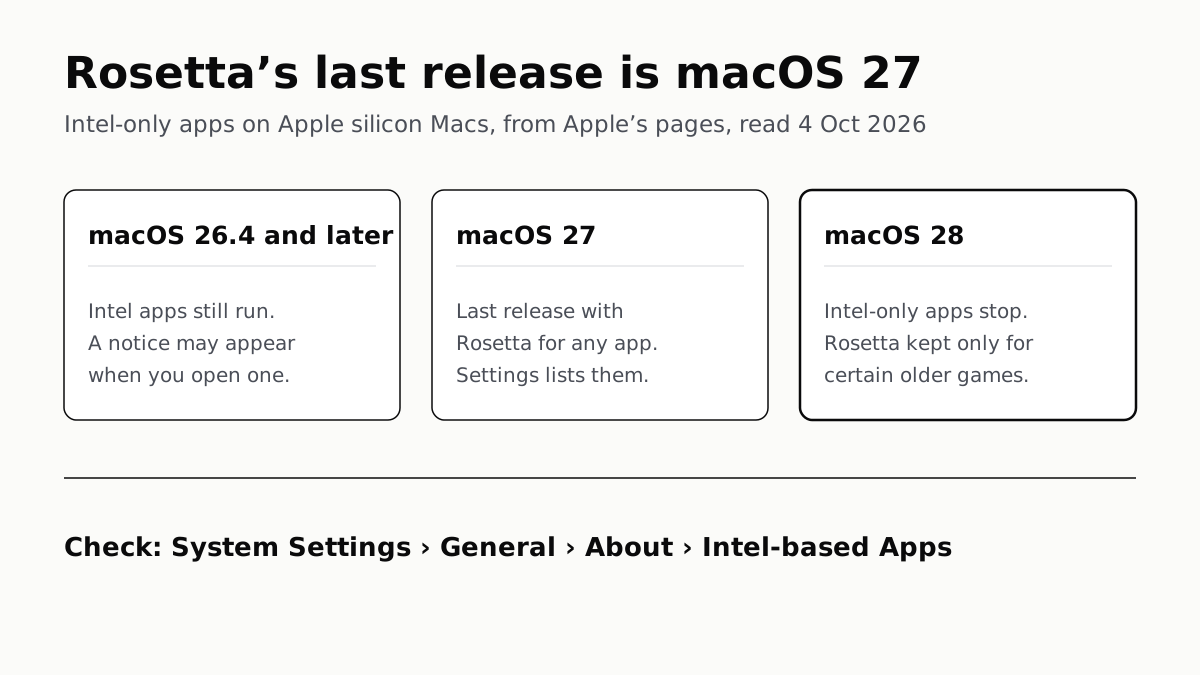
Mac apps built only for Intel chips stop running on Apple silicon Macs in macOS 28, because macOS 27 Golden Gate is the last release with Rosetta for any app. To see which of yours are affected, open System Settings › General › About and click Details next to Intel-based Apps.
The one exception Apple names is games: macOS 28 keeps part of Rosetta for “certain older, unmaintained games that rely on Intel-based frameworks”. Apple has not said which.
What changes, release by release
| macOS | What happens to Intel-only apps |
|---|---|
| 26.4 or later | They still run. A notice may appear when you open one, telling you to update it |
| 27 Golden Gate | They still run, through Rosetta, for the last time. System Settings lists them |
| 28, the next major release | They stop running, apart from certain older games |
Apple’s developer post of 1 September puts it without qualification: after macOS 27, Intel-only apps “will no longer run on Mac computers with Apple silicon”. Its support article for owners, published on 21 September, says the same about macOS 28.
Neither page gives macOS 28 a date.
Find your Intel-only apps
On macOS 27, the list:
- Open System Settings from the Apple menu.
- Click General, then About.
- In the macOS section, click Details next to Intel-based Apps.
Apple says the list shows apps “that you recently used or that are installed in common locations”, so an app kept somewhere unusual may not appear. Each entry can be shown in Finder or moved to the Trash from its More Info button.
On any version, one app at a time:
- Select the app in Finder. Most are in Applications.
- Press Command-I, or choose File › Get Info.
- Read the line after Kind.
| Kind says | What it means | In macOS 28 |
|---|---|---|
| Application (Apple silicon) | Built for Apple silicon only | Unaffected |
| Application (Universal) | Built for both Apple silicon and Intel | Unaffected |
| Application (Intel) | Built for Intel only; runs through Rosetta | Stops running, unless it is one of the games Apple keeps |
What to do about each one
Apple’s support page gives the order to try:
- App Store apps: check the App Store for an update.
- Everything else: look on the developer’s website for a version marked Universal or Apple silicon. The notice macOS shows may link to it.
- Apps with their own updater: use the app’s Check for Updates option.
- No update anywhere: ask the developer whether one is planned. If none is, macOS 28 is when you need a replacement. If you keep the app’s old .pkg to reinstall it later, check the date too: installers signed under Apple’s original Developer ID authority stop installing on 1 February 2027.
Check the add-ons too. Apple warns that plug-ins, extensions and updaters can be Intel-based separately from the app, and need updating on their own. A Universal app with an Intel-only plug-in is the case to look for, because Get Info shows the app itself as Universal.
That is what the Open using Rosetta checkbox in Get Info is for. It appears on some Universal apps and forces them to run as Intel apps so they can load Intel-only add-ons. Apple says that from macOS 28 Rosetta is kept only for certain older games, which leaves no room for this use, though its pages do not mention the checkbox’s future directly. If you rely on it, the add-on needs an Apple silicon version before macOS 28.
If you have to keep an Intel app
Staying on macOS 27 keeps Rosetta, and Apple’s support page says it is available on any Apple silicon Mac using macOS 27 or earlier. The trade is running an older macOS, and Apple does not publish how long older versions keep getting security fixes, as our guide to which Macs run macOS 27 found when four Intel Macs were dropped.
Rosetta also costs something while it lasts. Apple’s developer documentation says translation takes time, so translated apps can launch or run more slowly. Running x86 code on an Arm chip is the same problem Valve solves with FEX, the translation layer the Steam Frame uses for Windows games.
Questions people ask
Will Intel apps work on macOS 28?
Not on an Apple silicon Mac, with one exception. Apple says that from macOS 28 Rosetta will be available only for certain older, unmaintained games that rely on Intel-based frameworks. Every other Intel-only app stops running. Apple has not said which games qualify.
How do I see which of my Mac apps use Rosetta?
On macOS 27, open System Settings, click General, then About, and click Details next to Intel-based Apps. On any version, select an app in Finder, press Command-I and read Kind: Application (Intel) is the one that needs Rosetta.
Is macOS 27 the last version with Rosetta?
Yes, for apps in general. Apple calls macOS 27 the final release to support Rosetta. macOS 28 keeps a subset of it for older games only.
What does the Rosetta warning when I open an app mean?
From macOS 26.4, a Mac may show a notice when you open an app that relies on Rosetta. Apple’s support page says it means the app, or a component it uses, will not work with macOS 28. Look for an update from the App Store or the developer.
What does “Open using Rosetta” in Get Info do?
It appears only on Universal apps whose developer added it. It makes the app run as an Intel app so it can load Intel-only plug-ins or extensions. Apple says to switch it off once those add-ons are updated for Apple silicon.
Can I keep using an Intel app by staying on macOS 27?
Yes. Rosetta stays available on macOS 27 and earlier. The cost is staying on an older macOS, and Apple does not publish how long older versions get security fixes.
How we researched this
No one at bitcritiq has handled this product. Everything here comes from published sources, listed below.
- What this cannot tell you
- Apple has not said which games keep Rosetta in macOS 28, beyond 'older, unmaintained' titles that rely on Intel-based frameworks, and it has not given macOS 28 a release date. Apple's pages do not say directly what happens to the 'Open using Rosetta' setting for Universal apps; what we say about it is our reading of Apple's statement that Rosetta will be limited to those games. We have not run macOS 28, which is not out.
How we chose this, and what we did
- Why this subject
- Apple told developers on 1 September 2026 that macOS 27 is the final release to support Rosetta, and on 21 September published a support article telling Mac owners how to find their Intel-based apps. Our macOS 27 piece mentioned Rosetta only in passing. The owner's question is practical: which of my apps stop working, and when.
- How we looked at it
- Everything is from Apple's own pages, read through a browser on 4 October 2026: the Apple Developer news post 'Upcoming changes to Rosetta support for Intel-based macOS apps' (1 September 2026), the developer documentation 'About the Rosetta translation environment', and Apple Support article 102527, 'Using Intel-based apps on a Mac with Apple silicon' (published 21 September 2026).
What this rests on
6 claims, all official. Nothing here was measured by bitcritiq — see how we test for why. Open a claim to read the source it came from.
macOS 27 is the final release to support Rosetta, and Intel-only apps will no longer run on Apple silicon Macs after it.Official
Apple Developer News, 1 September 2026: “macOS 27: Final release to support Rosetta — Intel-only apps will no longer run on Mac computers with Apple silicon after this update.”
From macOS 28, Rosetta remains only for certain older, unmaintained games that rely on Intel-based frameworks.Official
Apple Support 102527: “Starting with macOS 28, the next major macOS release, Rosetta functionality will be available only for certain older, unmaintained games that rely on Intel-based frameworks.”
On macOS 26.4 or later, a Mac may show a notification when an app that relies on Rosetta is opened.Official
Apple Developer News: “macOS 26.4 or later: Users may receive a system notification when launching apps that rely on Rosetta, alerting them to update to an Apple silicon native version.”
macOS 27 lists Intel-based apps under System Settings, General, About, Intel-based Apps.Official
Apple Support 102527: “Make sure that you’re using macOS 27 Golden Gate or later… Click General in the sidebar, then click About on the right. In the macOS section, click the Details button next to Intel-based Apps.” The list shows “apps that you recently used or that are installed in common locations.”
In Finder, Get Info shows an app's Kind as Intel, Universal or Apple silicon.Official
Apple Support 102527: “Application (Intel): The app is made for a Mac with an Intel processor… Application (Universal): The app is made for both… Application (Apple silicon): The app is made for a Mac with Apple silicon.”
Plug-ins, extensions and updaters can be Intel-based separately from the app that uses them.Official
Apple Support 102527: “Some apps might include or use components, such as extensions or updaters, that need to be updated separately. If you added functionality to your app by installing Intel-based plug-ins, extensions, or other add-ons from a different developer, remember to update those as well.”
Sources 3
- Upcoming changes to Rosetta support for Intel-based macOS apps — Apple Developer News, 1 September 2026Officialaccessed Oct 4, 2026
- About the Rosetta translation environment — Apple Developer DocumentationOfficialaccessed Oct 4, 2026
- Using Intel-based apps on a Mac with Apple silicon — Apple Support 102527Officialaccessed Oct 4, 2026
Pass it on
Know someone weighing this up? Send them the answer.
bitcritiq.com/t5wdThe link is permanent: it opens this article for good, even if the title changes.
No email, no account
Follow bitcritiq
Every new article, in whatever reader you already use.
Subscribe by RSSAll the ways to follow
Using Chrome on Android? Open the browser menu and tap Follow. New articles then turn up in the Following tab in Discover.
read next
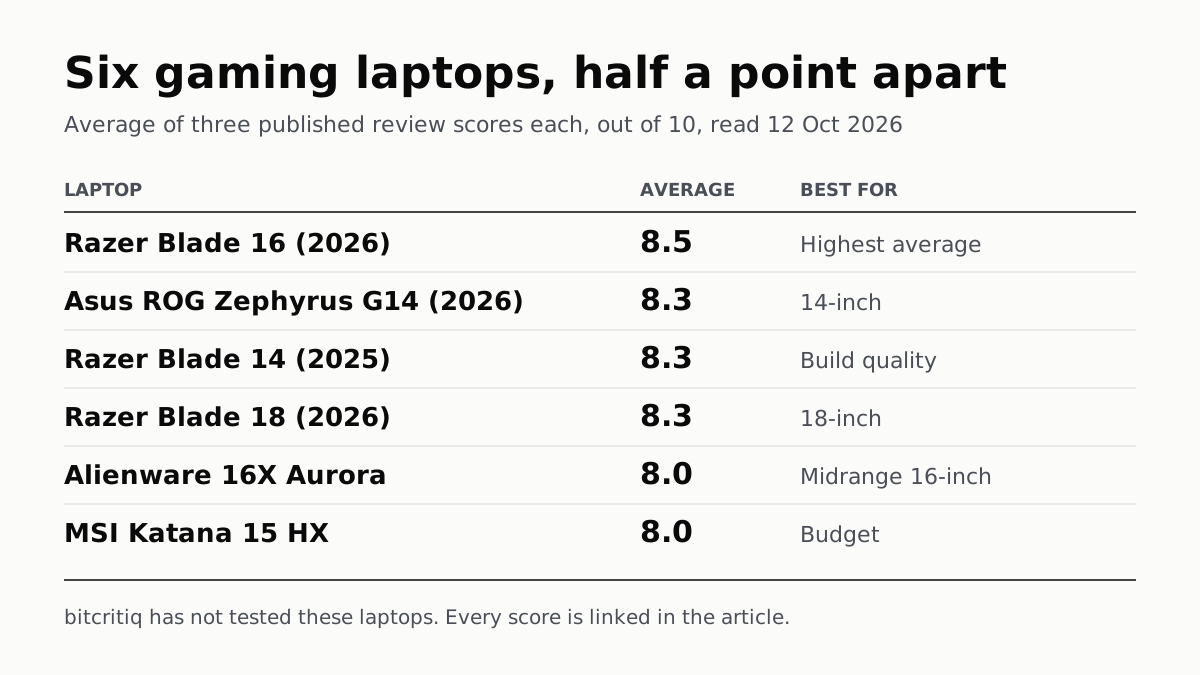
Razer Blade 16 Tops Gaming Laptop Reviews, by Half a Point
Eighteen review scores from eight outlets, all read on 12 October. Six laptops land within half a point, so pick by size and price.
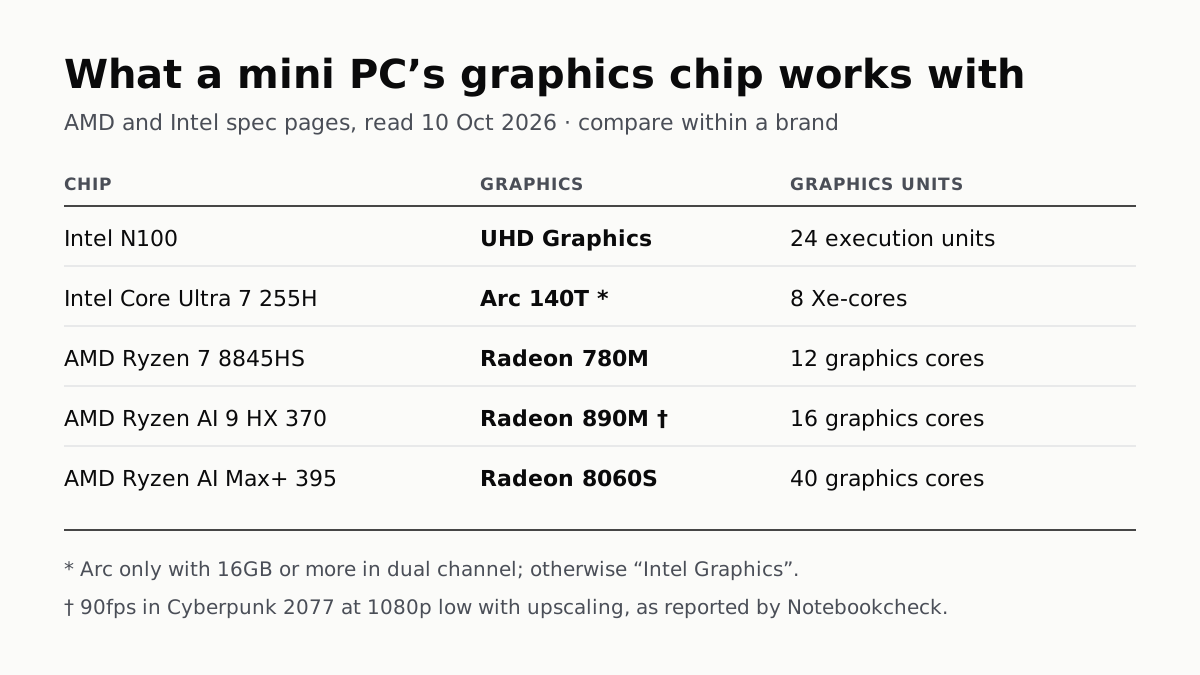
A Mini PC Can Game, but Its Graphics Chip Sets the Ceiling
Balatro's minimum is integrated graphics; Cyberpunk 2077's is a GTX 1060. A Radeon 890M ran Cyberpunk at 1080p low in one reported test.

A Used PC or CPU Can Carry Its Last Owner’s Game Ban
Riot and Activision ban hardware, not only accounts. Riot will re-check one on request; Activision rules out an appeal.
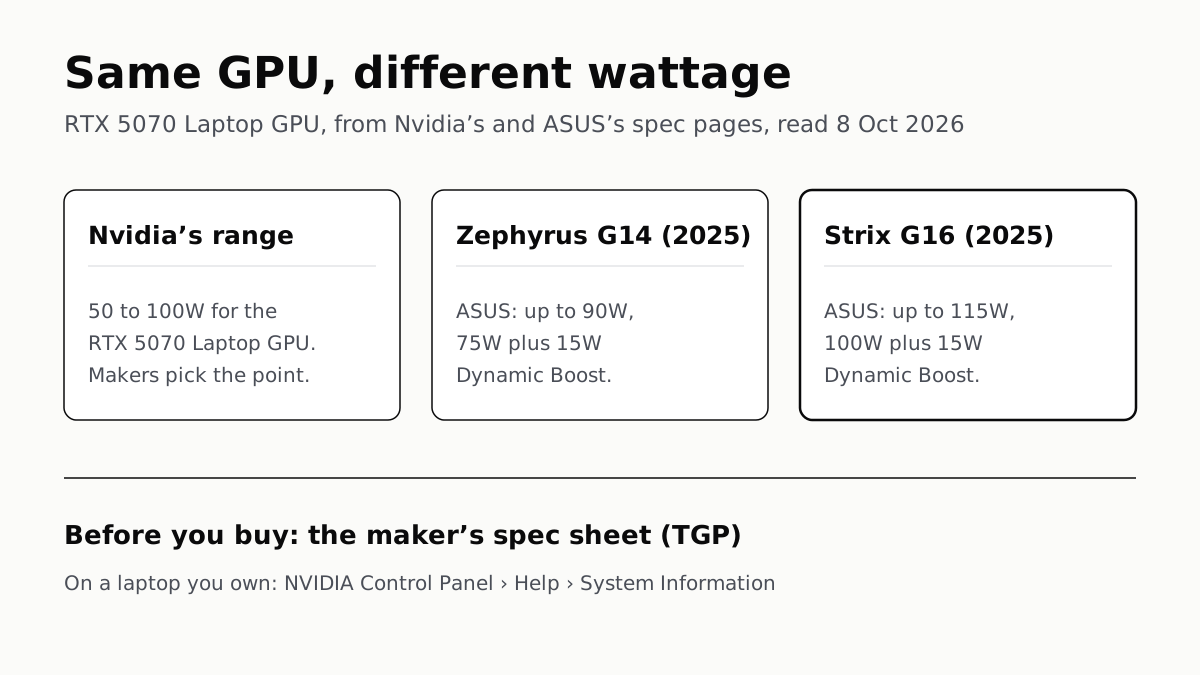
The Same RTX 5070 Laptop GPU Runs at 90W or 115W
Nvidia publishes a power range for each laptop GPU and the maker picks a point in it. The spec sheet, or Nvidia Control Panel, shows which.