macOS 27 Drops Four Intel Macs. Siri's New Voices Need M3
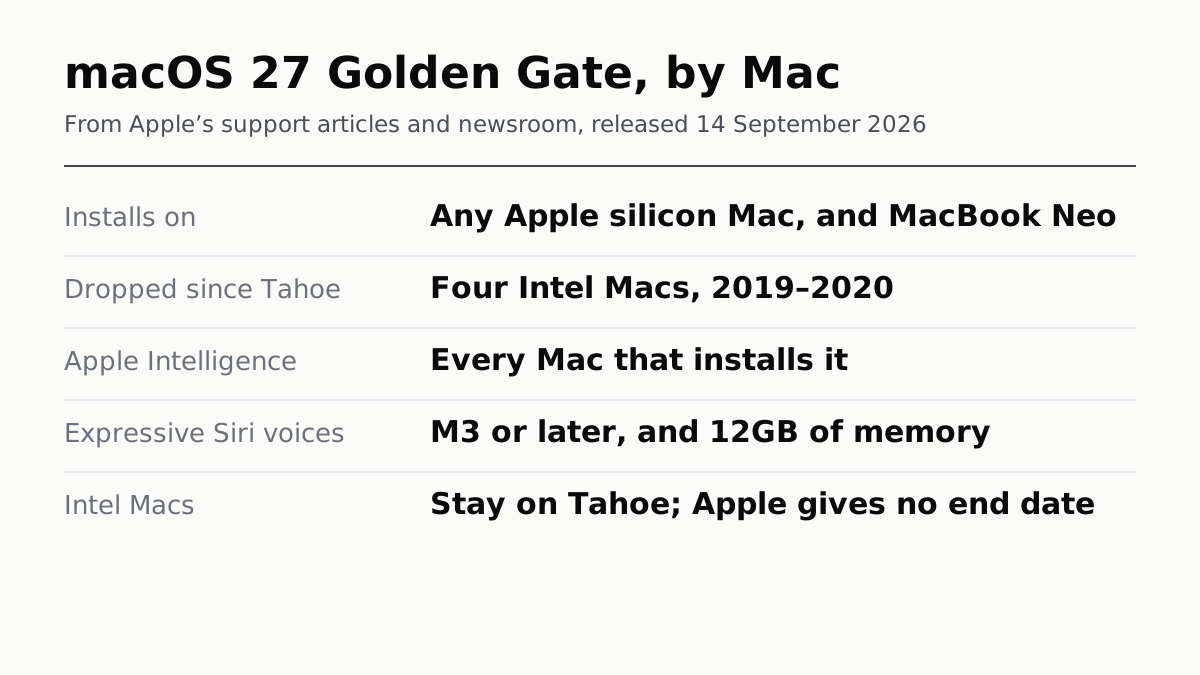
Every Apple silicon Mac that ran Tahoe runs Golden Gate. The expressive Siri voices need an M3 or later with at least 12GB of memory.
If you buy through our links, we may earn a commission. It never affects our verdicts or scores — how that works. As an Amazon Associate I earn from qualifying purchases.
If your Mac has an Apple chip, it can install macOS 27 Golden Gate. Apple’s list drops no Apple silicon Mac, and removes the last four Intel models that Tahoe still supported. Apple released it on 14 September.
Installing it is not the same as getting all of it. Apple Intelligence and Siri AI run on every Mac that installs Golden Gate. The expressive Siri voices and the more advanced dictation need an M3 or later with at least 12GB of memory, so an M1, an M2, a MacBook Neo and any M3 with less memory miss them.
The four Macs that stop at Tahoe
Apple said at WWDC25 that macOS Tahoe would be the final release for Intel Macs, and the lists now match. These four appear in Apple’s Tahoe compatibility article and not in the Golden Gate one:
| Mac | Last macOS |
|---|---|
| MacBook Pro (13-inch, 2020, Four Thunderbolt 3 ports) | Tahoe 26 |
| MacBook Pro (16-inch, 2019) | Tahoe 26 |
| iMac (Retina 5K, 27-inch, 2020) | Tahoe 26 |
| Mac Pro (2019) | Tahoe 26 |
They are not cut off today. On the day Golden Gate shipped, Apple also released Tahoe 26.7 and Sequoia 15.8. What Apple does not publish is an end date. Ars Technica expects Tahoe’s security updates to run until fall 2028, and says that assumes Apple follows its past practice. Treat that as an estimate, not a promise.
Three tiers of Mac on Golden Gate
| Tier | What you get | Which Macs |
|---|---|---|
| Installs | macOS 27 itself | Any Mac with Apple silicon, including MacBook Neo |
| Apple Intelligence | Apple Intelligence and Siri AI | The same list: M1 or later, and MacBook Neo |
| Advanced voice | Expressive Siri voices, more advanced dictation | M3 or later, with 12GB of memory or more |
The third tier turns on memory, not just the chip. Apple runs those two features on a larger on-device model, and its rule is M3 and 12GB. An M3 Mac configured below 12GB lands on the wrong side of it, which is one more reason memory is the spec to spend on when buying for AI features, whatever the chip.
Siri AI arrives as a beta, in English to start, and Apple says certain Apple Intelligence features that use server-side models have daily usage limits.
Which Macs are on the list
Apple’s article names 35 models. By family:
- MacBook Air: M1 (2020) and every later model, up to the M5.
- MacBook Pro: 13-inch M1 (2020) and every later model, up to the M5 Pro and M5 Max.
- MacBook Neo (13-inch, A18 Pro).
- iMac: 24-inch M1 (2021) and later.
- Mac mini: M1 (2020) and later, including the M6 and M5 Pro models.
- Mac Studio: 2022 and later, including the M5 Max and M5 Ultra models.
- Mac Pro: 2023.
What to do
- On an Intel Mac, stay on Tahoe and keep installing its updates. Nothing on Apple’s pages says they have stopped.
- On Apple silicon, the upgrade is in System Settings. Apple notes that if Rosetta was installed before, the upgrade does not restore it automatically, which matters if you still run Intel-only apps.
- Buying a Mac for the new Siri, check the memory as well as the chip. The iPhone split works the same way: iOS 27 also sorts devices into three tiers.
How we researched this
No one at bitcritiq has handled this product. Everything here comes from published sources, listed below.
- What this cannot tell you
- Apple publishes no end date for security updates to macOS Tahoe or Sequoia, so we cannot say how long a dropped Intel Mac stays patched; any date you see is an inference from past practice. We have not run macOS 27 on any Mac, and whether a given feature feels usable on an M1 is not something a requirements list can tell you.
How we chose this, and what we did
- Why this subject
- macOS 27 Golden Gate was released on 14 September, and Ars Technica published its review on 16 September. The questions a Mac owner has are whether their machine gets it and which features it will actually run. Our 16 September run could not answer the first, because Apple's macOS page had no model list at the time; Apple has since published one.
- How we looked at it
- The model list is Apple Support article 127255, 'macOS 27 Golden Gate is compatible with these computers'. The dropped models come from comparing it, name by name, with Apple's matching article for macOS Tahoe 26, 122867. Feature requirements are from Apple's newsroom releases of 14 September 2026 and the footnotes on apple.com/os/macos. Apple's statement that Tahoe was the last Intel release is from its WWDC25 Platforms State of the Union. All read on 17 September 2026.
What this rests on
6 claims, 5 official and 1 reported. Nothing here was measured by bitcritiq — see how we test for why. Open a claim to read the source it came from.
macOS 27 Golden Gate installs on any Mac with Apple silicon and on no Intel Mac.Official
Apple Support 127455: 'macOS 27 is compatible with any Mac with Apple silicon, which includes any Mac with an M-series chip or A-series chip.' Apple said at WWDC25: 'macOS Tahoe will be the final release for Intel Macs.'
Four Macs that run macOS Tahoe cannot run macOS 27: MacBook Pro (13-inch, 2020, Four Thunderbolt 3 ports), MacBook Pro (16-inch, 2019), iMac (Retina 5K, 27-inch, 2020) and Mac Pro (2019).Official
All four appear by name in Apple Support 122867, the macOS Tahoe 26 compatibility list, and none appears in Apple Support 127255, the macOS 27 list. Every Apple silicon model on the Tahoe list is on the macOS 27 list.
Apple Intelligence and Siri AI run on every Mac that can install macOS 27.Official
Apple's newsroom footnotes of 14 September 2026 list Apple Intelligence and Siri AI in macOS 27 as available on 'MacBook Neo (A18 Pro), Mac with M1 or later', which matches the macOS 27 install requirement.
Expressive Siri voices and the more advanced dictation need an M3 or later Mac with at least 12GB of unified memory.Official
Apple's Siri AI release, 14 September 2026: expressive voices and more advanced dictation 'are available on … Mac (M3) or later with at least 12GB of unified memory.' The apple.com/os/macos footnote gives the same Mac requirement.
macOS 27 was released on 14 September 2026, the same day Apple shipped security updates for Tahoe and Sequoia.Official
Apple's newsroom update of 14 September 2026 says the updates 'start rolling out today' across platforms including macOS 27. Apple's security releases page lists macOS Tahoe 26.7 and macOS Sequoia 15.8 on 14 Sep 2026.
Apple publishes no end date for security updates to Macs left on Tahoe; Ars Technica expects them to continue until fall 2028 based on past practice.Reported
Apple's security releases page lists patches but no support window. Ars Technica's review of 16 September 2026 says Tahoe's security and Safari updates would stop in fall 2028, 'assuming Apple sticks with its past practice'.
Sources 9
- macOS 27 Golden Gate is compatible with these computers — Apple Support 127255Officialaccessed Sep 17, 2026
- macOS Tahoe 26 is compatible with these computers — Apple Support 122867Officialaccessed Sep 17, 2026
- How to upgrade to macOS 27 Golden Gate — Apple Support 127455Officialaccessed Sep 17, 2026
- Major updates for Apple's software platforms are now available — Apple Newsroom, 14 September 2026Officialaccessed Sep 17, 2026
Show 5 more · 4 official or standards
- Siri AI, a profoundly more capable and personal assistant, is here — Apple Newsroom, 14 September 2026Officialaccessed Sep 17, 2026
- macOS 27 Golden Gate — AppleOfficialaccessed Sep 17, 2026
- Apple security releases — Apple Support 100100Officialaccessed Sep 17, 2026
- Platforms State of the Union, WWDC25 — Apple DeveloperOfficialaccessed Sep 17, 2026
- macOS 27 Golden Gate: The Ars Technica review — Ars Technica, 16 September 2026accessed Sep 17, 2026
No email, no account
Follow bitcritiq
Every new article, in whatever reader you already use.
Subscribe by RSSAll the ways to follow
Using Chrome on Android? Open the browser menu and tap Follow. New articles then turn up in the Following tab in Discover.
read next
eGPUs Work on Windows Laptops, Not on Apple Silicon Macs

Buying a Laptop in a Sale? Spend on What You Can't Change

The Mini PC Quietly Became the Default Desktop