Chrome Needs macOS 13 or Windows 10 to Keep Updating
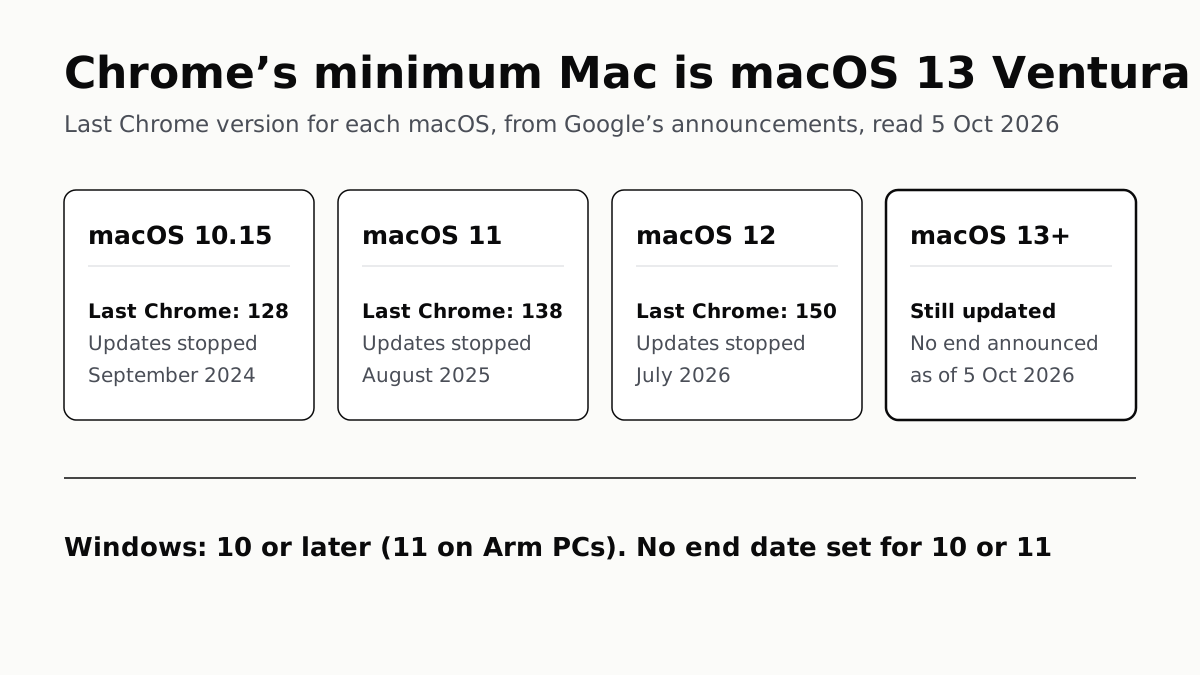
Chrome 150 was the last release for Monterey Macs. Google has set no end date for Windows 10 or 11, or for Ventura and later.
If you buy through our links, we may earn a commission. It never affects our verdicts or scores — how that works. As an Amazon Associate I earn from qualifying purchases.
Current Chrome needs macOS 13 Ventura or later on a Mac, and Windows 10 or later on a PC. Chrome 150 was the last version for macOS 12 Monterey; a Mac that cannot install Ventura keeps that version, with a warning bar, and gets no further updates.
Google has not set an end date for Chrome on Windows 10, Windows 11 or macOS 13 and later. Its system requirements page lists both Windows versions as “Not yet scheduled”.
The last Chrome for each system
| System | Last Chrome version | Updates stopped |
|---|---|---|
| macOS 10.15 Catalina | Chrome 128 | September 2024, when Chrome 129 was due |
| macOS 11 Big Sur | Chrome 138 | August 2025, when Chrome 139 shipped |
| macOS 12 Monterey | Chrome 150 | July 2026, when Chrome 151 shipped |
| macOS 13 Ventura and later | Still updated | No end announced |
| Windows 7, 8 and 8.1 | Chrome 109 | Early 2023 (Chrome 109 released 10 January) |
| Windows 10 | Still updated | “Not yet scheduled”, per Google |
| Windows 11 | Still updated | “Not yet scheduled”, per Google |
The macOS rows come from Google’s own announcements: Chrome Platform Status entries for macOS 11 and 12, and a Chrome Help Community post for 10.15. The Windows rows come from the support timeline on Google’s Chrome system requirements page. The months are from Chromium Dash, Google’s release schedule, which gives 5 August 2025 for Chrome 139 and 28 July 2026 for Chrome 151. Chrome 154 was the current stable version for Mac on 5 October 2026, so a Monterey Mac is now four versions behind.
Windows PCs with Arm processors are the one stricter case: Google requires Windows 11 on those.
What “no longer supported” means on a Mac
Google describes the same outcome each time it drops a macOS version. Chrome does not stop opening. In the words of the macOS 12 entry, “Chrome continues to work, showing a warning infobar, but it will not update any further.” New installs of Chrome 151 and later require macOS 13. A Mac that stays on Monterey stays on Chrome 150, with no further security fixes for the browser.
Windows Server 2012 and 2012 R2 got a grace period that the Mac entries do not mention: Google’s table says critical security fixes would be issued to Chrome 109 on those systems, “when feasible”, until 10 October 2023. The Platform Status entries for macOS 11 and 12 promise nothing similar.
Google gives the same reason in both macOS entries: each version is “outside of its support window with Apple”. The macOS 12 entry adds: “To maintain security, it is essential to run Chrome browser on a supported operating system.”
Which Macs are stuck on Chrome 150
Google’s dates tell you which macOS you need; Apple’s list tells you whether your Mac can get it. To get Chrome 151 or later, a Mac must run macOS 13 Ventura or later.
Apple’s list of Macs that can install Ventura starts at:
| Mac | Oldest model on Apple’s Ventura list |
|---|---|
| MacBook Pro | 2017 (13-inch and 15-inch) |
| MacBook Air | Retina, 13-inch, 2018 |
| MacBook | Retina, 12-inch, 2017 |
| iMac | 21.5-inch, 2017 |
| iMac Pro | 2017 |
| Mac mini | 2018 |
| Mac Pro | 2019 |
| Mac Studio | 2022 (the first model) |
A Mac older than the models on that list cannot install Ventura, so its newest Chrome is the last one for whichever macOS it tops out at: Chrome 150 if that is Monterey, Chrome 138 if Big Sur, Chrome 128 if Catalina. Apple’s newer releases have kept trimming the list; our guide to which Macs run macOS 27 covers the four Intel models dropped this year. Those still run macOS 26 Tahoe, which is well above Chrome’s minimum.
To check where you are, choose Apple menu › About This Mac for the macOS version, and in Chrome go to Chrome menu › Help › About Google Chrome for the Chrome version. The About page also starts an update if one is available.
If your Mac is on the wrong side
- If Apple lists your Mac for Ventura or later, update macOS. Chrome then updates past 150 on its own.
- If it does not, Chrome 150 keeps working but receives no more updates. Google’s advice in each announcement is to move to a supported macOS; where the hardware rules that out, a browser whose maker still supports your macOS version keeps you on security fixes. Check that maker’s own requirements page before switching.
Windows: no Chrome cut-off announced yet
Microsoft ended Windows 10 support in October 2025, per the same Google table, but Google has not scheduled Chrome’s end on it. A Windows 10 PC gets current Chrome today. Chrome updates are only part of the picture, though: Windows itself needs security updates, and Microsoft’s consumer Extended Security Updates for Windows 10 now run to October 2027, as our Windows 10 security updates explainer sets out.
When Google does schedule an end for Windows 10, its system requirements page is where the date will appear; for Windows 7 and 8 the same table named the last version and its release date.
Questions people ask
Does Chrome still work on macOS Monterey?
It still opens, but it no longer updates. Google says Chrome 150 is the last release for macOS 12 Monterey; on Monterey it keeps working with a warning bar, and Chrome 151 and later need macOS 13 Ventura.
What is the last version of Chrome for macOS Big Sur?
Chrome 138. Google’s Platform Status entry says Chrome 138 is the last release to support macOS 11 Big Sur, and Chrome 139, released in August 2025, needs macOS 12 or later.
What is the last version of Chrome for macOS Catalina?
Chrome 128. Google announced that Chrome 129, tentatively scheduled for 17 September 2024, was the first version to require macOS 11 or later, so Macs on 10.15 Catalina stopped at 128.
Will Chrome stop working on Windows 10?
Not on any date Google has announced. Google’s system requirements list the end of Chrome support for Windows 10 as “Not yet scheduled”, even though Microsoft’s own support ended in October 2025.
Can my old Mac run the latest Chrome?
Only if it can install macOS 13 Ventura or later. Apple’s Ventura list starts at 2017 MacBook Pro, iMac and MacBook models, 2018 MacBook Air and Mac mini, and the 2019 Mac Pro. An older Mac stops at the last Chrome its newest macOS supports.
What is the minimum Windows version for Chrome?
Windows 10 on a PC with what Google calls an Intel processor, or Windows Server 2016. On a Windows PC with an Arm processor, Chrome needs Windows 11. Windows 7, 8 and 8.1 stopped at Chrome 109, released in January 2023.
How we researched this
No one at bitcritiq has handled this product. Everything here comes from published sources, listed below.
- What this cannot tell you
- Google has not announced when Chrome will drop macOS 13 Ventura, Windows 10 or Windows 11, so we cannot give those dates. Google's Help pages list only the current minimum for Mac, without the per-version timeline they give for Windows; the macOS end points come from Platform Status and a Help Community announcement instead. Apple has archived its Ventura compatibility article and no longer updates it; the model list is unchanged for an OS that ships on no new Mac. We did not cover macOS 10.14 and earlier. Dates for each Chrome release are Google's scheduled stable dates; rollouts are staged, so a given computer may receive a version days later.
How we chose this, and what we did
- Why this subject
- Chrome 151 reached the stable channel on 28 July 2026 without macOS 12 Monterey support, so Macs that cannot install Ventura are now on a browser that no longer updates. The reader question is which systems still get Chrome updates, and which Chrome version an older Mac or PC is stuck on.
- How we looked at it
- Read through a browser on 5 October 2026: Google's Chrome Enterprise and Education Help article 'Chrome browser system requirements' (7100626) and the consumer Chrome Help page 'Download and install Google Chrome' (95346); the Chrome Platform Status entries 'Chrome 151 removes support for macOS 12' and 'Chrome removes support for macOS 11'; Google's Chrome Help Community announcement 'Sunsetting Chrome support for macOS 10.15'; Chromium Dash's milestone schedule and stable release feed for dates and the current version; and Apple's support article 'macOS Ventura is compatible with these computers'.
What this rests on
6 claims, all official. Nothing here was measured by bitcritiq — see how we test for why. Open a claim to read the source it came from.
Current Chrome needs macOS 13 Ventura or later on a Mac, and Windows 10 or later on an Intel PC (Windows 11 on Arm).Official
Google Chrome Help 95346: “To use Chrome on Mac, you need macOS 13 Ventura and up.” Google Chrome Help 95346: “Intel processor: Windows 10 and up.… ARM processor: Windows 11 and up.” Chrome Enterprise Help 7100626 adds “Windows Server 2016 or later”.
Chrome 150 is the last release for macOS 12; on Monterey it keeps working with a warning bar but does not update.Official
Chrome Platform Status: “Chrome 150 is the last release to support macOS 12; Chrome 151+ will no longer support macOS 12… On Macs running macOS 12, Chrome continues to work, showing a warning infobar, but it will not update any further.”
Chrome 138 is the last release for macOS 11, and Chrome 128 the last for macOS 10.15.Official
Chrome Platform Status: “Chrome 138 will be the last release to support macOS 11; Chrome 139+ will no longer support macOS 11.” Chrome Help Community announcement: “Chrome 128 is the last version of Chrome that will support macOS 10.15. Chrome 129 (tentatively scheduled for release on September 17th, 2024) is the first version of Chrome that requires macOS 11 or later.”
Chrome 109 is the last version for Windows 7, 8 and 8.1.Official
Chrome Enterprise Help 7100626, support timelines: “Chrome 109 is the last version to support this operating system. Chrome 109 was released January 10, 2023.”
Google has not scheduled an end of Chrome support for Windows 10 or Windows 11.Official
Chrome Enterprise Help 7100626, column 'Chrome deprecation release and date': “Windows 10 — Not yet scheduled”; “Windows 11 — Not yet scheduled”. The same table gives Microsoft's Windows 10 date as October 2025.
Apple's list of Macs that can install macOS Ventura starts with 2017 models for MacBook Pro, iMac and MacBook, 2018 for MacBook Air and Mac mini, and 2019 for Mac Pro.Official
Apple Support 102861: “You can install macOS Ventura on any of these Mac models.” Oldest listed: MacBook Pro (13-inch, 2017…), MacBook Pro (15-inch, 2017), MacBook Air (Retina, 13-inch, 2018), MacBook (Retina, 12-inch, 2017), iMac Pro (2017), iMac (21.5-inch, 2017), Mac mini (2018), Mac Pro (2019).
Sources 7
- Chrome browser system requirements — Chrome Enterprise and Education Help 7100626Officialaccessed Oct 5, 2026
- Download and install Google Chrome — Google Chrome Help 95346Officialaccessed Oct 5, 2026
- Chrome 151 removes support for macOS 12 — Chrome Platform StatusOfficialaccessed Oct 5, 2026
- Chrome removes support for macOS 11 — Chrome Platform StatusOfficialaccessed Oct 5, 2026
Show 3 more · 3 official or standards
- Sunsetting Chrome support for macOS 10.15 — Google Chrome Help Community announcementOfficialaccessed Oct 5, 2026
- Chromium Dash — milestone schedule and stable releasesOfficialaccessed Oct 5, 2026
- macOS Ventura is compatible with these computers — Apple Support 102861Officialaccessed Oct 5, 2026
Pass it on
Know someone weighing this up? Send them the answer.
bitcritiq.com/g227The link is permanent: it opens this article for good, even if the title changes.
No email, no account
Follow bitcritiq
Every new article, in whatever reader you already use.
Subscribe by RSSAll the ways to follow
Using Chrome on Android? Open the browser menu and tap Follow. New articles then turn up in the Following tab in Discover.
read next
Razer Blade 16 Tops Gaming Laptop Reviews, by Half a Point
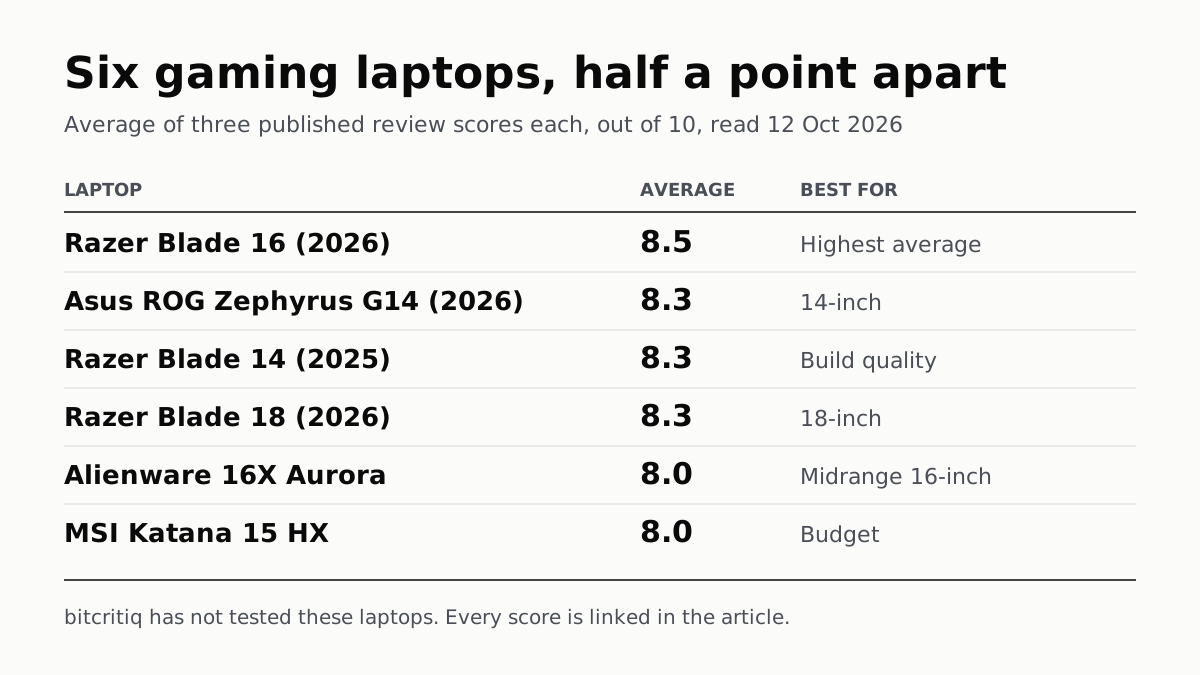
Eighteen review scores from eight outlets, all read on 12 October. Six laptops land within half a point, so pick by size and price.
A Mini PC Can Game, but Its Graphics Chip Sets the Ceiling
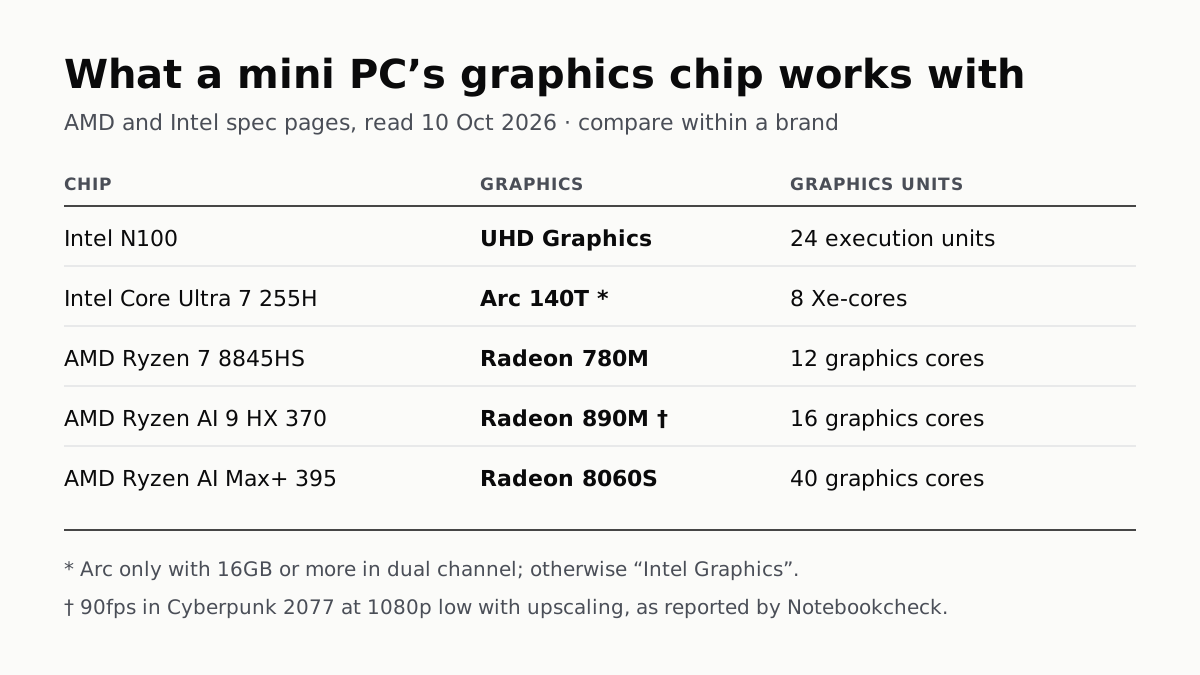
Balatro's minimum is integrated graphics; Cyberpunk 2077's is a GTX 1060. A Radeon 890M ran Cyberpunk at 1080p low in one reported test.
A Used PC or CPU Can Carry Its Last Owner’s Game Ban
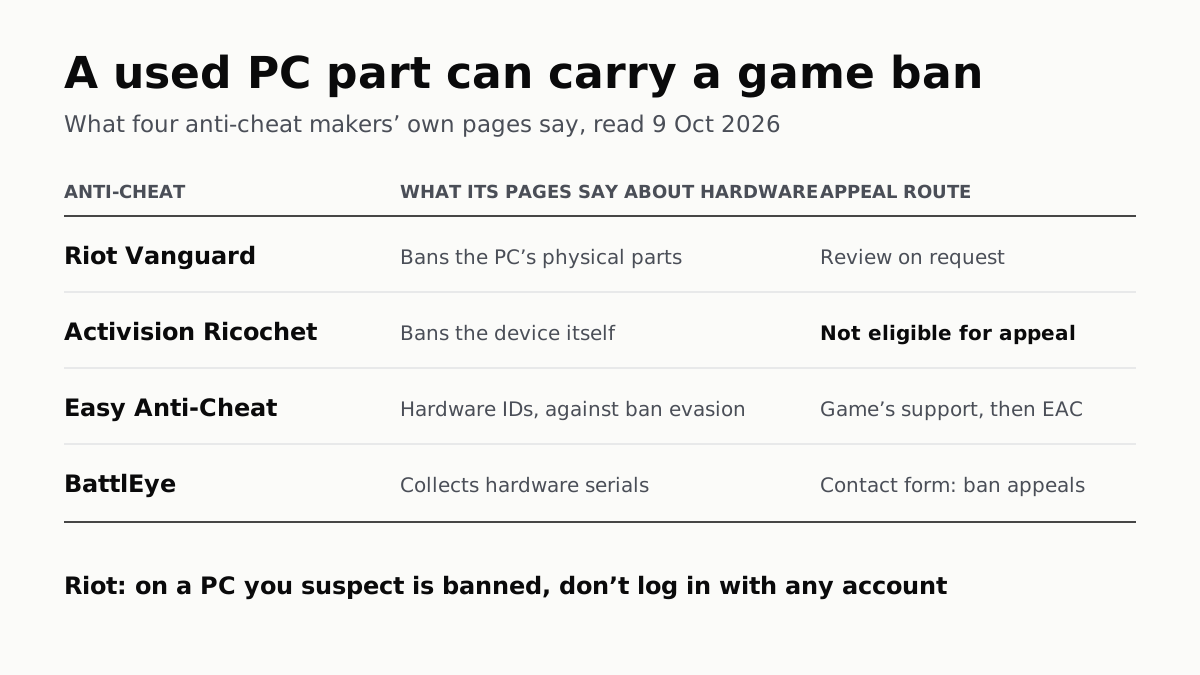
Riot and Activision ban hardware, not only accounts. Riot will re-check one on request; Activision rules out an appeal.
The Same RTX 5070 Laptop GPU Runs at 90W or 115W
Nvidia publishes a power range for each laptop GPU and the maker picks a point in it. The spec sheet, or Nvidia Control Panel, shows which.