HDR10 Is the Fallback; Dolby Vision and HDR10+ Are Upgrades
Samsung’s S90F lists HDR10+, not Dolby Vision; LG’s C6 the reverse. TCL’s QM7K lists both.
If you buy through our links, we may earn a commission. It never affects our verdicts or scores — how that works. As an Amazon Associate I earn from qualifying purchases.
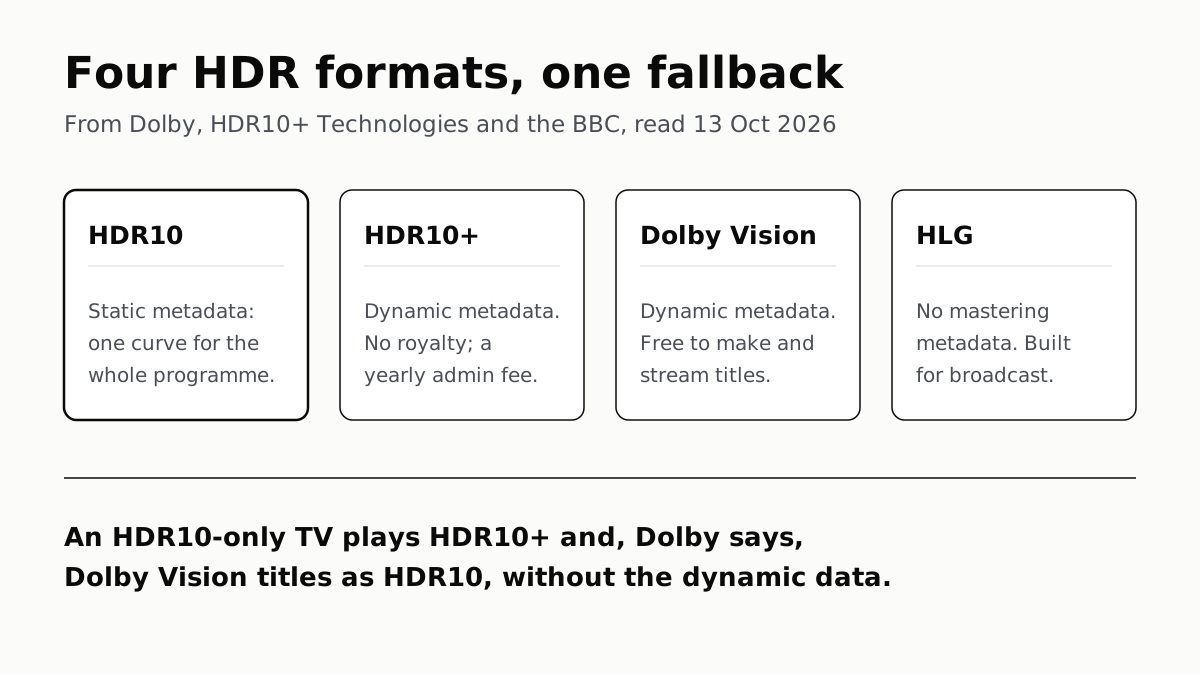
A TV that supports only HDR10 still plays HDR10+ titles, and, Dolby says, Dolby Vision titles, as HDR10. What Dolby Vision and HDR10+ add is dynamic metadata, instructions that change scene by scene, and the brands split on them: Samsung’s S90F lists HDR10+ but not Dolby Vision, LG’s C6 lists Dolby Vision but not HDR10+, and TCL’s QM7K lists both.
Everything below is what the format owners, TV makers and streaming services state on their own pages, read on 13 October 2026. We have not measured any TV or stream.
The four formats
| Format | Metadata | Licence, as its owner states it | Who lists it (pages we read) |
|---|---|---|---|
| HDR10 | Static: one set of values for the whole programme | Not stated by an owner we read | LG C6, TCL QM7K; Netflix, Disney+, HBO Max; Apple TV 4K |
| HDR10+ | Dynamic: scene by scene, or frame by frame for live | No per-device royalty; TV makers pay $10,000 a year and certify | Samsung S90F, TCL QM7K; Apple TV 4K (3rd generation only); Netflix’s quality labels |
| Dolby Vision | Dynamic, adjustable shot by shot | No fee to author or deliver titles; device terms not stated | LG C6, TCL QM7K; Netflix, Disney+, HBO Max, Prime Video; Apple TV 4K |
| HLG | No mastering metadata needed | Royalty-free | Samsung S90F, LG C6, TCL QM7K |
What the metadata does
An HDR picture is mastered on a display brighter than most TVs, so every TV has to squeeze it into what its own panel can show. Metadata is the instruction for that squeeze. Dolby puts it as “a set of instructions that tells a display how to act”.
HDR10 sends one instruction for the whole film. HDR10+ Technologies, which runs the rival format, describes HDR10’s static metadata as a single tone-mapping curve applied to the entire programme, which can crush shadows or clip highlights when a dark night cuts to a bright explosion.
HDR10+ and Dolby Vision send it scene by scene. HDR10+ uses scene-based data for films and frame-by-frame data for live encoding. Dolby says Dolby Vision lets the colourist customise the mapping for “any scene or shot”, and that its metadata processing on Dolby Vision devices is “tested and approved” with its partners. Neither owner publishes a comparison we could check, and we have not compared them on a screen.
HLG takes a different route. The BBC and NHK designed it for live broadcasting, because, the BBC says, metadata “often gets lost or becomes out-of-sync” as it passes through a production chain. HLG carries no description of the mastering display; the TV adapts the signal itself. It also plays on standard dynamic range sets, and the BBC says it is royalty-free.
If your TV lacks one, you lose the extra data, not the film
Both dynamic formats fall back. HDR10+ Technologies says that on an HDR10 display, HDR10+ content “is simply just HDR10 content”. Dolby says a device without Dolby Vision that does support HDR “will play back in HDR10”, and an SDR set gets an SDR version derived from the Dolby Vision metadata. A missing format costs you the scene-by-scene data, not access to the title.
How much that data is worth depends on the set. As our guide to TV price tiers puts it, supporting a format and having the brightness to render it are different things, and only the second costs money to build.
Which brands list which
| TV (US spec page) | HDR10 | HDR10+ | Dolby Vision | HLG |
|---|---|---|---|---|
| Samsung S90F (affiliate link to Amazon, opens in a new tab) (QN65S90FAFXZA) | not separately listed | Yes | Not mentioned | Yes |
| LG C6 (affiliate link to Amazon, opens in a new tab) (OLED65C6PUA) | Yes | Not listed | Yes | Yes |
| TCL QM7K | Yes | Yes | Yes (Dolby Vision IQ) | Yes |
Samsung’s spec page lists “HDR 10+ Yes (ADAPTIVE/ GAMING)” and HLG, and the words Dolby Vision appear nowhere on it. Samsung Canada’s HDR guide, updated 1 September, recommends HDR10+ and does not mention Dolby Vision either. LG’s C6 is the mirror image: its HDR row reads “Dolby Vision / HDR10 / HLG”. That split shows on our shortlist of the best-reviewed TVs, where the Samsung S90F (affiliate link to Amazon, opens in a new tab) is the pick for buyers to whom Dolby Vision does not matter.
Support varies by model and year, so check the spec sheet of the set you are buying. The same goes for anything you plug in: Amazon’s new Fire TV Stick 4K lists HDR10+ but not Dolby Vision, as our look at the 2026 Fire TV range found.
Which streaming services use which
- Netflix labels titles Dolby Vision, or “HDR or HDR10+”, and says every device in the chain, including a streaming stick and receiver, must support the format. HDR10+ Technologies says Netflix delivers HDR10+ only in the AV1 codec, so it needs a device that decodes AV1.
- Disney+ names HDR10 as its “default HDR format” and Dolby Vision as “a more dynamic version”. Its page does not mention HDR10+, though Samsung said in October 2025 that Disney+ was offering over 1,000 Hulu titles in HDR10+ on Samsung TVs.
- HBO Max offers “select titles in 4K UHD with HDR10 or Dolby Vision” on the Premium plan.
- Prime Video’s help refers to titles in Dolby Vision. HDR10+ Technologies quotes a Prime Video vice-president saying all its HDR content carries HDR10+ metadata.
- Apple TV 4K outputs Dolby Vision, HDR10+ and HDR10, but Apple says HDR10+ works only on the 3rd-generation model.
So for a reader choosing a TV, Dolby Vision is the format these services’ help pages name most often, and HDR10+ is the one Samsung’s TVs carry instead. Brightness and black level, which decide how much any HDR format can show, come from the panel; how OLED and Mini-LED make light covers that half.
Questions people ask
Is HDR10 good enough or do I need Dolby Vision?
HDR10+ Technologies and Dolby both say an HDR10 TV plays their titles as HDR10, so a missing format should not lock you out of a title. What you lose is the scene-by-scene metadata. Whether you would see that depends on the TV; we have not compared them.
Do Samsung TVs support Dolby Vision?
Samsung’s US spec page for the S90F OLED lists HDR10+ and HLG and does not mention Dolby Vision, and Samsung’s HDR guide names HDR10+ but not Dolby Vision. Check the spec page of the exact model you are looking at.
Does LG support HDR10+?
Not on the LG C6 we read: its US spec page lists “Dolby Vision / HDR10 / HLG” and HDR10+ appears nowhere on it. Check the spec page of the exact model and year you are looking at.
What happens if I play Dolby Vision on a TV that doesn’t support it?
Dolby says a device that lacks Dolby Vision but supports HDR plays it in HDR10, and an SDR device plays an SDR version derived from the Dolby Vision metadata. You still get a picture; you lose the dynamic metadata.
Which streaming services use Dolby Vision?
On their own help pages, Netflix, Disney+ and HBO Max name Dolby Vision, HBO Max only on its Premium plan, and a Prime Video help page refers to titles in Dolby Vision. Each says it depends on the title and the device.
What is the difference between HDR10 and HDR10+?
HDR10 carries static metadata: one tone-mapping curve for the whole programme. HDR10+ adds dynamic metadata, scene by scene, so the TV can map a dark night and a bright explosion differently. An HDR10-only TV ignores the extra data.
What is HLG used for?
Broadcast. The BBC and NHK designed HLG for live TV, which they say cannot rely on metadata surviving the production chain. It needs no mastering metadata and is compatible with standard dynamic range sets.
How we researched this
No one at bitcritiq has handled this product. Everything here comes from published sources, listed below.
- What this cannot tell you
- bitcritiq has tested no TVs and no streams; this is what the format owners, makers and services say. We read one model per maker, and support varies by model and year, so check your own set’s spec page. Dolby’s pages state no fee for content but do not state device licence terms. Disney+’s own page lists no HDR10+, while Samsung’s 2025 release says Disney+ offers it on Samsung TVs; we could not settle which is current. Sony and Hisense spec pages were not read, and a CTA definition of HDR10 was a PDF that would not render in our browser.
How we chose this, and what we did
- Why this subject
- Searches for OLED TVs were at 17% of their peak in our trends digest and rising toward Black Friday, and Search Console shows readers reaching our best-TVs page on “best tv 2026”. Our TV pages mention Dolby Vision and HDR10+ as things a set has or lacks, but none explains what the formats are or whether a missing one matters.
- How we looked at it
- Read through a browser on 13 October 2026. Format owners: the HDR10+ Technologies site (FAQ and licence terms), Dolby’s Dolby Vision consumer page and its primer for content creators, and BBC R&D’s HLG project page. TV makers: the US spec pages for the Samsung S90F 65-inch (QN65S90FAFXZA), LG C6 65-inch (OLED65C6PUA) and TCL QM7K, Samsung Canada’s HDR support guide, and Samsung’s US release on HDR10+ for Disney+ (29 October 2025). Services: Netflix’s video-quality help page, Disney+’s video-quality page, HBO Max’s 4K page, a Prime Video help page and Apple’s Apple TV 4K format page. Absence claims have controls: the S90F spec lists “HDR 10+ Yes” and “HLG Yes” and the string Dolby Vision appears nowhere on the page; the C6’s HDR row reads “Dolby Vision / HDR10 / HLG” with no HDR10+ anywhere on the page; Disney+’s and HBO Max’s pages name HDR10 and Dolby Vision but not HDR10+; Samsung’s HDR guide names HDR10+ but not Dolby Vision.
What this rests on
6 claims, all official. Nothing here was measured by bitcritiq — see how we test for why. Open a claim to read the source it came from.
A TV that supports only HDR10 plays HDR10+ content as HDR10, using the static metadata alone.Official
HDR10+ Technologies FAQ: “devices that only support HDR10 can play HDR10+ content, they can only use the static metadata portion without any dynamic enhancements” and “when HDR10+ content is viewed on an HDR10 display, it is simply just HDR10 content.”
Dolby says a device without Dolby Vision but with HDR plays Dolby Vision content in HDR10.Official
Dolby Professional primer: “If the device does not support Dolby Vision, but does support HDR, it will play back in HDR10. If the device is SDR, it will play back in SDR that was derived from the Dolby Vision metadata.”
HDR10+ carries no per-device royalty; TV makers pay a $10,000 annual administration fee and need certification by an authorised test centre.Official
HDR10+ FAQ: “There are no per-device or per-unit royalties payable to the LLC.” Licence programs, Display Manufacturer: “Certification by ATC (Authorized Test Center) … Annual Administration: $10,000”.
Dolby charges no fee to studios, distributors or creators to author or deliver Dolby Vision titles.Official
Dolby Professional primer: “There are no fees for studios, distributors, or content creators to author or deliver Dolby Vision titles.”
Samsung's S90F spec page lists HDR10+ and HLG and does not mention Dolby Vision; LG's C6 lists Dolby Vision, HDR10 and HLG and not HDR10+.Official
Samsung US, QN65S90FAFXZA: “OLED HDR+ HDR 10+ Yes (ADAPTIVE/ GAMING) HLG (Hybrid Log Gamma) Yes”; “Dolby Vision” appears nowhere on the page. LG US, OLED65C6PUA: HDR (High Dynamic Range) “Dolby Vision / HDR10 / HLG”.
HLG needs no metadata describing the mastering display and is royalty-free.Official
BBC R&D: “metadata that describes the mastering display is not required” and HLG “is included in ITU-R BT.2100 … and is royalty-free.”
Sources 14
- HDR10+ Official Site — FAQ and licence programs — HDR10+ TechnologiesOfficialaccessed Oct 13, 2026
- Dolby Vision — DolbyOfficialaccessed Oct 13, 2026
- Dolby Vision explained: a primer for content creators — Dolby ProfessionalOfficialaccessed Oct 13, 2026
- High Dynamic Range television and Hybrid Log-Gamma — BBC R&DOfficialaccessed Oct 13, 2026
Show 10 more · 10 official or standards
- 65" Class S90F OLED (QN65S90FAFXZA) — Samsung USOfficialaccessed Oct 13, 2026
- Understanding HDR technology for Samsung TVs — Samsung CanadaOfficialaccessed Oct 13, 2026
- HDR10+ Supported Content on Disney+ Launches First on Samsung TVs — Samsung US Newsroom, 29 October 2025Officialaccessed Oct 13, 2026
- 65 inch LG OLED evo AI C6 (OLED65C6PUA) — LG USAOfficialaccessed Oct 13, 2026
- TCL QM7K Series QD-Mini LED — TCL USAOfficialaccessed Oct 13, 2026
- How to get the best video quality — Netflix Help CenterOfficialaccessed Oct 13, 2026
- Video quality on Disney+ — Disney+ Help CenterOfficialaccessed Oct 13, 2026
- Watch HBO Max in 4K UHD & HDR10 or Dolby Vision — HBO Max HelpOfficialaccessed Oct 13, 2026
- Prime Video freezes, stops responding, or buffers — Prime Video HelpOfficialaccessed Oct 13, 2026
- About 4K, HDR, HDR10+, and Dolby Vision on your Apple TV 4K — Apple Support 102339Officialaccessed Oct 13, 2026
Pass it on
Know someone weighing this up? Send them the answer.
bitcritiq.com/xxm3The link is permanent: it opens this article for good, even if the title changes.
No email, no account
Follow bitcritiq
Every new article, in whatever reader you already use.
Subscribe by RSSAll the ways to follow
Using Chrome on Android? Open the browser menu and tap Follow. New articles then turn up in the Following tab in Discover.
read next
A Soundbar Works Without a Sub; Add One for the Lowest Bass
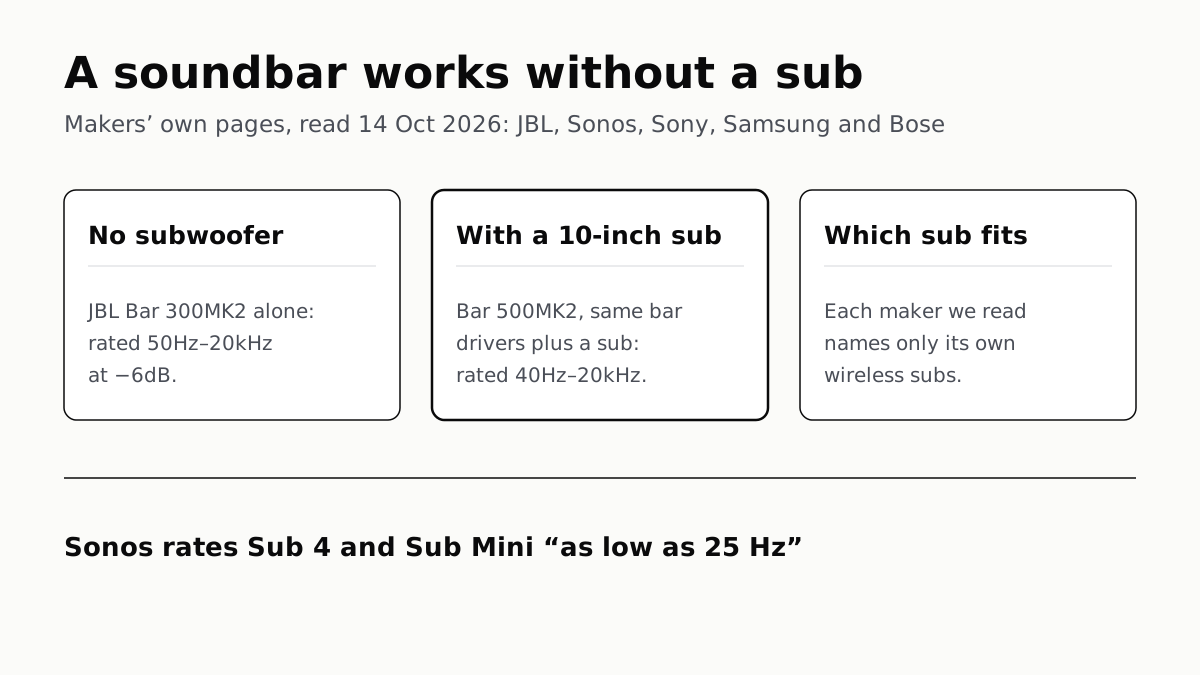
In JBL’s specs, the same bar drivers reach 50Hz alone and 40Hz with a 10-inch sub. Sony, Sonos and Samsung list only their own subs.
Seatback Bluetooth: United on 800+ Planes, Others Starting
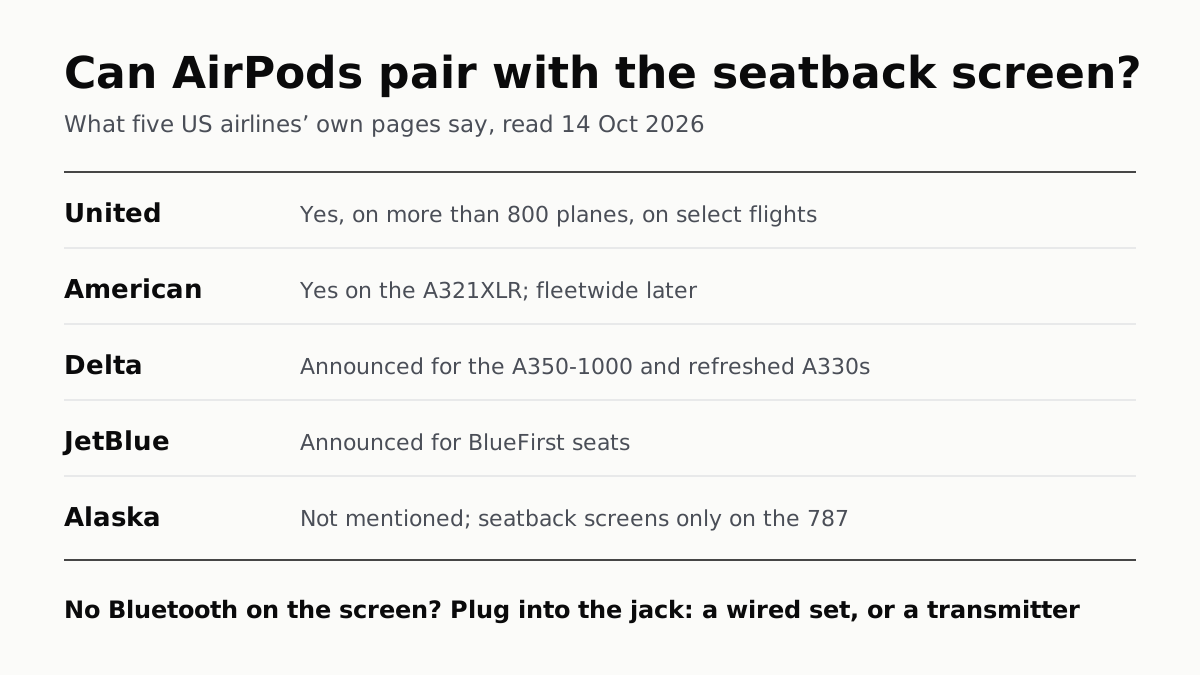
American’s A321XLR has it and JetBlue and Delta have announced it. Without it, the seatback jack needs a wired plug or a transmitter.
OLED Lights Each Pixel; Mini-LED Lights an LCD Behind It
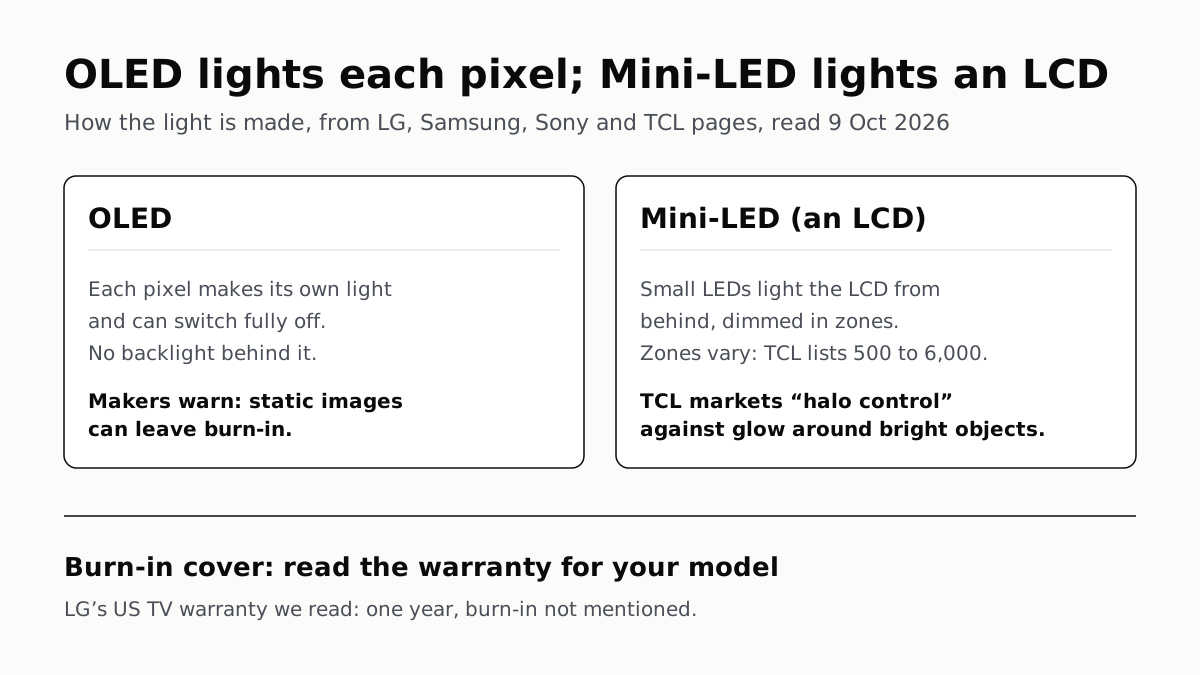
Self-lit pixels give OLED its blacks and a burn-in risk; a zoned backlight gives Mini-LED brightness and a halo risk.
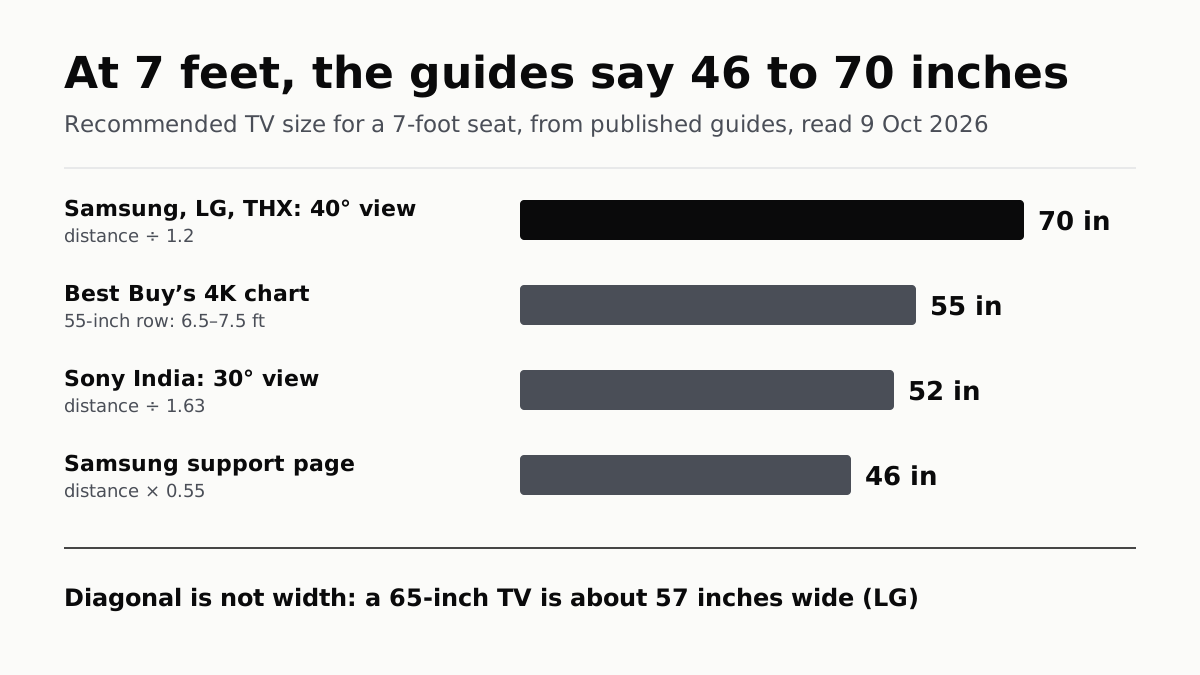
At 7 Feet, TV Makers’ Own Guides Range From 46 to 70 Inches
Samsung, LG and THX divide your distance by 1.2. Sony’s 30° table and Samsung’s own support page point you smaller.