VPN Passthrough Is a Setting You Almost Certainly Don't Need
It exists for two protocols from the 1990s. If your VPN is WireGuard or OpenVPN, the toggle does nothing for you.
If you buy through our links, we may earn a commission. It never affects our verdicts or scores — how that works. As an Amazon Associate I earn from qualifying purchases.
VPN passthrough is a router setting that helps two specific VPN protocols survive your home network’s address translation. Both protocols are from the 1990s, the problem was solved by a standard twenty years ago, and if your VPN is WireGuard or OpenVPN the toggle is irrelevant to you.
The problem it was built for
Your router performs network address translation: many devices inside your home share one public address, and the router rewrites addresses and ports as traffic passes through. Ordinary traffic does not mind. Two VPN protocols very much did.
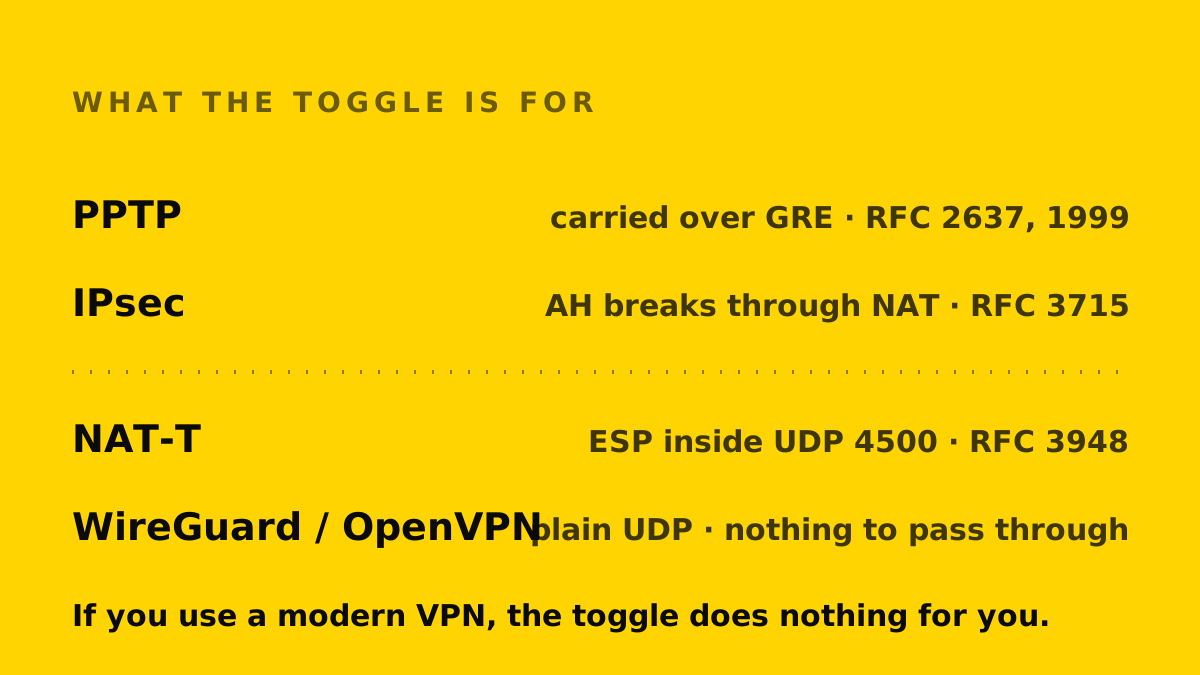
IPsec. RFC 3715 exists specifically to document “known incompatibilities between Network Address Translation (NAT) and IPsec”. The clearest one concerns the Authentication Header: because AH “incorporates the IP source and destination addresses in the keyed message integrity check”, a router rewriting those addresses invalidates the check and the packet is discarded. The specification also notes that ESP does not include those addresses in its integrity check, so it does not have that particular problem.
PPTP. RFC 2637 defines PPTP as carrying PPP over a “GRE (Generic Routing Encapsulation) mechanism”. GRE is not TCP or UDP and has no port numbers, and port numbers are what NAT uses to tell one device’s traffic from another’s. A router therefore needs to handle GRE specially or the tunnel does not work.
“Passthrough” is the router vendor’s name for that special handling.
The standard that made it unnecessary
RFC 3948 defines how to “encapsulate and decapsulate IP Encapsulating Security Payload (ESP) packets inside UDP packets for traversing Network Address Translators”. Wrap the protocol NAT struggles with inside UDP — the specification uses port 4500 — and NAT handles it like any other UDP traffic.
That is NAT traversal, it is negotiated automatically, and it removed the need for the router to know anything about VPNs.
Why it does not apply to a modern VPN
WireGuard and OpenVPN send their traffic over ordinary UDP, and OpenVPN can use TCP. There is nothing for a router to make an exception for, because their traffic already looks like the traffic every router handles all day.
So if you are using a commercial VPN app on your phone or laptop in 2026, the passthrough toggles in your router are almost certainly doing nothing for you either way.
When it still matters
Connecting to an older corporate VPN that uses IPsec or, rarely, PPTP — typically an appliance that predates NAT traversal being universal. If your employer’s VPN will not connect from home and works elsewhere, this is one of a small number of settings worth checking.
Otherwise leave it alone. Enabling it does not make a modern VPN faster or more reliable, and turning it off will not break one.
The short answer
If you found this setting while trying to make a VPN work: it is probably not your problem. Check whether your VPN app has its own protocol setting first, because that is far more likely to be what is failing.
How we researched this
No one at bitcritiq has handled this product. Everything here comes from published sources, listed below.
- What this cannot tell you
- Router firmware varies and some vendors attach the same label to different behaviour. This explains what the setting was designed to solve; whether your particular router does anything else under that name is a question for its manual.
How we chose this, and what we did
- Why this subject
- Searches for what VPN passthrough means are rising, which usually means people are finding the toggle in a router and wondering whether it matters. It is a genuinely obsolete setting, and the reason why is documented precisely in the standards rather than being a matter of opinion.
- How we looked at it
- Traced the setting back to the protocols it exists for, using the IETF specifications that define them and the specification that made the workaround unnecessary. Every technical claim below is from an RFC, cited at the foot.
Sources 3
- RFC 3715 — IPsec-NAT Compatibility RequirementsStandards / .govaccessed Aug 27, 2026
- RFC 3948 — UDP Encapsulation of IPsec ESP PacketsStandards / .govaccessed Aug 27, 2026
- RFC 2637 — Point-to-Point Tunneling Protocol (PPTP)Standards / .govaccessed Aug 27, 2026
Pass it on
Know someone weighing this up? Send them the answer.
bitcritiq.com/vj98The link is permanent: it opens this article for good, even if the title changes.
No email, no account
Follow bitcritiq
Every new article, in whatever reader you already use.
Subscribe by RSSAll the ways to follow
Using Chrome on Android? Open the browser menu and tap Follow. New articles then turn up in the Following tab in Discover.
read next

Free Airline Wi-Fi Needs a Loyalty Login, Except JetBlue
Delta, United, American, Southwest, Alaska and Hawaiian are free on equipped planes for members; JetBlue asks for a short ad.

Spotify Premium Is $12.99; Family Covers 6 for $21.99
Duo is $18.99 for two at one address and Student $6.99 with Hulu. Individual and plan managers get 15 audiobook hours a month.

YouTube Premium Lite Keeps Ads on Music and Shorts
At $8.99 a month against $15.99, Lite also leaves out the YouTube Music app and downloads or background play for songs.
Apple One Costs $13 to $35 a Month Less Than Its Parts
Individual $21.95: Music, TV, Arcade, 50GB. Family $27.95: the same with 200GB, for six. Premier $39.95 adds News+, Fitness+, 2TB.