Why Streaming Buffers When Your Speed Test Says You're Fine
Netflix asks for 15 Mbps to serve 4K. If you have 200 and it still stalls, the number you are measuring is not the one that matters.

If you buy through our links, we may earn a commission. It never affects our verdicts or scores — how that works. As an Amazon Associate I earn from qualifying purchases.
A stream does not need a fast connection. It needs a steady one. Netflix’s own published requirement for its highest quality is 15 Mbps or higher for Ultra HD — so if you are paying for 200 and still watching a spinning circle, more bandwidth was never the answer.
The full set it publishes is smaller than most people expect: 3 Mbps or higher for HD, 5 Mbps or higher for Full HD, 15 Mbps or higher for 4K.
The two official numbers disagree, and that is informative
The FCC’s Broadband Speed Guide puts streaming Ultra HD 4K at 25 Mbps. Netflix says 15.
Neither is wrong. The FCC is writing general guidance across services with headroom built in; Netflix is stating what its own encoder and player need. A ten-megabit spread between two authoritative answers tells you how soft this figure is — and how far both sit below a typical modern connection.
Whichever you take, the conclusion is the same. Bandwidth stopped being the constraint for most households some years ago, and buffering carried on happening.
What buffering actually is
The player keeps a reserve of video downloaded ahead of what you are watching. Buffering is that reserve reaching zero.
That happens when delivery falls below the bitrate and stays there long enough to drain the reserve. Note both halves. A one-second dropout does not empty a thirty-second buffer; a sustained shortfall does.
Which is exactly what a speed test cannot tell you. A speed test measures a short burst, to a deliberately nearby and well-provisioned server, at a moment you chose. A stream is a sustained pull, from wherever that service’s delivery network puts it, for two hours, including the hours when your neighbours are home. You are measuring a sprint to predict a marathon.
The four real causes, in the order worth checking
- The last hop. Wi-Fi is variable in a way a wired line is not, and a TV or console across the house is the weakest link in the chain. This is the most common cause by a distance.
- Peak-hour congestion. If it stalls at 8pm and never at 8am, nothing in your house is broken. That is contention somewhere between you and the service, and it is a pattern rather than a fault.
- The device. An older streaming stick can fail to decode a high-bitrate 4K stream smoothly even with bandwidth to spare. The symptom looks identical from the sofa.
- The service itself. Sometimes it is genuinely them, and no test at your end will show it.
The check, which takes one evening
- Note the time it happens. If there is a nightly pattern, stop testing your equipment — you have congestion, and the useful evidence is the pattern, not a speed test.
- Put one device on a cable, once. If a wired device streams cleanly while a wireless one stalls in the same hour, you have your answer and it is not your provider.
- Drop the quality deliberately and see if it holds. Netflix suggests changing the video quality setting to fix buffering. If 1080p is rock solid and 4K stalls, you have found a ceiling — and 1080p on a stable stream looks better than 4K that stops.
- Try a different service at the same moment. If one buffers and another does not, the problem is that service’s delivery, not your line.
What to actually do
- Stop running speed tests to diagnose buffering. They will keep telling you everything is fine, because by the only measure they take, it is.
- Fix the last hop first. A cable to the device that matters solves more buffering than any plan upgrade ever has.
- Do not upgrade your plan on buffering alone. You are almost certainly already at several times the published requirement — what the plan actually covers, and where the speed goes is the same lesson in a different room.
- Treat a nightly stall as evidence, not a fault. Report it with times and dates; that is the version a provider can act on.
- Accept 1080p when 4K is marginal. On most screens at normal viewing distance the difference is small, and the difference between playing and not playing is not.
How we researched this
No one at bitcritiq has handled this product. Everything here comes from published sources, listed below.
- What this cannot tell you
- This is about buffering caused by your connection. A stall that happens at the same moment in the same title for everyone is the service's problem and no amount of home testing will find it. Figures are for one service on the date accessed; other platforms publish their own, and live sport and high-frame-rate content are consistently more demanding than the general numbers suggest.
How we chose this, and what we did
- Why this subject
- The speed test is the first thing everybody reaches for and it is close to useless for this problem. Two authoritative bodies publish the bandwidth a stream needs, both numbers are far below what most people already pay for, and neither explains buffering — which means the explanation is somewhere else entirely, and worth writing down.
- How we looked at it
- Took the required bitrates from Netflix's own help pages, which are the numbers the service designs around, and cross-checked them against the FCC's published consumer guide. Where the two disagree, both are quoted rather than the more convenient one being picked.
What you would need
An Ethernet cable for the device that matters
Cat 5e or better, long enough to reach the TV or console without strain. A wired stream is the single fix that resolves most buffering, and the cable category above Cat 5e makes no difference at streaming bitrates.
Check price on Amazon (affiliate link, opens in a new tab)A powerline adapter, only if a cable genuinely cannot be run
A compromise, not an equal. It is more stable than distant Wi-Fi and slower than a cable, and performance depends on your house wiring, so buy somewhere you can return it.
Check price on Amazon (affiliate link, opens in a new tab)
We have not tested these and are not picking one for you — each link is a search for the class of thing described above. If you buy through one we may earn a commission, which changes nothing on this page. How that works. As an Amazon Associate I earn from qualifying purchases.
Sources 2
- Internet connection speed recommendations — Netflix Help CenterOfficialaccessed Aug 30, 2026
- Broadband Speed Guide — Federal Communications CommissionOfficialStandards / .govaccessed Aug 30, 2026
Pass it on
Know someone weighing this up? Send them the answer.
bitcritiq.com/78seThe link is permanent: it opens this article for good, even if the title changes.
No email, no account
Follow bitcritiq
Every new article, in whatever reader you already use.
Subscribe by RSSAll the ways to follow
Using Chrome on Android? Open the browser menu and tap Follow. New articles then turn up in the Following tab in Discover.
read next
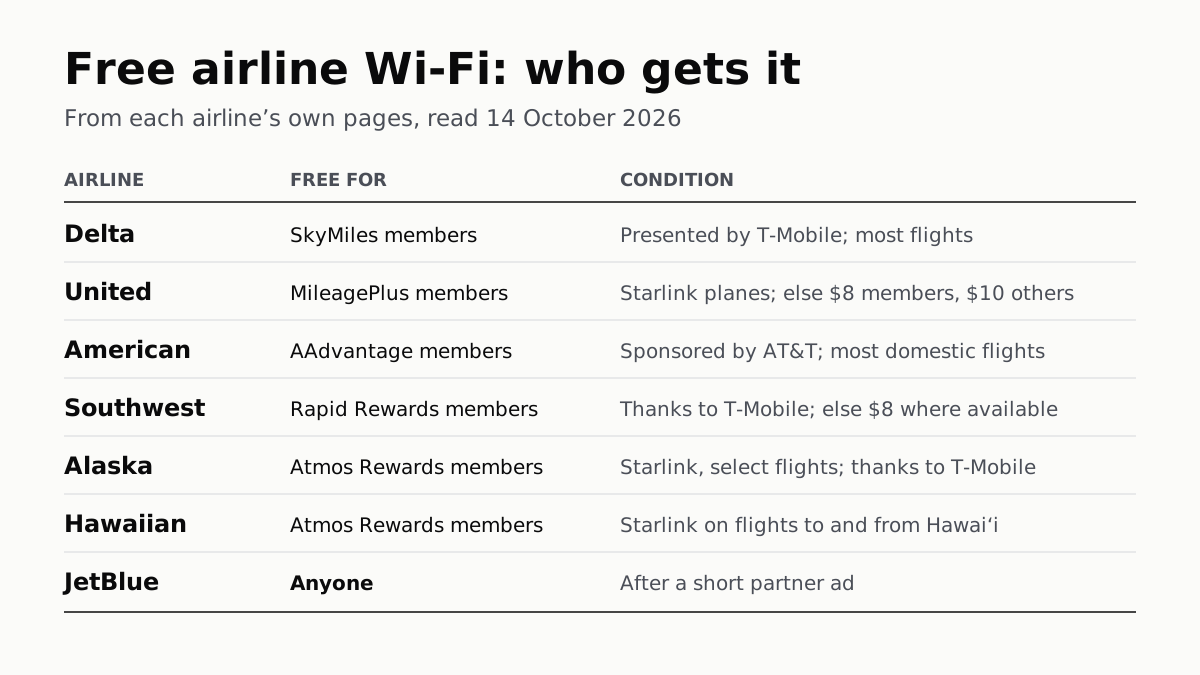
Free Airline Wi-Fi Needs a Loyalty Login, Except JetBlue
Delta, United, American, Southwest, Alaska and Hawaiian are free on equipped planes for members; JetBlue asks for a short ad.
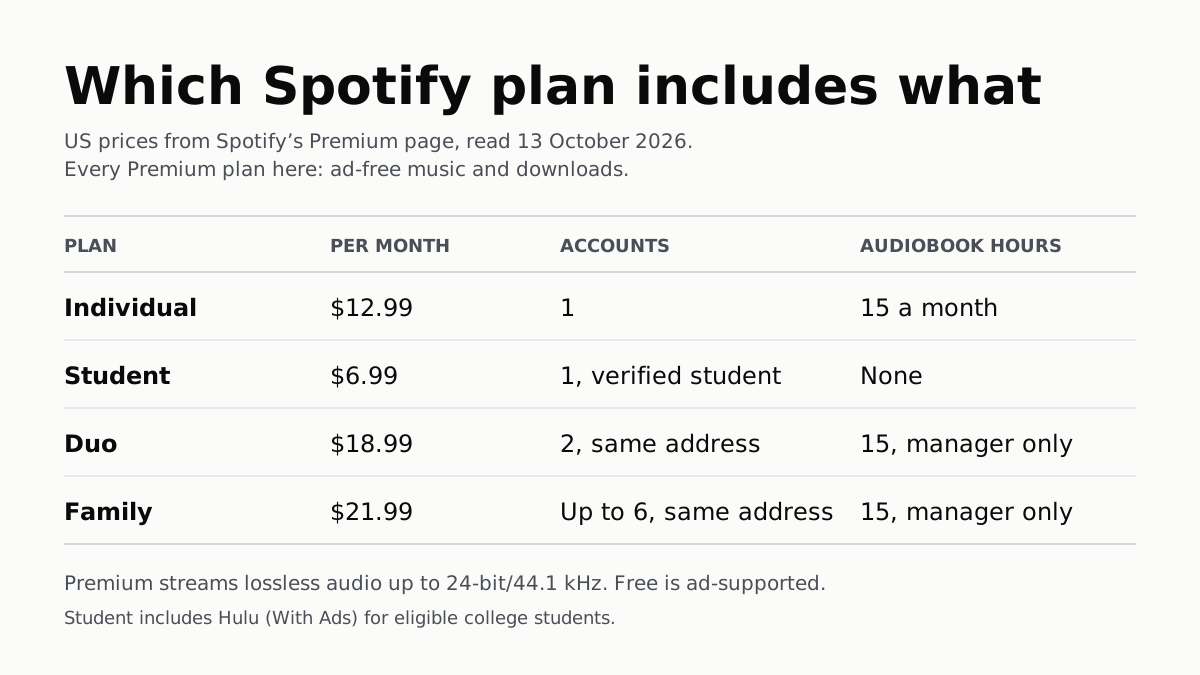
Spotify Premium Is $12.99; Family Covers 6 for $21.99
Duo is $18.99 for two at one address and Student $6.99 with Hulu. Individual and plan managers get 15 audiobook hours a month.
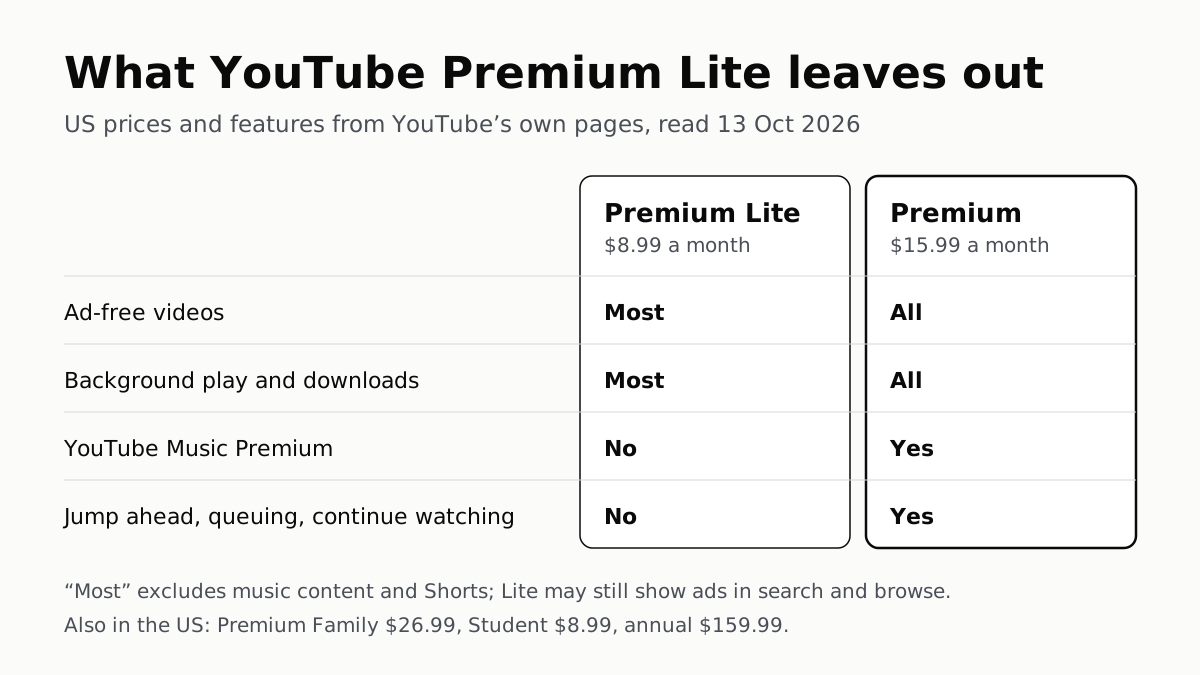
YouTube Premium Lite Keeps Ads on Music and Shorts
At $8.99 a month against $15.99, Lite also leaves out the YouTube Music app and downloads or background play for songs.
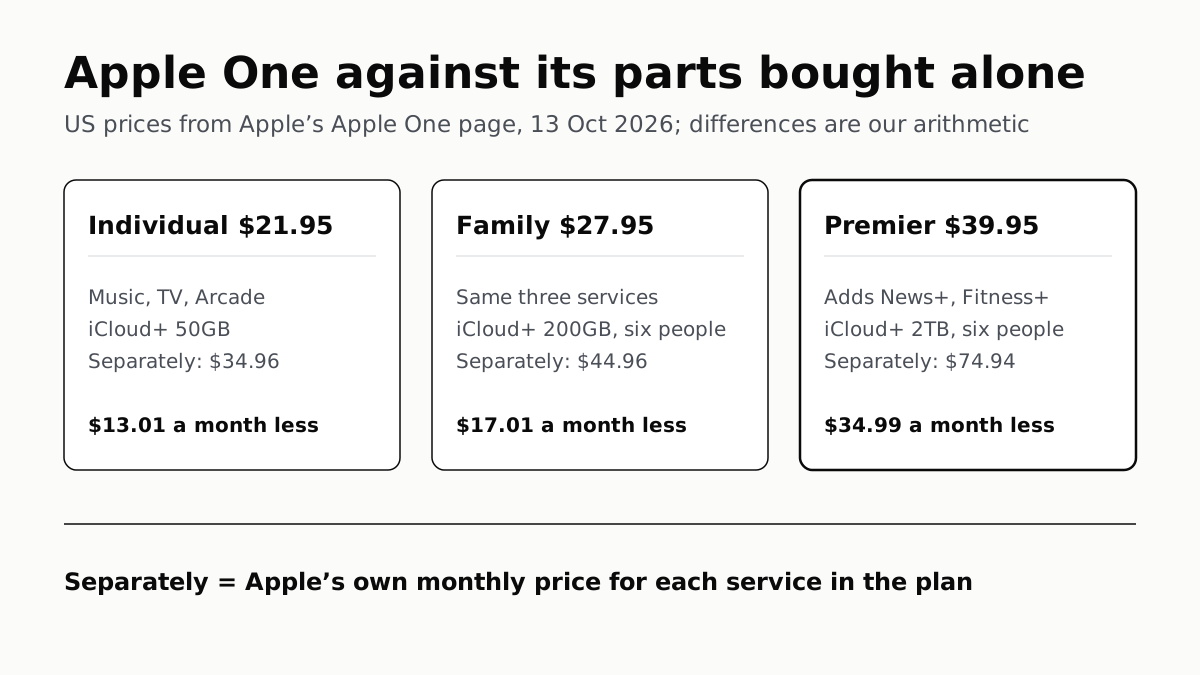
Apple One Costs $13 to $35 a Month Less Than Its Parts
Individual $21.95: Music, TV, Arcade, 50GB. Family $27.95: the same with 200GB, for six. Premier $39.95 adds News+, Fitness+, 2TB.