Why Your Wi-Fi Is Slower Than the Speed You Pay For
The plan describes what reaches your router. Wi-Fi is the hop after that, and it is the part nobody sold you.

If you buy through our links, we may earn a commission. It never affects our verdicts or scores — how that works. As an Amazon Associate I earn from qualifying purchases.
The number on your bill describes what arrives at your router. Wi-Fi is the hop after that, and nothing you pay for covers it.
That is the whole shape of the problem. A broadband plan is a service delivered to your home, and the FCC’s consumer labels require providers to disclose the speeds of that service — the wire into the building. The wireless link from your router to the laptop on your sofa is equipment you own, operating in shared public spectrum, and it is almost always the slowest part of the chain.
The people who answer this question every week on r/HomeNetworking have stopped being polite about how often it comes up. One reply asks for “a sticky and a automod reply to the 10 posts a week about ‘wifi is not my paid speed’”. Another gives the analogy that actually lands: it is “like paying for 500 gal/minute water pressure and hooking a small hose up to the system.”
Four things are taking the difference
Your device, not your router. This is the one that surprises people, and it is usually the answer. The radio in the thing running the speed test sets the ceiling, and a cheap or older client caps out well below what the router can send. One commenter in that thread describes a laptop that “never got over 150mbps even with my phone right next to it pulling 300+” — same room, same router, same second, half the speed. Buying a faster router does not raise a client’s ceiling.
The band you are on. Wi-Fi runs in three bands, and the Wi-Fi Alliance’s own description of Wi-Fi 7 covers “the 2.4 GHz, 5 GHz, and 6 GHz bands”. They are not equivalent. 2.4 GHz travels furthest through walls and is the slowest and the most crowded; 6 GHz is the fastest and barely leaves the room. If your phone has quietly settled on 2.4 GHz because you walked into the kitchen, your speed test is measuring the kitchen.
Channel width, which is where the big numbers come from. The Alliance notes that Wi-Fi 7’s “320 MHz channels available in the 6 GHz band provide twice the throughput of Wi-Fi 6”. Those headline multi-gigabit figures assume the widest channels in the newest band — conditions most homes are not in, on hardware most people do not own.
Everything else on the air. Airtime is shared, not just among your own devices but with every neighbouring network on the same channel. This is why the same test gives one answer at 3pm and another at 9pm in a block of flats, with nothing in your home having changed.
The two-minute check that locates it
Do these in order and stop at the first surprise. Each step rules out one layer, so the step where the number changes is the layer at fault.
- Plug a computer into the router with an Ethernet cable and run a speed test. This is the line itself, with Wi-Fi removed. The FCC’s own Measuring Broadband America programme used dedicated “at-home equipment to conduct automated, direct measurements” rather than phones on Wi-Fi, for exactly this reason.
- If the wired number is close to your plan, your line is fine and everything missing is being lost in the air. Carry on to step 3.
- If the wired number is also low, stop. Nothing in this article will help — that is a problem with the service or the router, and it is your provider’s to answer. You now have the evidence to make them.
- Run the wireless test standing next to the router, then again where you actually sit. The drop between those two numbers is your walls and your distance. The gap between the wired number and the next-to-the-router number is your device’s radio.
You may not be missing anything you need
Worth checking before you spend money on any of this: the speed you are chasing may exceed anything you do. The FCC’s Broadband Speed Guide puts minimum download speeds at 25 Mbps for Ultra HD 4K video, 5–8 Mbps for HD streaming, 6 Mbps for HD video teleconferencing and 4 Mbps for online multiplayer gaming.
Those are per-activity and they add up across a household, so a family streaming three things at once wants real headroom. But if a 300 Mbps plan is delivering 140 Mbps over Wi-Fi to a laptop that streams and does video calls, the honest answer is that nothing is being harmed. The number is disappointing. The experience is not affected.
What to actually do
- Test wired first, always. Every conversation about this that starts with a Wi-Fi speed test is a conversation about the wrong link.
- Move the router before you replace it. Central, high, out of a cabinet, away from the microwave. This is free and it beats most upgrades.
- Put the things that matter on a cable. A desktop, a games console, a TV. Consoles in particular are poor wireless clients, and they are the devices people most often test with.
- If you upgrade, upgrade the client too. A Wi-Fi 6E or Wi-Fi 7 router talking to a five-year-old laptop gives you a five-year-old laptop’s speed. Here is what a device needs to use Wi-Fi 7.
- Do not pay for a faster plan to fix a Wi-Fi problem. A bigger pipe into the building does nothing about the hose at the other end, and it is the most expensive way to not solve this.
How we researched this
No one at bitcritiq has handled this product. Everything here comes from published sources, listed below.
- What this cannot tell you
- This explains the gap and how to locate it. It is not a fix for a genuinely underperforming line — if a wired test also comes in low, the problem is upstream of everything here and belongs with your provider. Nor is it a router buying guide: the most common cause of a slow Wi-Fi speed test is the device running the test, and no router fixes that.
How we chose this, and what we did
- Why this subject
- This is the most common home networking complaint there is, and the version people search is specific — they know the number on the bill and they know the number on the speed test, and they want to know which one is lying. Neither is. The gap has a mechanism, and understanding it changes what you do about it.
- How we looked at it
- Took the speed requirements and the measurement approach from the FCC's own consumer guidance and its Measuring Broadband America programme, and the band and channel-width claims from the Wi-Fi Alliance, which certifies the standard. Then read a representative r/HomeNetworking thread on this exact complaint to see which cause the people who answer it every week point to first.
What you would need
An Ethernet cable
Cat 5e or better. At the speeds a home line runs, Cat 6, 7 or 8 change nothing you can measure — buy on length, not category, and buy the length you need rather than coiling twenty metres behind a cabinet.
Check price on Amazon (affiliate link, opens in a new tab)
We have not tested these and are not picking one for you — each link is a search for the class of thing described above. If you buy through one we may earn a commission, which changes nothing on this page. How that works. As an Amazon Associate I earn from qualifying purchases.
Sources 5
- Broadband Speed Guide — Federal Communications CommissionOfficialStandards / .govaccessed Aug 28, 2026
- Broadband Consumer Labels — Federal Communications CommissionOfficialStandards / .govaccessed Aug 28, 2026
- Measuring Broadband America — Federal Communications CommissionOfficialStandards / .govaccessed Aug 28, 2026
- Wi-Fi (MAC/PHY) — Wi-Fi AllianceOfficialaccessed Aug 28, 2026
- I get lower WiFi speeds than what I am paying for — r/HomeNetworkingaccessed Aug 28, 2026
Pass it on
Know someone weighing this up? Send them the answer.
bitcritiq.com/zp9bThe link is permanent: it opens this article for good, even if the title changes.
No email, no account
Follow bitcritiq
Every new article, in whatever reader you already use.
Subscribe by RSSAll the ways to follow
Using Chrome on Android? Open the browser menu and tap Follow. New articles then turn up in the Following tab in Discover.
read next
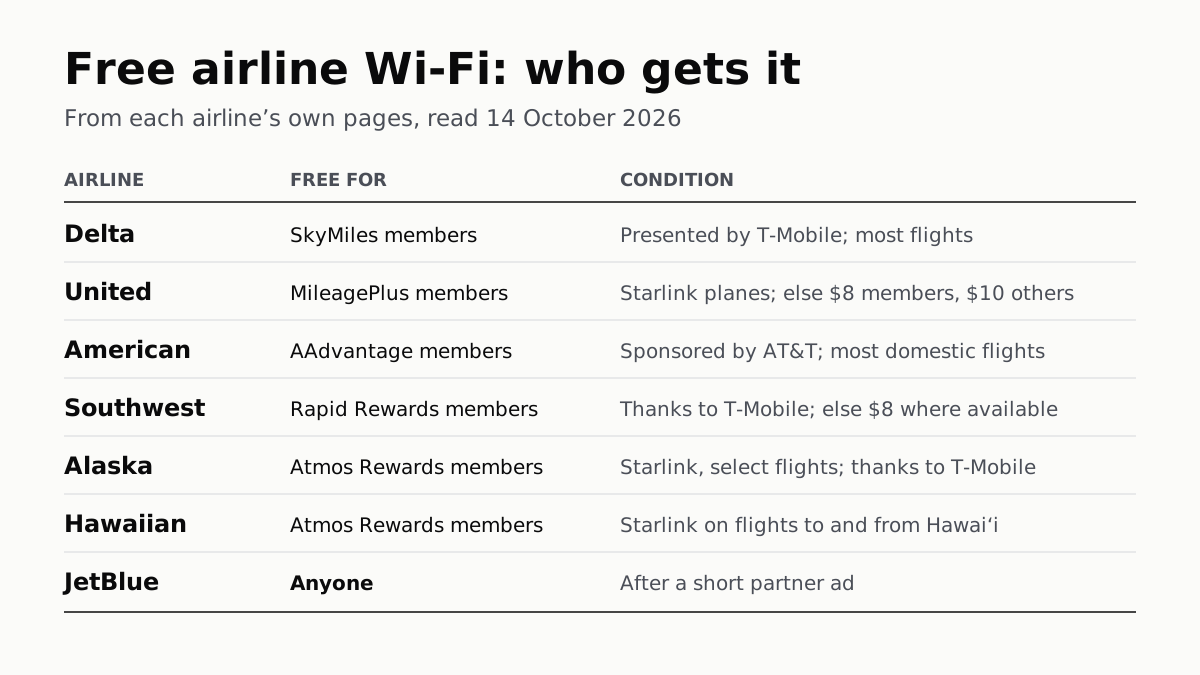
Free Airline Wi-Fi Needs a Loyalty Login, Except JetBlue
Delta, United, American, Southwest, Alaska and Hawaiian are free on equipped planes for members; JetBlue asks for a short ad.
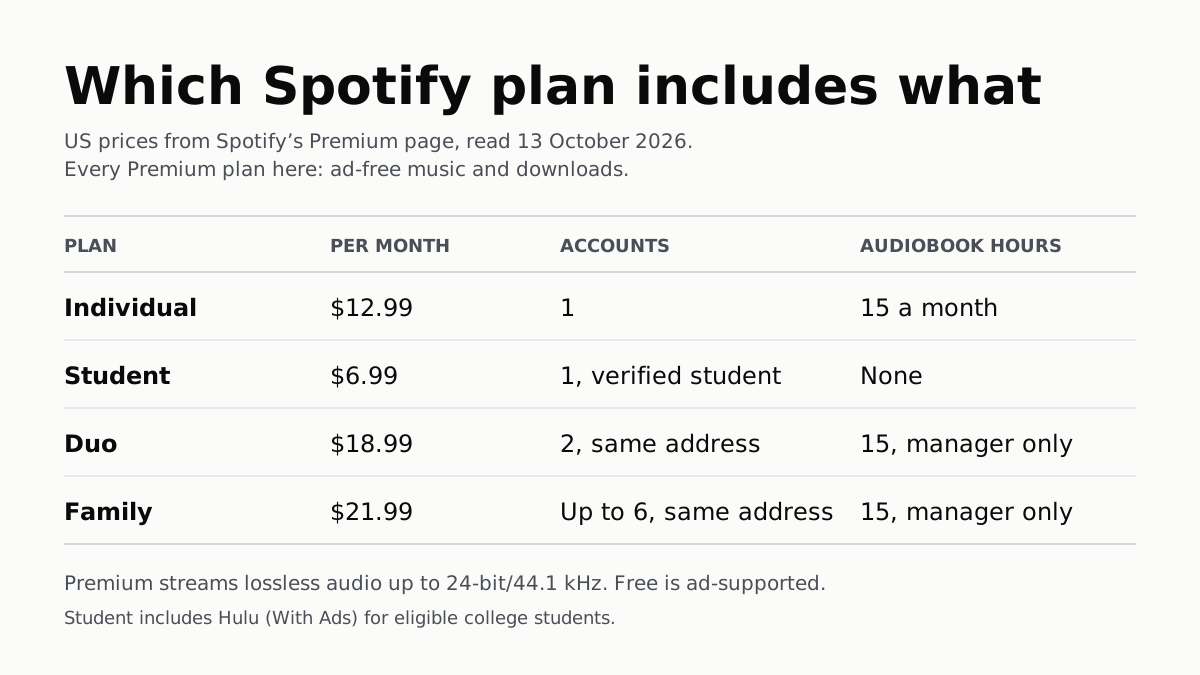
Spotify Premium Is $12.99; Family Covers 6 for $21.99
Duo is $18.99 for two at one address and Student $6.99 with Hulu. Individual and plan managers get 15 audiobook hours a month.
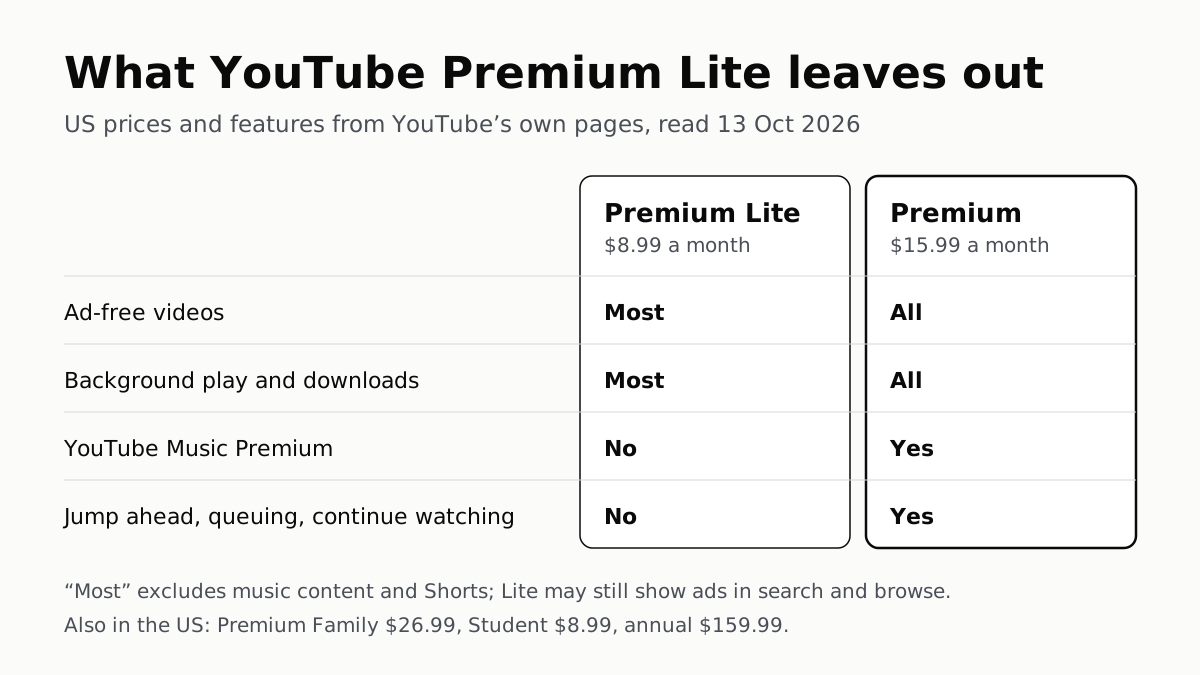
YouTube Premium Lite Keeps Ads on Music and Shorts
At $8.99 a month against $15.99, Lite also leaves out the YouTube Music app and downloads or background play for songs.
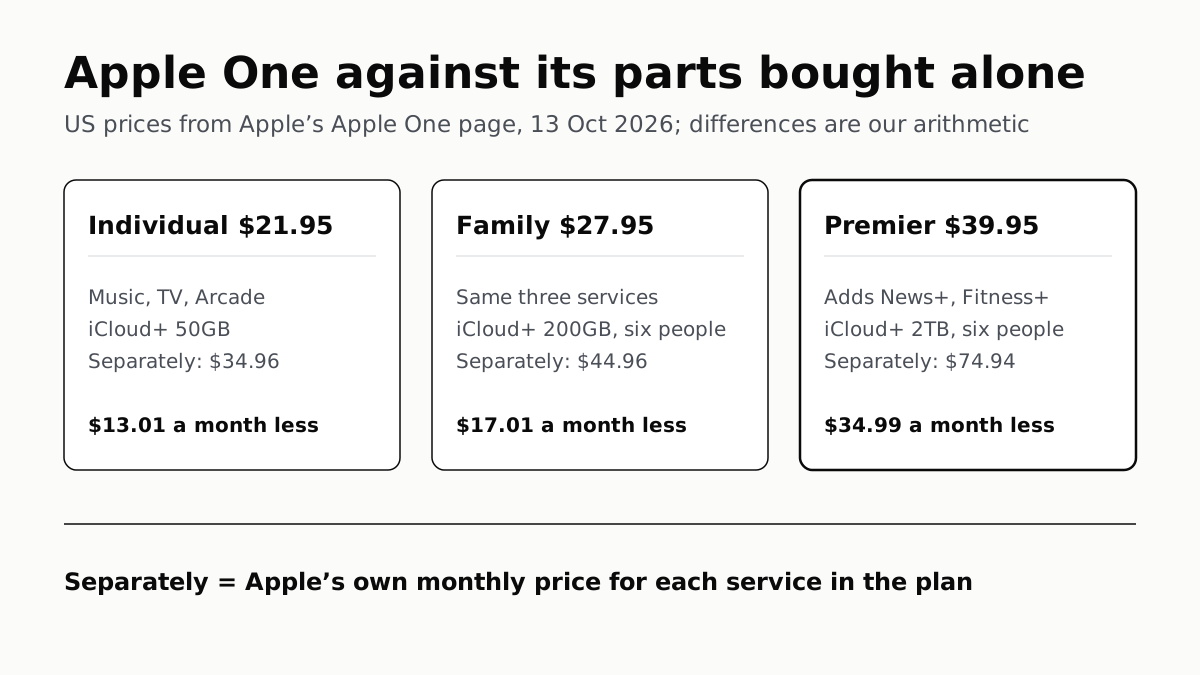
Apple One Costs $13 to $35 a Month Less Than Its Parts
Individual $21.95: Music, TV, Arcade, 50GB. Family $27.95: the same with 200GB, for six. Premier $39.95 adds News+, Fitness+, 2TB.