Your VPN Kill Switch Probably Isn't the One You Think
Most providers ship two, the weaker one is usually the default, and it stops protecting you the moment you disconnect on purpose.
If you buy through our links, we may earn a commission. It never affects our verdicts or scores — how that works. As an Amazon Associate I earn from qualifying purchases.
A VPN kill switch blocks your internet if the tunnel drops, so your real address is never exposed. The part nobody mentions is that most providers ship two versions of it, and the one enabled by default protects you in fewer situations than you think.
What it is meant to do
Proton VPN’s documentation puts the purpose plainly: the feature “stops your real IP address from being exposed to the internet,” and if the connection is lost it “blocks all internet traffic on your device until you’re reconnected.”
That is the whole idea. A VPN tunnel is a piece of software, and software stops — a server goes down, a laptop wakes from sleep on a new network, a phone moves from wifi to cellular. Without a kill switch, your traffic quietly carries on outside the tunnel and nothing tells you.
The two tiers, and why the difference matters
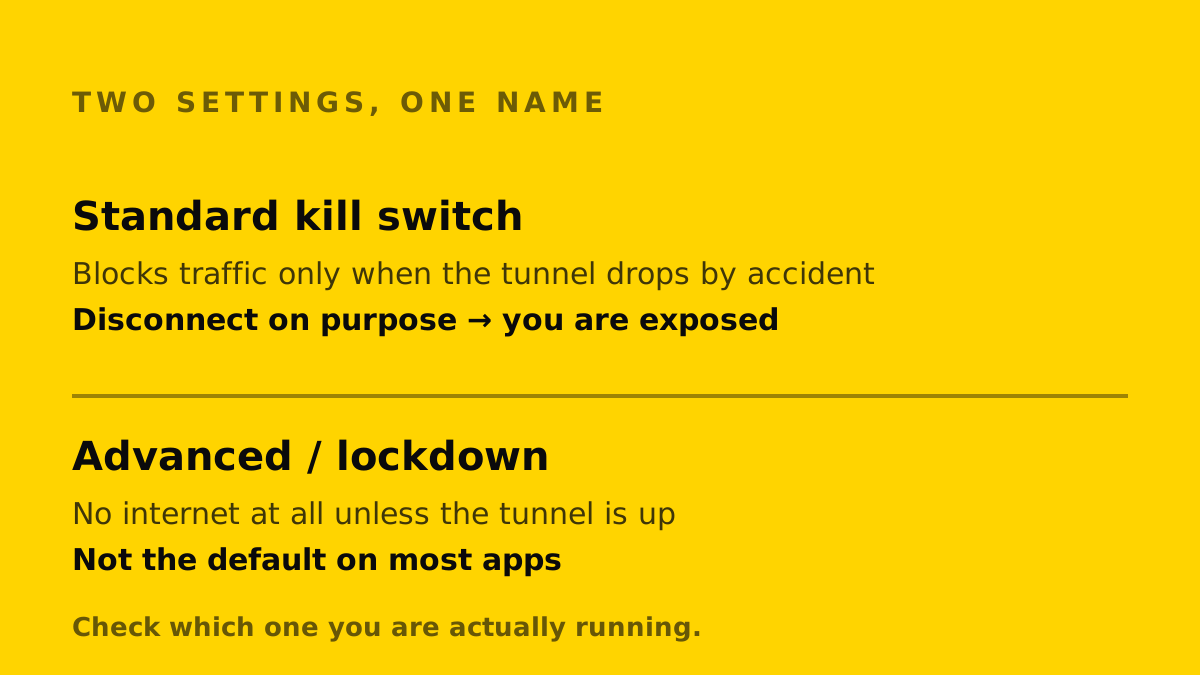
Here is the distinction the one-sentence explanations skip. Proton documents its standard kill switch as being “only activated when your connection drops by accident,” and states that as a result “it doesn’t block your internet connection if you deliberately disconnect.”
Its advanced kill switch, which the same documentation notes is available on Windows, the Linux GUI app and iOS or iPadOS, “only allows internet access when connected to Proton VPN, no exceptions.”
Mullvad splits the same idea across two settings in its app — a kill switch, and a separate lockdown mode — and documents a state where the internet is deliberately blocked because the kill switch is always on.
Two providers, four settings, and the same word doing different work in each. The version most people are running is the permissive one.
What the weaker tier does not cover
If your kill switch only reacts to accidental drops, then it is not protecting you when:
- you disconnect deliberately, intending to reconnect in a moment and then forget
- the app is not running at all, including immediately after a reboot before it starts
- the machine wakes and the network is up before the tunnel is
None of those are exotic. The middle one is how most exposure actually happens: the app is not on, so there is nothing to trigger.
What to check on your own device
Open your VPN’s settings and look for two separate controls rather than one. If there is only a single toggle, find your provider’s documentation and establish which behaviour it describes — the permissive one or the absolute one.
Then test it the only way that proves anything: connect, disconnect deliberately, and see whether your browser still loads a page. If it does, you are running the permissive tier.
One thing a kill switch is not
It is not protection against the tunnel being weak, misconfigured or leaking DNS. It is a single, narrow guarantee — no traffic outside the tunnel — and it says nothing about what happens inside it.
Nor does it always combine with split tunneling, which deliberately sends chosen apps outside the tunnel: Proton says the two are incompatible on most platforms, and NordVPN’s kill switch blocks the excluded apps too.
How we researched this
No one at bitcritiq has handled this product. Everything here comes from published sources, listed below.
- What this cannot tell you
- Every VPN implements this differently and names it differently, and behaviour changes between app versions and operating systems. Read your own provider's documentation for your own platform — this explains what to look for, not what your app definitely does.
How we chose this, and what we did
- Why this subject
- Searches for what a VPN kill switch does have risen sharply, and the answer people find is usually a single sentence that hides the part that matters — that the feature has tiers, and the weaker tier is what most people are running.
- How we looked at it
- Read the published documentation of two providers that document the feature precisely, and compared what each tier actually blocks. Every behaviour described below is quoted from a provider's own support pages rather than inferred from how the apps appear to behave.
Sources 3
- Kill switch and split tunneling — Proton VPN supportOfficialaccessed Aug 27, 2026
- Using the Mullvad VPN app — kill switch and lockdown modeOfficialaccessed Aug 27, 2026
- RFC 3948 — UDP Encapsulation of IPsec ESP PacketsStandards / .govaccessed Aug 27, 2026
Pass it on
Know someone weighing this up? Send them the answer.
bitcritiq.com/qjj5The link is permanent: it opens this article for good, even if the title changes.
No email, no account
Follow bitcritiq
Every new article, in whatever reader you already use.
Subscribe by RSSAll the ways to follow
Using Chrome on Android? Open the browser menu and tap Follow. New articles then turn up in the Following tab in Discover.
read next
Free Airline Wi-Fi Needs a Loyalty Login, Except JetBlue
Delta, United, American, Southwest, Alaska and Hawaiian are free on equipped planes for members; JetBlue asks for a short ad.
Spotify Premium Is $12.99; Family Covers 6 for $21.99
Duo is $18.99 for two at one address and Student $6.99 with Hulu. Individual and plan managers get 15 audiobook hours a month.
YouTube Premium Lite Keeps Ads on Music and Shorts
At $8.99 a month against $15.99, Lite also leaves out the YouTube Music app and downloads or background play for songs.
Apple One Costs $13 to $35 a Month Less Than Its Parts
Individual $21.95: Music, TV, Arcade, 50GB. Family $27.95: the same with 200GB, for six. Premier $39.95 adds News+, Fitness+, 2TB.