Why Games Stutter on a Fast PC Even at High FPS
The frame counter says 120 and the game still lurches. That hitch is usually the game building a shader at the moment it first needs it.

If you buy through our links, we may earn a commission. It never affects our verdicts or scores — how that works. As an Amazon Associate I earn from qualifying purchases.
A high average frame rate and a smooth game are different things. The lurch you feel when you turn a corner is usually not the graphics card running out of power — it is the game building a shader at the moment it first needs to draw something.
Which is why it happens on a machine that benchmarks beautifully, and why it happens in the same places every time on a fresh install.
What is actually happening
Before the GPU can draw anything, the exact combination of shaders and settings has to be compiled into a pipeline state object. Modern APIs want that done in advance. Engines built around older ones often cannot.
A Khronos Group post by a Valve engineer describes the problem in Source 2 exactly: the engine does not know, at the time shaders are provided, “the pairing of shaders across stages, vertex formats, framebuffer formats, depth/stencil state, viewport information, MSAA state, and several others.”
The consequence, in their words: “we delay creation of PSOs until draw time, which can lead to hitches, particularly with a cold pipeline cache.”
A cold cache is the whole story. The first time you see a weapon, an effect, a new area, the work happens then — while you are looking at it.
Why DirectX 11 games felt smoother
Worth knowing, because it explains why this seems to have got worse as hardware got faster.
The same post is candid about it. Direct3D 11 drivers “provide the illusion of compiling entirely with just the shader byte code”, but “there are massive heroics happening inside the drivers to make this so” — background compilation across threads — and even then, D3D11 “cannot guarantee that shader compilation doesn’t happen at draw time.”
Newer APIs handed that responsibility to the game. That is faster when done well, and produces exactly this when it is not. Your hardware is not the variable that changed.
The check, which takes one level
Run the same section twice and watch where it lurches.
- The hitch happens in the same spots on the first run and is gone on the second — shader compilation. The cache is now warm. Nothing is broken.
- It comes back after a driver update — the driver update invalidated the cache. Same cause, and it is expected.
- It happens in the same spots every time, warm or cold — that is asset streaming, not shaders. Usually storage, sometimes memory.
- It is random rather than positional, and matches something else on the machine waking up — background processes.
- It gets worse the longer you play and the fans get louder — thermal throttling, which is a different article.
The distinction that matters: positional-and-once is shaders, positional-and-always is streaming.
What to do now
- Let the shader pre-compilation step finish. When a game offers to compile shaders on first launch or after a driver update, that screen is not a delay before the game — it is the stutter, moved somewhere it does not matter. Do not skip it.
- Play a level through once before judging it. First-run stutter on a game you just installed is close to meaningless.
- Do not lower your resolution to fix it. Resolution is a throughput setting and this is not a throughput problem. It will change your frame rate and not the hitch.
- Do not buy a faster card for this. A faster card compiles a shader marginally faster and still compiles it at draw time.
- Keep the shader cache. Cleanup tools that clear it are undoing exactly the work that made the game smooth.
The fix is arriving from the platform
This is being solved above the level of anything you can configure, which is the right place for it.
AMD describes Advanced Shader Delivery, first shipped on the Ryzen Z Series handhelds including the Xbox ROG Ally (affiliate link to Amazon, opens in a new tab) and Ally X (affiliate link to Amazon, opens in a new tab), as addressing “longstanding issues of shader compilation times and in-game stutter by enabling gamers to download fully compiled shaders tailored for their hardware.”
Compiled elsewhere, downloaded ready, no cold cache. And at GDC 2026, per the same write-up, Microsoft said it is “uniting the ecosystem pieces between game developers, IHVs, and game stores to solve shader compilation on PC going forward”, with new tracing and compilation APIs in the Agility SDK.
So it is a real problem with a named cause and a funded fix — which is a better answer than the one people usually get, that their PC is not good enough.
How we researched this
No one at bitcritiq has handled this product. Everything here comes from published sources, listed below.
- What this cannot tell you
- Shader compilation is one cause of stutter and the one most often mistaken for weak hardware. It is not the only one — asset streaming as you cross a level, a CPU bottleneck, background processes and thermal throttling all produce their own patterns, and this does not diagnose those. The check below tells you which one you have rather than fixing any of them.
How we chose this, and what we did
- Why this subject
- This is the most-reported and least-understood problem in PC gaming, and the advice people are given — lower your settings, buy a better card — is aimed at the wrong thing entirely. The cause is documented by the people who build the graphics APIs, and the industry fix is now shipping, which makes it worth explaining properly rather than guessing at.
- How we looked at it
- Took the mechanism from a Khronos Group engineering post written by a Valve engineer about the Source 2 renderer, since it describes the exact conditions that produce a hitch, and took the state of the fix from AMD's GPUOpen write-up of what Microsoft announced at GDC 2026. Both are the parties building the thing rather than commentators on it.
Sources 3
- Reducing Draw Time Hitching with VK_EXT_graphics_pipeline_library — The Khronos GroupOfficialaccessed Aug 30, 2026
- AMD and Microsoft partner on DirectX ML, DirectStorage, and developer tools at GDC 2026 — AMD GPUOpenOfficialaccessed Aug 30, 2026
- Managing Graphics Pipeline State in Direct3D 12 — Microsoft LearnOfficialaccessed Aug 30, 2026
Pass it on
Know someone weighing this up? Send them the answer.
bitcritiq.com/f97sThe link is permanent: it opens this article for good, even if the title changes.
No email, no account
Follow bitcritiq
Every new article, in whatever reader you already use.
Subscribe by RSSAll the ways to follow
Using Chrome on Android? Open the browser menu and tap Follow. New articles then turn up in the Following tab in Discover.
read next
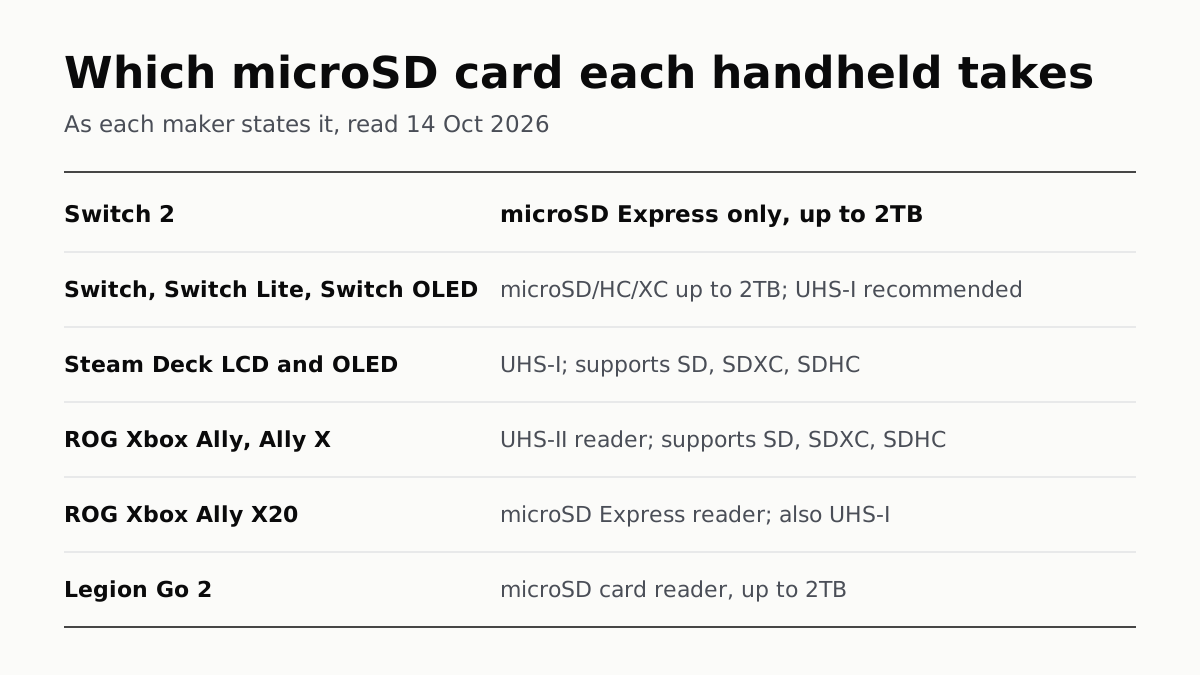
Switch 2 Needs microSD Express; Steam Deck Takes UHS-I
Asus’s Xbox Allys list UHS-II readers, the X20 an Express reader that also takes UHS-I, and Lenovo states 2TB for the Legion Go 2.

Switch Online Is $19.99 a Year; Expansion Pack Adds $30
The $49.99 tier adds N64, GBA, Virtual Boy and Genesis games and three DLC packs; GameCube games come only on Switch 2.

PS Plus: Essential for Online Play, Premium to Stream
Extra adds a catalog of hundreds of games for $134.99 a year; Premium adds classics and trials at $159.99. Essential is $79.99.

On Xbox, Day-One Games Need Ultimate; Online Play Is $9.99
PC Game Pass has day-one games at $13.99 but no cloud play, which from November is capped at 5, 10 or 15 hours a month by tier.