Switch 2 Needs microSD Express; Steam Deck Takes UHS-I
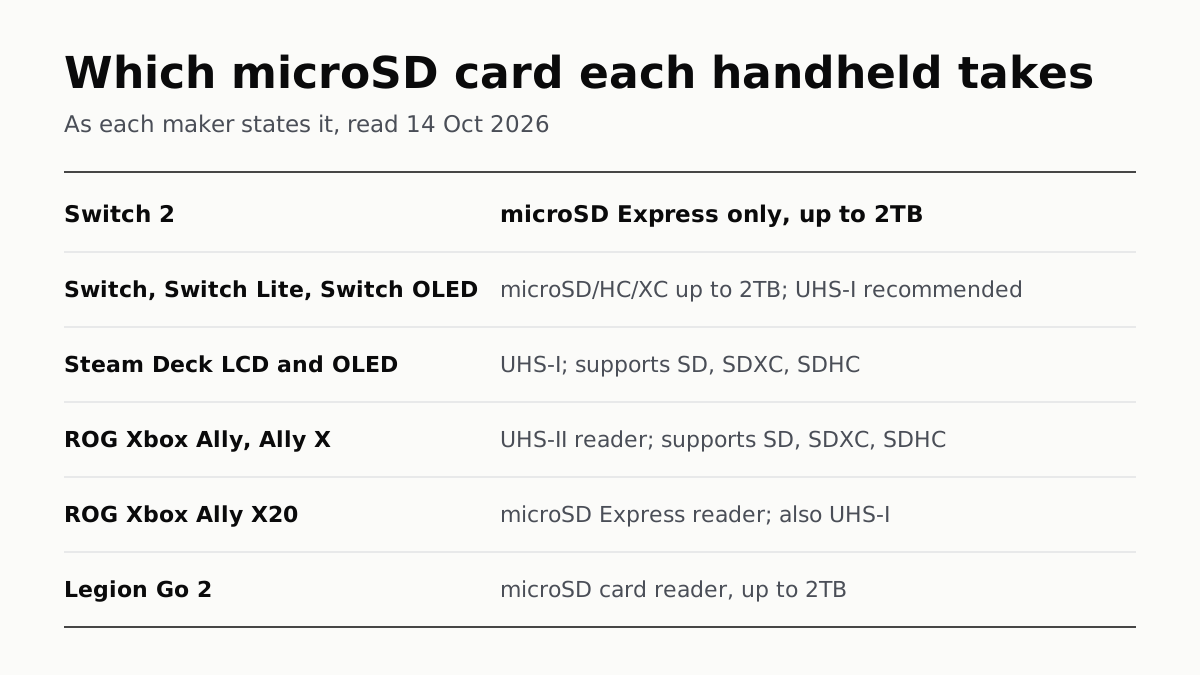
Asus’s Xbox Allys list UHS-II readers, the X20 an Express reader that also takes UHS-I, and Lenovo states 2TB for the Legion Go 2.
If you buy through our links, we may earn a commission. It never affects our verdicts or scores — how that works. As an Amazon Associate I earn from qualifying purchases.
Switch 2 is the one handheld here whose maker requires a microSD Express card: Nintendo says it takes nothing else, up to 2TB. The original Switch, Steam Deck, ROG Xbox Ally and Ally X all list standard microSD slots (UHS-I or UHS-II), the Ally X20 has an Express reader that also takes UHS-I, and Lenovo states only “up to 2TB” for the Legion Go 2.
Every handheld, by what its maker states
| Handheld | Card standard the maker states | Max capacity stated | Does a standard microSD card work? |
|---|---|---|---|
| Nintendo Switch 2 | microSD Express only | 2TB | No: screenshots and videos only |
| Nintendo Switch, Switch Lite, Switch OLED | microSD, microSDHC, microSDXC; UHS-I recommended | 2TB | Yes |
| Steam Deck OLED and LCD | UHS-I; supports SD, SDXC, SDHC | Not stated | Yes; the Deck reformats it |
| ROG Xbox Ally, ROG Xbox Ally X | UHS-II reader; supports SD, SDXC, SDHC | Not stated | Yes |
| ROG Xbox Ally X20 | microSD Express reader; also UHS-I (DDR200 mode) | Not stated | Yes, as UHS-I |
| Legion Go 2 | “microSD card reader”, class not stated | 2TB | Lenovo does not say |
The wording in the second column is each maker’s own, read on 14 October. Where a cell says “not stated”, the maker’s spec line exists and we read it in full; it just does not give that figure.
Switch 2: Express, and nothing else
Nintendo’s compatibility page is blunt: “Nintendo Switch 2 is only compatible with microSD Express cards.” A card you used in an original Switch “will not allow you to save or load digital games or save data”, though Switch 2 can open the screenshots and videos on it. Nintendo supports Express cards up to 2TB, and says the first one you insert needs a system update over the internet.
Look for the word Express, or the “EX” mark Nintendo highlights on its example card, rather than the capacity. What that adds to the price of the console is in what a console costs after you buy it.
Original Switch: any microSD, and Express adds nothing
The Switch, Switch Lite and Switch OLED take microSD (up to 2GB), microSDHC (4GB to 32GB) and microSDXC (64GB to 2TB). Nintendo recommends a UHS-I card rated 60 to 95 MB/sec, and notes that game save data stays in system memory rather than on the card.
An Express card does work in an original Switch, but Nintendo says it reads and writes there at the speed of an ordinary microSD card. If you are moving from a Switch to a Switch 2, the old card does not carry your games across; an Express card bought for the Switch 2 would work in both.
Steam Deck: UHS-I, formatted by the Deck
Valve’s tech specs for both the OLED and the LCD Steam Deck give the same line: “microSD UHS-I supports SD, SDXC and SDHC”. Valve does not state a maximum capacity or a speed rating. Its FAQ adds that the Deck formats cards to ext4 itself, so anything already on a card from a camera or a Switch is erased when the Deck formats it. Valve also says the Deck can boot from microSD.
More on what the Deck is, and why its storage slot matters, is in what a Steam Deck actually is.
ROG Xbox Ally family: UHS-II, except the X20
Asus lists a UHS-II microSD reader on both the ROG Xbox Ally and the ROG Xbox Ally X, supporting SD, SDXC and SDHC cards. The Ally X20 changes the slot to a microSD Express reader, which Asus says supports “up to SD v8.0, PCIe Gen4 x1; UHS-I with DDR200 mode”. So a standard card still works in the X20, through its UHS-I mode; Asus does not list UHS-II for it.
Asus’s pages for the Xbox Ally and Ally X do not mention Express cards, and none of the three state a maximum capacity. How the three models differ beyond the slot is in which ROG Xbox Ally to buy.
Legion Go 2: 2TB, class unstated
Lenovo’s US page for the Legion Go Gen 2 promises “up to 2TB microSD card expansion”, and its PSREF spec sheet lists a “microSD card reader”. Neither names UHS-I, UHS-II or Express, so Lenovo’s pages do not tell you which cards it reads at full speed. The Go 2’s versions are set out in the Legion Go line-up.
What none of them state
Speed ratings such as A1, A2 and V30 appear on none of the handheld spec pages we read; the only speed figure is Nintendo’s 60–95 MB/sec recommendation for the original Switch. Treat a seller’s claim that a card is “made for Steam Deck” or “for ROG Ally” as the seller’s, not the handheld maker’s.
Questions people ask
Does Switch 2 need a microSD Express card?
Yes. Nintendo says Switch 2 is only compatible with microSD Express cards, up to 2TB. A standard microSD card from an original Switch cannot hold Switch 2 games or save data; Nintendo says you can still load Switch screenshots and videos from it.
Can I use my old Switch microSD card in a Switch 2?
Not for games. Nintendo says a card used on an original Switch will not let a Switch 2 save or load digital games or save data. It can still load the screenshots and videos you captured on it.
What microSD card does the Steam Deck use?
Valve lists a UHS-I slot that supports SD, SDXC and SDHC cards on both the OLED and LCD models. It does not state a maximum capacity. The Deck formats a card to ext4 itself, so back up anything already on it first.
Does the ROG Xbox Ally take microSD Express?
Only the X20, which Asus lists with a microSD Express reader that also supports UHS-I. The ROG Xbox Ally and Ally X have UHS-II readers supporting SD, SDXC and SDHC, and Asus does not say they take Express cards.
What is the biggest microSD card the Legion Go 2 takes?
Lenovo states up to 2TB of microSD expansion on its Legion Go Gen 2 page. Its PSREF spec sheet lists a “microSD card reader” without naming UHS-I, UHS-II or Express.
Does a microSD Express card work in an original Switch?
Yes, Nintendo marks it compatible, but on an original Switch it reads and writes at the speed of a standard microSD card. Buying Express for an original Switch alone gains nothing Nintendo describes.
How we researched this
No one at bitcritiq has handled this product. Everything here comes from published sources, listed below.
- What this cannot tell you
- We have not put a card in any of these handhelds; this is what the makers state, not a test. Valve and Asus do not state a maximum capacity, and Lenovo does not state a card class for the Legion Go 2, so we have left those cells as the makers leave them rather than fill them from reviews. Speed ratings printed on cards (A1, A2, V30 and the like) appear on none of the pages we read, apart from Nintendo’s 60–95 MB/sec recommendation for the original Switch. Whether an Express card works in a handheld whose maker lists only UHS readers is not stated by Valve or Asus.
How we chose this, and what we did
- Why this subject
- Google Trends had “steam deck” at 35% of its peak with handheld queries among the top gaming searches, and the holiday season is when a card gets bought alongside a handheld. Our console cost guide covers the Switch 2’s Express requirement in one paragraph; no bitcritiq page put the current handhelds’ card slots side by side, so this is that lookup.
- How we looked at it
- Read on 14 October 2026 through a browser, from each maker’s own pages only: Nintendo Support’s microSD and microSD Express compatibility article (68425) and its microSD Card FAQ (22481); Valve’s Steam Deck tech specs pages for the OLED and LCD models and the Steam Deck FAQ; Asus’s US spec pages for the ROG Xbox Ally, Ally X and Ally X20; Lenovo’s PSREF page for the Legion Go 8ASP2 (Legion Go 2) and its US product page for the Legion Go Gen 2. Each maker’s wording for the slot is quoted as written. Where we say a maker does not state a capacity or card class, the control is that the same page’s expansion or card-reader line was found and read in full: Valve’s “Expansion” row, Asus’s card-reader line, and PSREF’s “Card Reader” row, which reads “microSD card reader”.
What this rests on
6 claims, all official. Nothing here was measured by bitcritiq — see how we test for why. Open a claim to read the source it came from.
Nintendo Switch 2 is only compatible with microSD Express cards, up to 2TB, and a standard microSD card cannot hold its games or save data.Official
Nintendo Support 68425: “Nintendo Switch 2 is only compatible with microSD Express cards.” “microSD Express cards with a capacity of up to 2TB are supported.” A microSD card previously used on a Nintendo Switch “will not allow you to save or load digital games or save data”; Switch screenshots and videos on it can be loaded.
The original Nintendo Switch family takes microSD, microSDHC and microSDXC cards up to 2TB, and Nintendo recommends UHS-I at 60–95 MB/sec.Official
Nintendo’s microSD Card FAQ: “microSD (up to 2 GB), microSDHC (4 GB - 32 GB), microSDXC (64 GB - 2 TB)”; “UHS-I (Ultra High Speed Phase I) compatible”; “Transfer speed 60 - 95 MB/sec”. Page applies to Nintendo Switch, Switch Lite and Switch OLED Model.
A microSD Express card works in an original Switch, at microSD card speed.Official
Nintendo Support 68425 marks microSD Express cards YES for Nintendo Switch, with the note: “On a Nintendo Switch console, the data reading and writing speed for a microSD Express card will be equivalent to that of a microSD card.”
Both Steam Deck models list a UHS-I microSD slot supporting SD, SDXC and SDHC, and the Deck formats cards to ext4.Official
Valve’s OLED and LCD tech specs: “Expansion: microSD UHS-I supports SD, SDXC and SDHC”. Steam Deck FAQ: “Steam Deck microSD cards use ext4 with casefolding - Steam Deck formats SD cards to the proper format.”
The ROG Xbox Ally and Ally X have UHS-II readers; the Ally X20 has a microSD Express reader that also supports UHS-I.Official
Asus spec pages, Xbox Ally and Xbox Ally X: “1x UHS-II microSD card reader (supports SD, SDXC and SDHC)”. Ally X20: “1x microSD Express card reader (supports up to SD v8.0, PCIe® Gen4 x1; UHS-I with DDR200 mode)”.
Lenovo lists a microSD card reader on the Legion Go 2 and states up to 2TB, without naming a card class.Official
Lenovo PSREF, Legion Go 8ASP2: Card Reader “microSD card reader”. Lenovo US Legion Go Gen 2 page: “up to 2TB microSD card expansion”.
Sources 10
- microSD Card and microSD Express Card Compatibility with Nintendo Switch 2 and Nintendo Switch — Nintendo SupportOfficialaccessed Oct 14, 2026
- microSD Card FAQ — Nintendo SupportOfficialaccessed Oct 14, 2026
- Steam Deck Tech Specs (OLED) — ValveOfficialaccessed Oct 14, 2026
- Steam Deck Tech Specs (LCD) — ValveOfficialaccessed Oct 14, 2026
Show 6 more · 6 official or standards
- Steam Deck FAQ — ValveOfficialaccessed Oct 14, 2026
- ROG Xbox Ally (2025) tech specs — ASUS ROG USAOfficialaccessed Oct 14, 2026
- ROG Xbox Ally X (2025) tech specs — ASUS ROG USAOfficialaccessed Oct 14, 2026
- ROG XBOX Ally X20 (2026) RC74XA tech specs — ASUS ROG USAOfficialaccessed Oct 14, 2026
- Legion Go 8ASP2 (Legion Go 2) — Lenovo PSREFOfficialaccessed Oct 14, 2026
- Legion Go Gen 2 (8.8″) — Lenovo USOfficialaccessed Oct 14, 2026
Pass it on
Know someone weighing this up? Send them the answer.
bitcritiq.com/h6n7The link is permanent: it opens this article for good, even if the title changes.
No email, no account
Follow bitcritiq
Every new article, in whatever reader you already use.
Subscribe by RSSAll the ways to follow
Using Chrome on Android? Open the browser menu and tap Follow. New articles then turn up in the Following tab in Discover.
read next
Switch Online Is $19.99 a Year; Expansion Pack Adds $30
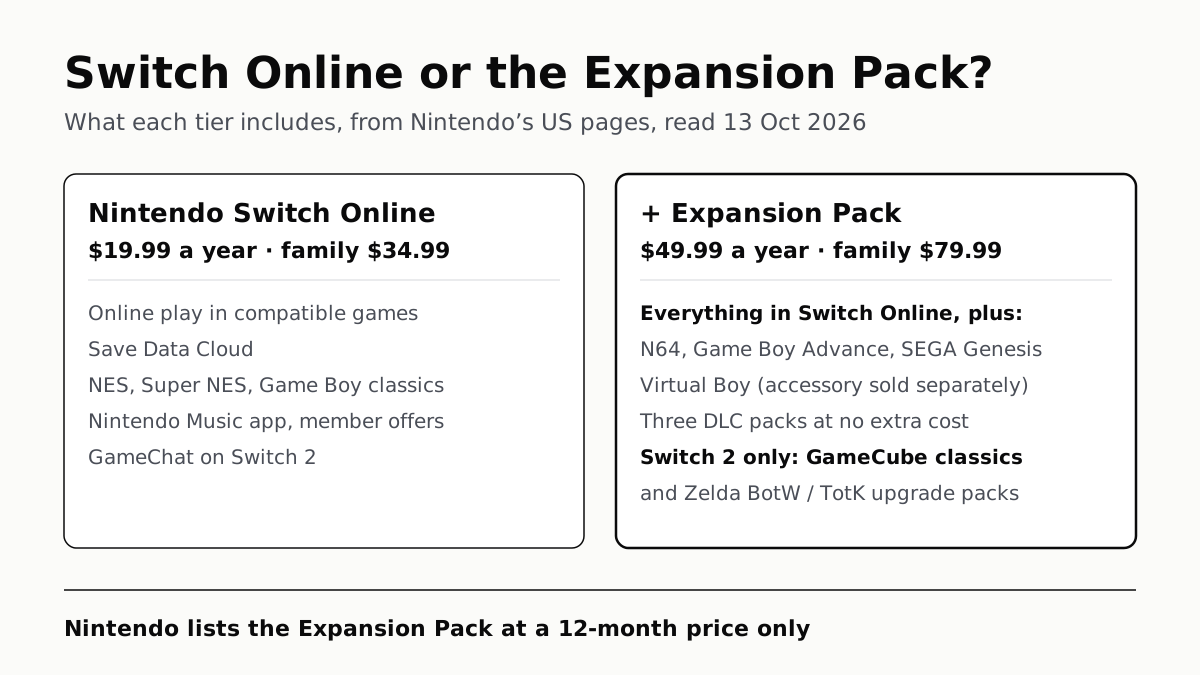
The $49.99 tier adds N64, GBA, Virtual Boy and Genesis games and three DLC packs; GameCube games come only on Switch 2.
PS Plus: Essential for Online Play, Premium to Stream
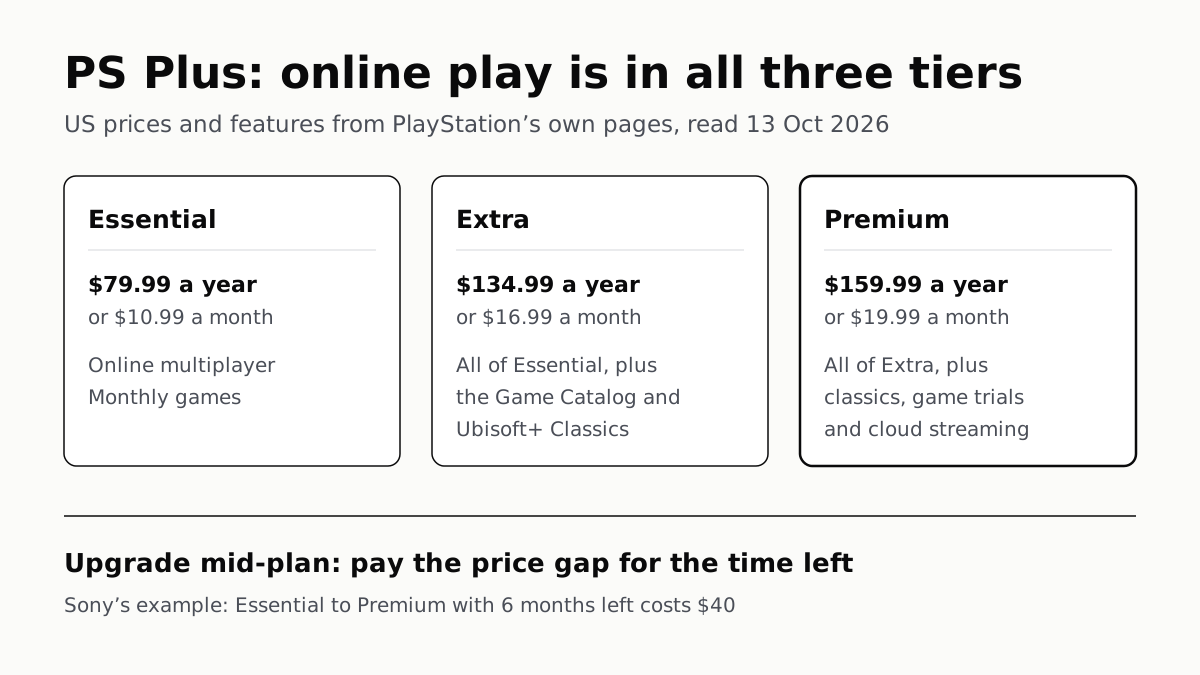
Extra adds a catalog of hundreds of games for $134.99 a year; Premium adds classics and trials at $159.99. Essential is $79.99.
On Xbox, Day-One Games Need Ultimate; Online Play Is $9.99
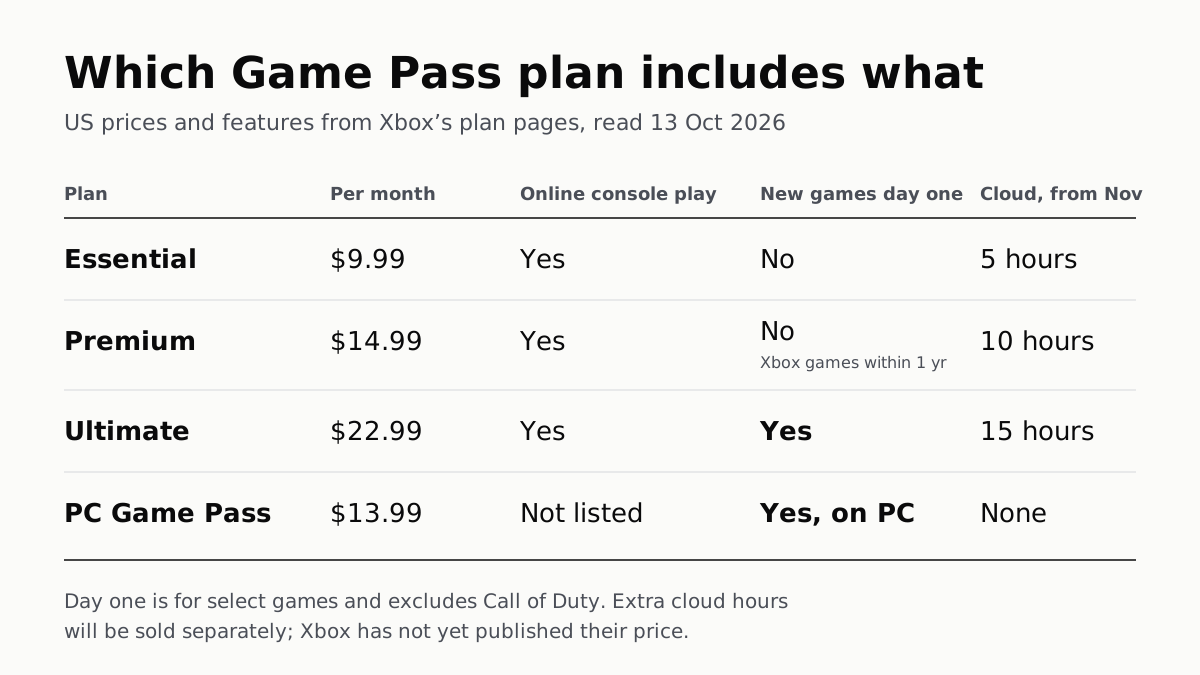
PC Game Pass has day-one games at $13.99 but no cloud play, which from November is capped at 5, 10 or 15 hours a month by tier.
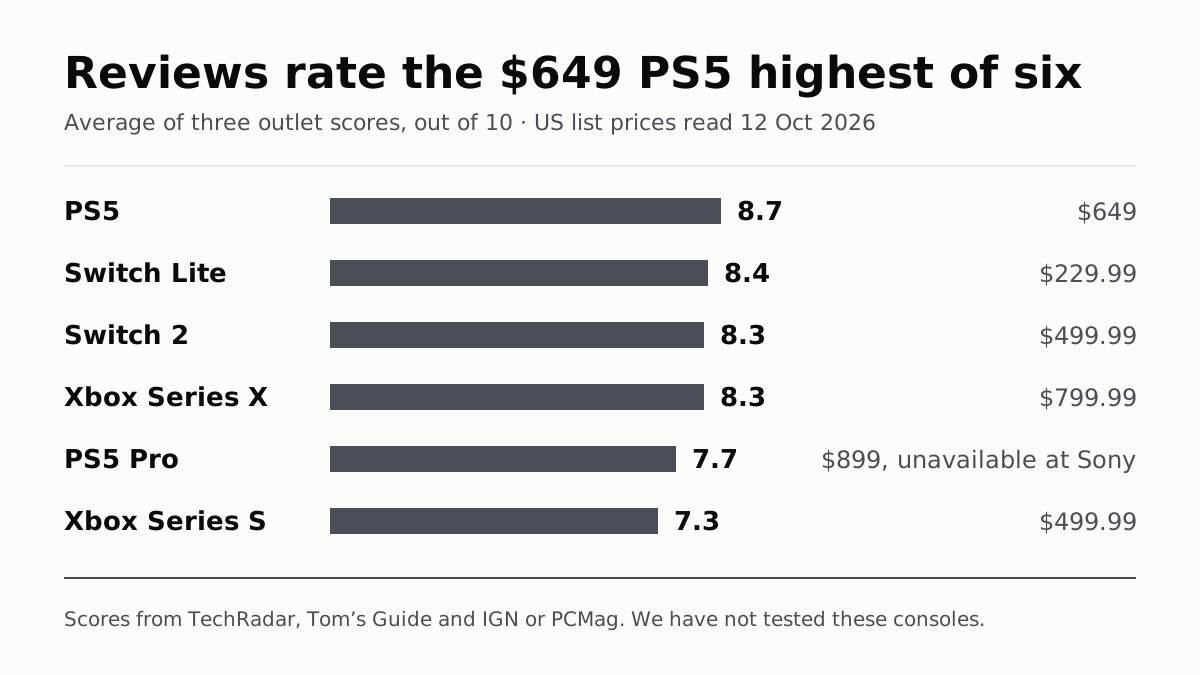
Reviews Rate the $649 PS5 Highest of Six Consoles
Eighteen scores from four outlets. Reviewers split most over the Switch 2, and the cheapest Xbox now lists at $499.99.