What Is a Steam Deck? A PC That Happens to Be Handheld
Not a console. A small AMD computer running Linux — which is why it plays what it plays, and why battery life is a range not a number.

If you buy through our links, we may earn a commission. It never affects our verdicts or scores — how that works. As an Amazon Associate I earn from qualifying purchases.
It is a computer, not a console. Steam Deck runs SteamOS 3, which Valve describes as Arch-based — Linux — with a full KDE Plasma desktop underneath. Nearly everything people find surprising about it follows from that one fact.
A console runs a fixed, certified library. A PC runs whatever it can be persuaded to run, at whatever speed the hardware allows, and hands you a desktop if you want one. When it breaks, it is wiped and reinstalled from a USB stick, the way a PC is.
What is actually inside
Valve publishes the whole sheet. The LCD model:
| Steam Deck (LCD) | |
|---|---|
| Processor | 7nm AMD APU — Zen 2, 4 cores / 8 threads; 8 RDNA 2 compute units |
| Power envelope | 4–15W |
| Memory | 16GB LPDDR5 |
| Screen | 7", 1280 × 800 IPS, 400 nits, 60Hz |
| Battery | 40Whr, 2–8 hours of gameplay |
| Weight | ~669g |
The number that explains the most is 4–15W. That is the entire power budget for processor and graphics together — roughly what a phone charger delivers. A desktop graphics card alone can draw twenty times it. Everything the Deck does well is a consequence of working inside fifteen watts, and so is everything it cannot do.
Why the battery figure is a range
Valve quotes “2 - 8 hours of gameplay”. That is a fourfold spread, and it is the honest answer rather than an evasive one.
A demanding 3D title pushes the APU to the top of its envelope. A 2D indie game or an emulated console sits near the bottom. Same battery, same machine, four times the difference — so any single number would be wrong for most people. Most vendors pick the flattering end and print that.
The OLED is a revision, not an upgrade
This catches people out, and the two spec sheets settle it. The OLED (affiliate link to Amazon, opens in a new tab) model keeps the same 1280 × 800 resolution and the same 298 × 117 × 49mm body. It is not faster.
What changed is everything around the silicon:
| LCD | OLED (affiliate link to Amazon, opens in a new tab) | |
|---|---|---|
| Screen | 7", IPS, 400 nits | 7.4", HDR OLED, 1,000 nits peak |
| Refresh | 60Hz | up to 90Hz |
| Battery | 40Whr, 2–8h | 50Whr, 3–12h |
| Wi-Fi | Wi-Fi 5, dual-band | Wi-Fi 6E, tri-band |
| Bluetooth | 5.0 | 5.3 |
| Weight | ~669g | ~640g |
Bigger screen, longer battery, lighter. The same chip, given a better body — which is a meaningfully different proposition from a generational jump, and worth knowing before paying the difference.
Where it sits in Valve’s hardware now
Valve’s own hardware page currently lists four products: Steam Deck, Steam Controller, Steam Machine and Steam Frame. The Deck is no longer the whole story, which is most of why searches around Valve hardware have risen sharply this year.
We are not going to characterise the other three until we can source their specifications the way we have sourced these. Naming what exists is reporting; describing what it does before Valve has published it is not.
What to actually do
- Judge it as a PC. Ask what it runs and how fast, not whether a game is “supported”. Valve’s per-title compatibility ratings are the thing to check before buying for a specific game.
- Expect to manage settings. Fifteen watts means trading resolution, frame cap and detail. People who enjoy the Deck are generally people who do not mind that; people who want to press play and never think about it often prefer a console.
- Choose OLED for the screen and the battery, not for speed. If someone tells you it performs better, the two spec sheets above disagree.
- Budget for storage. Every model takes a microSD card, and games are large. That expansion slot is doing real work.
- If a handheld’s battery life is your main worry, the range Valve publishes is the most honest figure in the category — treat any competitor quoting a single number with more suspicion, not less.
How we researched this
No one at bitcritiq has handled this product. Everything here comes from published sources, listed below.
- What this cannot tell you
- This explains what the machine is and what its specifications commit it to. It is not a review — bitcritiq has not tested one — and it is not a buying comparison against other handhelds, which would need hands-on time with all of them. Valve notes its specifications are subject to change, and storage tiers in particular move.
How we chose this, and what we did
- Why this subject
- 'What is a Steam Deck' appears across every pull of our trends corpus and is rising, alongside a broad handheld wave. It is a definition question, which is the kind a low-authority site can answer well, and the honest answer reframes the product: people evaluate it as a console and are then surprised by how it behaves.
- How we looked at it
- Took every figure from Valve's own published tech specs for the two models, and compared the two sheets line by line rather than relying on launch coverage. Where Valve publishes a range rather than a number, the range is reproduced as published.
What this rests on
3 claims, all official. Nothing here was measured by bitcritiq — see how we test for why.
Steam Deck is a PC running SteamOS 3, an Arch-based Linux, with a full KDE Plasma desktop.Official
Valve's published tech specs for both the LCD and OLED models.
Valve quotes battery life as a range: 2-8 hours on LCD, 3-12 on OLED.Official
Valve's own spec sheets. The range is the honest answer, because draw depends entirely on the title.
The OLED is a revision of the same machine, not a faster one.Official
Both spec sheets list the same 1280x800 resolution and the same physical size; the changes are display, battery, radio and weight.
Sources 3
- Steam Deck Tech Specs (LCD) — ValveOfficialaccessed Aug 30, 2026
- Steam Deck Tech Specs (OLED) — ValveOfficialaccessed Aug 30, 2026
- Steam Hardware — ValveOfficialaccessed Aug 30, 2026
Pass it on
Know someone weighing this up? Send them the answer.
bitcritiq.com/59skThe link is permanent: it opens this article for good, even if the title changes.
No email, no account
Follow bitcritiq
Every new article, in whatever reader you already use.
Subscribe by RSSAll the ways to follow
Using Chrome on Android? Open the browser menu and tap Follow. New articles then turn up in the Following tab in Discover.
read next
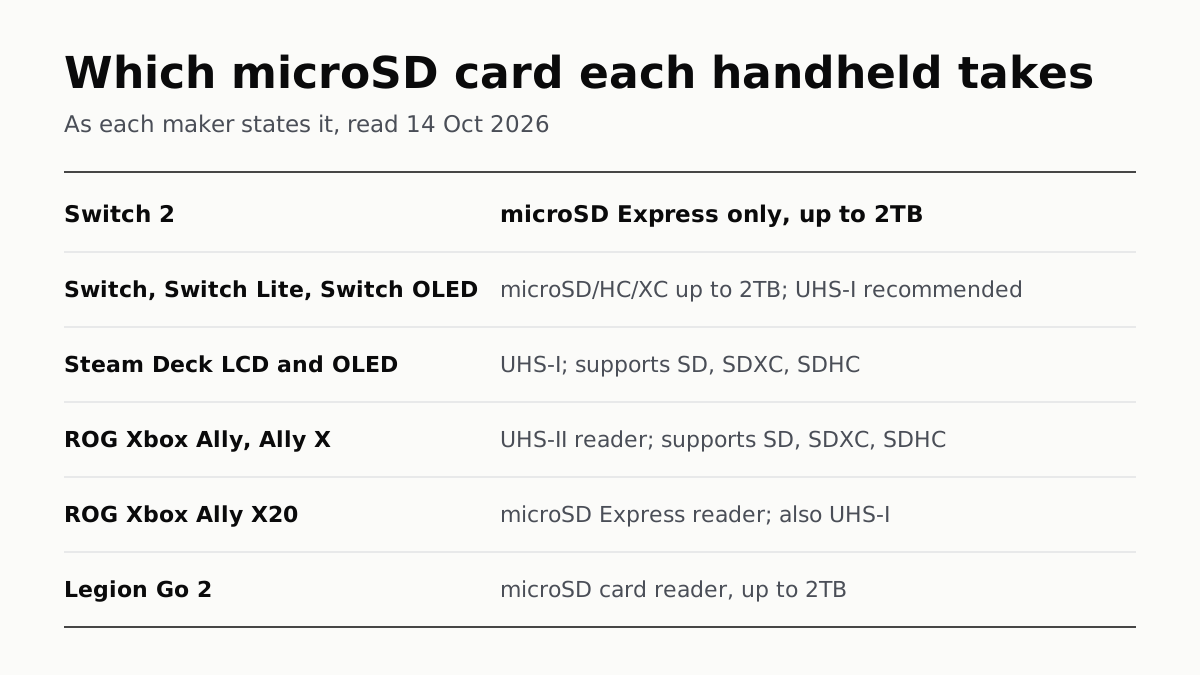
Switch 2 Needs microSD Express; Steam Deck Takes UHS-I
Asus’s Xbox Allys list UHS-II readers, the X20 an Express reader that also takes UHS-I, and Lenovo states 2TB for the Legion Go 2.

Switch Online Is $19.99 a Year; Expansion Pack Adds $30
The $49.99 tier adds N64, GBA, Virtual Boy and Genesis games and three DLC packs; GameCube games come only on Switch 2.

PS Plus: Essential for Online Play, Premium to Stream
Extra adds a catalog of hundreds of games for $134.99 a year; Premium adds classics and trials at $159.99. Essential is $79.99.
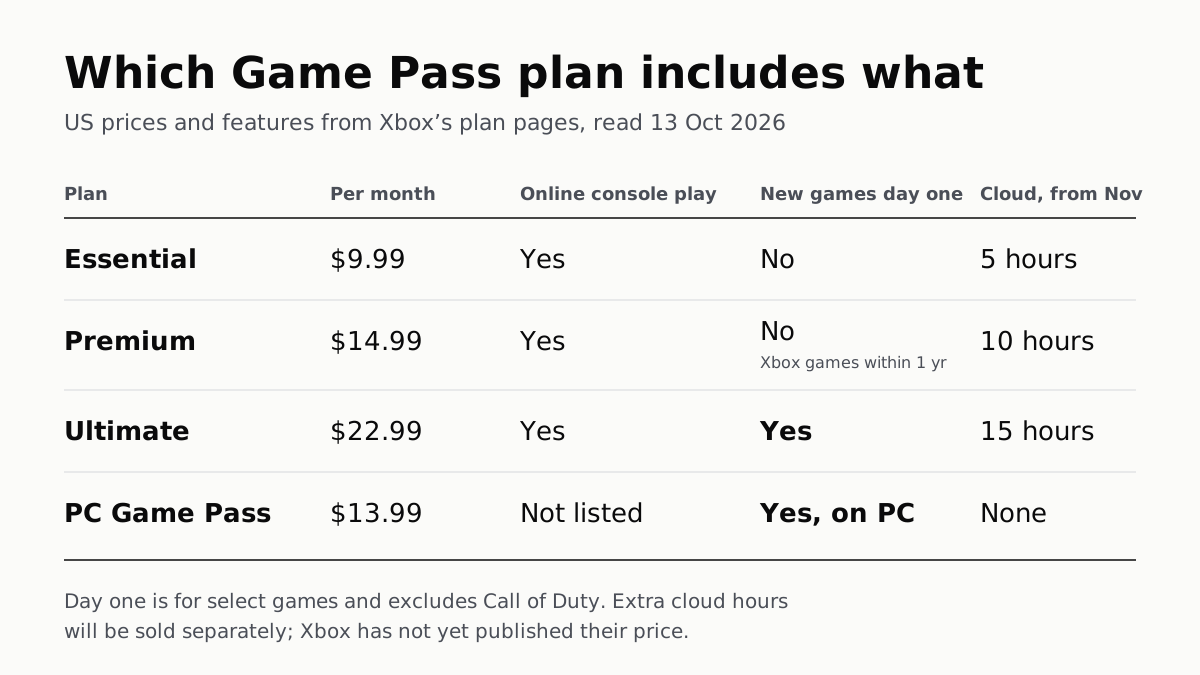
On Xbox, Day-One Games Need Ultimate; Online Play Is $9.99
PC Game Pass has day-one games at $13.99 but no cloud play, which from November is capped at 5, 10 or 15 hours a month by tier.