Bluetooth Codecs: LDAC's 990kbps Is Rarely 990kbps
The badge on the box names a ceiling, not what you are getting. Sony's own page says the rate drops to roughly SBC's on a bad link.

If you buy through our links, we may earn a commission. It never affects our verdicts or scores — how that works. As an Amazon Associate I earn from qualifying purchases.
LDAC’s 990kbps is its top rate, and you get it only when your phone is set to favour audio quality, the signal holds, and the Bluetooth link runs at 48 or 96kHz. At 44.1kHz the same top setting is 909kbps. Android’s own code starts LDAC in an adaptive mode, so the number on the box is a ceiling rather than what you normally hear.
Update, 4 October 2026. This page gave LDAC’s three rates as 990, 660 and 330kbps. Those are Sony’s figures at 48 and 96kHz; Sony’s encoder code gives 909, 606 and 303kbps at 44.1 and 88.2kHz, so the bottom rung can sit below Sony’s own SBC figure. We also removed two claims we could not source: that your body is the most common cause of drop-outs, and that Apple devices use only AAC and SBC. The rest of the page has been reworked around what people search for.
LDAC’s rates, from Sony’s own code
Sony contributed the LDAC encoder to the Android Open Source Project, and its header file sets out the rates. Sony’s headphone help guide gives the same pairs.
| Android’s setting | Link at 48 or 96kHz | Link at 44.1 or 88.2kHz |
|---|---|---|
| Optimized for Audio Quality | 990kbps | 909kbps |
| Balanced Audio And Connection Quality | 660kbps | 606kbps |
| Optimized for Connection Quality | 330kbps | 303kbps |
| Best Effort (Adaptive Bit Rate) | moves between the three | moves between the three |
Sony’s comparison puts ordinary SBC, the codec every Bluetooth device supports, at 328kbps. At 44.1kHz, LDAC’s lowest rung is 303kbps, under that figure. Different codecs at the same bit rate need not sound the same, and we have not listened for the difference. But at that point the “990kbps” on the box describes nothing being sent.
Is LDAC lossless? No, and Sony says so
Sony’s end-user site says “Bluetooth transmission of Hi-Res Audio content is only possible with lossy compression”, because Bluetooth’s bandwidth limit is “approximately 1 Mbps” and 24-bit, 96kHz audio is 4.6Mbps. It names LDAC as lossy compression.
Our arithmetic for CD quality: 44,100 samples a second × 16 bits × 2 channels is 1,411kbps uncompressed. LDAC’s 909kbps top rate at that sample rate carries less than two-thirds of it.
Sony’s position is that its lossy Hi-Res stream still sounds better than lossless CD-quality audio. That is a claim about listening, and it is Sony’s.
Why the rate moves
Sony calls the adaptive setting “Best effort” and says it “controls bitrate automatically depending on the network condition, ensuring stable connection even in harsh environments”. Its end-user site says the quality follows “the surrounding radio wave conditions”.
In Android’s open-source Bluetooth code, Best Effort is the default unless the phone maker sets another, and it starts on the middle setting, 660 or 606kbps, before stepping up or down. Your phone may differ, because makers can change that default.
Sony’s design favours an unbroken stream over a fixed rate, and that is a reasonable choice for headphones used on the move. The trouble is that the box advertises the ceiling, and finding your phone’s setting takes a hidden menu.
How to check, and how to ask for 990kbps, on Android
- Turn on Developer options. Find Build number and tap it seven times, until you see “You are now a developer!”. Google lists where it is: on a Pixel, Settings › About phone › Build number; on a Galaxy S8 or later, Settings › About phone › Software information › Build number.
- Open Developer options in Settings. Where it appears varies by maker.
- Bluetooth audio codec shows the codec in use.
- Bluetooth audio LDAC codec: playback quality shows the setting. Choose Optimized for Audio Quality (990kbps/909kbps) to ask for the top rate.
- Bluetooth audio sample rate decides which of the two numbers applies, by Sony’s table above.
A fixed top rate gives up the fall-back that Best Effort exists to provide, so expect breaks in sound where the signal is weak. If that happens, go back to Best Effort.
The headphones have a say too. Sony’s WH-1000XM3 (affiliate link to Amazon, opens in a new tab) guide offers “Priority on sound quality”, the default, and “Priority on stable connection” in its Headphones Connect app. Sony tells owners to use sound quality with an LDAC device, and says the headset switches to the phone’s codec automatically in that mode.
This check is Android-only. Sony’s help guide describes AAC as the codec “mainly used by Apple products such as iPhones”, and LDAC reached phones through Android’s open-source project.
What the codec does not change
The call switch. The moment anything wants your microphone, Bluetooth leaves the high-quality audio profile, and no codec helps; why your headphones sound worse the second a call starts covers the mechanism.
Everything else on the spec sheet. Drivers, tuning and fit shape the sound too, and none of them is on a codec badge. Outlet reviews weigh those, which is what our wireless earbuds shortlist averages.
What to actually do
- Treat the LDAC badge as a ceiling. Whether you reach it depends on your phone’s setting, the signal and the link’s sample rate.
- Check what you are connected with on Android, using the steps above. It settles the question for your phone and your headphones rather than in general.
- To try for 990kbps, set Optimized for Audio Quality and keep Sony headphones on Priority on sound quality. Go back to Best Effort if the sound breaks up.
- On an iPhone, look past the LDAC badge. Sony’s own guide names AAC, not LDAC, as the codec iPhones mainly use.
Questions people ask
What does LDAC 990kbps mean?
It is LDAC’s highest bit rate, the amount of audio data sent each second, and Sony says it is the rate at which LDAC meets the Hi-Res Audio Wireless logo. It applies when the link runs at 48 or 96kHz. At 44.1 or 88.2kHz the top rate is 909kbps. Two lower settings, 660 and 330kbps (606 and 303kbps), exist for weaker signals.
Is LDAC 990 lossless?
No. Sony says Bluetooth can carry Hi-Res Audio only with lossy compression, and names LDAC as lossy. By our arithmetic, uncompressed CD-quality stereo needs 1,411kbps, so LDAC’s top rates carry less data than that. Sony argues its Hi-Res stream still sounds better than lossless CD audio; that is a listening claim we have not tested.
How do I get LDAC at 990kbps?
On Android, turn on Developer options, then set Bluetooth audio LDAC codec: playback quality to Optimized for Audio Quality (990kbps/909kbps). Which of the two numbers you get depends on the link’s sample rate, shown under Bluetooth audio sample rate. On Sony headphones, keep the Headphones Connect app on Priority on sound quality.
Why does my phone show 990kbps/909kbps?
Because LDAC’s rate depends on the sample rate. Sony’s own encoder code gives 990kbps at 48 and 96kHz and 909kbps at 44.1 and 88.2kHz, and Android labels each setting with both numbers rather than the one you are on.
What is the LDAC Bluetooth codec?
A Bluetooth audio codec developed by Sony that sends about three times the data of SBC at its top rate. Sony contributed the encoder to the Android Open Source Project, so Android phone makers can include it, and the headphones have to support it too. It is a software codec, which Sony says is why so many devices can carry it.
Does LDAC drop to SBC quality?
Its bit rate can. Under Best Effort it falls to 330kbps, or 303kbps at 44.1kHz, against the 328kbps Sony quotes for SBC. Equal bit rates from different codecs do not guarantee equal sound, and we have not compared them by ear, but at that point the badge’s 990kbps no longer describes what is being sent.
How we researched this
No one at bitcritiq has handled this product. Everything here comes from published sources, listed below.
- What this cannot tell you
- This is a specification question, not a listening test: we have not compared how the codecs sound, and bitrate is one variable among several, beside drivers, tuning and fit. Android's default comes from Google's open-source code, and phone makers can set a different one. Apple's accessory guidelines, where a list of iPhone codecs would be, could not be read for this update, so the page says nothing about iPhone codecs beyond what Sony's help guide states.
How we chose this, and what we did
- Why this subject
- Codec badges are a headline feature on many wireless headphones, and the number attached to them is the best case rather than the normal case. Searches reaching this page ask what LDAC's 990kbps means and when you get it, which Sony's own documents answer more precisely than the box does.
- How we looked at it
- Rates, the lossy-compression statement and the SBC comparison figure are from Sony: its LDAC developer site, its LDAC site for end users, the WH-1000XM3 Help Guide, and the LDAC encoder header Sony contributed to the Android Open Source Project. Android's setting names and its default mode are from AOSP itself (the SettingsLib strings and the Bluetooth module's LDAC encoder), and the route to Developer options from Google's Android Developers documentation. All read on 4 October 2026, when the page was reworked; the first version, of 30 August, used Sony's developer site and the Bluetooth SIG's profile page.
What this rests on
5 claims, all official. Nothing here was measured by bitcritiq — see how we test for why. Open a claim to read the source it came from.
LDAC's three fixed rates are 990, 660 and 330kbps when the Bluetooth link runs at 48 or 96kHz, and 909, 606 and 303kbps at 44.1 or 88.2kHz.Official
Sony's ldacBT.h in AOSP: 'Bit rates in each EQMID are depend on sampling frequency', with HQ 909kbps at 44.1/88.2 and 990kbps at 48/96, SQ 606/660, MQ 303/330. Sony's WH-1000XM3 Help Guide: 'the bitrate of 990 kbps (96/48 kHz) or 909 kbps (88.2/44.1 kHz)'.
Sony compares LDAC against SBC at 328kbps, and describes LDAC as lossy compression.Official
Sony's LDAC sites footnote the comparison 'Bluetooth A2DP - SBC(328kbps,44.1kHz)'. The end-user site: 'Bluetooth transmission of Hi-Res Audio content is only possible with lossy compression', naming 'lossy compression such as LDAC'.
In Android's open-source code, LDAC defaults to Best Effort (adaptive bit rate) unless the phone sets another default, and adaptive mode starts on the middle setting.Official
AOSP a2dp_vendor_ldac_encoder.cc reads 'persist.bluetooth.a2dp_ldac.default_quality_mode' with A2DP_LDAC_QUALITY_ABR as the fallback, and '// Initial EQMID for ABR mode.' is defined as LDACBT_EQMID_SQ.
Android's Developer options offer four LDAC playback-quality settings, labelled with both rates for the top three.Official
AOSP SettingsLib arrays.xml: 'Optimized for Audio Quality (990kbps/909kbps)', 'Balanced Audio And Connection Quality (660kbps/606kbps)', 'Optimized for Connection Quality (330kbps/303kbps)', 'Best Effort (Adaptive Bit Rate)'.
Sony tells owners to use its headphones' 'Priority on sound quality' mode with LDAC devices, and ties automatic codec switching to that mode.Official
WH-1000XM3 Help Guide: 'When using an AAC, aptX, aptX HD or LDAC compatible device, use with the “Priority on sound quality” mode.' And: 'With the headset set to the “Priority on sound quality” mode, when music in one of the above codecs is transmitted from a connected device, the headset switches to that codec automatically'.
Sources 9
- LDAC developer site — Sony CorporationOfficialaccessed Oct 4, 2026
- LDAC site for end-users — Sony CorporationOfficialaccessed Oct 4, 2026
- WH-1000XM3 Help Guide: Supported codecs — SonyOfficialaccessed Oct 4, 2026
- WH-1000XM3 Help Guide: About the sound quality mode — SonyOfficialaccessed Oct 4, 2026
Show 5 more · 5 official or standards
- libldac inc/ldacBT.h, Sony Corporation — Android Open Source ProjectOfficialaccessed Oct 4, 2026
- SettingsLib res/values/arrays.xml — Android Open Source ProjectOfficialaccessed Oct 4, 2026
- Bluetooth a2dp_vendor_ldac_encoder.cc — Android Open Source ProjectOfficialaccessed Oct 4, 2026
- Configure on-device developer options — Android DevelopersOfficialaccessed Oct 4, 2026
- Advanced Audio Distribution Profile — Bluetooth SIGOfficialaccessed Aug 30, 2026
Pass it on
Know someone weighing this up? Send them the answer.
bitcritiq.com/s8myThe link is permanent: it opens this article for good, even if the title changes.
No email, no account
Follow bitcritiq
Every new article, in whatever reader you already use.
Subscribe by RSSAll the ways to follow
Using Chrome on Android? Open the browser menu and tap Follow. New articles then turn up in the Following tab in Discover.
read next
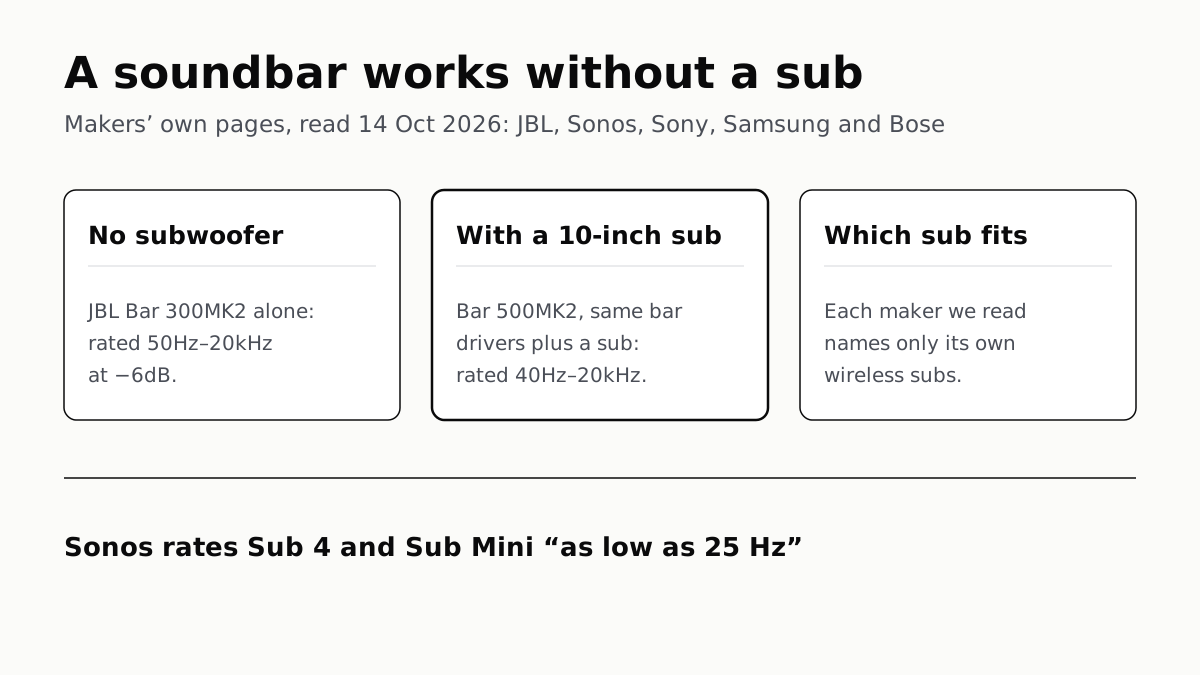
A Soundbar Works Without a Sub; Add One for the Lowest Bass
In JBL’s specs, the same bar drivers reach 50Hz alone and 40Hz with a 10-inch sub. Sony, Sonos and Samsung list only their own subs.
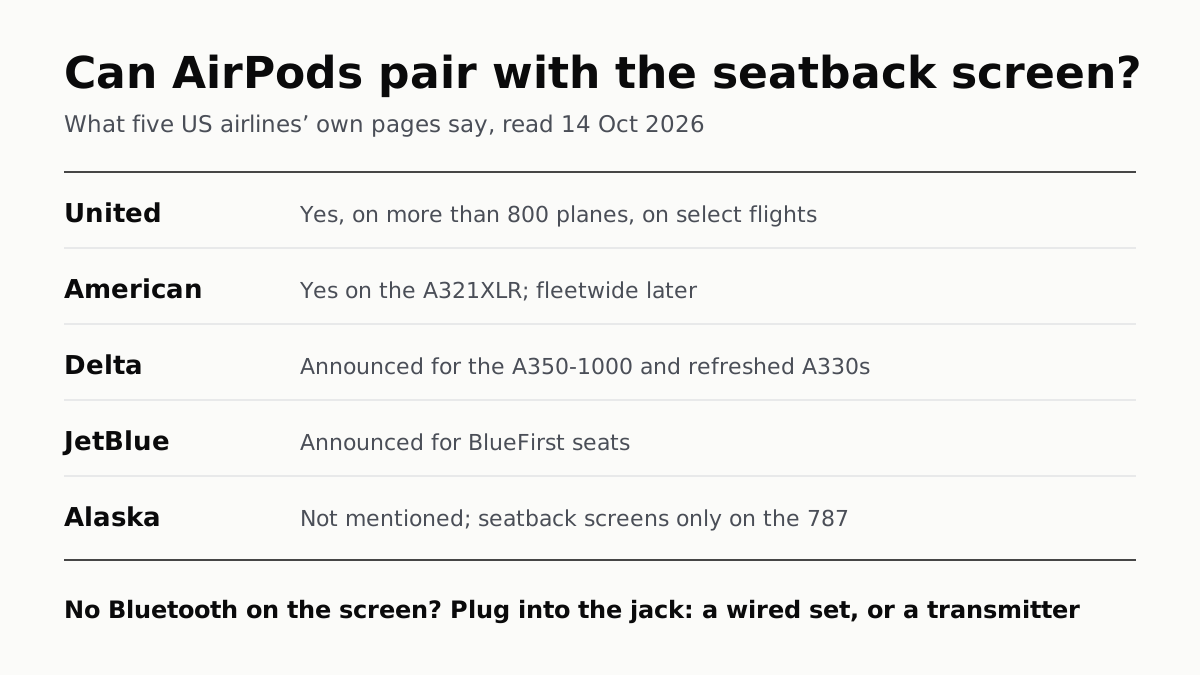
Seatback Bluetooth: United on 800+ Planes, Others Starting
American’s A321XLR has it and JetBlue and Delta have announced it. Without it, the seatback jack needs a wired plug or a transmitter.
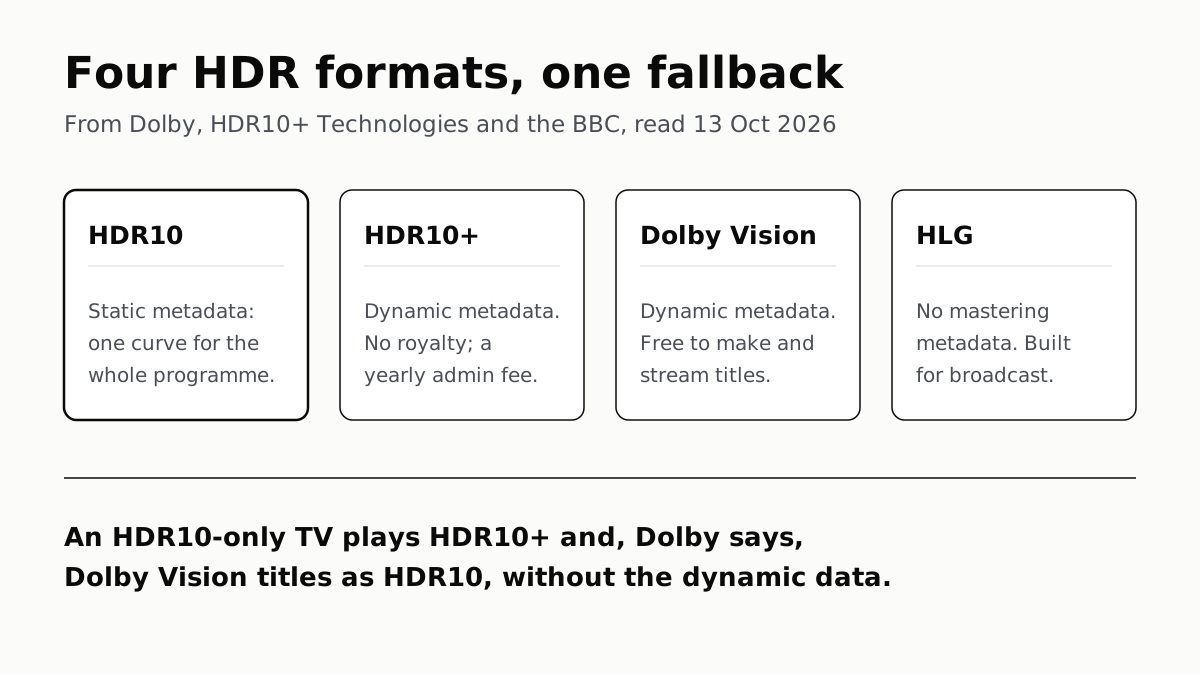
HDR10 Is the Fallback; Dolby Vision and HDR10+ Are Upgrades
Samsung’s S90F lists HDR10+, not Dolby Vision; LG’s C6 the reverse. TCL’s QM7K lists both.
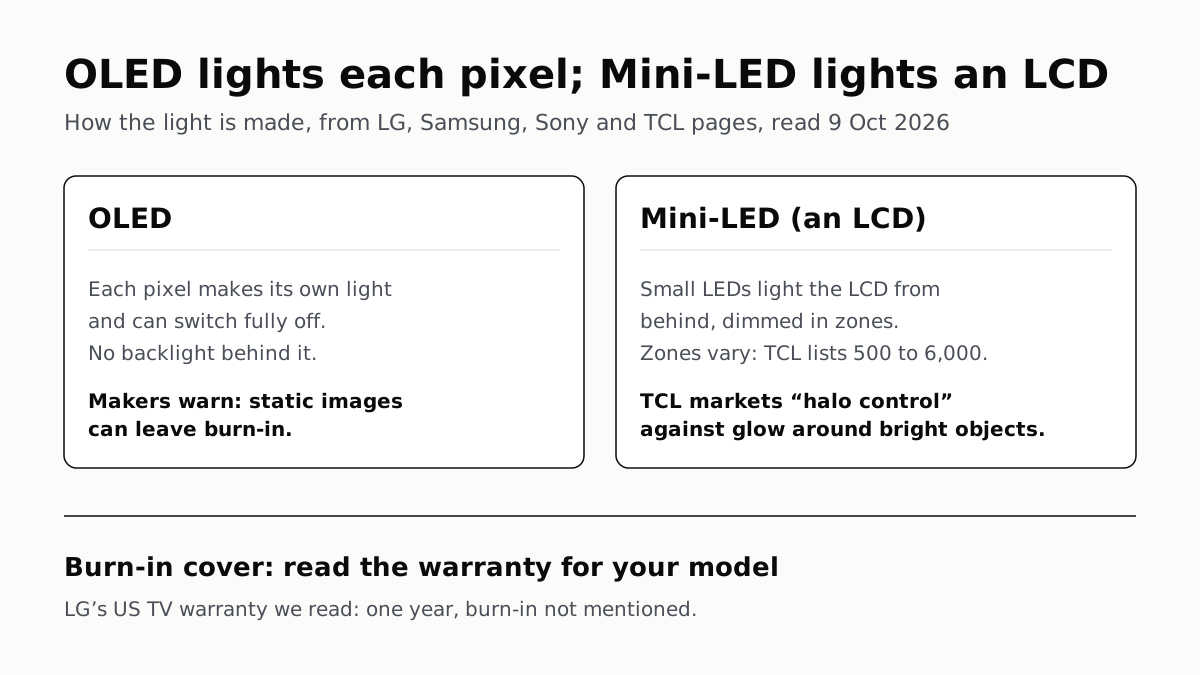
OLED Lights Each Pixel; Mini-LED Lights an LCD Behind It
Self-lit pixels give OLED its blacks and a burn-in risk; a zoned backlight gives Mini-LED brightness and a halo risk.