PS5 and Xbox Controllers Pair With PCs and Phones
Hold Create and PS on a DualSense, or Pair on a Bluetooth Xbox pad. Nintendo’s Pro Controller FAQs mention no PC or phone.
If you buy through our links, we may earn a commission. It never affects our verdicts or scores — how that works. As an Amazon Associate I earn from qualifying purchases.
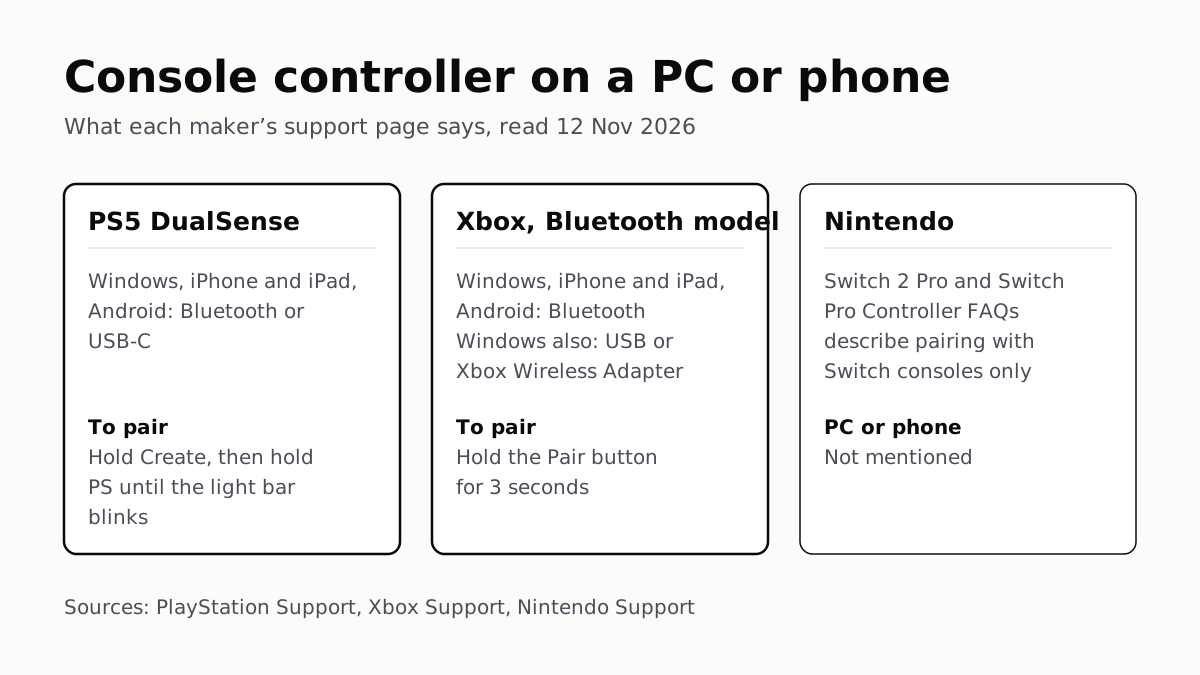
A PS5 DualSense pairs with a Windows PC, an iPhone or iPad, and an Android phone, by Bluetooth or USB-C. An Xbox Wireless Controller with Bluetooth pairs with all three over Bluetooth; an older one without it works with Windows over USB or Microsoft’s adapter. Nintendo’s Pro Controller FAQs describe pairing with Switch consoles only and mention no PC or phone.
To pair: on a DualSense, hold Create, then hold the PS button until the light bar blinks. On an Xbox controller, turn it on and hold the Pair button for 3 seconds. Then pick the controller in your device’s Bluetooth list.
Which controller works where
| Controller | Windows PC | iPhone and iPad | Android |
|---|---|---|---|
| PS5 DualSense | Bluetooth or USB-C; Windows 10 (64-bit) or 11 | Bluetooth or USB-C; iOS or iPadOS 14.5 or later | Bluetooth or USB-C; Android 12 or later |
| PS5 DualSense Edge | Bluetooth or USB-C; Windows 10 (64-bit) or 11 | Bluetooth or USB-C; iOS or iPadOS 16.4 or later | Not in Sony’s list of supported systems |
| Xbox Wireless Controller with Bluetooth (Series X or S, later Xbox One, Elite Series 2, Adaptive) | Bluetooth (Windows 10 Anniversary Update or later), USB, or the Xbox Wireless Adapter | Bluetooth only; iOS 14.5 for the Series X or S controller, iOS 13 for the others | Bluetooth only; Android 5.1.1 or later |
| Xbox One controller without Bluetooth | USB or the Xbox Wireless Adapter | Not listed by Microsoft | Not listed by Microsoft |
| Nintendo Switch 2 Pro Controller, Switch Pro Controller | Not mentioned by Nintendo | Not mentioned by Nintendo | Not mentioned by Nintendo |
Sources: PlayStation Support’s DualSense and DualSense Edge pages; Xbox Support’s platform table and PC and Bluetooth pages; Nintendo’s two Pro Controller FAQs. All read 12 November 2026.
A Bluetooth Xbox controller has the plastic around the Xbox button as part of its face. On older controllers without Bluetooth, Microsoft says that plastic “is only part of the top, where the bumpers are”. Microsoft’s setup page adds that a controller that came with an Xbox Series X or S has Bluetooth.
Sony’s DualSense Edge page names Android phones in its introduction, but its list of supported systems stops at Windows, macOS, iOS, iPadOS and tvOS, so we leave the Android cell as Sony’s list has it.
What stops working off the console
The controllers pair, but some features stay behind. Each maker lists them.
| PS5 DualSense | Xbox Wireless Controller | |
|---|---|---|
| Vibration or haptics | Haptics need USB on PC; not on Mac or mobile | No rumble on PC over Bluetooth; supported over the Xbox Wireless Adapter |
| Adaptive triggers | Not on Android | — |
| Headset or audio in the controller | Jack needs a wired PC or Mac connection; not on mobile | Not over Bluetooth; not supported on Android or Apple |
| Built-in mic and speaker | Windows PC only, where the game supports it | — |
| Firmware updates | From a PC with PlayStation Accessories | From a console or PC; not over Bluetooth |
For vibration or a headset on a PC, both makers point you away from Bluetooth: Sony to a cable, Microsoft to a cable or its adapter. Microsoft also says controller attachments such as chatpads and the Xbox Stereo Headset Adapter do not work over Bluetooth, and recommends one Bluetooth controller at a time. The PS5 and Digital Edition each come with a USB cable, though PlayStation Direct’s box list for the PS5 Pro has none, as our PS5 model guide notes.
Apple says support for features “such as a controller’s audio jack or lights” varies by controller and by the app you use it with.
How to pair, step by step
DualSense or DualSense Edge. Sony’s steps: make sure the player indicator is off (hold PS until it goes out), unplug any USB cable, then hold Create and, while holding it, press and hold PS until the light bar blinks. Select the controller in your device’s Bluetooth list. The controller stores up to four pairings, one per slot: hold PS with triangle, circle, cross or square for over 5 seconds to pair to slots 1 to 4, or about 3 seconds to switch to that slot later.
Xbox Wireless Controller. Press the Xbox button to turn it on, then hold the raised Pair button on top for 3 seconds until the Xbox button flashes rapidly. For an iPhone or iPad, Microsoft says to turn the controller off first if it is already paired to an Xbox. A double press of Pair on a Series X or S controller switches it back to the last console or PC it was paired with over Xbox Wireless.
Then, on the device:
| Device | Where to pair, as the page gives it | Source |
|---|---|---|
| Windows 11 | Settings › Bluetooth & devices › Add device › Bluetooth | Xbox Support |
| Windows 10 | Settings › Devices › Bluetooth & other devices › Add Bluetooth or other device › Bluetooth | Xbox Support |
| iPhone or iPad | Settings › Bluetooth, then tap the controller | Xbox Support; Apple Support 111099 |
| Android | Settings › Connected devices › Pair new device | Android Help |
On an Xbox Wireless Adapter or a PC with Xbox Wireless built in, Microsoft says to pick Everything else instead of Bluetooth. Google says some of its Bluetooth steps work only on Android 15 and up, and phone makers’ own menus can differ.
After it connects
Apple’s page, published 14 September 2026, says iOS and iPadOS 16 or later let you remap buttons under Settings › General › Game Controller. On Android, Google’s help puts the same options under Settings › Connected devices, then the controller’s Game Controller settings.
A game still has to support a controller. Sony suggests checking a Steam game’s store page for “Full Controller Support” or “Partial Controller Support”. For PS5 or PS4 games on a phone or PC, Sony points to its PS Remote Play app; for PC games on Android, our look at Android gaming handhelds covers how they arrive by Steam Link, Xbox Cloud Gaming or GeForce Now.
To use the controller on its console again: Sony says to plug the DualSense into the PS5 with a USB cable and press PS. Microsoft says a controller paired with a PC over Xbox Wireless must be re-synced to the console with the sync button or a USB cable; after Bluetooth, a Series X or S controller switches back with the double press of Pair.
Nintendo. Its FAQ says the Switch 2 Pro Controller pairs with the console “wirelessly, or by connecting” it to the dock, and that it “is only for use with Nintendo Switch 2”, not the original Switch. Neither Pro Controller FAQ mentions a PC, phone or tablet.
Questions people ask
Can I use my PS5 controller on my PC?
Yes. Sony supports the DualSense on Windows 10 (64-bit) and Windows 11, by Bluetooth or a USB-C cable. Use the cable if you want haptic feedback or a headset in the controller’s jack: Sony says both need a wired connection on PC.
How do I put a PS5 controller in pairing mode?
Turn it off first (hold PS until the lights go out) and unplug any cable. Then hold the Create button and, while holding it, press and hold the PS button until the light bar blinks. Pick the controller in your device’s Bluetooth list.
Does my Xbox controller have Bluetooth?
Look at the plastic around the Xbox button. Microsoft says on Bluetooth controllers it is part of the face of the controller; on older ones without Bluetooth it is part of the top, with the bumpers. Microsoft says a controller that came with an Xbox Series X or S has Bluetooth.
Why doesn’t my Xbox controller vibrate on PC?
Microsoft says vibration is not supported when the controller is connected to a PC by Bluetooth. It says vibration is supported when you connect through the Xbox Wireless Adapter for Windows instead.
Can I use a Switch Pro Controller on a PC or phone?
Nintendo does not say so. Its Pro Controller FAQs describe pairing with Switch consoles and the dock only, and do not mention PCs or phones. It also says the Switch 2 Pro Controller cannot be used with the original Switch.
How do I connect a controller to an iPhone?
Put the controller in pairing mode, then open Settings, Bluetooth on the iPhone and tap it in the list. Apple says this works for Xbox, PlayStation and other Bluetooth controllers, and that iOS 16 or later adds button customization under Settings, General, Game Controller.
How do I switch my controller back to my console?
For a DualSense, Sony says to connect it to the PS5 with a USB cable and press the PS button. For an Xbox Series X|S controller, Microsoft says to double-press the Pair button to jump back to the console it was last paired with.
How we researched this
No one at bitcritiq has handled this product. Everything here comes from published sources, listed below.
- What this cannot tell you
- We have not paired these controllers ourselves; this is what each maker’s page says. Sony’s DualSense Edge page names Android phones in its introduction, but its list of supported operating systems names no Android version, so the table says it is not listed. Microsoft’s platform table says USB is not supported on Android, while its Bluetooth troubleshooting page suggests connecting to an Android device by USB; we follow the table. Microsoft’s Android row still names a supported game, Minecraft: Gear VR Edition, which reads as dated. Apple’s page no longer names supported controller models, only “Xbox, PlayStation, or other Bluetooth game controller”. Android menu names come from Google’s own help, which says some steps work only on Android 15 and up; other phone makers’ menus can differ. Joy-Con and Joy-Con 2 are not covered: we did not read a Nintendo page on them. Mac is mentioned where a maker’s page groups it with phones, but is not a column.
How we chose this, and what we did
- Why this subject
- Consoles are a common gift this month, and a console controller is often the first one a household owns. Readers ask whether it will also work on the family PC, an iPhone or an Android phone, and how to pair it. Nothing on the site covered controller pairing. This answers it from Sony’s, Microsoft’s, Apple’s, Google’s and Nintendo’s own support pages.
- How we looked at it
- All first-party support pages, read through a browser on 12 November 2026, including collapsed sections (expanded and read in full). Sony Interactive: PlayStation Support ‘How to use DualSense wireless controllers with PC, Mac and mobile devices’ and the matching DualSense Edge page. Microsoft: Xbox Support ‘How do I connect my Xbox controller to PC?’, ‘Using the Xbox Wireless Controller on different platforms’ (its Windows 11, Windows 10, Android and Apple tables), ‘Set up Bluetooth on your Xbox Wireless Controller’ and ‘Using Bluetooth for Xbox gaming’. Apple: Support 111099, ‘Connect a wireless game controller to your Apple device’ (published 14 September 2026). Google: Android Help ‘Set up your game controller settings on Android’ and ‘Find & set up Bluetooth devices near your Android device’. Nintendo of America: the Nintendo Switch 2 Pro Controller FAQ and the Nintendo Switch Pro Controller FAQ. Nintendo’s absence of PC or phone support is checked against each FAQ’s pairing answer, the control phrase “can be paired to the Nintendo Switch 2 console wirelessly, or by connecting the Nintendo Switch 2 Pro Controller … to the dock”, which names consoles and the dock only; a search of Nintendo’s Americas support site for PC and smart-device wording returned nothing. Each table cell comes from the page named in its row.
What this rests on
6 claims, all official. Nothing here was measured by bitcritiq — see how we test for why. Open a claim to read the source it came from.
Sony says the DualSense connects by Bluetooth or USB to Windows 10 (64-bit), Windows 11, iOS and iPadOS 14.5, and Android 12 or later.Official
PlayStation Support: “Devices using the operating systems listed below or later support DualSense® wireless controller Bluetooth and USB connections.” The list: “Windows 10 (64 bit) iPadOS 14.5 Windows 11 tvOS 14.5 macOS Big Sur 11.3 Android 12 iOS 14.5”.
To pair a DualSense with a new device, hold the Create button, then hold the PS button until the light bar blinks.Official
PlayStation Support: “While pressing and holding the create button, press and hold the PS button until the light bar blinks. Enable Bluetooth on your device, and then select the controller from the list of Bluetooth devices.”
Sony says DualSense haptics need a USB connection on PC and do not work on Mac or mobile devices, and adaptive triggers do not work on Android.Official
PlayStation Support: “The haptic feedback feature is available when supported by the game and requires a USB connection on PC. It isn’t compatible with Mac computers and mobile devices.” “The adaptive triggers feature is available when supported by the game. It isn’t compatible with Android-based mobile devices.”
Microsoft’s tables list no USB or adapter connection for iPhone, iPad or Android, so an Xbox controller needs Bluetooth there; the plastic around the Xbox button shows which kind you have.Official
Xbox Support: “On Bluetooth-supported controllers, the plastic around the Xbox button is part of the faceplate of the controller. On controllers without Bluetooth, the plastic around the Xbox button is only part of the top, where the bumpers are.” Platform table, Android and Apple: “Connect via USB cable: Not supported”; Bluetooth: “Android 5.1.1 or later”, “iOS 14.5, iPadOS 14.5, tvOS 14.5” for Series X|S controllers.
Over Bluetooth, Xbox controllers lose vibration on PC, headset audio and attachments, and firmware updates.Official
Xbox Support: “Vibration (or “rumble”) features aren’t supported for the Xbox Wireless Controller when connected via Bluetooth. Vibration is supported if you connect your controller using the Xbox Wireless Adapter for Windows.” Windows 11 table: accessories, audio through controller and firmware updates are “Not supported via Bluetooth.”
Nintendo’s Pro Controller FAQs describe pairing with Switch consoles only, and say the Switch 2 Pro Controller does not work on the original Switch.Official
Nintendo Switch 2 Pro Controller FAQ: “The Nintendo Switch 2 Pro Controller can be paired to the Nintendo Switch 2 console wirelessly, or by connecting the Nintendo Switch 2 Pro Controller Pro Controller to the dock while the console is docked.” “Can the Nintendo Switch 2 Pro Controller be used with Nintendo Switch? No. The Nintendo Switch 2 Pro Controller is only for use with Nintendo Switch 2.”
Sources 11
- How to use DualSense wireless controllers with PC, Mac and mobile devices — PlayStation SupportOfficialaccessed Nov 12, 2026
- How to use DualSense Edge wireless controllers with PC, Mac, and mobile devices — PlayStation SupportOfficialaccessed Nov 12, 2026
- How do I connect my Xbox controller to PC? — Xbox SupportOfficialaccessed Nov 12, 2026
- Using the Xbox Wireless Controller on different platforms — Xbox SupportOfficialaccessed Nov 12, 2026
Show 7 more · 7 official or standards
- Set up Bluetooth on your Xbox Wireless Controller — Xbox SupportOfficialaccessed Nov 12, 2026
- Using Bluetooth for Xbox gaming — Xbox SupportOfficialaccessed Nov 12, 2026
- Connect a wireless game controller to your Apple device — Apple SupportOfficialaccessed Nov 12, 2026
- Set up your game controller settings on Android — Android HelpOfficialaccessed Nov 12, 2026
- Find & set up Bluetooth devices near your Android device — Android HelpOfficialaccessed Nov 12, 2026
- Nintendo Switch 2 Pro Controller FAQ — Nintendo SupportOfficialaccessed Nov 12, 2026
- Nintendo Switch Pro Controller FAQ — Nintendo SupportOfficialaccessed Nov 12, 2026
Pass it on
Know someone weighing this up? Send them the answer.
bitcritiq.com/n7hfThe link is permanent: it opens this article for good, even if the title changes.
No email, no account
Follow bitcritiq
Every new article, in whatever reader you already use.
Subscribe by RSSAll the ways to follow
Using Chrome on Android? Open the browser menu and tap Follow. New articles then turn up in the Following tab in Discover.
read next
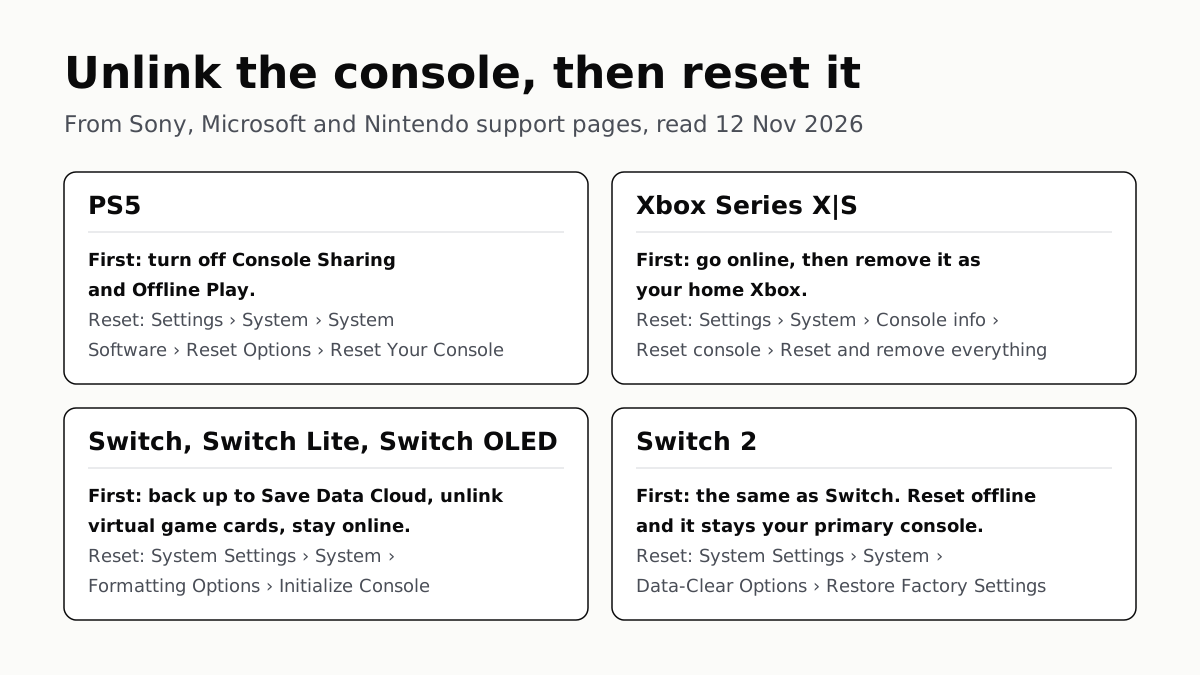
Before You Sell a Console, Unlink It, Then Reset It
Each maker has a setting that ties a console to your account. Switch it off and back up your saves before the wipe.
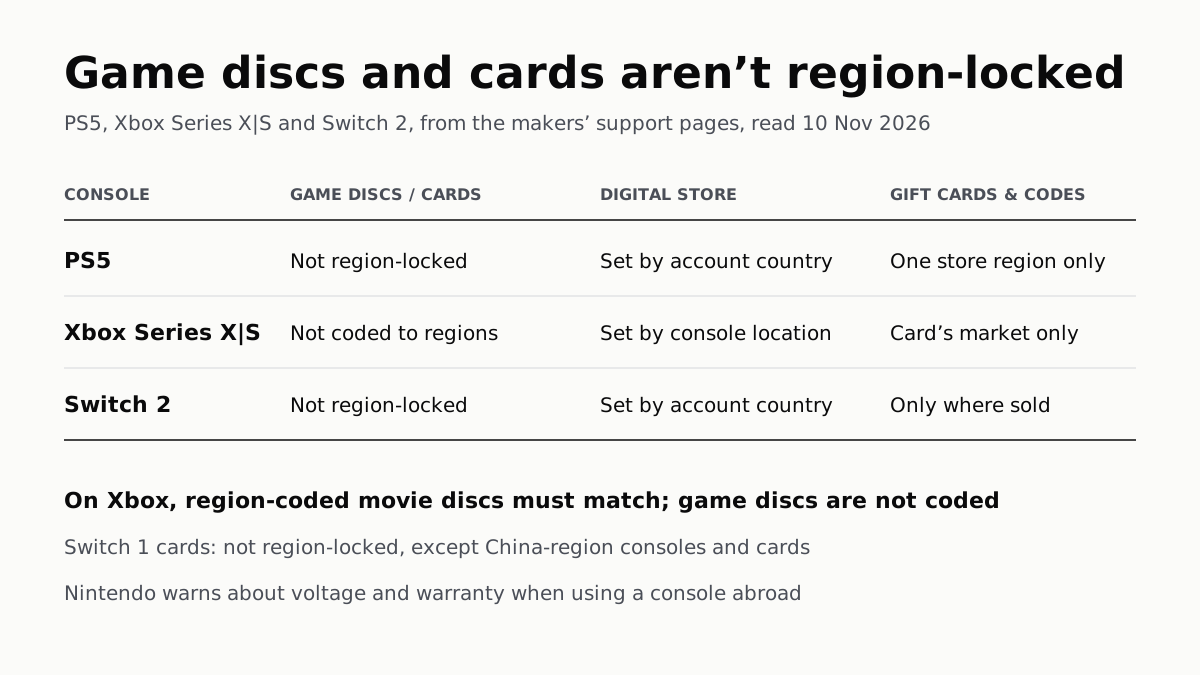
PS5, Xbox and Switch 2 Games Aren’t Region-Locked
Your account’s or console’s country decides what you can buy; gift cards, subscription codes and some add-ons stay in one region.
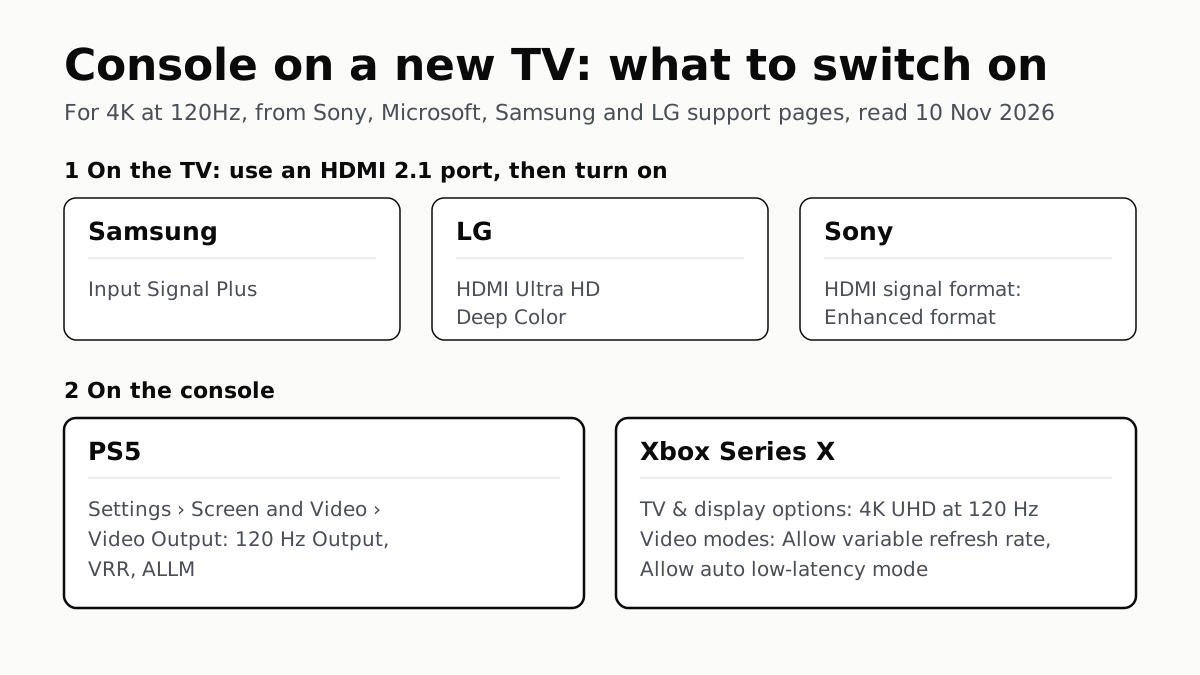
4K 120Hz on PS5 or Xbox Starts With a TV Port Setting
Samsung calls it Input Signal Plus, LG HDMI Ultra HD Deep Color, Sony Enhanced format. Then turn on 120Hz, VRR and ALLM on the console.
Switch 2 Game-Key Cards Hold a Key, Not the Game
Internet for the first launch, free space for the download, and the card in the slot every time you play. You can lend it to anyone.