Before You Sell a Console, Unlink It, Then Reset It
Each maker has a setting that ties a console to your account. Switch it off and back up your saves before the wipe.
If you buy through our links, we may earn a commission. It never affects our verdicts or scores — how that works. As an Amazon Associate I earn from qualifying purchases.
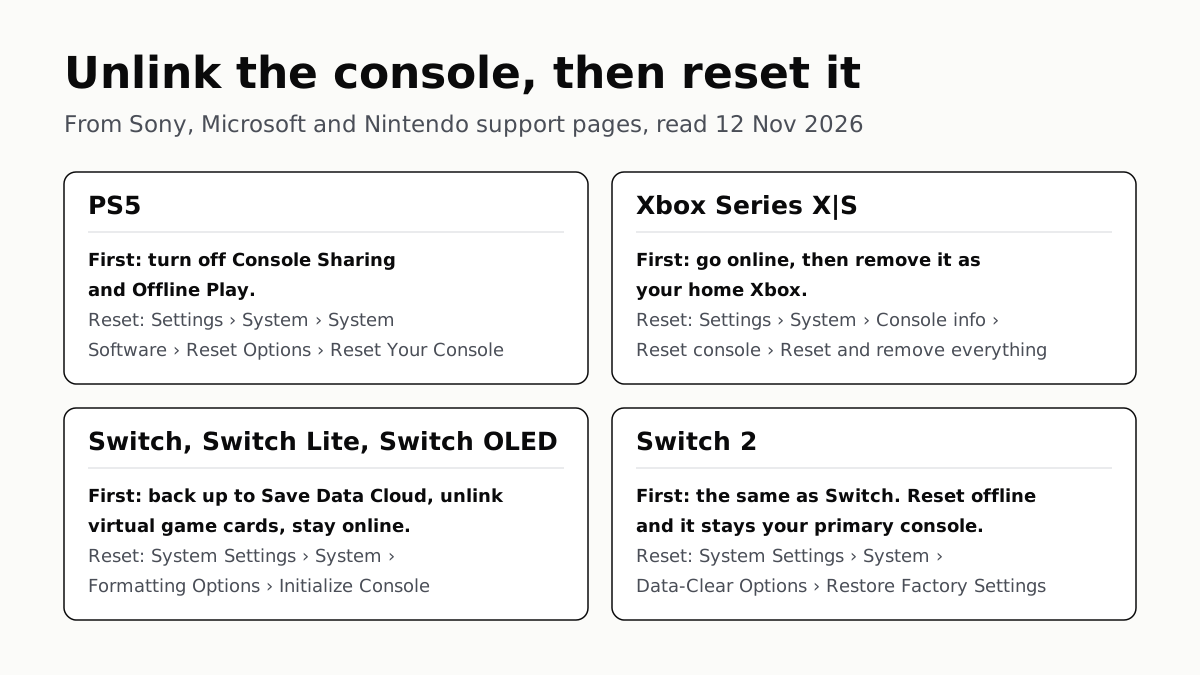
Release the console from your account first, then reset it. On PS5 that means turning off Console Sharing and Offline Play; on Xbox, removing it as your home Xbox; on Switch and Switch 2, backing up saves and resetting while online, so Nintendo can unlink your account. The reset itself is one menu on each console.
The order matters because each maker has a limit on fixing it remotely. Sony lets you deactivate all devices from the web only once every 6 months, and Nintendo allows a forced unlink of a virtual game card console once a year.
The steps side by side
| Console | Before you reset | Reset path | What stays on your account |
|---|---|---|---|
| PS5 | Turn off Console Sharing and Offline Play; back up saves; sync trophies; remove an M.2 SSD you want to keep | Settings › System › System Software › Reset Options › Reset Your Console | Subscriptions, which Sony says apply when you sign in on a new console |
| Xbox Series X|S | Go online so it syncs; remove it as your home Xbox; leave Xbox Insider if enrolled | Settings › System › Console info › Reset console › Reset and remove everything | Digital games, playable on any Xbox while you are signed in online |
| Switch, Switch Lite (affiliate link to Amazon, opens in a new tab), Switch OLED (affiliate link to Amazon, opens in a new tab) | Back up to Save Data Cloud; unlink it from virtual game cards; connect to the internet | System Settings › System › Formatting Options › Initialize Console | Your Nintendo Account, eShop purchase history and balance; purchases can be re-downloaded |
| Switch 2 (affiliate link to Amazon, opens in a new tab) | The same as Switch | System Settings › System › Data-Clear Options › Restore Factory Settings | The same as Switch |
PS5: turn off Console Sharing first
Console Sharing and Offline Play is the setting that lets anyone using that PS5 play your games, and Sony allows it “on one PS5 console at a time”. Switch it off at Settings › Users and Accounts › Other › Console Sharing and Offline Play, then select Disable.
Sony’s own sale-and-disposal checklist does not mention this step. It lists recording the serial number, removing discs and USB devices, backing up, syncing trophies and removing an M.2 SSD. The sharing page is where the setting lives, and it tells you to turn sharing off on the previous console before you can turn it on for a new one. If the old PS5 has already gone, you have to sign in to Account Management and deactivate all devices, which Sony limits to once every 6 months.
Back up before the wipe. Sony points to PlayStation Plus cloud storage or a USB drive, and says plainly that after a reset “deleted data cannot be restored”. Then go to Settings › System › System Software › Reset Options › Reset Your Console. If the PS5 will not reach Settings, Sony’s fallback is a USB reinstall from Safe Mode, choosing Reset PS5 (Reinstall System Software).
Xbox Series X|S: remove it as your home Xbox
Microsoft gives the same selling steps for Xbox One and for both Series consoles, the Series X and the Series S. Its checklist starts with the home console setting. On the Xbox you are selling, go to Profile & system › Settings › General › Personalization › My home Xbox, then select Make this my home Xbox and Remove this as my home Xbox. You can switch your home Xbox up to five times in a year, so do it once, on purpose.
Connect the console to the internet before resetting. Microsoft’s warning is that “anything not uploaded to the XBOX network will be lost”, and a console that has been offline may hold saves the cloud has not seen. Then go to Profile & system › Settings › System › Console info › Reset console and pick Reset and remove everything. The other option, Reset and keep my games & apps, is for troubleshooting and leaves installed content on the console.
Two last steps from Microsoft’s list. If you were in the Xbox Insider Program, remove the console in the Xbox Insider Hub under Settings › Manage Devices. And unregister the console from your account only after the sale is final, because Microsoft says you need its serial number to report it missing or stolen. Do not pull the internal drive: Microsoft says that renders the console unusable.
Switch and Switch 2: back up, unlink, stay online
A Switch reset deletes all software, save data, screenshots and user information in system memory. Saves backed up to Nintendo’s Save Data Cloud come back when you link your account on another console; saves that were not backed up do not.
If the console is one of the two your Nintendo Account uses to load virtual game cards, unlink it while you still have it: open Virtual Game Cards from the HOME Menu, then Settings, choose the console and select Unlink. Nintendo’s reset pages do not mention virtual game cards at all. Forcing an unlink from your other console or from the Account Home website, once the console is gone, is limited to once a year.
Initialize with the console online. Nintendo says a Switch initialized offline “will remain registered as your primary console”, and that the reset tries to connect so it can unlink your accounts. The path on Switch, Switch Lite and Switch OLED is System Settings › System › Formatting Options › Initialize Console. On Switch 2 it is System Settings › System › Data-Clear Options › Restore Factory Settings. Either asks for the parental control PIN if one is set.
Take the microSD card out if you are keeping it. Nintendo says software on the card becomes unusable after a reset but the data on it is not deleted, so a card left in goes to the next owner with your files on it.
What the next owner gets, and what you keep
Nintendo and Microsoft tie your purchases to the account rather than the console. Nintendo says you can re-download any software or DLC bought on your Nintendo Account, on the same console or a different one. Microsoft says your digital games can be downloaded and played “on any XBOX console” while you are online and signed in. Sony’s dispose page speaks only of subscriptions: when you sign in on a new console, “your subscriptions are applied to your account”.
The risk these pages describe is not a lock on the next owner, as with Activation Lock on an iPhone, but one on you: a console you no longer own can keep holding one of your account’s limited slots, the one sharing PS5 or one of two virtual game card consoles, until you free it. The same order applies to a phone you trade in and to a Steam Deck: sign out, back up, then wipe. If the console is staying in the family rather than being sold, sharing your games with it may suit you better than a reset.
Questions people ask
How do I factory reset my PS5 before selling it?
Turn off Console Sharing and Offline Play first (Settings, Users and Accounts, Other). Back up your saves to PS Plus cloud storage or a USB drive. Then Settings, System, System Software, Reset Options, Reset Your Console.
Does resetting an Xbox remove my account?
Yes, if you choose Reset and remove everything. Microsoft says it deletes accounts, saved games, settings, home Xbox associations and installed content. Reset and keep my games & apps is for troubleshooting, not for selling.
How do I reset a Nintendo Switch for a new owner?
Connect it to the internet, then System Settings, System, Formatting Options, Initialize Console. On Switch 2 the last steps are Data-Clear Options, Restore Factory Settings. Offline, Nintendo says the console stays registered as your primary console.
Will I lose my digital games if I reset my console?
The copies on the console go. Nintendo says you can re-download anything bought on your Nintendo Account, and Microsoft says your digital games play on any Xbox while you are signed in online. Sony says your subscriptions apply when you sign in on a new console.
What if I already sold my PS5 without deactivating it?
Sign in to Account Management on the web and deactivate all devices. Sony allows that only once every 6 months, and it removes every console, not just the one you sold.
Do I need to unregister my Xbox after selling it?
Microsoft says to unregister it from your account, but only after the sale is final and the new owner has it. Until then, keep it registered: the serial number is needed if the console goes missing in transit.
How we researched this
No one at bitcritiq has handled this product. Everything here comes from published sources, listed below.
- What this cannot tell you
- We have not reset any of these consoles; these are the makers' instructions, not our observations. None of Sony's or Microsoft's pages names a system software version, so menu names may move with updates; Nintendo's Switch page names the Switch, Switch Lite and Switch OLED, and its Switch 2 page names Switch 2 only. Sony's pages do not say whether a reset turns off Console Sharing by itself, and Nintendo's do not say whether a reset unlinks a console from virtual game cards, so we treat both as steps to do by hand. We did not read PS4, Xbox One or Xbox 360 steps beyond the menu names Sony and Microsoft print alongside.
How we chose this, and what we did
- Why this subject
- Trade-in and hand-down season brings one question per console: what do I do so the next owner cannot use my account, and how do I wipe it? Sony, Microsoft and Nintendo each publish a reset page, but the step that frees the console from your account sits on a different page for each. bitcritiq already covers the Steam Deck reset and phone trade-ins; this piece is the console seller's checklist only.
- How we looked at it
- Every step and menu path is copied from the makers' own US support pages, read through a browser on 12 November 2026: PlayStation Support's 'Transfer or dispose of your PlayStation console', 'How to turn on PS5 Console Sharing and Offline Play' and 'Reinstall PS5 console and PS4 console system software using Safe Mode'; Xbox Support's 'How can I get my XBOX console ready to sell or trade?', 'How to reset your XBOX console to factory defaults' and 'How home XBOX and game sharing work'; Nintendo Support's 'How to Delete All Content & Settings on Nintendo Switch', 'How to Delete Content on Nintendo Switch 2' and 'How to Unlink Systems That Can Load Virtual Game Cards'. Collapsed sections were read from the page text after expanding them. Where we say Sony's dispose checklist does not mention Console Sharing, the control is the checklist itself on the same page: record the serial number, remove USB devices and discs, back up, transfer, sync trophies, remove the M.2 SSD, reset. Where we say Nintendo's reset pages do not mention virtual game cards, the control is their own list of what a reset deletes and unlinks.
What this rests on
6 claims, all official. Nothing here was measured by bitcritiq — see how we test for why. Open a claim to read the source it came from.
On PS5, the factory reset is Settings › System › System Software › Reset Options › Reset Your Console, and it cannot be undone.Official
PlayStation Support: “Go to the home screen and select Settings > System > System Software > Reset Options. Select Reset Your Console.” “This process cannot be undone, so be sure not to delete any important data by mistake. Deleted data cannot be restored.”
Sony allows Console Sharing and Offline Play on one PS5 at a time, and a remote deactivation of all devices only every 6 months.Official
PlayStation Support: “You can turn on Console Sharing and Offline Play on one PS5 console at a time.” “To deactivate a console you no longer have access to, sign in to Account Management and deactivate all devices. Please note, you can only remotely deactivate all devices every 6 months.”
Microsoft says to choose Reset and remove everything when selling or trading an Xbox, and that this deletes accounts, saved games, settings, home Xbox associations and installed content.Official
Xbox Support: “When you’re resetting an XBOX One or XBOX Series X|S console so that you can sell or trade the device, make sure to select the Reset and remove everything option.” “All user data, including accounts, saved games, settings, home XBOX associations, and all installed content will be deleted.”
Anything not uploaded to the Xbox network is lost in a reset, so Microsoft says to connect first if the console has been offline.Official
Xbox Support: “Anything not uploaded to the XBOX network will be lost. Your console syncs when it’s connected to the XBOX network, but if you've been offline for a while, connect to the network before taking these steps.”
A Switch initialized offline stays registered as your primary console; Nintendo Accounts are unlinked, not deleted, and purchases can be re-downloaded.Official
Nintendo Support: “If you are not connected to the Internet while initializing the console, it will remain registered as your primary console.” “Any Nintendo Accounts linked to the console will not be deleted, but they will be unlinked from the system.” “By re-linking your Nintendo Account after initializing the console (to the same system or a different one), it is possible to re-download any software or DLC purchased using that account.”
Unlinking a console from virtual game cards without the console in hand, by force or on the Account Home website, is limited to once a year.Official
Nintendo Support: “Important: Unlinking a system through this process can only be done once per year.” “Important: Unlinking a system through the Account Home website can only be done once per year.”
Sources 9
- Transfer or dispose of your PlayStation console — PlayStation SupportOfficialaccessed Nov 12, 2026
- How to turn on PS5 Console Sharing and Offline Play — PlayStation SupportOfficialaccessed Nov 12, 2026
- Reinstall PS5 console and PS4 console system software using Safe Mode — PlayStation SupportOfficialaccessed Nov 12, 2026
- How can I get my XBOX console ready to sell or trade? — Xbox SupportOfficialaccessed Nov 12, 2026
Show 5 more · 5 official or standards
- How to reset your XBOX console to factory defaults — Xbox SupportOfficialaccessed Nov 12, 2026
- How home XBOX and game sharing work — Xbox SupportOfficialaccessed Nov 12, 2026
- How to Delete All Content & Settings on Nintendo Switch — Nintendo Support (US)Officialaccessed Nov 12, 2026
- How to Delete Content on Nintendo Switch 2 — Nintendo Support (US)Officialaccessed Nov 12, 2026
- How to Unlink Systems That Can Load Virtual Game Cards — Nintendo Support (US)Officialaccessed Nov 12, 2026
Pass it on
Know someone weighing this up? Send them the answer.
bitcritiq.com/87czThe link is permanent: it opens this article for good, even if the title changes.
No email, no account
Follow bitcritiq
Every new article, in whatever reader you already use.
Subscribe by RSSAll the ways to follow
Using Chrome on Android? Open the browser menu and tap Follow. New articles then turn up in the Following tab in Discover.
read next
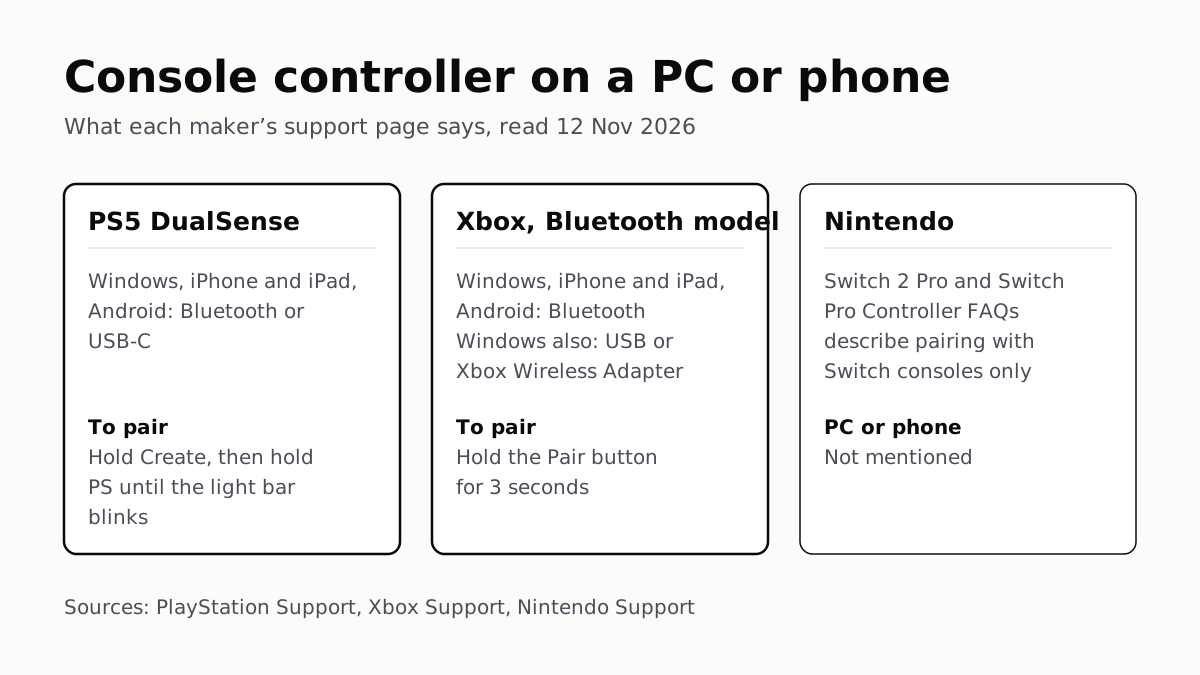
PS5 and Xbox Controllers Pair With PCs and Phones
Hold Create and PS on a DualSense, or Pair on a Bluetooth Xbox pad. Nintendo’s Pro Controller FAQs mention no PC or phone.
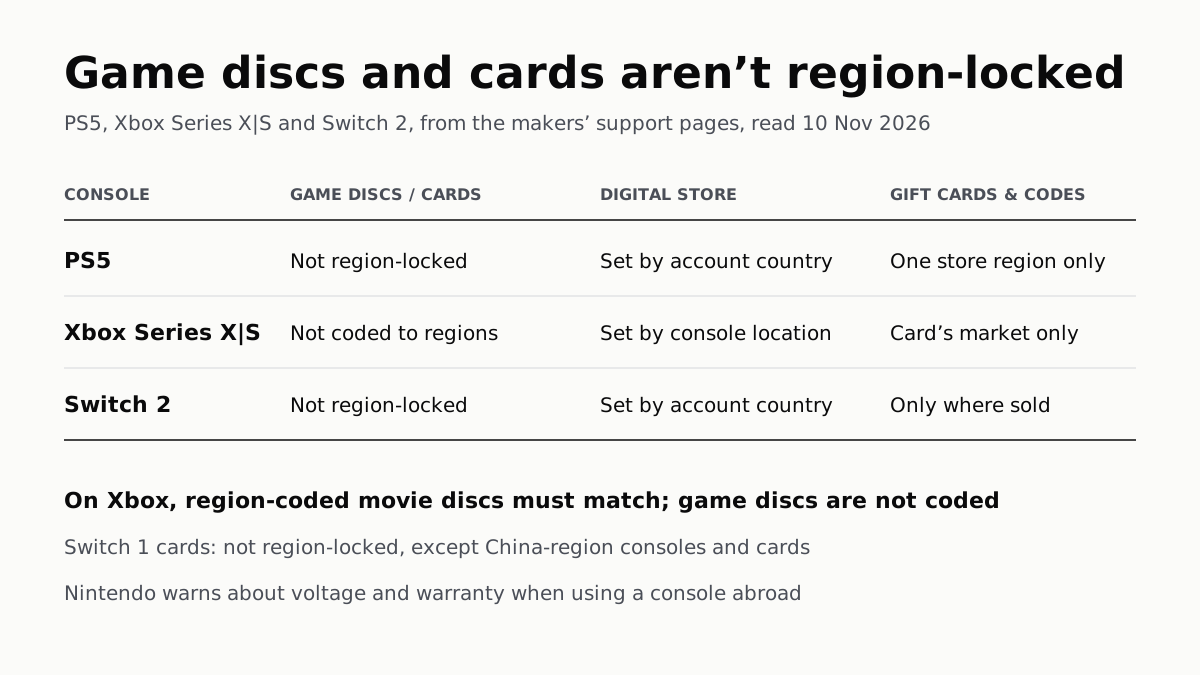
PS5, Xbox and Switch 2 Games Aren’t Region-Locked
Your account’s or console’s country decides what you can buy; gift cards, subscription codes and some add-ons stay in one region.
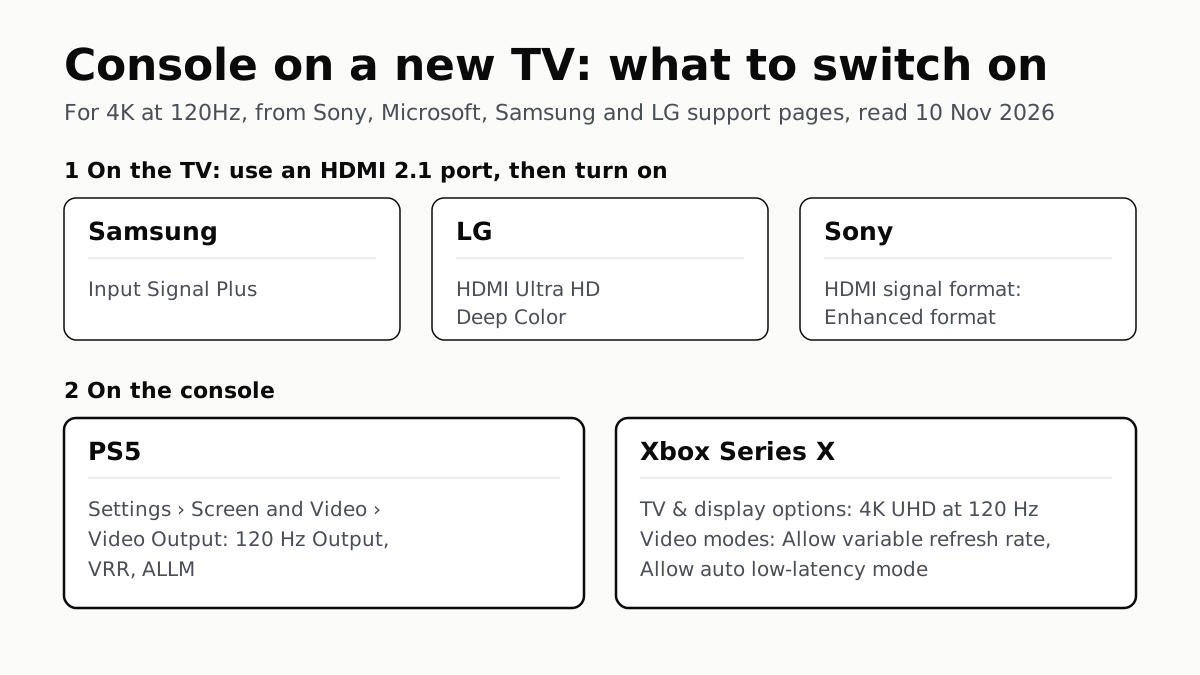
4K 120Hz on PS5 or Xbox Starts With a TV Port Setting
Samsung calls it Input Signal Plus, LG HDMI Ultra HD Deep Color, Sony Enhanced format. Then turn on 120Hz, VRR and ALLM on the console.
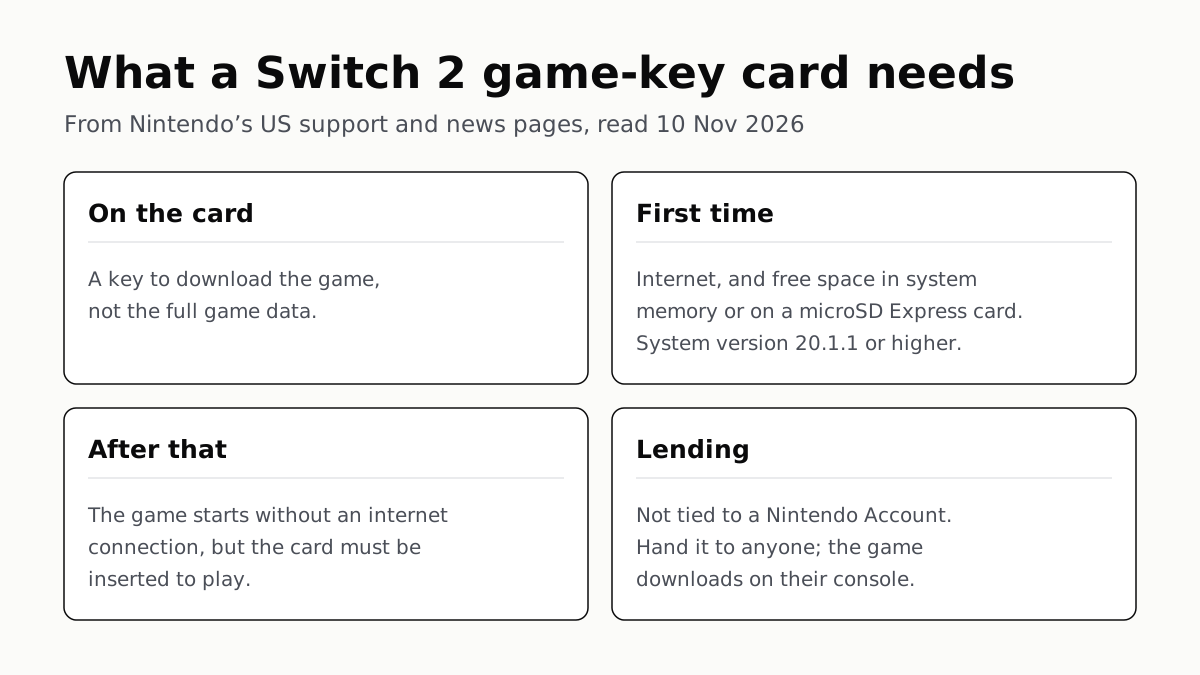
Switch 2 Game-Key Cards Hold a Key, Not the Game
Internet for the first launch, free space for the download, and the card in the slot every time you play. You can lend it to anyone.