Most Atmos Plays Over ARC; Lossless Atmos Needs eARC
Dolby encodes streaming Atmos as Dolby Digital Plus, which ARC carries. eARC adds Dolby TrueHD, DTS:X and uncompressed 7.1.
If you buy through our links, we may earn a commission. It never affects our verdicts or scores — how that works. As an Amazon Associate I earn from qualifying purchases.
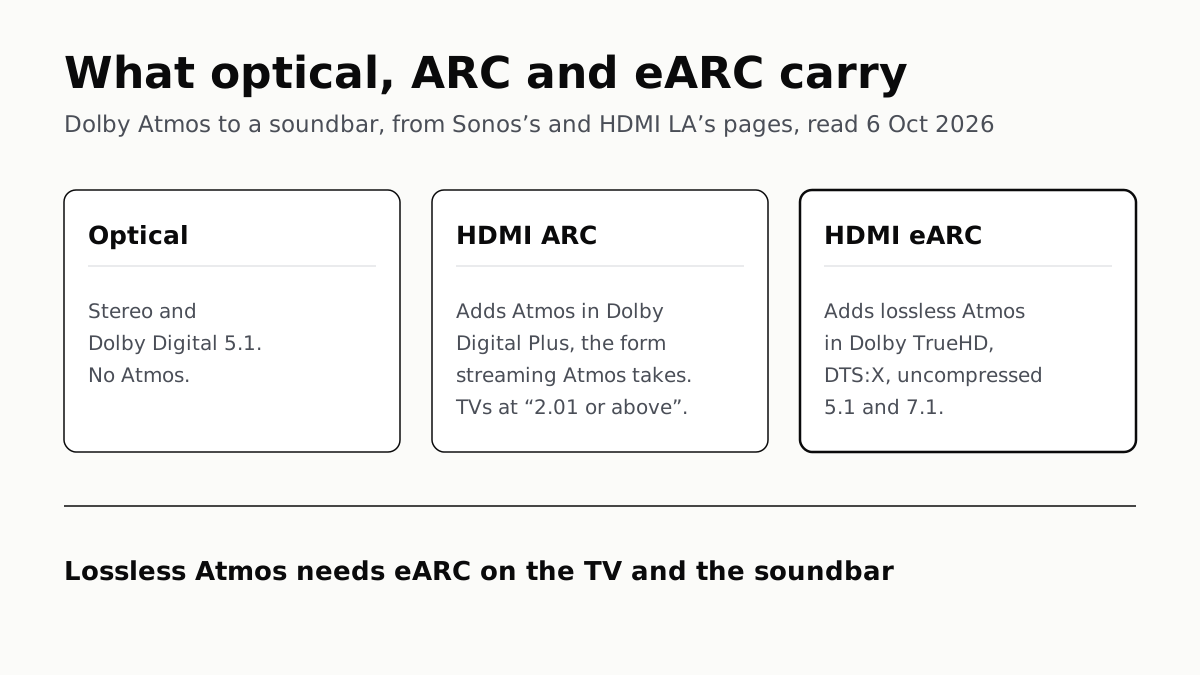
Most Dolby Atmos reaches a soundbar fine over plain HDMI ARC, because Dolby encodes Atmos for streaming as Dolby Digital Plus, which ARC carries. You need eARC, on both the TV and the soundbar, for lossless Atmos in Dolby TrueHD, the format Dolby built for Blu-ray.
Sonos puts it in two sentences on its support page: “Most Dolby Atmos audio can be played through HDMI-ARC using the Dolby Digital Plus codec. HDMI-eARC is required to play lossless Dolby Atmos audio using the Dolby TrueHD codec.”
What each connection carries
Sonos publishes the split as a table for its own soundbars. Its rows, with HDMI Licensing Administrator’s (HDMI LA) list for eARC:
| Connection | Stereo | Dolby Digital 5.1 | Atmos in Dolby Digital Plus | Atmos in Dolby TrueHD |
|---|---|---|---|---|
| Optical | Yes | Yes | No | No |
| HDMI ARC, TV at “version 2.0 or below” | Yes | Yes | No | No |
| HDMI ARC, TV at “version 2.01 or above” | Yes | Yes | Yes | No |
| HDMI eARC | Yes | Yes | Yes | Yes |
HDMI LA says eARC also carries uncompressed 5.1 and 7.1 at up to 192kHz and 24-bit, DTS-HD Master Audio and DTS:X. Its own description of the gap is blunt: “eARC can pass uncompressed and higher bandwidth audio; ARC can’t.”
Sonos does not say what its version numbers for ARC refer to. On an older TV, the practical test is whether the soundbar shows an Atmos signal at all.
Why the line falls there
Dolby’s ceilings for the two Atmos formats are more than ten times apart. Dolby’s support page gives its encoders for broadcast and streaming (“OTT delivery”) data rates of 384 to 1,024kbps for Dolby Digital Plus with Atmos. Dolby TrueHD, which Dolby calls “100 percent lossless”, runs at up to 18Mbps. ARC handles the first; the second needs the bandwidth eARC adds.
So the question splits by source. If your Atmos comes from apps on the TV or a streaming stick plugged into it, ARC on a recent TV covers it. If it comes from a 4K Blu-ray player feeding the TV, the TrueHD track needs eARC to reach the bar intact.
When ARC or optical is enough
- Streaming, with a recent TV: ARC. On Sonos’s table it carries Atmos in Dolby Digital Plus.
- Stereo or 5.1 sources, no interest in Atmos: optical or ARC. Sonos lists both as carrying stereo and Dolby Digital 5.1.
- Blu-ray discs with TrueHD or DTS:X tracks: eARC at both ends, or plug the player into the soundbar itself.
That last route skips the return channel entirely. Dolby’s setup guide says connecting sources to the soundbar’s own HDMI inputs gives “the highest level of compatibility and the best quality experience”, with the bar passing picture on to the TV. It only works on a bar with HDMI inputs, and some have none: the Sonos Arc Ultra, a pick on our soundbar shortlist, has no HDMI passthrough.
What the TV, soundbar and cable each need
Both ends have to be eARC. Dolby says an eARC TV with an ARC soundbar still plays, but “due to bandwidth limitations playback support for certain audiovisual formats may be reduced”. HDMI LA goes further: eARC “is not defined to be backwards compatible with ARC”, so mixing the two works only where the maker built for both.
It is a hardware feature. Asked whether eARC can arrive by firmware update, HDMI LA answers “Generally speaking, no.” Samsung says its TVs and soundbars support eARC from 2020 models onward. Makers label the port; HDMI LA says to use the one marked eARC, and that it may need switching on in the TV’s menu.
Samsung’s is off out of the box. Its US support page gives the steps:
- Settings, General, External Device Manager: turn on Anynet+ (HDMI-CEC).
- Settings, Audio, Expert Settings: set HDMI eARC Mode to Auto.
- On the soundbar, plug into its eARC port and set the source to D.In; Samsung says it then switches to TV eARC.
Dolby’s guide adds that sources should be set to bitstream output, so the soundbar does the Atmos decoding.
The cable is the part HDMI LA and Samsung word differently. HDMI LA says both Ultra cables are designed for eARC, and that older Standard and High Speed cables with Ethernet “might” work but “are not certified for eARC operation”. Samsung asks only for a cable with Ethernet. If eARC cuts out over an older cable, a certified Ultra High Speed one is the first thing to try, and our guide to HDMI cable tiers explains the labels to look for.
Before you buy for Atmos
Check the TV before the bar. A soundbar with eARC behind an ARC-only TV still gets streaming Atmos on a recent set, but not TrueHD from a disc player plugged into the TV. If you are weighing what a dearer TV adds, an eARC port is one line on the spec sheet that decides what a future soundbar can receive. What the bar does with Atmos once it arrives, from up-firing drivers or processing alone, is in our explainer on Atmos height channels.
Questions people ask
Do I need eARC for Dolby Atmos?
Not for most of it. Sonos says most Dolby Atmos plays over HDMI ARC as Dolby Digital Plus, the format Dolby encodes Atmos in for streaming. You need eARC on both the TV and the soundbar for lossless Atmos in Dolby TrueHD, the Blu-ray format.
What is the difference between ARC and eARC?
Both send TV sound to a soundbar over one HDMI cable. eARC adds lossless and uncompressed formats: Dolby TrueHD, DTS-HD Master Audio, DTS:X and uncompressed 5.1 and 7.1, according to HDMI Licensing Administrator. Dolby says it also corrects audio delay automatically.
Can an optical cable carry Dolby Atmos?
Not on Sonos’s table. It lists optical as carrying stereo and Dolby Digital 5.1 only, with no Atmos in either form. Optical is enough if your sources are stereo or 5.1 and you do not want Atmos.
Will an eARC soundbar work with an ARC TV?
Dolby says an eARC and ARC pairing still plays, with fewer formats available. HDMI LA adds that eARC is not defined as backwards compatible with ARC, so it works where the maker built the product to do both.
Do I need a special HDMI cable for eARC?
HDMI LA says both Ultra cables are designed for eARC, and older HDMI cables with Ethernet might work but are not certified for it. Samsung’s own page asks for a cable with Ethernet. If eARC drops out, a certified Ultra High Speed cable is the swap to try.
Can I add eARC to my TV with a software update?
Generally not. HDMI LA’s answer is “generally speaking, no”, and it tells owners to ask the maker of their product. Check the port labels: makers mark the eARC port on the TV.
How do I turn on eARC on a Samsung TV?
Samsung ships it switched off. Turn on Anynet+ (HDMI-CEC) under Settings, General, External Device Manager, then go to Settings, Audio, Expert Settings, HDMI eARC Mode and set it to Auto.
How we researched this
No one at bitcritiq has handled this product. Everything here comes from published sources, listed below.
- What this cannot tell you
- Sonos’s table describes Sonos speakers; other soundbars may handle the same connections differently, and Sonos does not define what its “version 2.01” for ARC refers to. We did not check which streaming services, if any, send lossless Atmos. We read one TV maker’s setup steps, Samsung’s; menu names differ on other brands. We have not connected or measured anything.
How we chose this, and what we did
- Why this subject
- Soundbar searches are climbing into the holiday season, and “do I need eARC for Dolby Atmos” is the question buyers hit once a bar is in the basket. Our soundbar shortlist and our HDMI cable explainer mention eARC in a line each; neither says what ARC can and cannot carry, or when optical is enough.
- How we looked at it
- Read through a browser on 6 October 2026: HDMI Licensing Administrator’s eARC page and FAQ, and its blog post on TV sound; Dolby’s articles on ARC and eARC and on connecting a soundbar, its soundbar setup guide, its Dolby TrueHD page, and its support article on Dolby Digital Plus with Atmos data rates; Sonos’s support article on Atmos from a TV, whose format table is built from images, so we read which cells carry a tick from the page structure; and Samsung US support article ANS10006962 on eARC, including its collapsed sections.
What this rests on
6 claims, all official. Nothing here was measured by bitcritiq — see how we test for why. Open a claim to read the source it came from.
Most Dolby Atmos plays over HDMI ARC as Dolby Digital Plus; lossless Atmos in Dolby TrueHD needs eARC.Official
Sonos Support: “Most Dolby Atmos audio can be played through HDMI-ARC using the Dolby Digital Plus codec. HDMI-eARC is required to play lossless Dolby Atmos audio using the Dolby TrueHD codec.”
eARC carries uncompressed 5.1 and 7.1, up to 192kHz and 24-bit, plus Dolby TrueHD, Dolby Atmos, DTS-HD Master Audio and DTS:X.Official
HDMI LA: eARC “supports the latest high-bitrate audio formats up to192kHz, 24-bit, and uncompressed 5.1 and 7.1, and 32-channel uncompressed audio. It also supports DTS-HD Master Audio™, DTS:X®, Dolby® TrueHD, Dolby Atmos®.”
Dolby’s Dolby Digital Plus with Atmos encoders for broadcast and streaming run at 384 to 1,024kbps; Dolby TrueHD runs at up to 18Mbps.Official
Dolby Professional Support: “For Broadcast and OTT delivery — Dolby Digital Plus with Dolby Atmos encoders support data rates of 384*, 448, 576, 640, 768 and 1,024 kbps.” Dolby TrueHD page: “Transfers data at bit rates of up to 18 Mbps.”
Sonos lists optical, and ARC on TVs at version 2.0 or below, as carrying stereo and Dolby Digital 5.1 but not Atmos.Official
Sonos’s format table ticks Stereo (PCM) and 5.1 (Dolby Digital) for “HDMI ARC (version 2.0 or below)” and “Optical adapter”, and leaves both Dolby Atmos columns empty for those rows.
eARC is not defined as backwards compatible with ARC, and generally cannot be added by a firmware update.Official
HDMI LA FAQ: “eARC is not defined to be backwards compatible with ARC.” On firmware: “Generally speaking, no. Check with the manufacturer of your product to confirm.”
Samsung TVs ship with HDMI eARC Mode turned off; it is enabled under Expert Settings after turning on Anynet+.Official
Samsung US ANS10006962: “By default, the HDMI eARC Mode is turned off… activate Anynet+ (HDMI-CEC)… Settings (All Settings) > Audio (Sound) > Expert Settings, and select HDMI eARC Mode. Then, set it to Auto.”
Sources 9
- HDMI Enhanced Audio Return Channel (eARC) — HDMI Licensing AdministratorOfficialaccessed Oct 6, 2026
- How To Get the Best Sound From a TV — HDMI Licensing Administrator blog, 18 May 2021Officialaccessed Oct 6, 2026
- What are HDMI 2.1 ARC and eARC cables? — DolbyOfficialaccessed Oct 6, 2026
- How to connect a Dolby Atmos-enabled soundbar to your TV — DolbyOfficialaccessed Oct 6, 2026
Show 5 more · 5 official or standards
- Soundbar setup guide — DolbyOfficialaccessed Oct 6, 2026
- Dolby TrueHD lossless audio — Dolby ProfessionalOfficialaccessed Oct 6, 2026
- What is the supported data rate of Dolby Digital Plus with Dolby Atmos? — Dolby Professional SupportOfficialaccessed Oct 6, 2026
- Listen to Dolby Atmos audio from your TV on Sonos — Sonos SupportOfficialaccessed Oct 6, 2026
- eARC on your Samsung TV and soundbar — Samsung US SupportOfficialaccessed Oct 6, 2026
Pass it on
Know someone weighing this up? Send them the answer.
bitcritiq.com/8vauThe link is permanent: it opens this article for good, even if the title changes.
No email, no account
Follow bitcritiq
Every new article, in whatever reader you already use.
Subscribe by RSSAll the ways to follow
Using Chrome on Android? Open the browser menu and tap Follow. New articles then turn up in the Following tab in Discover.
read next
A Soundbar Works Without a Sub; Add One for the Lowest Bass
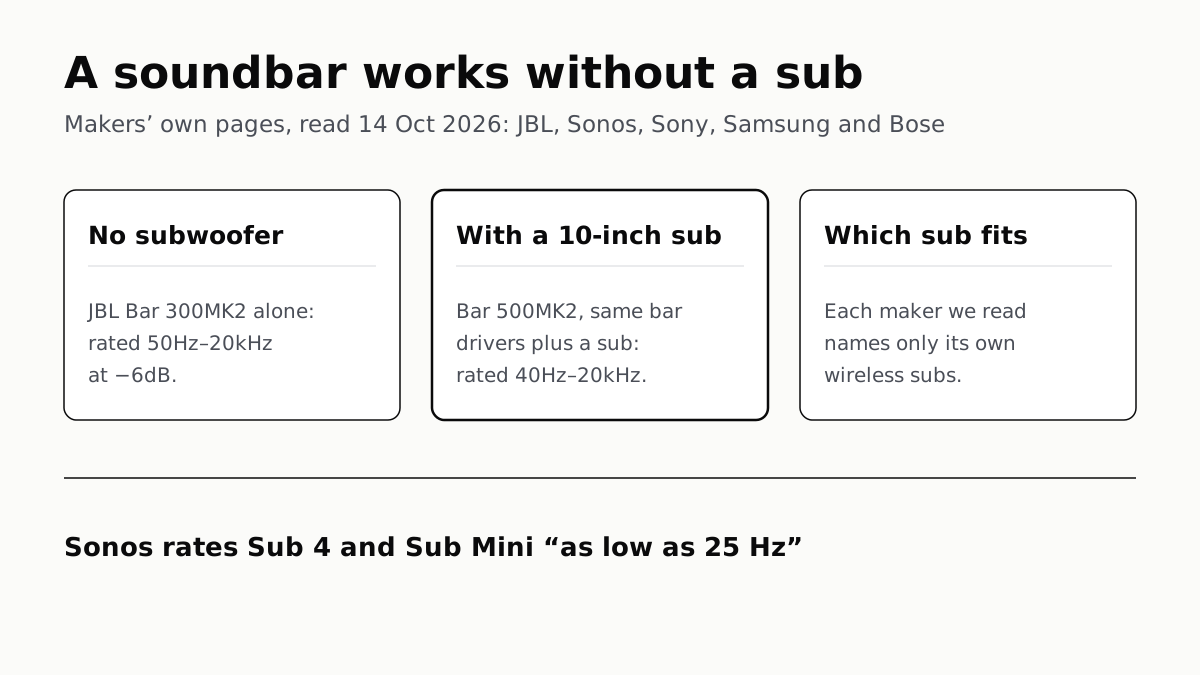
In JBL’s specs, the same bar drivers reach 50Hz alone and 40Hz with a 10-inch sub. Sony, Sonos and Samsung list only their own subs.
Seatback Bluetooth: United on 800+ Planes, Others Starting
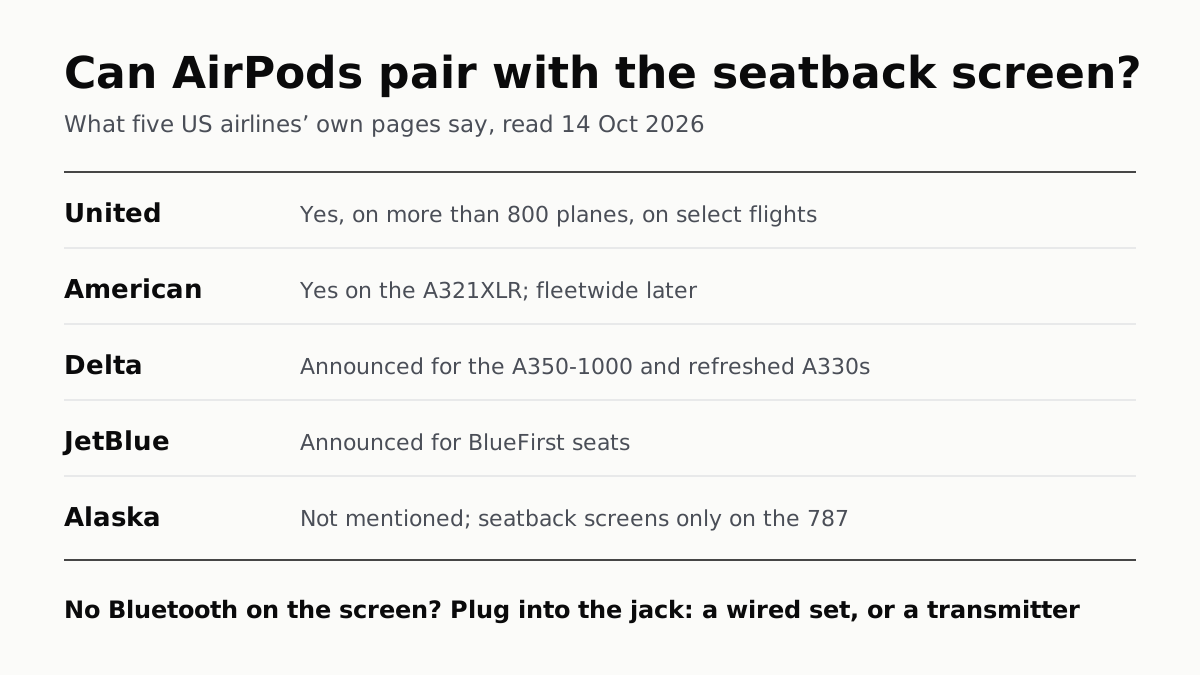
American’s A321XLR has it and JetBlue and Delta have announced it. Without it, the seatback jack needs a wired plug or a transmitter.
HDR10 Is the Fallback; Dolby Vision and HDR10+ Are Upgrades
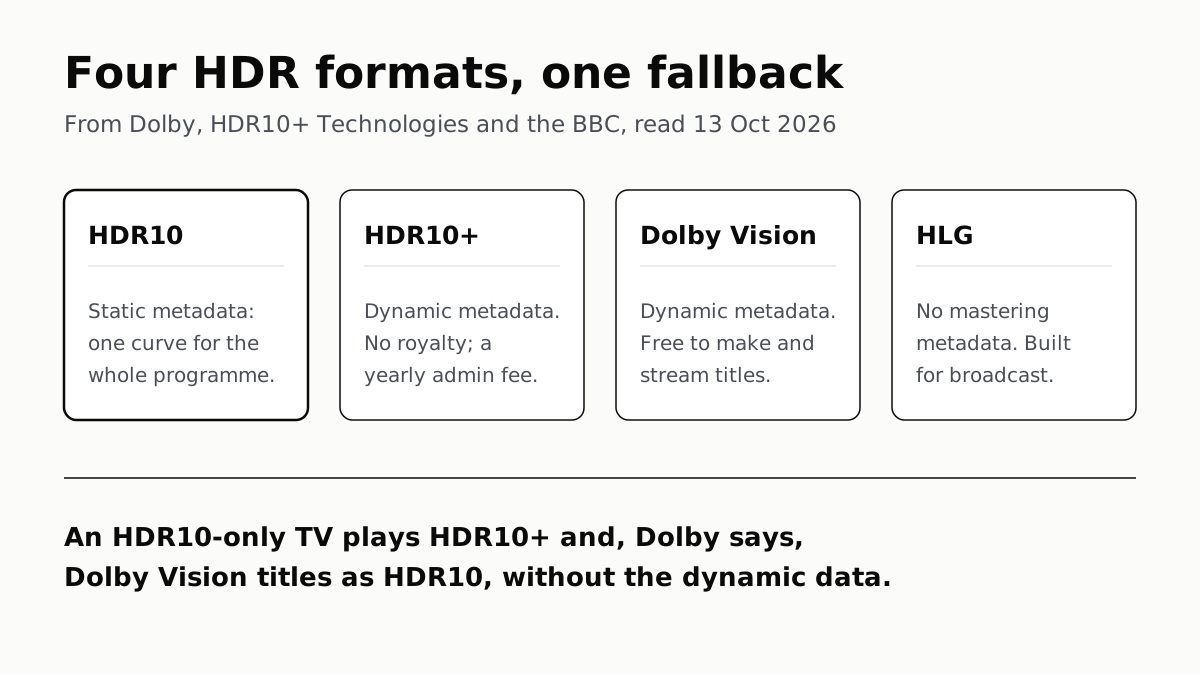
Samsung’s S90F lists HDR10+, not Dolby Vision; LG’s C6 the reverse. TCL’s QM7K lists both.

OLED Lights Each Pixel; Mini-LED Lights an LCD Behind It
Self-lit pixels give OLED its blacks and a burn-in risk; a zoned backlight gives Mini-LED brightness and a halo risk.