Why Your Smart Home Stops Working When the Internet Drops
Whether a light switch survives an outage depends on one thing: how far the command travels. Some go across the room, some go to Virginia.

If you buy through our links, we may earn a commission. It never affects our verdicts or scores — how that works. As an Amazon Associate I earn from qualifying purchases.
One question decides it: when you tap the button, how far does the command travel? If it goes to a company’s server and back, an outage breaks it. If it crosses the room, an outage is irrelevant.
Nothing about the device tells you which. A bulb that joins your Wi-Fi directly, with no hub, looks like the simpler product — and it is usually the one that stops working, because with no hub in your house there is nowhere local for the command to be handled.
Amazon says this out loud
Most vendors are vague here. Amazon’s developer documentation is not, because it is written for people building the things.
On connecting a device through Matter, it states the option “enables Alexa to control your device locally during Internet outages or when your add-on isn’t available”, and that with Matter, devices “connect directly to Alexa without a separate hub or smart home add-on.”
The phrase doing the work is smart home add-on — Amazon’s current name for what used to be called a smart home skill. Its own page on local protocols says that for devices using add-ons, you can add a second connection “from your cloud-connected devices with local connectivity protocols”, and that this is what “allows Alexa to control your device during internet outages.”
Read that backwards and you have the answer to the whole question. An add-on integration is a cloud integration. If that is the only way your device talks to Alexa, the outage wins.
The Alliance’s own framing for Matter is the same idea from the other side: it lists reliability as “consistent and responsive local connectivity.”
Three different outages, which people keep conflating
“The internet is down” covers three failures, and your kit may survive one, two, or none. This is why two people give flatly contradictory advice about the same brand.
| What broke | Cloud device | Hub + local protocol | Hub + physical remote |
|---|---|---|---|
| Internet down, router fine | ✗ | ✓ | ✓ |
| Router down entirely | ✗ | ✗ (app can’t reach hub) | ✓ |
| Hub itself down | ✗ | ✗ | ✗ |
The third column is the one people forget. In the r/smarthome thread, someone points out that with a Hue switch “you don’t even need Wifi or a functioning router” — because the switch talks to the bulbs directly over the local radio, with nothing in between. A physical control on a local protocol is the only thing that survives a dead router.
The check, and most people do it wrong
The instinct is to unplug the router. Do not — that tests something else and tells you nothing about the cloud.
Unplug the cable coming into the router from outside — the fibre, the coax, the DSL line. Your home network stays up; only the path to the internet dies. That is what an outage actually looks like.
Then walk round and try things in the app. Whatever still works is local; whatever fails was making a round trip to a server. It takes two minutes and it is the only reliable inventory of which half of your house is which.
What owners actually report
The thread that prompted this piece opens with a person an hour into an outage, unable to switch off self-contained Wi-Fi bulbs whose cord switches sit behind a heavy dresser: “I’ve resorted to unscrewing the bulbs slightly.”
The replies split cleanly along the line above. Hub owners were fine — “I use Philips Hue. It comes with a ZigBee hub and I can control the lights with the smart switches even when the WiFi is down.” Another: “All of my Kasa switches and my smart plug work when internet is down too.” A third had gone further, on Z-Wave, “for 100% local control”.
And one person had the opposite experience, which is the useful warning: LightwaveRF gear “requires an Internet connection to function. Without it you can’t even operate sockets that have been ‘locked’ at all.”
The most careful reply refuses to generalise, and is right to: whether a hub gives you local control “depends on hub and software”, and “most if not all WIFI devices need to be cloud connected.” A hub is necessary for local control but does not guarantee it — some hubs are just a cloud relay in a plastic box.
What to actually do
- Run the test above before you buy anything else. Knowing which of your existing devices are cloud-bound changes what you buy next more than any review will.
- Treat “no hub required” as a warning, not a feature. It is genuinely simpler to set up, and it means there is nothing in your home that can act when the line is down.
- Buy at least one physical control for anything that matters. A wall switch or remote on the same local radio as the device is the only thing that works when the router is dead, and it is also what guests and family can use without an app.
- Prefer Matter over Thread or Zigbee for lights and switches, where the choice exists — those are local by design. If you are unsure what the terms mean, Matter, Thread and Zigbee are not three competing standards sorts out which is which.
- Accept that some things genuinely need the internet. Remote access, video streamed to your phone elsewhere, anything with a voice assistant answering general questions. The goal is not zero cloud; it is knowing which lights you can turn off in the dark.
How we researched this
No one at bitcritiq has handled this product. Everything here comes from published sources, listed below.
- What this cannot tell you
- This explains what decides the outcome and how to test your own kit. It is not a compatibility list: two bulbs from the same brand can differ, and firmware changes behaviour. Brand names below are what owners reported at the time, and are examples of the categories rather than current recommendations. Nor does this cover devices that need the internet by their nature — a doorbell that streams to your phone while you are out cannot work without it.
How we chose this, and what we did
- Why this subject
- Everyone with a smart home hits this eventually, and the useful version of the question is not why it happened but which of your devices it will happen to next time. That is answerable in advance, from what the ecosystems publish about their own connection types, rather than by waiting for the next outage to find out.
- How we looked at it
- Took the connection model from Amazon's own developer documentation, which is unusually direct about which integrations survive an outage and which do not, and the definition of local operation from the Connectivity Standards Alliance. Then read a long r/smarthome thread from someone stuck in an outage, because what owners report about specific brands is the part no vendor page will tell you.
What this rests on
3 claims, 2 official and 1 reported. Nothing here was measured by bitcritiq — see how we test for why.
Devices connected through a cloud integration stop responding during an internet outage.Official
Amazon's developer documentation describes smart home add-ons as cloud-connected, and local protocols as what allows control during outages.
Matter devices can be controlled locally when the internet is down.Official
Amazon's Matter documentation states this explicitly.
Whether a given hub provides local control varies by hub and firmware.Reported
Owner reports naming specific products that do and do not. Not tested by bitcritiq, and firmware changes it.
Sources 4
- Connect Your Device to Alexa with Matter — Amazon Alexa developer documentationOfficialaccessed Aug 29, 2026
- Other Local Connectivity Protocol Options for Smart Home Devices — Amazon Alexa developer documentationOfficialaccessed Aug 29, 2026
- Build With Matter — Connectivity Standards AllianceOfficialaccessed Aug 29, 2026
- Internet outage. Can't turn my lights off. Ugh. — r/smarthomeaccessed Aug 29, 2026
Pass it on
Know someone weighing this up? Send them the answer.
bitcritiq.com/24mbThe link is permanent: it opens this article for good, even if the title changes.
No email, no account
Follow bitcritiq
Every new article, in whatever reader you already use.
Subscribe by RSSAll the ways to follow
Using Chrome on Android? Open the browser menu and tap Follow. New articles then turn up in the Following tab in Discover.
read next
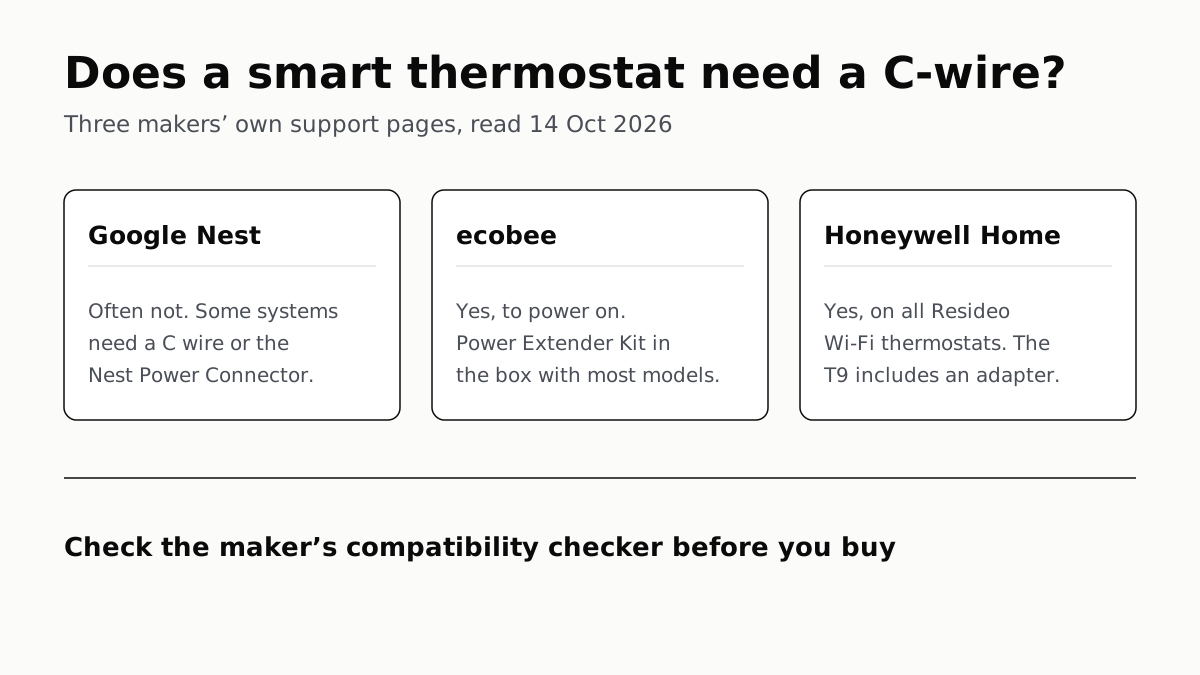
Ecobee and Honeywell Need a C-Wire; Nest Often Doesn’t
Each maker has a fix for homes without the wire, and each sends you to its own compatibility checker before you buy.
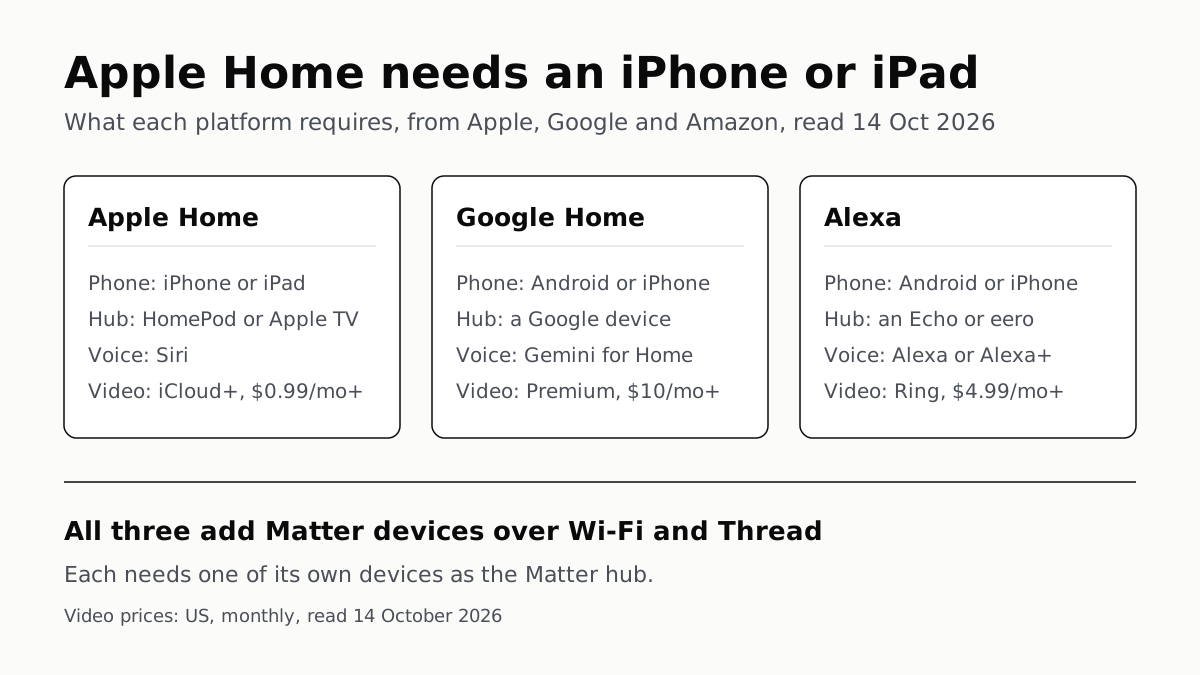
Apple Home Needs an iPhone; Google and Alexa Run on Both
All three add Matter and Thread devices. They differ in which hub you need, which assistant answers and what camera video history costs.
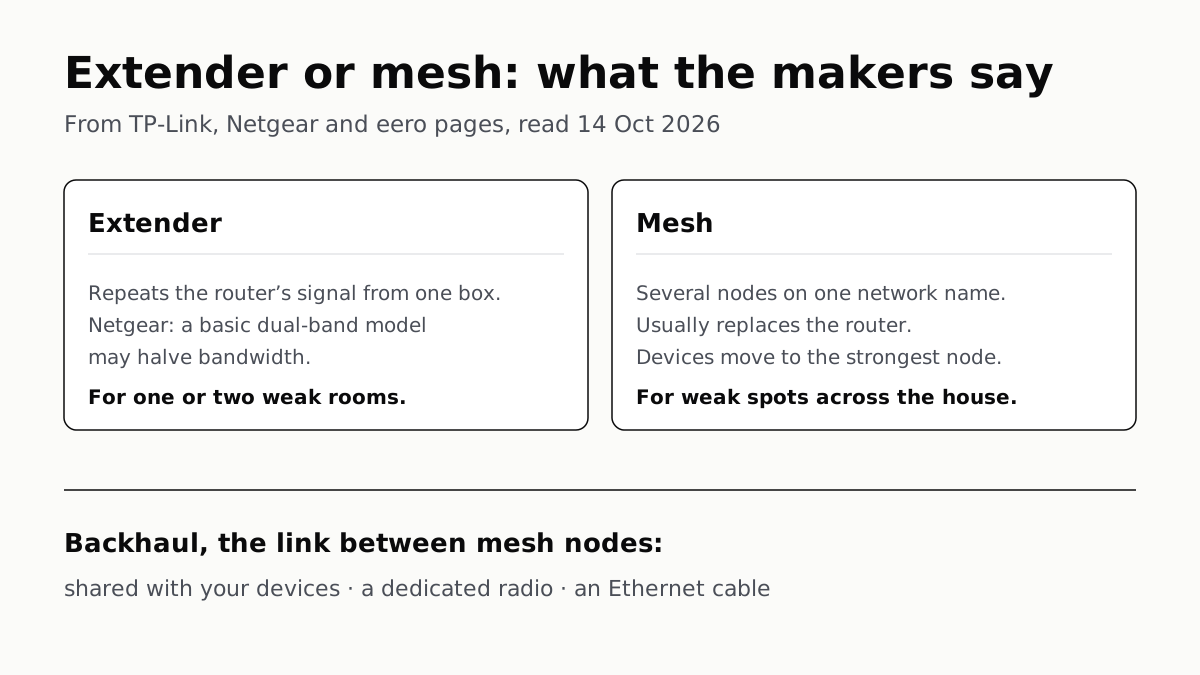
Extender for One Dead Room, Mesh for a Whole House
An extender repeats your router from one plug; mesh runs several nodes as one network. How the nodes link sets the speed.
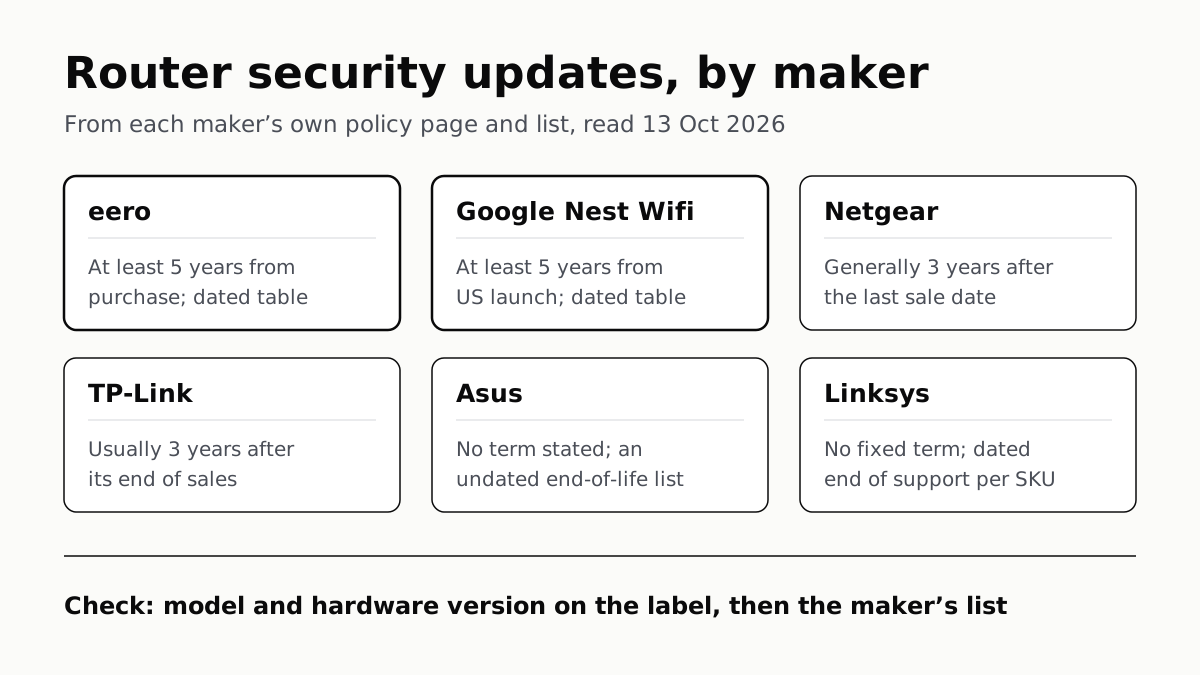
Four Router Makers Set an Update Term; Asus, Linksys Don’t
eero and Google guarantee five years at minimum; Netgear and TP-Link stop about three years after a model leaves sale.