The Charging Pad Is Not What Ages Your Battery
Apple, Samsung and Google name heat, cycles and time spent full. None names the charging method. Above 35°C, Apple says damage is permanent.
If you buy through our links, we may earn a commission. It never affects our verdicts or scores — how that works. As an Amazon Associate I earn from qualifying purchases.
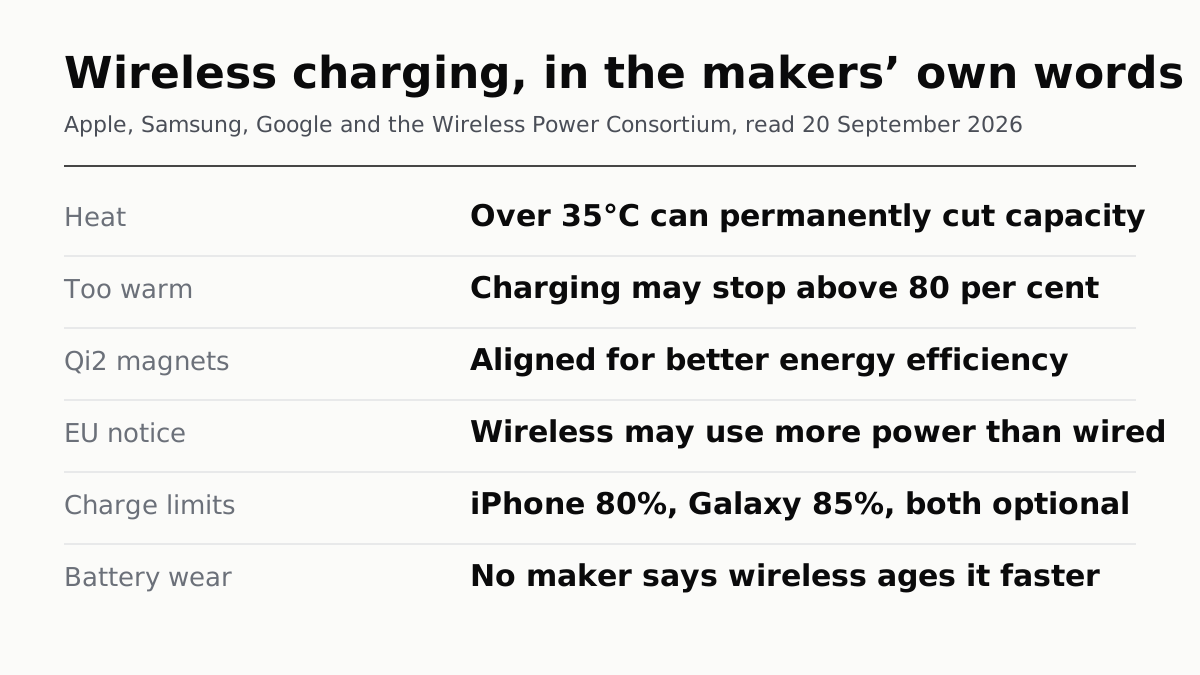
None of the three makers publishes a claim that wireless charging wears a battery faster than a cable. Apple, Samsung and Google all publish what does wear one — heat, time spent full, charge cycles — and on every page where they explain it, the charging method is not on the list.
That is an absence, not a clean bill of health, so it is worth being exact about where the absence sits. Apple’s wireless charging article talks about battery lifespan in the same breath as warmth. Samsung’s charging page has a section headed “Device overheating while wireless charging”. Google’s says a warm Pixel “might pause charging to protect your battery”. All three had the obvious opportunity to say wireless is worse for the cell. None takes it.
What they do publish: heat
Heat is the mechanism every maker names, and the numbers are specific.
Apple puts the comfort zone at 62° to 72° F (16° to 22° C) and is blunt about the ceiling: avoid ambient temperatures higher than 95° F (35° C), “which can permanently damage battery capacity”. It adds a sentence that matters here more than anywhere — “Charging the device in high ambient temperatures can damage it further.”
Samsung gives the same band as a range rather than an ideal: the optimal usage temperature for a Galaxy is 32° – 95° F (0° – 35° C), and “continuous use or charging in extreme temperatures may accelerate battery deterioration”. Google’s tip is a single line: charge the phone in a cool place, “about 25℃ or 78℉”.
So the honest version of the folk theory is narrower than the folk theory. Charging in heat is published as damaging. A charging method that makes your phone hotter is therefore worth avoiding in a hot room — and that is as far as any maker’s own words carry the argument.
Both platforms treat warmth as a reason to stop
The tell that the makers take charging heat seriously is that the software intervenes, and it intervenes the same way on a pad as on a cable.
Apple says it on both wireless pages, in identical words: “To extend the lifespan of your battery, if the battery gets too warm, software might limit charging above 80 percent.” Google’s is blunter — a phone that gets too warm “might pause charging to protect your battery”, and charging restarts when it cools. Samsung says both the device and the charger rising in temperature while charging “is completely normal”, and that charging may shut off past a certain level to protect the device.
Notice what that does to the argument. If wireless charging runs hotter, the published response is that the phone charges more slowly or stops — which is the protection working, not the battery quietly ageing. Nobody publishes a figure for how much lifespan is lost when it does not intervene in time.
Efficiency is a real difference, and it is about your electricity bill
This is the one place a maker does put wireless below wired in print, and it is narrower than it looks.
Apple tells iPhone 15 and later owners in the EU and EFTA that the first time they use a wireless charger they will see a notification. In Apple’s words: “Mandated by the EU, the notification says that wireless charging might use more power than wired charging.”
Read the object of that sentence. It is power drawn from the wall, which is a regulator’s energy-labelling concern. Apple does not extend it to the battery, on that page or any other.
The Wireless Power Consortium, which defines Qi, makes the counter-argument on the same axis. Qi2 “devices feature magnetic attachment technology which aligns devices and chargers perfectly for improved energy efficiency, faster charging, and easier usability”. Apple’s version of the claim is that MagSafe “provides optimal magnetic alignment for faster, more efficient charging” and “includes technologies that reduce energy waste when compared to other wireless charging methods”. Google now builds on the same standard: Pixel 10 and later, excluding the 10a, support Qi2, and older Qi1.x pads “will still work but they’ll charge your phone slower at up to 5W”.
Nobody publishes an efficiency percentage. Alignment is the named cause of the gain, magnets are the named fix, and the size of what is left is not a number any of them prints.
Speed is capped, and the caps are published
If you suspect wireless charging is the fast, hot option, the wattages say otherwise for most pads.
A plain Qi-certified charger runs an iPhone at up to 7.5W, in Apple’s own figure. Apple’s MagSafe Charger reaches up to 25W peak on iPhone 17 Pro and 18 Pro with a 30W or greater adapter, and Apple is careful to say actual power “will vary depending on the iPhone model, wattage of the power adapter, and system conditions”. The WPC puts Qi2 25W at 0 to 50% in about 30 minutes. A Qi1.x pad charging a Pixel tops out at 5W.
Those are ceilings, not rates, and they behave the same way a cable does — which is the whole argument of why your 65W charger is not charging at 65W. The number on the box is what the charger will offer, not what the phone will take.
The lever the makers actually give you
Every maker ships a way to spend less time at a full charge, and all three explain it in terms of lifespan. None of them mentions how you charge.
| Platform | Feature | What it does |
|---|---|---|
| iPhone 15 and later | Charge Limit | A limit between 80% and 100%, in 5% steps. Settings → Battery → Charging |
| iPhone (all) | Optimized Battery Charging | Delays charging past 80% until shortly before you unplug, once it has learned your routine |
| Galaxy | Protect battery | Off by default; on, it caps the charge at 85% and shows “Charging paused” |
| Pixel 6a and later | Battery health assistance | Lowers maximum voltage in stages from 200 cycles to 1000, and tunes charging speed |
Apple’s reasoning for Optimized Battery Charging is the clearest statement of the principle anyone publishes: it “is designed to reduce the wear on your battery and improve its lifespan by reducing the time your iPhone spends fully charged”. It needs at least 14 days and at least nine charges of five hours or more in one location before it engages, which is why a phone that charges in a different place every night may never see it.
What about cycles?
The fear that wireless charging burns through charge cycles faster runs into a definition problem. Apple counts a cycle as the point where you have used an amount equal to 100 per cent of the battery’s capacity. Google counts partial discharges the same way: 100% down to 50% and back is 0.5 cycles.
Both define a cycle by what leaves the battery, not by what the wall pays for. Neither publishes anything about how the charging method affects that count — which means anyone telling you wireless charging adds cycles is filling in a gap the makers left empty.
The cycle numbers themselves are published, and they are the target to judge a battery against: 500 cycles to 80% capacity for iPhone 14 and earlier, 1000 for iPhone 15 models, 800 for Pixel 3 through 8 Pro and the Fold, and 1000 for Pixel 8a and later. Where to read your own number, and what it should be at your age of phone, is a separate job.
What to do
- Take the case off if the phone gets hot on the pad. Apple says charging inside certain styles of case “may generate excess heat, which can affect battery capacity”. Samsung’s version is that a device charged with its case on “may overheat due to confined space”. This is the one piece of wireless-specific advice the makers agree on.
- Clear the back of the phone. Google names ring holders, MagSafe accessories and PopSockets as causes of slow wireless charging. Samsung says a metallic or magnetic object between phone and pad can make the device overheat. Apple warns that cards, badges and passports between phone and charger can be damaged.
- Do not charge in a hot car, on either method. Samsung is explicit that charging may stop in a hot environment to protect the device, and that this is the safeguard working.
- Turn on the charge limit if your phone is usually plugged in overnight, and leave it off if you need every percent. It is the one setting all three makers tie directly to lifespan.
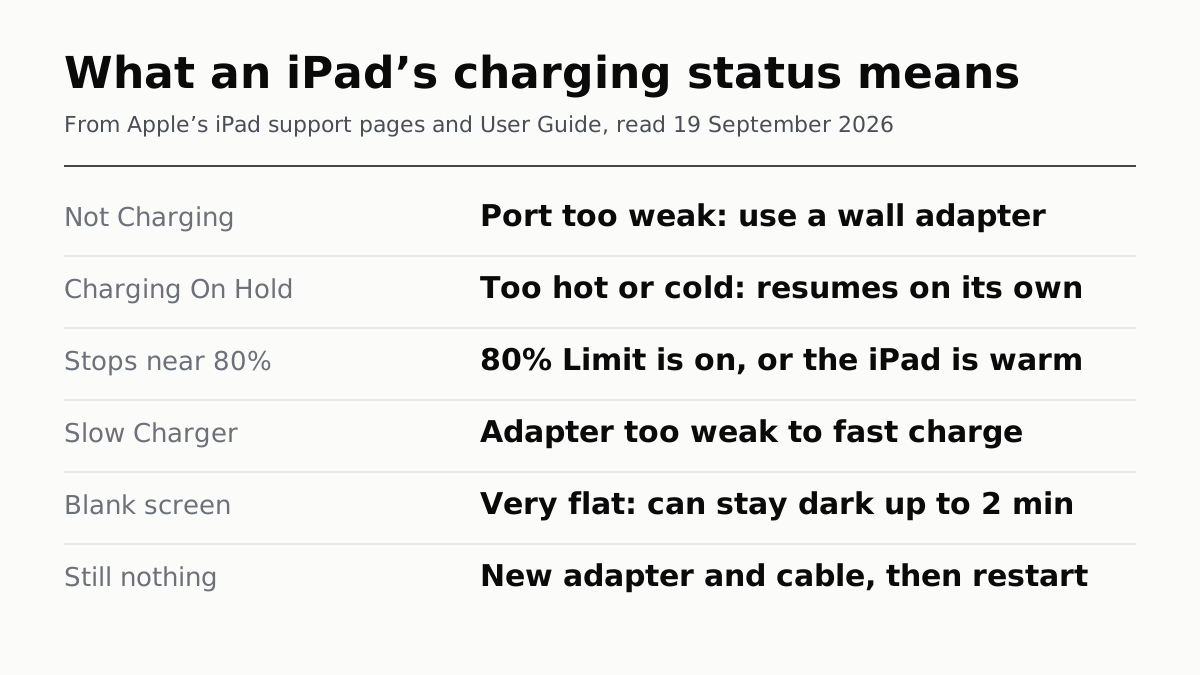
- Match the pad to the phone before blaming the technology. A Qi1.x pad and a Qi2 phone is a 5W pairing, and that will look like bad wireless charging when it is a mismatched accessory. The same logic applies to an iPad that says Not Charging: the status is usually the power source, not the device.
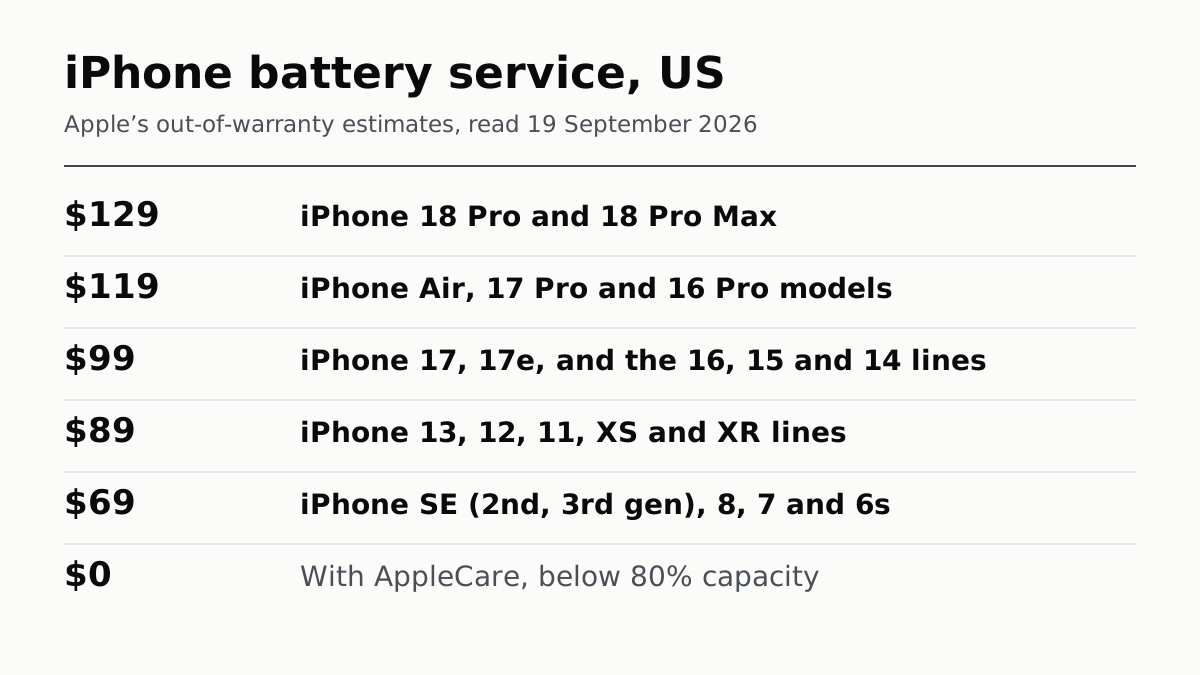
- If the battery is already down near 80%, the method you charge with stops being the question and what a replacement costs starts being it.
How we researched this
No one at bitcritiq has handled this product. Everything here comes from published sources, listed below.
- What this cannot tell you
- We have not tested any phone, charger or charging pad, and this piece reports no measurement of our own. The absence at the centre of it is an absence on the pages listed, not proof that wireless charging is harmless — makers publish what they choose to publish. No maker gives an efficiency percentage for wireless against wired charging, so the size of the energy difference is not established here. Menu names are from current iOS, One UI and Pixel software and differ on older versions, and Samsung's Protect battery article is an Indian-market page.
How we chose this, and what we did
- Why this subject
- Does wireless charging damage my battery is one of the questions people ask about phones most often, and almost every answer to it online is folklore with a mechanism attached. The makers publish a great deal about what ages a battery and a great deal about wireless charging. The useful piece of work is to read both sets of pages and report where they meet, and where they do not.
- How we looked at it
- Read Apple's Maximizing Battery Life and Lifespan page, its iPhone battery and performance article (101575), its Charge Limit and Optimized Battery Charging article (108055) and its two wireless charging articles (108377 and 105047); Samsung's Galaxy Battery hub pages on care and maintenance and charging tips, and Samsung India's Protect battery article; Google's Understand your Pixel battery and Charge your Pixel phone pages; and the Wireless Power Consortium's own Qi standard page. All read on 20 September 2026. Every figure below is quoted from one of those.
What this rests on
6 claims, all official. Nothing here was measured by bitcritiq — see how we test for why. Open a claim to read the source it came from.
Apple, Samsung and Google publish no statement that charging wirelessly shortens a battery's lifespan, on the pages where each explains what does shorten it.Official
Apple's wireless charging page (108377) discusses battery lifespan directly — 'To extend the lifespan of your battery, if the battery gets too warm, software might limit charging above 80 percent' — and says nothing about wireless wear. Apple's battery-ageing pages (maximizing-performance and 101575) name temperature history, charging pattern and cycles, and never mention wireless charging or MagSafe. Samsung's Charging Tip page carries a section headed 'Device overheating while wireless charging' and ties it to foreign objects, cases and hot rooms, not to lifespan. Google's Charge your Pixel phone page says a warm phone 'might pause charging to protect your battery'.
Apple says ambient temperatures above 35°C can permanently damage battery capacity, and that charging in high ambient temperatures can damage it further.Official
Apple, Maximizing Battery Life and Lifespan: 'It's especially important to avoid exposing your device to ambient temperatures higher than 95° F (35° C), which can permanently damage battery capacity… Charging the device in high ambient temperatures can damage it further.' Read 20 September 2026.
When the battery gets too warm, Apple's software may limit charging above 80 per cent, and Google's may pause charging entirely.Official
Apple 108377 and 105047: 'To extend the lifespan of your battery, if the battery gets too warm, software might limit charging above 80 percent.' Google, Charge your Pixel phone: 'If your phone gets too warm, it might pause charging to protect your battery… Charging starts again when your phone cools down.' Read 20 September 2026.
Apple tells iPhone 15 and later owners in the EU and EFTA that wireless charging might use more power than wired charging, because the EU requires the notification.Official
Apple 105047 and 108377: 'Mandated by the EU, the notification says that wireless charging might use more power than wired charging.' Apple states the notification's subject as power used, not battery wear. Read 20 September 2026.
The Wireless Power Consortium attributes Qi2's efficiency gain to magnetic alignment, and publishes no efficiency figure on its Qi standard page.Official
WPC, Qi Wireless charging: 'Qi2 devices feature magnetic attachment technology which aligns devices and chargers perfectly for improved energy efficiency, faster charging, and easier usability.' The same page gives a charging-power figure — Qi2 25W reaching 0 to 50% in about 30 minutes — but no percentage for efficiency. Read 20 September 2026.
Both platforms ship a charge limit, and the two makers set it at different levels: Apple between 80 and 100 per cent, Samsung at 85 per cent.Official
Apple 108055: 'You can choose a charge limit between 80 percent and 100 percent in 5 percent increments.' Samsung India, 'Protect battery' feature in Galaxy phones, updated 24 October 2025: 'By default, this setting is turned off; however, when activated, it limits the battery charge to 85%.' Read 20 September 2026.
Sources 12
- Maximizing Battery Life and Lifespan — AppleOfficialaccessed Sep 20, 2026
- iPhone battery and performance — Apple Support 101575Officialaccessed Sep 20, 2026
- About Charge Limit and Optimized Battery Charging on iPhone — Apple Support 108055Officialaccessed Sep 20, 2026
- How to wirelessly charge your iPhone — Apple Support 108377Officialaccessed Sep 20, 2026
Show 8 more · 8 official or standards
- How to use your MagSafe Charger with iPhone — Apple Support 105047Officialaccessed Sep 20, 2026
- Galaxy Battery — Care and Maintenance — Samsung USOfficialaccessed Sep 20, 2026
- Galaxy Battery — Charging Tip — Samsung USOfficialaccessed Sep 20, 2026
- ‘Protect battery’ feature in Galaxy phones — Samsung IndiaOfficialaccessed Sep 20, 2026
- Understand your Pixel battery — Google Pixel Phone HelpOfficialaccessed Sep 20, 2026
- Charge your Pixel phone — Google Pixel Phone HelpOfficialaccessed Sep 20, 2026
- Fix slow wireless charging on your Pixel phone — Google Pixel Phone HelpOfficialaccessed Sep 20, 2026
- Qi Wireless charging — Wireless Power ConsortiumOfficialaccessed Sep 20, 2026
No email, no account
Follow bitcritiq
Every new article, in whatever reader you already use.
Subscribe by RSSAll the ways to follow
Using Chrome on Android? Open the browser menu and tap Follow. New articles then turn up in the Following tab in Discover.
read next
CarPlay Ultra Adds the Gauges. Your Car Decides.
When an iPad Says Not Charging, Apple Blames the Port
An iPhone Battery From Apple Costs $69 to $129