Search and Siri Optimizing on iPhone? It Is Reindexing
Apple says rebuilding the search index after an update can take hours or days. Power, Wi-Fi and leaving the phone alone speed it up.
If you buy through our links, we may earn a commission. It never affects our verdicts or scores — how that works. As an Amazon Associate I earn from qualifying purchases.
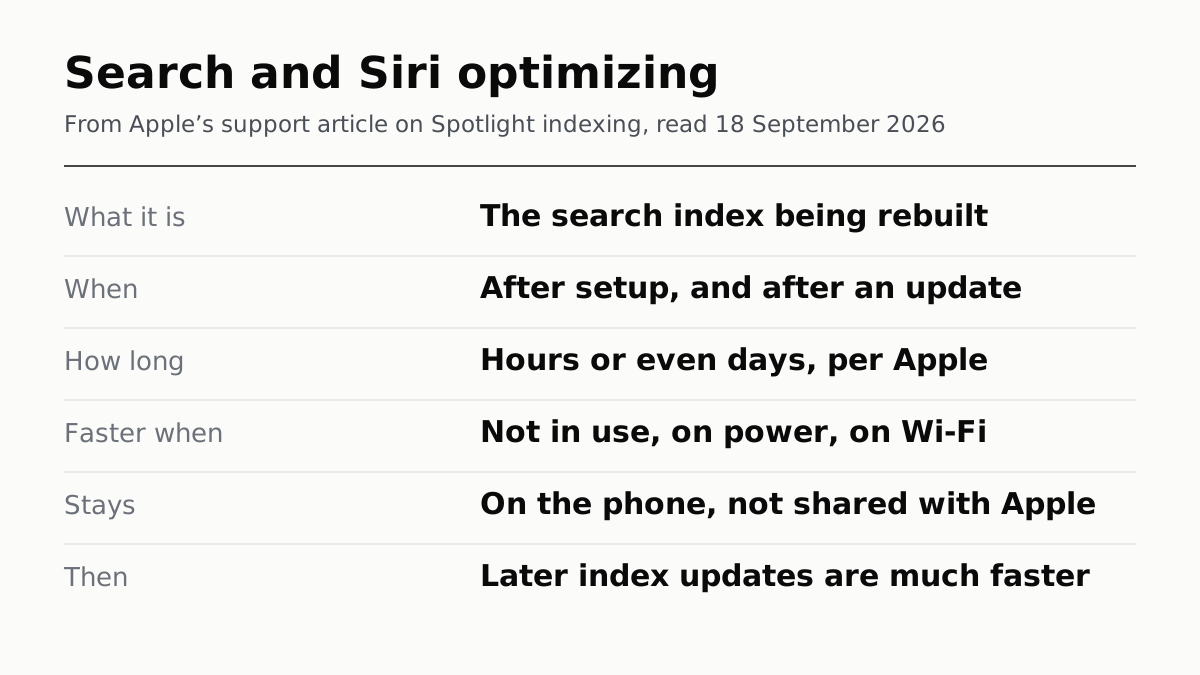
The notice means your iPhone is rebuilding its search index after the update. Apple’s support article says devices may show a notification in Settings that search and Siri are optimizing while Spotlight indexing runs. Apple describes it as expected after an update, and there is nothing to fix.
It can take a while. Apple says indexing can take hours or even days, depending on how much data is on the device. It finishes faster when the phone is on power, on Wi-Fi and not being used, which in practice means plugged in and left alone.
What is being rebuilt
Spotlight keeps an index of what is on the phone: documents, mail, messages, contacts, photos, music, podcasts, notes and settings. iOS rebuilds it when you first set up a phone, after a software update, and as data changes. Siri draws on the same index, which is why the notice names both. Apple says Siri AI in iOS 27 uses the Spotlight index as one of its on-device sources.
Apple describes the index as local and private: it stays on the phone and is not shared with Apple or your other devices.
The iOS 27 release notes list improved search in Spotlight, Photos and Mail. Apple does not say whether that makes this year’s reindex take longer, so we will not either.
How to let it finish
Apple names three conditions that speed indexing up:
- Connect to power.
- Stay on Wi-Fi, because mail and other data may need downloading to be indexed.
- Leave the phone unused.
Plugged in overnight on Wi-Fi meets all three. Once the first full index is done, Apple says incremental updates after that are much faster.
If a Mail notice also says indexing is incomplete, that is the same process, reported by Mail.
If it seems to take forever
Apple sets no deadline beyond “hours or even days”, so a second day is within what Apple describes. If search results still look wrong after that, Apple’s fix on iPhone is to install any newer update, then open Settings, tap Search and check which apps and content are switched on. The Mac has a way to rebuild part of the index by hand; Apple’s article gives no iPhone equivalent.
The other background work after an update
Indexing is one of several jobs iOS finishes after a major update, alongside downloading new assets and updating apps. Apple calls the temporary hit to battery and temperature normal and says to wait a few days before judging battery life. Three things to check in the meantime:
- The battery screen. If battery life has dropped, look for the Ongoing iOS Update insight first.
- Heat. A warm phone in the first days after an update has a known cause, and when warmth is worth worrying about is a separate question.
- Whether your phone gets Siri AI at all, which depends on the model: iOS 27 sorts iPhones into three tiers.
How we researched this
No one at bitcritiq has handled this product. Everything here comes from published sources, listed below.
- What this cannot tell you
- Apple does not say whether search or Siri return fewer results while indexing runs, so we do not claim it. It does not say whether the iOS 27 reindex takes longer than earlier ones. We have not timed an index ourselves, and how long yours takes depends on how much is on the phone.
How we chose this, and what we did
- Why this subject
- iOS 27 went out on 14 September, and CNET, Tom's Guide and others have since covered a notice in Settings reading Optimizing Search and Siri. Apple explains it, but in a Spotlight indexing article that never uses the words on the banner, so a reader searching for the message does not find Apple's answer.
- How we looked at it
- What the message means, how long it takes and what speeds it up are from Apple Support's article on Spotlight indexing, published 25 August 2026. Background work after an update is from Apple's articles on software updates and on battery drain, and Siri AI's use of the index is from Apple's newsroom release of 14 September 2026. All read on 18 September 2026. The exact wording on the banner is as CNET reported it on 18 September; Apple's page describes the notice without quoting it.
What this rests on
6 claims, 5 official and 1 reported. Nothing here was measured by bitcritiq — see how we test for why. Open a claim to read the source it came from.
The notice means the iPhone is rebuilding its on-device Spotlight search index.Official
Apple's Spotlight indexing article says that while indexing is under way, devices other than the Mac may show 'a notification in the Settings app that search and Siri are optimizing.' It lists indexing as happening 'after you install a software update or upgrade'.
Apple says indexing can take hours or even days, and later incremental updates are much faster.Official
Apple Support 102321: 'Depending on the amount of data on your device, Spotlight indexing can take hours or even days. Incremental updates after that are much faster.'
Indexing finishes faster when the phone is not in use, is on power and is connected to Wi-Fi.Official
Apple Support 102321: 'Indexing completes more quickly when: Your device is not in use. Your device is connected to power.' and when connected via Wi-Fi or Ethernet in case email or other data needs downloading.
The index stays on the device and is not shared with Apple, and Siri draws on it.Official
Apple Support 102321 calls it 'a local, private index that stays on your device and isn't shared with Apple or your other devices' and says 'Siri can also use content from the index when responding to your requests.'
Apple describes a battery or temperature effect after a major update as temporary and normal.Official
Apple Support 125039 says after a major update the device needs time to finish setup in the background, 'including indexing data and files for search', and calls the temporary battery and thermal impact normal.
The on-screen wording reported for iOS 27 is Optimizing Search and Siri; Apple's article describes the notice without quoting it.Reported
CNET, 18 September 2026, reports the banner in Settings as 'Optimizing Search and Siri'. That string appears on none of eleven Apple pages checked, while Apple's Spotlight article, as a control, contains its own description of the notice.
Sources 6
- About Spotlight indexing and search results on Apple devices — Apple Support 102321Officialaccessed Sep 18, 2026
- About Apple software updates — Apple Support 125039Officialaccessed Sep 18, 2026
- If the battery in your iPhone or iPad drains too quickly — Apple Support 120745Officialaccessed Sep 18, 2026
- About iOS 27 Updates — Apple Support 149076Officialaccessed Sep 18, 2026
Show 2 more · 1 official or standards
- Siri AI, a profoundly more capable and personal assistant, is here — Apple Newsroom, 14 September 2026Officialaccessed Sep 18, 2026
- What 'Optimizing Search and Siri' Means in iOS 27 and How to Speed It Up — CNET, 18 September 2026accessed Sep 18, 2026
No email, no account
Follow bitcritiq
Every new article, in whatever reader you already use.
Subscribe by RSSAll the ways to follow
Using Chrome on Android? Open the browser menu and tap Follow. New articles then turn up in the Following tab in Discover.
read next
The Charging Pad Is Not What Ages Your Battery
CarPlay Ultra Adds the Gauges. Your Car Decides.
When an iPad Says Not Charging, Apple Blames the Port