Battery Draining After iOS 27? Look for One Insight First
Apple's own battery screen flags an update still finishing in the background. It gives no time limit, so the fix is to check, not wait.
If you buy through our links, we may earn a commission. It never affects our verdicts or scores — how that works. As an Amazon Associate I earn from qualifying purchases.
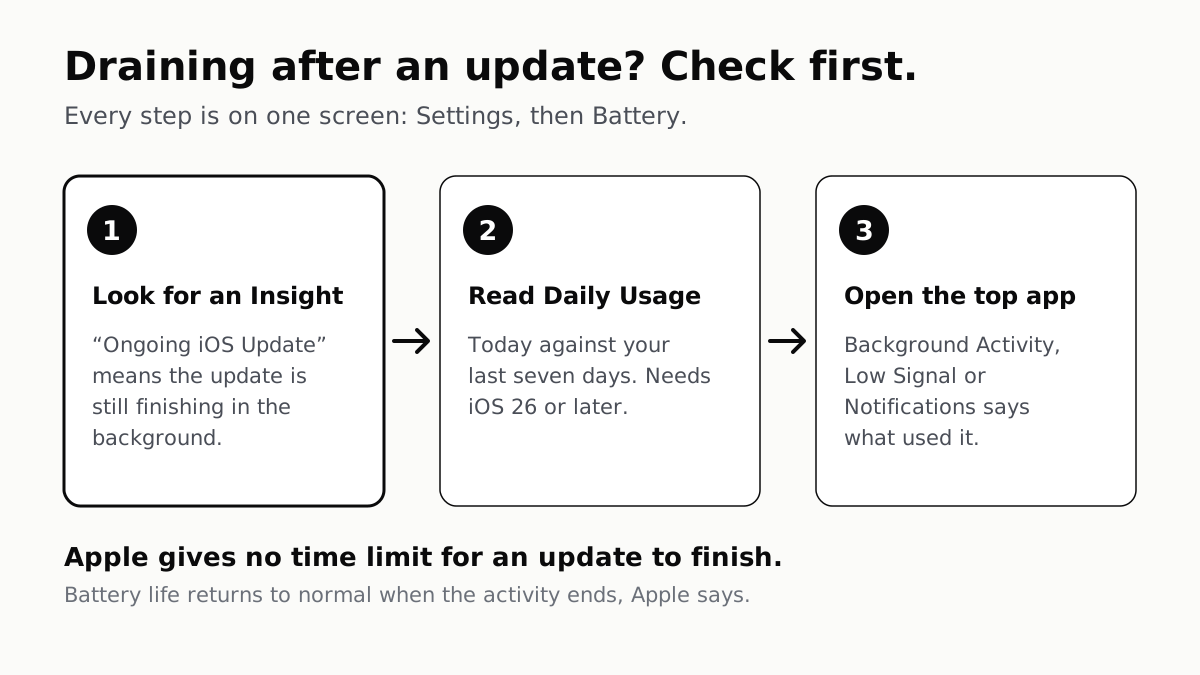
Before waiting a day for the battery to settle, open one screen. Apple’s own Settings flags an update that is still working: under Battery, an Insight reading “Ongoing iOS Update” means “a recent software update is finishing in the background.”
If that Insight is there, the drain has a named cause and an end. If it is not, waiting will not fix anything, and the same screen tells you where to look instead.
The number everyone quotes is not Apple’s
Search this problem and you will be told to give a new iOS a set number of hours or days. Apple’s support article says the background activity affects battery life “for a while”, and that “when the activity finishes, battery life will return to normal.” It gives no duration, anywhere on the page.
That matters more than it sounds. A fixed waiting period turns a diagnosis into a guess: if your phone drains for three days and a website promised two, you cannot tell whether the update is slow or something else is wrong. The Insight answers that directly, and it disappears when the work is done.
If the Insight has gone and the drain has not
Open Settings, then Battery, and read the Daily Usage chart. It compares today against your last seven days and says whether you are using more than usual. You need iOS 26 or later to see it.
Below the chart, the apps that used the most battery are listed. Tap one, and Apple labels how it was used. Three labels do most of the diagnosing:
- Background Activity — the app worked while you were not looking at it, such as playing audio or tracking location. The fix is using that app less, or limiting what it may do in the background.
- No Mobile Coverage and Low Signal — the phone spent battery hunting for a signal. Apple’s own advice is Wi-Fi where you can, since it uses less power than cellular, and Airplane Mode somewhere you know has no coverage.
- Notifications — the app keeps waking the screen. Turning its notifications down is the cheapest fix on the list.
When it is not the update at all
A drain that survives the Insight disappearing, with no app or signal to blame, is the case where the battery itself is the suspect. That is a different check with a different screen, and our guide to reading your battery health covers what the number means and when it is worth acting on.
Two related symptoms are worth ruling out on the way. A phone that is running hot is often doing the same background work that drains it, and the fix is the same: find the work. And if you updated to reclaim space and the phone still says it is full, the storage labelled Other is a separate thing that an update can briefly swell. If Settings also says search and Siri are optimizing, that is the search index being rebuilt, part of the background work Apple says follows a major update.
How we researched this
No one at bitcritiq has handled this product. Everything here comes from published sources, listed below.
- What this cannot tell you
- This describes what the Battery screen reports, not why a particular iPhone drains. A drain that persists after the update Insight has gone points at something else — an app, weak signal, or a battery that has worn — and those are separate diagnoses. The Daily Usage chart and Adaptive Power need iOS 26 or later; Insights need iOS 18 or later.
How we chose this, and what we did
- Why this subject
- Every September a new iOS release arrives and battery-drain searches arrive with it. The usual answer online is a confident number of hours to wait. Apple's own support article answers a different and more useful question — how to tell whether the drain is the update at all — and it names no number.
- How we looked at it
- Every step and label here is quoted from Apple's support article 'If the battery in your iPhone or iPad drains too quickly', read on 15 September 2026. Nothing is measured by us, and no duration is given because Apple gives none.
What this rests on
6 claims, all official. Nothing here was measured by bitcritiq — see how we test for why. Open a claim to read the source it came from.
iPhones on iOS 18 and later show an Insight when background work is affecting battery life, including one for an update still finishing.Official
Apple's support article states that with iOS 18 and later, Insights inform you of background activities that can affect battery life and thermal performance, and lists 'Ongoing iOS Update: A recent software update is finishing in the background.'
Apple says battery life returns to normal once that background activity finishes.Official
The same article states: "When the activity finishes, battery life will return to normal."
Apple does not publish how long an update takes to finish in the background.Official
The article describes the activity as affecting battery life "for a while" and gives no duration anywhere on the page.
The Daily Usage chart compares today's battery use against the previous seven days, and needs iOS 26 or later.Official
Apple states you need iOS 26 or later to see the Daily Usage chart, which summarizes today's battery usage as compared with your usage over the last seven days.
A weak or missing signal shows up as its own cause of battery drain.Official
Apple lists 'No Mobile Coverage and Low Signal' as a usage type, meaning the device was searching for a signal or used in a low-signal environment, and says Wi-Fi uses less battery than cellular networks.
Notifications that wake the phone are listed separately as a battery cost.Official
Apple lists 'Notifications' as a usage type where the app's notifications wake the device, and suggests adjusting them to wake it less often.
Sources 2
- If the battery in your iPhone or iPad drains too quickly — Apple SupportOfficialaccessed Sep 15, 2026
- How to Check Your Phone's Battery Health, and What It Means — bitcritiqaccessed Sep 15, 2026
No email, no account
Follow bitcritiq
Every new article, in whatever reader you already use.
Subscribe by RSSAll the ways to follow
Using Chrome on Android? Open the browser menu and tap Follow. New articles then turn up in the Following tab in Discover.
read next
The Charging Pad Is Not What Ages Your Battery
CarPlay Ultra Adds the Gauges. Your Car Decides.
When an iPad Says Not Charging, Apple Blames the Port