ChromeOS Updates End Mid-2034, Even If Your Date Says 2036
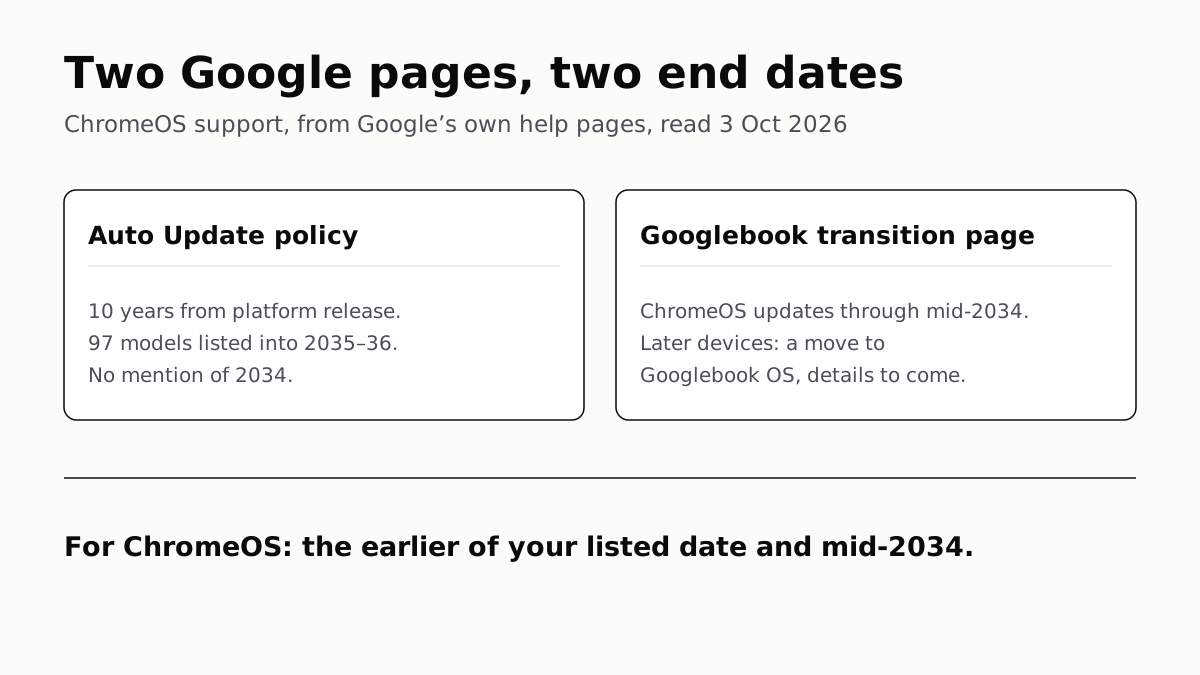
Google’s update list still shows 97 models supported into 2035 or 2036. A newer Google page says ChromeOS stops in mid-2034.
If you buy through our links, we may earn a commission. It never affects our verdicts or scores — how that works. As an Amazon Associate I earn from qualifying purchases.
Google now says ChromeOS gets updates only until mid-2034, whatever date your Chromebook was promised. Its Auto Update list still shows 97 models supported into 2035 or 2036, and those dates now run past the end of the operating system. For them, Google promises a move to Googlebook OS and has not yet said which devices qualify.
If your Chromebook’s own date is earlier than mid-2034, nothing has changed for you.
Two Google pages, two answers
| Auto Update policy | Googlebook transition page | |
|---|---|---|
| Written for | Everyone buying a Chromebook | Schools and businesses |
| What it promises | 10 years of updates from the platform’s release | Updates and security patches through mid-2034 |
| Latest dates shown | Jun 2036 | Mid-2034 |
| Mentions 2034 | No | Yes |
| After that | Not covered | A move to Googlebook OS for qualifying devices |
The newer statement is in a help article titled “What the Googlebook announcement means for your ChromeOS devices”, under its question about hardware buying plans. The Auto Update policy that sets each model’s date still says ChromeOS devices “receive 10 years of updates” and does not mention 2034 anywhere. Google’s consumer help page says the same 10 years.
So a model can carry a 2036 date on Google’s own list while Google says ChromeOS stops two years earlier.
Work out your own date
- On the Chromebook, open Settings, select About ChromeOS, then Additional details.
- Under Update schedule, note the date of the last update.
- If it is mid-2034 or earlier, that is still your end date.
- If it is later than mid-2034, ChromeOS updates end in mid-2034, and anything after depends on a Googlebook OS move.
That last case covers recent machines. In Acer’s section of the list alone:
| Model | Date on Google’s list |
|---|---|
| Chromebook 311 (C725) | Jun 2036 |
| Chromebook 311 (CBOA311-2H) | Jun 2036 |
| Chromebook 315 (CB315-8H) | Jan 2036 |
| Chromebook 311 (COA732) | Jun 2035 |
| Chromebook 514 (C937) | Jun 2035 |
The date counts from when the chip platform was released, not when you bought the laptop. A Chromebook bought new in a sale can be years into its window already, and the list is the place to check before paying.
What Google has and has not said about Googlebook OS
Google’s promise is for “qualifying devices purchased today whose 10-year support lifecycle extends beyond 2034”, and it says “many devices” will have “direct migration paths”. It has published no list of which ones, no date and no method. For schools and businesses, Googlebook management only starts rolling out in the second half of 2027, which is why the statement sits on a page for administrators.
Googlebook OS itself is a different system, built on Android with desktop parts from ChromeOS. We compared the three Googlebooks Google prices, and Google’s launch post promises Googlebook OS updates for up to 10 years.
What happens on the last day
A Chromebook past its final update keeps working. It gets no more ChromeOS or browser updates, which includes security fixes, and Google warns that existing features may stop working and that some apps need newer versions. Verified boot, which checks the system at every start and repairs it if tampered with, stays.
Running the web on an unpatched browser is the real cost, the same way it is on a TV whose updates have stopped, and on a Chromebook the browser is most of what you use.
If you are buying one now
Mid-2034 is under eight years away. For a laptop kept four or five years, the change makes no practical difference. For a school or family that keeps Chromebooks to the last update, the dates on Google’s list past mid-2034 now depend on a migration nobody has seen.
What to spend on in a Chromebook has not changed either: memory you cannot add later matters more than the processor, the argument in spend on what you can’t change.
Questions people ask
When does ChromeOS support end?
Google says ChromeOS devices get regular updates and security patches through mid-2034. A Chromebook whose own update date falls earlier stops on that earlier date, as before. Google has not given a day or month within 2034.
Will my Chromebook still get 10 years of updates?
Of ChromeOS updates, only if ten years from its platform’s release ends before mid-2034. Past that point Google promises qualifying devices a move to Googlebook OS instead, and has not yet said which devices qualify.
How do I check when my Chromebook stops getting updates?
Open Settings, select About ChromeOS, then Additional details. The Update schedule section shows the date of the last update. If that date is after mid-2034, Google’s newer statement means ChromeOS itself ends first.
Can my Chromebook upgrade to Googlebook OS?
Google says many newer Chromebook models will be able to, and that details on migration paths and eligibility will be shared later. As of 3 October 2026 it has published no list of eligible models.
What happens when a Chromebook stops getting updates?
It keeps working, but it gets no more ChromeOS or browser updates, including security fixes, and Google warns that existing features and some apps may stop working. Verified boot, which repairs a tampered system at startup, stays.
Should I still buy a Chromebook in 2026?
If you plan to keep it for seven years or fewer, the change does not touch you: mid-2034 is under eight years away. Buying for longer, check the model’s date in Google’s list, and treat anything after mid-2034 as depending on a Googlebook OS move Google has not detailed.
How we researched this
No one at bitcritiq has handled this product. Everything here comes from published sources, listed below.
- What this cannot tell you
- Google has not said which Chromebooks will be able to move to Googlebook OS, how, or when; it says details will come later. The mid-2034 statement sits on a page written for schools and businesses, and Google's consumer pages had not been changed to match when we read them. We have not used Googlebook OS. Google could revise either page.
How we chose this, and what we did
- Why this subject
- Ars Technica, Tom's Hardware and The Verge all reported in the last week of September that Google had put an end date on ChromeOS. None of them told an owner how to work out what that means for their own Chromebook, and Google's own pages still give two different answers.
- How we looked at it
- Everything here is from Google's own help pages, read through a browser on 3 October 2026: the Chrome Enterprise and Education article on what the Googlebook announcement means for ChromeOS devices (last updated 23 September 2026), the Auto Update policy with its per-model list, and the Chromebook Help article on checking your update schedule. The count of 97 models is ours: the rows of the Auto Update list whose date falls in 2035 or 2036.
What this rests on
5 claims, all official. Nothing here was measured by bitcritiq — see how we test for why. Open a claim to read the source it came from.
Google says ChromeOS devices will get regular updates and security patches through mid-2034.Official
Google's Googlebook transition article, last updated 23 September 2026: “ChromeOS devices will continue to receive regular updates and security patches through mid-2034.”
For devices whose 10-year support would run past 2034, Google promises a move to Googlebook OS, without yet saying which devices or how.Official
The same article: “For qualifying devices purchased today whose 10-year support lifecycle extends beyond 2034, Google is committed to supporting your transition to Googlebook OS, with many devices offering direct migration paths.” And: “Details on migration paths and device eligibility will be shared at a later date.”
Google's Auto Update policy still promises 10 years and lists 97 models with update dates in 2035 or 2036, without mentioning 2034.Official
The Auto Update policy: “ChromeOS devices receive 10 years of updates.” Its model list includes, for example, Acer Chromebook 311 (C725) at Jun 2036 and Acer Chromebook 315 (CB315-8H) at Jan 2036. Counting the list's rows on 3 October 2026, 97 carry a 2035 or 2036 date. The page states the 10-year rule but contains no reference to 2034.
A Chromebook shows its own last-update date under Settings, About ChromeOS, Additional details, Update schedule.Official
Chromebook Help 9367166: “select About ChromeOS. Select Additional details. In the ‘Update schedule’ section, you’ll find when your Chromebook will receive its last update.”
After its final update a Chromebook gets no more security fixes or browser updates, but keeps verified boot.Official
Chromebook Help 9367166: after a “Final software update” notification, “your device won’t receive ChromeOS and browser updates anymore”, including security updates, and “Existing features may stop working.” And: “Even if your Chromebook no longer gets automatic updates, it still comes with a verified boot.”
Sources 3
- What the Googlebook announcement means for your ChromeOS devices — Chrome Enterprise and Education Help, GoogleOfficialaccessed Oct 3, 2026
- Auto Update policy — Chrome Enterprise and Education Help, GoogleOfficialaccessed Oct 3, 2026
- Check your Chromebook’s update schedule — Chromebook Help, GoogleOfficialaccessed Oct 3, 2026
Pass it on
Know someone weighing this up? Send them the answer.
bitcritiq.com/d5rxThe link is permanent: it opens this article for good, even if the title changes.
No email, no account
Follow bitcritiq
Every new article, in whatever reader you already use.
Subscribe by RSSAll the ways to follow
Using Chrome on Android? Open the browser menu and tap Follow. New articles then turn up in the Following tab in Discover.
read next
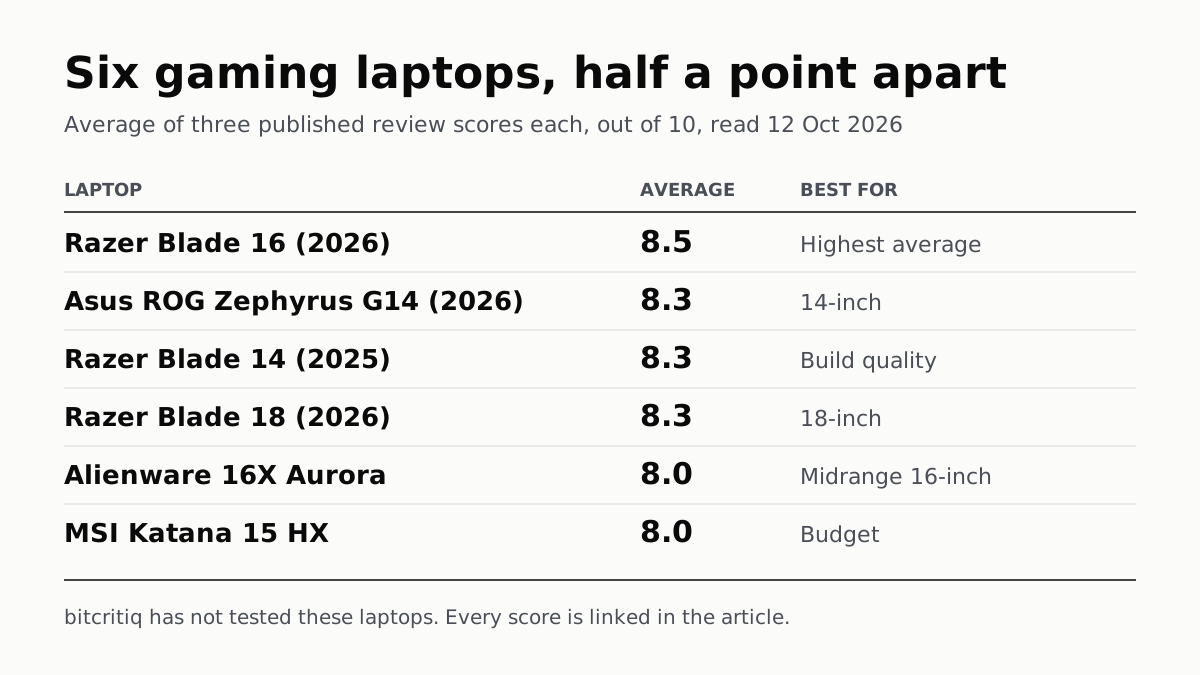
Razer Blade 16 Tops Gaming Laptop Reviews, by Half a Point
Eighteen review scores from eight outlets, all read on 12 October. Six laptops land within half a point, so pick by size and price.
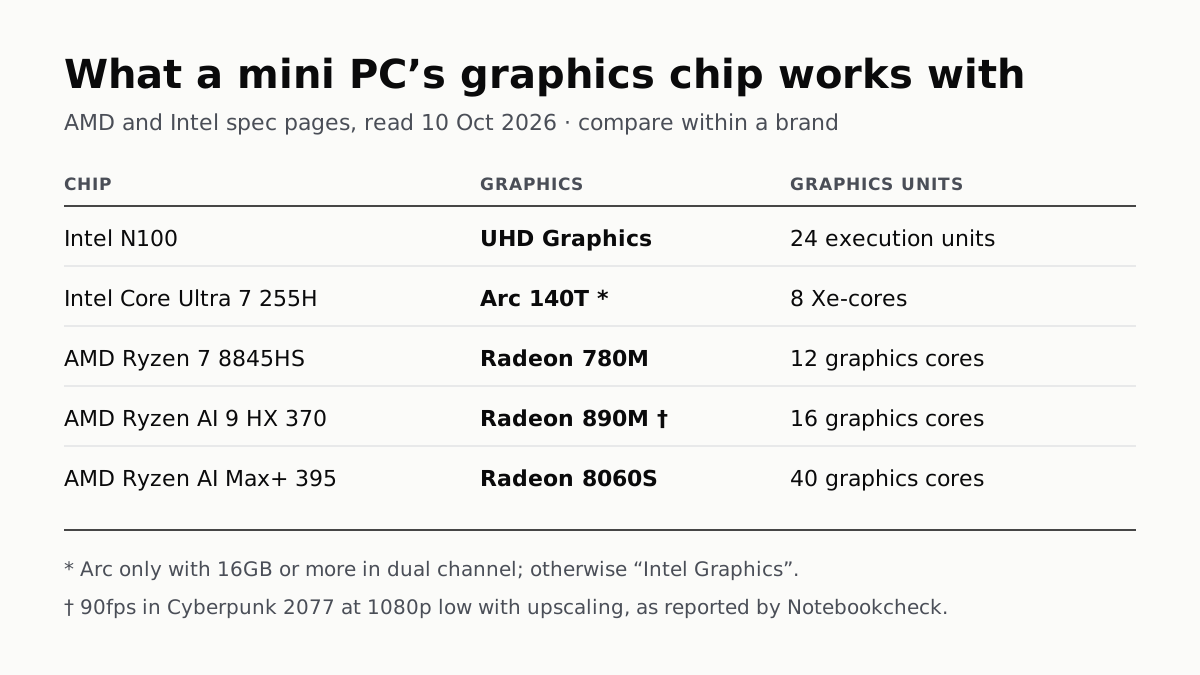
A Mini PC Can Game, but Its Graphics Chip Sets the Ceiling
Balatro's minimum is integrated graphics; Cyberpunk 2077's is a GTX 1060. A Radeon 890M ran Cyberpunk at 1080p low in one reported test.
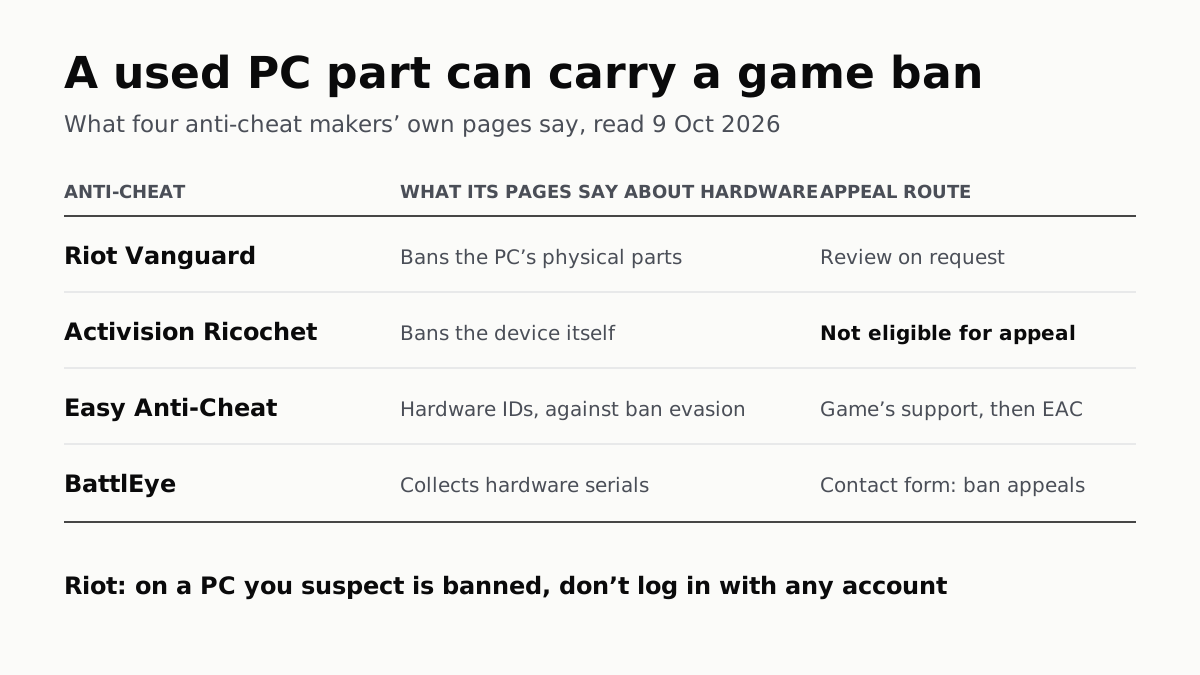
A Used PC or CPU Can Carry Its Last Owner’s Game Ban
Riot and Activision ban hardware, not only accounts. Riot will re-check one on request; Activision rules out an appeal.
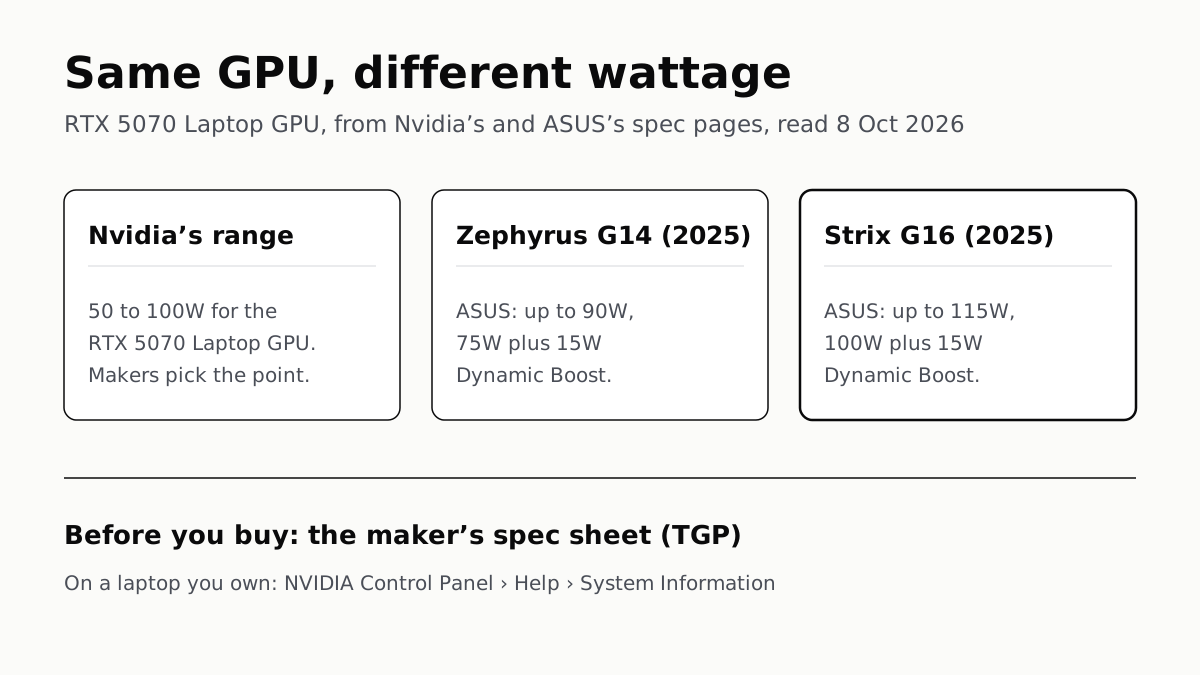
The Same RTX 5070 Laptop GPU Runs at 90W or 115W
Nvidia publishes a power range for each laptop GPU and the maker picks a point in it. The spec sheet, or Nvidia Control Panel, shows which.