512GB of Memory Changes What You Can Run at Home
Apple's new Mac Studio holds sixteen times what the fastest GeForce card does. Capacity and speed are different problems.
If you buy through our links, we may earn a commission. It never affects our verdicts or scores — how that works. As an Amazon Associate I earn from qualifying purchases.
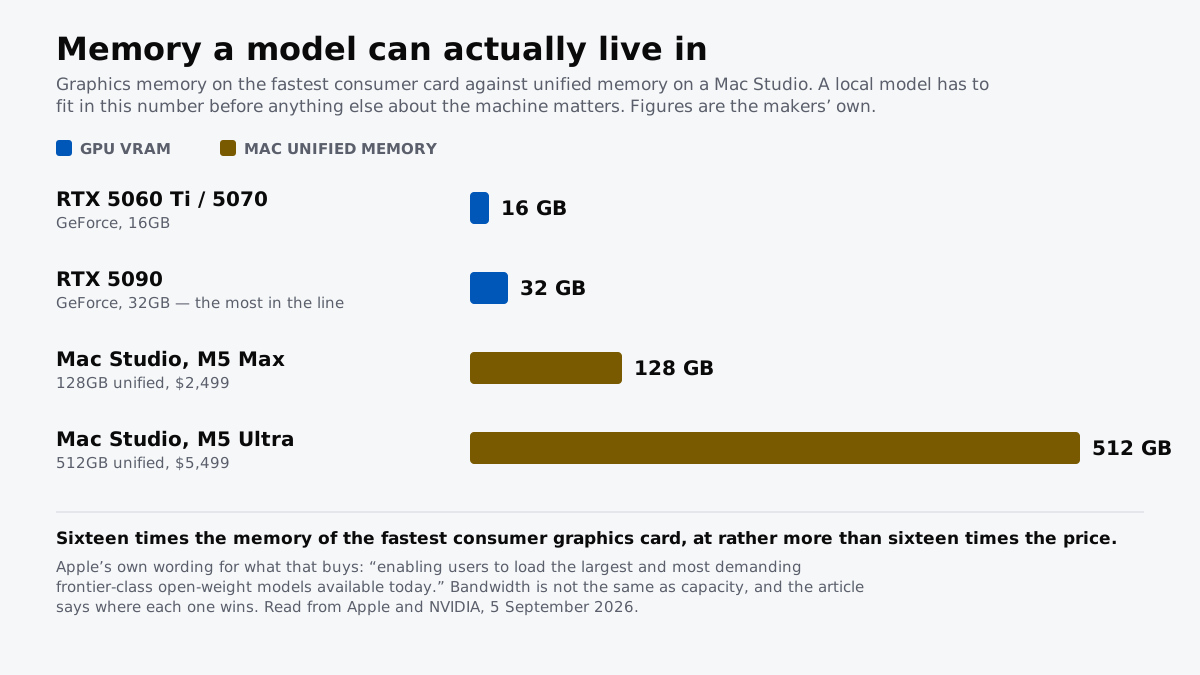
The number that decides what you can run at home just moved by a factor of sixteen. Apple’s new Mac Studio scales to 512GB of unified memory. The largest consumer GeForce card holds 32GB.
Apple is unusually direct about why, saying in its own announcement that the configuration exists for “loading the largest and most demanding frontier-class open-weight models available today”.
The two numbers that are not the same
| Memory a model can occupy | Bandwidth | |
|---|---|---|
| RTX 5090 | 32 GB | the fastest of these, per gigabyte |
| Mac Studio, M5 Max | up to 128 GB | up to 614 GB/s |
| Mac Studio, M5 Ultra | up to 512 GB | 1.2 TB/s |
Apple’s and NVIDIA’s own published figures. Mac Studio starts at $2,499 with M5 Max and $5,499 with M5 Ultra, with availability from 22 September. A maximum-memory machine costs a great deal more than either starting price.
Capacity is a wall. Bandwidth is a speed limit.
This is the distinction that makes the comparison useful rather than a spec contest. A model that does not fit in memory does not run slowly. It does not run.
Once it fits, how fast it answers is governed largely by how quickly its weights can be read, which is bandwidth. So the two figures answer different questions, and which one binds depends entirely on the size of what you are trying to run.
Below about 32GB the graphics card wins, because everything at that size already fits and the only remaining question is speed. Above it the card is not slower, it is absent, and a machine with the memory is the only machine in the conversation.
What this does not fix
Three honest caveats, because the headline number invites more enthusiasm than the situation supports.
Fitting is not the same as being fast. A very large model on a machine with generous memory and moderate bandwidth will produce text at a pace that makes it useful for batch work and frustrating for conversation.
Software has to exist for the platform. A substantial amount of local AI tooling is written against a specific vendor’s stack first and everything else later, and “runs” and “runs well” are different claims.
The price is not the starting price. These are the figures for the base configurations, and memory is the option that moves the total hardest.
Who this actually changes things for
Not most people. The honest reading is that this is a workstation answer to a workstation problem, and the number of households that need to run a frontier-class open model at home is small.
It matters anyway, for two reasons. It sets a ceiling that consumer graphics cards have not approached, and it makes running a large model privately a purchasable option rather than a research-lab one. Whether that is worth $5,499 before you have added the memory is a question about your work, not about the hardware.
What to actually do
- Size the model before you size the machine. Our VRAM explainer has the arithmetic, and it will usually tell you the answer is smaller than you feared.
- Buy capacity for what you cannot otherwise run, bandwidth for what you use daily. They are different purchases and conflating them is expensive.
- Check the tooling before the hardware. The model you want has to be supported on the platform you buy, not merely theoretically runnable.
- Do not treat a large context window as free. It consumes the same memory the weights do, which is why chatbots forget and why a big context is a hardware decision as much as a software one.
How we researched this
No one at bitcritiq has handled this product. Everything here comes from published sources, listed below.
- What this cannot tell you
- This compares one specification. It is not a review of either machine, carries no score, and bitcritiq has run models on neither. Capacity is necessary and not sufficient: a model that fits can still generate slowly, and the bandwidth figures below are why. It also ignores everything about a machine that is not memory, including whether the software you want has been built for the platform at all, which for some local AI tooling is still a real question. Prices are Apple's published starting configurations and a maximum-memory machine costs considerably more than the number quoted.
How we chose this, and what we did
- Why this subject
- Apple announced a desktop with 512GB of unified memory on 26 August 2026 and said in its own words that it exists to run frontier-class open models on device. That is a bigger change to home AI than any model release this year, because the binding constraint on running a large model locally has never been speed. It is whether the thing fits in memory at all, and no consumer graphics card has ever offered a number remotely like this.
- How we looked at it
- Every capacity, bandwidth and price figure is quoted from the maker's own published material: Apple's newsroom announcement for the Mac Studio, NVIDIA's published specifications for the GeForce RTX 50 series. Where the piece describes what a model needs, it uses the arithmetic set out in our own explainer on VRAM rather than a third-party requirements table.
What this rests on
5 claims, 4 official and 1 corroborated. Nothing here was measured by bitcritiq — see how we test for why. Open a claim to read the source it came from.
The Mac Studio with M5 Ultra scales to 512GB of unified memory, sixteen times the 32GB on the largest consumer GeForce card.Official
Apple states the M5 Ultra Mac Studio scales up to a 36-core CPU, up to an 80-core GPU and 512GB of unified memory. NVIDIA's RTX 5090 is the largest memory pool in the GeForce line at 32GB.
Apple says explicitly that the machine exists to run large models locally.Official
Its announcement states the configuration is "enabling users to load the largest and most demanding frontier-class open-weight models available today" and that Mac Studio "lets users run massive models entirely on device with complete privacy".
Mac Studio starts at $2,499 with M5 Max and $5,499 with M5 Ultra, with availability beginning 22 September 2026.Official
Apple's announcement gives both US starting prices and states the machine is available for pre-order with availability beginning September 22.
The M5 Ultra offers 1.2TB/s of memory bandwidth against up to 614GB/s on the M5 Max.Official
Apple states 1.2TB/s for M5 Ultra, described as 50 per cent higher than before, and up to 614GB/s for M5 Max.
Capacity decides what runs and bandwidth decides how fast, so the two figures answer different questions.Corroborated
A model that does not fit in memory cannot be loaded at all, while a model that fits generates at a rate governed largely by how quickly its weights can be read. Our own VRAM explainer sets out the same arithmetic.
Sources 4
- Apple introduces new Mac Studio with M5 Max and M5 Ultra — Apple NewsroomOfficialaccessed Sep 5, 2026
- GeForce RTX 50 Series Graphics Cards — NVIDIAOfficialaccessed Sep 5, 2026
- How Much VRAM You Need to Run an LLM on Your Own Machine — bitcritiqaccessed Sep 5, 2026
- Why ChatGPT Forgets What You Told It Earlier — bitcritiqaccessed Sep 5, 2026
No email, no account
Follow bitcritiq
Every new article, in whatever reader you already use.
Subscribe by RSSAll the ways to follow
Using Chrome on Android? Open the browser menu and tap Follow. New articles then turn up in the Following tab in Discover.
read next

Google's CC Agent Reads Only the Family Email You Share
Open Weight Is Not Open Source