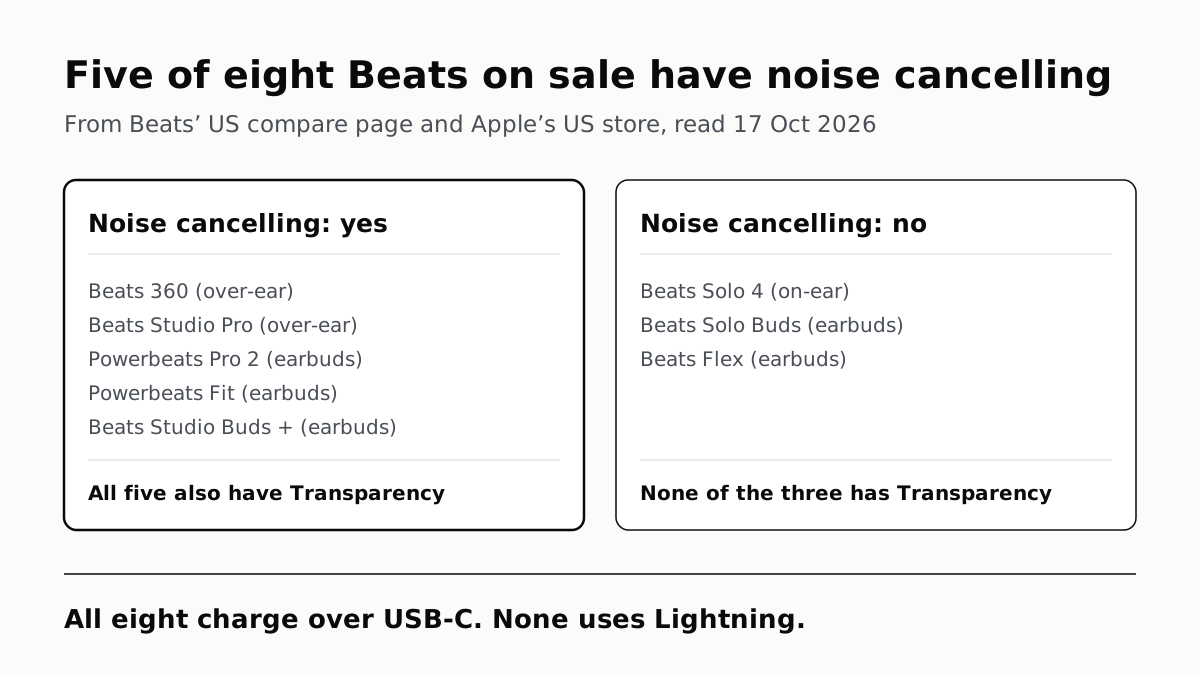
Five of Beats’ Eight Headphones and Earbuds Have ANC
Solo 4, Solo Buds and Flex have none. All eight charge over USB-C, and prices on Beats’ US store run from $69.99 to $349.99.
If you buy through our links, we may earn a commission. It never affects our verdicts or scores — how that works. As an Amazon Associate I earn from qualifying purchases.
Five of the eight headphones and earbuds Beats sells in the US have Active Noise Cancelling and Transparency: Beats 360, Beats Studio Pro, Powerbeats Pro 2, Powerbeats Fit and Beats Studio Buds +. Beats Solo 4, Beats Solo Buds and Beats Flex have neither, according to Beats’ own compare page, read on 17 October 2026.
The names do not help. Studio Pro and Studio Buds + cancel noise; Solo 4 and Solo Buds, the two models with Solo in the name, do not. If noise cancelling is the point, check the full model name, not the brand.
Model by model
From Beats’ US compare page and product pages, read 17 October 2026.
| Model | Type | Noise cancelling | Transparency | Spatial Audio | Chip Beats lists |
|---|---|---|---|---|---|
| Beats 360 | Over-ear | Yes | Yes | Personalized, head tracking | Beats platform |
| Beats Studio Pro (affiliate link to Amazon, opens in a new tab) | Over-ear | Yes | Yes | Personalized, head tracking | Beats platform |
| Beats Solo 4 (affiliate link to Amazon, opens in a new tab) | On-ear | No | No | Personalized, head tracking | Beats platform |
| Powerbeats Pro 2 (affiliate link to Amazon, opens in a new tab) | Earbuds, earhooks | Yes | Yes | Personalized, head tracking | Apple H2 |
| Powerbeats Fit | Earbuds, wingtips | Yes | Yes | Personalized, head tracking | Apple H1 |
| Beats Studio Buds + | Earbuds | Yes | Yes | Spatial Audio | Beats platform |
| Beats Solo Buds | Earbuds | No | No | Spatial Audio | Beats platform |
| Beats Flex | Earbuds | No | No | Spatial Audio | Apple W1 |
“Beats platform” is Beats’ own wording, “Beats proprietary platform”, for models without an Apple chip. The compare page also carries Beats Pill, a speaker, which this page leaves out. Apple’s Beats User Guide sets out the three listening modes on supported models as Active Noise Cancellation, Transparency and Off. We explain what noise cancelling can and cannot remove in why it is better at hum than voices.
Battery, as Beats states it
| Model | Battery Beats states | Case |
|---|---|---|
| Beats 360 | Up to 32 hours, noise cancelling on | — |
| Beats Studio Pro | Up to 24 hours with noise cancelling or Transparency on; up to 40 hours off | — |
| Beats Solo 4 | Up to 50 hours | — |
| Powerbeats Pro 2 | Up to 10 hours, noise cancelling off | Up to 45 hours with case |
| Powerbeats Fit | Up to 7 hours, noise cancelling off | Up to 30 hours with case |
| Beats Studio Buds + | Up to 9 hours, noise cancelling off | Up to 36 hours with case |
| Beats Solo Buds | Up to 18 hours | Not stated |
| Beats Flex | Up to 12 hours | — |
Read the conditions before comparing rows: Beats rates the over-ear models with noise cancelling on and the earbuds with it off. The longest figure belongs to Solo 4, which has no noise cancelling to run.
Prices
| Model | Beats US store and Apple US store, 17 Oct 2026 |
|---|---|
| Beats 360 | $349.99 |
| Beats Studio Pro | $299.99 |
| Powerbeats Pro 2 | $249.99 |
| Beats Solo 4 | $199.99 |
| Powerbeats Fit | $199.99 |
| Beats Studio Buds + | $169.99 |
| Beats Solo Buds | $79.99 |
| Beats Flex | $69.99 |
These are list prices, and both stores showed the same figure for each model. Other retailers may charge less. Read against the feature table, the three models without noise cancelling include the two lowest-priced in the line.
What else separates them
The new over-ear pair drops the cable. Beats calls Beats 360’s noise cancelling its most advanced, with “up to 1.75x more total noise cancellation than Beats Studio Pro”. It is also Beats’ first over-ear model rated IPX4 for sweat and water, with swappable ear and headband cushions. But Beats says it is wireless-only: its USB-C port charges it and carries no audio. Studio Pro and Solo 4 both list lossless listening over USB-C or a 3.5mm cable.
The chips decide some Apple features. Powerbeats Pro 2 are the one model with Apple’s H2 chip, Powerbeats Fit use the H1 and Flex the W1. Beats lists Automatic Switching between Apple devices for Beats 360, Powerbeats Pro 2 and Powerbeats Fit, and not for the other five. All eight list one-touch pairing and Find My on Apple devices.
Powerbeats Pro 2 carry the most extras. Beats’ compare page lists a Qi wireless charging case, wireless lossless audio with low latency, and heart rate monitoring for workouts on Powerbeats Pro 2, and marks all three unavailable on Powerbeats Fit and Solo Buds.
Android is covered across the line. All eight list Android features on the compare page: Fast Pair, Find Hub and Audio switch for five models, and the Beats app for Android for Powerbeats Pro 2, Powerbeats Fit and Flex. Beats says its app is on Google Play, and Apple’s guide uses it to switch between noise cancelling and Transparency on an Android phone.
USB-C throughout. Every one of the eight is listed with a USB-C connector, so none of the current line needs a Lightning cable.
If you are choosing between Beats and AirPods
Beats and AirPods are both Apple lines, and they split the same question differently: Apple’s four current AirPods all have noise cancelling, while three of Beats’ eight do not. We set the AirPods models out the same way in which AirPods have noise cancelling. If you buy Beats at Target, its return window for Apple and Beats products is shorter than for other electronics, as our guide to returning opened earbuds explains.
Questions people ask
Do Beats Solo 4 have noise cancelling?
No. Beats’ compare page lists Active Noise Cancelling and Transparency as “Feature not available” for Solo 4, and its product page does not mention noise cancelling. It does have Personalized Spatial Audio, lossless listening over USB-C or a 3.5mm cable, and up to 50 hours of playback.
Which Beats earbuds have noise cancelling?
Of the five earbuds Beats sells, three: Powerbeats Pro 2, Powerbeats Fit and Beats Studio Buds +. Each also has Transparency. Beats Solo Buds and Beats Flex have neither.
Do Beats Studio Buds + have noise cancelling?
Yes. Beats lists Active Noise Cancelling and Transparency for Studio Buds +, with up to 9 hours of playback with noise cancelling off and up to 36 hours with the charging case.
Do Beats headphones work with Android?
All eight current models list Android features on Beats’ compare page: Fast Pair, Find Hub and Audio switch for most, and the Beats app for Android for Powerbeats Pro 2, Powerbeats Fit and Flex. Beats says the app is on Google Play, and Apple’s guide uses it to switch noise modes on Android.
Do any Beats still use Lightning?
None of the eight headphones and earbuds on Beats’ US compare page does. Every one is listed with a USB-C connector. Older Beats you find second-hand may differ, so check the port before you buy a cable.
Which Beats have the strongest noise cancelling?
Beats calls the noise cancelling in Beats 360 its most advanced, with up to 1.75 times the total noise cancellation of Beats Studio Pro. The pages we read give no comparable figure for the earbuds, so we cannot say how they compare with either.
Can you use Beats 360 with a cable?
No. Beats says Beats 360 is wireless-only and its USB-C port is for charging. Studio Pro and Solo 4 do take a cable, and Beats lists lossless audio over USB-C or 3.5mm for both.
How we researched this
No one at bitcritiq has handled this product. Everything here comes from published sources, listed below.
- What this cannot tell you
- We have not used any of these headphones; every feature is Beats’ or Apple’s statement of what the model supports. Battery figures are Beats’ maximums and are stated under different conditions: some with noise cancelling on, some with it off, and some without a condition. Beats gives a noise cancelling comparison only for Beats 360 against Studio Pro, so this page does not compare the earbuds’ noise cancelling with each other. Prices are list prices read on 17 October 2026 and can change; other retailers may charge less. Older Beats no longer on the compare page, such as Beats Fit Pro, are not covered model by model.
How we chose this, and what we did
- Why this subject
- “beats headphones” and “beats” were durable top queries across six Google Trends pulls, and “noise cancelling headphones” is both top and rising. Beats names do not say which models cancel noise: the Solo 4 headphones and Solo Buds earbuds lack it, while the similarly named Studio Pro and Studio Buds + have it. Our AirPods page answers the same question for Apple’s own line; nothing on the site set out Beats’ current models.
- How we looked at it
- Read through a browser on 17 October 2026. The model list and each feature cell are from beatsbydre.com/products/compare, US region, with every one of the eight headphones and earbuds selected in turn; we read the row structure of the page (each row holds one value per selected model, left to right) to assign values to models. Product pages for Beats 360, Studio Pro, Solo 4 and Flex were read for battery figures, wired listening and chips. US prices are the list prices on Beats’ own store and on Apple’s US store listing of headphones and speakers, which matched for all eight. Apple’s Beats User Guide page on listening modes gives the mode names and the Android route. For the absence of noise cancelling on Solo 4, the control is that its product page text contains “Personalized Spatial Audio” and “Lossless Audio” but no “noise cancel”. Beats Pill, a speaker on the same compare page, is left out.
What this rests on
6 claims, all official. Nothing here was measured by bitcritiq — see how we test for why. Open a claim to read the source it came from.
Beats 360, Beats Studio Pro, Powerbeats Pro 2, Powerbeats Fit and Beats Studio Buds + have Active Noise Cancelling and Transparency.Official
Beats’ US compare page, Listening Modes, read 17 October 2026: “Active Noise Cancelling” and “Transparency Mode” listed for each of the five.
Beats Solo 4, Beats Solo Buds and Beats Flex have no noise cancelling and no Transparency.Official
Compare page, Listening Modes: “Feature not available” in the Active Noise Cancelling and Transparency Mode rows for Solo 4, Solo Buds and Flex. The Solo 4 product page names Personalized Spatial Audio and Lossless Audio but contains no mention of noise cancelling.
All eight current Beats headphones and earbuds charge over USB-C.Official
Compare page, Battery: “USB-C Connector” for Beats 360, Studio Pro, Solo 4, Powerbeats Pro 2, Powerbeats Fit, Solo Buds, Studio Buds + and Flex.
Beats says Beats 360 has up to 1.75 times the total noise cancellation of Beats Studio Pro.Official
Beats 360 product page: “with up to 1.75x more total noise cancellation than Beats Studio Pro.” It also lists “Beats’ Most Advanced Active Noise Cancellation”.
Powerbeats Pro 2 use Apple’s H2 chip, Powerbeats Fit the H1 and Beats Flex the W1; Beats lists the others as its own platform.Official
Compare page, Device Ecosystem: “Apple H2 chip” (Powerbeats Pro 2), “Apple H1 chip” (Powerbeats Fit), “Apple W1 chip” (Beats Flex), and “Beats proprietary platform” for Beats 360, Studio Pro, Solo 4, Solo Buds and Studio Buds +.
Beats 360 has no wired listening; Studio Pro and Solo 4 play lossless audio over USB-C or a 3.5mm cable.Official
Beats 360 FAQ: “No. Beats 360 is a wireless-only headphone and does not support a wired audio connection… its USB-C port is for charging.” Compare page: “Lossless Audio via USB-C or 3.5mm cable” for Studio Pro and Solo 4.
Sources 7
- Compare Beats Headphones, Earbuds & Speakers — Beats by Dre (US)Officialaccessed Oct 17, 2026
- Beats 360 — Beats by Dre (US)Officialaccessed Oct 17, 2026
- Beats Studio Pro — Beats by Dre (US)Officialaccessed Oct 17, 2026
- Beats Solo 4 — Beats by Dre (US)Officialaccessed Oct 17, 2026
Show 3 more · 3 official or standards
- Beats Flex — Beats by Dre (US)Officialaccessed Oct 17, 2026
- Headphones & Speakers — Apple Store (US)Officialaccessed Oct 17, 2026
- Switch between listening modes using your Apple or Android device — Beats User Guide, Apple SupportOfficialaccessed Oct 17, 2026
Pass it on
Know someone weighing this up? Send them the answer.
bitcritiq.com/vc8tThe link is permanent: it opens this article for good, even if the title changes.
No email, no account
Follow bitcritiq
Every new article, in whatever reader you already use.
Subscribe by RSSAll the ways to follow
Using Chrome on Android? Open the browser menu and tap Follow. New articles then turn up in the Following tab in Discover.
read next
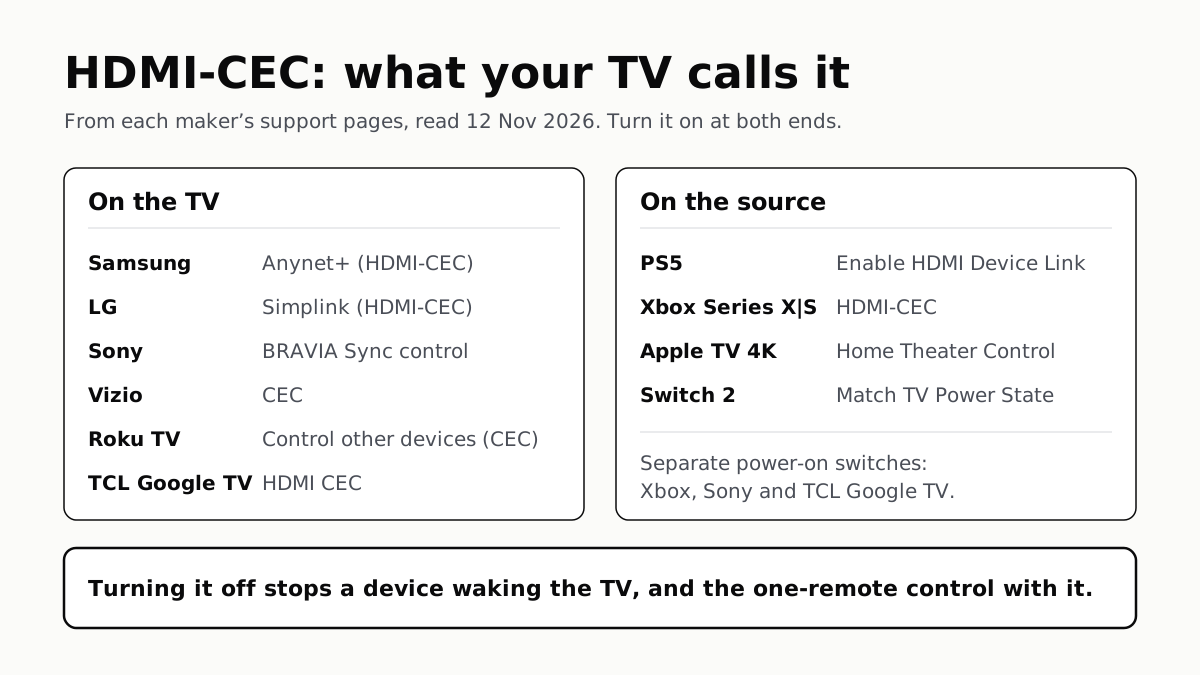
To Use One TV Remote, Turn On HDMI-CEC at Both Ends
Samsung calls it Anynet+, LG Simplink, Sony BRAVIA Sync, Vizio CEC. Consoles, Apple TV and Switch 2 have their own switch.
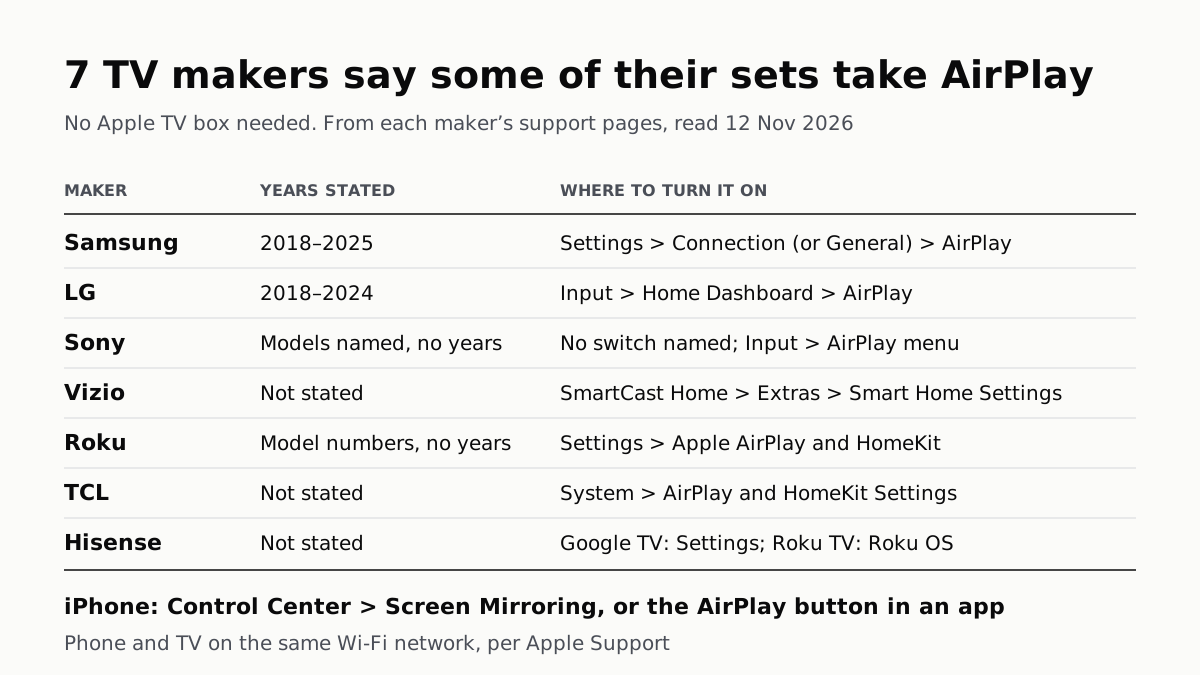
7 TV Makers Build AirPlay Into Some Sets, No Apple TV Needed
Samsung lists 2018–2025 sets and LG 2018–2024. Switch AirPlay on in the TV’s settings, then use Screen Mirroring in Control Center.
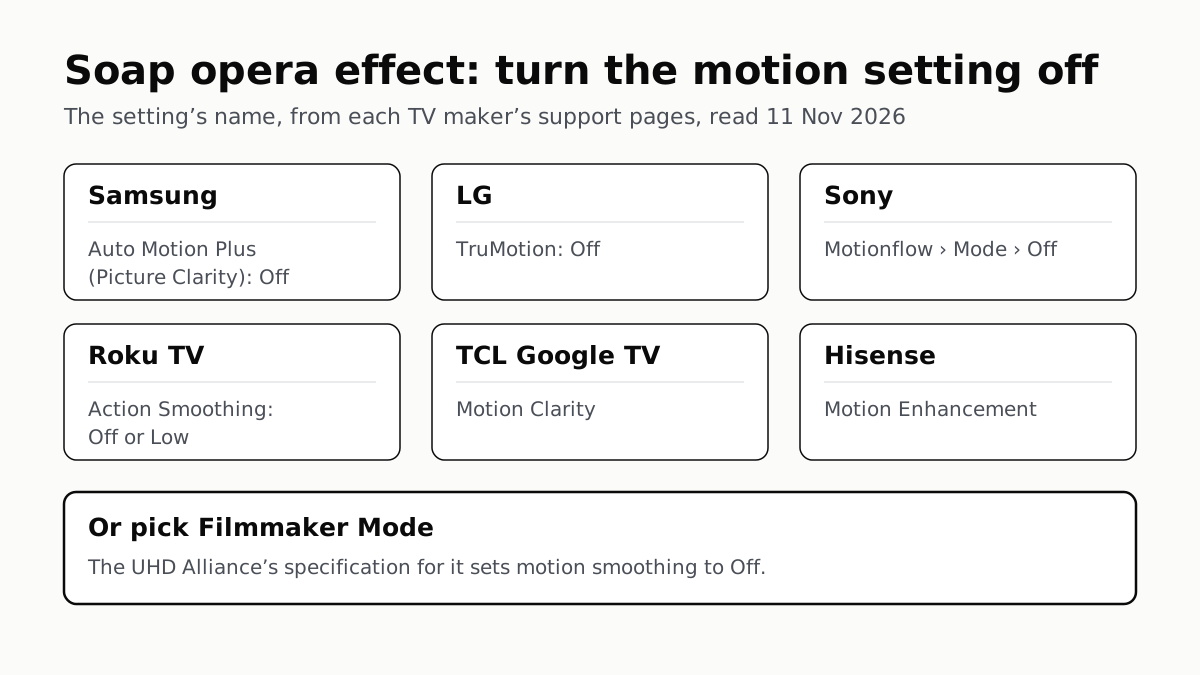
Soap Opera Effect: Set the TV’s Motion Setting to Off
Samsung calls it Auto Motion Plus, LG TruMotion, Sony Motionflow, Roku Action Smoothing. Filmmaker Mode switches it off where offered.
4 of 5 TV Platforms: Antenna and HDMI Work Without Sign-In
Google TV’s basic mode needs no account or internet. Vizio and Samsung let you skip signing in; on Roku it depends on the model.