Soap Opera Effect: Set the TV’s Motion Setting to Off
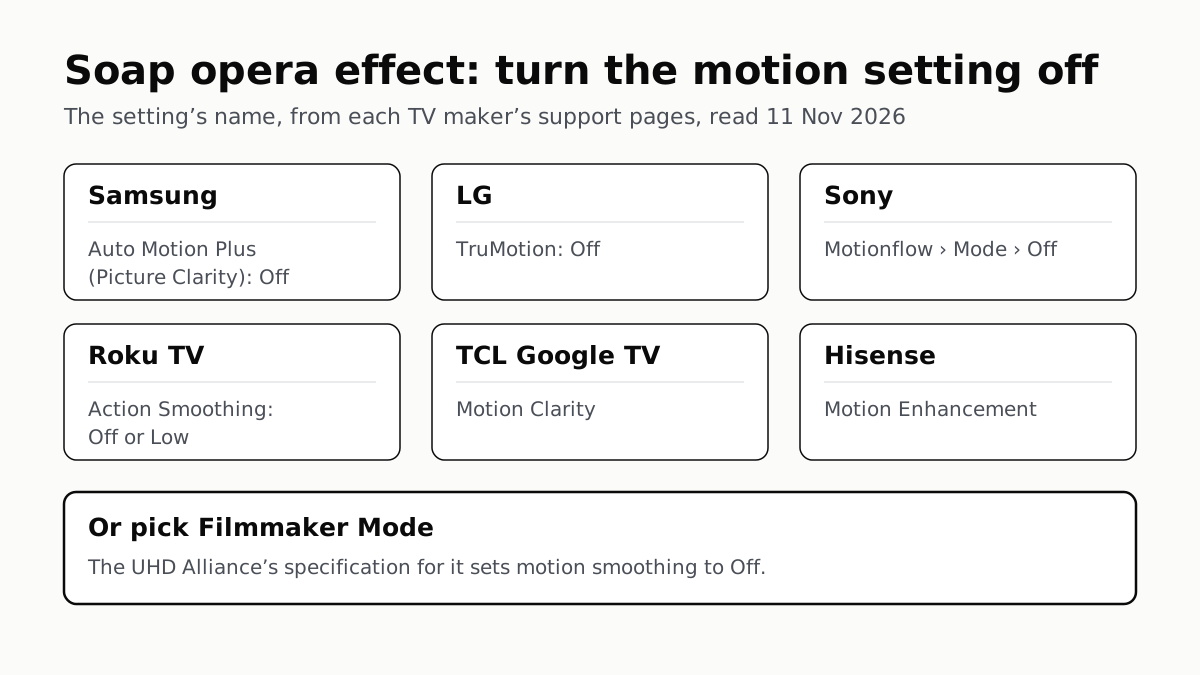
Samsung calls it Auto Motion Plus, LG TruMotion, Sony Motionflow, Roku Action Smoothing. Filmmaker Mode switches it off where offered.
If you buy through our links, we may earn a commission. It never affects our verdicts or scores — how that works. As an Amazon Associate I earn from qualifying purchases.
To stop the soap opera effect, open your TV’s picture settings, find its motion setting and set it to Off: Auto Motion Plus (or Picture Clarity) on Samsung, TruMotion on LG, Motionflow on Sony, Action Smoothing on a Roku TV. Filmmaker Mode does the same in one step on TVs that have it: the UHD Alliance’s specification for it sets “Motion Smoothing/Interpolation: OFF”.
Motion smoothing adds frames between the ones in the video. Sony’s guide says Motionflow “increases the number of image frames to display videos smoothly”, and Samsung says the setting removes ghosting and blur from fast motion. Whether that looks better is your call. Samsung itself says these settings “look great on live TV, like sporting events or parades” and that most films “are not intended to be viewed with these features”.
The setting on each brand
The 7 brands below, with the path as each maker’s own page prints it and the software or year it names.
| TV brand | Setting name | Menu path, as the maker gives it | Choices it lists | Filmmaker Mode? |
|---|---|---|---|---|
| Samsung | Auto Motion Plus (Picture Clarity) | Settings › Picture › Expert Settings › Auto Motion Plus Settings (no model year named) | Auto (default), Off, Custom | On the UHD Alliance’s brand list |
| LG | TruMotion | Picture › Advanced Settings › Clarity › TruMotion (2025 webOS guide; same path on webOS 22 and 6.0). webOS 5.0 (2020): Picture › Picture Mode Settings › Picture Option › TruMotion | Off, Cinematic Movement, Natural, Smooth Movement, User Selection (2025) | Yes; LG’s guide has FILMMAKER MODE Auto Start |
| Sony | Motionflow | Settings › Display & Sound › Picture & Sound › Picture › Motion › Motionflow › Mode › Off (current BRAVIA Help Guide) | Off; Custom adjusts Smoothness and Clearness | Not on the UHD Alliance’s brand list |
| TCL (Google TV) | Motion Clarity | Home › Settings › All settings › Display & Sound › Picture Settings › Motion Settings › Motion Clarity | Not listed in TCL’s guide | Yes; FILMMAKER MODE is a picture mode |
| Hisense | Motion Enhancement | Settings › Display & Sound › Picture › Motion Enhancement (Hisense support, 2024 Google TV model) | Not given | On the UHD Alliance’s brand list |
| Roku TV (Roku-made and partner brands) | Action Smoothing | Star button › Picture settings › Expert settings (Roku also writes Picture settings › Customize Picture › Expert settings) | Off, Low, up to High | Not on the UHD Alliance’s brand list |
| Vizio | “Motion settings” (Vizio does not name it) | Menu › All Settings › Picture; Vizio points to your model’s user manual | Not given | Not on the UHD Alliance’s brand list |
Roku’s steps start with a show playing, then the Star button. The TCL row is for TCL’s Google TV sets; TCL also sells Roku TVs, which Roku’s page covers, with its note that partner models may name these settings differently.
Samsung: Off or Custom
Samsung ships Auto Motion Plus on Auto, which it says “automatically turns on and off based on the type of program being watched”. Off removes it. Custom keeps it with three controls: Blur Reduction, Judder Reduction and LED Clear Motion. Samsung describes judder as rough motion, “such as camera panning or zoom”, when a show “has fewer frames than your TV displays”, and Judder Reduction is the control aimed at it.
LG and Sony: check the picture mode first
Both brands lock the motion setting in game picture modes. LG says “TruMotion cannot be set if you set the game mode for the video mode”. Sony says that when Content type is Game, Motionflow and CineMotion are disabled. If the setting is greyed out, change the picture mode first. Our console settings guide covers what game modes do on these TVs.
LG’s 2025 guide lists Off as the first TruMotion option. Its older webOS 22 page lists only Cinematic, Natural and Smooth motion, and suggests TruMotion for console games that run at 30 frames per second. Sony’s guide lists CineMotion separately from Motionflow; Sony describes it as reproducing 24-frame film motion smoothly, and its troubleshooting page sets both to Off for a distorted picture. Sony’s spec sheets also carry a Motionflow rating, which our BRAVIA series page quotes for some models.
Filmmaker Mode: one switch instead of several
The UHD Alliance, the industry group behind the label, says Filmmaker Mode turns off motion smoothing, sharpening and noise reduction, and keeps the source’s frame rate and aspect ratio. Its list of brands offering it names Samsung, LG, TCL, Hisense and Panasonic among nine. LG’s guide warns that the mode “may appear darker than other Picture Mode”.
Some sets switch to it on their own: LG has FILMMAKER MODE Auto Start, and TCL’s Google TV guide says its Automatic Content Recognition setting can switch picture mode when Filmmaker Mode content is detected. That TCL setting shares its name with the viewing-data feature in our guide to TV tracking settings, though TCL describes it only as the picture-mode switch.
If it comes back
Settings can be saved per input and per picture mode: Vizio says so, and LG’s guide has an Apply to All Inputs option. Turn motion smoothing off on each input you use, or apply it to all. Roku says some Roku OS updates have turned motion smoothing back on. If you are still choosing a set, our TV shortlist covers the models the reviews rate highest.
Questions people ask
How do I turn off the soap opera effect on my TV?
Open the picture settings and find the motion setting: Auto Motion Plus or Picture Clarity on Samsung, TruMotion on LG, Motionflow on Sony, Action Smoothing on Roku TVs. Set it to Off. Or pick Filmmaker Mode, which the UHD Alliance specifies with motion smoothing off.
Does Filmmaker Mode turn off motion smoothing?
By the UHD Alliance’s specification, yes: Filmmaker Mode disables post-processing such as motion smoothing and keeps the source frame rate. Samsung, LG, TCL and Hisense are among the brands on its list. Sharpening and noise reduction go off too, and LG warns the mode may look darker.
Why did motion smoothing come back on my Roku TV?
Roku says some Roku OS updates change motion or picture defaults, sometimes turning motion smoothing back on. Set Action Smoothing to Off or Low again under Star, Picture settings, Expert settings.
Should I leave motion smoothing on for sports?
That is a preference, not a fix. Samsung says its motion settings “look great” on live TV such as sport, and Roku suggests Action Clarity for sports and Action Smoothing Low or Off for films. Try both on the content you watch.
Why can’t I change TruMotion or Motionflow?
Game settings lock them on some sets. LG says TruMotion cannot be set while the picture mode is Game, and Sony says a Game content type disables Motionflow and CineMotion. Switch the picture mode or content type first.
What is motion smoothing called on a Hisense TV?
Motion Enhancement. Hisense’s support team gave the path Settings, Display & Sound, Picture, Motion Enhancement for a 2024 Google TV model. Hisense TVs on other software may lay out the menu differently.
How we researched this
No one at bitcritiq has handled this product. Everything here comes from published sources, listed below.
- What this cannot tell you
- We have not set up these TVs; this is what each maker’s page says. Menu paths change with model year and software, and each maker says options vary by model. Samsung’s page names no model year. TCL’s guide is based on one Google TV model’s manual and does not list Motion Clarity’s options. Hisense’s own US manuals are PDFs we could not read on 11 November, so the Hisense path comes from Hisense’s support team answering on a retailer’s page, for one 2024 Google TV model; Hisense TVs on other software may differ. Sony’s support article on Motionflow could not be read on 11 November, so the Sony row rests on its Help Guide. Vizio’s pages do not name its motion setting. Roku says partner-brand Roku TVs may name these settings differently or leave them out. Whether a given TV supports Filmmaker Mode is set by its maker; the UHD Alliance list names brands, not models.
How we chose this, and what we did
- Why this subject
- A new TV is a common gift this month, and the first complaint after setting one up is that films look too smooth, the “soap opera effect”. Our TV pages list motion specs, and our ACR and console guides cover other settings, but nothing on the site gave the name and menu path of the motion setting on each brand. This answers that from each maker’s own pages.
- How we looked at it
- Read through a browser on 11 November 2026. Samsung US support answer ANS10006969. LG USA Help Library ‘Troubleshooting Poor Picture Quality on PS5’ (paths for webOS 22, 6.0 and 5.0) and LG’s online webOS TV User Guide, 2025, US English (Picture › Advanced Settings › Clarity). Sony’s BRAVIA Help Guide that lists BRAVIA 9, BRAVIA 8, BRAVIA 8 II, BRAVIA 7, BRAVIA 5, A95L, XR8B and XR8C: ‘Adjusting the picture quality’ and the troubleshooting page ‘Distorted picture./The screen flickers.’ TCL Support ‘TCL Google TV Settings and User Manual Guide’. Roku Support ‘How to reduce motion blur in fast-moving scenes on your Roku TV system’ (last updated 24 June 2026). Vizio Support ‘How to Adjust Picture Settings’ and ‘TV Picture Quality Is Poor or Does Not Look Right’. For Hisense, an answer signed by Hisense’s support team on Best Buy’s question page for a 2024 Google TV model. The UHD Alliance’s Filmmaker Mode ‘About’ and ‘How to get it’ pages. Absence checks: Vizio’s picture-settings page lists Auto Brightness, Backlight, Brightness, Contrast, Color, Tint and Sharpness and no motion setting (control: Sharpness is described in full); its picture-quality page lists ‘Motion settings’ and points to the model’s user manual. The UHD Alliance’s ‘How to get it’ page lists nine brands (control: Samsung, LG, TCL and Hisense are among them); Sony, Vizio and Roku are not. LG’s webOS 22 page lists three TruMotion modes and no Off (control: its 2025 guide lists Off first). Counted 7 brand rows in the table.
What this rests on
6 claims, all official. Nothing here was measured by bitcritiq — see how we test for why. Open a claim to read the source it came from.
Samsung names its motion smoothing settings Auto Motion Plus or Picture Clarity, defaults them to Auto, and offers Off or Custom.Official
Samsung ANS10006969: “On Samsung TVs, these are known as Auto Motion Plus or Picture Clarity.” “Navigate to and open Settings. Then select Picture, and then Expert Settings, now select Auto Motion Plus Settings (Picture Clarity Settings).” “The default setting is Auto.” “Select Auto Motion Plus (Picture Clarity) to change the setting to either Off or Custom.”
Samsung says motion smoothing suits live TV such as sport, and that most films are not meant to be watched with it.Official
Samsung ANS10006969: “These motion smoothing settings look great on live TV, like sporting events or parades, which are filmed at 30 frames per second. Most movies, however, are filmed at 24 frames per second and are not intended to be viewed with these features.”
LG’s 2025 webOS guide puts TruMotion under Picture, Advanced Settings, Clarity, with Off as an option.Official
LG webOS TV User Guide: “Picture Advanced Settings Clarity” … “TruMotion Suitable the image quality of fast-moving pictures. Off: Turns off the TruMotion. Cinematic Movement … Natural … Smooth Movement … User Selection: Sets TruMotion manually.”
Sony’s BRAVIA Help Guide gives Motionflow, Mode, Off under Picture, Motion, and says Game content type disables Motionflow.Official
Sony Help Guide: “[Settings] — [Display & Sound] — [Picture & Sound] — [Picture] — [Motion] — [Motionflow] — [Mode] — [Off].” “Motionflow Refines moving images. Increases the number of image frames to display videos smoothly.” “When [Content type] is set to [Game], [Motion blur reduction] is enabled, and [Motionflow] and [CineMotion] are disabled.”
Roku tells owners of Roku TVs to set Action Smoothing to Off or Low to avoid the soap opera effect, and says software updates can turn motion smoothing back on.Official
Roku Support: “For movies: Set Action Smoothing Low or Off to avoid “soap-opera” effect.” “Press Star > Picture settings > Expert settings. Turn Action Smoothing to Off or Low.” “Some Roku OS updates change motion or picture defaults, sometimes turning motion smoothing back on or altering HDR color balance.”
The UHD Alliance’s Filmmaker Mode specification sets motion smoothing to off.Official
UHD Alliance, About Filmmaker Mode: “Disables all post-processing (e.g. motion smoothing) for both SDR & HDR content preserving the correct aspect ratios, colors and frame rates” … “Motion Smoothing/Interpolation: OFF”.
Sources 12
- Motion smoothing and the soap opera effect on Samsung TVs — Samsung US SupportOfficialaccessed Nov 11, 2026
- LG TV - Troubleshooting Poor Picture Quality on PS5 — LG USA SupportOfficialaccessed Nov 11, 2026
- webOS TV User Guide, 2025, US English — LG ElectronicsOfficialaccessed Nov 11, 2026
- Adjusting the picture quality — Sony BRAVIA Help GuideOfficialaccessed Nov 11, 2026
Show 8 more · 7 official or standards
- Distorted picture./The screen flickers. — Sony BRAVIA Help GuideOfficialaccessed Nov 11, 2026
- TCL Google TV Settings and User Manual Guide — TCL SupportOfficialaccessed Nov 11, 2026
- How to reduce motion blur in fast-moving scenes on your Roku TV system — Roku SupportOfficialaccessed Nov 11, 2026
- How to Adjust Picture Settings on Your VIZIO or onn Powered by VIZIO TV — Vizio SupportOfficialaccessed Nov 11, 2026
- TV Picture Quality Is Poor or Does Not Look Right — Vizio SupportOfficialaccessed Nov 11, 2026
- “How do you turn on motion enhancement?” answered by the Hisense Support Team — Best Buy questions and answersaccessed Nov 11, 2026
- About Filmmaker Mode — UHD AllianceOfficialaccessed Nov 11, 2026
- How to get Filmmaker Mode — UHD AllianceOfficialaccessed Nov 11, 2026
Pass it on
Know someone weighing this up? Send them the answer.
bitcritiq.com/j6t7The link is permanent: it opens this article for good, even if the title changes.
No email, no account
Follow bitcritiq
Every new article, in whatever reader you already use.
Subscribe by RSSAll the ways to follow
Using Chrome on Android? Open the browser menu and tap Follow. New articles then turn up in the Following tab in Discover.
read next
To Use One TV Remote, Turn On HDMI-CEC at Both Ends
Samsung calls it Anynet+, LG Simplink, Sony BRAVIA Sync, Vizio CEC. Consoles, Apple TV and Switch 2 have their own switch.
7 TV Makers Build AirPlay Into Some Sets, No Apple TV Needed
Samsung lists 2018–2025 sets and LG 2018–2024. Switch AirPlay on in the TV’s settings, then use Screen Mirroring in Control Center.
4 of 5 TV Platforms: Antenna and HDMI Work Without Sign-In
Google TV’s basic mode needs no account or internet. Vizio and Samsung let you skip signing in; on Roku it depends on the model.
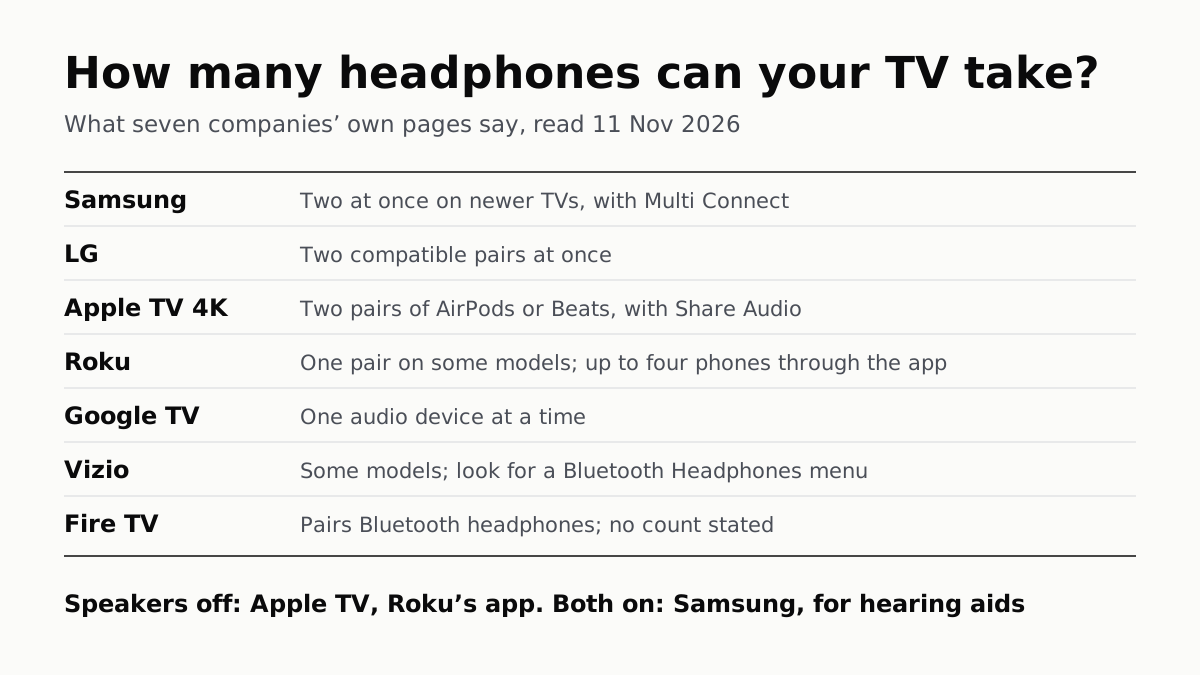
LG, Apple TV and Newer Samsung TVs Play to Two Headphones
Roku, Google TV, Fire TV and Vizio pair them too, each with its own limits. Roku’s phone app lets up to four people listen.