Four Framework Laptops, 12 to 16 Inches; One Swaps Its GPU
Laptop 12 is a 12.2-inch convertible, the 13 and 13 Pro share a 13.5-inch 3:2 screen, and the 16 takes swappable Nvidia or AMD graphics.
If you buy through our links, we may earn a commission. It never affects our verdicts or scores — how that works. As an Amazon Associate I earn from qualifying purchases.
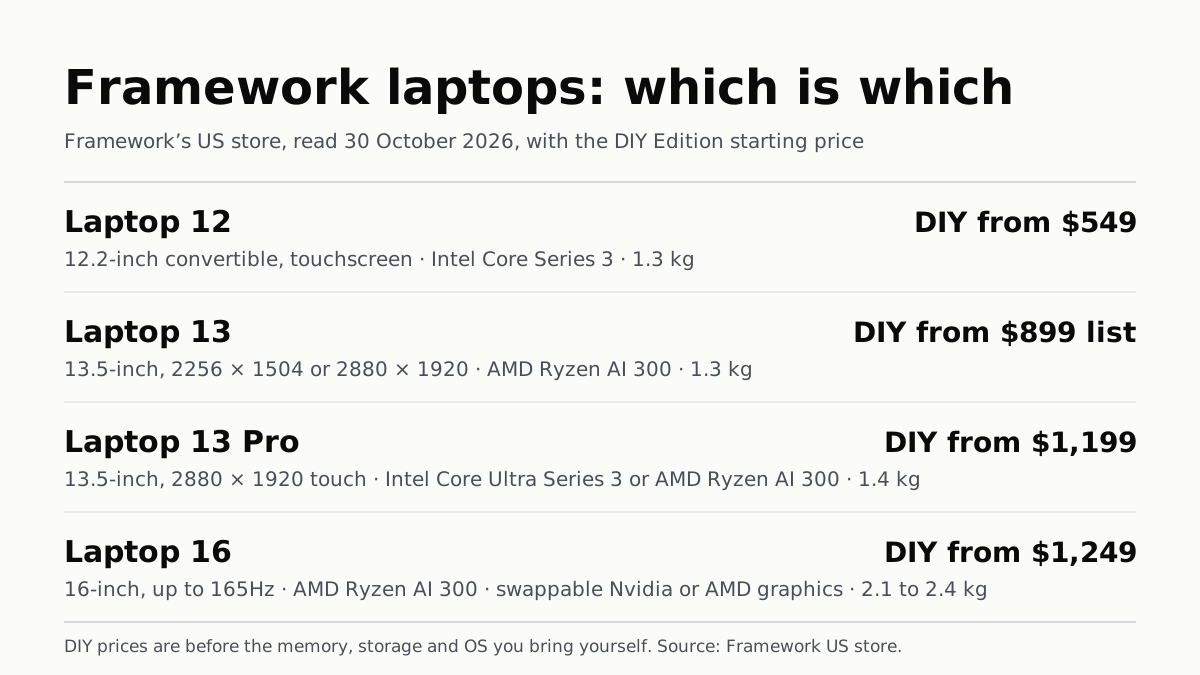
Framework’s US store sells four laptops: the Laptop 12, a 12.2-inch convertible; the Laptop 13 and Laptop 13 Pro, both 13.5 inches; and the Laptop 16, which takes a swappable graphics module. Of the four, one takes a separate graphics module, and three use the graphics built into their chips. The Laptop 13 and 16 use AMD Ryzen AI 300 chips, the 13 Pro Intel Core Ultra Series 3 or AMD Ryzen AI 300, and the 12 Intel Core Series 3. Each comes as a DIY Edition you assemble or as a pre-built laptop with an operating system installed.
Specs below are from Framework’s own product pages, and prices from its US configurator pages, read on 30 October 2026. Each laptop has several processor, memory and storage choices, so a row covers a range of configurations.
The four laptops, side by side
| Laptop | Screen | Chips Framework lists | Graphics | Memory (max) | Battery (Wh) | Weight (kg) |
|---|---|---|---|---|---|---|
| Laptop 12 | 12.2in, 1920 × 1200 touch, 360° hinge, stylus | Intel Core Series 3: Core 3 304, Core 5 320, Core 7 350 | Built into the chip | 64GB DDR5, one slot | 50 | 1.3 |
| Laptop 13 | 13.5in 3:2, 2256 × 1504 or 2880 × 1920, matte | AMD Ryzen AI 5 340, AI 7 350, AI 9 HX 370 | Built into the chip | 96GB DDR5 | 61 | 1.3 |
| Laptop 13 Pro | 13.5in, 2880 × 1920 touch, 30–120Hz | Intel Core Ultra 5 325, Ultra X7 358H, Ultra X9 388H; or AMD Ryzen AI 7 350, AI 9 HX 370 | Built into the chip | 64GB LPCAMM2 | 74 | 1.4 |
| Laptop 16 | 16in, 2560 × 1600, up to 165Hz | AMD Ryzen AI 5 340, AI 7 350, AI 9 HX 370 | Optional module: Nvidia RTX 5070 (8GB or 12GB) or AMD Radeon RX 7700S | 96GB DDR5, two slots | 85 | 2.1 (shell) to 2.4 (graphics module) |
That is four laptops, and three of them are 13.5 inches or smaller and weigh 1.3 to 1.4 kg. The Laptop 13 and 13 Pro have the same 296.63 × 228.98 × 15.85 mm footprint on Framework’s pages; the Pro adds a touchscreen, a larger battery, an all-aluminium chassis and a haptic touchpad, and swaps socketed DDR5 for LPCAMM2 memory, which Framework describes as LPDDR5X “in a modular form”. Framework rates the 13 Pro at 20 hours of 4K Netflix streaming in its own April 2026 test.
On the Laptop 16, the Expansion Bay at the back takes either a thin Expansion Bay Shell or a graphics module, and Framework says a swap takes “under 5 minutes with the one tool we include in the box”. Framework lists 2.1 kg with the shell and 2.4 kg with a graphics module. The Laptop 16 also has six Expansion Card slots for ports, against four on the Laptop 12.
Starting prices on 30 October
| Laptop | DIY Edition from | Pre-built from | Pre-built OS | 3-year warranty add-on |
|---|---|---|---|---|
| Laptop 12 | $549 (Core 3 304) | $699 (Core 3 304, 8GB, 512GB) | Fedora or Windows 11 | $89 |
| Laptop 13 | $899 list, $849 on sale (Ryzen AI 5 340) | $1,099 list, $1,049 on sale (out of stock) | Windows 11 | $139 |
| Laptop 13 Pro | $1,199 Intel; $1,399 AMD | $1,599 Intel (Ultra 5 325, 16GB, 512GB); $2,299 AMD | Windows 11 or Ubuntu | $179 |
| Laptop 16 | $1,249 (Ryzen AI 5 340) | $1,839 (Ryzen AI 5 340, 16GB, 512GB, Windows 11 Pro) | Windows 11 | $189 |
Prices are the “Starting at” figures on Framework’s US configurators, in US dollars. A one-year limited warranty is included on all four. DIY Edition starting prices ran from $549 to $1,249, but they are not like for like with pre-built ones. Framework sells the DIY Edition without the memory, storage and operating system you bring yourself, so a finished DIY build costs more than its starting figure.
Several configurations were pre-orders that day: Framework listed the Laptop 12 and Laptop 13 Pro as shipping in December and the entry Laptop 16 DIY in November. The cheapest pre-built Laptop 13 was marked out of stock. Older chip generations were also listed: a 13th Gen Intel version of the Laptop 12, on sale that day, and Intel Core Ultra Series 1 and Ryzen 7040 Series versions of the Laptop 13 and Laptop 16, both marked out of stock.
Repair and upgrade paths
Framework’s pages for the Laptop 12, 13 Pro and 16 say their parts can be replaced with the one tool Framework puts in the box. What its pages say each laptop can take:
| Laptop | Processor upgrade | Memory | Storage |
|---|---|---|---|
| Laptop 12 | Swap the Mainboard for a new processor | One DDR5 SO-DIMM slot | M.2 2230 SSD, up to 2TB |
| Laptop 13 | Not stated on the Laptop 13 page we read | DDR5, up to 96GB | M.2 SSD, up to 8TB |
| Laptop 13 Pro | Chassis takes every Laptop 13 Mainboard | LPCAMM2 module, up to 64GB | PCIe Gen 5 NVMe, up to 8TB |
| Laptop 16 | Original 7040 Series model upgradable part by part | Two DDR5 SO-DIMM slots, up to 96GB | Two M.2 slots, up to 10TB |
Because memory sits in slots or a module rather than being soldered down, it can be replaced later, up to the maximums Framework lists above; how to check a laptop’s real RAM limit shows where to look a limit up.
Framework’s pages for the Laptop 12, 13 Pro and 16 also describe physical switches that cut off the webcam and microphones, and all four pages describe the Expansion Card system, which lets you choose which port sits in each slot.
Other makers’ ranges are set out the same way: LG’s gram lines and Microsoft’s Surface laptops and tablets. Outlets’ verdicts on laptops in general are gathered in our laptop shortlist.
Questions people ask
What is the difference between Framework Laptop 13 and 13 Pro?
Both have a 13.5-inch 3:2 screen. Framework lists the 13 Pro with a 2880 × 1920 touchscreen at 30–120Hz, a 74Wh battery, LPCAMM2 memory up to 64GB, a CNC aluminium chassis, a haptic touchpad and Intel or AMD chips. The Laptop 13 has a 2.2K or 2.8K matte screen, 61Wh and DDR5 up to 96GB.
What is the Framework DIY Edition?
Framework’s DIY Edition is a laptop you assemble yourself, bringing your own memory, storage and operating system, including Linux. The pre-built version arrives with an operating system installed: Windows 11 or Fedora on the Laptop 12, Windows 11 or Ubuntu on the 13 Pro.
Can you upgrade the graphics on a Framework laptop?
On the Laptop 16, yes. Its Expansion Bay takes a graphics module with Nvidia GeForce RTX 5070 (8GB or 12GB) or AMD Radeon RX 7700S graphics, or a thin shell with none. Framework says a swap takes under five minutes with the tool in the box. The 12, 13 and 13 Pro use the graphics built into their chips.
Which Framework laptop is a 2-in-1?
The Laptop 12. Framework calls it a 12.2-inch convertible, with a 360-degree hinge, a 1920 × 1200 touchscreen and USI 2.0 stylus support. Framework sells it pre-built in Sage and as a DIY Edition in five colours.
Can you upgrade a Framework laptop’s processor?
Framework’s pages say so for three of them: the Laptop 12 page lists swapping the Mainboard for a new processor, the Laptop 13 Pro chassis works with every Laptop 13 Mainboard, and an original Laptop 16 can be upgraded part by part to the latest generation.
How heavy are Framework laptops?
Framework lists 1.3 kg for the Laptop 12 and the Laptop 13, 1.4 kg for the Laptop 13 Pro, and 2.1 kg for the Laptop 16 with the Expansion Bay Shell, rising to 2.4 kg with a graphics module.
How we researched this
No one at bitcritiq has handled this product. Everything here comes from published sources, listed below.
- What this cannot tell you
- Framework’s DIY Edition is sold without the memory, storage and operating system you bring yourself (Framework’s wording), so a DIY starting price and a pre-built starting price are not like for like, and we did not price a fully configured DIY build. Several configurations were pre-orders shipping in November or December, and the cheapest pre-built Laptop 13 configuration was marked out of stock. We could not read a stand-alone price for the Laptop 16 graphics modules in the configurator on 30 October. Battery hours are Framework’s own test figures, not a test of ours. Prices and stock change daily. We have not used any of these laptops, and this page does not rank them.
How we chose this, and what we did
- Why this subject
- Search Console shows our best-laptops shortlist collecting impressions for “best laptops 2025” and “what is the best laptop”, from readers comparing laptops by maker. Framework sells four laptops in the US whose names are mostly numbers (12, 13, 13 Pro, 16), each in a DIY Edition and a pre-built version, and a search of our posts for “Framework” returned no post setting out which is which. Framework also sells the Framework Desktop; it is not a laptop and is left out.
- How we looked at it
- Read on 30 October 2026 in the research browser. Framework’s US home page (prices in USD) names four laptops in its navigation and product sections: Laptop 12, Laptop 13 Pro, Laptop 13 and Laptop 16, plus the Desktop. We read the product pages for each laptop (frame.work/laptop12, /laptop13, /laptop13pro, /laptop16) for screen, chip, memory, battery, weight and upgrade statements, and the eight configurator pages (DIY Edition and pre-built for each laptop, both chip families on the Laptop 13 Pro) for starting prices, processor options, shipping status and warranty extension prices. The count of four is the laptop names in Framework’s own navigation and home-page sections, counted by hand; the four rows in each table are those four laptops. Starting prices are the “Starting at” figure on each configurator; where the page showed a “was” price, the table gives that list price and notes the sale price. Out-of-stock labels were read in page order, where each one sits directly above the chip generation it applies to.
What this rests on
6 claims, all official. Nothing here was measured by bitcritiq — see how we test for why. Open a claim to read the source it came from.
Framework’s US store sells four laptops: Laptop 12, Laptop 13, Laptop 13 Pro and Laptop 16.Official
frame.work US home page, 30 October 2026, navigation “Desktop, Laptop 12, Laptop 13, Laptop 16” and product sections for “Framework Laptop 13 Pro”, “Framework Laptop 12”, “Framework Desktop”, “Framework Laptop 16” and “Framework Laptop 13”, each with “Configure now”.
The Laptop 16 is the one Framework laptop with a swappable graphics module, offered with Nvidia GeForce RTX 5070 or AMD Radeon RX 7700S graphics.Official
frame.work/laptop16: “You can now choose between NVIDIA® GeForce RTX™ 5070 Laptop GPU or AMD Radeon™ RX 7700S graphics. Swap in under 5 minutes with the one tool we include in the box.” Configurator Expansion Bay options: Expansion Bay Shell; Graphics Module (RTX 5070) 8GB; Graphics Module (RTX 5070) 12GB; Graphics Module (Radeon RX 7700S) (2nd Gen).
The Laptop 12 is a 12.2-inch convertible with a 1920 × 1200 touchscreen and stylus support.Official
frame.work/laptop12: “Framework Laptop 12 is a 12.2" convertible”; “12.2" touchscreen, 1920x1200 resolution, >400nit brightness for outdoor use, with USI 2.0 stylus support.”
On 30 October 2026 the DIY Edition starting list prices were $549 (Laptop 12), $899 (Laptop 13), $1,199 (Laptop 13 Pro) and $1,249 (Laptop 16).Official
Configurators: Laptop 12 DIY “Series 3 Starting at $549.00”; Laptop 13 DIY “AI 300 Series Starting at $849.00 was: $899”; Laptop 13 Pro DIY “Intel Core™ Ultra Series 3 Starting at $1,199.00”; Laptop 16 DIY “AI 300 Series Starting at $1,249.00”.
Framework says the Laptop 13 Pro chassis works with every Framework Laptop 13 Mainboard, and that an original Laptop 16 can be upgraded part by part.Official
frame.work/laptop13pro: “It works with every Framework Laptop 13 Mainboard, from earlier generations to what’s next.” frame.work/laptop16: “You can upgrade an original Framework Laptop 16 (AMD Ryzen™ 7040 Series) to the latest generation, part by part.”
The Laptop 13 Pro uses LPCAMM2 memory up to 64GB; the Laptop 13 and Laptop 16 take up to 96GB of DDR5.Official
frame.work/laptop13pro: “up to 64GB of LPCAMM2 LPDDR5X memory”. frame.work/laptop13: “supports up to a massive 96GB of high-speed DDR5”. frame.work/laptop16: “Up to 96GB of memory across two DDR5 SO-DIMM slots.”
Sources 14
- Framework | Modular Laptops & PCs You Can Repair — Framework US home pageOfficialaccessed Oct 30, 2026
- Framework Laptop 12 — FrameworkOfficialaccessed Oct 30, 2026
- Framework Laptop 13 with AMD Ryzen AI 300 Series — FrameworkOfficialaccessed Oct 30, 2026
- Framework Laptop 13 Pro — FrameworkOfficialaccessed Oct 30, 2026
Show 10 more · 10 official or standards
- Framework Laptop 16 with AMD Ryzen AI 300 Series — FrameworkOfficialaccessed Oct 30, 2026
- Configure Framework Laptop 12 DIY Edition (Intel Core Series 3) — FrameworkOfficialaccessed Oct 30, 2026
- Configure Framework Laptop 12 (Intel Core Series 3), pre-built — FrameworkOfficialaccessed Oct 30, 2026
- Configure Framework Laptop 13 DIY Edition (AMD Ryzen AI 300 Series) — FrameworkOfficialaccessed Oct 30, 2026
- Configure Framework Laptop 13 (AMD Ryzen AI 300 Series), pre-built — FrameworkOfficialaccessed Oct 30, 2026
- Configure Framework Laptop 13 Pro DIY Edition (Intel Core Ultra Series 3) — FrameworkOfficialaccessed Oct 30, 2026
- Configure Framework Laptop 13 Pro DIY Edition (AMD Ryzen AI 300 Series) — FrameworkOfficialaccessed Oct 30, 2026
- Configure Framework Laptop 13 Pro (Intel Core Ultra Series 3), pre-built — FrameworkOfficialaccessed Oct 30, 2026
- Configure Framework Laptop 16 DIY Edition (AMD Ryzen AI 300 Series) — FrameworkOfficialaccessed Oct 30, 2026
- Configure Framework Laptop 16 (AMD Ryzen AI 300 Series), pre-built — FrameworkOfficialaccessed Oct 30, 2026
Pass it on
Know someone weighing this up? Send them the answer.
bitcritiq.com/asr9The link is permanent: it opens this article for good, even if the title changes.
No email, no account
Follow bitcritiq
Every new article, in whatever reader you already use.
Subscribe by RSSAll the ways to follow
Using Chrome on Android? Open the browser menu and tap Follow. New articles then turn up in the Following tab in Discover.
read next
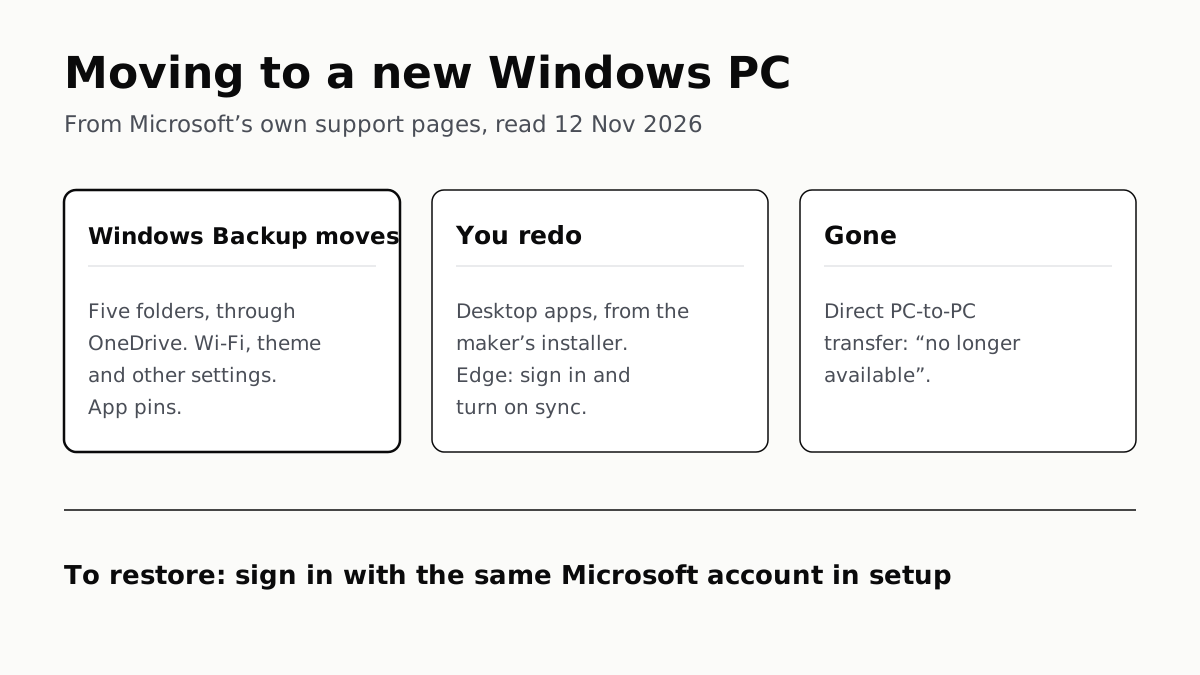
Windows Backup Moves Files and Settings, Not Desktop Apps
Sign in with the same Microsoft account during setup to restore. Files travel through OneDrive, whose free tier is 5 GB.
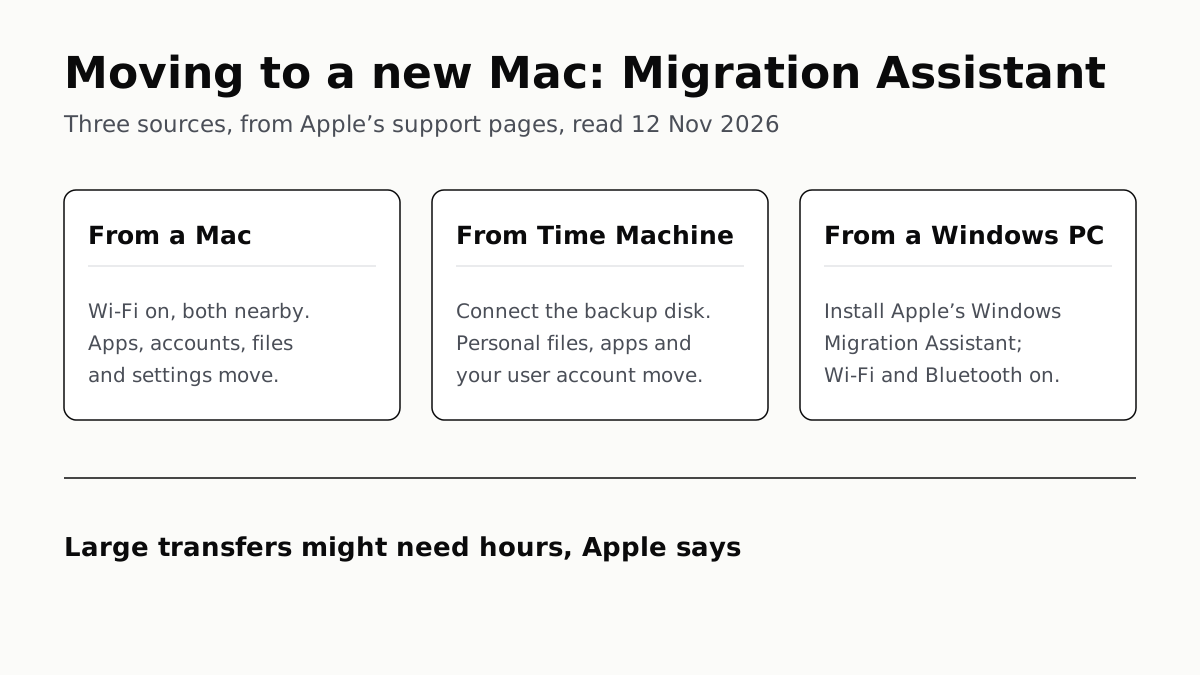
Migration Assistant Moves Your Old Mac or PC to a New Mac
It comes with your Mac. A PC needs Apple’s Windows Migration Assistant, and Apple warns large transfers might need hours.
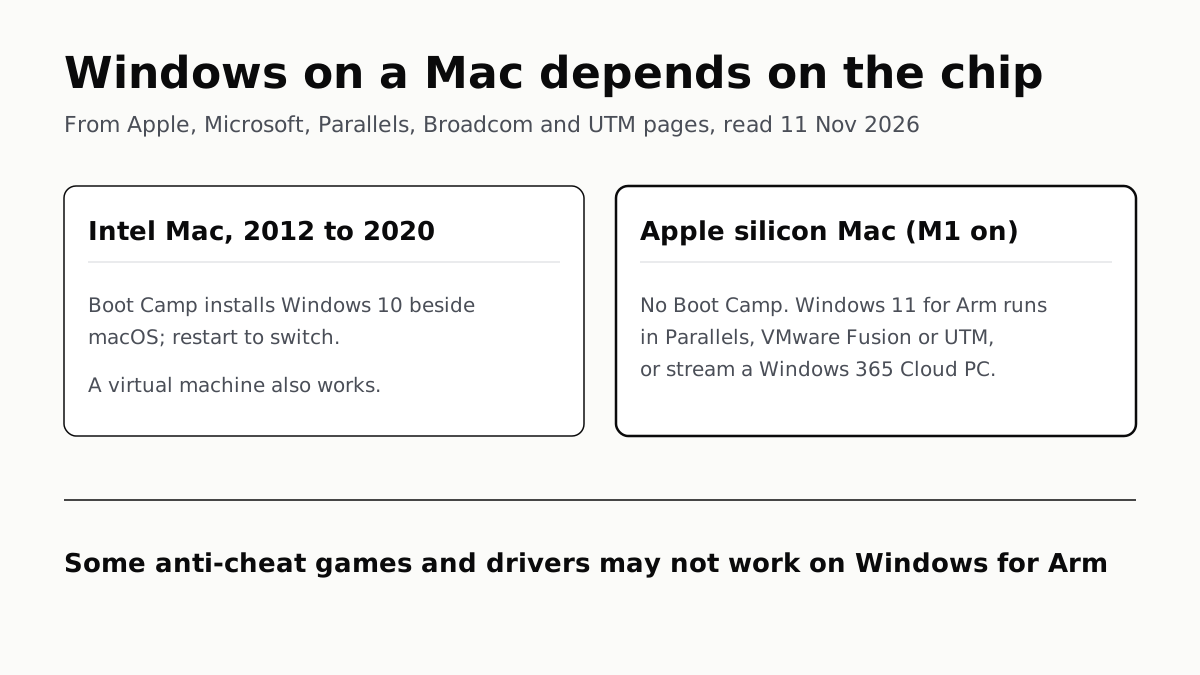
A Mac Can Run Windows, but Apple Silicon Means No Boot Camp
Microsoft authorizes Parallels on M1 to M3; Fusion and UTM are free. All run Windows 11 for Arm, where some games may not work.
Windows 11 Pro Adds BitLocker, Remote Desktop and VMs
Home can encrypt the drive on supported laptops. Pro adds a Remote Desktop host, Hyper-V, Windows Sandbox and domain join.