eGPUs Work on Windows Laptops, Not on Apple Silicon Macs
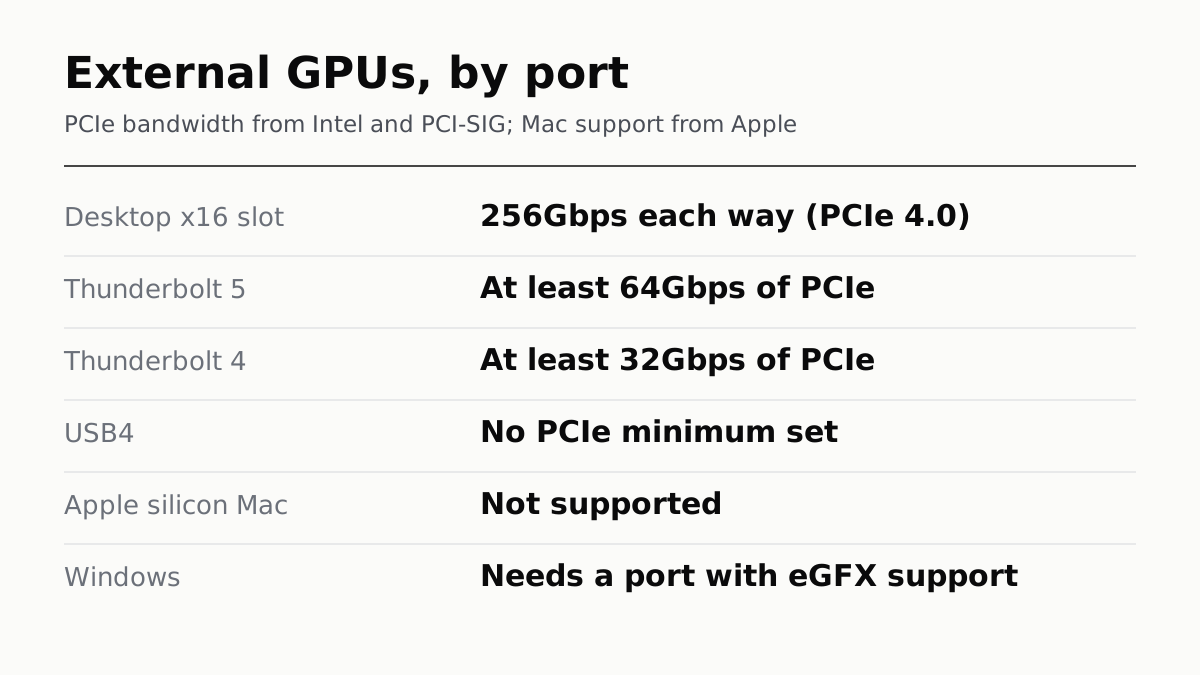
The port decides it: Thunderbolt 5 guarantees 64Gbps of PCIe, Thunderbolt 4 32Gbps, USB4 no minimum. A desktop x16 slot carries far more.
If you buy through our links, we may earn a commission. It never affects our verdicts or scores — how that works. As an Amazon Associate I earn from qualifying purchases.
An external GPU works with a Windows laptop whose port supports external graphics, and not at all with an Apple silicon Mac. Apple’s support page says an eGPU needs a Mac with an Intel processor. On Windows, the port decides both whether it works and how much of the card you get.
The port sets the ceiling. Intel’s table sets a minimum PCIe bandwidth of 64Gbps for Thunderbolt 5 and 32Gbps for Thunderbolt 4, and no minimum at all for USB4. A desktop PCIe 4.0 x16 slot carries 256Gbps in each direction.
How much of the card the port lets through
| Connection | PCIe bandwidth | Source |
|---|---|---|
| Desktop PCIe 4.0 x16 slot | 256Gbps each way | PCI-SIG lane rate, times 16 |
| Thunderbolt 5 | At least 64Gbps | Intel |
| Thunderbolt 4 | At least 32Gbps | Intel |
| USB4 | No minimum set | Intel’s table shows none |
On paper, a Thunderbolt 5 eGPU gets a quarter of a desktop slot’s bandwidth, and Thunderbolt 4 an eighth. These are specification minimums and raw rates, not frame rates: how much a game loses depends on how much it moves across the link, and we found no first-party benchmark that states its test conditions. What the figures do show is that a card in an enclosure gets a fraction of the link it would have in a desktop slot.
USB4 is the one to check. Intel’s table gives it no PCIe minimum, and the USB Implementers Forum publishes no PCIe figure on its USB4 page. A laptop with a USB4 port may or may not support an eGPU well; the laptop maker’s spec page has to say external graphics is supported.
Macs: only the Intel ones, and only AMD cards
Apple’s page supports eGPUs on Intel Macs with Thunderbolt 3, running macOS High Sierra 10.13.4 or later, with graphics cards using the same GPU architecture as Macs, which on Apple’s list means AMD. It also says:
- No third-party drivers. Aftermarket GPU drivers are not compatible with macOS.
- Not in Boot Camp, and not in macOS Recovery.
- Not every app benefits. Games gain most with a monitor plugged into the eGPU itself.
For an Apple silicon Mac, none of this applies: Apple lists no support, and Razer’s enclosure page says the same. If the goal is running AI models locally rather than games, Apple silicon takes a different route, which we covered in what 512GB of unified memory changes.
Windows: two things that trip people up
The port label. Razer, as one enclosure maker, requires a Thunderbolt 4, Thunderbolt 5 or USB4 port with external graphics support, plus Windows 10 RS5 or Windows 11. A USB-C port alone does not qualify.
The lock screen. Microsoft says that if a device’s driver is not compatible with DMA remapping, Windows blocks it until someone signs in or unlocks the screen. Whether a given graphics driver is compatible, Microsoft’s page does not say. Once connected, Windows’ Graphics settings let you choose which GPU apps use by default.
What an enclosure costs
Razer’s Core X V2, as one example, is US$349.99 on razer.com, read 18 September, without a graphics card or power supply. It takes cards up to four slots wide and supplies up to 140W to the laptop over Thunderbolt 5. Razer recommends a power supply with 230W more than the card itself needs. That is before the card.
Before you buy one
- Check the laptop’s spec page for Thunderbolt 5, Thunderbolt 4 or USB4 with external graphics. The port shape proves nothing.
- Do the sum. Enclosure, card and power supply against a desktop or a laptop with a better built-in GPU; if you are buying a new laptop anyway, the parts you cannot upgrade later matter more.
- OCuLink docks exist and use a PCI-SIG standard, but PCI-SIG’s public summary covers only PCIe 3.0 rates, so we cannot confirm the faster rates docks advertise.
- If you want a small desktop instead, the case for that is in the mini PC quietly became the default desktop.
How we researched this
No one at bitcritiq has handled this product. Everything here comes from published sources, listed below.
- What this cannot tell you
- We have not tested an eGPU, and link rates are specification minimums and raw rates, not measured game performance; nobody publishes a first-party benchmark with its test conditions that we could use. USB-IF publishes no PCIe figure for USB4. OCuLink's public PCI-SIG summary covers only PCIe 3.0 rates, so we cannot source the faster rates docks advertise. Intel's own pages disagree on Thunderbolt 4 charging power, so we give no figure for it.
How we chose this, and what we did
- Why this subject
- Engadget ran a piece on the limits of external GPUs on 17 September, and laptop searches are climbing towards their Black Friday peak in our trends data. The question behind an eGPU purchase is whether it will work at all with the laptop you have, and how much of the graphics card the cable lets through. Both have first-party answers from Apple, Intel and PCI-SIG, which the enclosure makers' pages do not collect in one place.
- How we looked at it
- Mac support is from Apple Support's page on external graphics processors. Link figures are from Intel's Thunderbolt comparison table and its Thunderbolt 4 and 5 announcements, the USB Promoter Group's USB4 announcements, and PCI-SIG's published lane rates. Windows behaviour is from Microsoft Learn and Microsoft's DirectX blog, and the example enclosure from Razer's own product and compatibility pages. All read on 18 September 2026. The x16 slot total is our arithmetic on PCI-SIG's per-lane rate.
What this rests on
6 claims, all official. Nothing here was measured by bitcritiq — see how we test for why. Open a claim to read the source it came from.
Macs with Apple silicon do not support external GPUs.Official
Apple Support 102363: 'To use an eGPU, a Mac with an Intel processor is required.' Razer's Core X V2 page states eGPUs are 'not supported by M1 & later Mac devices'.
Intel sets a minimum PCIe bandwidth of 64Gbps for Thunderbolt 5 and 32Gbps for Thunderbolt 4, and none for USB4.Official
Intel's Thunderbolt comparison table, row 'Minimum PC data requirements': Thunderbolt 5 'PCIe: 64 Gbps', Thunderbolt 4 'PCIe: 32 Gbps', USB4 '--'.
A desktop PCIe 4.0 x16 slot carries 256Gbps in each direction, several times any laptop port's PCIe minimum.Official
PCI-SIG: 'PCIe 4.0 added support for 16.0 Gigabits/second/Lane/direction of raw bandwidth.' Sixteen lanes at that rate is 256Gbps each way; the multiplication is ours.
On Windows, an eGPU needs a Thunderbolt or USB4 port that supports external graphics, not just any USB-C port.Official
Razer's Core X V2 page: 'Laptops and other devices require a Thunderbolt 4, 5 or USB 4 port with external graphics (eGFX) support' and Windows 10 RS5 or Windows 11. Microsoft Learn lists graphics cards among PCIe hot plug devices attached over Thunderbolt and USB4.
Windows may block an eGPU's driver until you sign in or unlock, if the driver is not compatible with DMA remapping.Official
Microsoft Learn: 'peripherals with DMA Remapping incompatible drivers are blocked from starting and performing DMA until an authorized user signs into the system or unlocks the screen.'
Razer's Core X V2 enclosure lists at US$349.99 without a graphics card or power supply, and supplies up to 140W to the laptop over Thunderbolt 5.Official
razer.com, read 18 September 2026, lists the Core X V2 at US$349.99, with the graphics card and power supply not included, and states it 'can supply up to 140 W of power via Thunderbolt 5.'
Sources 8
- Use an external graphics processor with your Mac — Apple Support 102363Officialaccessed Sep 18, 2026
- Thunderbolt Technology: A Universe of Possibilities — IntelOfficialaccessed Sep 18, 2026
- Intel Introduces Thunderbolt 5 Connectivity Standard — Intel newsroom, 12 September 2023Officialaccessed Sep 18, 2026
- What bit rates does the PCIe 5.0 specification support — PCI-SIGOfficialaccessed Sep 18, 2026
Show 4 more · 4 official or standards
- USB4 — USB Implementers ForumOfficialaccessed Sep 18, 2026
- Kernel DMA Protection — Microsoft LearnOfficialaccessed Sep 18, 2026
- Razer Core X V2 — RazerOfficialaccessed Sep 18, 2026
- PCI Express OCuLink Specification — PCI-SIGOfficialaccessed Sep 18, 2026
No email, no account
Follow bitcritiq
Every new article, in whatever reader you already use.
Subscribe by RSSAll the ways to follow
Using Chrome on Android? Open the browser menu and tap Follow. New articles then turn up in the Following tab in Discover.
read next
macOS 27 Drops Four Intel Macs. Siri's New Voices Need M3

Buying a Laptop in a Sale? Spend on What You Can't Change

The Mini PC Quietly Became the Default Desktop