Office on a New Windows Laptop Is a Trial Unless You Paid
It is a one-month Microsoft 365 Family trial. Word, Excel and PowerPoint stay free in a browser, or you can buy Office once.
If you buy through our links, we may earn a commission. It never affects our verdicts or scores — how that works. As an Amazon Associate I earn from qualifying purchases.
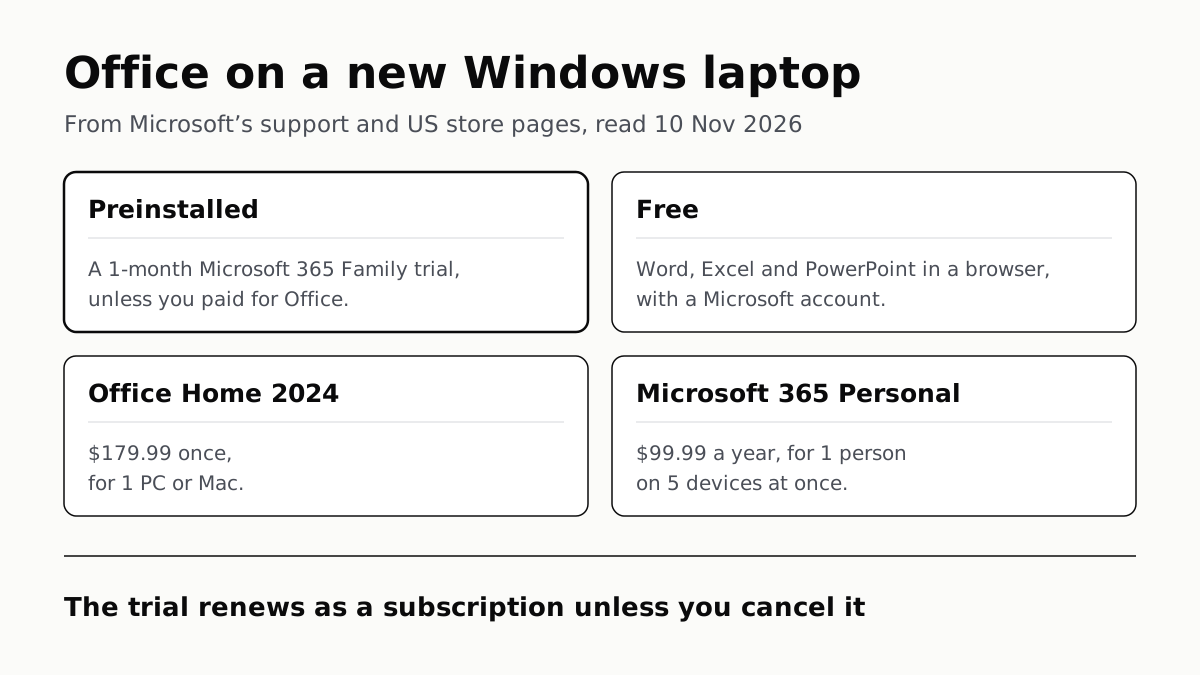
A new Windows laptop does not come with Office to keep unless Office was part of what you paid for: what Microsoft preinstalls is a 1-month trial of Microsoft 365 Family. Without paying, Word, Excel and PowerPoint are free in a web browser, and owning the desktop apps costs $179.99 once for Office Home 2024 or $99.99 a year for Microsoft 365 Personal, at Microsoft’s US store prices on 10 November 2026.
What is on the laptop when you open Word
Microsoft’s support page describes the screen most buyers meet. If Word, or another Office app, opens to a Let’s get started screen with options to try, buy or activate, “Microsoft 365 is installed on your new PC as a 1-month trial of Microsoft 365 Family.” The same page adds that you won’t get a product key from the laptop’s maker “unless you paid for an Microsoft 365 product key card.”
From that screen, Microsoft lists five ways forward:
- Start the one-month Microsoft 365 Family trial.
- Buy Microsoft 365 or a one-time-purchase Office.
- Add the laptop to a Microsoft 365 subscription you already have.
- Enter a product key from a new key card.
- Install an older one-time-purchase Office you already own.
The trial turns into a subscription. Microsoft’s trial page says that after the month, the subscription “automatically renews” unless cancelled in your Microsoft account. On the plan comparison page that day, Microsoft 365 Family was $129.99 a year or $12.99 a month.
Ignoring the screen is not a free option either. Microsoft says Office that can’t activate “eventually becomes unlicensed and all editing features of Microsoft 365 are disabled”, and that preinstalled Office needs the Family trial or a purchase to keep working. The apps on a new laptop are a way in to a subscription, not a free copy.
You may also see the Microsoft Copilot app. That is the new name for what Microsoft calls “the Microsoft 365 (Office) app”, and Microsoft says it is still the place to find files and open Word, Excel and the rest. Copilot Chat inside it needs a Microsoft 365 subscription on a personal account.
If the laptop was sold with Office
Some laptops are sold with Office included. Microsoft’s wording for that case is specific: “a digital product key is transmitted to your PC when you activate Windows. You won’t receive a printed product key.” Word then shows a screen saying the product is installed “as a one-year subscription or one-time purchase”, and you activate it by signing in with a Microsoft account, which also lets you reinstall it later.
Those two are very different buys. A one-year subscription stops editing when the year runs out unless you renew it; a one-time purchase does not need renewing. Check which one the listing names before you count Office as part of the laptop’s value.
What you get for nothing
A free Microsoft account gets Word, Excel and PowerPoint in a browser. Microsoft’s page offers “free access to Word, Excel, and PowerPoint using Microsoft 365 for the web”, along with web and mobile Outlook and 5 GB of OneDrive storage. Real-time collaboration needs the files saved in and shared from OneDrive. Basic spelling and grammar checks come with it, as our look at what free writing tools cap found.
On phones and small tablets, the mobile apps edit for free. Microsoft says core editing is free on iOS and Android devices “with screen sizes of 10.1 inches or less”. Extras such as tracking changes in Word need a subscription, and so does creating or editing documents on an iPad Pro.
The free route lacks the desktop apps. On Microsoft’s comparison table, a free account also gets Outlook only as the version that “includes ads”, and Copilot with “limited usage”.
Microsoft’s ways to get Word and Excel, side by side
Prices are Microsoft’s US list prices, read from its store on 10 November 2026. Support dates are from Microsoft’s Lifecycle page.
| Option | Cost (Microsoft US store) | Apps | People and devices | How long it lasts |
|---|---|---|---|---|
| Preinstalled trial | Free for 1 month, then renews as Family | As Microsoft 365 Family | As Family | 1 month, unless you pay |
| Free web and mobile | Free with a Microsoft account | Word, Excel, PowerPoint, Outlook, OneDrive; 5 GB storage | Any browser; free core editing on screens up to 10.1 inches | No trial period stated |
| Office Home 2024 | $179.99 once | Word, Excel, PowerPoint, OneNote | 1 PC or Mac; non-commercial use | Supported to 10 October 2029 |
| Office Home & Business 2024 | $249.99 once | Adds Outlook | 1 PC or Mac | Supported to 10 October 2029 |
| Microsoft 365 Personal | $99.99 a year, or $9.99 a month | Word, Excel, PowerPoint, Outlook, OneNote with Copilot; Access on PC; 1 TB storage | 1 person, 5 devices at once | While you subscribe |
| Microsoft 365 Family | $129.99 a year, or $12.99 a month | As Personal; 2 TB shared storage; AI for the owner only | 1 to 6 people, 5 devices each | While you subscribe |
| Microsoft 365 Premium | $199.99 a year, or $19.99 a month | As Family, with Microsoft’s “extensive” AI usage | 1 to 6 people | While you subscribe |
For one laptop and the core apps, buying once costs less by the second year. Two years of Microsoft 365 Personal come to $199.98, more than Office Home 2024’s one-off $179.99. Microsoft’s FAQ is clear that one-time purchases get no upgrade pricing, so the next version is a full-price buy. Our guide to Office 2021’s end of support covers what happens when a one-time version’s updates stop.
For more than one device or person, the subscription covers more. Personal runs on five devices at once, including phones and tablets, and Family stretches to six people. Office Home 2024 (affiliate link to Amazon, opens in a new tab) covers one PC or Mac.
Before you buy
Some budget laptops ship in S mode, which limits the machine to apps from the Microsoft Store; leaving S mode is free but one-way. If you are still choosing the laptop, our roundup of the laptops reviewers rate highest is where to start, and the Office decision can wait until the trial screen appears. When it arrives, Windows Backup brings over files and settings but not desktop apps: what moves to a new Windows PC, item by item.
Questions people ask
Does a new laptop come with Microsoft Office for free?
Not to keep. Microsoft says the Office it preinstalls on a new Windows PC is a 1-month trial of Microsoft 365 Family. You own the apps only if you paid for an Office product with the laptop. Word, Excel and PowerPoint for the web are free with a Microsoft account.
How long is the free Office trial on a new laptop?
One month. Microsoft calls it a 1-month trial of Microsoft 365 Family, and its store says the subscription renews automatically after the trial unless you cancel it in your Microsoft account.
Can I use Word and Excel for free?
Yes, in a web browser. Microsoft offers Word, Excel and PowerPoint for the web free with a Microsoft account, plus 5 GB of OneDrive storage. On phones and tablets with screens of 10.1 inches or less, core editing in the mobile apps is free too.
What happens if I don’t start the Microsoft 365 trial?
The preinstalled apps stay unactivated, and Microsoft says unlicensed Office has its editing features disabled. To keep using it, you start the Family trial or buy Microsoft 365 or Office, or install an older Office you already own.
My new laptop came with Office but no product key. Where is it?
There isn’t a printed one. Microsoft says a paid Office product bundled with a Windows PC gets a digital key when Windows activates. You activate it by signing in with a Microsoft account, which also lets you reinstall it later.
Is Office Home 2024 a one-time purchase?
Yes. It is $179.99 once at Microsoft’s US store, for 1 PC or Mac, with Word, Excel, PowerPoint and OneNote, and is supported until 10 October 2029. Microsoft says there is no upgrade pricing, so its successor costs full price.
What is the Microsoft Copilot app?
It is the new name for the Microsoft 365 app, which many people called the Office app. Microsoft says it remains the place to find files and open Word, Excel and the rest. Copilot Chat in it needs a Microsoft 365 subscription on a personal account.
How we researched this
No one at bitcritiq has handled this product. Everything here comes from published sources, listed below.
- What this cannot tell you
- Microsoft’s pages describe what Microsoft installs; a laptop maker or retailer can bundle a paid Office product, and we did not read any maker’s or retailer’s listings. Microsoft’s pages say a bundled product is either a one-year subscription or a one-time purchase, and do not say which is more common. The trial page showed no renewal price when we read it, so the renewal price in this article is the Microsoft 365 Family list price from the plan comparison. Prices are Microsoft’s US list prices on 10 November 2026 and can change.
How we chose this, and what we did
- Why this subject
- Buyers of a new Windows laptop open Word and meet a sign-in or trial screen, and the search ‘does a new laptop come with Microsoft Office’ follows. Our Office 2021 piece is written for people who already own Office; nothing on the site answered what a new laptop ships with, what is free, and what owning the apps costs.
- How we looked at it
- Everything is from Microsoft’s own pages, read through a browser on 10 November 2026: the Microsoft Support articles ‘Using product keys with Microsoft 365’, ‘Activate Office for Windows’, ‘Unlicensed Product and activation errors in Office’, ‘Microsoft 365 mobile apps’ and ‘The Microsoft 365 app transition to the Microsoft Copilot app’; the Microsoft Lifecycle page for Office 2024; and the Microsoft Store US pages for the plan comparison, the free trial, Office Home 2024, Office Home & Business 2024 and free Microsoft 365 for the web. Prices are the list prices shown on those store pages. The free web page states no trial period for Word, Excel and PowerPoint for the web; the control is the same page’s ‘Try free for one month’ offer for the paid subscription, which does carry one.
What this rests on
6 claims, all official. Nothing here was measured by bitcritiq — see how we test for why. Open a claim to read the source it came from.
Office preinstalled on a new Windows PC is a one-month trial of Microsoft 365 Family, and the maker supplies no product key unless you paid for a product key card.Official
Microsoft Support, Using product keys with Microsoft 365: “If you see a Let’s get started screen with options to try, buy, or activate Microsoft 365, this means that Microsoft 365 is installed on your new PC as a 1-month trial of Microsoft 365 Family. You won’t receive a product key from your PC manufacturer unless you paid for an Microsoft 365 product key card.”
If you paid for Office to be included with the PC, a digital key arrives when Windows activates, the product is a one-year subscription or a one-time purchase, and signing in adds it to your Microsoft account.Official
Using product keys with Microsoft 365: “If you paid for a Microsoft 365 product to be included on your new Windows PC, a digital product key is transmitted to your PC when you activate Windows. You won’t receive a printed product key.” Activate Office for Windows: “Microsoft 365 is installed as a one-year subscription or one-time purchase… After you sign in, your product is added to your Microsoft account, so that you can reinstall it later.”
Preinstalled Office that is not activated stops editing: you have to start the trial or buy Microsoft 365 to keep using it.Official
Activate Office for Windows: “If Microsoft 365 can’t activate, it eventually becomes unlicensed and all editing features of Microsoft 365 are disabled… If Microsoft 365 was pre-installed on your new PC, you must start an Microsoft 365 Family trial or buy Microsoft 365 to continue using Microsoft 365.”
Word, Excel and PowerPoint for the web are free with a Microsoft account, which also includes 5 GB of OneDrive storage.Official
Microsoft (US), free Microsoft 365 for the web: “Get free access to Word, Excel, and PowerPoint using Microsoft 365 for the web (formerly Office).” Free benefits: “Access web and mobile versions of apps including Word, Excel, PowerPoint, OneDrive, and Outlook. 5 GB of cloud storage.”
Core editing in the Word, Excel and PowerPoint mobile apps is free on iOS and Android devices with screens of 10.1 inches or less.Official
Microsoft Support, Microsoft 365 mobile apps: “Core editing is available for free on iOS devices with screen sizes of 10.1 inches or less.” and “Core editing is available for free on Android devices with screen sizes of 10.1 inches or less.”
On 10 November 2026 Microsoft’s US store listed Office Home 2024 at $179.99 and Office Home & Business 2024 at $249.99 once, and Microsoft 365 Personal, Family and Premium at $99.99, $129.99 and $199.99 a year.Official
Microsoft Store US plan comparison: “Microsoft 365 Personal $99.99/year… Or buy at $9.99/month”, “Microsoft 365 Family $129.99/year… Or buy at $12.99/month”, “Microsoft 365 Premium $199.99/year… Or buy at $19.99/month”, “Office Home 2024 One-time purchase for PC or Mac $179.99”. Office Home & Business 2024 page: “One-time purchase for 1 PC or Mac… $249.99”.
Sources 11
- Using product keys with Microsoft 365 — Microsoft SupportOfficialaccessed Nov 10, 2026
- Activate Office for Windows — Microsoft SupportOfficialaccessed Nov 10, 2026
- Unlicensed Product and activation errors in Office — Microsoft SupportOfficialaccessed Nov 10, 2026
- Microsoft 365 mobile apps — Microsoft SupportOfficialaccessed Nov 10, 2026
Show 7 more · 7 official or standards
- The Microsoft 365 app transition to the Microsoft Copilot app — Microsoft SupportOfficialaccessed Nov 10, 2026
- Office 2024 — Microsoft LifecycleOfficialaccessed Nov 10, 2026
- Compare Microsoft 365 plans and pricing — Microsoft Store (US)Officialaccessed Nov 10, 2026
- Free trial: Microsoft 365 Family — Microsoft Store (US)Officialaccessed Nov 10, 2026
- Office Home 2024 — Microsoft Store (US)Officialaccessed Nov 10, 2026
- Office Home & Business 2024 — Microsoft Store (US)Officialaccessed Nov 10, 2026
- Use Microsoft 365 apps for free on the web — Microsoft (US)Officialaccessed Nov 10, 2026
Pass it on
Know someone weighing this up? Send them the answer.
bitcritiq.com/f63xThe link is permanent: it opens this article for good, even if the title changes.
No email, no account
Follow bitcritiq
Every new article, in whatever reader you already use.
Subscribe by RSSAll the ways to follow
Using Chrome on Android? Open the browser menu and tap Follow. New articles then turn up in the Following tab in Discover.
read next
Windows Backup Moves Files and Settings, Not Desktop Apps
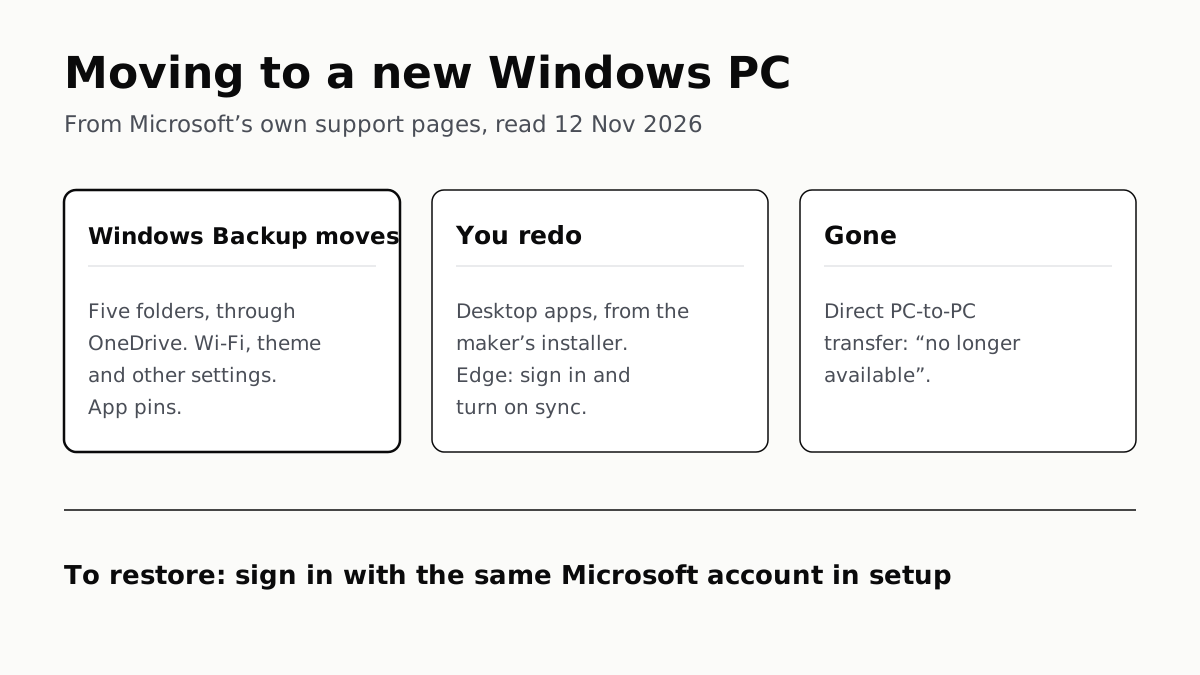
Sign in with the same Microsoft account during setup to restore. Files travel through OneDrive, whose free tier is 5 GB.
Migration Assistant Moves Your Old Mac or PC to a New Mac
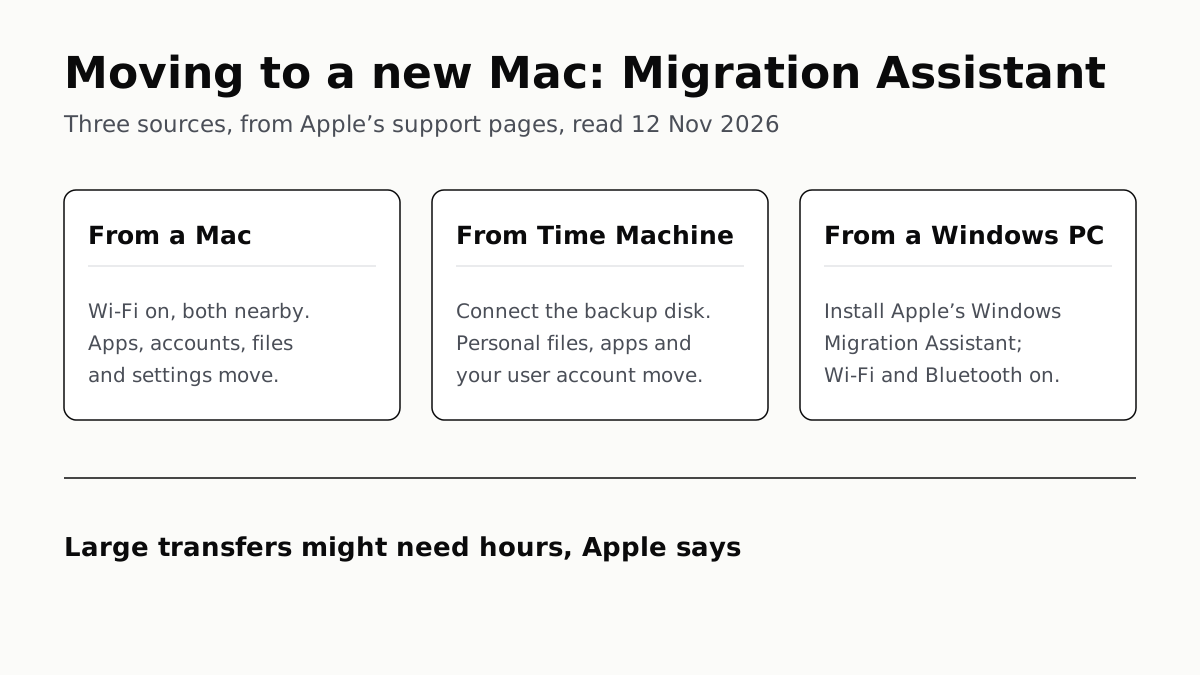
It comes with your Mac. A PC needs Apple’s Windows Migration Assistant, and Apple warns large transfers might need hours.
A Mac Can Run Windows, but Apple Silicon Means No Boot Camp
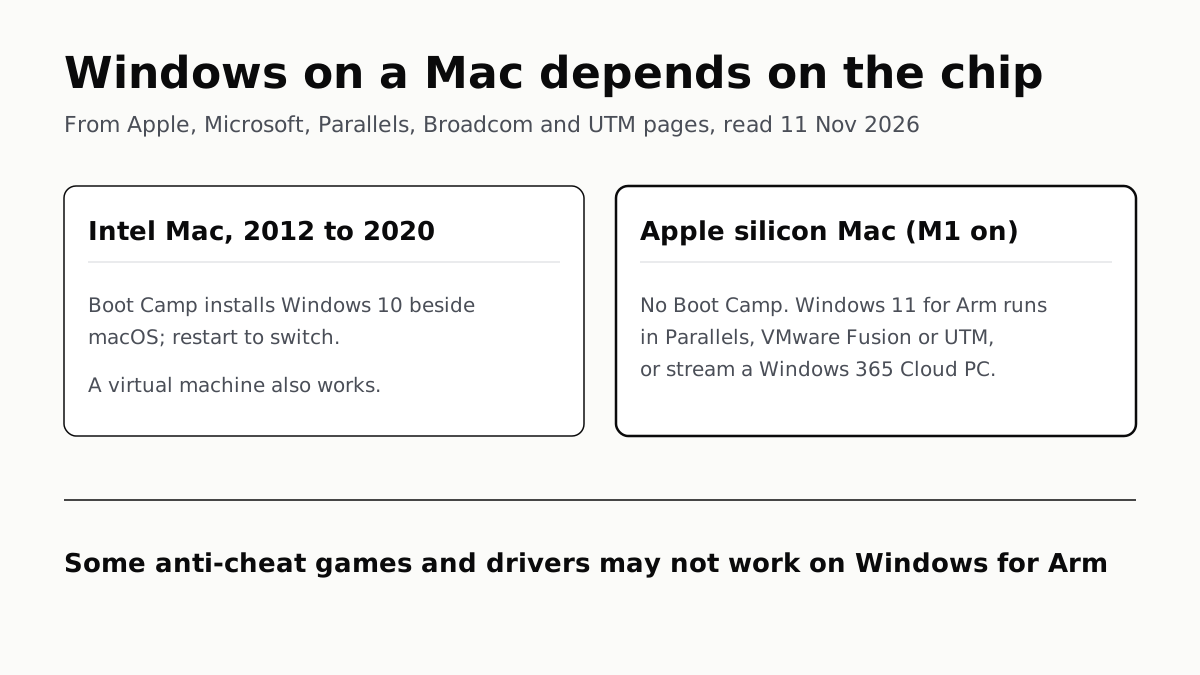
Microsoft authorizes Parallels on M1 to M3; Fusion and UTM are free. All run Windows 11 for Arm, where some games may not work.
Windows 11 Pro Adds BitLocker, Remote Desktop and VMs
Home can encrypt the drive on supported laptops. Pro adds a Remote Desktop host, Hyper-V, Windows Sandbox and domain join.