Roku’s Four Players: Dolby Vision Starts at the Stick 4K
All three sticks can run off a TV’s USB port; the Ultra is the one with Ethernet, Wi-Fi 6 and a rechargeable remote you can find.
If you buy through our links, we may earn a commission. It never affects our verdicts or scores — how that works. As an Amazon Associate I earn from qualifying purchases.
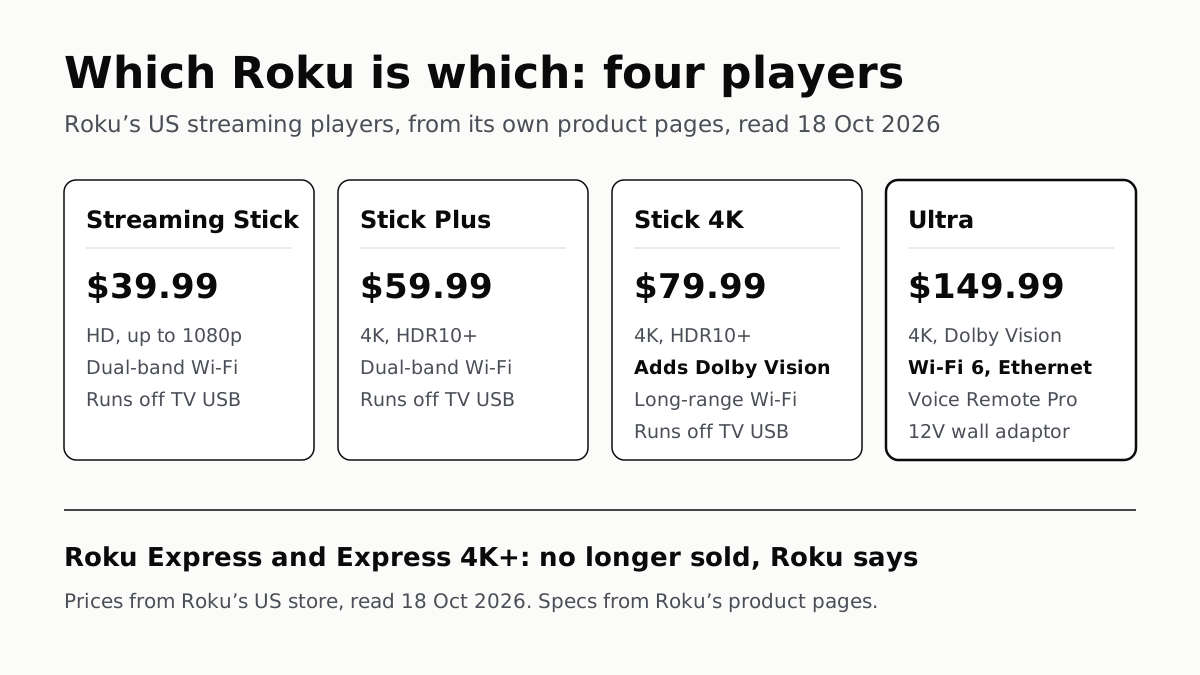
Roku sells four streaming players in the US, and each step up adds something the cheaper one lacks: the $39.99 Streaming Stick is HD, the Stick Plus adds 4K with HDR10+, the Stick 4K adds Dolby Vision and a long-range Wi-Fi receiver, and the Ultra adds Wi-Fi 6, Ethernet and a rechargeable remote. The Express and Express 4K+ are gone: Roku’s own pages say both are “no longer available for purchase”.
Prices are as Roku’s US store listed them on 18 October 2026, with no discount shown that day. Black Friday is 27 November, and retailers’ prices may move before then; these are the list prices to measure a deal against.
The four players
| Streaming Stick (affiliate link to Amazon, opens in a new tab) | Streaming Stick Plus (affiliate link to Amazon, opens in a new tab) | Streaming Stick 4K (affiliate link to Amazon, opens in a new tab) | Ultra (affiliate link to Amazon, opens in a new tab) | |
|---|---|---|---|---|
| Roku US store, 18 Oct 2026 | $39.99 | $59.99 | $79.99 | $149.99 |
| Max resolution | 1080p | 4K at 60fps | 4K at 60fps | 4K at 60fps |
| HDR formats | None listed | HDR10, HDR10+, HLG | Dolby Vision, HDR10, HDR10+, HLG | Dolby Vision, HDR10, HDR10+, HLG |
| Wi-Fi | Dual-band, standard not stated | Dual-band, standard not stated | 802.11ac (Wi-Fi 5), long-range receiver | Wi-Fi 6 |
| Ethernet | No | No | No | 10/100 |
| Remote | Voice, TV controls, AAA batteries | Voice, TV controls, AAA batteries | Voice, TV controls, AAA batteries | Voice Remote Pro: rechargeable, backlit, hands-free, lost-remote finder |
| Power from TV’s USB port | Yes (5V, 1A) | Yes (5V, 1A) | Yes (5V, 1A) | No; 12V adaptor |
| Model number | 3840R | 3830R | 3820R2 | 4850R |
Specs are from the “Product details” list on each player’s page; USB power for the sticks is from Roku Support. Roku’s players page also lists the Streambar SE at $149.99, a soundbar with 4K streaming built in, which is a different kind of product and not in the table.
What each step adds
Streaming Stick (affiliate link to Amazon, opens in a new tab) to Stick Plus (affiliate link to Amazon, opens in a new tab): 4K and HDR. Roku’s FAQ puts it plainly: the two share “the same compact plug‑in design and Roku Voice Remote”, and the difference is picture. The Stick Plus plays 3840×2160 at 60fps, with HDR10, HDR10+ and HLG. An HD TV cannot display the 4K output, and Roku’s own guide points HD TVs at the Streaming Stick.
Stick Plus to Stick 4K (affiliate link to Amazon, opens in a new tab): Dolby Vision and stronger Wi-Fi. The Stick 4K adds Dolby Vision, and Roku describes its Wi-Fi as long-range: its page lists 802.11ac dual-band MIMO Wi-Fi with the receiver built into the USB power cable, where the cheaper sticks list only “dual-band Wi-Fi”. Dolby Vision works only if the TV supports it too, and not every 4K TV does: as we set out in how HDR10, HDR10+ and Dolby Vision differ, Samsung’s S90F lists HDR10+ but not Dolby Vision. Check your TV’s spec sheet for the words before paying for the step up.
Stick 4K to Ultra (affiliate link to Amazon, opens in a new tab): the network, the remote and the speed. The Ultra is a box rather than a stick, and it is the one Roku player with an Ethernet port, a 10/100 one, alongside Wi-Fi 6. It also has a USB 3.0 port for playing your own video, music and photos, Dolby Atmos decoding over HDMI, an HDMI 2.1b output, and an HDMI cable in the box. Roku says it is “30% faster than any other Roku player”; that is Roku’s claim, and its page does not say how it was measured.
The remote is the other difference you would notice daily. The three sticks ship with a voice remote that has TV power, volume and mute buttons, running on two AAA batteries. The Ultra’s Voice Remote Pro (2nd edition) is rechargeable over USB-C, has backlit buttons and hands-free “Hey Roku” voice control, and has a lost-remote finder. None of the three stick pages lists those features.
Power: the sticks can run off the TV
Roku Support says “All Roku Streaming Sticks support USB power”, and the setup step is to plug the stick’s cable into a USB port on the back of the TV. Each stick page lists the input as 5V, 1A, and typical draw while streaming at about 2.2W for the Streaming Stick, 2.5W for the Stick Plus and under 3.5W for the Stick 4K.
Roku also says the USB port on some TVs cannot power its devices; if you see its on-screen warning, it says to use a 5V 1A USB power adaptor and a wall outlet. The Stick 4K includes a power adaptor in the box; the Streaming Stick and Stick Plus come with a USB-C to USB-A cable only. That is more than Amazon publishes for its own sticks: as we found in our look at Amazon’s new stick on paper, Amazon gives no power figure for running the Fire TV Stick 4K from a TV’s port.
Who each one suits, by the specs
- An HD TV, a spare room or travel: the Streaming Stick. It plays up to 1080p, and 4K would not show on that screen.
- A 4K TV with HDR10 or HDR10+ but no Dolby Vision: the Stick Plus covers both formats.
- A 4K TV with Dolby Vision, or a TV far from the router: the Stick 4K, for Dolby Vision and the long-range receiver.
- A wired network connection, Atmos speakers, or a remote that goes missing: the Ultra is the one with Ethernet, Atmos decoding and the lost-remote finder.
A 4K player shows 4K only when the service and the plan send it; several services keep 4K for their top tier, as our list of which streaming plans include 4K sets out. When we read Roku’s update pages in September, they gave no number of years it will keep updating a player; what each TV platform promises on updates compares that with Amazon, Google and the TV makers.
Questions people ask
What is the difference between the Roku Streaming Stick and the Streaming Stick Plus?
Resolution and HDR. On Roku’s spec pages the Streaming Stick plays up to 1080p, and the Stick Plus plays 4K at 60fps with HDR10, HDR10+ and HLG. Both have dual-band Wi-Fi, the same voice remote with TV controls, and can run off a TV’s USB port. Roku listed them at $39.99 and $59.99 on 18 October 2026.
Which Roku supports Dolby Vision?
The Streaming Stick 4K and the Roku Ultra. The Streaming Stick Plus lists HDR10, HDR10+ and HLG but not Dolby Vision, and the Streaming Stick is HD only. Dolby Vision also needs a TV that supports it.
Is the Roku Express discontinued?
Yes. Roku’s Streaming Stick page says the Express “is no longer available for purchase”, and its Stick Plus page says the same of the Express 4K+. Roku names the Streaming Stick and the Stick Plus, both launched in 2025, as their replacements.
Can a Roku stick be powered by the TV’s USB port?
Roku Support says all of its Streaming Sticks support USB power, and each stick page lists a 5V, 1A power input. Some TVs’ ports cannot supply that; Roku says to use a 5V 1A adaptor and a wall outlet if you see its low-power warning. The Ultra uses its own 12V adaptor.
Which Roku has an Ethernet port?
Of Roku’s four current players, the Ultra is the one with a built-in Ethernet port, a 10/100 port, plus Wi-Fi 6. None of the three sticks’ spec lists includes Ethernet.
What does the Roku Ultra add over the Streaming Stick 4K?
On Roku’s pages: Wi-Fi 6 instead of 802.11ac, a 10/100 Ethernet port, a USB 3.0 port for local media, Dolby Atmos decoding, and the Voice Remote Pro, which is rechargeable and backlit, with hands-free voice and a lost-remote finder. Roku also calls it 30% faster than any other Roku player.
How we researched this
No one at bitcritiq has handled this product. Everything here comes from published sources, listed below.
- What this cannot tell you
- Prices are Roku’s own list prices on its US store on 18 October 2026; Roku showed no discount that day, and retailers’ prices around Black Friday may differ. Roku does not name a Wi-Fi standard for the Streaming Stick or Stick Plus, only “dual-band”, so the table gives none. Roku does not say which TVs’ USB ports supply enough power, only that some do not. Roku’s Streambar SE is a soundbar with streaming built in and is left out of the table. We have not used any of these players, and this page does not rank them.
How we chose this, and what we did
- Why this subject
- Streaming sticks are a holiday purchase, and Black Friday falls on 27 November. Roku’s range changed in 2025: its product pages say the Express and Express 4K+ are no longer sold and name two new sticks as their replacements, so older buying advice no longer matches the store. Our existing streaming-device posts cover Amazon’s Fire TV range and the Apple TV; none sets Roku’s players side by side.
- How we looked at it
- Read through a browser on 18 October 2026: Roku’s US players page and its compare page for the current list and prices, and the product page of each player — Roku Streaming Stick, Streaming Stick Plus, Streaming Stick 4K and Roku Ultra — for the “Product details” spec list (resolution, HDR formats, networking, ports, remote, power input, box contents, model number) and the FAQ text. USB power for all three sticks is from Roku Support’s setup article for the Streaming Stick family. For the absence of a lost-remote finder and a rechargeable battery on the sticks’ remotes, the control was the Ultra’s product page, which lists both for its Voice Remote Pro in the same spec block where each stick page lists “Voice remote with TV power, volume, and mute buttons” and “Two pre-installed AAA batteries”.
What this rests on
6 claims, all official. Nothing here was measured by bitcritiq — see how we test for why. Open a claim to read the source it came from.
Roku’s US store lists four streaming players: the Streaming Stick at $39.99, the Streaming Stick Plus at $59.99, the Streaming Stick 4K at $79.99 and the Roku Ultra at $149.99.Official
Roku’s players page, read 18 October 2026: “Roku® Streaming Stick® … HD … $39.99”, “Roku® Streaming Stick® Plus … 4K, HDR … $59.99”, “Roku® Streaming Stick® 4K … 4K, HDR, Dolby Vision® … $79.99”, “Roku Ultra … $149.99”. The fifth product on the page, the Streambar SE, is a soundbar.
Roku says the Express and Express 4K+ are no longer sold, and names the Streaming Stick and Streaming Stick Plus, both from 2025, as their replacements.Official
Streaming Stick page FAQ: “Roku Streaming Stick (HD) is our new (2025) entry‑level HD streaming device. Roku Express is no longer available for purchase.” Stick Plus page FAQ: “Roku Streaming Stick Plus (4K) is our new (2025) 4K streaming device. Roku Express 4K+ is no longer available for purchase.”
The Stick Plus supports HDR10, HDR10+ and HLG; the Stick 4K and the Ultra add Dolby Vision.Official
Product details: Stick Plus “Supports HDR10/10+ and HLG”; Stick 4K “Supports Dolby Vision, HDR10/10+, and HLG up to 60fps”; Ultra “Supports Dolby Vision at 60fps, HDR10/10+ and HLG”.
The Ultra is the one Roku player with Ethernet and Wi-Fi 6; the Stick 4K lists 802.11ac Wi-Fi with a long-range receiver.Official
Ultra: “802.11ax dual-band MIMO Wi-Fi® 6 (2.4 GHz / 5 GHz)” and “10/100 Base-T Ethernet”. Stick 4K: “802.11ac dual-band MIMO Wi-Fi (2.4 GHz / 5 GHz)” and “USB for Power & Long-range Wi-Fi receiver”. Stick and Stick Plus: “Dual-band Wi-Fi®️ (2.4 GHz / 5 GHz)”; none of the three stick pages lists Ethernet.
All three sticks can be powered from a TV’s USB port, though some TVs’ ports cannot supply enough power.Official
Roku Support: “All Roku Streaming Sticks support USB power… The USB port on some TVs may be unable to power a Roku device. If you see the on-screen warning message that appears in these cases, use a 5V 1A USB power adaptor and connect to a wall outlet.” Each stick page lists “Power input 5V – 1A”.
Only the Ultra’s remote is rechargeable, backlit and has a lost-remote finder; the sticks ship with a voice remote that has TV controls and runs on AAA batteries.Official
Ultra page: “Roku Voice Remote Pro has backlit buttons, is conveniently rechargeable, has hands-free voice control, and even a lost remote finder.” Each stick page: “Voice remote with TV power, volume, and mute buttons” and “Two pre-installed AAA batteries”.
Sources 7
- Roku Streaming Players — Roku (US)Officialaccessed Oct 18, 2026
- Compare Roku streaming players — Roku (US)Officialaccessed Oct 18, 2026
- Roku Streaming Stick — Roku (US)Officialaccessed Oct 18, 2026
- Roku Streaming Stick Plus — Roku (US)Officialaccessed Oct 18, 2026
Show 3 more · 3 official or standards
- Roku Streaming Stick 4K — Roku (US)Officialaccessed Oct 18, 2026
- Roku Ultra — Roku (US)Officialaccessed Oct 18, 2026
- How to set up your Roku Streaming Stick, Streaming Stick Plus, or Streamer — Roku SupportOfficialaccessed Oct 18, 2026
Pass it on
Know someone weighing this up? Send them the answer.
bitcritiq.com/acd9The link is permanent: it opens this article for good, even if the title changes.
No email, no account
Follow bitcritiq
Every new article, in whatever reader you already use.
Subscribe by RSSAll the ways to follow
Using Chrome on Android? Open the browser menu and tap Follow. New articles then turn up in the Following tab in Discover.
read next
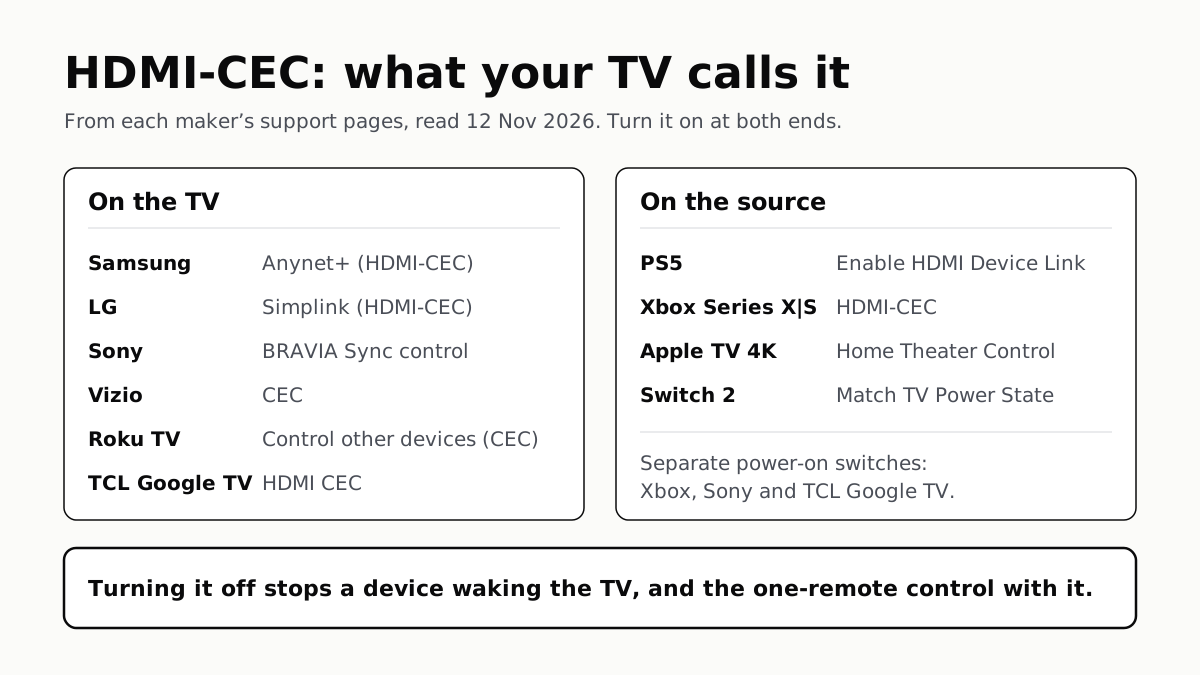
To Use One TV Remote, Turn On HDMI-CEC at Both Ends
Samsung calls it Anynet+, LG Simplink, Sony BRAVIA Sync, Vizio CEC. Consoles, Apple TV and Switch 2 have their own switch.
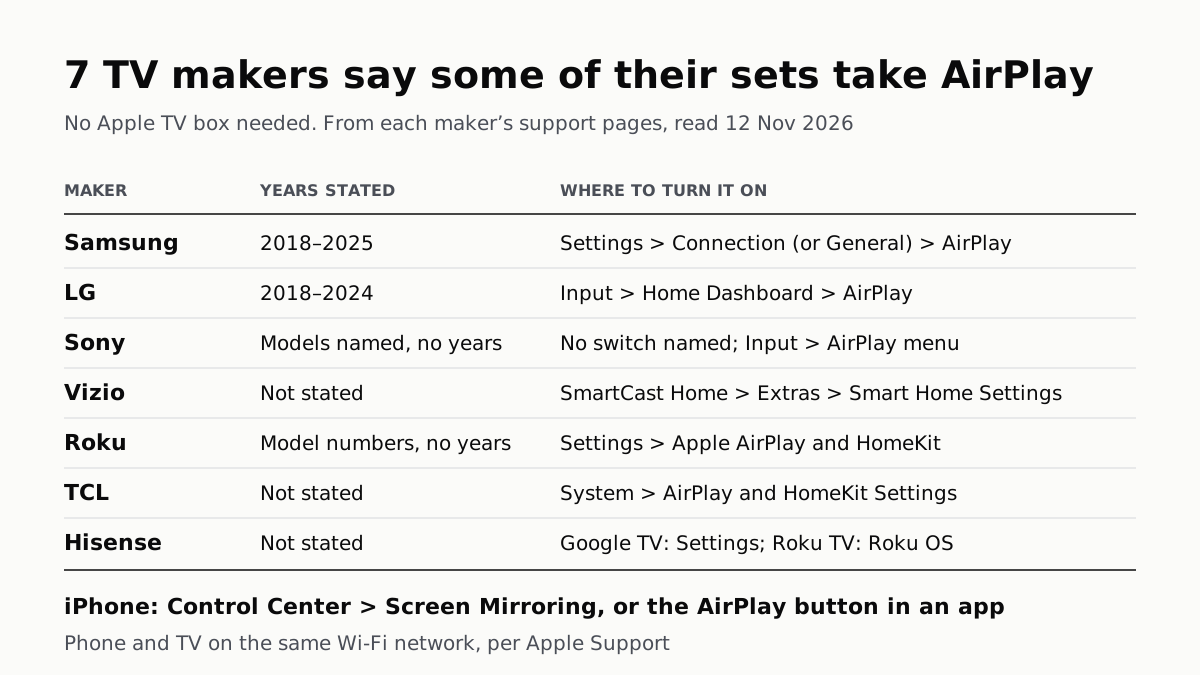
7 TV Makers Build AirPlay Into Some Sets, No Apple TV Needed
Samsung lists 2018–2025 sets and LG 2018–2024. Switch AirPlay on in the TV’s settings, then use Screen Mirroring in Control Center.
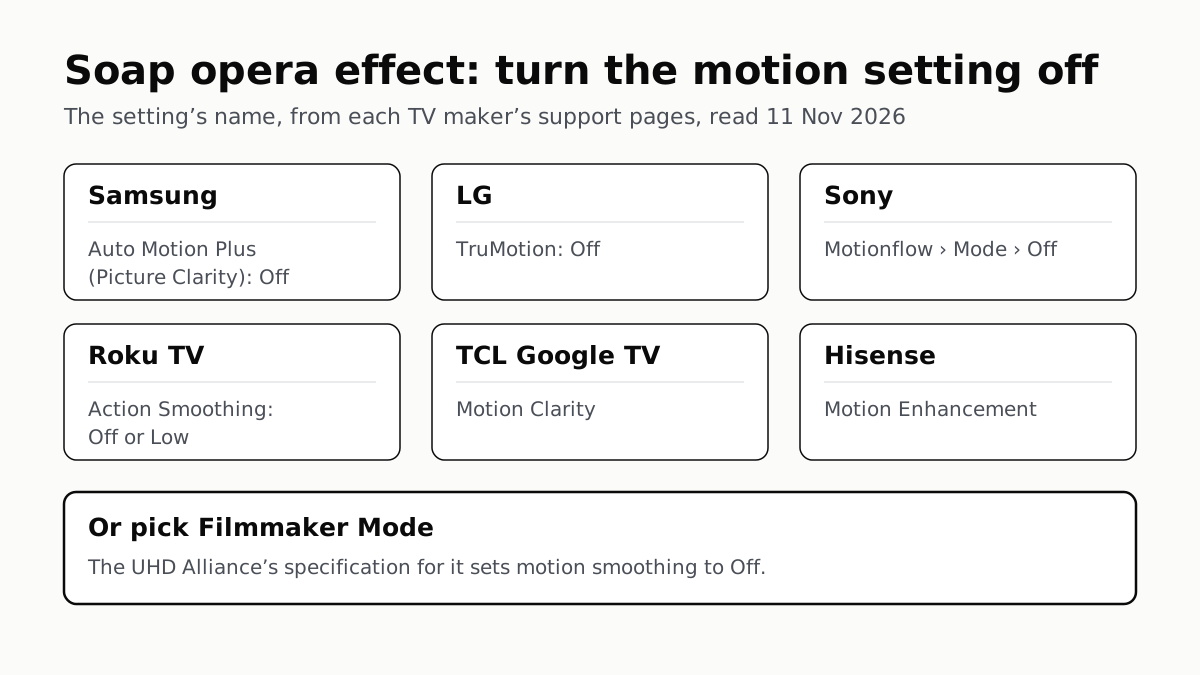
Soap Opera Effect: Set the TV’s Motion Setting to Off
Samsung calls it Auto Motion Plus, LG TruMotion, Sony Motionflow, Roku Action Smoothing. Filmmaker Mode switches it off where offered.
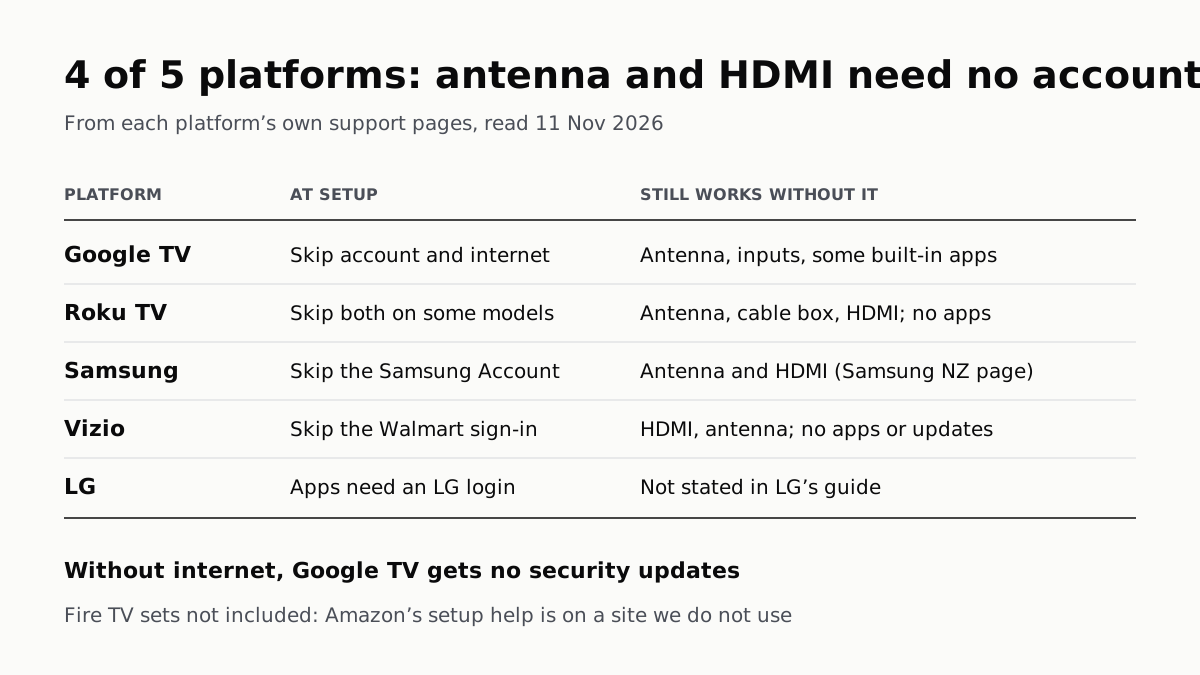
4 of 5 TV Platforms: Antenna and HDMI Work Without Sign-In
Google TV’s basic mode needs no account or internet. Vizio and Samsung let you skip signing in; on Roku it depends on the model.