There Is No Single Switch to Turn Off Apple Intelligence
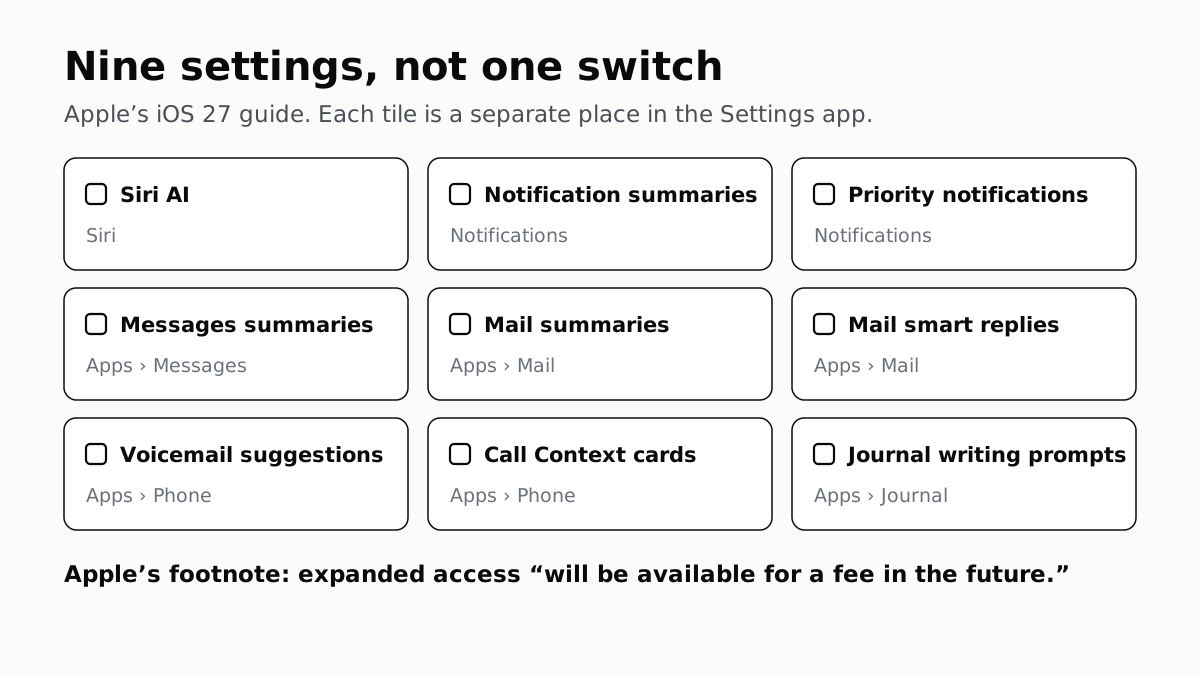
Apple's iOS 27 guide lists nine separate settings, not one switch. Its own footnote adds that a fee for expanded access is coming.
If you buy through our links, we may earn a commission. It never affects our verdicts or scores — how that works. As an Amazon Associate I earn from qualifying purchases.
Apple does not give you one switch. Its iOS 27 guide to turning off Apple Intelligence is a table of separate settings, each in a different part of the Settings app. Turning it all off means visiting each of them.
The same page ends with a footnote worth reading before you decide whether to keep any of it: Apple says expanded access to its server-side features “will be available for a fee in the future.”
The nine settings, and where each one is
All of these start in the Settings app.
| Feature | Where to turn it off |
|---|---|
| Siri AI | Siri, then Turn Off Siri |
| Notification summaries | Notifications, then Summarize Notifications |
| Priority notifications | Notifications, then Prioritize Notifications |
| Messages summaries | Apps, Messages, then Summarize Messages |
| Mail summaries | Apps, Mail, then Summarize Message Previews |
| Mail smart replies | Apps, Mail, then Personalize Smart Replies |
| Voicemail suggestions | Apps, Phone, then Suggestions in Voicemail |
| Call Context cards | Apps, Phone, Apple Intelligence & Siri, then Show When Calling |
| Journal writing prompts | Apps, Journal, then Get Writing Prompts |
Turning off Siri AI turns off Siri. Apple’s way back to an assistant is to turn Siri on again and choose Siri Classic, which is the previous Siri rather than no Siri.
For restricting features rather than switching them off one by one, Apple points to Screen Time, the same place parents set limits. That is also the route for doing this on a child’s iPhone.
Why it may be worth doing on some phones
Apple states that Apple Intelligence can use up to 14GB of storage on the iPhone 17 Pro, iPhone 17 Pro Max and iPhone Air, and up to 8GB on other eligible models. On an iPhone that is already short of space, that is not a rounding error, and it is worth knowing before you go hunting for the storage labelled Other.
The footnote about paying
Apple’s page says features that rely on its servers — including Siri AI and Image Playground — “are subject to daily usage limits”, and that “expanded access to such features will be available for a fee in the future.”
That changes the comparison we made in what phone AI actually costs, where Apple’s column read as no subscription at all. It is still no subscription today. Apple has now said in writing that it will not stay entirely that way.
All of this assumes an iPhone that Apple Intelligence supports. Apple’s list starts at the iPhone 15 Pro, so an iPhone 15 or 15 Plus on iOS 27 does not get these features; the device lines are in which iPhones get iOS 27, and which get Siri AI.
The setting that is about your recordings, not the features
Separately from all of the above, Apple asks whether it may store and review a sample of your audio recordings and transcripts to improve Siri and its models. That is under Privacy & Security, then Analytics & Improvements, then Improve Siri & Apple Intelligence. Turning features off does not change it, and turning it off does not remove any feature.
It is the same distinction we drew for whether ChatGPT trains on your chats: using an assistant and letting its maker learn from you are two different agreements, and each has its own switch.
How we researched this
No one at bitcritiq has handled this product. Everything here comes from published sources, listed below.
- What this cannot tell you
- Menu paths change between releases, and Apple's page offers a version picker for exactly that reason; this describes iOS 27. Some features vary by language and region, and Siri AI is not initially available in the EU. We have not measured how much storage Apple Intelligence uses on any particular iPhone — the figures are Apple's stated maximums.
How we chose this, and what we did
- Why this subject
- iOS 27 put Apple Intelligence on every eligible iPhone that updates, and the question that follows every release is how to turn it off. The answer turns out to be a list rather than a switch, and the same Apple page carries a line about future pricing that most coverage has not picked up.
- How we looked at it
- The settings and their paths are quoted from Apple's iPhone User Guide page on turning off and restricting Apple Intelligence, iOS 27 version. Storage figures and usage limits are from Apple's support article on getting the next generation of Apple Intelligence. The recording-review setting is from Apple's article on Improve Siri and Apple Intelligence. All read on 15 September 2026.
What this rests on
6 claims, all official. Nothing here was measured by bitcritiq — see how we test for why. Open a claim to read the source it came from.
Apple's iOS 27 guide offers no single switch for Apple Intelligence; it lists separate settings for each feature.Official
Apple's page says you can turn off features 'like Siri AI (Beta), summarization features, and more', then gives a table of individual settings, each with its own path in the Settings app.
Turning off Siri AI means turning Siri off, with Siri Classic offered as the way back.Official
Apple's instruction is to tap Siri, then Turn Off Siri; to use Siri Classic instead, turn Siri off, tap Turn on Siri, then tap Siri Classic.
Summaries are three separate settings: Messages, Mail and notifications each have their own.Official
Apple lists Summarize Messages under Apps then Messages, Summarize Message Previews under Apps then Mail, and Summarize Notifications under Notifications.
Apple Intelligence can use up to 14GB of storage on some iPhones and up to 8GB on others.Official
Apple states up to 14GB of on-device storage for iPhone 17 Pro, iPhone 17 Pro Max and iPhone Air, and up to 8GB for other Apple Intelligence-enabled iPhone models.
Server-side Apple Intelligence features have daily usage limits, and Apple says expanded access will cost a fee in the future.Official
Apple states that features relying on server-side models, including Siri AI and Image Playground, are subject to daily usage limits, and that "Expanded access to such features will be available for a fee in the future."
Letting Apple review recordings of your requests is a separate setting from the features themselves.Official
Apple describes Improve Siri & Apple Intelligence as an optional setting that lets Apple store and review a sample of audio recordings and transcripts, adjusted under Privacy & Security, then Analytics & Improvements.
Sources 3
- Turn off and restrict access to Apple Intelligence features on iPhone — Apple SupportOfficialaccessed Sep 15, 2026
- How to get the next generation of Apple Intelligence — Apple SupportOfficialaccessed Sep 15, 2026
- Turn Improve Siri & Apple Intelligence or Improve Siri & Dictation on or off — Apple SupportOfficialaccessed Sep 15, 2026
No email, no account
Follow bitcritiq
Every new article, in whatever reader you already use.
Subscribe by RSSAll the ways to follow
Using Chrome on Android? Open the browser menu and tap Follow. New articles then turn up in the Following tab in Discover.
read next
Google's CC Agent Reads Only the Family Email You Share
Open Weight Is Not Open Source